Windows 98 Cursors
## Info
This is a resource pack that changes the default Cursor to be more like Windows 3.1 to Windows XP.
## Preview
  
## Requirements
This requires Minecraft Cursors
it’s just that simple. 🙂
WINDOW DOOR

This is a very small resource pack; future versions will continue to resource other editions.
**_The new version might be marked as incompatible, but it can actually display correctly._**
Feedback:https://forms.gle/vfNMyg4HZgxZsgFe9
##
在原本中空的門中央加入一些美觀的窗戶造型。(意味著實心的門將不會有任何改變:杉木門…)
這是一個很小的資源包,未來將繼續支援其他版本
**_新版本可能標示不相容,但實際上可以正常顯示。_**
反饋:https://forms.gle/vfNMyg4HZgxZsgFe9
Wind Explosion
Replaces explosion sounds and particles with Wind charge particles and sounds
Wind Charge 3D
replaces the wind charge item with the entity model
Windows 11 Edition Title
All Logos and/or branding belongs to Microsoft (Windows), Canonical (Ubuntu), RedHat (Fedora), and Judd Vinet (Arch), please don’t sue me.
## Info
Have you ever heard of Minecraft: Windows 10 Edition… no? ok. This resource pack replaces the standard Java Edition Title to Windows 11 Edition Title for Legacy4J and eventually Legacy Tweaks, use this resource pack on Windows 11 (NOT Windows 10… maybe), or even use this on Kubuntu, Fedora KDE Desktop, or Arch Linux that looks like Windows 11.

## Requirements
This requires Legacy4J or Legacy Tweaks(Not Finished) for this resource pack.
## You can use Modpacks Like
– Re-Console by Nostalgica Reverie
– Project4J by Cixon
– Legacy Return by Atreyu1227
– William’s Console: Revisited by PeacefulWilliam and VoliaFlower
Wilo’s 1.7 Sword Blocking

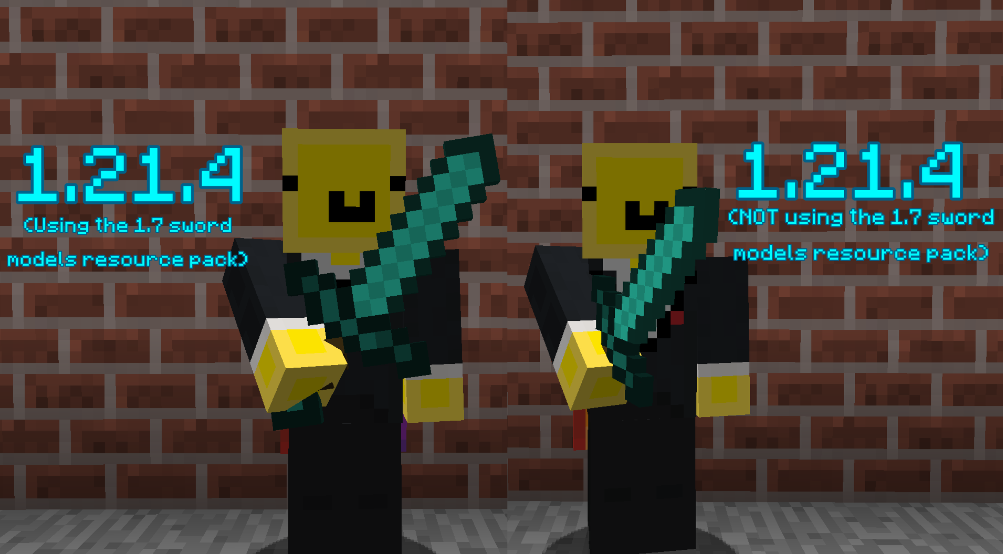
Recently there has been a lot of datapacks & plugins that have implemented/brought back pre-1.9 sword blocking mechanics! Although, by default, the game uses a model similar to 1.8’s when blocking with the sword!
This resource pack makes the sword blocking model much closer and more faithful to the model/positioning from versions 1.7 and prior!
## ⭐ NOTE
This resource pack assumes that the datapack or plugin you are using for sword-blocking uses {animation:”block”} as most do! Another version of this resource pack will likely be uploaded in the future to support sword-blocking without {animation:”block”}
##
## ⚔️ Side-by-side comparison
##
## ❤️ Socials
* Youtube channel: [[YT Link]](https://www.youtube.com/@wilozyx/videos)
* PMC page: [[PMC Link]](https://www.planetminecraft.com/member/wilozyx/)
* Discord: wilozyxx
Willow’s Horror Cave Sounds
This resource pack changes all cave sounds in the game.
I really recommend using Sound Physics Remastered since it will work great!
(If you use it personally in any videos or showcases please credit me thanks! :3)
Also term name of “Willow” is my old username on CF and Minecraft. If anyone is wondering why this RP is called like that.
Wild Vanilla – Better plants and flowers
Wild vanilla is a Minecraft resource pack that attempts to update most plants,
flowers and a few other natural elements visually.
It does this in a way that updates them to more modern looking designs that make landscapes
and gardens feel more alive, while sticking to Minecraft Vanilla’s visual style and adhering closely
to the plants’ real-life counterparts.
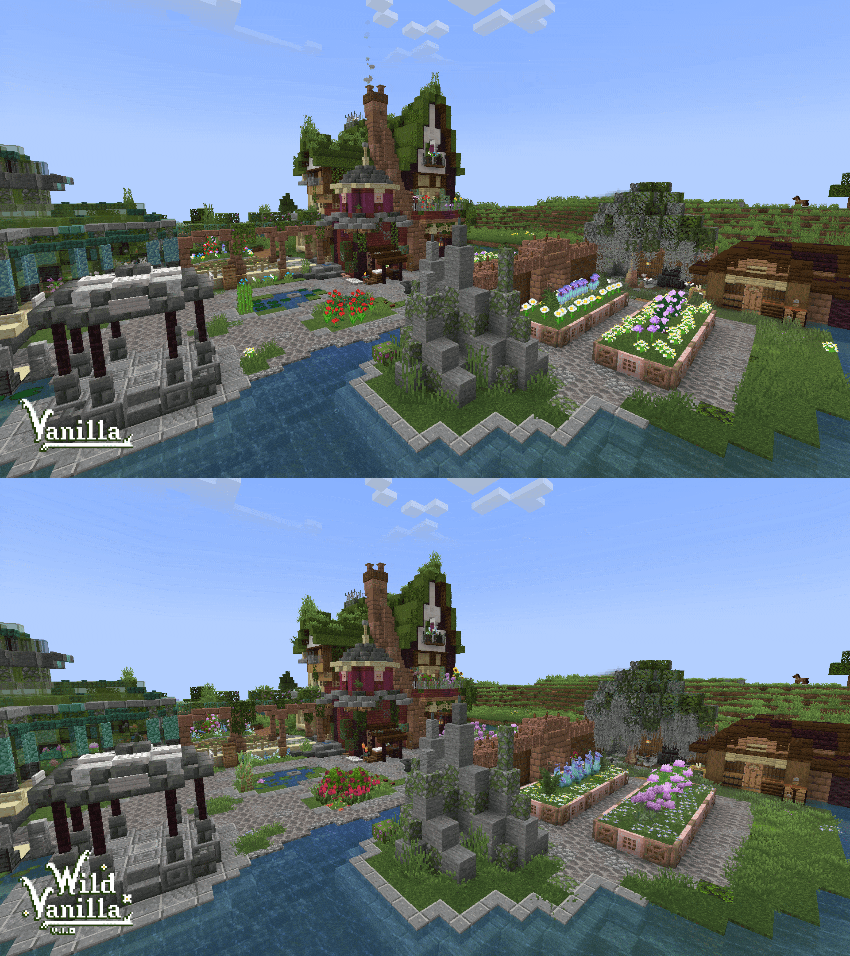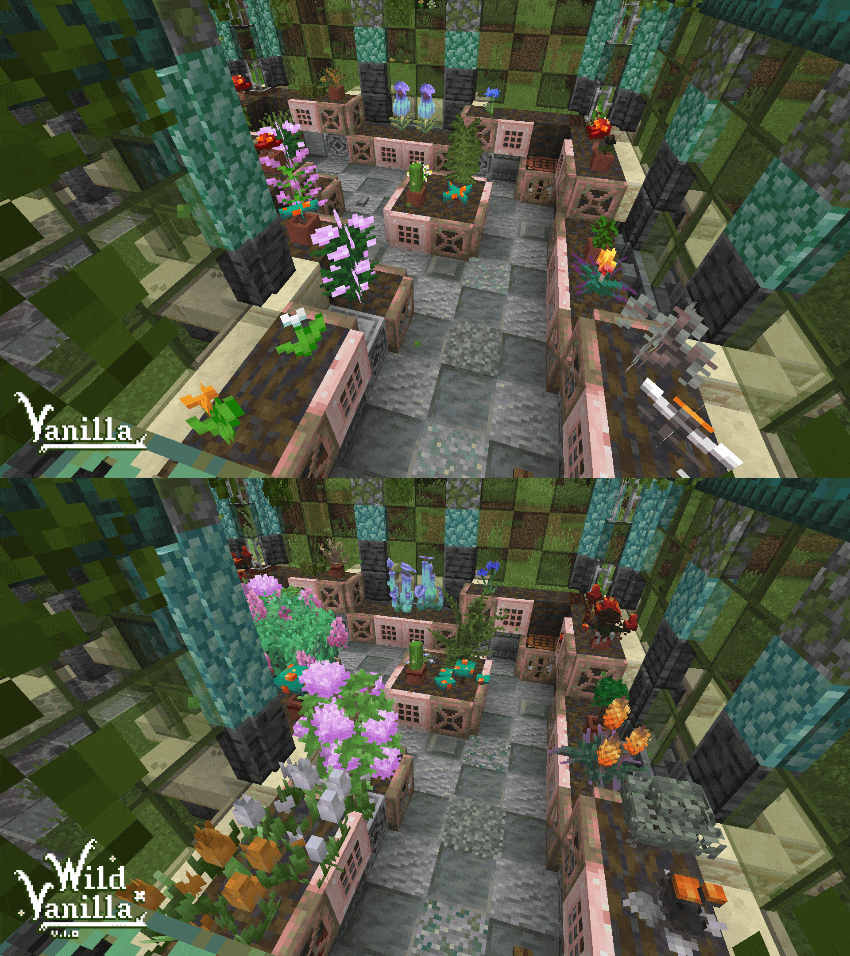
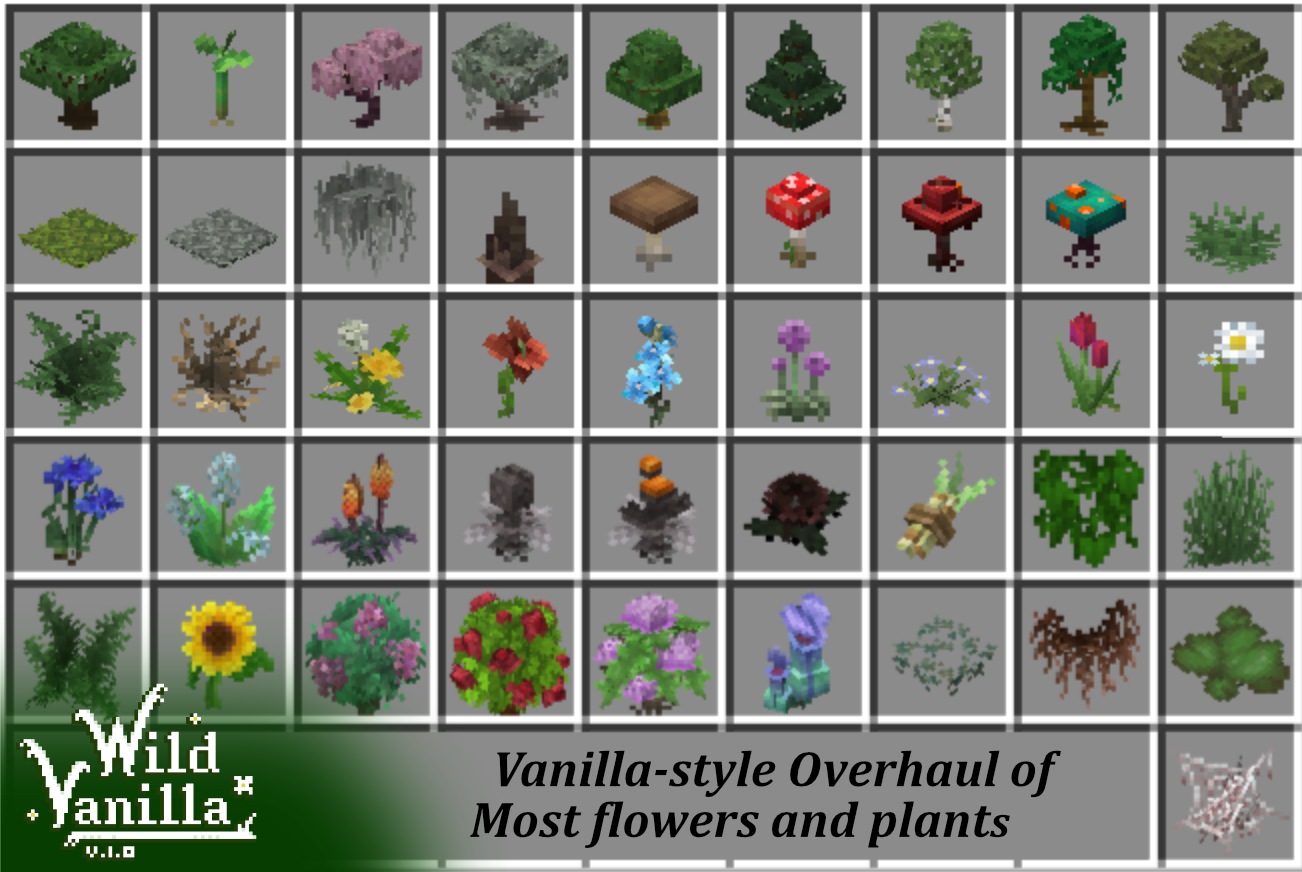
I’ve been making steady progress on the pack, and I currently intend to update the following:
– Grass and ferns, normal and tall.
– All standard flowers in the game, including 2 block tall ones.
– Dripstones, roots
– All Saplings
– All Mushrooms and Fungi
– Other foliage from older versions like Sugarcane and Vines
There’s a few principles I’m using in updating these models:
– Pixel accuracy.
I was kinda shocked to find out that all plants that use the standard cross shape in game are not
pixel accurate and stretched. I intend to fix that, and have all plants be as pixel accurate as I can,
like most of the newly added things are nowadays
– Overlap and Wild growth.*
Most of my models exceed the size of the block they’re planted on. This is to add to the feeling of
the plants growing wild, and adds a lot of visual eyecandy to the world. I also extend them downwards
into the block, adding roots that can be visible if the plant is randomly placed over an edge.
In vanilla this creates an ugly and unnatural seam between plant and air, especially prevalent in grass.
– Life-accurate.
I strive for my models to look as accurate as I can without to their real life counterparts without breaking
the vanilla look. This creates more variety and makes the plants more recognizable. Building a garden
in Minecraft has never been as interesting.
All models are made using Blockbench.
Check out blockbench: [https://www.blockbench.net](www.blockbench.net)
Some screenshots are made using Complementary Reimagined shader.
Get it here: [https://www.complementary.dev/shaders/](www.complementary.dev)
Wilder Wildflowers
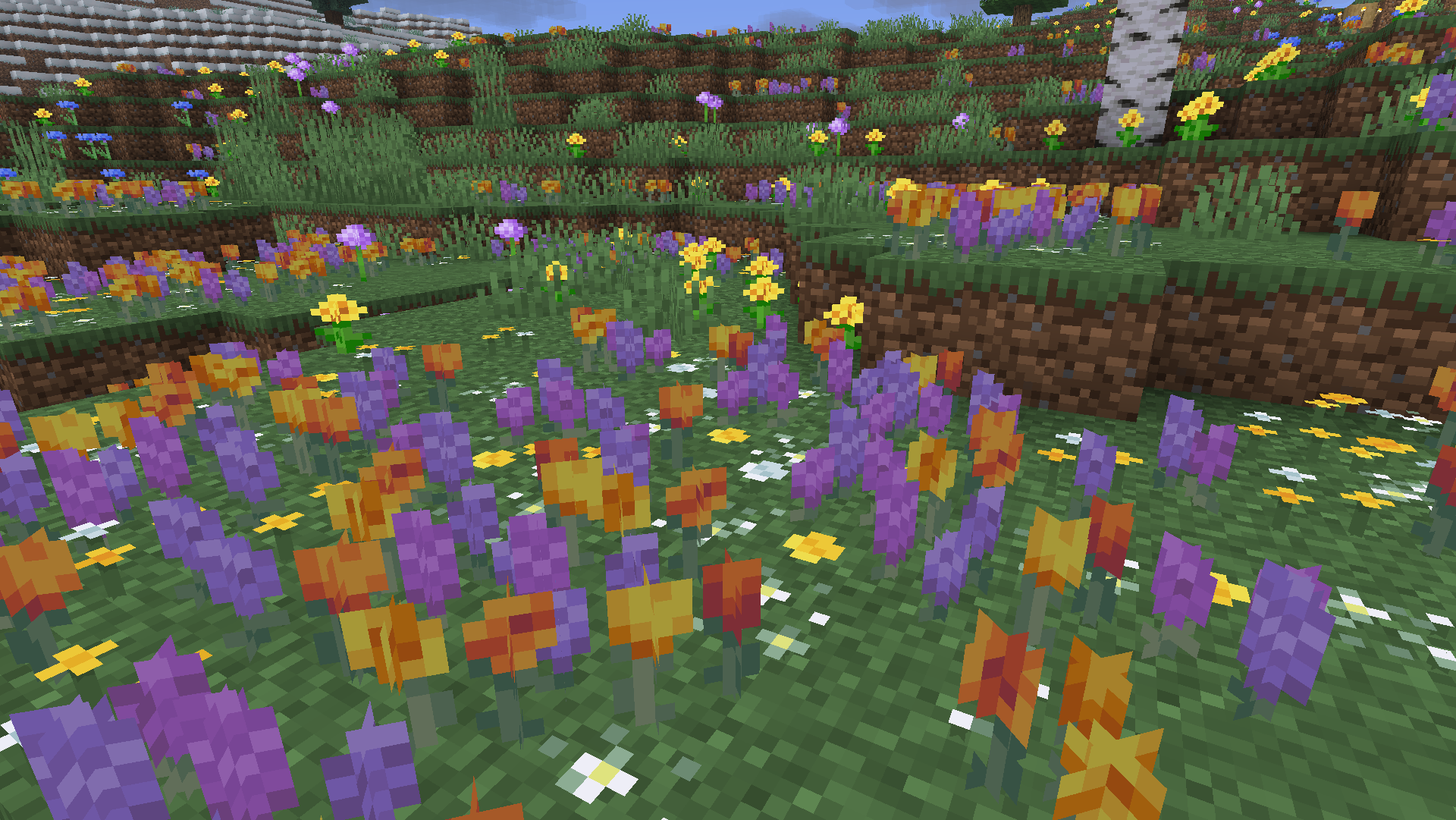
# Wilder Wildflowers
Wilder Wildflowers is a resource pack that changes Wildflowers to appear with more variants, taking inspiration from real wildflowers.
## Featured Variants
Wilder Wildflowers includes four different types of flowers;
– Yellow (default vanilla MC)
– Lavender [Native to The Mediterranian]
– Stellaria/Chickweed [Native to US/Canada]
– Golden Poppy [Native to Sonoran Desert, US]
—
## Other Projects
    
—
credits:
Wilder Wildflowers © 2024 by InnerToast is licensed under Creative Commons Attribution-NoDerivatives 4.0 International
Wild Wolves x Fresh Animations
A Fresh Animations Add-on for Wild Wolves
Original version here
Fresh Animations here
Works best for Versions 1.19 -1.21
OptiFine OR ETF/EMF mods Required
Tutorial
Due to OptiFine having inconsistent updates and features, its recommended to use mods: EMF & ETF instead
If using OptiFine, make sure to enable these settings for complete features:
Video Settings -> Quality -> Custom Entity Models: ON
Random Entities -> ON
Emissive Textures -> ON
Wild Wolves should be above Fresh Animations in your Resource Pack list to work properly