[MTR] BB22200
This addon adds three French liveries for the BB 22200 electric locomotive in Minecraft Transit Railway (MTR).
**The pack includes the following skins:**
– BETON livery, inspired by the classic SNCF freight and regional era
– PACA livery, based on the Provence-Alpes-Côte d’Azur regional design
– OUIGO livery, inspired by the modern low-cost SNCF branding
– Bourgogne livery, based on the Bourgogne-franche-compté regional design
– Infra livery, based on the maintenance locomotive from the SNCF
– Old livery, based on the OCEM age
– Gray livery, The Phantom version
– Fret livery, Today HexaFret but this is the SNCF version
– En Voyage livery, the classic livery of the en voyage series
– Proto livery, the old prototype of the BB22200
In rhe V2, we have added the interior of the locomotive. the 2 cabin
The locomotive uses pantographs created by two different authors, both credited in the project.
Requirements:
Minecraft, Minecraft Transit Railway (MTR), and a compatible mod loader (Fabric if required).
Winter’s Banner Tweaks
A simple resource pack that replaces the 4 individual corner patterns with checkers, stripes and an overlay, to allow for colour mixing and pride flags among other things.
Winter Time
Need a server for you and your friends? click the image below: 
# Winter Time V2
Winter Time turns your world into a Wonderfull Snowy Landscape with colder colours for plants and flowers. This changes crops, flowers, saplins, trees, vines. This pack is great if you are in the wintery feel for things or getting ready to enjoy the winter holidays.
## Changes
– Grass and foliage Colour Maps to a mix of white and blue.
– Leaf Litter Colour Map to be a little bit more white to fit in with the snow.
– Saplings have Snow on them to match Trees.
– Most Flowers have been changed.
– Birch and Spruce Leaves to Fit in Better.
– Makes Water Icy
## Preview

## My Socials
My YouTube: https://www.youtube.com/@sirjumpy8772
My TikTok: https://www.tiktok.com/@sirjumpy8772
Winter Pack


**WINTER🎄**
Embrace the chill with the Winter Texture Pack for Minecraft Java!
@znygames

### 🗒|DESCRIPTION
This pack transforms your game with a beautifully designed winter theme, turning your Minecraft world into a snowy wonderland.
The Winter Texture Pack includes numerous user interface modifications, such as a redesigned action bar, inventory, creative mode, and title screen. Each graphic has been meticulously edited to create a cold and snowy environment, enhancing the overall player experience. Step into a wintery atmosphere and enjoy Minecraft like never before with the Winter Texture Pack.
New! with this pack:
– start screen
– options
– buttons
– gui
– hotbar
### 🎞|TRAILER
### 💬|SOCIAL
(っ^▿^)۶🍸🌟🍺٩(˘◡˘ )
**DISCORD** ▶️ visit me!
Hey,
We invite you to join our Discord community where you can connect with fellow players, share your ideas, and report any bugs you encounter. Whether you have suggestions for improving the hotbar or need support with any issues, our community is here to help. Let’s build, explore, and create together!


### 🖼|EXAMPLE
**HOTBAR**


**GUI**

**START SCREEN**

**more examples in the picture gallery above ⬆️**
### 🛈 |INSTALL
Note: If you encounter any issues, make sure that the texture pack is compatible with your version of Minecraft, and that you have followed all of the steps correctly.
VANILLA
– Open Minecraft: Launch Minecraft and click on the “Options” button.
– Go to the “Resource Packs” section: In the options menu, select “Resource Packs” to open the resource packs screen.
– Move the texture pack to the correct location: Locate the folder where your Minecraft resource packs are stored. The default location is usually in the “resourcepacks” folder under your Minecraft game directory. Move the downloaded .zip file to this folder.
– Select the texture pack in Minecraft: Back in the resource packs screen, select the texture pack that you just moved to the resource packs folder. The texture pack should now be listed in the “Selected Resource Packs” section.
– Apply the changes: Click on the “Done” button to apply the changes and enable the texture pack.
– Enjoy the new texture pack: Start a new game or load a saved game, and the new texture pack should now be in effect.
### 🔗|BEDROCK VERSION


### 💖| THX!
See you in the next pack!

Winter Melodies
Replace the original music from music albums with songs that give the feeling of being in the winter season.
This texture pack is ideal for setting the mood for you game.
In addition to the music, it also changes the textures of records to cassettes and displays the names of the new songs (currently only available in English (US) and Spanish (Mexico).
The list is:
– 11 – Snowy Holiday | Club Penguin
– 13 – Jingle Bells | Club Penguin
– cat – Winter Theme | Stardew Valley
– chirp – Nocturne of Ice | Stardew Valley
– creator_music_box – Wizard Waltz | Club Penguin
– far – Winter Festival | Stardew Valley
– mall – Anchovy Jazz | Club Penguin
– mellohi – Maybe Baby | ClubPenguin
– otherside – Warm Coats | Club Penguin
– pigstep – Ski Lodge | Club Penguin
– precipice – Minecraft Festive Edition Music Battle Map #2
– relic – Minecraft Festive Edition Music Battle Map #1
– stal – Pizza Parlor | Club Penguin
– strad – Carol of the Bubbles | Club Penguin
– tears – Minecraft Festive Edition Music Battle Map #3
– wait – Charlie’s Here | Club Penguin
– ward – Noir Noises | Club Penguin
Winter GUI Pack

Screenshots


# The Winter GUI Pack: Java Edition
**Winter GUI** Pack refreshes Minecraft’s interface with a soft and atmospheric winter theme. Gentle snow accents, subtle icy highlights, and warm seasonal details bring a festive touch to menus and inventories without overwhelming the vanilla style.

## This pack updates:
– Main menu
– Buttons and UI elements
– Inventory and container screens
– Hover and selection effects
Everything is designed to feel cozy, clean, and easy on the eyes-perfect for both single-player worlds and servers.
**Feel free to share feedback! Helpers are welcome too :)**
## Support me and receive bonuses :3

### Contact me:
ㅤㅤ
Wingdings Enchants
**”Wingdings is a series of dingbat fonts that render letters as a variety of symbols. They were originally developed in 1990 by Microsoft by combining glyphs from Lucida Icons, Arrows, and Stars licensed from Charles Bigelow and Kris Holmes.”**
~ Wikipedia.org
**Wingdings Enchants** is a resourcepack that replaces the “Standard Galactic Alphabet”, seen in Minecraft in enchanting tables, to the mysterious font “Wingdings”, seen in works such as “UNDERTALE” and… “Saturday Night Live”.
The font was redrawn entirely by me, to fit in with the pixelart-y style of Minecraft.
**Note:** The font in the resourcepack uses lowercase Wingdings characters for both upper and lowercase, as it is impossible to see uppercase SGA in Minecraft by normal means, and because SGA doesen’t even have upper or lowercase letters.
Windswept Mace (2D+3D)
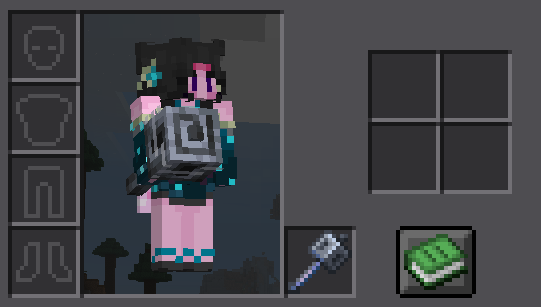
## Windswept Swirl
The mace’s heavy core now swirls with a wind effect when held!

## 3D Model, 2D Sprite
While the mace’s held model is now 3D, it keeps the inventory display as a 2D Sprite!
**🛜Get 25% off on BisectHosting using the code “konci”**
Windswept 16x
This overlay/stylized texture pack with lower shields small totems and low fire.
May be incompatable or not show up at all in older versions.
Windows Pack
# Windows Pack
My Minecraft texture pack is designed around the unique constraint of using a 16-color Windows palette. While the result may not always be the most visually refined, the challenge of working within this limited palette allows for a distinct, retro aesthetic. Each texture in the game from blocks to items has been meticulously created using only these 16 colors:
### Palette 16x Windows :
– #000000 (Black)
– #7e7e7e (Dark Gray)
– #bebebe (Light Gray)
– #ffffff (White)
– #7e0000 (Dark Red)
– #fe0000 (Bright Red)
– #047e00 (Dark Green)
– #06ff04 (Bright Green)
– #7e7e00 (Dark Yellow)
– #ffff04 (Bright Yellow)
– #00007e (Dark Blue)
– #0000ff (Bright Blue)
– #7e007e (Dark Magenta)
– #fe00ff (Bright Magenta)
– #047e7e (Dark Cyan)
– #06ffff (Bright Cyan)
This limitation creates a pixel-art style that feels nostalgic and challenging, appealing to those who appreciate creative boundaries in game design.