ResourceFix
Warning
This pack is by no means a stable fix to make all 1.19.2 packs work perfectly on 1.12.2. You may experience crashes and rendering glitches with certain packs. ResourceFix will not load on vanilla 1.12.2, and requires OptiFine as the game will refuse to load the pack.
In addition, the assets from vanilla 1.19.2 are required to load this pack. Directions on doing that are given below.
ResourceFix
ResourceFix is a resource pack for 1.12.2 that makes it possible to load resource packs from 1.17 – 1.19.2.
Pack Order
The following pack order is required for ResourceFix to function correctly:
- ResourceFix
- Packs to be loaded with ResourceFix (includes Programmer Art)
- 1.19.2 assets (2nd to bottom)
- Default (bottom)
ResourceFix may override a few things, and in that case if you’re feeling adventurous you can try loading a pack on top of ResourceFix. ResourceFix handles most things correctly, and loading a pack on top of ResourceFix (especially one that messes with models or blockstates) can lead to crashes and instability.
Prerequisites
ResourceFix does NOT provide the vanilla models and textures. If you load ResourceFix with nothing below it, you will see missing models or the game will potentially crash.
Directions
To get ResourceFix working with the vanilla 1.19.2 assets:
- Locate a 1.19.2 jar file. If you are on Windows this may be in %appdata%/.minecraft/versions/1.19.2/, on macOS it may be in /Library/Application Support/minecraft/versions/1.19.2/, and on Linux it may be in ~/.minecraft/versions/1.19.2/
- Open the jar file and find the assets folder
- Open the resource pack folder for your 1.12.2 instance
- Make a new folder with any name you choose
- Copy the assets folder into the new folder you made
- Find a pack.mcmeta file from any pack and copy it into that folder
- Load the pack under ResourceFix
To get Programmer Art:
- Go back to the main folder where you have Minecraft installed (should be .minecraft or minecraft)
- Open assets/indexes/1.19.json
- Search through the file for “programmer” and find the hash. Remember the first 5 letters and numbers
- Go up one level and find the objects folder
- Enter the directory that matches the first two characters of the hash
- Locate the file that matches the hash
- Copy it into your instance’s resource packs folder and rename it to have the .zip extension
State of the project
At the moment, ResourceFix only covers block models. Item models will be supported in the future, and most packs that change things such GUI textures and fonts should work.
Entity models such as chests are bugged, and I plan to use OptiFine’s custom entity model system to fix them at some point.
While this pack should work with most packs and has worked with many of the packs I have tested, if the game crashes look at the game log and replace the blockstate file with one from vanilla.
Unresolvable Issues
Redstone, mushroom blocks and glass panes use the models from 1.12.2 but are redirected to use the modern textures, so any models from a pack loaded with ResourceFix that affect those blocks will not work.
CTM will also never work, as 1.12.2 and 1.13+ use different names and models can’t affect those names.
Since custom models can’t be defined for liquids, water and lava will use the texture from 1.12.2.
Results
As stated earlier, ResourceFix is only meant to target block models and textures at the moment. These results do not factor in any rendering glitches or bugs with items/entities.
🟢 means that the loaded pack appeared to work perfectly fine
🟡 means that there were some minor issues
🔴 means that there were major issues such as crashes or the loaded pack not functioning at all
- Bare Bones 🟢
- Stay True 🟢
- XRay Ultimate 🔴
- Patrix 32x 🔴
- Faithful 32x and 64x 🟢
- Golden Days 🟢
- UltimaCraft v1.4 🟡 (saplings use missing model)
R.E.P.O Totem
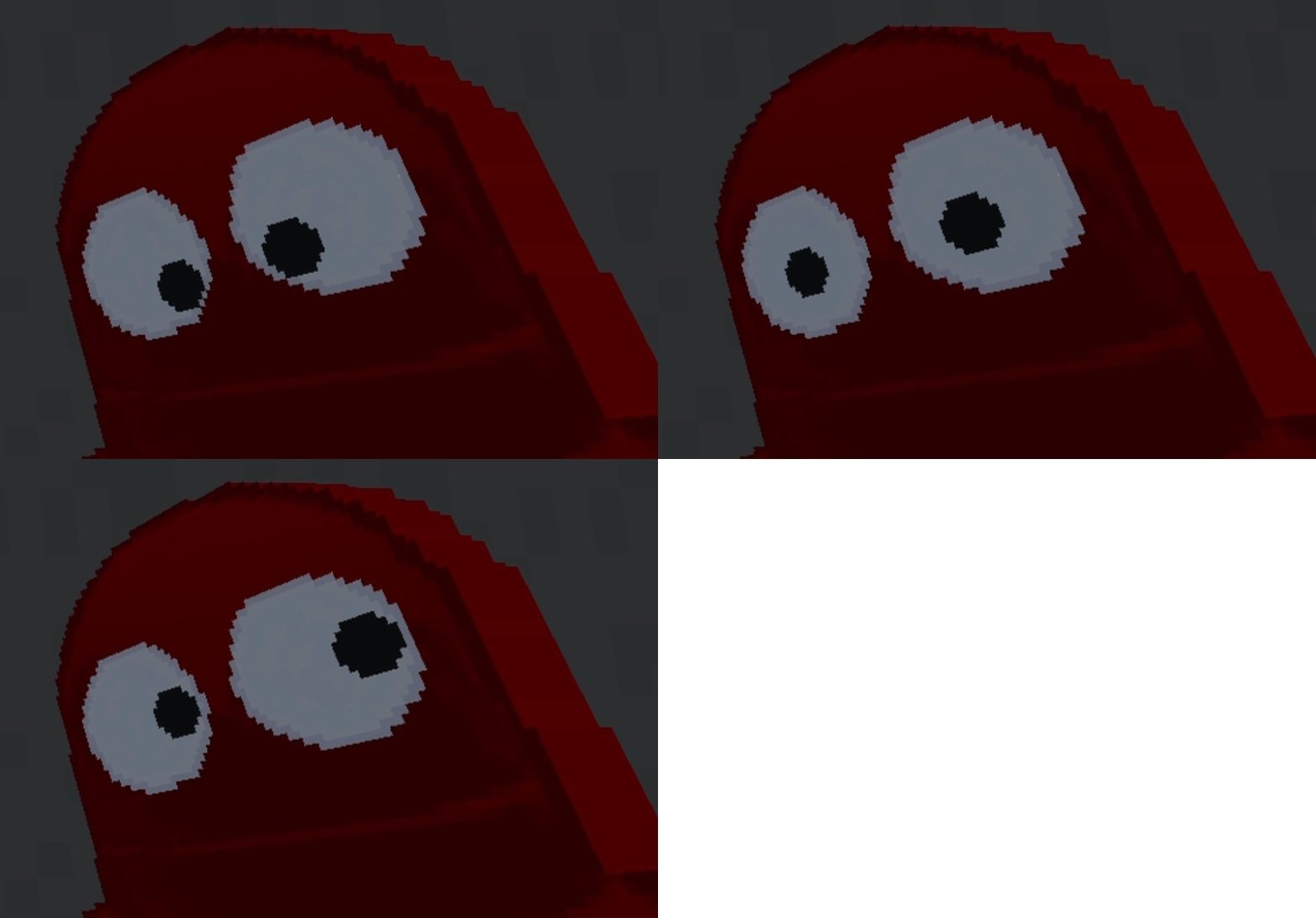
## **Have a Repo character as your totem of undying.**
**They even look around with their eyes while holding them or placed.**
![]()

Remove Potion Particles
Compatibility: **_1.6.1_** to **_1.21.1_**.
===========================================
Remove Potion Particles completely eliminates the visual clutter caused by potion and beacon particles.
* * *
### Additional Information:
At only 3.6KB, this is a super-lightweight resource pack that prevents the particle effect particles from being loaded into VRAM. Paired with other performance-enhancing mods, you can expect a framerate increase upwards of 15 FPS using this resource pack making it perfect for lower-end systems.
While it does a great job of removing particle effects, it does unfortunately have a single drawback: it can sometimes make it slightly harder to confirm if a Zombie Villager has been splashed with a Potion of Weakness during the curing process. If you’re actively working with Zombie Villagers it might be easier to temporarily disable this resource pack until you’ve finished curing the Zombie Villager.
* * *
### Support development:
If you enjoy this resource pack and would like to support my work, please consider making a donation. Even a donation as little as £1 or $1 is appreciated and helps keep me motivated to continue development on this resource pack.
* [Support development via Ko-fi!](https://ko-fi.com/brandontgs)
or if you’d like, through a Cryptocurrency of your choice! 😀
* Ethereum (ETH): `0x52Bb639Ce58bDa894eEbc583831158213Af9F8F3`
* Bitcoin (BTC): `bc1qvu6pa9kzlwe6te54drta7w85apanuk7m5zyv78`
* Monero (XMR): `4B5LzGGRTKz2hn1ETd7Nwo7a6k7Kkhr7nGKmos3cNgdofmhqRGAxr4ZXDcitjkavogXrzur7RJdeeaqgYzqre7qCTVxzBL8`
* Dogecoin (DOGE): `DGpyWyJtRJyikSkEUoaiwcc3C9GTGvnrfp`
Thank You! 🥰
=============
Arjuna: Refined Storage [PBR 512x]
![Arjuna: Refined Storage [PBR 512x]](https://cdn.modrinth.com/data/cached_images/d066808ae79221bcbda086af72f53256efe3de2f.jpeg)
Realistic resource pack with PBR textures for the [Refined Storage](https://modrinth.com/mod/refined-storage) and addons: ExtraStorage, Extra Disks, Refined Types.
For best results, it’s highly recommended to use compatible shaders such as Complementary, IterationRP or Bliss. Make sure to enable “RP Support” in shader settings by selecting the option “labPBR.”
## Texture Completion Progress
– Refined Storage – 99%
– Extra Storage – 100%
– Extra Disks – 100%
– Refined Types – 99%
– Refined Storage – Mekanism Integration – 100%
– Cable Tiers – 80% (WIP)
## Features:
– Realistic Surface Textures: Includes roughness and metal effects for enhanced visuals.
– Parallax Occlusion Mapping (POM): Adds depth and detail to surfaces for more realistic appearances.
– Glow Effects: Emissive textures bring additional life and atmosphere to various blocks.
## Texture resolutions:
– Items – 128px
– Blocks – 512px
Telegram – [https://t.me/arjuna_rp](https://t.me/arjuna_rp)
Donation – [https://dalink.to/arjuna_dk](https://dalink.to/arjuna_dk)
Redstone Tweaks Overlaid Gadget
original author:ZiYun
Add-on package author:w_y
Be sure to put it on top of Redstone Tweaks Overlaid!!!!
Be sure to put it on top of Redstone Tweaks Overlaid!!!!
Be sure to put it on top of Redstone Tweaks Overlaid!!!!
Redstone Tweaks Overlaid download link:[https://modrinth.com/resourcepack/ziyun-redstone-cover](https://modrinth.com/resourcepack/ziyun-redstone-cover)
1.Add has_record=true status to jukebox
2.The model of the open fence gate was changed to XK Highlight Block style
3.Observer model changed to look like the XK Redstone Display.
4.The model of the piston was changed to look like the XK Redstone Display.
5.Distinguish state 6 from 9 for redstone wires.
6.calibrated_sculk_sensor is now directionally distinguishable on the sides, back and bottom.
6.The dropper, dispenser and hopper point more obviously, cf. XK Redstone Display
7.sculk shrieker’s can_summon=true status does the showing
8.The debug stick model was changed to a bedrock stick?
RedDragon PvP
This make PvP equipment better looking a little, makes minecraft textures seems more fun
– Changes swords textures.
– Changes armor textures.
– Changes blocks textures (bedwars blocks)
– Change the old particle to red, blue and black
my other texturepack
https://modrinth.com/resourcepack/flowsaqua
realism blend 128x
# Realism blend 128x version
## Description and purpose
A texture pack for Minecraft which has the purpose to upgrade the default textures for the most blocks while still retaining some vanilla textures. The texture pack was made through photos with permissive licenses. Low quality: 128×128 textures (high downscale).
### How to enable the texture pack
If in the main menu click options, resource packs, and then go over available to select the resource pack and load it by clicking the arrow pointing right. You can unload the resource pack by going over selected and pressing the arrow pointing to left. Also in order to actually work be careful because in available the priority system is a top down one, thus you should press the small lateral arrows to move the texture pack on top and always on top of default to actually apply the new textures.
RealisCraft JE: Realistic Default Textures
# **🎉 Welcome to RealisCraft!**
***
Hello and thank you for checking out RealisCraft 🙌. This **free demo version** lets you experience a taste of the realism and detail that RealisCraft brings to Minecraft.
If you enjoy it and want to unlock **higher resolutions, advanced features (POM, PBR, SSS, Emission, and more)**, consider upgrading to the **Full Version**. By supporting this project, you’re not only getting the best realistic texture pack, but also helping me continue to improve and expand RealisCraft for everyone. 💖
Enjoy your game, and thank you for being part of this journey! 🎮
## **🔹 Add-ons**
***
**Artifacts Glass** – [[Download](https://drive.google.com/file/d/1lmHgYCP-RHYyHd8WUcspwj1x3U9-GKtT/view?usp=drive_link)]
💡 _Note:_ To get the same visual result as shown in the screenshots, you’ll need to install a shader pack.
I personally recommend [**BSL Shaders**](https://texture-packs.com/shaders/bsl-shaders/) for the best experience.
## **🔹 Main Pack**
***
**RealisCraft: Realistic Default Textures (Full)**
* [Patreon](https://www.patreon.com/ScorpioGraphics)
* [Gumroad](https://scorpiographics2.gumroad.com/l/RealisCraftJavaEdition)
## **📌 Important Information**
***
**Update**: 1 time per month
**Support Contact**:
* Twitter: [@Scorpiographic2](https://twitter.com/Scorpiographic2)
* Instagram: [scropio_graphics](https://instagram.com/scropio_graphics)
* Email: [[email protected]](mailto:[email protected])
## **🛠️ Features**
***
**RealisCraft JE (Demo)**
* The essential pack
* 128x textures
* Blocks only
* Normal maps
* Specular maps
* Phisically Based Rendering
**RealisCraft JE (Full)**
* The complete experience
* 256x, 512x, 1024x, and 2048x textures
* Full featured
* Normal maps
* Specular maps
* Parallax Occlusion Mapping
* Phisically Based Rendering
* SSS (Subsurface Scattering)
* Porosity
* Emission
* Material AO
* Optifine features
**RealisCraft BE (Demo)**
* The essential pack
* 128x textures
* Blocks only
* Normal maps
* Specular maps
* Phisically Based Rendering
**RealisCraft BE (Full)**
* The complete experience
* 256x textures
* Full featured
* Normal maps
* Specular maps
* Phisically Based Rendering
* Emission
* Material AO
* Metallic
## **🌍 Compatibility**
***
* **Minecraft Bedrock Edition 26+**
* **Minecraft Java Edition 26**
* **Supports**: RTX, Vibrant Visuals, LabPBR 1.3, OldPBR
## **🔥 Why RealisCraft?**
***
* **Realistic Default** → Hyper-realistic textures but still feel “Minecraft.”
* **High Resolution** → Pixel-perfect detail with material shadows.
* **Advanced Mapping** → PBR + exclusive features for an immersive experience.
## **⚠️ Disclaimer**
***
* For best results → use a shader pack.
* Requires a high-performance device → try the Lite version first.
* This product is digital only → no refunds.
* Not affiliated with Mojang.
## **💬 Questions & Support**
***
“Why pay?” 👉 Because creating texture packs requires hardware, software, internet access, and time. By supporting, you help keep this project alive.
If your device is capable of 512x–2048x + shaders, you likely have a premium setup. So, $2–$5 support is a small price tag compared to what you’re getting.
If you can’t support it yet? Don’t worry, there’s a free version you can try first.
## **📜 Agreement**
***
✅ Allowed: creating videos/streaming with RealisCraft
✅ Allowed: modifying for personal use
❌ Not allowed: reuploading, redistributing, claiming as your own work
👉 If you want to share, use the official link
## **🙏 Credits**
***
* **Mojang Studios** – for Minecraft
* **You** – for supporting RealisCraft 🎉
## **🔒 License**
***
(C) GalanticCraft – All Rights Reserved
Vanilla soundtrack tweaks (Reactive Music: OFF)
This resourcepack copies vanilla but as a songpack for Reactive Music.
This pack can be helpful as a template for other songpacks based on vanilla music or if you want to change music to vanilla without disabling the mod.
# How to install the resource pack
– Download [Reactive Music mod](https://modrinth.com/mod/reactive-music)
– Download this resource pack
– Open Reactive Music settings (use [Mod Menu](https://modrinth.com/mod/modmenu) or `/reactivemusic` command in the world)
– Choose **Reactive Music: OFF** in the list
– There are a few different special versions available that you can choose if you want
# Different versions in one file
### There are different versions of the songpack all stored inside the pack:
– Available in Reactive Music menu by default:
– latest version preset;
– Alpha 1.2.0 / Beta 1.7.3 preset;
– C418 songs only preset;
– Old main menu songs only preset;
– Creative mode exclusive songs only;
– Creative mode presets based on multiple presets:
– latest version;
– Alpha 1.2.0 / Beta 1.7.3;
– C418 songs only;
– Available only by unarchiving the songpack:
– presets for every Minecraft version where new music were added.
How to choose the version of the pack:
– Some of the main presets are already available in Reactive Music menu. Just select it if it’s there;
– If you want something more specific, unarchive the songpack;
– Copy yaml file of the version you want to use from _songpack-versions_ folder;
– Past it in songpack root folder (the folder where _README.txt_ is);
– Preferably archive the pack again;
– Select this version in Reactive Music menu.
Really dumb villager
# Really dumb villager
Adds a sign at the back of the villager saying “I am dumb”. That’s it.
I made this because I found it funny at the moment, so if you are too, don’t hesitate to give it a try! Plus, it’s discreet, even the nitwit didn’t found out I put this on his back 🤫
I might improve it in the future.
## How to use
1 – Download the version of your choice on the side of this page
2 – Place the .zip (don’t extract it) inside your `.minecraft/resourcepacks`
3 – In game, put it above every other pack you could have
4 – You’re finished! Well done, and enjoy 🙂