PvP particles
Most particles will have a yellow background. The only exceptions are :
– Strength (orange)
– Slowness (greenish)
– Regeneration (red)
– Weakness (dark greenish)
– Luck (green)
– Fire resistance (orange)
– Water breathing (green)
– Swiftness (flashy green)
– Poison (greenish)
Every other potion effect are yellow tints.
NyaPack 🤺 Minimal Armor

**NyaPack 🦋** is a resource pack that lets you show off your skin even more!
Armor becomes more like **accessories** or **situational outfits**, helping you customize your appearance without covering your character entirely.
✨ **Features:**
– **Emissives** and **animations** support in newer versions, all **without additional mods**
– Support for the new **copper armor**
– Versions **without emissive** and **without animations** are also available for those who prefer a simpler look
Give your skin more personality and style! 🦋
No Hotbar
No Hotbar, Pretty Straight forward. Idk what this can be useful for tbh. Maybe clear hotbar? Just use idk.
Q&A:
Can I put this in my modpack?
Sure but add the credit. Or just paste the text below
No Hotbar
By Zacgamingpro1234
https://modrinth.com/resourcepack/nohotbar
If you want to redistribute to other websites just tell me and I’ll try.
You can use it in your modpack.
You can use it for personal use.
If you want to modify this resource you must ask me.
No GUI
No GUI,
A texture pack made for fun and as a challenge. Can you beat it? If you want you can record ur self beating it and I will put you below as a verified winner! (you should dm me on discord for notice)
Also the GUI isn’t black its invisible so you can see stuff under your current tab or something.
Q&A:
Can I put this in my modpack?
Sure but add the credit. Or just paste the text below
No GUI
By Zacgamingpro1234
https://modrinth.com/resourcepack/nogui
You can redistribute this resource but you may not monetize from it.
You can use it for personal use.
Mod Remapping API
# Mod Remapping API
Remaps non-Fabric mods made for a different environment (by default obfuscated) to the current runtime mappings.
Provides hooks to expand the remapping process from other mods.
This mod doesn’t depend on a specific Minecraft version and should work on any version that Fabric Loader can launch.
### Mods depending on this API:
– [Fabricated Legacy Forge](https://modrinth.com/mod/fabricated-forge)
– [Apron](https://modrinth.com/mod/Apron)
– [Fabricated-Rift](https://modrinth.com/mod/fabricated-rift)
## Credits
### Most of the original code of the mod remapper
– paulevsGitch’s mod BetaLoader
Mod Loading Screen
# Mod Loading Screen
An advanced loading screen with the loading progress of mods. It works on all Minecraft versions, as it doesn’t even require Minecraft. Its only requirement is Fabric Loader 0.12.0 or later or Quilt Loader (specific versions of Quilt support are unknown). Do note that if you run this mod on a game other than Minecraft, the loading screen may not close itself.
## Agent
Mod Loading Screen provides a Java agent, which allows opening the loading screen before even the mod loader itself loads. This feature is primarily targeted at modpack developers who want to make a seamless loading experience. The agent can be used by passing `-javaagent:mod-loading-screen-1.0.4.jar` as a JVM argument. If the agent is used, the loading screen should *not* be installed as a mod.
## API
To depend on the API, use the Modrinth Maven. The API should be JiJed, and doing so will not include Mod Loading Screen inside your mod (it will only include the API, which is only a few kilobytes). The API is designed to have both forwards and backwards binary compatibility with future Mod Loading Screen versions. An API is provided for checking which API calls will return stubs and which ones are real.
“`gradle
repositories {
exclusiveContent {
forRepository {
maven {
name = “Modrinth”
url = “https://api.modrinth.com/maven”
}
}
filter {
includeGroup(“maven.modrinth”)
}
}
}
dependencies {
// implementation, not modImplementation!
include(implementation(“maven.modrinth:mod-loading-screen:1.0.4:api”))
}
“`
The API has two top-level classes: `LoadingScreenApi` and `AvailableFeatures`. Full javadocs are available for both classes.
Debug
# 
~~**There is a bug in in-20100110 when using mods that makes the game stop responding when attemping to close.**~~
~~**This is not caused by our mod(s), but we would like to attempt to fix this.**~~
~~**If you have any info, make a github issue!**~~
This has been fixed in both save and debug.
## Dependencies
– [Quilt Loader](https://quiltmc.org/) 0.25.0 or newer.
– You will need to use [OrnitheMC](https://ornithemc.net/) to use Quilt with Minecraft in-20100110.
– [Java 8](https://adoptium.net/temurin/releases/?version=8). (Built using Eclipse Temurin 8.0.412+8)
– [Minecraft Indev 0.31 in-20100110](https://minecraft.wiki/w/Java_Edition_Indev_0.31_20100110).
It’s reccommended to use `-Djava.util.Arrays.useLegacyMergeSort=true` in your java arguments.
To fix sounds, we reccommend using the betacraft proxy: `-Dhttp.proxyHost=betacraft.uk -Dhttp.proxyPort=11702`.
## Attributions
– [Feather Mappings](https://github.com/OrnitheMC/feather-mappings).
– These mappings are licensed under [CC0-1.0](https://github.com/OrnitheMC/feather-mappings/blob/main/LICENSE).
## Also check out
[Pre-Release Minecraft Mod Collection](https://modrinth.com/collection/HP6y1bUY)
## Mismatched Versioning
Section 5.1 of [Modrinth’s Content Rules](https://modrinth.com/legal/rules#miscellaneous)
> All metadata, including license, client/server-side information, tags, etc. are filled out correctly and are consistent with information found elsewhere.
Modrinth doesn’t currently list archived versions of Minecraft ([modrinth:code#2566](https://github.com/modrinth/code/issues/2566)).
We currently incorrectly list the game version as `c0.30_01c`, but list the actual version in the mod version title, we will fix this once the above mentioned issue has been fixed.
#
Licensed under LGPL-3.0-or-later.
**This mod is not affiliated with/endorsed by Mojang Studios or Microsoft.**
Jappaified
Jappaified backports new Jappa-styled textures to every single version of Minecraft before 1.14 except for snapshots and April Fools updates, and I mean it. EVERY. SINGLE. VERSION. (There’s also a Classicube version)
This pack aims to port the modern textures as accurately as possible. This includes having correct ore textures, new cloud textures, and new changes when new updates drop if possible.

## Installation (pre a1.2.2)
### Prism Launcher / MultiMC
In the instance menu (click “Edit Instance” to get there), go to the Version section and click “Add to Minecraft.jar”. Once your file explorer of choice opens up, find the version you downloaded and select it. After that, it should be installed and you can launch the game with it.

I’d also recommend using [LegacyFix](https://github.com/betacraftuk/legacyfix) to get those old versions running idealy.
### Optifine and MCPatcher for old versions
Optifine and MCPatcher can be used to get the water and lava working properly in versions between a1.1.2_01 and r1.4.7. You can get the version you want [here](https://github.com/backporteverything/Backport-Everything/tree/main/Supplementary%20Files) and then you can add them by doing the same thing you do when using pre a1.2.2 versions of this pack to add MCPatcher.
## Version Numbering Scheme
game1(-game2).bigpatch.smallpatch.bugfix
game1 is the earliest Minecraft version a version of this pack supports
game2 is the latest Minecraft version a version of this pack supports
bigpatch is if I add or change something to every single version of the pack. Whenever this happens, I will make a downloadable .zip file with every version of the pack (it saves me a LOT of time)
smallpatch is if I want to add or change something in certain versions of the pack
bugfix is if I need to fix something in certain versions of the pack
The current version of a pack right now would be game1(-game2)(-OP).2.X.X
## Also Check Out
[Tunes: Backport](https://modrinth.com/resourcepack/tunes-backport): A pack that adds new songs to r1.6 and later. It works great alongside this pack.
[MC New Textures: Sound Pack](https://modrinth.com/resourcepack/mcnt-sound): A pack that backports the new sounds to r1.7 and later. It’s meant to go with MC New Textures, but it should work with this pack too.
[Modernity: Climate Mapped Water](https://modrinth.com/resourcepack/modernity): There are water climate resource packs that truly add the new water colors to r1.6 to r1.12.2. Though, you’ll have to copy the stuff from this to my pack if you are using r1.6 specifically.
[Modernity Adjunct](https://modrinth.com/resourcepack/modernity-adjunct): A pack that added Jappa-like textures to old mods on old versions. It’s meant to go with Modernity, a pack similar to this one, but I think mine should work as well if you want to give it a shot.
[Backport Everything](https://modrinth.com/resourcepack/backport-everything): A pack with a very similar goal as this one, that was made around the same time by pure coincidence! If there are changes in this pack you like more, use it instead of my pack. Also, this pack works with the StationAPI port of The Aether mod on b1.7.3 if you like that and Jappa textures.
Icon Bubbles
**This resource pack changes your hearts and hunger bar icons to be circles.**
### Features:
– Round hearts
– Round hunger bar
– Changes all types of hearts (poison, freezing, hardcore…)
– Compatible with the [AppleSkin mod](https://modrinth.com/mod/appleskin)
**♡ Make sure to follow!**
Happier Pumpkin
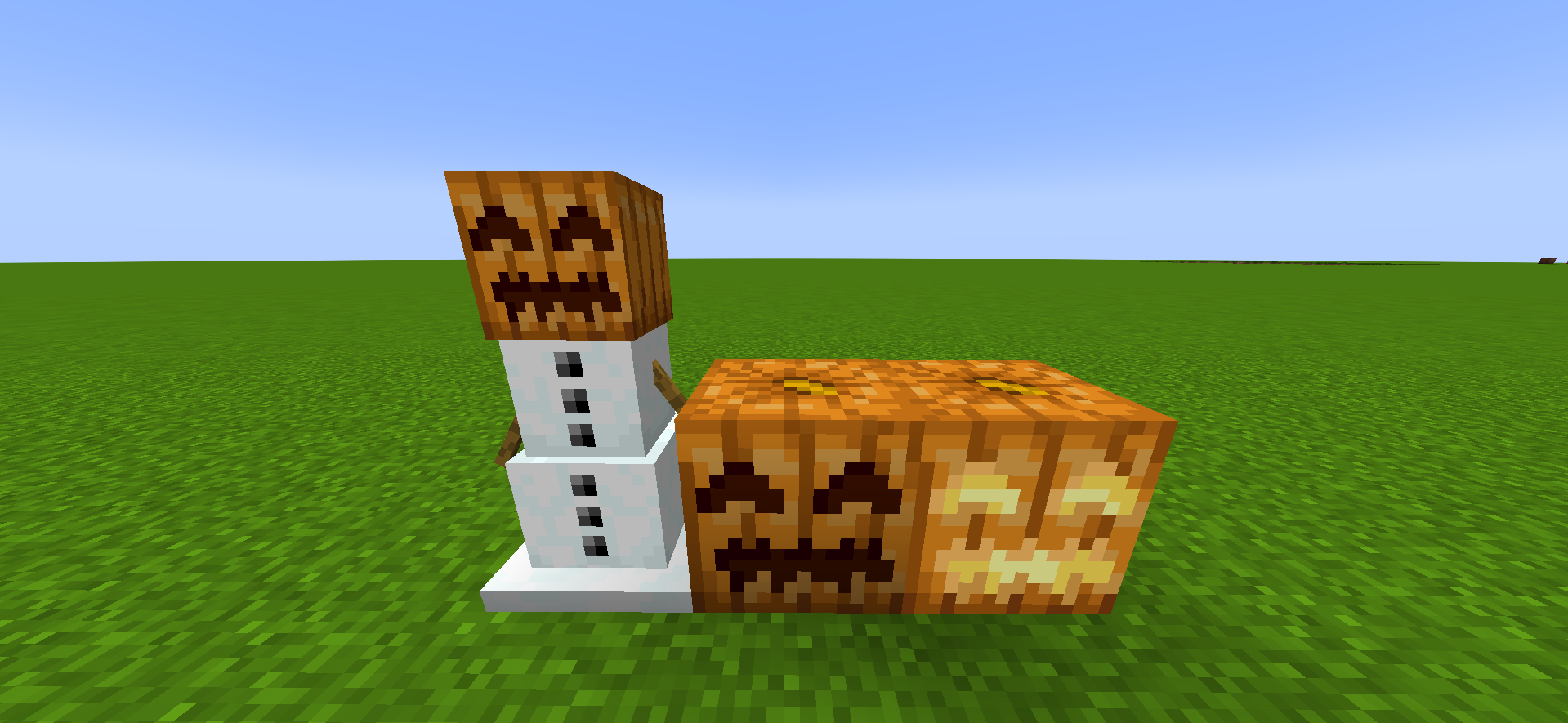
# **😊Happier Pumpkin🎃**
**Happier Pumpkin** makes pumpkins happier the **HAPPIEST** in the **PUMPKING KINGDOM**