New Hearts
# **New Hearts**
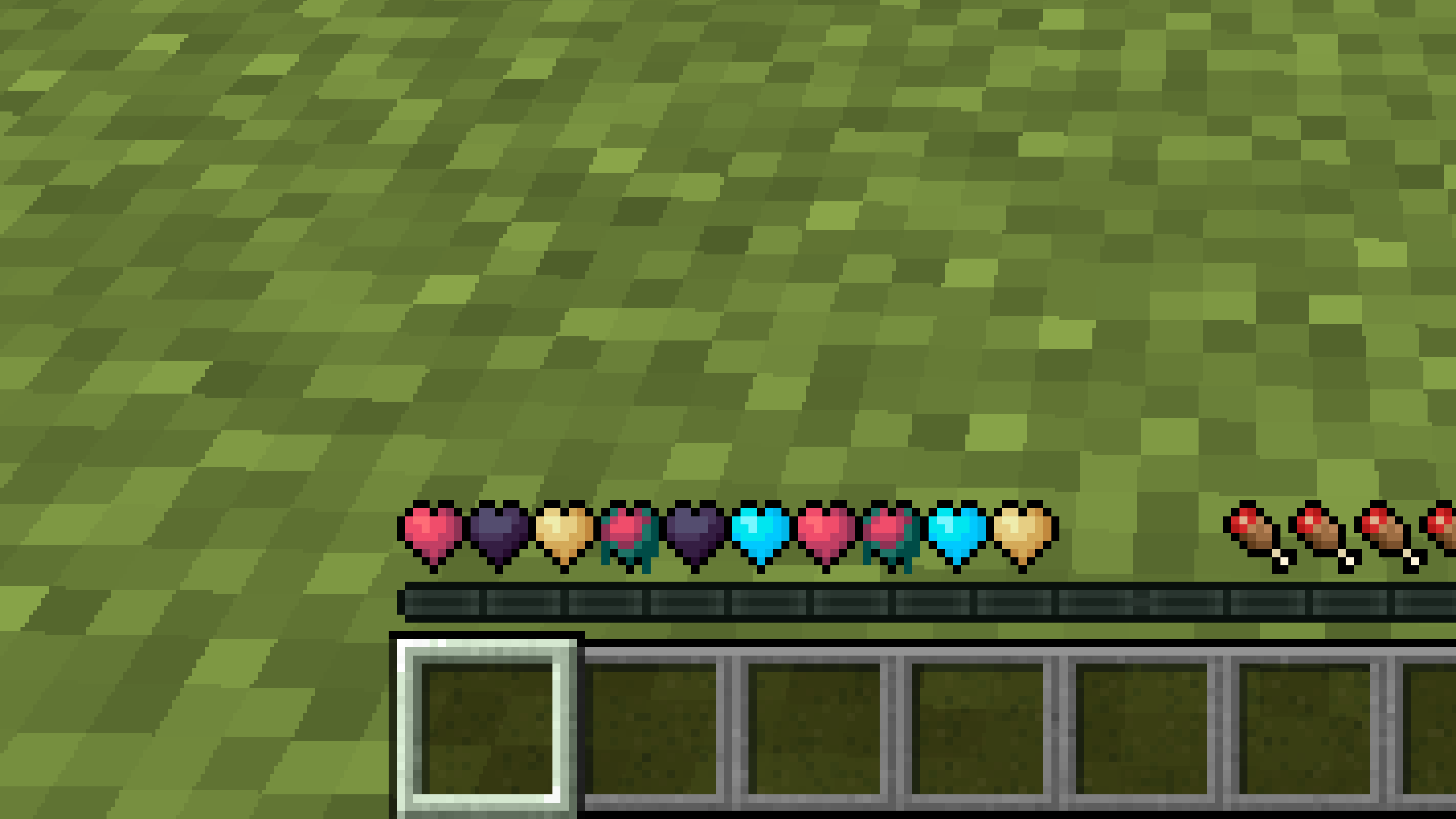
**Don’t like the bright colors of the hearts?**
**This texture pack is for you.**
—
—
## **Description**
**Pastel-colored hearts with softer color transitions.**
—
**Texture pack in classic colors: [New Hearts, classic colors](https://modrinth.com/resourcepack/new-hearts-classic-colors)**
Netherite Styled Default Armors
Gives all default armors the look of netherite. UPDATED FOR 1.0-1.22+
Variants:
Ashen 16x https://modrinth.com/resourcepack/netherite-styled-ashen-16x-armors
Bare Bones https://modrinth.com/resourcepack/netherite-styled-bare-bones-armors
Bronze https://modrinth.com/resourcepack/bronze-netherite-styled-armor
SimpleOres https://modrinth.com/resourcepack/simpleores-netherite-styled-armor
View the whole collection here! https://modrinth.com/collection/J5xlug9g
Subscribe to Subsetgaming on YouTube
https://www.youtube.com/@subset.gaming
Type “Subsetg4ming” in your search bar to find everything by me!
legacy-lwjgl3
# legacy-lwjgl3
A mod for [Ornithe](https://ornithemc.net) to run old versions of Minecraft with [lwjgl3](https://github.com/lwjgl/lwjgl3).
### Usage
#### Configuration
The mod offers optional configuration options via system properties or
environment variables.
A list of currently available options is provided below.
| Property Name | Environment variable name | Description |
|———————————————–|———————————————–|——————————————————|
| `legacy_lwjgl3.use_sdl` | `LEGACY_LWJGL3_USE_SDL` | Use SDL3 instead of GLFW for window & input handling |
### Unstable versions (CI)
Bleeding-Edge versions can be found in the Actions tab of the repository: https://github.com/moehreag/legacy-lwjgl3/actions.
### Building
This mod can be built using `./gradlew build`, jars can then be found at `build/libs/`.
### Dev
This mod is published to AxolotlClient’s maven, located at https://maven.axolotlclient.com.
“`kotlin
repositories {
maven(“https://maven.axolotlclient.com/releases”)
//maven(“https://maven.axolotlclient.com/snapshots”) // for unstable versions, optional
}
dependencies {
modImplementation(“io.github.moehreag:legacy-lwjgl3:“)
}
“`
### IME support for other mods
This mod provides IME preedit overlay functionality. If other mods provide independent text field implementations
they will not integrate with IME by default. legacy-lwjgl3 publishes a small API package which allows other mods
to integrate with IME input.
“`kotlin
repositories {
maven(“https://maven.axolotlclient.com/releases”)
//maven(“https://maven.axolotlclient.com/snapshots”) // for unstable versions, optional
}
dependencies {
modImplementation(“io.github.moehreag.legacy-lwjgl3:api:“)
}
“`
### Contributing
Contributions are welcome! Due to the project structure and its goal to support as many Minecraft versions
as possible working with the codebase is not trivial. If you are interested in contributing and need
assistance please join our [Discord server](https://discord.gg/BfmYmPw3Ts)
### Credits
This mod is forked from the version for legacyfabric authored by Zarzelcow: https://github.com/Zarzelcow/legacy-lwjgl3.
It is based on [lwjgl2](https://github.com/lwjgl/lwjgl) and a forge mod by gudenau: https://github.com/gudenau/MC-LWJGL3.
Additional Credits to:
– The OrnitheMC Project: https://ornithemc.net
– Contributors to this mod, especially: [Floweynt](https://github.com/Floweynt)
Mod Menu Ornithe
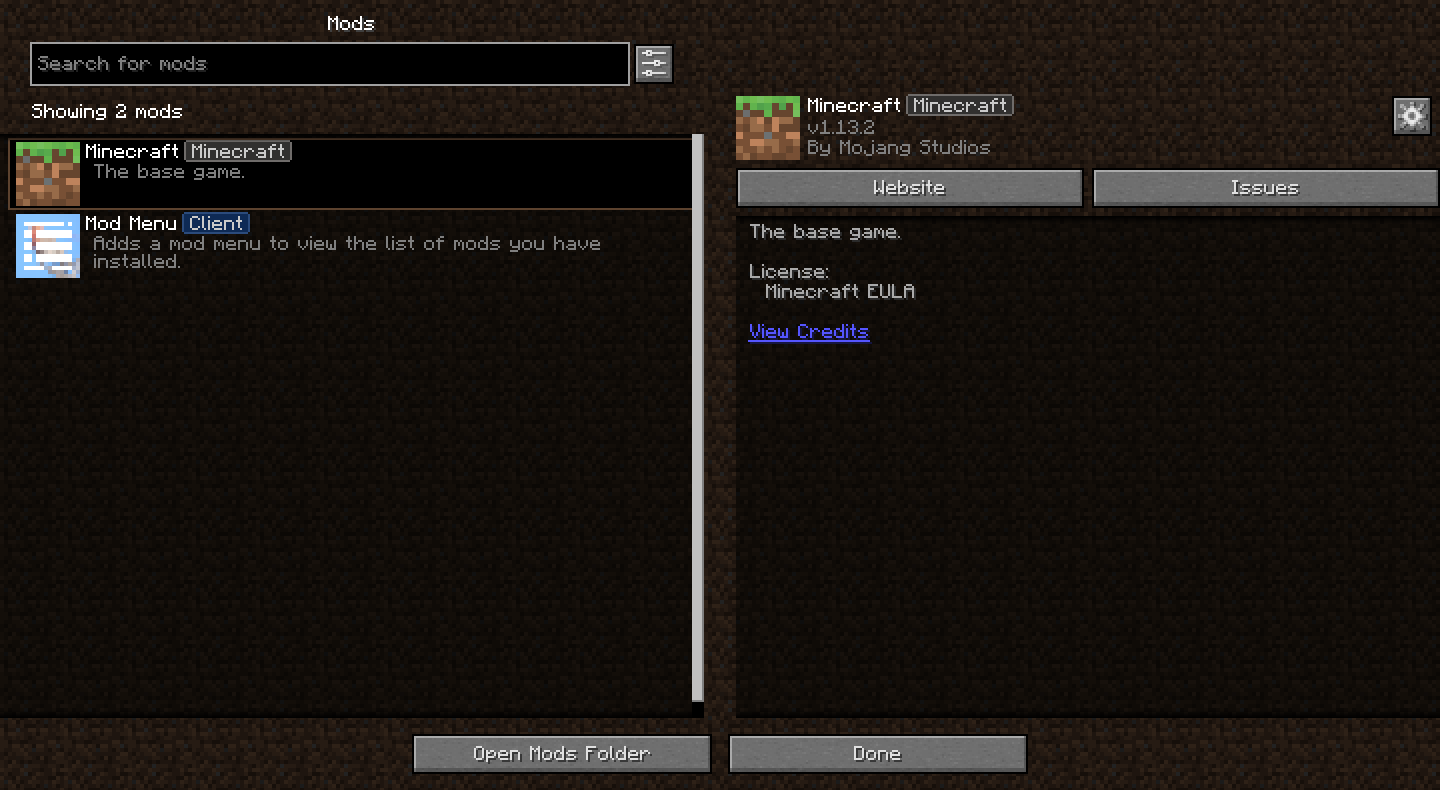
Bringing [Mod Menu](https://modrinth.com/mod/modmenu) to legacy Minecraft versions through [Ornithe](https://ornithemc.net)!
Requires [Ornithe Standard Libraries](https://modrinth.com/mod/osl).
Modern Textures
Backports textures from modern Minecraft to 1.2.5 and older.
The “No Mojang” version doesn’t replace the Mojang startup logo. The size of the modern image causes
Mod Remapping API
# Mod Remapping API
Remaps non-Fabric mods made for a different environment (by default obfuscated) to the current runtime mappings.
Provides hooks to expand the remapping process from other mods.
This mod doesn’t depend on a specific Minecraft version and should work on any version that Fabric Loader can launch.
### Mods depending on this API:
– [Fabricated Legacy Forge](https://modrinth.com/mod/fabricated-forge)
– [Apron](https://modrinth.com/mod/Apron)
– [Fabricated-Rift](https://modrinth.com/mod/fabricated-rift)
## Credits
### Most of the original code of the mod remapper
– paulevsGitch’s mod BetaLoader
Mod Loading Screen
# Mod Loading Screen
An advanced loading screen with the loading progress of mods. It works on all Minecraft versions, as it doesn’t even require Minecraft. Its only requirement is Fabric Loader 0.12.0 or later or Quilt Loader (specific versions of Quilt support are unknown). Do note that if you run this mod on a game other than Minecraft, the loading screen may not close itself.
## Agent
Mod Loading Screen provides a Java agent, which allows opening the loading screen before even the mod loader itself loads. This feature is primarily targeted at modpack developers who want to make a seamless loading experience. The agent can be used by passing `-javaagent:mod-loading-screen-1.0.4.jar` as a JVM argument. If the agent is used, the loading screen should *not* be installed as a mod.
## API
To depend on the API, use the Modrinth Maven. The API should be JiJed, and doing so will not include Mod Loading Screen inside your mod (it will only include the API, which is only a few kilobytes). The API is designed to have both forwards and backwards binary compatibility with future Mod Loading Screen versions. An API is provided for checking which API calls will return stubs and which ones are real.
“`gradle
repositories {
exclusiveContent {
forRepository {
maven {
name = “Modrinth”
url = “https://api.modrinth.com/maven”
}
}
filter {
includeGroup(“maven.modrinth”)
}
}
}
dependencies {
// implementation, not modImplementation!
include(implementation(“maven.modrinth:mod-loading-screen:1.0.4:api”))
}
“`
The API has two top-level classes: `LoadingScreenApi` and `AvailableFeatures`. Full javadocs are available for both classes.
LegacyVoiceChat
# LegacyVoiceChat
**LegacyVoiceChat** adds proximity voice chat to legacy — including **Ornithe**, **StationAPI**, **Better than Adventure!**, **Project Poseidon**, **Risugami Modloader** and **More!**.
## ⚠️ WARNING
> **LegacyVoiceChat is currently a WIP mod.**
> Expect bugs, UI changes, and protocol changes at any time.
## Features
### Proximity Voice Chat
– 3D positional audio
– Directional sound based on player orientation
– Dynamic volume fading with distance
### Audio Device Management
– Choose custom **input** and **output** devices
– **Push-to-Talk** or **Voice Activation** modes
– Adjustable mic sensitivity
### Groups / Parties
– Create or join voice groups
– Talk privately with teammates (ignores distance)
### Mute & Deafen
– Mute specific players or yourself
– Deafen to silence all incoming voice
Looking for the raw jar file for MultiMc or Prism Launcher? [Click Here](https://legacyvoicechat.com/)
### Server Notes
Make sure to port forward “`25566 UDP“` or change the port in the server config
Legacy OptiFabric
**for mcsr**: use [mods.tildejustin.dev](https://mods.tildejustin.dev/)
If you’re looking for OptiFabric for 1.14 to 1.15.2 for regular Fabric instead of Ornithe, check out [OptiFabric Origins](https://modrinth.com/mod/optifabric-origins)
## Legacy OptiFabric
OptiFabric for Legacy Fabric (1.3.1-1.13.2) and Ornithe (b1.7.3-1.14.4)
– Legacy Fabric installer and official MultiMC instances: https://legacyfabric.net/downloads.html
– Ornithe installer (can generate MultiMC instances): https://ornithemc.net
– Legal speedrunning MultiMC instances for Ornithe and Legacy Fabric (vanilla LWJGL, no extra libraries or mods): [Minecraft-Java-Edition-Speedrunning/legacy-fabric-instance-generator/releases](https://github.com/Minecraft-Java-Edition-Speedrunning/legacy-fabric-instance-generator/releases)
based on the work of [RedLime’s OptiFabric-Pre1.14](https://github.com/RedLime/OptiFabric-Pre1.14), a fork of [hYdos’s OptiFabric 1.8.9](https://github.com/hYdos/OptiFabric) which
in turn is a derivative of [modmuss’ original OptiFabric](https://github.com/modmuss50/OptiFabric)
## installing
this mod requires an optifine jar in the mods folder alongside optifabric. for 1.7.2 and onwards this can be sourced
from [OptiFine’s official website](https://optifine.net/downloads), and older versions these can be retrieved either
from [SpeedyCube64’s Pre-1.9 Optifine Archive](https://github.com/speedycube64/Complete_OptiFine_Archive_Pre_1.9) or on
the [OptiFine history thread](https://www.minecraftforum.net/forums/mapping-and-modding-java-edition/minecraft-mods/1286605-b1-4-1-9-optifine-history).
## how it works
this mod uses [Minecraft-Java-Edition-Speedrunning/fabric-asm](https://github.com/Minecraft-Java-Edition-Speedrunning/fabric-asm), a minor derivative
of [Cat Core’s Fabric-ASM/no-guava](https://github.com/thecatcore/Fabric-ASM/tree/no-guava) which itself is an updated version
of [Chocohead’s fabric-asm](https://github.com/Chocohead/Fabric-ASM). fabric asm allows more extreme asm modification and the fork used has no dependency on guava or apache
commons, which older minecraft versions don’t provide.
### steps
1. the mod looks for an optifine installer or mod jar or zip in the current mods folder
2. if it finds an installer jar it runs the extract task in its own throwaway classloader
3. the optifine mod jar is a set of classes that need to replace the ones that minecraft provides
4. optifine’s replacement classes change the name of some lambda methods, so it take a good guess at the old name (using the original minecraft jar)
5. remap optifine to intermediary
6. move the patched classes out as they won’t do much good on the classpath twice
7. add optifine to the classpath
8. register the patching tweaker for every class that needs replacing
9. replace the target class with the class that was extracted, also do some more fixes to it, and make it public (due to access issues)
10. hope it works
## notes
– this mod does not really work in dev or named environments. In Legacy Fabric’s case the yarn builds are corrupted in some versions so this cannot work atm, feather is better but still has issues.
– the accessWideners are created based on the output of tiny remapper’s checkPackageAccess option, but they are unlikely to ever be 100% complete. if you have a crash that has to do with and invalid access, report it and it may be able to be fixed.
## class excluder
this is a kind of hidden feature that is occasionally useful to remove files when remapping the jar. to do this, it reads the `optifabric-excluded-classes.json` file
in `.minecraft/config/` if it exists, and expects the file to contain a mapping of versions (field names) to an array of removable classes (or textures or anything else, it’s just
a filename).
an example file contents to revert the removal of the profiler for 1.3.2 light is provided below. if the optifine version you are trying to make an excluder extry for has already
been loaded before in your instance, delete its folder in the `.optifine` folder in `.minecraft` to force a recache.
“`json
{
“OptiFine_1.3.2_L_B2”: [
“ik.class”
]
}
“`
Jappaified
Jappaified backports new Jappa-styled textures to every single version of Minecraft before 1.14 except for snapshots and April Fools updates, and I mean it. EVERY. SINGLE. VERSION. (There’s also a Classicube version)
This pack aims to port the modern textures as accurately as possible. This includes having correct ore textures, new cloud textures, and new changes when new updates drop if possible.

## Installation (pre a1.2.2)
### Prism Launcher / MultiMC
In the instance menu (click “Edit Instance” to get there), go to the Version section and click “Add to Minecraft.jar”. Once your file explorer of choice opens up, find the version you downloaded and select it. After that, it should be installed and you can launch the game with it.

I’d also recommend using [LegacyFix](https://github.com/betacraftuk/legacyfix) to get those old versions running idealy.
### Optifine and MCPatcher for old versions
Optifine and MCPatcher can be used to get the water and lava working properly in versions between a1.1.2_01 and r1.4.7. You can get the version you want [here](https://github.com/backporteverything/Backport-Everything/tree/main/Supplementary%20Files) and then you can add them by doing the same thing you do when using pre a1.2.2 versions of this pack to add MCPatcher.
## Version Numbering Scheme
game1(-game2).bigpatch.smallpatch.bugfix
game1 is the earliest Minecraft version a version of this pack supports
game2 is the latest Minecraft version a version of this pack supports
bigpatch is if I add or change something to every single version of the pack. Whenever this happens, I will make a downloadable .zip file with every version of the pack (it saves me a LOT of time)
smallpatch is if I want to add or change something in certain versions of the pack
bugfix is if I need to fix something in certain versions of the pack
The current version of a pack right now would be game1(-game2)(-OP).2.X.X
## Also Check Out
[Tunes: Backport](https://modrinth.com/resourcepack/tunes-backport): A pack that adds new songs to r1.6 and later. It works great alongside this pack.
[MC New Textures: Sound Pack](https://modrinth.com/resourcepack/mcnt-sound): A pack that backports the new sounds to r1.7 and later. It’s meant to go with MC New Textures, but it should work with this pack too.
[Modernity: Climate Mapped Water](https://modrinth.com/resourcepack/modernity): There are water climate resource packs that truly add the new water colors to r1.6 to r1.12.2. Though, you’ll have to copy the stuff from this to my pack if you are using r1.6 specifically.
[Modernity Adjunct](https://modrinth.com/resourcepack/modernity-adjunct): A pack that added Jappa-like textures to old mods on old versions. It’s meant to go with Modernity, a pack similar to this one, but I think mine should work as well if you want to give it a shot.
[Backport Everything](https://modrinth.com/resourcepack/backport-everything): A pack with a very similar goal as this one, that was made around the same time by pure coincidence! If there are changes in this pack you like more, use it instead of my pack. Also, this pack works with the StationAPI port of The Aether mod on b1.7.3 if you like that and Jappa textures.