PC Gamer Cow
It is the cow from the PC Gamer Demo! But with a slightly modified logo and it uses the new cow texture from 1.14
It is the cow from the PC Gamer Demo! But with a slightly modified logo and it uses the new cow texture from 1.14
## Introduction
This mod adds Paxels, a combination of Pickaxe, Axe and Shovel, which can efficiently mine all blocks which can be mined by Pickaxes, Axes and Shovels!
## Currently supported mods:
* Aether
## Installation using Prism Launcher
1. Download an instance of Babric for Prism Launcher: https://github.com/babric/prism-instance
2. Install Java 17 and set the instance to use it: https://adoptium.net/temurin/releases/
3. (Optional) Add Mod Menu to the mod folder for the instance: https://modrinth.com/mod/modmenu-babric
4. Add this mod to the mod folder for the instance: https://github.com/Kaosreven/Paxels/releases
5. Run and enjoy! :thumbsup:
## Feedback
Got any suggestions on what should be added next? Feel free to share it by [creating an issue](https://github.com/Kaosreven/Paxels/issues/new). Know how to code and want to do it yourself? Then look below on how to get started.
## Contributing
Thanks for considering contributing! To get started fork this repository, make your changes, and create a PR.
If you are new to StationAPI consider watching the following videos on Babric/StationAPI Minecraft modding: https://www.youtube.com/watch?v=9-sVGjnGJ5s&list=PLa2JWzyvH63wGcj5-i0P12VkJG7PDyo9T
Ornithe Standard Libraries (OSL) provides tools for modding with Ornithe.
## Libraries
### Core API
The Core API provides common utilities used by other modules, such as an events system and registries.
### Branding API
This module patches the title screen with mod loader information in 16w05a and below, emulating what you would see in 16w05b and above. This is done by parsing the run args for the `versionType` option.
### Config API
The Config API provides a framework for building and storing mod configs.
### Entrypoints API
The Entrypoints API allows mod developers to submit entrypoints that are called before the game is initialized.
### Keybinds API
The keybinds API provides events for registering keybinds.
### Lifecycle Events API
The Lifecycle Events API provides events to track the lifecycle of the Minecraft client and server.
### Networking API
The Networking API provides a framework for client-server communication.
### Resource Loader API
The Resource Loader API allows mods to load their own resources into the game.
## Information for developers
Our [Ploceus gradle plugin](https://github.com/OrnitheMC/ploceus) provides helper methods for adding OSL dependencies to your projects:
“`groovy
dependencies {
…
ploceus.dependOsl(‘0.17.1’)
}
“`
You can also add dependencies on individual OSL modules:
“`groovy
dependencies {
…
ploceus.dependOslModule(‘0.17.1’, ‘core’)
ploceus.dependOslModule(‘0.17.1’, ‘entrypoints’)
}
“`
# SUPPORTS LITERALLY EVERY SINGLE VERSION FROM ALPHA 1.2.2 TO 1.21.8
this is not a joke lol it actually works on every version that has texture/resource packs
on versions from 1.8 to 1.20.1 ignore the “incompatible made for a newer version” warning
there’s no way for me to get rid of that warning but it does work on those versions
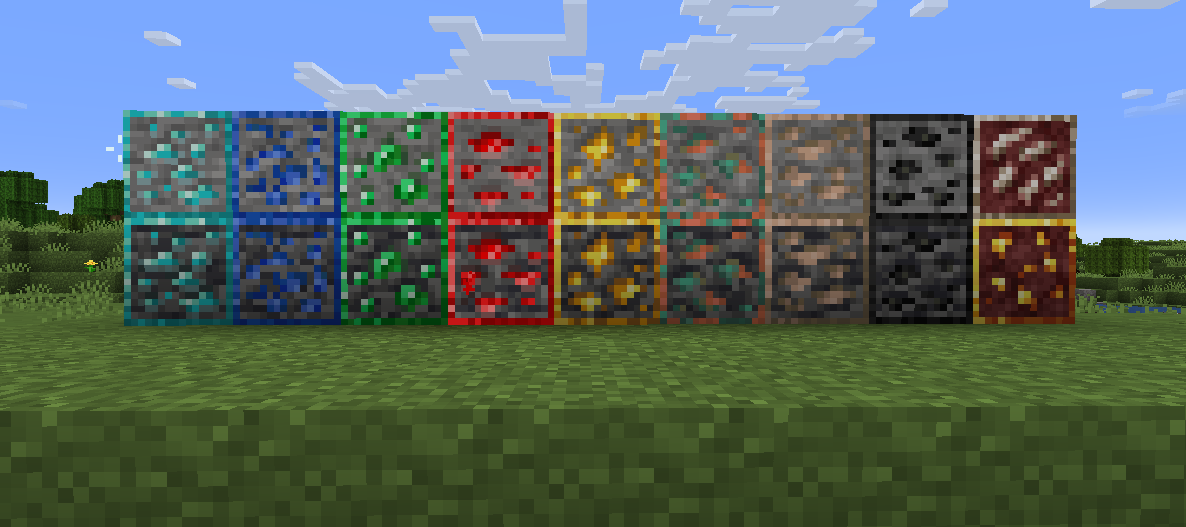
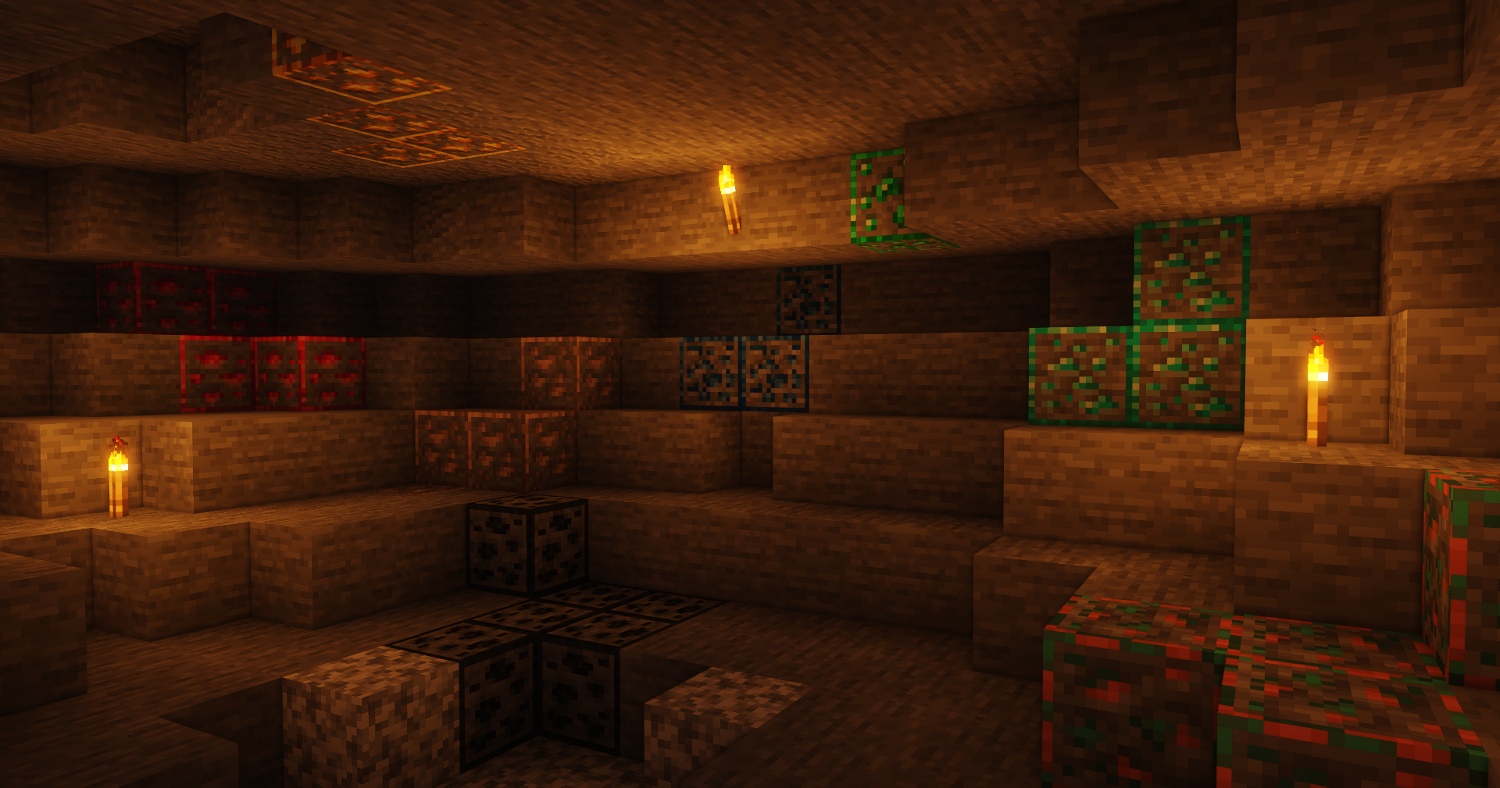
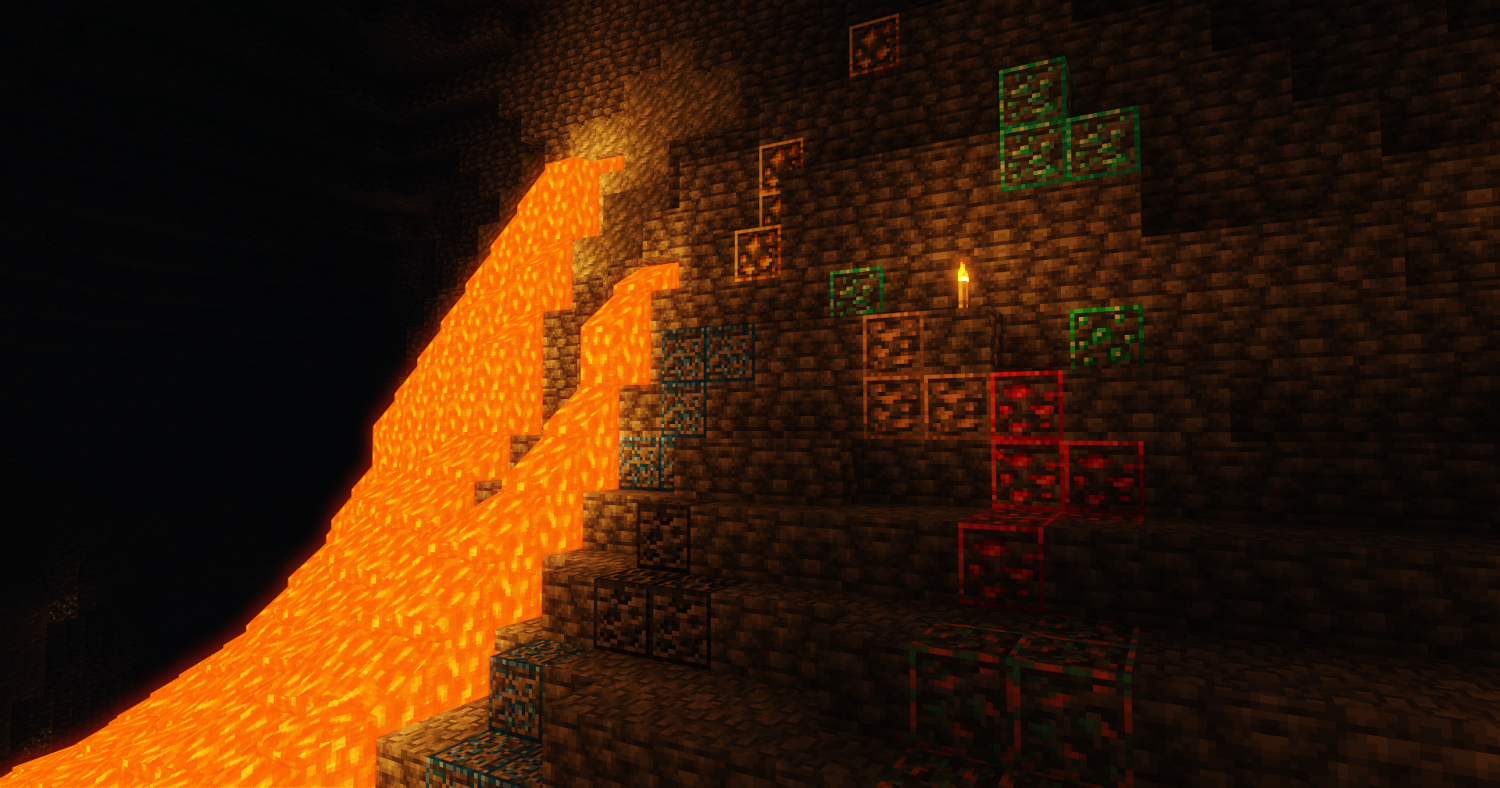
really simple pack that just adds outlines on the ores. ik its been done a billion times but i did it again lol
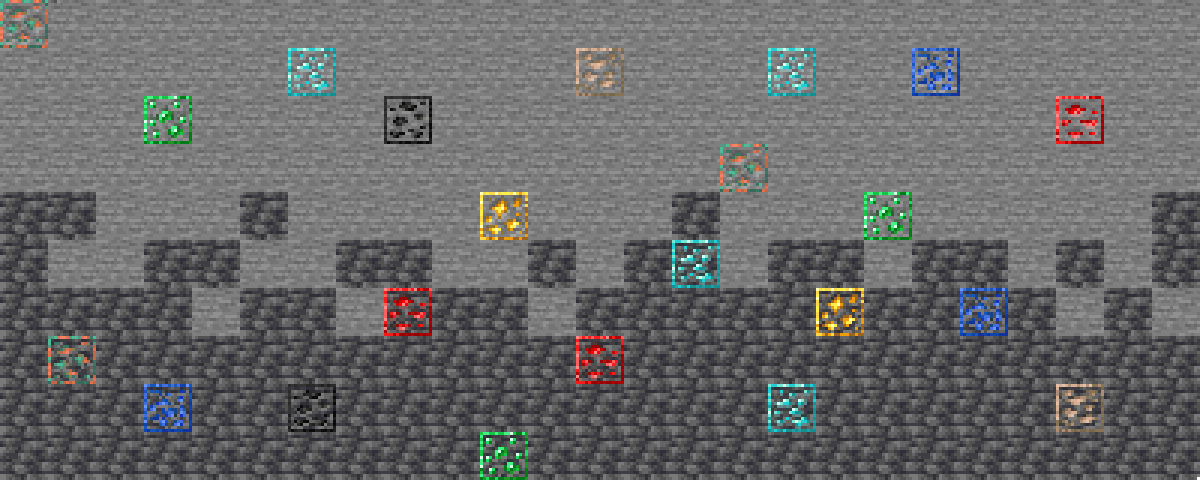
the ore is like compacted so it doesn’t touch the outlines to make it not blend together
## English
OptiCool will soon be updated to 1.21.6 but before that I plan to release for 1.21.5!
Sorry for the long wait!
## Русский
OptiCool скоро обновиться до 1.21.6, но перед этим, я планирую выпустить релиз для 1.21.5!
Простите за долгие ожидания!
**OptiCool** is a modpack that has **improved optimization** and **support OptiFine features**!
Let’s compare OptiCool 1.0 B1 pre1 with [OptiFabric](https://modrinth.com/modpack/optifabric-modpack) and OptiFine (1.21.4)!
Menu in 1.21.4 OptiFine


Menu in OptiFabric (Modpack)


Menu in OptiCool 1.0 B1 pre1


As you’ve already noticed for yourself that OptiCool is inspired by old OptiFine parts…
Now let’s get to the most interesting part – FPS Testing!
FPS with 1.21.4 OptiFine

I had to put 12 chunks to have an accurate result.
FPS with OptiFabric (Modpack)

FPS with OptiCool 1.0 B1 pre1

Why this result? Most likely because OptiCool uses optimized settings options that try to give the look of Minecraft on Fancy graphics although it’s Fast and fixes the big lag issues from particles.
In new versions there will be **updates or add mods for optimization / mods for OptiFine features**.
There are **8 editions** (2 editions support both **Fabric** and **Quilt**) of OptiCool:
1. Default Edition (The name of the edition is hidden and looks like this: OptiCool) – **basic OptiCool**.
2. **Plus Edition** – **improved version of OptiCool** where **useful mods are added**!
3. **NeoForge** Edition – OptiCool port on **NeoForge**.
4. **NeoForge Plus Edition** – **OptiCool: Plus Edition** port on **NeoForge**.
Non-updatable:
1. OptiCool Beta 1.7.3 – OptiCool for Beta 1.7.3 (Babric) Reason: Not supporting json files.
2. OptiCool Beta 1.7.3: Plus Edition – OptiCool: Plus Edition for Beta 1.7.3 (Babric) Reason: Not supporting json files.
New editions may be completely different and you may not like it.
If you have any problems send it to [OptiCool Issues](https://github.com/ShrikerChestTrees/OptiCool)
**OptiCool** – модпак с **улучшенной оптимизацией** и **поддержкой возможностей OptiFine**!
Давайте сравним OptiCool 1.0 B1 pre1 с [OptiFabric](https://modrinth.com/modpack/optifabric-modpack) и OptiFine (1.21.4)!
Меню в 1.21.4 OptiFine


Меню в OptiFabric (Модпак)


Меню в OptiCool 1.0 B1 pre1


Как вы уже и сами заметили, что OptiCool вдохновляется старыми деталями OptiFine…
Теперь перейдём к самому интересному – Тестирование FPS!
FPS с 1.21.4 OptiFine

Пришлось поставить 12 чанков, чтобы был результат точен.
FPS с OptiFabric (Модпак)

FPS с OptiCool 1.0 B1 pre1

Почему такой результат? Скорее всего из-за того, что OptiCool использует оптимизированные варианты настроек, которые стараются придать вид Minecraft на Детальном графике, хотя это Быстрая и исправить большие проблемы с лагами от частиц.
В новых версиях будут **обновления или добавления модов для оптимизации / модов для возможностей OptiFine**.
Имеются **8 изданий** (2 издания поддерживают и **Fabric**, и **Quilt**) OptiCool:
1. Default Edition (Название издания скрыто и это выглядит вот так: OptiCool) – **обычный OptiCool**.
2. **Plus Edition** – **улучшенная версия OptiCool** где **добавлены полезные моды**!
3. **NeoForge** Edition – порт OptiCool на **NeoForge**.
4. **NeoForge Plus Edition** – порт **OptiCool: Plus Edition** на **NeoForge**.
Не обновляемые:
1. OptiCool Beta 1.7.3 – OptiCool для Beta 1.7.3 (Babric) Причина: Не поддержка json файлов.
2. OptiCool Beta 1.7.3: Plus Edition – OptiCool: Plus Edition для Beta 1.7.3 (Babric) Причина: Не поддержка json файлов.
Новые издания могут быть совершенно другими и вам это может не понравиться.
Если имеете какие-то проблемы, то отправляйте это в [OptiCool Issues](https://github.com/ShrikerChestTrees/OptiCool)
# Omnilook
_A simple freelook/perspective mod for Minecraft._
Omnilook implements a small utility function for your player camera, which lets you rotate which way the third-person camera faces independent of your player’s head movement. This lets you take fancy cinematic shots or aim your cursor in a specific direction while not having to be locked to looking in that direction too!
## Version Support
Omnilook will support pretty much any and every mod loader and version of Minecraft you can think of. The table for this is kind of big, so please see [the GitHub readme](https://github.com/rhysdh540/Omnilook#version-support) for the full thing.
## Why Omnilook?
Omnilook is not the first mod to do this. Here’s why you should try it out:
– **It’s lightweight.** Unlike other mods, Omnilook is small and lightweight in about every way possible. It depends on other mods minimally, doesn’t interrupt your game in the slightest, and the mod jar weighs in at far under 100 kilobytes.
– **It’s compatible.** Omnilook will *just work* anywhere you put it. It uses as few injections as possible to get the job done, and often uses mod loaders’ events and APIs to make sure it functions well with other mods.
– …that’s about it for now.
## Configuration
Omnilook at its core is a pretty simple mod, so there aren’t too many configuration options right now. Besides the activation key binding (by default bound to the grave key, `), the one other option to configure is if pressing it toggles the effect, or if holding it keeps it activated.
## Issues?
See me on [GitHub](https://github.com/rhysdh540/Omnilook/issues). I’d love to help!

**NyaPack 🦋** is a resource pack that lets you show off your skin even more!
Armor becomes more like **accessories** or **situational outfits**, helping you customize your appearance without covering your character entirely.
✨ **Features:**
– **Emissives** and **animations** support in newer versions, all **without additional mods**
– Support for the new **copper armor**
– Versions **without emissive** and **without animations** are also available for those who prefer a simpler look
Give your skin more personality and style! 🦋
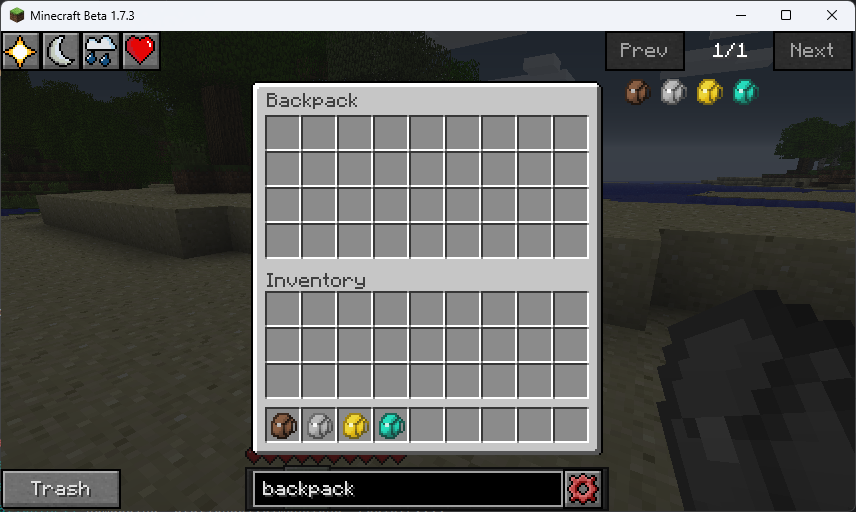
Adds simple backpacks to the game which can be use to store items. They can be opened either by right-clicking them in hand or by pressing the Open Backpack keybind which will open the first avalible backpack
# BTVR/NR
### Nostalgic Reality, aka Better Than VR
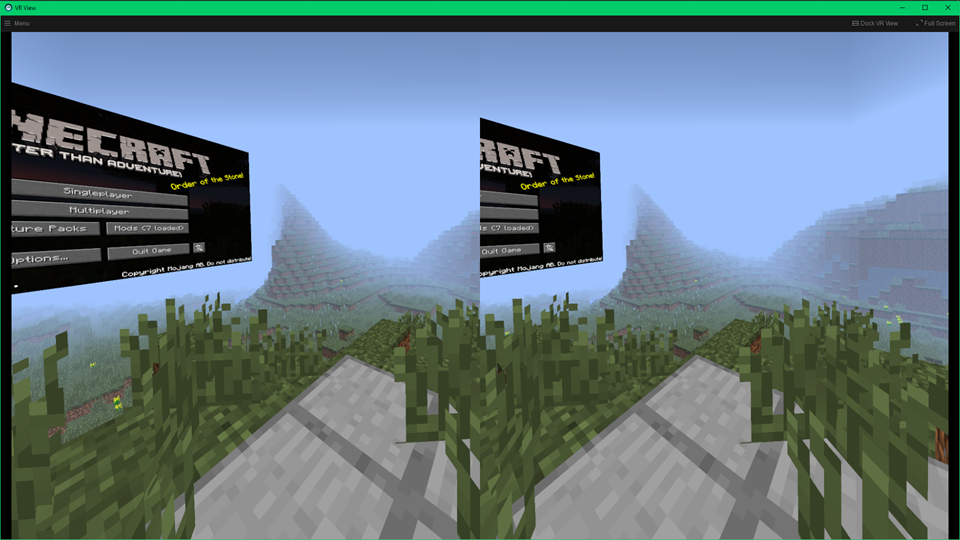
VR mod for BTA
## Requirements
– [Babric for BTA 7.1a](https://github.com/Turnip-Labs/babric-instance-repo/releases/tag/v7.1-pre1a)
– [Halplibe](https://github.com/Turnip-Labs/bta-halplibe/releases/tag/3.4.1)
## Info
NR is not a port of vivecraft, it is it’s own thing.
NR currently has
– some gestures (swinging your arm to do actions; attacking, digging, using foods)
– GUIs
– controls
Some future plans:
– menu world navigation
– teleportation mechanics
– a menu for some less important but still useful actions
– gesture based switching of hotbar slots
– vr keyboard
No Hotbar, Pretty Straight forward. Idk what this can be useful for tbh. Maybe clear hotbar? Just use idk.
Can I put this in my modpack?
Sure but add the credit. Or just paste the text below
No Hotbar
By Zacgamingpro1234
https://modrinth.com/resourcepack/nohotbar
If you want to redistribute to other websites just tell me and I’ll try.
You can use it in your modpack.
You can use it for personal use.
If you want to modify this resource you must ask me.