Sci-fi like UI for Beta 1.7.3
The texture pack changes every In-game UI to something more futuristic. There’s also some other minor additions in the texture pack, Such as the breaking animation being a loading bar, And the texture pack also changing the Jukebox and Noteblock’s appearance.
Originally only made as a test to figure out how texture packs in Beta work, But then turned into a full on texture pack. No plans on putting it into modern minecraft, But if it recieves enough attention i might consider doing so 😀
## Note: The texture pack works perfectly without Optifine.
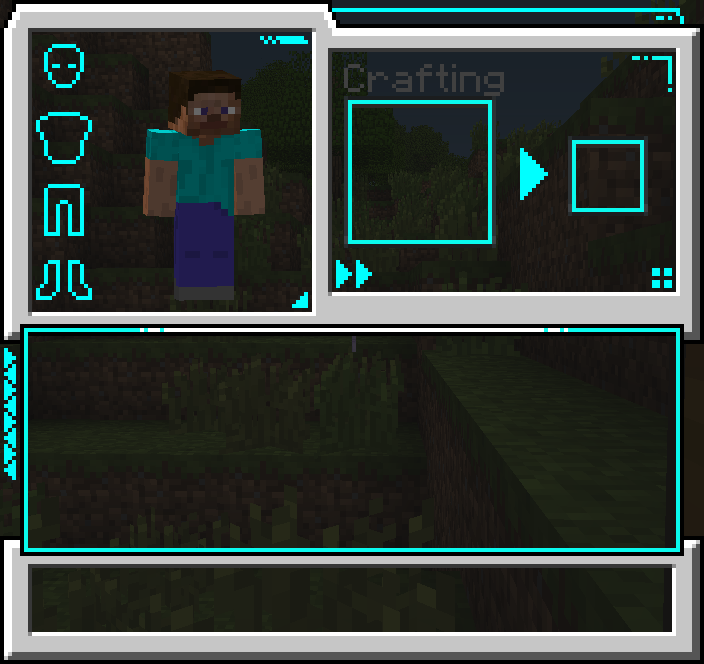
### More images in the gallery.
SameOldSpells StationAPI
# SameOldSpells StationAPI for Minecraft Beta 1.7.3
Some basic world control using spells!
* Requires [Zastavka API](https://modrinth.com/mod/zastavkaapi) (used for freeze effect with ice spells)
* Mod works on Multiplayer with [GlassConfigAPI](https://modrinth.com/mod/glass-config-api) version 3.0+ used to sync configs!
## List of changes
Note that all changes can be individually disabled using GlassConfigAPI if undesired
### Same Old Spells
Adds a couple unique spells to the game that are activated on entity collision:
– Arrow Spell: Fires an arrow in each cardinal direction (North, East, South, and West)
– Single use, crafted from 1x spell vessel and 4x arrows
– Crafting recipe is shaped with spell vessel in the center and arrows placed vertically and horizontally beside it
– Dark Spell: Makes night begin
– Single use, crafted from 1x spell vessel and 1x obsidian
– Dark Spell Cube: Makes it midnight
– Infinite use, NOT craft-able
– Fire Spell: Sets an entity on fire
– Single use, crafted from 1x spell vessel and 1x fire
– Fire is now craft-able via placing UNUSED flint and steel in the crafting grid (recipe output is 3x fire)
– Configuration available to craft it directly from 1-3x spell vessels and 1x unused flint and steel (output is 1-3x fire spells)
– Fire Spell Cube: Sets an entity on fire only while in the spell cube
– Infinite use, NOT craft-able
– Grass Spell: Clears the weather
– Single use, crafted from 1x spell vessel and 1x dandelion (Vanilla b1.7.3 Minecraft just calls this item “Flower”)
– Grass Spell Cube: Clears the weather
– Infinite use, NOT craft-able
– Holy Spell: Spawns lightning
– Single use, crafted from 1x spell vessel and 1x bookshelf
– Holy Spell Cube: Spawns lightning
– Infinite use, NOT craft-able
– Ice Spell: Freezes an entity
– Single use, crafted from 1x spell vessel and 1x ice
– Ice is now craft-able via placing 2x snow block and 1x water bucket in the crafting grid
– Configuration available to craft it directly from 2x snow block, 1x water bucket, and 1x spell vessel
– Ice Spell Cube: Periodically freezes an entity in the spell cube
– Infinite use, NOT craft-able
– Light Spell: Makes daytime begin
– Single use, crafted from 1x spell vessel and 1x glowstone
– Light Spell Cube: Makes it midday
– Infinite use, NOT craft-able
– Spell Vessel: Does nothing
– Single use, crafted from 1x glowstone dust and 4x snow blocks
– Crafting recipe is shaped with glowstone dust in the center and snow blocks placed vertically and horizontally beside it
– Rock Spell: Starts a thunderstorm
– Single use, crafted from 1x spell vessel and 1x iron block
– Rock Spell Cube: Starts a thunderstorm
– Infinite use, NOT craft-able
– Water Spell: Starts rain
– Single use, crafted from 1x spell vessel and 1x lapis lazuli block
– Water Spell Cube: Starts rain
– Infinite use, NOT craft-able
## Special thanks to Rocetti/kcilds for the tile art <3
Find their original post at OpenGameArt.org here:
[https://opengameart.org/content/universal-fantasy-roguelike-tileset-16x16](https://opengameart.org/content/universal-fantasy-roguelike-tileset-16x16)
## Installation using Prism Launcher
1. Download an instance of Babric for Prism Launcher: https://github.com/babric/prism-instance
2. Install Java 17 and set the instance to use it: https://adoptium.net/temurin/releases/
3. Add GlassConfigAPI 3.0.2+ to the mod folder for the instance: https://modrinth.com/mod/glass-config-api
4. Add Glass Networking to the mod folder for the instance: https://modrinth.com/mod/glass-networking
5. Add StationAPI to the mod folder for the instance: https://modrinth.com/mod/stationapi
6. Add ZastavkaAPI to the mod folder for the instance: https://modrinth.com/mod/zastavkaapi
7. (Optional) Add Mod Menu to the mod folder for the instance: https://modrinth.com/mod/modmenu-beta
8. Add this mod to the mod folder for the instance: https://github.com/telvarost/SameOldSpells-StationAPI/releases
9. Run and enjoy! 👍
## Feedback
Got any suggestions on what should be added next? Feel free to share it by [creating an issue](https://github.com/telvarost/SameOldSpells-StationAPI/issues/new). Know how to code and want to do it yourself? Then look below on how to get started.
## Contributing
Thanks for considering contributing! To get started fork this repository, make your changes, and create a PR.
If you are new to StationAPI consider watching the following videos on Babric/StationAPI Minecraft modding: https://www.youtube.com/watch?v=9-sVGjnGJ5s&list=PLa2JWzyvH63wGcj5-i0P12VkJG7PDyo9T
Ruined Beta!
## Info:
A small texture pack for a small version. The
(https://modrinth.com/resourcepack/ruined-beta/gallery) outlines the main tweaks pretty well. Newer tweaks are explained by looking at the [changelog](https://modrinth.com/resourcepack/ruined-beta/changelog).
The pack name isnt so true, couldn’t really think of anything else since BetaTweaks already exists lol
## Credit:
Birevan on the [Modification Station Discord](https://discord.com/channels/397834523028488203/397839884590776320/1141646111690469426) and his [Default Beta texture pack](https://discord.com/channels/397834523028488203/1123535104187310130/1123535104187310130) for the idea for this pack and a lot of the inspiration.
Various [Vanilla Tweaks](https://vanillatweaks.net/picker/resource-packs/) packs.
RRDiscordBridge
# Retro-Release Discord Bridge
[](https://modrinth.com/plugin/RRDiscordBridge)
[](https://rrdiscordbridge.nostalgica.net/javadocs)
[](https://discord.gg/k2wGKEaCRA)
Discord bridge/relay plugin that [supports old Minecraft versions and server software](#tested-versions) (Beta 1.4-Release 1.21.1)
For config info, check out [this page](https://rrdiscordbridge.nostalgica.net/javadocs/me/dexrn/rrdiscordbridge/config/Settings.html#field-summary).
Download: https://modrinth.com/plugin/rrdiscordbridge
When reading the source code, you may notice that the projects have odd names, this is to make the source look slightly cleaner.
See [versions.md](https://github.com/DexrnZacAttack/RRDiscordBridge/tree/master/versions.md) for more info.
## Features
– Message Relay
– [Version support](#supported-versions)
– Broadcasting (/dcbroadcast)
– Server Stats from Discord (/about)
– Relays the following to Discord (configurable)
– Player Join
– Player Leave
– Player Kick
– Player Death
– Player Chat
– Player Advancements/Achievements
– Contains advancement description (if applicable) and link to wiki page
– Server Start
– Plugin Reload
– Server Stop
– /say
– /me
– [~~Server Console (if configured)~~](https://github.com/DexrnZacAttack/RRDiscordBridge/issues/12)
– Relays the following information from Discord (configurable)
– Channel message
– User join (if the relay channel is also the system messages channel)
– Server boost (if the relay channel is also the system messages channel)
– Thread creation
– Message pin
– Poll created/ended (with results)
– Slash commands used
– User app used (also activities)
– Message forwarded (probably not complete)
– Extensions (configurable)
– **Extra info available in-game by typing `/rdbext help`**.
– Built-in extensions:
– Waypoint embed (Waypoints)
– Allows for Xaero’s Minimap and JourneyMap/VoxelMap waypoints to be embedded in the relay channel.
– **[See config options](https://rrdiscordbridge.nostalgica.net/javadocs/me/dexrn/rrdiscordbridge/extensions/options/WaypointExtensionOptions.html#field-summary)**
– Operator Chat (OpChat)
– Allows for communicating between ops and optionally a (likely private) discord channel.
– Inspired by MCGalaxy’s OPChat feature.
– Syntax: ##
– **[See config options](https://rrdiscordbridge.nostalgica.net/javadocs/me/dexrn/rrdiscordbridge/extensions/options/OpChatExtensionOptions.html#field-summary)**
– ### For development info, see [the example repo](https://github.com/Nostalgica-Reverie/RRDiscordBridgeExampleExtension)
– Customizable [color palette](https://rrdiscordbridge.nostalgica.net/javadocs/me/dexrn/rrdiscordbridge/config/ColorPalette.html#field-summary) for messages sent to Discord
## Supported versions
### CraftBukkit (and forks)
– [X] [UberBukkit](https://github.com/Moresteck/uberbukkit)
– [X] b1.2_01-b1.3_01 (int. `bukkitCake` | Made for Bukkit Build 33)
– Missing many features, as build 33 was missing many events.
– No commands
– [X] b1.4-r1.0 (int. `bukkitCookie`)
– [X] [Project Poseidon](https://github.com/retromcorg/Project-Poseidon)
– [X] 1.1-1.2.5 (int. `bukkitFlat`)
– [X] 1.3.1-1.7.8 (int. `bukkitEmerald`)
– [X] 1.7.9-1.11.2 (int. `bukkitRealms`)
– [X] 1.12-1.19.1 (int. `bukkitColor`)
– [X] 1.19.2-Latest (int. `bukkitVex`)
### Fabric
– [ ] 1.14.4
– [ ] 1.15.2
– [X] 1.16.4-1.18.2
– [X] 1.19
– [X] 1.19.1-1.19.2
– [X] 1.19.3-1.20.1
– [X] 1.20.2
– [X] 1.20.3-1.20.5
– [X] 1.20.5-1.21.8
– [X] 1.21.9-Latest
### NeoForge
– [X] 1.20.2-1.20.4
– `neoforge.mods.toml` was unused until 1.20.5
– [X] 1.20.5-1.21.8
– [X] 1.21.9-Latest
### Forge
– [ ] 1.1-1.20
– [X] 1.20.1
– [X] 1.20.2
– [X] 1.20.3-1.20.5
– [X] 1.20.6-1.21.5
– [X] 1.21.6-1.21.8
– [X] 1.21.9-Latest
### Ornithe
– Coming soon (hopefully)
## Credits
– [placeholder.co](https://placeholder.co)
– Used for waypoint badges
– [MCHeads](https://www.mc-heads.net/)
– Used for player head avatar
– [p0t4t0sandwich](https://github.com/p0t4t0sandwich)
– Was very helpful in helping me set up gradle and helped me through every issue I had
RPZ Beta Vanilla
Vanilla modpack that provides enhanced Minecraft Beta 1.7.3 experience and fixes annoying bugs with certain blocks, items, etc. It also uses TAB mod to properly display tablist for servers with Essentials or RetroCommands.
RobloxChat
## 📋 Overview
RobloxChat is a lightweight Bukkit plugin for Minecraft Beta 1.7.3 that modernizes vanilla chat formatting. It replaces the standard ` message` format with `[Name]: message`, where each player’s name appears in a **unique, consistent color** based on their username—similar to Roblox’s name coloring system.
✅ **Compatible with Canyon and Uberbukkit server forks**

## ✨ Features
– **🎨 Deterministic Colors**: Each username generates a permanent color assignment. The same name always appears in the same color across all sessions.
– **🔲 Square Bracket Format**: Clean `[Name]: message` appearance with proper spacing and punctuation.
– **🎯 Beta 1.7.3 Native**: Built specifically for vintage Minecraft servers using modern Bukkit fork enhancements.
– **⚡ Zero Configuration**: Works out-of-the-box with no config files required.
– **🚀 Performance Optimized**: Uses Bukkit’s API with minimal overhead.
## 📦 Installation
1. ⬇️ Download `RobloxChat.jar`
2. 📁 Place in your server’s `plugins/` folder
3. 🔄 Restart the server
4. 💬 Chat format automatically updates for all players
## ⚙️ Requirements
– Minecraft Beta 1.7.3
– Canyon or Uberbukkit server JAR
– Java 8+
## 🔧 Technical Details
Each username is processed through a deterministic algorithm that maps to Minecraft’s color palette (`&a` through `&f`), ensuring visual variety while maintaining **per-player consistency**.
**Example:**
– Input: `Steve builds a house`
– Output: `[§aSteve§r]: builds a house` (where §a = green)
## 🧪 Compatibility
Fully tested on:
– [Canyon b1.7.3](https://github.com/canyonmodded/canyon)
– [Uberbukkit 1.7.3](https://github.com/Moresteck/uberbukkit)
## 📜 License
ARR License – All Right Reserve.
RetroCommands
# Retro Commands for b1.7.3
+ it works on servers
+ it has an extensible API.
+ No dependencies required
## Optional Dependencies
+ To access /tp with dimensions, install STAPI
+ To access /gamemode, install BHCreative
## Help
+ Use `/help` in-game
## API
Note: Please make Retro Commands optional!!
build.gradle
“`gradle
repositories {
maven {
name = “Jitpack”
url “https://jitpack.io/”
}
}
dependencies {
modImplementation(‘com.github.matthewperiut:retrocommands:0.5.2’) {
transitive false
}
}
“`
fabric.mod.json
“`json
“suggests”: {
“retrocommands”: “*”
},
“`
in your mods initialization
“`java
public static void init_of_some_sort()
{
if (FabricLoader.getInstance().isModLoaded(“retrocommands”)){
MyModsCommands.add();
}
}
“`
implement `com.matthewperiut.retrocommands.api.Command`
register with `com.matthewperiut.retrocommands.api.CommandRegistry`
`CommandRegistry.add(new Command())`
new Command() replaced with your custom command.
### Add your own summon command for your entities
Use `com.matthewperiut.retrocommands.api.SummonRegistry`
SummonRegistry.add(…)
Examples from `com.matthewperiut.retrocommands.util.VanillaMobs`
“`java
SummonRegistry.add(Creeper.class, (level, pos, param) -> {
Creeper creeper = new Creeper(level);
if (param.length > 5)
if (!param[5].isEmpty())
if (param[5].charAt(0) != ‘0’)
((EntityAccessor) creeper).getDataTracker().setInt(17, (byte) 1);
return creeper;
}, “{charged (0 or 1)}”);
SummonRegistry.add(Sheep.class, (level, pos, param) -> {
int color = Integer.parseInt(param[5]);
int has_wool = 1;
if (param.length > 6)
has_wool = Integer.parseInt(param[6]);
Sheep sheep = new Sheep(level);
sheep.setSheared(has_wool == 0);
sheep.setColour(color);
return sheep;
}, “{wool color meta} {has wool (0/1)} “);
“`
RetroAuth
# RetroAuth
– Adds authentication and skin fixes for b1.7.3
– Allows you to join servers with proper authentication and have modern minecraft skins
## Server Note
– This must be installed on both server and client for proper authentication.
Red Creepers
Are you tired of not seeing a creeper in the middle of a grass field? Just use this pack for more contrast between the creeper and the blocks around it.
– This [version](https://modrinth.com/resourcepack/red-creepers/version/1.0.0) is for [Fresh Animations](https://modrinth.com/project/50dA9Sha) and is not suitable for Vanilla Minecraft.
– This [version](https://modrinth.com/resourcepack/red-creepers/version/1.0.1) is for Vanilla Minecraft and is not suitable for [Fresh Animations](https://modrinth.com/project/50dA9Sha).
Raywire
# Raywire
Raywire is an event library for Better Than Adventure (BTA), designed to provide a flexible and efficient event-driven system for BTA mod developers.
Written in Kotlin, Raywire makes it easy to create, subscribe to, and manage custom events within your BTA mods.
## Using Raywire in Your Mod
Add Raywire as a dependency in your `build.gradle.kts`:
“`kotlin
dependencies {
implementation(“com.github.Apollointhehouse:Raywire:“)
}
“`
Replace `` with the latest Raywire release.
—
# Usage
Take a look at the [Event Library](https://github.com/SmushyTaco/Event-Library) for information on how to use this.
This mod provides a global bus you can optionally choose to use:
“`kotlin
import me.apollointhehouse.raywire.Raywire
val bus = Raywire.GLOBAL_BUS
“`
# Dependencies
– [Fabric Language Kotlin](https://github.com/FabricMC/fabric-language-kotlin)