BTA Light Overlay
# BTA Light Overlay
Light up your world more efficiently!
# Better Than Adventure
This mod is for Better Than Adventure (Minecraft beta mod), check out the discord server https://discord.com/invite/jvwD8BKq5e
# Inspiration
Light Level Overlay Reloaded
MiniHUD
LightLevel
Thanks to Uncle0698 for the original version for version before 7.3
Pie’s Building Tweaks
# Pie’s Building Tweaks
Get rid of annoying repetitive inventory actions while playing BTA!
This mod is made with multiplayer in mind, so you can use its features on any server!
## Features
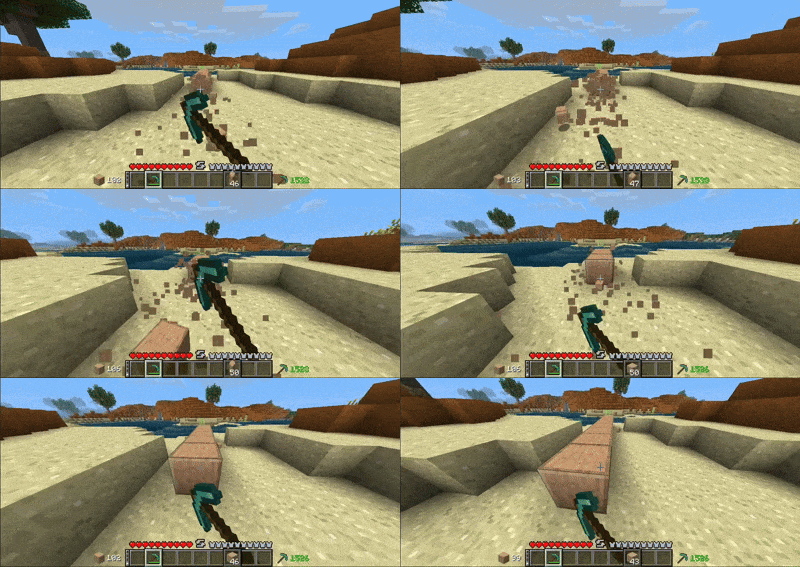
**Offhand** so you can spend less time changing slots and focus on your creations!
—
**Randomize** to randomly pick blocks utilizing offhand feature.

—
**Refill** to automatically refill items in your hand _(or offhand)_ when they run out.

—
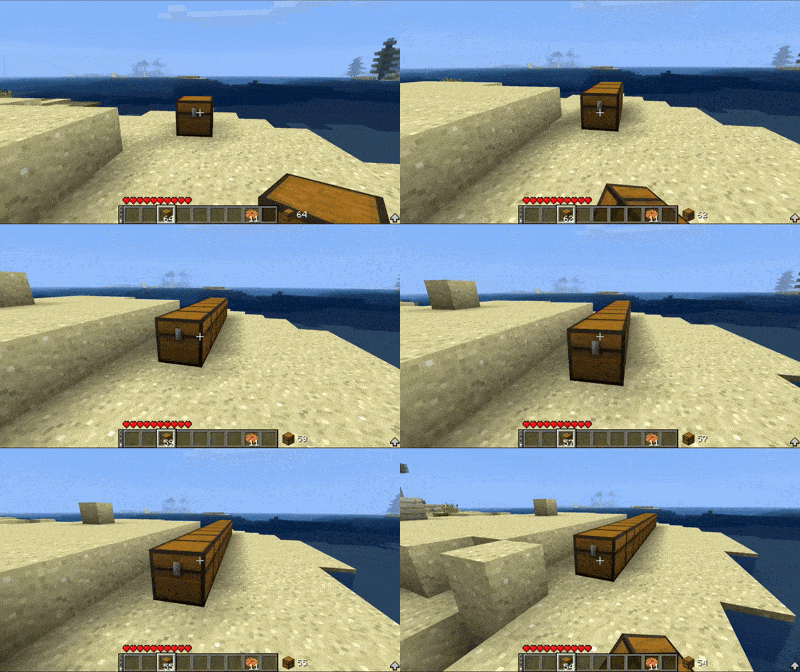
**Shift Lock** to build without interacting any blocks.
—
**Auto Tool** so you can forget about finding the right tool *(also uses silk touch if needed)*

—
_There’ll be more features in future, stay tuned!_
Bit by Bit (BTA 7.0_02)
# Bit by Bit
Eat foods Bit by Bit. Save the rest for later or split it with your friends.
> **Important**
> Required Babric to run the mod.
## Credits
– Eating sound by Mojang
– SoundHelper by PrismaticLibe
BTA! Russian Language Pack
Перевод мода Better Than Adventure! на русский язык. На данный момент переведено 100% текста, использующегося в геймплее, включая блоки, предметы, настройки и достижения.
# Установка
Установка перевода в BTA! немного отличается от ресурспаков. Для
этого необходимо:
1. Скачать последнюю версию перевода
2. Через главное меню игры зайти в “`Options -> Language Packs -> Open Folder“`, чтобы попасть в папку “`languages“`
3. Переместить архив с переводом в открывшееся окно проводника. **Разархивировать перевод не надо**
4. В настройках игры выбрать появившийся язык “`Русский (Россия)“`
# Поддержка
Данный перевод создан любителем, который хочет сделать BTA! более доступным для русскоязычных игроков. Если заметили ошибки, неточности, либо имеете предложения по улучшению, можете писать об этом в Issues в Github или официальном Discord сервере в ветке о переводе.
Broken Generation
Broken Generation adds a new generation to the game, which consists of “steps” of 8 blocks.
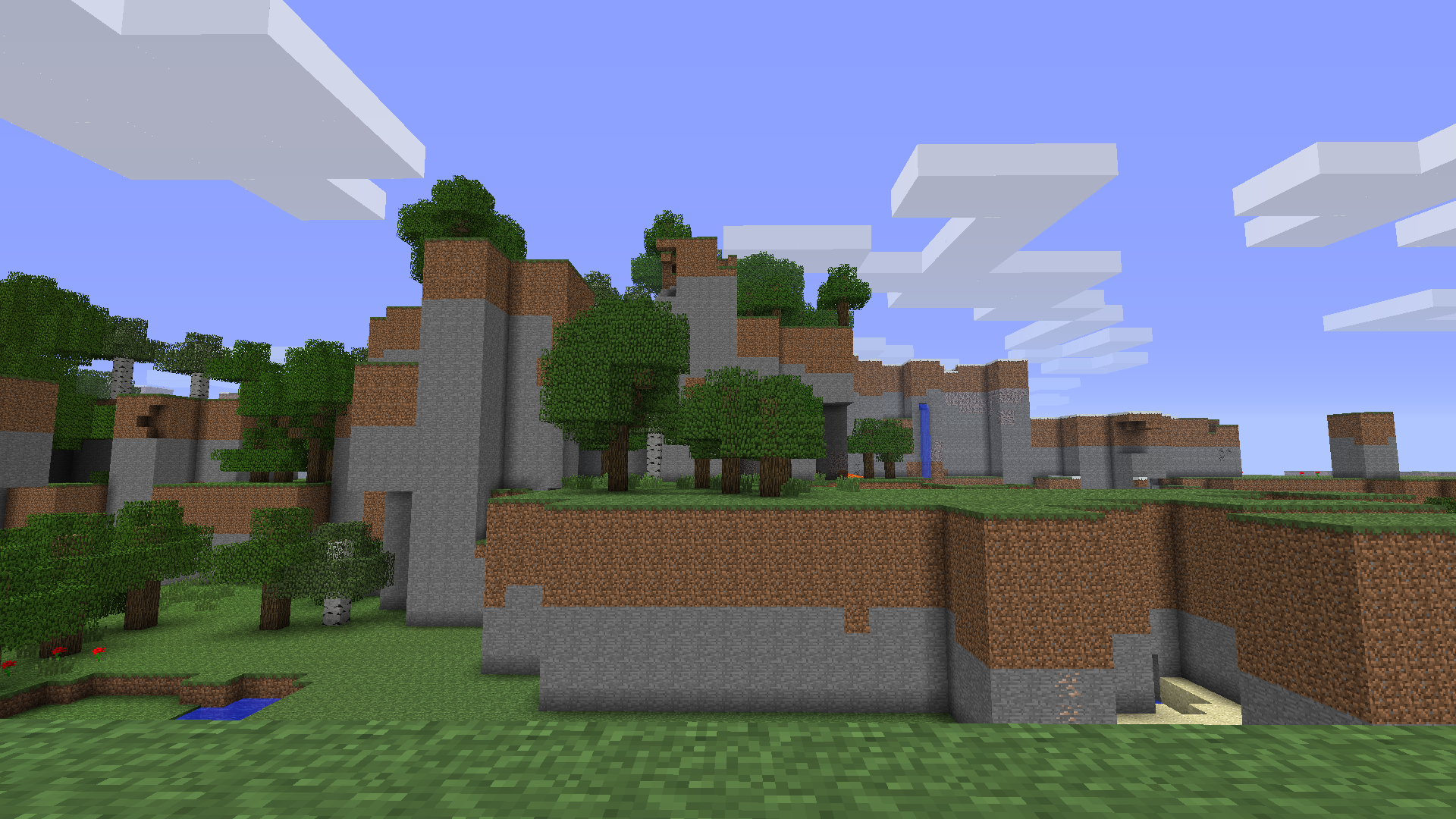
Here you can see caves and other features of normal generation
This mod doesn’t require anything to work, like Risugami’s Modloader.
This mod don’t remove:
– Caves
– Trees
– Mobs spawning
– Water
– Ores
– Cactuses
– Cane
The game with this mod generates regular lakes and lakes 8 blocks deep:

This mod may be ported to newer versions in the future, such as 1.5.2, 1.7.10, 1.12.2 and more.
This mod changes the GenerateTerrain function:
“`
double var15 = this.field_4180_q[((var10 + 1) * var9 + var11 + 0) * var8 + var12 + 0];
double var17 = this.field_4180_q[((var10 + 1) * var9 + var11 + 0) * var8 + var12 + 0];
double var19 = this.field_4180_q[((var10 + 1) * var9 + var11 + 0) * var8 + var12 + 0];
double var21 = this.field_4180_q[((var10 + 1) * var9 + var11 + 0) * var8 + var12 + 0];
double var23 = (this.field_4180_q[((var10 + 1) * var9 + var11 + 0) * var8 + var12 + 0] – var15) * var13;
double var25 = (this.field_4180_q[((var10 + 1) * var9 + var11 + 0) * var8 + var12 + 0] – var17) * var13;
double var27 = (this.field_4180_q[((var10 + 1) * var9 + var11 + 0) * var8 + var12 + 0] – var19) * var13;
double var29 = (this.field_4180_q[((var10 + 1) * var9 + var11 + 0) * var8 + var12 + 0] – var21) * var13;
“`
With normal generation, this passage would look like this:
“`
double var15 = this.field_4180_q[((var10 + 0) * var9 + var11 + 0) * var8 + var12 + 0];
double var17 = this.field_4180_q[((var10 + 0) * var9 + var11 + 1) * var8 + var12 + 0];
double var19 = this.field_4180_q[((var10 + 1) * var9 + var11 + 0) * var8 + var12 + 0];
double var21 = this.field_4180_q[((var10 + 1) * var9 + var11 + 1) * var8 + var12 + 0];
double var23 = (this.field_4180_q[((var10 + 0) * var9 + var11 + 0) * var8 + var12 + 1] – var15) * var13;
double var25 = (this.field_4180_q[((var10 + 0) * var9 + var11 + 1) * var8 + var12 + 1] – var17) * var13;
double var27 = (this.field_4180_q[((var10 + 1) * var9 + var11 + 0) * var8 + var12 + 1] – var19) * var13;
double var29 = (this.field_4180_q[((var10 + 1) * var9 + var11 + 1) * var8 + var12 + 1] – var21) * var13;
“`
Bread’s Biomes Mod
This mod uses a modified version of Fabric (Babric) and is designed only for Better than Adventure, a heavily modified version of Minecraft b1.7.3! For more information, join the discord server provided on this projects page.
This mod adds new biomes to your world.
Current list of biomes:
1. Indev Plains
Generates in areas with high temperature. Has retro grass, retro oak and two new structures with new blocks: Brick pyramid with retro bricks; Starting house with retro cobblestone and retro mossy cobblestone.
Blueprints BTA
### This mod is for Better Than Adventure – it will _not_ work for vanilla Minecraft!
A completely client-side mod which you can use on unmodded/vanilla servers to design your builds freely before you actually build them.
– Press V to enter/exit design mode, which gives you flight and a creative-like inventory.
– Press G to access the Blueprints menu.
– Press H to toggle Shuffle, which randomly places a block from your hotbar.
– Press X to toggle Interaction Mode between “Fulfill” and “Passthrough”
All keybinds are configurable in the vanilla keybinds section of the pause menu.
“`
Credit to soupAmng & HobbleRox for the logo! Love you guys!
“`
Block Helper
# Block Helper
A direct WAILA port for old versions of Minecraft, with almost the same API and many, many additional fixes!
## Download
**Download on CurseForge**
**Download on Modrinth** (More versions are available here)
### Fixers
Some Minecraft versions have bugs. That’s normal. In order to fix some of them, you can install the following fixers:
– Class Loader Fixer
– Font Fixer
## Old source code
This repository hosts the source code for BlockHelper versions 2.x and onwards.
The source code for older versions (0.x and 1.x), has moved here.
## Installation
### Forge (all versions) / ModLoaderMP (≤ 1.2.3)
#### Client
Just drop the mod into the `mods` folder. Done! 🙂
#### Server
If you are running a server on MC 1.3.x or newer, just copy the Block Helper jar file into the `mods` folder.
On older versions, you need to download the dedicated server build of the mod.
It can be found under “Additional files” both on Modrinth and CurseForge.
In MC b1.5_02 and older, you need to copy all the files from this jar into the server jar.
In all newer versions, it is sufficient to just copy the jar file into the `mods` folder.
#### MCPC+/Cauldron/Bukkit
If you are running a server on MC 1.3.x or newer, just copy the Block Helper jar file into the `mods` folder.
On older versions, you need to download the dedicated Bukkit/MCPC+ build of the mod.
It can be found under “Additional files” both on Modrinth and CurseForge.
In MC b1.7.3 and older, you need to copy all the files from this jar into the Bukkit jar.
In all newer versions, it is sufficient to just copy the jar file into the `mods` folder.
### Fabric
Drop the mod into the `mods` folder and install Apron or BetaLoader (for b1.7.3)
or Fabricated Forge (for 1.3.2+).
## Features
### Mod Compatibility
Next to Vanilla blocks, integration modules for the following mods are in place (list updated only irregularly!):
– Advanced Machines
– Advanced Solar Panels
– Applied Energistics 1
– Barrels
– BuildCraft 2 and 3
– ChickenChunks
– Ender Storage
– Equivalent Exchange 1, 2 and 3
– Factorization
– Falling Meteors
– Flora & Soma / Natura
– Forestry
– Forge Multipart
– GregTech
– IC²
– Immibis’s Microblocks
– IndustrialCraft
– InfiCraft
– NEI
– Pam’s Mods
– Project Zulu
– Railcraft
– Red Power
– Thaumcraft
– Thermal Expansion
– Total Panels
– Twilight Forest
Some of these mods still host downloads to this day.
If you cannot find downloads for some of these,
chances are that they are still downloadable via MCModArchive.
### API
Block Helper features WAILA’s API (with minimal changes) from version 2.x onwards.
Since there are many resources online on how to use the API, I will keep this as simple as possible here and just list a few “good” examples:
– Block Helper’s own plugins
– BlockHelperAddons
Just try to follow these examples and you will succeed. To safely register your plugin, use the code snippet from the
JavaDoc of the `mod_BlockHelper#registerPlugin` function.
### Other features
Yes, Block Helper has a few additional features and integrations you probably have not seen before 🙂
On the Modrinth and CurseForge page, there are a few images of most of these features in action!
_Please note that not every feature is available for every Minecraft version due to modding limitations._
#### NEI/AMI/HMI integration
– Two new keybinds (default: NUM3 and NUM4), which show all the recipes for or using the
block currently looked at
– Show the mod an item is from in the item’s tooltip [this also works without NEI/AMI/HMI in Apron]
– Another keybind specific for NEI (default: I), which shows all the applicable enchantments for the
currently highlighted item in the inventory
#### World Overlays
Just like NEI in MC 1.4.7 and onwards, Block Helper features a light level overlay and chunk border overlay. The default
keybinds for these are F7 and F9, respectively.
## Source Code
Block Helper is being developed for:
– a1.2.6
– b1.1_01/b1.1_02
– b1.2_02
– b1.3_01
– b1.4_01
– b1.5/b1.5_01
– b1.6.5/b1.6.6
– b1.7-b1.7.3
– b1.8/b1.8.1
– b1.9p5
– 1.0/1.0.1
– 1.1
– 1.2.3
– 1.2.4/1.2.5
– 1.3.2
– 1.4
– 1.4.1/1.4.2
– 1.4.3
– 1.4.4/1.4.5
– 1.4.6/1.4.7
– 1.5.x
Blinding Pumpkin Overlay
You ever wanted to completely blind your foes with a curse of binding pumpkin? Then this is the resource pack for you!
Should work for every version.
It just makes the pumpkin overlay completely black, thats it.
[Alternative Download [PlanetMinecraft]](https://www.planetminecraft.com/texture-pack/blinding-pumpkin-overlay)
Black Hole Moon
# 
Thanks for checking out Black Hole Moon! This Resource Pack will change the boring moon to a Black Hole. Great to prank your friends, or just to change the moon to something else.
## FAQ
### Does this require any external mods?
Nope. This Resource Pack does not need any external mods for it to function properly.
### Can you put this pack on CurseForge?
I do not plan to put this pack on CurseForge, and probably never will.
### On some versions of Minecraft it either says “The pack is too new” or “The pack is too old”
On these versions “supported_formats” in pack.mcmeta was not introduced yet, because of that it looks at “pack_format” and says on the lines of “Pack format 5? (pack format for 1.15.2) That is old. This pack must not work on me anymore” even though the pack supports that version. Best you can do is just ignore it and enable the pack anyway, do the same if it says “pack is too new”.
### Did you make the Pixel Art yourself?
Yes! and you are free to use it on whatever project your working on. Credit would be appreciated, but its not mandatory, just dont copy the Resource Pack outright and publish it claiming its your own.