Custom Messages
# CustomMessages


CustomMessages is a Beta 1.7.3 Minecraft Project Poseidon plugin that allows players and admins to set custom join and leave messages, with advanced filtering options.
## Features
– Set your own join or leave message using `/setjoin` or `/setleave`
– Admins can view, set or reset messages for any player
– Supports color codes (ie. `&6` for gold)
– Configurable regex-based blacklist for blocking words or patterns
– Notifies admins in game and in console when players try to use blacklisted words
## Commands
– `/setjoin ` — Set your custom join message (must include `%player%`)
– `/setleave ` — Set your custom leave message (must include `%player%`)
– `/viewmessages ` — View a player’s join and leave messages
– `/setplayerjoin ` — Set another player’s join message
– `/setplayerleave ` — Set another player’s leave message
– `/resetmessages ` — Reset a player’s messages to default
## Permissions
– `custommessages.setjoin` — Allows setting your join message
– `custommessages.setleave` — Allows setting your leave message
– `custommessages.admin` — Allows setting/resetting messages for any player (`default: op`)
## Configuration
– Place your blacklist regex patterns in `plugins/CustomMessages/blacklist.txt`
Example:
“`
(?i)bt[e3]+stb
(?i)btr[e3]+eb
“`
– Player join & leave Messages are stored in `plugins/CustomMessages/messages.properties`
## Setup
1. Drop the plugin jar into your server’s `plugins` folder
2. Start the server to generate config files
3. Edit `blacklist.txt` to specify disallowed words/patterns
4. Add permission nodes as needed to groups or players
Cryonic Config
# 
– Cross-version easy to port config tool with minimal dependencies
– Specifically targeting ease of use and portability
– Cryonic because it’s cool as hell
# Explanation of Functionality
– This will store jsons in {minecraft_dir}/config as “mod_id.json”
– All config files will be read by dictionary in “cryonicconfig.json” on early init
– Configs are only configurable by editing the jsons directly, no plans of GUI config
– For ease of portability, synced variables are sent directly to a player in chat, and intercepted
– Hashmaps are used to look up Str to ConfigStorage and Str to Obj (variable)
# API
## Groovy (build.gradle) Add Dependency
Add Maven:
“`groovy
repositories {
maven { url “https://api.modrinth.com/maven” }
}
“`
Modern/Architectury:
For only fabric or neoforge, replace `${project.name}` with `fabric`,`forge`,`neoforge`
“`groovy
dependencies {
modImplementation “maven.modrinth:cryonicconfig:fabric-${project.name}:1.0.0+mc${rootProject.minecraft_version}”
}
“`
b1.7.3:
“`groovy
dependencies {
modImplementation “maven.modrinth:cryonicconfig:babric:1.0.0+mcb1.7.3”
}
“`
## Simple Usage:
“`java
// You can store or use on the fly, this can be called anywhere
ConfigStorage config = CryonicConfig.getConfig(“mod_id”);
// You can store ints, doubles, booleans, and strings
// By getting them, you are setting their default value too
// getter format (variable name, default value)
// You cannot reuse variable names! They will be overridden.
config.getInt(“varName”, 3);
config.getDouble(“name”, 3.3);
config.getBoolean(“var”, true);
config.getString(“str”, “Geronimo!”)
// The variable will exist locally on client and server
// If you want a connected server player to use a server config
// You must call, making client use the server’s value
config.sync(“varName”, playerEntity);
// Feel free to use this format:
CryonicConfig.getConfig(“mod_id”).getInt(“varName”, 3);
// You can set variables manually, instead of letting get generate them
// This is also useful for overriding old values
config.setInt(“varName”, 3);
config.setDouble(“name”, 3.3);
config.setBoolean(“var”, true);
config.setString(“str”, “Geronimo!”);
“`
## Mark Dependency
In `fabric.mod.json`:
“`json
{
“depends”: {
“cryonicconfig”: “*”
}
}
“`
In `mods.toml`/`neoforge.mods.toml`:
“`toml
[[dependencies.cryonicconfig]]
modId = “cryonicconfig”
type = “required”
versionRange = “[0,)”
“`
CreativeEditorWands StationAPI
# CreativeEditorWands StationAPI for Minecraft Beta 1.7.3
A StationAPI mod for Minecraft Beta 1.7.3 that adds world edit type properties to wooden tools when enabled.
* Mod (mostly) works on Multiplayer with GlassConfigAPI version 3.0+ used to sync configs!
## List of changes
All changes only apply when player is OP or in single-player toggle wands on/off via bedrock.
* Selection Tool (wooden axe)
* Mode 1: Select two points (`right-click` on two blocks)
* Mode 2: Copy selection (area between the two points) over to the new area `right-click`
* Mode 3: Fill selection (area between the two points) with whatever block is `right-clicked`
* Use `scroll-wheel` in inventory to rotate selection (does nothing if no selection has been made)
* Hit living entities to rotate selection in multiplayer (also works in single-player)
* Hold `left-shift` and use `scroll-wheel` to change axe mode in single-player
* Use `right-click` in the air to change axe mode in multiplayer
* Paint Brush (wooden sword)
* Draw with `right-click`
* Block ID zero means copy `right-clicked` block and use it to draw
* Use `scroll-wheel` in inventory to select block type
* Hold `left-shift` and use `scroll-wheel` to select block metadata
* Erase Brush (wooden shovel)
* Erase with `right-click`
* Block ID zero means erase any block
* Use `scroll-wheel` in inventory to select block type
* Hold `left-shift` and use `scroll-wheel` to select block metadata
* Block Picker (wooden pickaxe)
* Select block ID and metadata with `right-click`
* In single-player in inventory pick up the pickaxe and click a brush to apply the color to it
* In multiplayer the selected block will be used for all brushes
* Use `scroll-wheel` in inventory to select block type
* Hold `left-shift` and use `scroll-wheel` to select block metadata
* Brushes Mode (wooden hoe)
* Use `scroll-wheel` in inventory to change brush size
* Hit living entities to change brush size in multiplayer (also works in single-player)
* Use `right-click` on a block to change brush type and apply brush mode
* Use `right-click` in the air to apply brush mode
* Enable/disable creative editor wands tools with bedrock block
* Use `right-click` to enable/disable creative editor wands
* This is a single-player only feature
## Structure Command
If you are using RetroCommands with this mod, you now also have access to the `/structure` command.
This command allows you to save, copy, and paste structures.
* NOTE: This command currently does not work with modded blockstates
How it works:
1. `/structure 1` to set the first position of the structure to copy (this happens where your player is standing)
2. `/structure 2` to set the second position of the structure to copy (this happens where your player is standing)
3. `/structure copy SaveName` copies the structure using a cube between positions 1 and 2
– `SaveName` can be anything you want and is the saved name of the structure.
– You can save as many structures as you want, just don’t reuse the same name unless if you want to overwrite that structure.
4. `/structure paste SaveName` pastes the structure at the location the player is currently standing at
5. `/structure fill BlockID (BlockMeta)` fills the structure with the provided block ID (and optionally metadata value) using a cube between positions 1 and 2
## Installation using Prism Launcher
1. Download an instance of Babric for Prism Launcher: https://github.com/babric/prism-instance
2. Install Java 17 and set the instance to use it: https://adoptium.net/temurin/releases/
3. Add GlassConfigAPI 3.0.2+ to the mod folder for the instance: https://modrinth.com/mod/glass-config-api
4. Add Glass Networking to the mod folder for the instance: https://modrinth.com/mod/glass-networking
5. Add StationAPI to the mod folder for the instance: https://modrinth.com/mod/stationapi
6. (Optional) Add Mod Menu to the mod folder for the instance: https://modrinth.com/mod/modmenu-beta
7. Add this mod to the mod folder for the instance: https://github.com/telvarost/GameplayEssentials-StationAPI/releases
8. Run and enjoy! 👍
## Feedback
Got any suggestions on what should be added next? Feel free to share it by creating an issue. Know how to code and want to do it yourself? Then look below on how to get started.
## Contributing
Thanks for considering contributing! To get started fork this repository, make your changes, and create a PR.
If you are new to StationAPI consider watching the following videos on Babric/StationAPI Minecraft modding: https://www.youtube.com/watch?v=9-sVGjnGJ5s&list=PLa2JWzyvH63wGcj5-i0P12VkJG7PDyo9T
CraftPresence
# CraftPresence
Completely customize the way others see you play Minecraft via Discord’s Rich Presence API & the DiscordIPC API
by jagrosh!


## General Notes
* Beginning in v2.5.0, UniLib is now a **required** dependency
* UniLib is a new library mod I have created to abstract common API functions for more general use cases as well as
future projects
* The mod can be downloaded here
* This mod **will crash** if UniLib is not found or if using an incompatible version
* This mod identifies as a **Client Side-only** mod
* This means it **will not run** on the Server’s side.
* Fabric and Quilt mod loaders will simply ignore the
mod, while other mod loaders may crash.
* Some versions of the mod for Minecraft 1.14.x and above require
the Fabric API
and the Fabric mod loader
* Some versions of the mod for Minecraft 1.13.x require
the Rift API
and the Rift mod loader
* Some versions of the mod for Minecraft 1.1.0 and below
require Risugami’s ModLoader
## Features
In addition to having the ability to change your discord status from “Playing Minecraft”,
This mod offers plenty of customization options to specify entirely how others see you play.
From having your current biome show up, to which dimension your in, as well as which server you’re in, and more.
The customization possibilities are limitless, with the only real limit being how creative you customize your display.
### Launcher and Pack Integration Support
CraftPresence will detect whether your Launch Directory contains:
* A ATLauncher Instance (instance.json)
* A valid Twitch/Overwolf/Curse/GDLauncher Manifest (manifest.json, minecraftinstance.json)
* A MCUpdater Instance (instance.json)
* A Modrinth Instance (profile.json)
* A MultiMC Instance (instance.cfg)
* A Technic installedPacks File (installedPacks)
If using any of these launchers, note the following:
* Prior to v1.6.0, it’ll put the packs name in your display as well as show its icon (when not in a
server)
* From v1.6.0 until v2.0.0, it’ll instead parse the Pack’s name into the `&PACK&` placeholder, that you can configure
for
usage in the RPC
* In v2.0, the pack’s info is instead parsed into the `pack.name` and `pack.icon` placeholders, that you can configure
for
usage in the RPC
As an example, this is how the mod will convert a pack’s name to an iconKey:
Example: `All the Mods 7` would parse as `allthemods7`
Note: MultiMC natively has an Icon Key Property that is used instead of converting from the Pack’s Display Name
## Commands
CraftPresence currently offers the following Commands:
Keep in mind the following:
* Commands must be prefixed by either `/craftpresence` or `/cp`
* In v1.5.0 and above, these commands are only usable via the Commands Gui, found within the Config Gui
___
* `/cp compile “[expr]”` – Test the output of a placeholder expression, via Starscript
* `/cp search (type:typeName, [searchTerm], all)` – Search for valid placeholders available to use with Rich Presence
* `/cp reload` – Reloads mod data
* `/cp request` – View Join Request Info
* `/cp export` – View export commands for mod data
* `/cp view` – Help command to display the commands available to view and control a variety of display data
* `/cp view placeholders` – Displays all available placeholders for use in the RPC
* `/cp view currentData` – Displays your Current RPC Data, in text form
* `/cp view assets (custom | all)` – Displays all asset icon keys available to you
* `/cp view dimensions` – Displays all Dimension Names available for use, requires `Show Current Dimension` to be
enabled
* `/cp view biomes` – Displays all Biome Names available for use, requires `Show Current Biome` to be enabled
* `/cp view servers` – Displays all Server Addresses available for use, requires `Show Game State` to be enabled
* `/cp view screens` – Displays all Gui Names available for use, if Per-Gui is enabled
* `/cp view items` – Displays all Item Names available for use, if Per-Item is enabled
* `/cp view entities` – Displays all Entity Names available for use, if Per-Entity is enabled
* `/cp reboot` – Reboots the RPC
* `/cp shutdown` – Shutdown the RPC (Can be turned on from `/cp reboot`)
* `/cp (help | ?)` – Help Command to display the above commands and these explanations
## KeyBinds
CraftPresence currently contains the following KeyBinds:
Notes:
* In v1.5.5 up to v1.8.0, KeyBinds are now customized in the Accessibility Settings in the Config Gui, and not the
normal controls menu
* In v1.8.0 and above, KeyBinds can now be customized in either the dedicated menu in the Config Gui or the normal
control menu on applicable versions
___
* `Open Config Gui` – KeyBind to open the CraftPresence Config Gui (Default: GRAVE/TILDE Key)
## About Placeholders and Functions
In some configuration areas, CraftPresence provides some placeholders and functions to make things easier:
Keep in mind the following:
* In v2.0.0, placeholders have been rewritten to be compatible
with Starscript
* The older list of this section can be
viewed here)
* All Placeholders, functions, and code expressions must be surrounded with curly brackets (Example: `{foo.bar}`)
* In the event that you need to combine a placeholder with other data in a function argument, use the `getResult`
function
* Additional functions and standard variables are available
within StandardLib
___
### Placeholder List
The following placeholders are available for use anywhere in CraftPresence:
* General Placeholders:
* `general.brand` – The Minecraft branding label
* `general.icon` – The default display icon
* `general.mods` – The amount of mods currently in your mods folder
* `general.title` – The Minecraft title label
* `general.version` – The Minecraft version label
* `general.protocol` – The Minecraft version protocol label
* Menu Event Placeholders (Loading and Main Menu):
* `menu.message` – The main menu’s display data, while applicable
* `menu.icon` – The main menu’s display icon, while applicable
* Pack Placeholders:
* `pack.name` – The currently detected pack’s name
* `pack.icon` – The currently detected pack’s icon
* `pack.type` – The currently detected pack’s type
* Player Placeholders:
* `player.name` – Your username
* `player.uuid.short` – Your UUID (Trimmed Format)
* `player.uuid.full` – Your UUID (Full Format, if valid UUID)
* `player.icon` – Your player head icon, while applicable
* `player.position.x` – Your current in-game X position
* `player.position.y` – Your current in-game Y position
* `player.position.z` – Your current in-game Z position
* `player.health.current` – Your current in-game health
* `player.health.max` – Your current in-game maximum health
* `player.mode` – Your current game mode
* Gui Placeholders:
* `screen.message` – The current Gui Screen’s display data, while applicable
* `screen.name` – The current Gui Screen name
* `screen.icon` – The current Gui Screen icon
* `screen.default.icon` – The default Gui Screen icon
* Biome Placeholders:
* `biome.message` – The current biome’s display data, while in-game
* `biome.name` – The current biome name
* `biome.identifier` – The current biome identifier
* `biome.icon` – The current biome icon
* `biome.default.icon` – The default biome icon
* Dimension Placeholders:
* `dimension.message` – The current dimension’s display data, while in-game
* `dimension.name` – The current dimension name
* `dimension.identifier` – The current dimension identifier
* `dimension.icon` – The current dimension icon
* `dimension.default.icon` – The default dimension icon
* Entity Placeholders:
* `entity.default.icon` – The default entity icon
* `entity.target.message` – The currently targeted entity’s display data, while applicable
* `entity.target.name` – The currently targeted entity’s name
* `entity.target.icon` – The currently targeted entity’s icon
* `entity.riding.message` – The currently riding entity’s display data, while applicable
* `entity.riding.name` – The currently riding entity’s name
* `entity.riding.icon` – The currently riding entity’s icon
* World Placeholders:
* `world.difficulty` – The current world’s difficulty
* `world.weather.name` – The current world’s weather name
* `world.name` – The name of the current world
* `world.type` – The current world type
* `world.time.format_24` – The current world’s in-game time (24-hour format)
* `world.time.format_12` – The current world’s in-game time (12-hour format)
* `world.time.day` – The current world’s in-game day count
* Server Placeholders:
* `server.message` – The current server’s display data, while in-game
* `server.icon` – The current server icon
* `server.default.icon` – The default server icon
* `server.players.current` – The server’s current player count
* `server.players.max` – The server’s maximum player count
* `server.address.full` – (MP) The raw current server address
* `server.address.short` – (MP) The formatted current server address
* `server.name` – (MP) The current server name
* `server.motd.raw` – (MP) The current raw server motd
* `server.minigame` – (Realm) The current realm minigame name
* `server.type` – (Realm) The current realm world type
* Item Placeholders:
* `item.message.default` – The default item display data, while applicable
* `item.message.holding` – The held item(s) display data, while applicable
* `item.message.equipped` – The equipped item(s) display data, while applicable
* `item.[slotId].name` – Current `slotId` item name
* `item.[slotId].message` – Current `slotId` item message
* Integration – Replay Mod:
* `replaymod.time.current` – When in the Video Renderer, retrieves the `renderTimeTaken` field
* `replaymod.time.remaining` – When in the Video Renderer, retrieves the `renderTimeLeft` field
* Extra Placeholders (Advanced Usage):
* `_general.instance` – The `Minecraft` Instance
* `_general.player` – The `Minecraft` Player Instance
* `_general.world` – The `Minecraft` World Instance
* `_config.instance` – The Mod Config Instance
* `_[moduleName].instance` – An instance of one of the modules CraftPresence has
* Module Order: `biome, dimension, entity, item, screen, server, <...>`
* `data.biome.instance` – An instance of the player’s current biome
* `data.biome.class` – The class object for the player’s current biome
* `data.dimension.instance` – An instance of the player’s current dimension
* `data.dimension.class` – The class object for the player’s current dimension
* `data.entity.target.instance` – An instance of the currently targeted entity
* `data.entity.target.class` – The class object for the currently targeted entity
* `data.entity.riding.instance` – An instance of the currently riding entity
* `data.entity.riding.class` – The class object for the currently riding entity
* `data.item.[slotId].instance` – An instance of the current `slotId`
* `data.item.[slotId].class` – The class object for the current `slotId`
* `data.screen.instance` – An instance of the current Gui Screen
* `data.server.motd.line_[number]` – Retrieves a specific line of `server.motd.raw`
* `data.[moduleName].time` – The timestamp at which a module has changed its primary state
* Use `data.general.time` for the current RPC Starting Timestamp
### Function List
The following functions are available for use anywhere in CraftPresence:
* `asIcon(input, whitespaceIndex ?: ”)` – Converts a String into a Valid and Acceptable Icon Format
* `asIdentifier(target, formatToId ?: false, avoid ?: false)` – Converts an Identifier into a properly formatted and
interpretable Name
* `asProperWord(input, avoid ?: false, skipSymbolReplacement ?: false, caseCheckTimes ?: -1)` – Converts input into a
Properly Readable String
* `capitalizeWords(input, timesToCheck ?: -1)` – Capitalizes the words within a specified string
* `clampDouble(num, min, max)` – Clamps the Specified Number between a minimum and maximum limit
* `clampFloat(num, min, max)` – Clamps the Specified Number between a minimum and maximum limit
* `clampInt(num, min, max)` – Clamps the Specified Number between a minimum and maximum limit
* `clampLong(num, min, max)` – Clamps the Specified Number between a minimum and maximum limit
* `convertTime(input, originalPattern, newPattern)` – Convert the specified string into the specified date format, if
able
* `convertTimeFormat(dateString, fromFormat, toFormat)` – Convert a Date String from one format to another format
* `convertTimeZone(dateString, fromFormat, fromTimeZone, toTimeZone)` – Convert a Date String from one timezone to
another timezone
* `dateToEpochMilli(dateString, format, timeZone ?: null)` – Convert Date String to Epoch Timestamp in milliseconds
* `dateToEpochSecond(dateString, format, timeZone ?: null)` – Convert Date String to Epoch Timestamp in seconds
* `epochMilliToDate(epochMilli, format, timeZone ?: null)` – Convert Epoch Timestamp to Date String in the given format
and
timezone
* `epochSecondToDate(epochSecond, format, timeZone ?: null)` – Convert Epoch Timestamp to Date String in the given
format and
timezone
* `executeMethod(classToAccess=Object|String|Class, instance=Object, methodName=String, …)` –
Invokes the specified Method in the Target Class via Reflection
* `format(input=String, args=Object…)` – Returns a formatted string using the specified format string and arguments
* `formatAddress(input, returnPort ?: false)` – Formats an IP Address based on Input
* `getArrayElement(content=Array, index)` – Retrieves the array element from the specified content, or null if unable
* `getAsset(input)` – Retrieves the Specified DiscordAsset data from an Icon Key, if present
* `getAssetId(input)` – Retrieves the Parsed Icon ID from the specified key, if present
* `getAssetKey(input)` – Retrieves the Parsed Icon Key from the specified key, if present
* `getAssetType(input)` – Retrieves the Parsed Image Type from the specified key, if present
* `getAssetUrl(input)` – Retrieves the Parsed Image Url from the specified key, if present
* `getClass(reference=Object|String)` – Attempt to retrieve a class object, via the string path or object reference
* `getComponent(data=DataComponentHolder, path=String)` – (MC 1.20.5+) Attempt to retrieve the Component Data with the
specified path
* `getCurrentTime()` – Retrieve the current time, as an Instant
* `getElapsedMillis()` – Retrieve the elapsed time, in milliseconds
* `getElapsedNanos()` – Retrieve the elapsed time, in nanoseconds
* `getElapsedSeconds()` – Retrieve the elapsed time, in seconds
* `getField(classToAccess=Object|String|Class, instance=Object, fieldName=String…)` – Retrieves the
Specified Field(s) via Reflection
* `getFields(classObj=Object|String|Class)` – Retrieve the available field names for a class object
* `getFirst(args)` – Retrieve the first non-null string from the specified arguments, or return null
* `getJsonElement(url|jsonString, path=Object…)` – Retrieves the json element from the specified content, or null if
unable
* `getMethods(classObj=Object|String|Class)` – Retrieve the available method names for a class object
* `getNamespace(input)` – Retrieve the namespace portion of an Identifier-Style Object
* `getNbt(data=Entity|ItemStack, path=String…)` – Attempt to retrieve the NBT Tag with the specified path
* `getOrDefault(target, alternative ?: ”)` – Retrieve the primary value if non-empty; Otherwise, use the secondary
value
* `getPath(input)` – Retrieve the path portion of an Identifier-Style Object
* `getResult(input)` – Perform recursive conversion on the specified input
* `hasField(classObj=Object|String|Class, fieldName)` – Retrieves whether the specified class contains the specified
field name
* `isColor(input)` – Determines whether an inputted String classifies as a valid Color Code
* `isCustomAsset(input)` – Determines if the Specified Icon Key is present under the Custom Assets List
* `isUuid(input)` – Checks via Regex whether the specified String classifies as a valid Uuid
* `isValidAsset(input)` – Determines if the Specified Icon Key is present under the Current Client ID
* `isValidId(input)` – Determines if the specified Client ID is valid
* `isWithinValue(value, min, max, contains_min ?: false, contains_max ?: false, check_sanity ?: true)` – Determines
whether the specified value is within the specified range
* `length(input)` – Returns the length of the specified string
* `lerpDouble(num, min, max)` – Linearly Interpolate between the specified values
* `lerpFloat(num, min, max)` – Linearly Interpolate between the specified values
* `mcTranslate(input=String, args=Object…)` – Translates an Unlocalized String, based on the game translations
retrieved for
the current language
* `minify(input, length)` – Reduces the Length of a String to the Specified Length
* `nullOrEmpty(input, allowWhitespace ?: false)` – Determines whether a String classifies as NULL or EMPTY
* `randomAsset()` – Attempts to retrieve a Random Icon Key from the available assets
* `randomString(args)` – Retrieves a random element from the specified arguments, as a string
* `removeRepeatWords(input)` – Removes Duplicated Words within an inputted String
* `roundDouble(num, places ?: 0)` – Rounds a Double to the defined decimal place, if possible
* `snapToStep(num, valueStep)` – Rounds the Specified Value to the nearest value, using the Step Rate Value
* `split(input, regex, limit ?: 0)` – Splits this string around matches of the given regular expression
* `stripAllFormatting(input)` – Strips Color and Formatting Codes from the inputted String
* `stripColors(input)` – Strips Color Codes from the inputted String
* `stripFormatting(input)` – Strips Formatting Codes from the inputted String
* `timeFromEpochMilli(epochMilli)` – Retrieve a Time Instant from the specified epoch time
* `timeFromEpochSecond(epochSecond)` – Retrieve a Time Instant from the specified epoch time
* `timeFromString(dateString, fromFormat, fromTimeZone ?: null)` – Format a Date String from one timezone and format
into a valid Instant instance
* `timeToEpochMilli(data)` – Gets the number of milliseconds from the Java Epoch, derived from specified args
* `timeToEpochSecond(data)` – Gets the number of seconds from the Java Epoch, derived from specified args
* `timeToString(date, toFormat, toTimeZone ?: null)` – Format a Date String using the specified timezone and format.
* `toCamelCase(input)` – Converts a String into a Valid and Acceptable Camel-Case Format
* `translate(input=String, args=Object…)` – Translates an Unlocalized String, based on the mod translations retrieved
for
the current language
## Disclaimers & Additional Info
### Minecraft Issues + Additional Build Info
Despite best efforts, issues can occur due to the state of the Minecraft Codebase.
These issues can hinder certain portions of the backend in addition to cause certain parts of the mod to not work.
With this in mind, please note the following:
* **Minecraft 1.16 and above**
* As more parts of the game become data-driven, some modded data is no longer able to be automatically retrieved
without first being in the world.
* So far, Biome and Dimension Modules are effected by this change and only display default data, with extra data
needing to be discovered first.
* **Minecraft 1.15 and below**
* `MC-112292`: When interacting with the `RenderUtils#drawItemStack` method, used in the v2 Item Renderer, blocks
using certain renderers may fail to display properly.
* Additionally, on 1.15.x exclusively, z-level issues may occur on Screens using this method
* **Minecraft a1.1.2_01 and below**
* On these versions, the Biome and Dimension Modules are **stubbed** with default data, due to the logic for these
methods being missing (Having been initially implemented in Alpha 1.2.6)
* **Miscellaneous Issues**
* Due to obfuscation issues in earlier versions of Minecraft, incorrect data may appear when using certain parts of
the mod.
* In this case, the Biome and Dimension Modules may fail to auto-detect some necessary information
* As a fallback, the mod is also designed to add selectable Module Data when said biome/dimension is first
discovered.
* The “Add New” option found in some of the module lists can also be used to work around this issue.
Additionally, some settings or API calls may perform differently under certain MC versions.
### Icon Requesting
Not seeing an Icon you like or have a suggestion for an Icon to add/modify on the default Client ID?
If so, you can make a request on my Issue Tracker, with the
following requirements:
* If adding an Icon from a dimension, specify the Mod’s link that the dimension derives from
* This is because specific Icon IDs must be used, which can be found by the mod or from checking your Logs/Chat
after entering the dimension as CraftPresence will tell you the ID expected
* An Icon of size between `512×512` and `1024×1024` to be used (Either minimum or recommended size for best quality)
* Icons between these sizes can be used, but may not give a great final quality
* If requesting an icon to be modified or removed from the Default Client ID, please specify a reason why
* Mostly just so it can be logged why it was changed for future reference
Additionally, you can also create your own Set of Icons by
following this guide
### Support
Need some assistance with one of my mods or wish to provide feedback?
I can be contacted via the following methods:
* [Email](mailto:[email protected])
* CurseForge
* Discord :: 
Additionally, codebase documentation for this mod is
available here with further guides available
on the wiki
#### Licensing
This Mod is under the MIT License as well as the Apache 2.0 License
This project currently makes usage of the following dependencies internally:
* Starscript
by MeteorDevelopment
* DiscordIPC API by jagrosh
* UniLib by CDAGaming
#### Discord Terms of Service
As with other RPC Mods, this Mod uses your in-game data to send display information to a 3rd party service (In this
Case, Discord).
The terms of service relating to Creating a Discord ID for icons can be
found here
The terms of service for using Discord as a service can additionally be located here
Copper and Caverns
– **Stone tools are replaced with copper tools**, slowing down early-game progression and requiring you to hold onto wooden tools for a bit longer. This also means “stone” (now copper) and iron have been pushed further underground, making them more of a challenge to get and making each tool stage more rewarding.
– **Beneath the surface** is a thin crust of vanilla underground generation with coal and copper ore. Beneath that is a large, dangerous cavern with iron, diamonds, and other valuables.
– **Cherry trees** spawn in forest biomes.
I made this mod because 1) I don’t like stripmining and 2) I don’t like how in the first 5 minutes of the game, you can immediately jump right from wood to stone to iron tools without even going underground.
ContainerUtils
# ContainerUtils
**ContainerUtils** is a simple and lightweight utility plugin focused on simplifying container operations for server events, builds, dungeons or other admin focused builds.
Note: This plugin is ported from Beta 1.7.3 so as of now only supports chests, dispensers and furnaces.
—
## Features
– Saving chest contents and restocking them manually or on a timed interval
—
## Installation
Download from Modrinth then run /restock list for commands.
—
## Permission nodes
| Permission Node | Description |
| ——————————– | ———————————— |
| `containerutils.admin` | Use container utils |
### Modrinth
You can download the latest version of ContainerUtils from Modrinth.
—
## Links
– Modrinth Project
– GitHub Repository
—
Commandly
Single Player Command was my very first mod I have ever installed in Minecraft. While most of the commands have made to modern Minecraft some have not. This mods aim to port some if not most of the missing feature as well as new ones from Single Player Commands to Better than Adventure.
## Videos:
Explosive growth with /grow
Veinmining
Protecting again Veinminer/Treecapitator
Ascend and Descend
Better with Aether Veinmining
## Important
This from release 1.1.3 all new commandly version are using a newer BTA Babric version.
## Commands
This is a comprehensive list of all the commands that this mod currently support.
For each commands I will provide what version included the command, what argument the command required and what the command does.
| Commands | Arguments | Action | Version |
| :——– | :——-: | :——- | :——-: |
| /ascend or /up |player| send player up a level | 1.1.1|
| /descend or /down |player| send player down a level | 1.1.1|
| /grow |none| grows all bonemeable plants in player loading radius| 1.0.0|
| /protect |radius/chunk/points| adds blocks to be protects from beeing veinmined or treecapitatored | 1.1.0|
Aside from commands there are also additional gamerules. Some of the game rule were previously part of my other mods and as such predate this mod.
Similar to commands, the individual rules are explained in a sentence or two; their type is shown, and the initial release version in which the rule debuted is listed.
| Gamerules | Type | Action | Version |
| :——– | :——- | :——- | :——-: |
| doGrassSpreading |boolean| prevents grass from spreading | previosly NoMossSpreading |
| doMossSpreading |boolean| prevents moss from spreading | previosly NoMossSpreading |
| veinmining |boolean| allows the mine an entire vein of ore at once just like treecapitator| 1.0.0 |
Colorful Spawning Sheep
# Colorful Spawning Sheep! Beta 1.7.3
The spawning of different colors is completely equal. There is no sort of rarity, just sheep spawning with all the color of wool!
This mod makes a very simple change to the ‘EntitySheep’ class. View Code in Spoiler directly below.
**_Modloader not required but I had to select an API._**
Spoiler
Base Fuction
“`java
public static int getRandomFleeceColor(Random random0) {
int i1 = random0.nextInt(100);
return i1 < 5 ? 15 : (i1 < 10 ? 7 : (i1 < 15 ? 8 : (i1 < 18 ? 12 : (random0.nextInt(500) == 0 ? 6 : 0))));
}
```
Edited for this mod
```java
public static int getRandomFleeceColor(Random random0) {
int i1 = random0.nextInt(100);
return i1;
}
```
Here is some extra information about the two diffetent version ‘Normal Drops’ and ‘x2 Drops’.
Normal Drops just means when you shear a sheep you will get the normal amount of wool out of them, 2-5.
X2 Drops will give you 4-10 when you shear the sheep. View Code in Spoiler directly below.
Spoiler
Normal Drops
“`java
public boolean interact(EntityPlayer entityPlayer1) {
ItemStack itemStack2 = entityPlayer1.inventory.getCurrentItem();
if(itemStack2 != null && itemStack2.itemID == Item.shears.shiftedIndex && !this.getSheared()) {
if(!this.worldObj.multiplayerWorld) {
this.setSheared(true);
int i3 = 2 + this.rand.nextInt(3);
for(int i4 = 0; i4 < i3; ++i4) {
EntityItem entityItem5 = this.entityDropItem(new ItemStack(Block.cloth.blockID, 1, this.getFleeceColor()), 1.0F);
entityItem5.motionY += (double)(this.rand.nextFloat() * 0.05F);
entityItem5.motionX += (double)((this.rand.nextFloat() - this.rand.nextFloat()) * 0.1F);
entityItem5.motionZ += (double)((this.rand.nextFloat() - this.rand.nextFloat()) * 0.1F);
}
}
itemStack2.damageItem(1, entityPlayer1);
}
return false;
}
```
x2 Drops
```java
public boolean interact(EntityPlayer entityPlayer1) {
ItemStack itemStack2 = entityPlayer1.inventory.getCurrentItem();
if(itemStack2 != null && itemStack2.itemID == Item.shears.shiftedIndex && !this.getSheared()) {
if(!this.worldObj.multiplayerWorld) {
this.setSheared(true);
int i3 = 4 + this.rand.nextInt(6);
for(int i4 = 0; i4 < i3; ++i4) {
EntityItem entityItem5 = this.entityDropItem(new ItemStack(Block.cloth.blockID, 1, this.getFleeceColor()), 1.0F);
entityItem5.motionY += (double)(this.rand.nextFloat() * 0.05F);
entityItem5.motionX += (double)((this.rand.nextFloat() - this.rand.nextFloat()) * 0.1F);
entityItem5.motionZ += (double)((this.rand.nextFloat() - this.rand.nextFloat()) * 0.1F);
}
}
itemStack2.damageItem(1, entityPlayer1);
}
return false;
}
```
Specifially these lines
```java
int i3 = 2 + this.rand.nextInt(3);
```
```java
int i3 = 4 + this.rand.nextInt(6);
```
2 or 4 is the amount of wool you will always get from the sheep, where the 'this.rand.nextInt(3);' or 6 will give you an extra 0 through 3 or 6 in addition to the 2 or 4 you have already been given. This happens simultaneously but I am trying to explain the fuction :)
Edit: 7 April 2024
No Changes, but I added support for b1.2-b1.8.1, r1.0, r1.1, r1.2.4&5. I will do 1.2, 1.2.1, 1.2.2, and 1.2.3 soon.
Edit: 8 April 2024
Added 1.2.1-3 support. I am considering adding 1.3-1.20 support. It will be a bit before that happens I am sure.
CME is Bad
# Abstract
Players and modpack developers sometimes find the game crashed with `ConcurrentModificationExceptions` (CME) and `IndexOutOfBoundsExceptions` (IOOBE), which only give stacktrace of current thread and are hard to trace which mod causes them. Here’s one of the crashes which is caused by SimpleReloadInstance in 1.20.1 Forge:
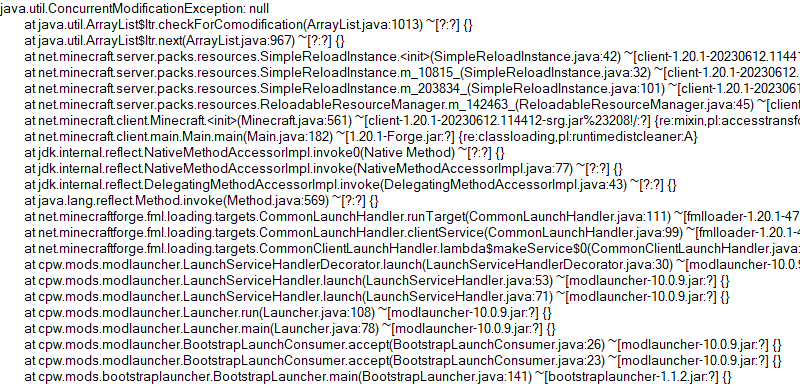
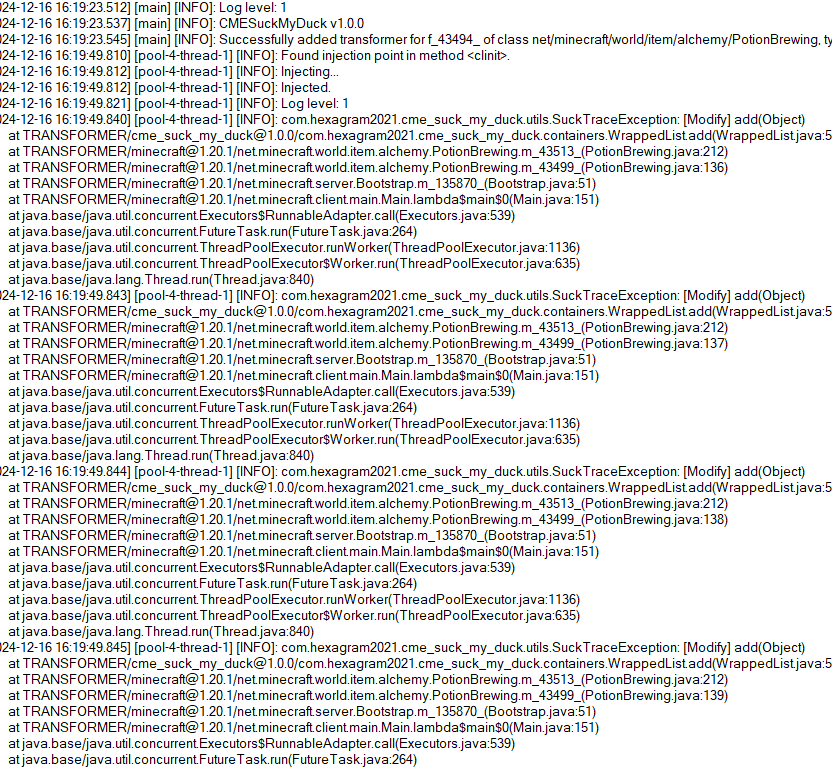
So this is what the mod is developed for. Players who install this mod and add javaagent to JVM Argument correctly will receive a full log for modification history of a certain collection:
# Usage
First, add this jar to mods folder.
Second, edit your Java Virtual Machine Argument in your launcher. Add `-javaagent:mods/CMESuckMyDuck-.jar=;;;`.
Finally, run the game, play and wait until the crash happens.
# Usage for Other Java Projects
This mod can not only be used for Minecraft debugging, but also be utilized to debug other java projects. Similar to Minecraft. The only different step is that you should add gson and asm jar to classpath (`-cp`) before javaagent, and add our `CMESuckMyDuck-.jar` to classpath after javaagent.
# Arguments
##
A full name of the class, which has a container that you would like to monitor. Use “ instead of `.` (a.k.a. the internal name of class).
##
A field name of the container in target class, which you would like to monitor. For Forge, use SRG name. For Fabric, use intermediary name. For NeoForge, use official name.
##
Currently, we only support three containers: `List`, `Set`, `Map`. This argument indicates the type of monitored container.
##
`static` or `nonstatic`. This argument indicates the container is a static field or non-static field.
# How to get and
Let’s start with an example.
First, take a look at the stacktrace of CME/IOOBE:
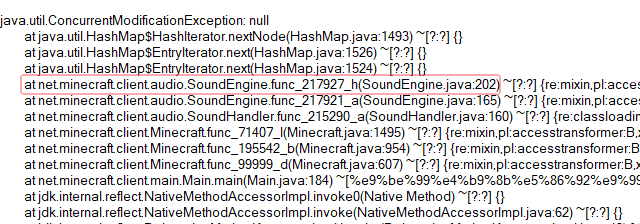
Second, read the source code of SoundEngine and confirm which container is facing this issue:
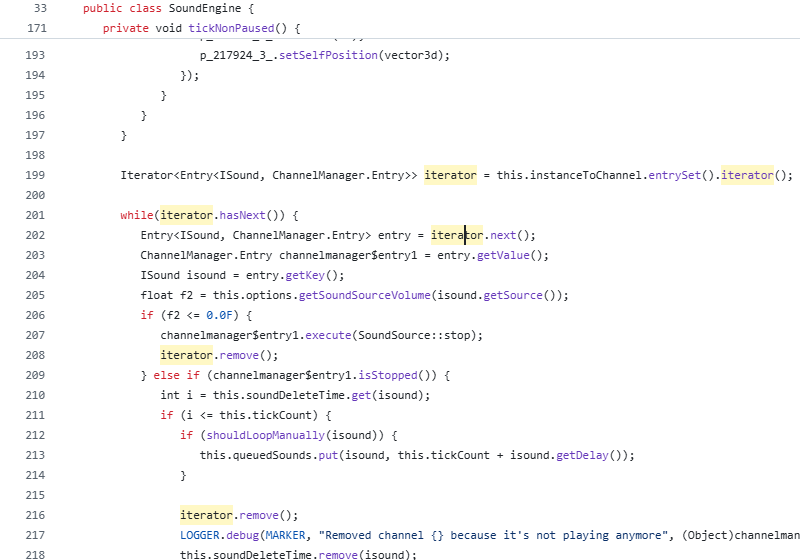
Now we know we should monitor map `field_217942_m` (`instanceToChannel` in `SoundEngine`). Keep going.
Third, install this mod, and add “`-javaagent:mods/CMESuckMyDuck-1.0.0.jar=net/minecraft/client/audio/SoundEngine;field_217942_m;Map;nonstatic`” to Java Virtual Machine Argument. Relaunch the game and wait for the next crash.
Finally, open `CMESuckMyDuck.log` file and you will see which thread and which mod has concurrently modified the container.
# Examples (JVM Arguments)
## ConcurrentModificationException from SoundEngine in Forge 1.16.5 Environment
`-javaagent:mods/CMESuckMyDuck-1.0.0.jar=net/minecraft/client/audio/SoundEngine;field_217942_m;Map;nonstatic`
## ConcurrentModificationException from PotionBrewing in Forge 1.20.1 Environment
`-javaagent:mods/CMESuckMyDuck-1.0.0.jar=net/minecraft/world/item/alchemy/PotionBrewing;f_43494_;List;static`
## ArrayIndexOutOfBoundsException from Zeta mod
`-javaagent:CMESuckMyDuck-1.0.0.jar=org/violetmoon/zetaimplforge/event/ForgeZetaEventBus;convertedHandlers;Map;nonstatic`
# Other options
## Log Level
Use system property `-Dcme_suck_my_duck.log_level=` to set custom log level.
Default 1, which means no debug message will be logged.
Users can set it to 0 to output debug message, which is not recommended – query functions like Map#get, Set#containsAll will also be logged when set to 0, and make the file very very long.
## ASM API Version (v1.0.2+)
In order to maintain compatibility with the latest version of Minecraft, this mod is compiled with asm version 9.7. For older versions of Minecraft (such as 1.12.2), API level operations such as ASM_9 cannot be applied, so players need to use `-Dcme_suck_my_duck.asm_api_version=` to modify the ASM API version compatibility. For example, game version 1.12.2: `-Dcme_suck_my_duck.asm_api_version=5`.
## File Max Entries (v1.0.3+)
Since we notice that when crash happens, the last few operations in the log are much more important than the previous ones. So our mod adopts a paging strategy after v1.0.3, and only the last two pages are retained at the end. The number of logs output on each page (that is, the number of operation call stacks) is fixed, and the default value is 500. Players can use `-Dcme_suck_my_duck.file_max_entries=` to modify the maximum number of elements on the page.
## Whitelist of Constructor (v1.0.3+)
Sometimes a container in a certain class is used in many places (eg. CompoundTag#tags). Directly using this mod will cause the log to be too long or the valid content to be replaced by subsequent operations. Therefore, players can specify an additional constructor whitelist to monitor the corresponding container in the corresponding class of a specific module. The default is empty, that is, there is no whitelist. Players can use `-Dcme_suck_my_duck.whitelist_constructor_stacktrace=` to specify it. If any line in the stack trace where the container is constructed includes the content of the whitelist string, the container will be monitored – otherwise, the container will not be monitored, which greatly simplifies the log output information.
## Transform to Thread Safe (v1.0.4+)
Use system property `-Dcme_suck_my_duck.transform_to_thread_safe=true` to transform the field into a thread-safe container.
This is NOT recommended unless you like slowness and don’t want to fix the problem.
## Inject method (v1.0.4+)
Use system property `-Dcme_suck_my_duck.inject_method=true` to switch to inject mode.
If set, you should use `-javaagent:CMESuckMyDuck-.jar=;` and whenever this method is called, you will receive a stack trace in log files.
## Ignore threads (v1.0.5+)
Use system property `-Dcme_suck_my_duck.ignore_threads=;;;…` to ignore some thread that is expected to modify the given container (or call the given method). For example, `-Dcme_suck_my_duck.ignore_threads=”Server thread”`.
## Stop logging early (v1.0.7+)
Use system property `-Dcme_suck_my_duck.stop_logging_if_exception_created=false` to stop logging if critical error occurs.
## Trace ID Updater (v1.0.8+)
Use system property `-Dcme_suck_my_duck.trace_id_updater=;` to update trace ID when calling the given method. This might be useful in inject mode.
## Monitoring Local Variables (v1.1.0+)
Use system property `-Dcme_suck_my_duck.local_var_index=` to monitor local variable at given index in the given method.
If set, you should use `-javaagent:CMESuckMyDuck-.jar=;;`. By the way, the index can be reused by different local variables. So you might have to use `-Dcme_suck_my_duck.match_local_index=` to specify the ordinal of ASTORE operation to indicate which local variable to monitor.
# Conclusion
I like eating peking duck. It’s so delicious!

Clear Water
This mod adds better visibility underwater by removing the water fog and increasing a the brightness a bit. I intended the mod to make underwater builds in beta minecraft a bit more impressive. It’s also kind of a companion mod to the coral reef port I made for babric. This is intended specifically for babric b1.7.3 minecraft.