DragonFly Model Library
_This mod uses a modified version of Fabric (Babric) and is designed only for Better than Adventure, a heavily modified version of Minecraft b1.7.3!_
For more information, join the discord server provided on this projects page.
# About
DragonFly is a model library which allows other mods made for BTA to use model formats used in modern Minecraft versions. It makes modeling and texturing able to be done through programs like BlockBench making complex models much less daunting to implement.
– DragonFly also allows texturepacks to change the models of any mod using DragonFly.
– DragonFly uses HalpLibe for texture registration and for HalpLibe’s entrypoints
– You can look at the DragonFly Example Mod for help using DragonFly in your project
### Supported data types:
DragonFly Allows the use of
– Modern Java Block/Item Models
– Modern Java Block States
– Modern Bedrock Entity Geometries
– Modern Bedrock Entity Animations
### How to make Entity Animations (in 7.3_03 or above):
Using Animation to Json Converter Plugin from Blockbench Plugin to export json file
once export. you should place Put it under assets//animation folder
and load with
“`
// for example. ../animation/test should be
// DragonFly.loadEntityAnimations(, “test”)
DragonFly.loadEntityAnimations(, )
“`
# Installation
This mod needs a specific MultiMC/Prism instance to run and another other mod as a dependency:
– HalpLibe by Turnip Labs
# Credits
### DragonFly:
– Useless – Block Models, Block States
– baguchan – Entity Models, Animations
– 0999312 – MMLib (Tremendously helpful for implementing Entity Model support)
### Libraries used:
– Turnip Labs – halplibe
### BTA Developers:
– jonkadelic
– maggandgeez
– nebulabc
– bestsoft100
– sunsetsatellite (Martin)
– useless
### Babric (fork of Fabric for Beta Minecraft) Maintainers:
– calmilamsy
– 6pak
### Special thanks:
– Better than Adventure Discord Server (biggest fork of b1.7.3 with many cool features)
– BTA Modding Discord Server (community of modding pioneers of this fork, because it was possible and nobody stopped us)
Doku’s RPG
**About**:
————
This pack is a continuation of Doku’s RPG,
a texture pack by Doku, it was the initial inspiration for Gerudoku and several other remix packs, Doku’s RPG was discontinued in 2010.
in 2014 Handsome_Dan started a continuation project called Doku RPG: Faithful Continuation,
it had a few items and new blocks, but was discontinued in 2015 due to lack of time,
most of Doku RPG: Faithful Continuation is used within this pack.
the original plan for this continuation was to avoid using anything made for Gerudoku and parts of Dokucraft, however I realized that I would never finish the pack if I didn’t use a few parts from them, the original version of Doku’s RPG didn’t have items or mobs and the task of making nearly 14 years worth of textures all at once was a little too daunting, so I’ve tried to use as few as possible while updating the pack through each version of minecraft and trying to maintain a consistent style.
**Links and Other Information**
——————————
I recommend **Optifine** for full functionality of the pack.
For Fabric I’d recommend the **Fabulously Optimized** modpack for ease of use, or https://lambdaurora.dev/optifine_alternatives/ for a list of Optifine alternatives
Some things will not work without optifine or an alternative,
**Optifine**
– https://www.optifine.net/downloads
**Fabulously Optimized**
– https://modrinth.com/modpack/fabulously-optimized
– https://www.curseforge.com/minecraft/modpacks/fabulously-optimized
——————————
– **Doku RPG: Faithful Continuation**
– **Gerudoku Faithful**
– **Gerudoku Genesis**
– **Proof of Permission**
**Alternate Textures & Add-on files**
——————————
Alternate Textures & add-on files available on Github:
– **Doku’s RPG Github**
**Credits**
——————————
Doku, Handsome_Dan, SOM3GUY, Tyken132, Jademalo, Lilyo, Coagulated, Runesmith, Krayloon, Jzus,TDWP_FTW/Forstride, DrZhark, Executive_Hamster, Bloody_Toast, Vamediah, History, Hozz, Richasackboy/Teknician, GameslayerX2, DooDooRoonys, Velimas,
Specific Credits in zip file.
All Dokucraft textures included within this pack were made by Doku for Dokucraft 1.0 to 2.5 between March 2011 and July 2011.
DockBridge
# DockBridge
Velocity plugin to auto-register Docker-backed servers (e.g., Limbo) and check for updates on Modrinth.
## Features
– Auto-discovery: Containers with label `net.uebliche.dockbridge.autoregister=true` are registered as Velocity servers. Host from container name, port from label `net.uebliche.dockbridge.server_port` (fallback: first exposed port, else 25565).
– Name collisions: Default `suffix` → append short container id (`basename-abcdef`). Alternative `overwrite` → keep basename, last writer wins.
– `/dockbridge` command (permission `dockbridge.command`): Shows label filter, duplicate strategy, last scan stats, and registered servers (no sensitive data).
– Modrinth update check on proxy start; login hint for players with permission `dockbridge.update.notify`.
## Installation
1) Download the latest DockBridge release from Modrinth (jar file).
2) Place the jar into your Velocity `plugins/` folder.
3) (Optional) If Velocity runs in Docker, mount `/var/run/docker.sock` into the Velocity container so DockBridge can discover containers.
4) Start Velocity. On first start, the config file `dockbridge.conf` is created in the Velocity data folder; adjust settings and restart.
5) Permissions:
– `dockbridge.command` for `/dockbridge`
– `dockbridge.update.notify` for update hints on login
## Configuration
`dockbridge.conf` (created in the Velocity data folder on first start):
“`
docker.endpoint=unix:///var/run/docker.sock
docker.poll_interval_seconds=30
filters.proxy_group=default
docker.autoregister.label_key=net.uebliche.dockbridge.autoregister
docker.autoregister.label_value=true
docker.autoregister.name_label=net.uebliche.dockbridge.server_name
docker.autoregister.port_label=net.uebliche.dockbridge.server_port
docker.autoregister.duplicate_strategy=suffix # suffix | overwrite
“`
## Docker labels (example)
“`
net.uebliche.dockbridge.autoregister=true
net.uebliche.dockbridge.server_name=limbo
net.uebliche.dockbridge.server_port=30000
“`
## Local testing
### Gradle run
“`
./gradlew runVelocity
“`
Downloads Velocity, builds the plugin (shadowJar), and starts the proxy with the plugin loaded.
### Docker Compose (Limbo set)
“`
docker compose up –build # or: docker compose -f docker-compose.limbo.yml up –build
“`
Includes three Limbo backends (ports 30000/30001/30002) and Velocity on host port 26678. Velocity runs via `runVelocity` inside the container and mounts your sources/config.
## Commands & permissions
– `/dockbridge` (permission `dockbridge.command`): Status and registered servers.
– Update hint on login: permission `dockbridge.update.notify`.
## Troubleshooting
– No servers registered?
– Ensure your containers have the label `net.uebliche.dockbridge.autoregister=true` and a valid `net.uebliche.dockbridge.server_port`.
– Make sure Velocity can reach Docker: mount `/var/run/docker.sock` (or set `docker.endpoint` to a reachable TCP endpoint).
– Check `/dockbridge` output for last scan count and registered servers.
– Port mismatch or forwarding errors?
– Verify the Limbo (or other backend) port matches the label and the server properties.
– For Velocity forwarding, ensure forwarding secret/mode match on both ends.
– Duplicate names?
– Default strategy is `suffix`. Switch to `overwrite` via `docker.autoregister.duplicate_strategy` if you want last-writer-wins.
## Build
“`
./gradlew build
“`
Produces the shaded jar at `build/libs/DockBridge-.jar`.
## Contributing
– Fork & PRs welcome. Keep code comments minimal but purposeful.
– Default Java 21, Gradle Kotlin DSL, Velocity API 3.4.0-SNAPSHOT for run task; 3.1.1 for compileOnly/annotationProcessor.
– Run `./gradlew build` before submitting; Docker-based tests are optional.
Dithering3D
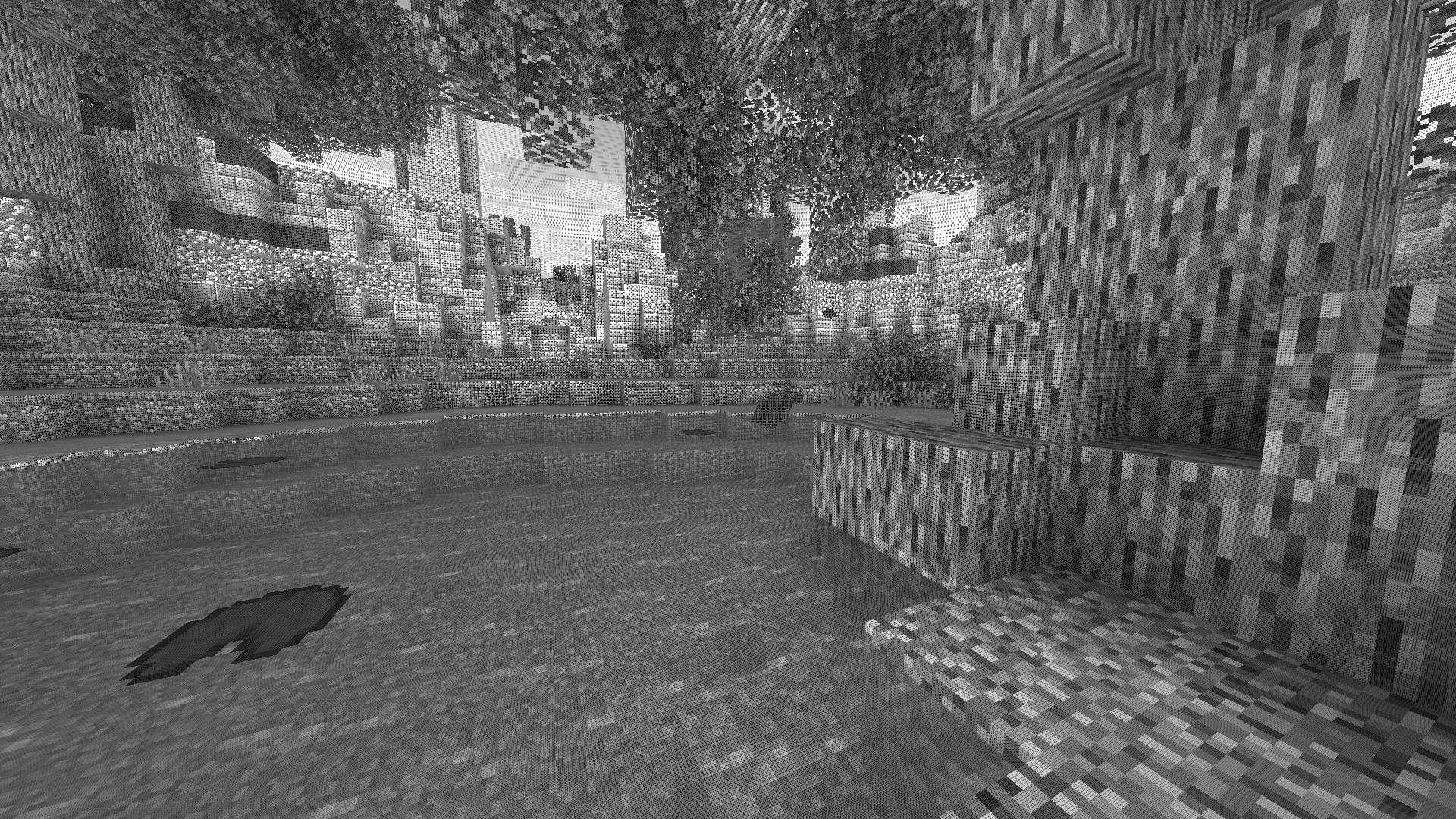
# 🎨 Dithering3D – Surface-Stable Fractal Dithering




—
## 🖼️ Screenshots
—
## ✨ A Revolutionary Visual Experience
Transform your Minecraft world with **Surface-Stable Fractal Dithering** — a groundbreaking rendering technique where dither dots **stick to 3D surfaces** instead of the screen, creating a unique manga/comic book aesthetic that feels alive.
> 🎬 *Based on the innovative work by Rune Skovbo Johansen* — **Watch the explainer video**
—
## 🖼️ What Makes This Shader Special?
### 📌 **Surface-Stable Dots**
Unlike traditional dithering where patterns “swim” on screen, Dither3D anchors each dot to the actual 3D surface. Walk around blocks, and the dots stay perfectly attached!
### 🔄 **Fractal Scaling Magic**
As you move closer or farther from surfaces, dots dynamically split or merge to maintain **constant screen-space density**. It’s mesmerizing to watch!
### 🎨 **Three Color Modes**
| Mode | Description |
|:—-:|:————|
| **Grayscale** | Classic black & white dithering — clean, minimalist, timeless |
| **RGB** | Each color channel gets its own dot layer — vibrant and unique |
| **CMYK Halftone** | Authentic newspaper/comic print simulation with rotated dot angles |
—
## ⚡ Features at a Glance
| Feature | Description |
|:——–|:————|
| 🎯 **Precision Dithering** | SVD-based frequency analysis for mathematically perfect dot placement |
| 🌀 **Anti-Stretch Technology** | Anisotropic smoothing keeps dots circular even on oblique surfaces |
| 🎥 **Camera Stable** | Radial compensation prevents dot swimming during camera rotation |
| ⚙️ **Highly Configurable** | 10+ parameters to fine-tune your perfect look |
| 🚀 **Performance Optimized** | Efficient 3D texture sampling for smooth gameplay |
| 📱 **Universal Compatibility** | Works with OptiFine AND Iris on virtually any Minecraft version |
—
## 🎛️ Customization Options
Fine-tune every aspect of the dithering effect with our intuitive in-game sliders:
### 🔧 Dither Settings
| Parameter | Range | Effect |
|———–|:—–:|——–|
| **Dot Scale** | 2 – 10 | Control overall dot size (exponential) |
| **Size Variability** | 0 – 1 | 0 = Bayer pattern, 1 = Halftone style |
| **Dot Contrast** | 0 – 2 | Sharpen or soften dot edges |
| **Stretch Smooth** | 0 – 2 | Combat stretched dots on angled surfaces |
### 💡 Input Controls
| Parameter | Range | Effect |
|———–|:—–:|——–|
| **Exposure** | 0 – 5 | Brightness multiplier |
| **Offset** | -1 to 1 | Brightness offset adjustment |
### 🎮 Additional Options
– **Inverse Dots** — Flip dot colors for a negative effect
– **Radial Compensation** — Stabilize during camera rotation *(recommended!)*
– **Quantize Layers** — Prevent dot morphing for a more “classic” look
– **Debug Mode** — Visualize fractal layers for development
—
## 📦 Installation
### For OptiFine Users
1. Download and extract the shader pack
2. Place the `shaders` folder in `.minecraft/shaderpacks/`
3. Launch Minecraft → Options → Video Settings → Shaders
4. Select **Dithering3D** and enjoy!
### For Iris Users (Fabric/Quilt)
1. Install Iris Shaders mod (1.2.0+)
2. Download and extract the shader pack
3. Place the `shaders` folder in `.minecraft/shaderpacks/`
4. Press **O** in-game to open shader menu
5. Select **Dithering3D**
> 💡 **Tip:** Press `F3 + T` to quickly reload shaders after making changes!
—
## 🎨 Preset Profiles
Choose from pre-configured profiles for instant results:
| Profile | Color Mode | Dot Scale | Best For |
|:——-:|:———-:|:———:|:———|
| 🟢 **LOW** | Grayscale | 4.0 | Performance, retro feel |
| 🟡 **MEDIUM** | Grayscale | 5.0 | Balanced experience |
| 🟠 **HIGH** | RGB | 5.0 | Colorful, artistic |
| 🔴 **ULTRA** | CMYK | 6.0 | Maximum visual impact |
—
## 🌟 Perfect For
| 📸 Screenshot enthusiasts | Create unique, artistic captures |
|:————————:|:——————————–|
| 🎬 **Content creators** | Stand out with a distinctive visual style |
| 🎮 **Retro lovers** | Relive the charm of 1-bit graphics |
| 🎨 **Artists** | Manga, comic book, and newspaper aesthetics |
| 🧪 **Tech enthusiasts** | Experience cutting-edge rendering techniques |
—
## ❓ FAQ
**Q: Does this work with other shaders?**
> Dithering3D is a standalone shader pack. Combining with other shaders may cause conflicts.
**Q: Why do some surfaces look different?**
> The sky and some special effects may appear different as surface-stable dithering reveals flat geometry.
**Q: Performance impact?**
> Moderate. The 3D texture sampling is optimized but more demanding than vanilla rendering. Most GPUs handle it smoothly.
**Q: Can I use this in my modpack?**
> Yes! Under MPL-2.0 license. Credit appreciated.
—
## 🔬 The Science Behind It
Dithering3D uses **Singular Value Decomposition (SVD)** to analyze UV coordinate derivatives in real-time, determining the exact frequency and direction of surface textures. This mathematical approach enables:
“`
✅ Perfectly uniform dot density regardless of distance
✅ Seamless fractal transitions between detail levels
✅ Circular dots even on extremely angled surfaces
✅ Rotation-stable patterns that don’t “swim”
“`
—
## 📚 Credits & Resources
| Resource | Link |
|:———|:—–|
| 🔗 **Original Algorithm** | Rune Skovbo Johansen |
| 🎥 **Technique Explanation** | YouTube Video |
| 💬 **Technical Discussion** | FAQ Thread |
—
## 📄 License
“`
Mozilla Public License 2.0 (MPL-2.0)
“`
—
🎨 Transform your world. Experience Dithering3D. 🎨
If you enjoy this shader, consider leaving a ⭐ and sharing this shader page !
Discord Bridge
# Discord Bridge
A somewhat cool plugin that creates a chat bridge between Discord & Minecraft.
—
> Quick setup guide
| Command | Description | Permission |
|:—|:—:|—:|
| `discordbridge` | Main command, with many subcommands! | dcbridge.cmd |
## Discord features
| Command | Description | Roles |
|:—|:—:|—:|
| `console` | Executes a command as console | Console |
### Extra implemented stuff
**Spigot:** PlaceholderAPI
**Paper:** PlaceholderAPI, Advancements (built-in), Folia
### For developers
Feel free to make your own addons. For an example, refer to DCBridge-Advancements or BetaDeaths.
You can use the **.jar** file as a dependency.
The Devil Within
This plugin is a remake of GoldEnchant.
This plugin depends on tenkumaLib.
Have you ever wanted to have enchantments in your beta server? This is the plugin you want.
## Enchanting
To enchant a armor piece you need to interact to a diamond block with a diamond armor piece in your hand.
## Enchantments and Curses
All of those enchantments will not take effect if the damage exceeds the player’s HP. An armor get cursed if it’s durability is below 30%. Spooky bad stuff will happen if your armor is cursed 😀
### Helmet
**E:** Prevents the player from drowning.
**C:** The player cannot sleep. If the player try to sleep a entity will tell the player the text set in the config.
### Chestplate
**E:** Prevents fire damage. Does not prevent lava damage.
**C:** Protects the player from fire damage only half of the time, also has a 25% chance to ignite the player every time it takes damage.
### Leggings
**E:** Nothing for now. Only useful for the full-set perks.
**C:** Makes player run slower 50% of the time a PlayerMoveEvent happens. The speed is randomly generated.
### Boots
Prevents fall damage.
### Full-set perks
If the player has a full-set of enchanted armor the condition of the damage being taken if it’s greater than the player’s HP is ignored, also the player gets immune to contact damage (cactus), lava damage and lava damage.
## Config
Everything is explained in the config file’s comments, in case it changes.
DEEP
**A mod that adds a variety of new features to BTA with a focus adding more to the deeper regions of the world!**
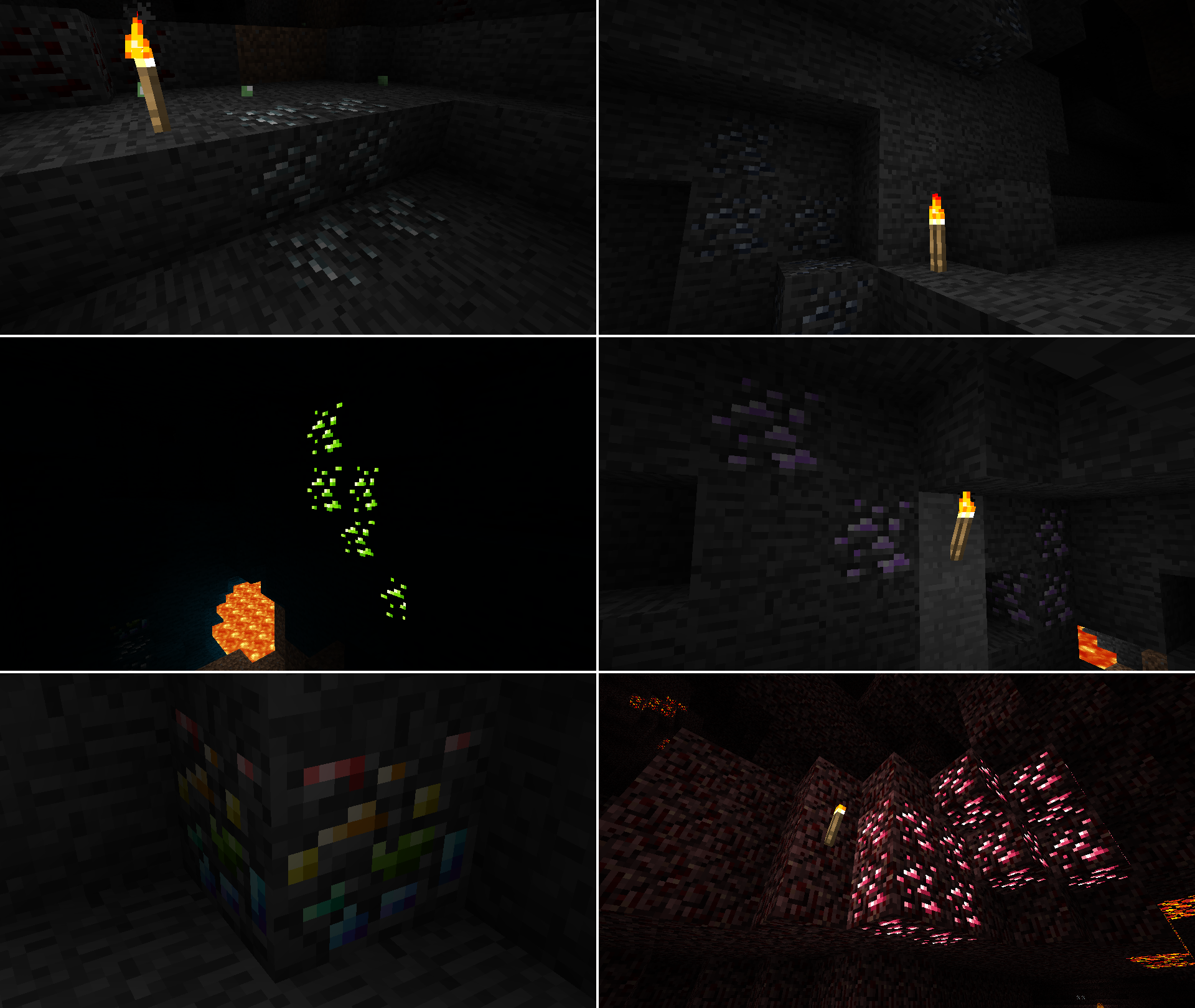
**New Ores!**
– **Silver**
– Silver is as rare as gold and can be found both in the overworld and the nether.
– Silver tools are similar to gold tools where they have silk touch. Unlike gold however they have higher durability but are much slower.
– Silver armor is similar to iron being good all around however it has slightly better combat defense and slightly worse fall defense.
– Silver can be used to make ice/snow powered freezers that can increase the stack size of certain foods by three times the amount at the cost of making them inedible unless reheated. They can also turn any stone type into permafrost and more.
– Silver Apples can be stacked up to two. Each apple heals less than a gold apple but heals more per slot making them more space effecient but more expensive.
– Silver Meshes are like gold meshes but instead of letting the item inside them through they let every item but the item inside them through.
– Silver throwing knifes are a somewhat expensive but fairly strong throwing weapon that breaks on use.
– **Lead**
– Lead is as rare as iron and only found in the overworld.
– Lead tools are similar to iron tools however they have less durability and mine faster.
– Lead armor has extremely high combat defense at the cost of lowering every other defense stat.
– Lead can be used to duplicate most dyes.
– Lead can be turned into drain buckets which can drain a singular liquid source block.
– **Uranium**
– Uranium is slightly rarer than diamond and only found in the overworld.
– Uranium can be used as fairly powerful furnace fuel.
– Uranium can be turned into tons of tnt, explosive charges, and or torches.
– **Amethyst**
– Amethyst is as rare as diamond and only found in the overworld.
– Amethyst tools are extremely fast instamining most blocks however they have extrememly low durability.
– Amethyst armor gives extremely high defense in all stats but breaks extremely easily.
– Amethyst, like diamond can also be used in jukeboxes.
– **Bismuth**
– Bismuth is much rarer than diamond and only found in the overworld.
– Bismuth can be used to fully repair tools when right clicked on with bismuth.
– **Rhodonite**
– Rhodonite is extremely common and only found in the nether.
– Rhodonite can be turned into pink dye.
– Rhodonite, like lapis is primairly decorative.
**New World Generation Features**
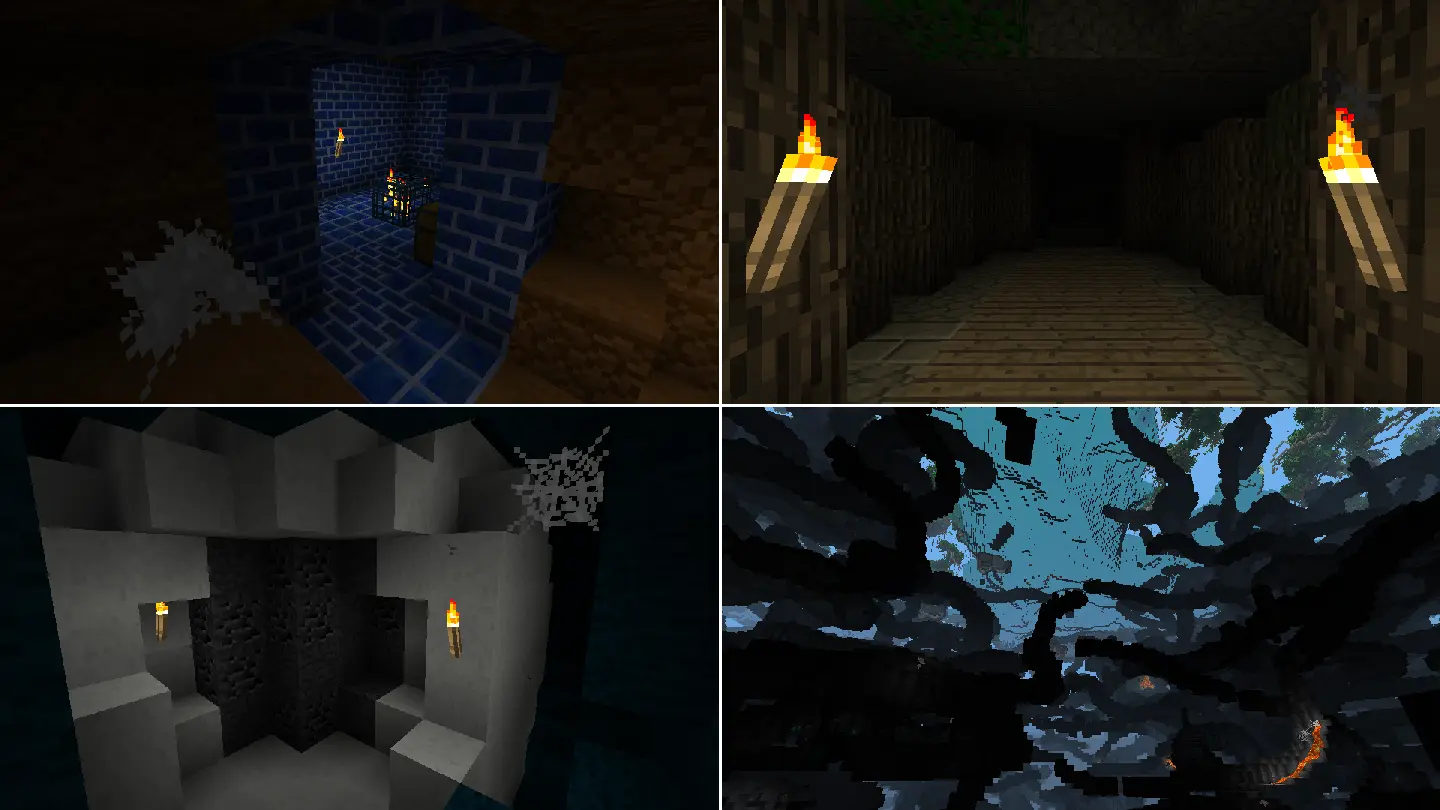
– **New Stone Types**
– Deep adds four new stone types to the overworld including Abyssalrite, pearlstone, peridotite, and scorched sandstone.
– **More Ocean Variety**
– Deep adds new stuff to the deep blue including lilypads, coral, cattails, salt pillars, and more.
– **Updated Dungeons**
– Dungeons along with having DEEP items now come in new pallets.
– **Updated Labyrinths**
– Labyrinths along with having DEEP items now have humid variants which appear in rainforest and swamps. Humid and hot labyrinths also have diving helmets and bast statues respectively.
– **Geodes**
– Geodes are rare but have tons of ore inside of them. They also have a marble outside.
– **Tripled Cave Generation Rate**
– Caves are now three times more common. No more strip mining for hours on end without finding any caves!
**More Mobs**
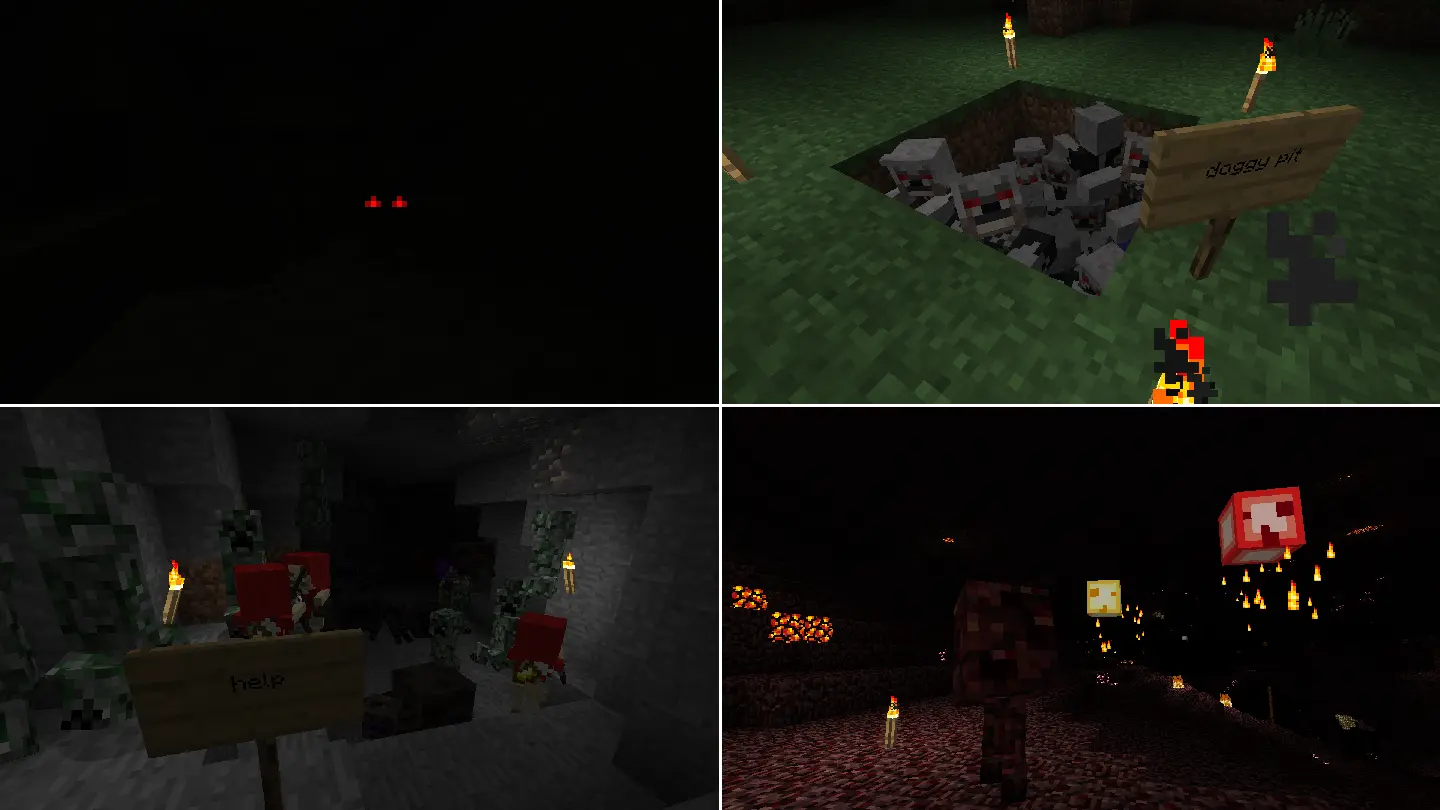
– **Elder Skeletons**
– A more agile and accurate variant of the regular skeleton. Wears a robe and a pair of leather boots.
– **Deepers**
– A more aggressive creeper that has adapted to it’s natural habitat with it’s durable stone covered body.
– **Werewolves**
– A zombie that has been bit by a werewolf and now packs a punch at the cost of being weaker. Watch your back!
– **Jellyfish**
– Jellyfish are a source of gel, a bouncy material that can be turned into slime. They can be found in lakes and oceans at night.
– **Shades**
– Shades are apparitions with great speed at the cost of their weak physical form.
– **Raging Slimes**
– Raging slimes are similar to common slimes however much more aggressive.
– **Water Slimes**
– Water slimes instead of jumping slide around with their wet bodies. This makes them much better on flatter terrain at the cost of them performing worse on rougher terrain.
– **Volatile Slimes**
– Volatile slimes are slimes that have absorbed explosives.
– **Note Block Zombies**
– A zombie holding a note block capable of summoning other zombies as backup.
– **Piston Block Zombies**
– A zombie holding a piston capable of jumping to extreme heights and lunges when attacked.
– **Beetles**
– Beetles are large bugs with a tough shell that appear underground in darkness.
– **Mother Spiders**
– Mother Spiders are large spiders that are capable of spawning their children as backup.
– **Outback Zombies**
– Outback Zombies are a kind of zombie that appear only in the warmest places of the world. They have adapted to their extremely hot environment becoming immune to the sun’s heat. Legend says these zombies even ride cows.
– **Poppers**
– A deadly netherrack abomination capable of exploding an indefinite number of times. They are found in the Nether.
– **Wisps**
– Wisps are flying enemies that charge at you and set you on fire on contact. They are found in the Nether.
**And more!**
Geniunely, there is a TON of stuff in this mod and it’s hard to list it all here. A lot of it can be understood by just exploring though.
Day Vote Plugin
Allows **players** in an **overworld** _(Multi-World Support)_ to vote for the **sun** to **shine** in an **instant** without waiting or depending on everybody sleeping in a bed!
`/voteday` – Starts/Casts a day-vote.
For Ops:
`/cancelvote` – Cancels the current vote in a world.
`/canceldayvotetimeout` – Removes the current timeout in a world before a new day-vote can be started.
Dark Mojang Logo (BTA)
This is a Texture Pack, designed for “Better Than Adventure!”, that makes the Mojang Logo(s) have a black background, and an adjusted color palette that makes the logo colors slightly more vibrant, and with a shadow that fits them.

# CREDITS
– Made by AndreWharn.
– Do not use the assets without permission, please!
# Thanks for using this pack! 😀
Customizable Player Models
## Customizable Player Models
Create a custom avatar using the built-in editor.
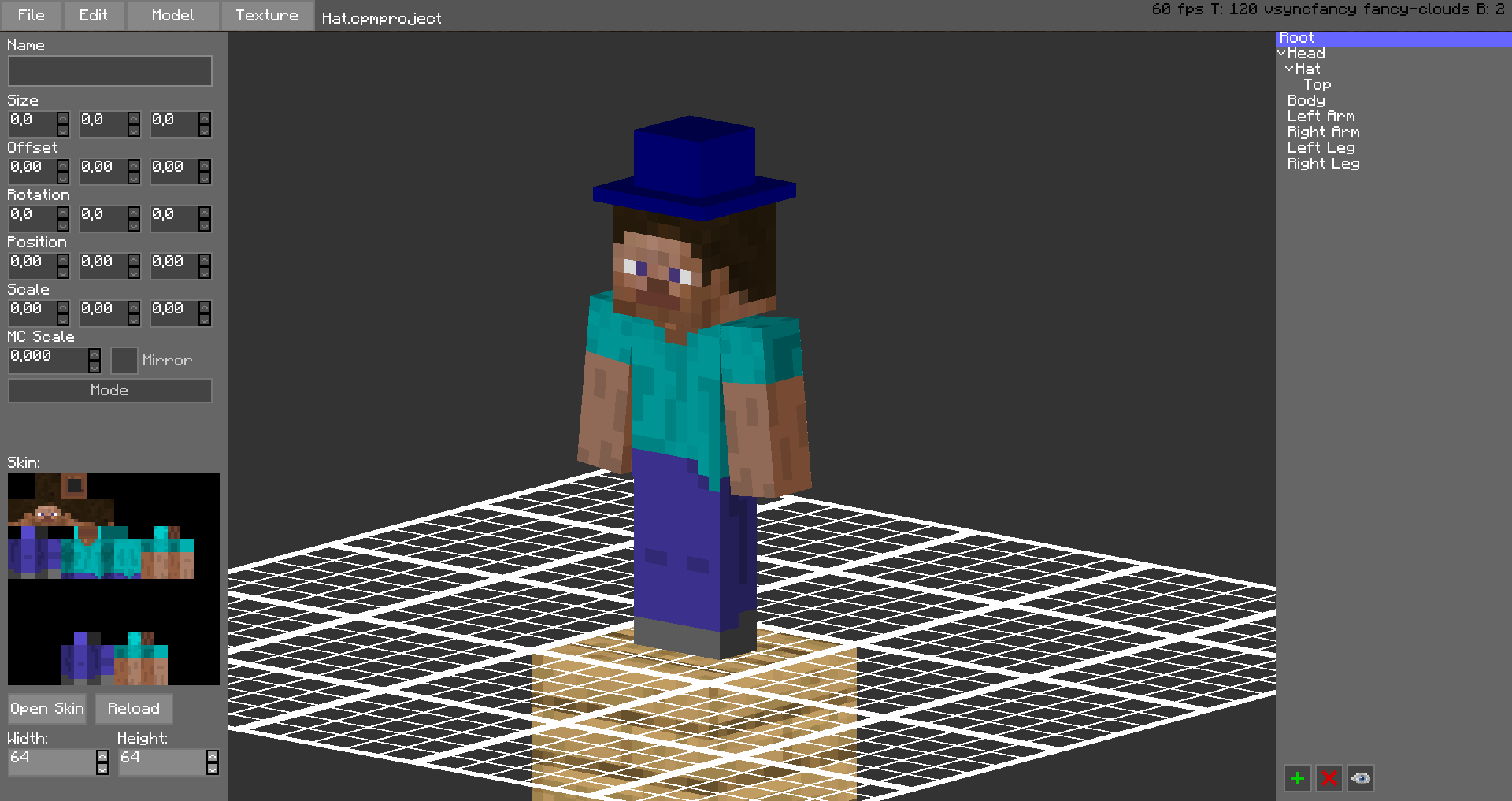
The models are stored in unused space on your Minecraft Skin, or as a Gist on GitHub.
Upload the exported image file as your skin to load the custom model.
Browse uploaded models on the Models Website.
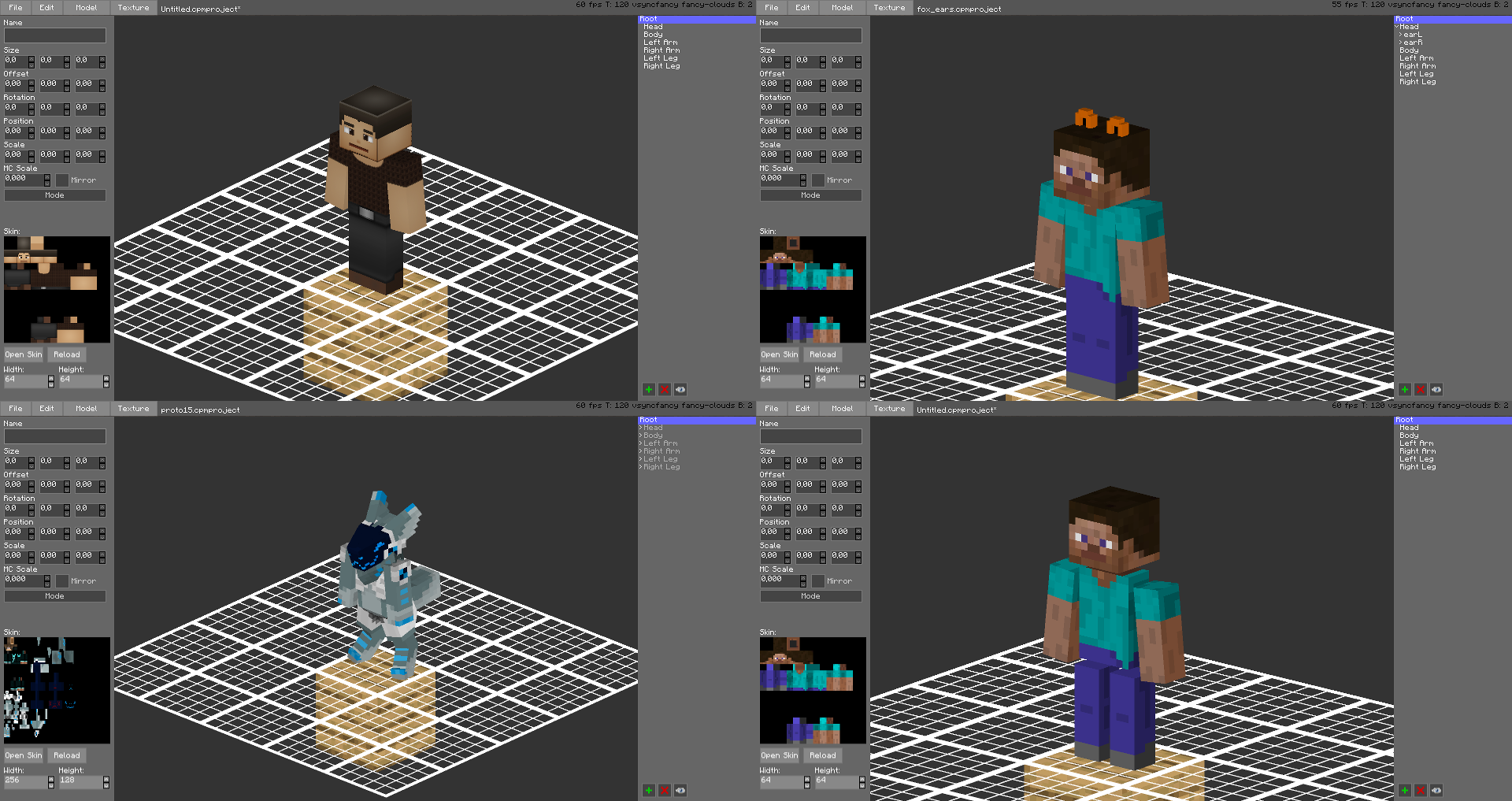
The additional parts can have custom textures, higher resolution skins can be used (Steve skin from Soartex Fanver – Vanilla)
Parts of the normal player model can be hidden or moved around.
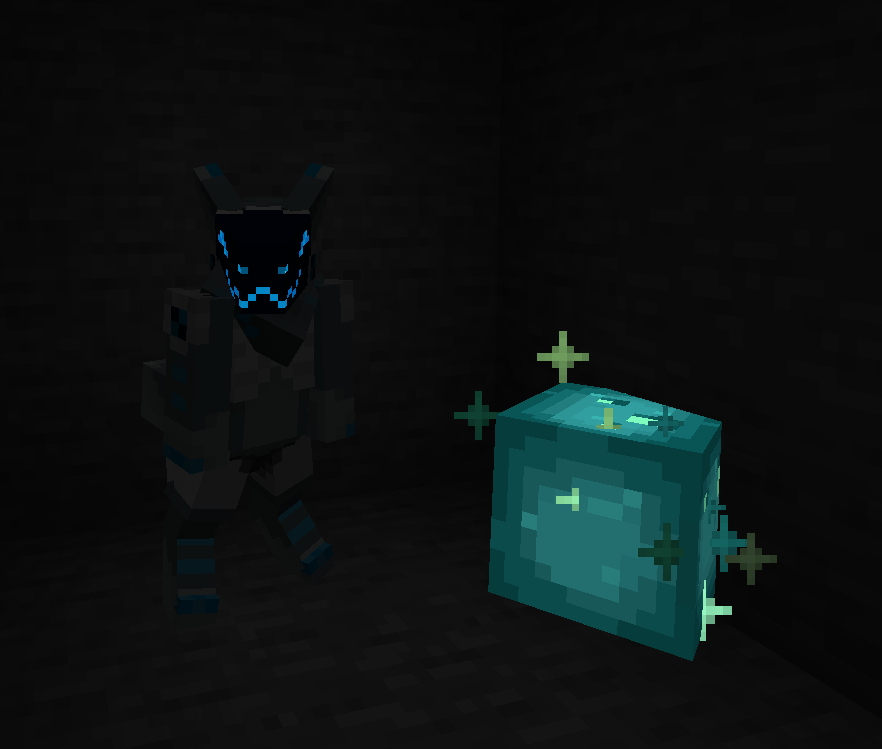
You can even make parts of your skin “glow” like a glow squid.
Plugin for Bukkit/Spigot servers for changing skins ingame (not required): https://github.com/tom5454/CustomPlayerModels/releases