Fabric Placeholder
# Fabric Placeholder
A placeholder mod that provides the `fabric` mod ID for older mods.
## MALWARE WARNING
There is a vibe-coded version of this mod going around that downloads and runs a Remote Access Trojan (RAT). The impersonation has the mod ID `fabric-placeholder` along with code whereas this mod is called `fabric-ph` and has no code in it.
Do not run mods or modpacks from people who you do not absolutely trust, and be sure not to download anything off of Discord either.
## Do I need this?
**Probably not.** Fabric API only removed the `fabirc` mod ID in `26.1-snapshot-1`, so mods using this mod ID will need to be recompiled anyway. However, if a mod asks you to add `fabric` on 26.1 or later, you can try using this mod to resolve the error. However, it very likely won’t work. I mostly made this as a joke in the Fabric Voice Chat, so if this actually works for something, please ping @sylv256 in the Fabric Discord server because it would be extremely funny.
## Use Case
You may need this if you’re using simpler mods that support many
versions at once within one jar or simply a mod that hasn’t updated
to using the `fabric-api` mod ID as a dependency.
~~In general, it is better to install this mod than not, especially
if a mod requires `fabric` and you have Fabric API installed.~~
F3DeathCoords
A mod that displays your death coordinates in the Debug Menu when you die. It will disappear after you log out of a world/server.
Requires **F3Mod**!
> If you’re gonna play on a **server**, remember to ask if the mod is allowed.
Eye of Nemesis


_This project is in a early stage, please report any bug you find._
# Eye of Nemesis
Eye of Nemesis is a plugin that allows server admins to write policies that will deny or allow (black/whitelist) players to do specific things based on the value of nodes.
## Motivations
I made this plugin as an effort to preserve a village from my private server. Originally from beta 1.7.3 Betalands server, then transferred to RetroMC, and then finally we downloaded the chunks to merge into our server, I was afraid it would not have the same feeling after all the updates, so I had the idea to make a plugin that can block the newer features.
## Permissions
Eye of Nemesis supports permissions for its commands, below is a list of permissions and commands.
* `nemesiseye.help`
* help
* `nemesiseye.reload`
* reload
* `nemesiseye.policy.list.self`
* currentpolicies
* `nemesiseye.policy.list.all`
* listpolicies
* `nemesiseye.policy.info`
* policyinfo
## Performance
This plugin is not scalable as it is and will end up running unoptimized checks when your players do things with policies in effect, I made it for a server with a few friends. I’ll look forward into writing more performant code after all my other priorities are implemented.
Even More Mob Variants (BTA)
This is a Texture Pack, designed for “Better Than Adventure!”, that adds Mob Variations.
# VARIANTS
– Ghast
– Zombie Pigman
– Sheep
– Slime
– Squid
– Wolf
# CREDITS
Textures from:
– RESOURCE PACK: “Extra Mob Variants”, by sx22. (Discord tag)
– RESOURCE PACK: “Better Than Ghasts!”, by sx22. & schlokanov (Discord tags)
– RESOURCE PACK: “Golden Days” / “Programmer Art Continuation Project”
– The rest either comes from Mojang Studios or was made by me, AndreWharn.
Extra:
– “pack.png” made by AndreWharn.
– No copyright infringments are intended, please contact me on Discord immediately if there’s something wrong: https://andrewharn.carrd.co
# Thanks for using this pack! 😀
Elevators
# Elevators
Elevators is a b1.7.3 StationAPI mod that adds elevator blocks that are highly inspired by the mod OpenBlocks
## Features
– Elevator block that allows you to travel to other elevator blocks above or below it
– Directional elevator block that puts the players horizontal direction in the direction it is placed
– Elevator dying by right clicking placed elevators with dye
– Configurable distance limit via GCAPI
## Recipes


## Requirements
StationAPI
GCAPI
ModMenu
## Screenshots


## Extra credits
The sound of the elevator is by LloydEvans09 on freesound. License: Attribution 4.0
Elemental Creepers StationAPI
# Elemental Creepers
This version is for b1.7.3, Station API, and the Babric (fabric for beta) toolchain.
* Original Minecraft Forum Post: https://www.minecraftforum.net/forums/mapping-and-modding-java-edition/minecraft-mods/1275396-1-5-1-elemental-creepers-v3-2-1-daawwwwwww
## Config and Features (Installation Instructions at the Bottom)
### Added Config Using GlassConfigAPI
* Modify spawn rate of each creeper type
* Modify explosion radius/intensity of each creeper type
* Modify if creeper types spawn everywhere or only in their specific biomes
* To see which creepers spawn where when enabled scroll down to the bottom of the page
### Added Creeper Types
– CookieCreeper – explodes into cookies
– EarthCreeper – explodes into dirt
– ElectricCreeper – explodes into lightning
– FireCreeper – explodes into fire
– GhostCreeper – explodes damaging nearby entities
– IceCreeper – explodes into snow/freezing nearby water
– MagmaCreeper – explodes into lava
– PsychicCreeper – explodes launching nearby entities into the air
– WaterCreeper – explodes into water
## Original Showcase Videos
## Installation using Prism Launcher
1. Download an instance of Babric for Prism Launcher: https://github.com/babric/prism-instance
2. Install Java 17 and set the instance to use it: https://adoptium.net/temurin/releases/
3. Add GlassConfigAPI 3.0.2+ to the mod folder for the instance: https://modrinth.com/mod/glass-config-api
4. Add Glass Networking to the mod folder for the instance: https://modrinth.com/mod/glass-networking
5. Add StationAPI to the mod folder for the instance: https://modrinth.com/mod/stationapi
6. (Optional) Add Mod Menu to the mod folder for the instance: https://modrinth.com/mod/modmenu-beta
7. Add this mod to the mod folder for the instance: https://github.com/matthewperiut/elementalcreepers-fabric-b1.7.3/releases
8. Run and enjoy! 👍
## Creeper Biomes (if config for biome specific spawning is enabled)
* Electric Creeper – Rainforest, Savanna, and Sky
* Psychic Creeper – Taiga, Shrubland, and Sky
* Ice Creeper – Tundra, Ice Desert, Seasonal Forest, and Sky
* Ghost Creeper – Ice Desert (and they have a chance to spawn when other creepers die)
* Water Creeper – Swampland and Rainforest
* Cookie Creeper – Seasonal Forest
* Earth Creeper – Plains and Taiga
* Fire Creeper – Desert and Nether (Hell)
* Magma Creeper – Nether (Hell)
Elemental Arrows
Elemental Arrows adds several arrow with different effects upon landing.
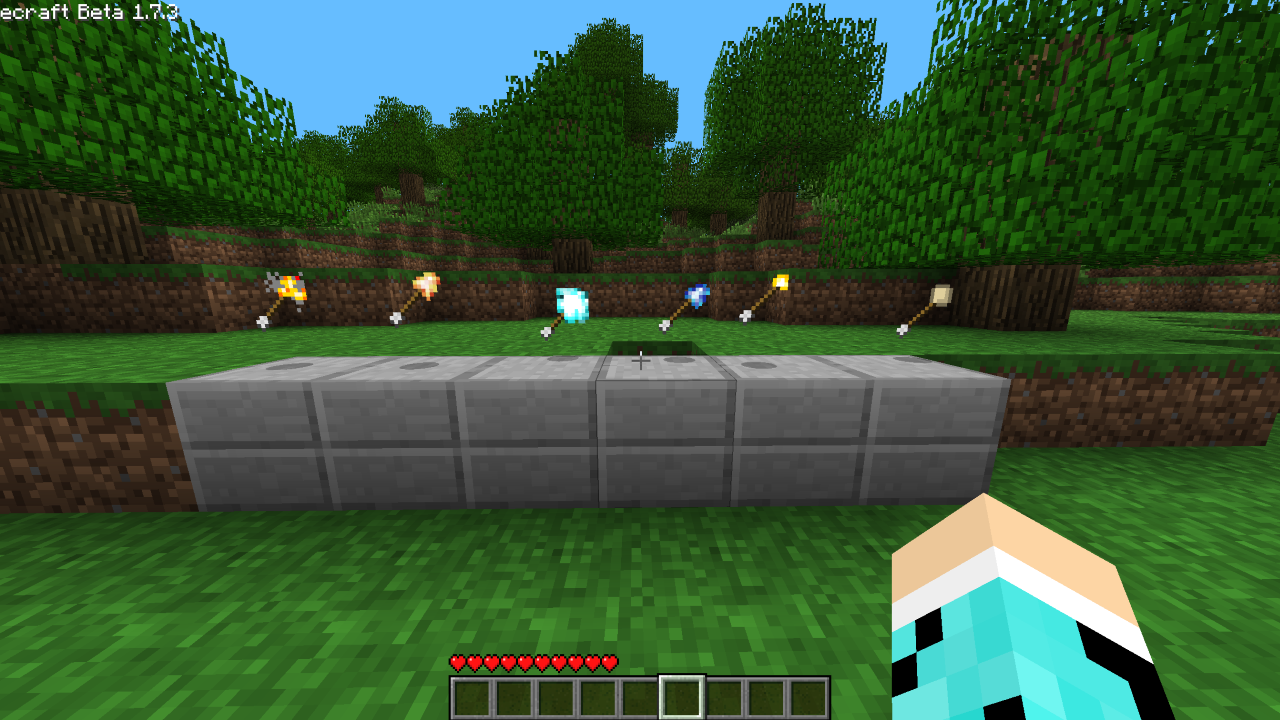
**Explosive Arrow** – Explodes upon impact
**Fire Arrow** – Will set entity or block it impacts with on fire
**Ice Arrow** – Extinguishes fire, solidifies obsidian, freezes water and breaks torches upon impact
**Lightning Arrow** – Spawns a lighting upon impact
**Torch Arrow** – Places a torch upon impact
**Egg Arrow** – Spawns a chicken upon impact
Edible Moss BTA
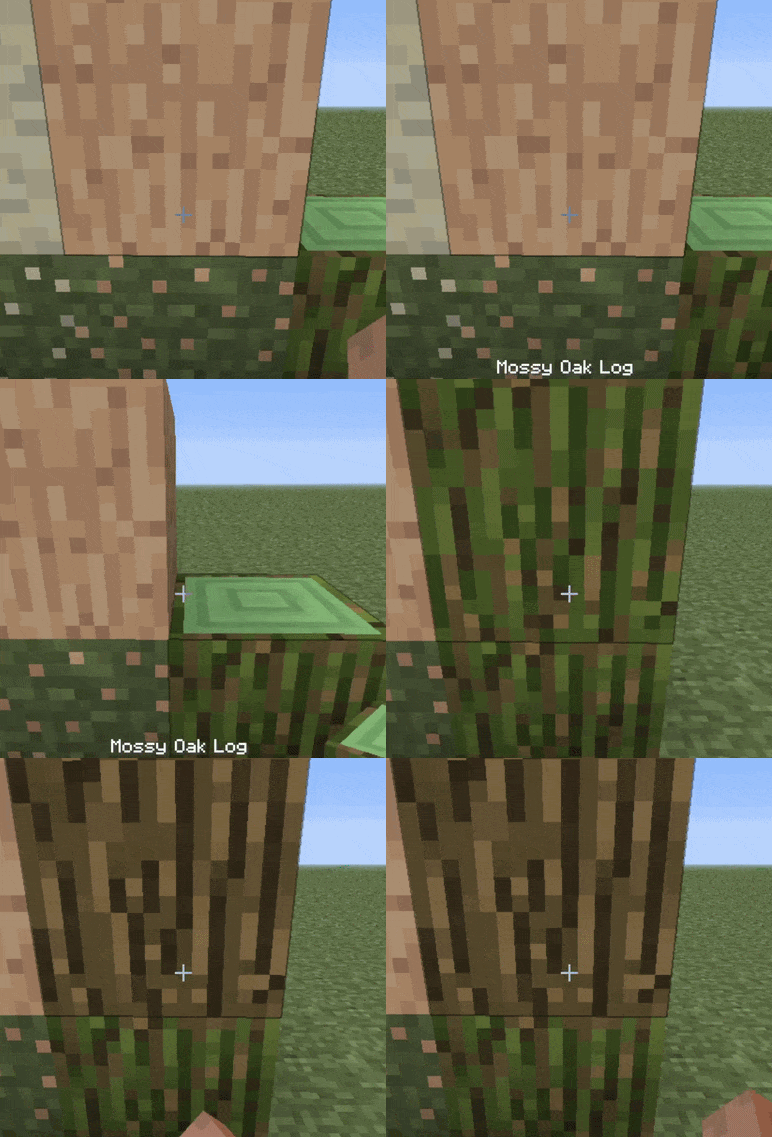
☻ Simply right click the moss while holding no item.
☻ Works serverside, but recommended on client.
☻ Eating the moss provides no positives or negatives, other than the satisfaction of a job well done.
Ears (+ Snouts/Muzzles, Tails, Horns, Wings, and More)

Faithful fancy fashion features for fuzzy folk.
Created due to a lack of the Tails mod for 1.16, Ears is a mod that adds ears, snouts, tails, horns, wings, and more to the player. Eventually, it also became a complete lightweight open source 1.9 skin backport for many old versions, which works even if you aren’t using its special features.
Ears has a more vanilla-faithful appearance than Tails, with a lot of 2D regions but a few 3D ones too. There are a wide variety of possible configurations and it can all be customized.

Why use Ears instead of Tails? Because Ears is easy to port to other versions, based on a multi-version abstraction allowing the mod to even run in web browsers. The Tails mod has wonderful 3D models and animations, but it’s a burden to update it to any version due to its large rendering system and all the data syncing code, causing it to be tightly coupled with the version of the game and mod loader it was designed for. Ears stores all data as pixels in the player’s skin.
However, Ears requires you to draw your own additions, and does not come with easy recolorable prefabs like Tails. Additionally, unlike CPM or Figura, Ears has a limited number of customization options. (Note that if you have a simple idea, I may add it. Open an issue on GitHub or hop in Discord.) Ears offers a good middle-ground that will work in almost any version you wish to play. It also does not and never will use external servers, just Mojang’s skin server, so there’s no concerns about a third-party server going down (be it temporarily or for good).
Why use Ears instead of other skin fixes? Ears provides a lot of new features to customize your skin, and is a much more lightweight patch with no usage of third-party servers and is completely open source. Additionally, Ears backports translucent secondary layer support to 1.8 and 1.7.
Come discuss this mod and any of my others on Discord or Matrix, or send me an email.
DropConfirm
# DropConfirm
### Think twice before you drop.
—
## What *is* DropConfirm, exactly?
DropConfirm is a **configurable quality-of-life mod** that adds a confirmation dialog when dropping items. I made it
because I was tired of accidentally dropping my items to other players or into lava/voids.
I use this mod personally, and I wanted to share it with others because I’ve noticed that a lot of my friends have had
this exact problem (and I assume others have too).
## Compatibility
DropConfirm actively supports **all major versions from 1.14.4 onward**, with the help of Stonecutter and Modstitch.
## Configuration
– **Enable:**
– Whether or not to enable DropConfirm.
– **Play Sounds:**
– Whether or not to play sounds when doing various actions related to DropConfirm, e.g.:
– Enabling/Disabling
– Dropping items
– **Reset Delay:**
– Amount of time (in seconds) before the confirmation status is reset.
– **Blacklist**
– Allows for disabling the confirmation prompt on certain items.
– Can also be used like a whitelist instead.
– **Confirmation Mode**
– The mode to be used for displaying the confirmation prompt.
– Options: Actionbar (default), chat, popup.
