Font Fixer
## Summary
This mod fixes and extends the Font Renderer in Legacy versions of Minecraft by essentially backporting a newer version of the `FontRenderer` class (1.5.2 was used as the base in version 1; 1.12.2 is used as the base in version 2).
## Details
In particular, the following bugs have been fixed and features have been added:
– Fix the text width calculation and shadows when rendering non-ASCII characters
– Change Font height to 9 instead of 8
– Add support for glyphs/unicode characters
– Add missing formatting and color codes
## Installation
### As a ModLoaderMP / Forge mod
This mod needs to be installed as a **jar-mod**. That means, you have to…
1. Be sure to back up your `minecraft.jar`!
2. Extract the content of the mod zip into the `minecraft.jar` file
3. Delete the `META-INF` folder in there
4. Overwrite any existing files when doing so!
5. ???
6. Profit!
### As a Fabric mod
Just place the mod file in your mods folder 🙂
## Issues
– Some **OptiFine** versions have minor issues with Font Fixer installed (e.g., custom fonts do not work)
– ~~Some unicode characters could not be rendered~~ – this has been fixed in version **2**!
FConfigLib
# FConfigLib
**FConfigLib** is a simple JSON configuration library designed specifically for Fabric Mod Loader.
## Features
* **Version compatibility**: FConfigLib is compatible with every Minecraft version, supported by Fabric Loader. It works on **Ornithe**, **LegacyFabric**, **Babric**, and other such projects.
* **Support for other games**: This library is not dependent on Minecraft code, it can be run on any other Java game loaded through Fabric Loader.
* **Easy to use API**: FConfigLib has annotation-based value limiters and validators. It allows for safe version conversion via config fixers.
Java 8+ is required in order for this mod to work.
## For mod devs
How to add to your project
Add JitPack to your repositories list in build.gradle.
“`groovy
maven {
name “JitPack”
url “https://jitpack.io”
}
“`
Add the following line to your dependencies in build.gradle.
“`groovy
dependencies {
…
modImplementation “com.github.ForwarD-NerN:fconfiglib:1.1.0”)
}
“`
Currently, there is no documentation available, however, you can look at an example [here](https://github.com/ForwarD-NerN/fconfiglib/blob/master/src/main/java/ru/nern/fconfiglib/example/ExampleMod.java).
Fast Leaves +
Made for The Last Frontier of Dominion project

**If any mod creators are concerned about this resource pack supporting their mods, I’m open to communication.**
🌴 **Features:**
– Transparency **removed** from modded leaves
– Supported Mods:
– [Oh The Biomes We’ve Gone](https://modrinth.com/mod/oh-the-biomes-weve-gone)
– [Burnt](https://modrinth.com/mod/burnt)
– [Chipped](https://modrinth.com/mod/chipped)
– [IceAndFire Community Edition](https://modrinth.com/mod/iceandfire-ce)
– [Malum](https://modrinth.com/mod/malum)
– [[Let’s Do] Meadow](https://modrinth.com/mod/lets-do-meadow)
**! Hanging Birch Leaves have a temporary solution / fix, which will most likely change with updates.**
– [Nature’s Aura](https://modrinth.com/mod/natures-aura)
– [Nature’s Spirit](https://modrinth.com/mod/natures-spirit)
– [Pastel](https://modrinth.com/mod/pastel-mod)
– [Project: Vibrant Journeys](https://modrinth.com/mod/project-vibrant-journeys)
– [Regions Unexplored](https://modrinth.com/mod/regions-unexplored)
– [Roots](https://www.curseforge.com/minecraft/mc-mods/roots)
– [Thavma](https://modrinth.com/mod/thavma)
For lovers of solid foliage and mods – enjoy! 🎋
Fast Leaves
Made for The Last Frontier of Dominion project

🍀 **Features:**
– Transparency **removed** from all vanilla leaves
– Dark oak leaves are **darker** for clearer visual contrast with oak leaves
– Glow lichen **no longer has a backside** – you almost never see it, so there’s no reason for it to exist
For lovers of solid foliage – enjoy using it! 🍂
Fabric Placeholder
# Fabric Placeholder
A placeholder mod that provides the `fabric` mod ID for older mods.
## MALWARE WARNING
There is a vibe-coded version of this mod going around that downloads and runs a Remote Access Trojan (RAT). The impersonation has the mod ID `fabric-placeholder` along with code whereas this mod is called `fabric-ph` and has no code in it.
Do not run mods or modpacks from people who you do not absolutely trust, and be sure not to download anything off of Discord either.
## Do I need this?
**Probably not.** Fabric API only removed the `fabirc` mod ID in `26.1-snapshot-1`, so mods using this mod ID will need to be recompiled anyway. However, if a mod asks you to add `fabric` on 26.1 or later, you can try using this mod to resolve the error. However, it very likely won’t work. I mostly made this as a joke in the Fabric Voice Chat, so if this actually works for something, please ping @sylv256 in the Fabric Discord server because it would be extremely funny.
## Use Case
You may need this if you’re using simpler mods that support many
versions at once within one jar or simply a mod that hasn’t updated
to using the `fabric-api` mod ID as a dependency.
~~In general, it is better to install this mod than not, especially
if a mod requires `fabric` and you have Fabric API installed.~~
Doku’s RPG
**About**:
————
This pack is a continuation of Doku’s RPG,
a texture pack by Doku, it was the initial inspiration for Gerudoku and several other remix packs, Doku’s RPG was discontinued in 2010.
in 2014 Handsome_Dan started a continuation project called Doku RPG: Faithful Continuation,
it had a few items and new blocks, but was discontinued in 2015 due to lack of time,
most of Doku RPG: Faithful Continuation is used within this pack.
the original plan for this continuation was to avoid using anything made for Gerudoku and parts of Dokucraft, however I realized that I would never finish the pack if I didn’t use a few parts from them, the original version of Doku’s RPG didn’t have items or mobs and the task of making nearly 14 years worth of textures all at once was a little too daunting, so I’ve tried to use as few as possible while updating the pack through each version of minecraft and trying to maintain a consistent style.
**Links and Other Information**
——————————
I recommend **Optifine** for full functionality of the pack.
For Fabric I’d recommend the **Fabulously Optimized** modpack for ease of use, or https://lambdaurora.dev/optifine_alternatives/ for a list of Optifine alternatives
Some things will not work without optifine or an alternative,
**Optifine**
– https://www.optifine.net/downloads
**Fabulously Optimized**
– https://modrinth.com/modpack/fabulously-optimized
– https://www.curseforge.com/minecraft/modpacks/fabulously-optimized
——————————
– **[Doku RPG: Faithful Continuation](https://www.minecraftforum.net/forums/mapping-and-modding-java-edition/resource-packs/wip-resource-pack/2290911-doku-rpg-faithful-continuation-on-hiatus)**
– **[Gerudoku Faithful](https://modrinth.com/resourcepack/gerudoku-faithful)**
– **[Gerudoku Genesis](https://www.curseforge.com/minecraft/texture-packs/gerudoku-genesis)**
– **[Proof of Permission](https://imgur.com/a/LNjg4BY)**
**Alternate Textures & Add-on files**
——————————
Alternate Textures & add-on files available on Github:
– **[Doku’s RPG Github](https://github.com/ShadySalesGnome/Doku-s-RPG)**
**Credits**
——————————
Doku, Handsome_Dan, SOM3GUY, Tyken132, Jademalo, Lilyo, Coagulated, Runesmith, Krayloon, Jzus,TDWP_FTW/Forstride, DrZhark, Executive_Hamster, Bloody_Toast, Vamediah, History, Hozz, Richasackboy/Teknician, GameslayerX2, DooDooRoonys, Velimas,
Specific Credits in zip file.
All Dokucraft textures included within this pack were made by Doku for Dokucraft 1.0 to 2.5 between March 2011 and July 2011.
DockBridge
# DockBridge
Velocity plugin to auto-register Docker-backed servers (e.g., Limbo) and check for updates on Modrinth.
## Features
– Auto-discovery: Containers with label `net.uebliche.dockbridge.autoregister=true` are registered as Velocity servers. Host from container name, port from label `net.uebliche.dockbridge.server_port` (fallback: first exposed port, else 25565).
– Name collisions: Default `suffix` → append short container id (`basename-abcdef`). Alternative `overwrite` → keep basename, last writer wins.
– `/dockbridge` command (permission `dockbridge.command`): Shows label filter, duplicate strategy, last scan stats, and registered servers (no sensitive data).
– Modrinth update check on proxy start; login hint for players with permission `dockbridge.update.notify`.
## Installation
1) Download the latest DockBridge release from Modrinth (jar file).
2) Place the jar into your Velocity `plugins/` folder.
3) (Optional) If Velocity runs in Docker, mount `/var/run/docker.sock` into the Velocity container so DockBridge can discover containers.
4) Start Velocity. On first start, the config file `dockbridge.conf` is created in the Velocity data folder; adjust settings and restart.
5) Permissions:
– `dockbridge.command` for `/dockbridge`
– `dockbridge.update.notify` for update hints on login
## Configuration
`dockbridge.conf` (created in the Velocity data folder on first start):
“`
docker.endpoint=unix:///var/run/docker.sock
docker.poll_interval_seconds=30
filters.proxy_group=default
docker.autoregister.label_key=net.uebliche.dockbridge.autoregister
docker.autoregister.label_value=true
docker.autoregister.name_label=net.uebliche.dockbridge.server_name
docker.autoregister.port_label=net.uebliche.dockbridge.server_port
docker.autoregister.duplicate_strategy=suffix # suffix | overwrite
“`
## Docker labels (example)
“`
net.uebliche.dockbridge.autoregister=true
net.uebliche.dockbridge.server_name=limbo
net.uebliche.dockbridge.server_port=30000
“`
## Local testing
### Gradle run
“`
./gradlew runVelocity
“`
Downloads Velocity, builds the plugin (shadowJar), and starts the proxy with the plugin loaded.
### Docker Compose (Limbo set)
“`
docker compose up –build # or: docker compose -f docker-compose.limbo.yml up –build
“`
Includes three Limbo backends (ports 30000/30001/30002) and Velocity on host port 26678. Velocity runs via `runVelocity` inside the container and mounts your sources/config.
## Commands & permissions
– `/dockbridge` (permission `dockbridge.command`): Status and registered servers.
– Update hint on login: permission `dockbridge.update.notify`.
## Troubleshooting
– No servers registered?
– Ensure your containers have the label `net.uebliche.dockbridge.autoregister=true` and a valid `net.uebliche.dockbridge.server_port`.
– Make sure Velocity can reach Docker: mount `/var/run/docker.sock` (or set `docker.endpoint` to a reachable TCP endpoint).
– Check `/dockbridge` output for last scan count and registered servers.
– Port mismatch or forwarding errors?
– Verify the Limbo (or other backend) port matches the label and the server properties.
– For Velocity forwarding, ensure forwarding secret/mode match on both ends.
– Duplicate names?
– Default strategy is `suffix`. Switch to `overwrite` via `docker.autoregister.duplicate_strategy` if you want last-writer-wins.
## Build
“`
./gradlew build
“`
Produces the shaded jar at `build/libs/DockBridge-.jar`.
## Contributing
– Fork & PRs welcome. Keep code comments minimal but purposeful.
– Default Java 21, Gradle Kotlin DSL, Velocity API 3.4.0-SNAPSHOT for run task; 3.1.1 for compileOnly/annotationProcessor.
– Run `./gradlew build` before submitting; Docker-based tests are optional.
Dithering3D
# 🎨 Dithering3D – Surface-Stable Fractal Dithering




—
## 🖼️ Screenshots
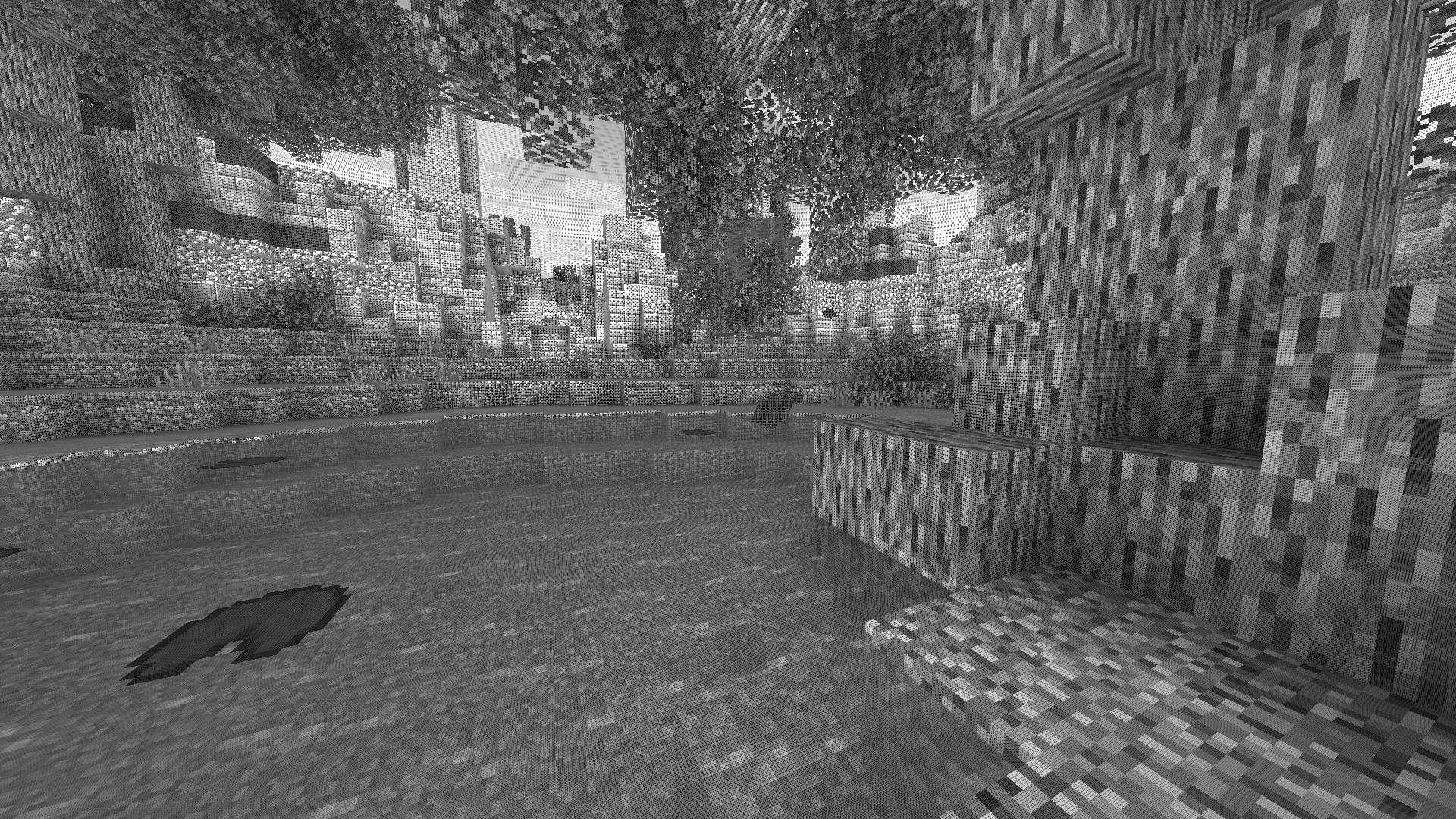
—
## ✨ A Revolutionary Visual Experience
Transform your Minecraft world with **Surface-Stable Fractal Dithering** — a groundbreaking rendering technique where dither dots **stick to 3D surfaces** instead of the screen, creating a unique manga/comic book aesthetic that feels alive.
> 🎬 *Based on the innovative work by [Rune Skovbo Johansen](https://github.com/runevision/Dither3D)* — **[Watch the explainer video](https://youtu.be/HPqGaIMVuLs)**
—
## 🖼️ What Makes This Shader Special?
### 📌 **Surface-Stable Dots**
Unlike traditional dithering where patterns “swim” on screen, Dither3D anchors each dot to the actual 3D surface. Walk around blocks, and the dots stay perfectly attached!
### 🔄 **Fractal Scaling Magic**
As you move closer or farther from surfaces, dots dynamically split or merge to maintain **constant screen-space density**. It’s mesmerizing to watch!
### 🎨 **Three Color Modes**
| Mode | Description |
|:—-:|:————|
| **Grayscale** | Classic black & white dithering — clean, minimalist, timeless |
| **RGB** | Each color channel gets its own dot layer — vibrant and unique |
| **CMYK Halftone** | Authentic newspaper/comic print simulation with rotated dot angles |
—
## ⚡ Features at a Glance
| Feature | Description |
|:——–|:————|
| 🎯 **Precision Dithering** | SVD-based frequency analysis for mathematically perfect dot placement |
| 🌀 **Anti-Stretch Technology** | Anisotropic smoothing keeps dots circular even on oblique surfaces |
| 🎥 **Camera Stable** | Radial compensation prevents dot swimming during camera rotation |
| ⚙️ **Highly Configurable** | 10+ parameters to fine-tune your perfect look |
| 🚀 **Performance Optimized** | Efficient 3D texture sampling for smooth gameplay |
| 📱 **Universal Compatibility** | Works with OptiFine AND Iris on virtually any Minecraft version |
—
## 🎛️ Customization Options
Fine-tune every aspect of the dithering effect with our intuitive in-game sliders:
### 🔧 Dither Settings
| Parameter | Range | Effect |
|———–|:—–:|——–|
| **Dot Scale** | 2 – 10 | Control overall dot size (exponential) |
| **Size Variability** | 0 – 1 | 0 = Bayer pattern, 1 = Halftone style |
| **Dot Contrast** | 0 – 2 | Sharpen or soften dot edges |
| **Stretch Smooth** | 0 – 2 | Combat stretched dots on angled surfaces |
### 💡 Input Controls
| Parameter | Range | Effect |
|———–|:—–:|——–|
| **Exposure** | 0 – 5 | Brightness multiplier |
| **Offset** | -1 to 1 | Brightness offset adjustment |
### 🎮 Additional Options
– **Inverse Dots** — Flip dot colors for a negative effect
– **Radial Compensation** — Stabilize during camera rotation *(recommended!)*
– **Quantize Layers** — Prevent dot morphing for a more “classic” look
– **Debug Mode** — Visualize fractal layers for development
—
## 📦 Installation
### For OptiFine Users
1. Download and extract the shader pack
2. Place the `shaders` folder in `.minecraft/shaderpacks/`
3. Launch Minecraft → Options → Video Settings → Shaders
4. Select **Dithering3D** and enjoy!
### For Iris Users (Fabric/Quilt)
1. Install Iris Shaders mod (1.2.0+)
2. Download and extract the shader pack
3. Place the `shaders` folder in `.minecraft/shaderpacks/`
4. Press **O** in-game to open shader menu
5. Select **Dithering3D**
> 💡 **Tip:** Press `F3 + T` to quickly reload shaders after making changes!
—
## 🎨 Preset Profiles
Choose from pre-configured profiles for instant results:
| Profile | Color Mode | Dot Scale | Best For |
|:——-:|:———-:|:———:|:———|
| 🟢 **LOW** | Grayscale | 4.0 | Performance, retro feel |
| 🟡 **MEDIUM** | Grayscale | 5.0 | Balanced experience |
| 🟠 **HIGH** | RGB | 5.0 | Colorful, artistic |
| 🔴 **ULTRA** | CMYK | 6.0 | Maximum visual impact |
—
## 🌟 Perfect For
| 📸 Screenshot enthusiasts | Create unique, artistic captures |
|:————————:|:——————————–|
| 🎬 **Content creators** | Stand out with a distinctive visual style |
| 🎮 **Retro lovers** | Relive the charm of 1-bit graphics |
| 🎨 **Artists** | Manga, comic book, and newspaper aesthetics |
| 🧪 **Tech enthusiasts** | Experience cutting-edge rendering techniques |
—
## ❓ FAQ
**Q: Does this work with other shaders?**
> Dithering3D is a standalone shader pack. Combining with other shaders may cause conflicts.
**Q: Why do some surfaces look different?**
> The sky and some special effects may appear different as surface-stable dithering reveals flat geometry.
**Q: Performance impact?**
> Moderate. The 3D texture sampling is optimized but more demanding than vanilla rendering. Most GPUs handle it smoothly.
**Q: Can I use this in my modpack?**
> Yes! Under MPL-2.0 license. Credit appreciated.
—
## 🔬 The Science Behind It
Dithering3D uses **Singular Value Decomposition (SVD)** to analyze UV coordinate derivatives in real-time, determining the exact frequency and direction of surface textures. This mathematical approach enables:
“`
✅ Perfectly uniform dot density regardless of distance
✅ Seamless fractal transitions between detail levels
✅ Circular dots even on extremely angled surfaces
✅ Rotation-stable patterns that don’t “swim”
“`
—
## 📚 Credits & Resources
| Resource | Link |
|:———|:—–|
| 🔗 **Original Algorithm** | [Rune Skovbo Johansen](https://github.com/runevision/Dither3D) |
| 🎥 **Technique Explanation** | [YouTube Video](https://youtu.be/HPqGaIMVuLs) |
| 💬 **Technical Discussion** | [FAQ Thread](https://github.com/runevision/Dither3D/discussions/12) |
—
## 📄 License
“`
Mozilla Public License 2.0 (MPL-2.0)
“`
—
🎨 Transform your world. Experience Dithering3D. 🎨
If you enjoy this shader, consider leaving a ⭐ and sharing this shader page !
Custom Messages
# CustomMessages
[](https://github.com/Garsooon/Custom-Messages/releases/latest)
[](https://github.com/Garsooon/Custom-Messages/releases)
CustomMessages is a Beta 1.7.3 Minecraft Project Poseidon plugin that allows players and admins to set custom join and leave messages, with advanced filtering options.
## Features
– Set your own join or leave message using `/setjoin` or `/setleave`
– Admins can view, set or reset messages for any player
– Supports color codes (ie. `&6` for gold)
– Configurable regex-based blacklist for blocking words or patterns
– Notifies admins in game and in console when players try to use blacklisted words
## Commands
– `/setjoin ` — Set your custom join message (must include `%player%`)
– `/setleave ` — Set your custom leave message (must include `%player%`)
– `/viewmessages ` — View a player’s join and leave messages
– `/setplayerjoin ` — Set another player’s join message
– `/setplayerleave ` — Set another player’s leave message
– `/resetmessages ` — Reset a player’s messages to default
## Permissions
– `custommessages.setjoin` — Allows setting your join message
– `custommessages.setleave` — Allows setting your leave message
– `custommessages.admin` — Allows setting/resetting messages for any player (`default: op`)
## Configuration
– Place your blacklist regex patterns in `plugins/CustomMessages/blacklist.txt`
Example:
“`
(?i)bt[e3]+stb
(?i)btr[e3]+eb
“`
– Player join & leave Messages are stored in `plugins/CustomMessages/messages.properties`
## Setup
1. Drop the plugin jar into your server’s `plugins` folder
2. Start the server to generate config files
3. Edit `blacklist.txt` to specify disallowed words/patterns
4. Add permission nodes as needed to groups or players
Colorful Spawning Sheep
# Colorful Spawning Sheep! Beta 1.7.3
The spawning of different colors is completely equal. There is no sort of rarity, just sheep spawning with all the color of wool!
This mod makes a very simple change to the ‘EntitySheep’ class. View Code in Spoiler directly below.
**_Modloader not required but I had to select an API._**
Spoiler
Base Fuction
“`java
public static int getRandomFleeceColor(Random random0) {
int i1 = random0.nextInt(100);
return i1 < 5 ? 15 : (i1 < 10 ? 7 : (i1 < 15 ? 8 : (i1 < 18 ? 12 : (random0.nextInt(500) == 0 ? 6 : 0))));
}
```
Edited for this mod
```java
public static int getRandomFleeceColor(Random random0) {
int i1 = random0.nextInt(100);
return i1;
}
```
Here is some extra information about the two diffetent version ‘Normal Drops’ and ‘x2 Drops’.
Normal Drops just means when you shear a sheep you will get the normal amount of wool out of them, 2-5.
X2 Drops will give you 4-10 when you shear the sheep. View Code in Spoiler directly below.
Spoiler
Normal Drops
“`java
public boolean interact(EntityPlayer entityPlayer1) {
ItemStack itemStack2 = entityPlayer1.inventory.getCurrentItem();
if(itemStack2 != null && itemStack2.itemID == Item.shears.shiftedIndex && !this.getSheared()) {
if(!this.worldObj.multiplayerWorld) {
this.setSheared(true);
int i3 = 2 + this.rand.nextInt(3);
for(int i4 = 0; i4 < i3; ++i4) {
EntityItem entityItem5 = this.entityDropItem(new ItemStack(Block.cloth.blockID, 1, this.getFleeceColor()), 1.0F);
entityItem5.motionY += (double)(this.rand.nextFloat() * 0.05F);
entityItem5.motionX += (double)((this.rand.nextFloat() - this.rand.nextFloat()) * 0.1F);
entityItem5.motionZ += (double)((this.rand.nextFloat() - this.rand.nextFloat()) * 0.1F);
}
}
itemStack2.damageItem(1, entityPlayer1);
}
return false;
}
```
x2 Drops
```java
public boolean interact(EntityPlayer entityPlayer1) {
ItemStack itemStack2 = entityPlayer1.inventory.getCurrentItem();
if(itemStack2 != null && itemStack2.itemID == Item.shears.shiftedIndex && !this.getSheared()) {
if(!this.worldObj.multiplayerWorld) {
this.setSheared(true);
int i3 = 4 + this.rand.nextInt(6);
for(int i4 = 0; i4 < i3; ++i4) {
EntityItem entityItem5 = this.entityDropItem(new ItemStack(Block.cloth.blockID, 1, this.getFleeceColor()), 1.0F);
entityItem5.motionY += (double)(this.rand.nextFloat() * 0.05F);
entityItem5.motionX += (double)((this.rand.nextFloat() - this.rand.nextFloat()) * 0.1F);
entityItem5.motionZ += (double)((this.rand.nextFloat() - this.rand.nextFloat()) * 0.1F);
}
}
itemStack2.damageItem(1, entityPlayer1);
}
return false;
}
```
Specifially these lines
```java
int i3 = 2 + this.rand.nextInt(3);
```
```java
int i3 = 4 + this.rand.nextInt(6);
```
2 or 4 is the amount of wool you will always get from the sheep, where the 'this.rand.nextInt(3);' or 6 will give you an extra 0 through 3 or 6 in addition to the 2 or 4 you have already been given. This happens simultaneously but I am trying to explain the fuction :)
Edit: 7 April 2024
No Changes, but I added support for b1.2-b1.8.1, r1.0, r1.1, r1.2.4&5. I will do 1.2, 1.2.1, 1.2.2, and 1.2.3 soon.
Edit: 8 April 2024
Added 1.2.1-3 support. I am considering adding 1.3-1.20 support. It will be a bit before that happens I am sure.