CME is Bad
# Abstract
Players and modpack developers sometimes find the game crashed with `ConcurrentModificationExceptions` (CME) and `IndexOutOfBoundsExceptions` (IOOBE), which only give stacktrace of current thread and are hard to trace which mod causes them. Here’s one of the crashes which is caused by SimpleReloadInstance in 1.20.1 Forge:
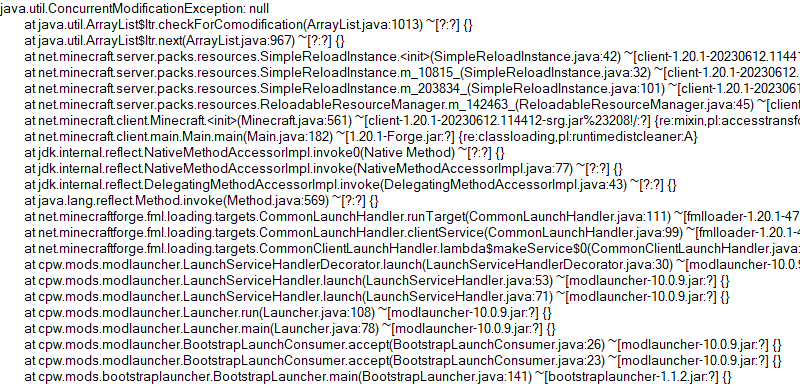
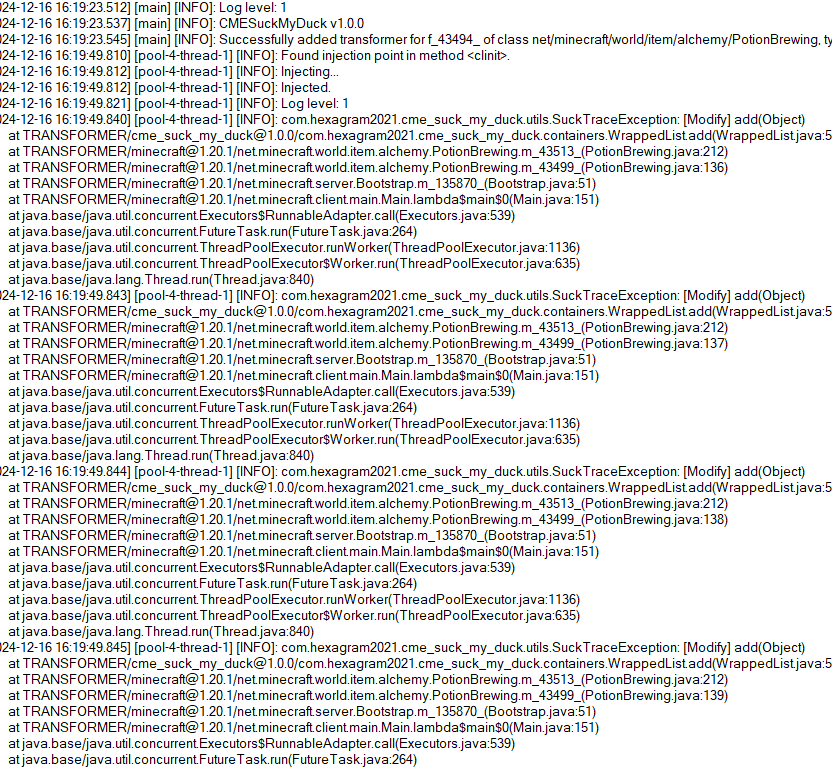
So this is what the mod is developed for. Players who install this mod and add javaagent to JVM Argument correctly will receive a full log for modification history of a certain collection:
# Usage
First, add this jar to mods folder.
Second, edit your Java Virtual Machine Argument in your launcher. Add `-javaagent:mods/CMESuckMyDuck-.jar=;;;`.
Finally, run the game, play and wait until the crash happens.
# Usage for Other Java Projects
This mod can not only be used for Minecraft debugging, but also be utilized to debug other java projects. Similar to Minecraft. The only different step is that you should add gson and asm jar to classpath (`-cp`) before javaagent, and add our `CMESuckMyDuck-.jar` to classpath after javaagent.
# Arguments
##
A full name of the class, which has a container that you would like to monitor. Use “ instead of `.` (a.k.a. the internal name of class).
##
A field name of the container in target class, which you would like to monitor. For Forge, use SRG name. For Fabric, use intermediary name. For NeoForge, use official name.
##
Currently, we only support three containers: `List`, `Set`, `Map`. This argument indicates the type of monitored container.
##
`static` or `nonstatic`. This argument indicates the container is a static field or non-static field.
# How to get and
Let’s start with an example.
First, take a look at the stacktrace of CME/IOOBE:
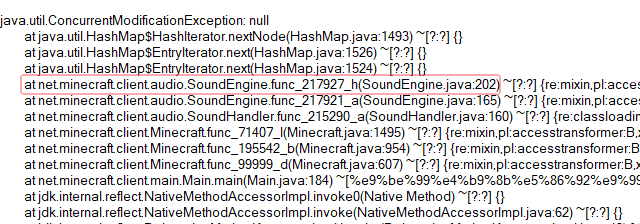
Second, read the source code of SoundEngine and confirm which container is facing this issue:
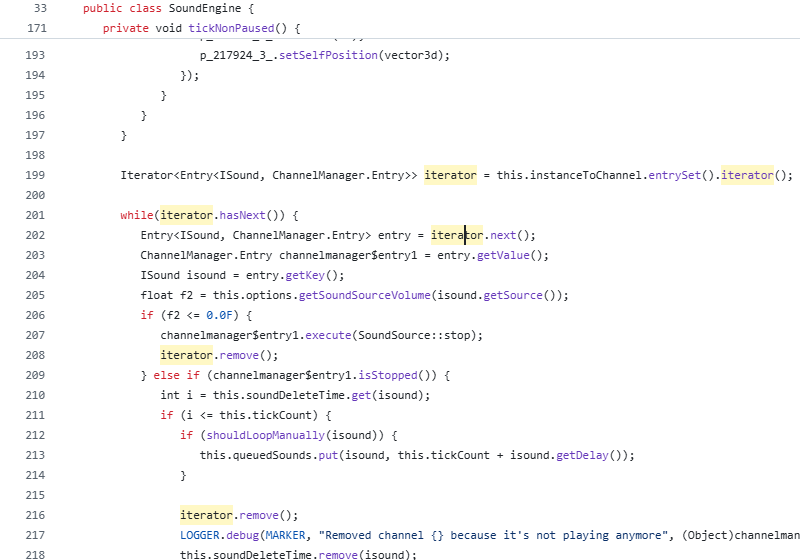
Now we know we should monitor map `field_217942_m` (`instanceToChannel` in `SoundEngine`). Keep going.
Third, install this mod, and add “`-javaagent:mods/CMESuckMyDuck-1.0.0.jar=net/minecraft/client/audio/SoundEngine;field_217942_m;Map;nonstatic`” to Java Virtual Machine Argument. Relaunch the game and wait for the next crash.
Finally, open `CMESuckMyDuck.log` file and you will see which thread and which mod has concurrently modified the container.
# Examples (JVM Arguments)
## ConcurrentModificationException from SoundEngine in Forge 1.16.5 Environment
`-javaagent:mods/CMESuckMyDuck-1.0.0.jar=net/minecraft/client/audio/SoundEngine;field_217942_m;Map;nonstatic`
## ConcurrentModificationException from PotionBrewing in Forge 1.20.1 Environment
`-javaagent:mods/CMESuckMyDuck-1.0.0.jar=net/minecraft/world/item/alchemy/PotionBrewing;f_43494_;List;static`
## ArrayIndexOutOfBoundsException from Zeta mod
`-javaagent:CMESuckMyDuck-1.0.0.jar=org/violetmoon/zetaimplforge/event/ForgeZetaEventBus;convertedHandlers;Map;nonstatic`
# Other options
## Log Level
Use system property `-Dcme_suck_my_duck.log_level=` to set custom log level.
Default 1, which means no debug message will be logged.
Users can set it to 0 to output debug message, which is not recommended – query functions like Map#get, Set#containsAll will also be logged when set to 0, and make the file very very long.
## ASM API Version (v1.0.2+)
In order to maintain compatibility with the latest version of Minecraft, this mod is compiled with asm version 9.7. For older versions of Minecraft (such as 1.12.2), API level operations such as ASM_9 cannot be applied, so players need to use `-Dcme_suck_my_duck.asm_api_version=` to modify the ASM API version compatibility. For example, game version 1.12.2: `-Dcme_suck_my_duck.asm_api_version=5`.
## File Max Entries (v1.0.3+)
Since we notice that when crash happens, the last few operations in the log are much more important than the previous ones. So our mod adopts a paging strategy after v1.0.3, and only the last two pages are retained at the end. The number of logs output on each page (that is, the number of operation call stacks) is fixed, and the default value is 500. Players can use `-Dcme_suck_my_duck.file_max_entries=` to modify the maximum number of elements on the page.
## Whitelist of Constructor (v1.0.3+)
Sometimes a container in a certain class is used in many places (eg. CompoundTag#tags). Directly using this mod will cause the log to be too long or the valid content to be replaced by subsequent operations. Therefore, players can specify an additional constructor whitelist to monitor the corresponding container in the corresponding class of a specific module. The default is empty, that is, there is no whitelist. Players can use `-Dcme_suck_my_duck.whitelist_constructor_stacktrace=` to specify it. If any line in the stack trace where the container is constructed includes the content of the whitelist string, the container will be monitored – otherwise, the container will not be monitored, which greatly simplifies the log output information.
## Transform to Thread Safe (v1.0.4+)
Use system property `-Dcme_suck_my_duck.transform_to_thread_safe=true` to transform the field into a thread-safe container.
This is NOT recommended unless you like slowness and don’t want to fix the problem.
## Inject method (v1.0.4+)
Use system property `-Dcme_suck_my_duck.inject_method=true` to switch to inject mode.
If set, you should use `-javaagent:CMESuckMyDuck-.jar=;` and whenever this method is called, you will receive a stack trace in log files.
## Ignore threads (v1.0.5+)
Use system property `-Dcme_suck_my_duck.ignore_threads=;;;…` to ignore some thread that is expected to modify the given container (or call the given method). For example, `-Dcme_suck_my_duck.ignore_threads=”Server thread”`.
## Stop logging early (v1.0.7+)
Use system property `-Dcme_suck_my_duck.stop_logging_if_exception_created=false` to stop logging if critical error occurs.
## Trace ID Updater (v1.0.8+)
Use system property `-Dcme_suck_my_duck.trace_id_updater=;` to update trace ID when calling the given method. This might be useful in inject mode.
## Monitoring Local Variables (v1.1.0+)
Use system property `-Dcme_suck_my_duck.local_var_index=` to monitor local variable at given index in the given method.
If set, you should use `-javaagent:CMESuckMyDuck-.jar=;;`. By the way, the index can be reused by different local variables. So you might have to use `-Dcme_suck_my_duck.match_local_index=` to specify the ordinal of ASTORE operation to indicate which local variable to monitor.
# Conclusion
I like eating peking duck. It’s so delicious!

Classic Natural Textures
# Natural Texture Pack
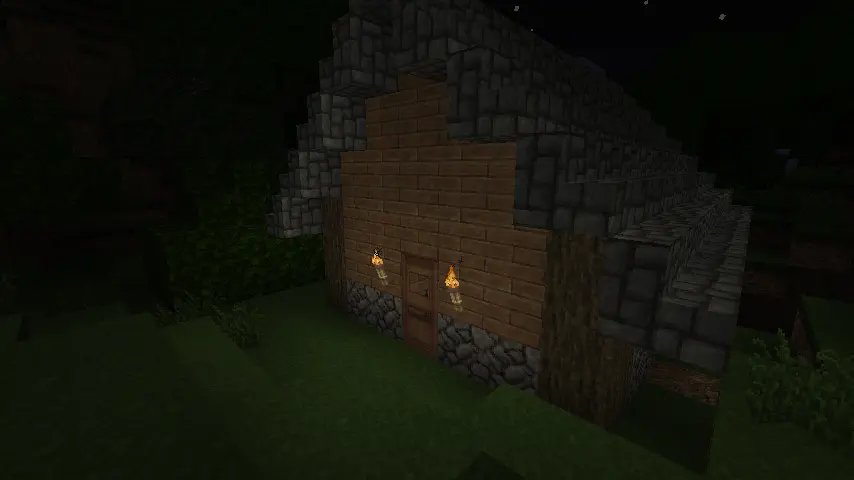
This texture pack was originally created by 4J Studios for the legacy console editions of the games. I extracted this from the texture files for the Xbox 360 edition and ported most of the textures (excluding console-exclusive GUI textures I’d have to make from scratch). This pack is soley for early release and beta versions of the game. If you want a modern port for the current version, the people behind Legacy4J maintain a port of the modern bedrock version with recreations of the missing GUI textures you can download [here](https://modrinth.com/resourcepack/natural-texture-pack)
### Due to being 32x, this pack needs mods to work (OptiFine, MCPatcher, StationAPI, etc.) on versions 1.5 and older. If they aren’t present, you will encounter issues like this:
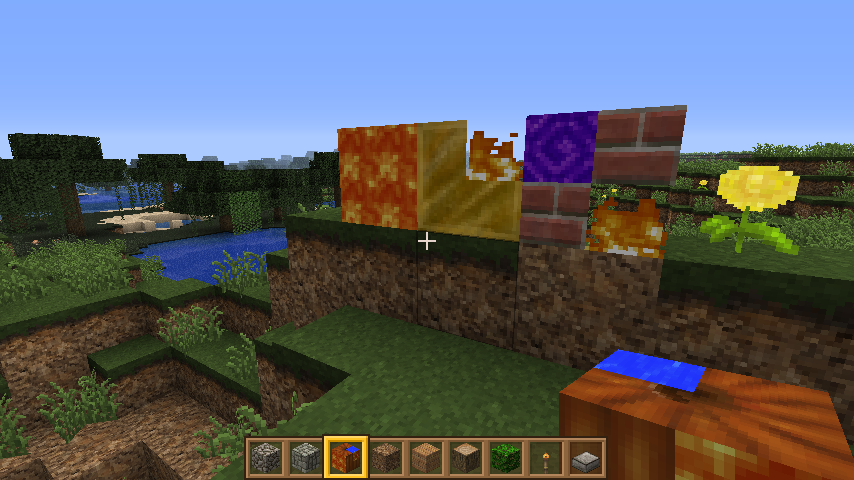
### This is not an issue of the pack. This is a game issue those mods fix.
Circular Logs
# Improve the look of your default Logs with… ↴

## Adds Vanilla-like circulated Logs Top | No Optifine or other Mods needed!
### It’s supports every Version of the game! (even including Legacy ones)
### And day-by-day will have more and more mods supported!
Supported Mods
• [Abundance](https://modrinth.com/mod/abundance) – by exoplanetary
• [Architect’s Palette](https://modrinth.com/mod/architects-palette) – by Jsburg
• [Biomes O’ Plenty](https://modrinth.com/mod/biomes-o-plenty) – by Forstride & Adubbz
• [The Aether](https://modrinth.com/mod/aether) – by Oz-Payn
• Vanilla Minecraft – by Mojang
• [Wilder Wild](https://modrinth.com/mod/wilder-wild) – by FrozenBlock
Cave Tweaks
CAVE TWEAKS!
❤️ Made by Wilozyx and DraconicAxolotl! ❤️
Cave tweaks is a vanilla-esque tweaks 16x pack for most minecraft versions. The goal of the pack is to include most versions from infdev (yep), alpha, beta and release!
This pack is 100% public domain, we totally allow and encourage people who enjoy the pack to use, edit and improve upon our textures for their own works if you wish to do so!
Wish to support us?
Subscribe to our channels on youtube!
[Wilozyx’s Channel](https://www.youtube.com/@wilozyx) |
[DraconicAxolotl’s Channel](https://www.youtube.com/@Draconic_Axolotl)
—
What versions is the pack available for, currently?
| Sign | State |
|———————|:———————:|
| ✔️ | Fully done & uploaded |
| ❌ | Not done but planned |
| 🔨 | Currently being worked on |
| ⏳ | Done and awaiting to be posted |
| Version | Status |
|———————|:———————:|
| Beta 1.0 | 🔨 |
| Beta 1.1 | 🔨 |
| Beta 1.2 | 🔨 |
| Beta 1.3 | ⏳ |
| Beta 1.4 | ⏳ |
| Beta 1.5 | ✔️ |
| Beta 1.6 | ✔️ |
| Beta 1.7 | ✔️ |
| Beta 1.8 | ✔️ |
| Release 1.0 | ✔️ |
| Release 1.1 | ✔️ |
| Release 1.2| ✔️ |
| Release 1.3| ✔️ |
| Release 1.4| ✔️ |
| Release 1.5| ✔️ |
| Release 1.6| ✔️ |
| Release 1.7| ✔️ |
| Release 1.8| ✔️ |
| Release 1.9| ✔️ |
| Release 1.10| ✔️ |
| Release 1.11| 🔨 |
| Release 1.12+| ❌ |
BukkitGreentext
The best >greentext plugin out there. Probably.
Prefix any message with a “>” and *bam* it’s >green. Or postfix it with “<” and it's orange<.

Cool features:
* Per-player and global toggling via command
* Optional permissions check
* Compatibility with emoticons >:c >_<
* Custom exceptions to greenification
* 1.16+ RGB support for 4chan-accurate color
Everything should work right out-of-the-box.
Metrics for the plugin can be found on [bStats](https://bstats.org/plugin/bukkit/BukkitGreentext/2814).
## Usage
Download the plugin JAR
and drop it in the `plugins/` directory of your Minecraft server.
Any message starting with the greater-than sign, `>`,
is made green, whilst any message *ending* with the opposite `<`
is made orange.
Players can avoid making anything starting with `>` green by
prepending a space, i.e. ` >`, or by using `/greentext [on|off]`.
### Configuration
To avoid automatic greenification of angry emotions, e.g. `>:C`,
or Japanese-style emoticons such as `>_>`, *exceptions*
for `:` and `_` are specified in the config file.
Custom exceptions are allowed as well, naturally.
Greentext can be either enabled or disabled upon startup.
In the case the parameter `enabled-by-default` is set true,
each player must manually enable the plugin with `/greentext on`.
Additionally, orangetext, an obscure feature
[used probably once](https://www.reddit.com/r/BannedFrom4chan/comments/221co5/),
can be disabled via config.
If you want to take advantage of 1.16’s full RGB support and
use 4chan-accurate colors in chat, set `use-hex-colors` as true.
### Permissions
If `check-for-permissions` is set true in the config file,
give players the desired permissions to enable use of the plugin:
* `greentext.chat.*`: all features
* `greentext.chat.green`: greentext
* `greentext.chat.orange`: orangetext
* `greentext.toggle`: toggle ability to use features
* `greentext.toggle.others`: toggle others’ ability to use features
BuildCraft Transport
The transport submodule as provided by [BuildCraft](https://modrinth.com/mod/buildcraft).
This submodule adds BuildCraft’s pipe system – designed to be low-level, simple, and allow a high degree of flexibility and control over the flow of your **items**, **liquids** and **energy** (MJ/RF, depending on version).
The functionality of the pipe system includes, depending on version:
* being able to control the maximum flow rate of liquids and power,
* being able to route items by type and color tagging,
* being able to perform round-robin extraction and insertion,
* being able to use **Gates** to react to events and control pipe behaviour,
* being able to use facades, different types of stones, and pipe staining for decorative and compact building purposes.
Note that the [BuildCraft](https://modrinth.com/mod/buildcraft) project contains the complete mod in single-JAR format – but not all versions are available in this format; likewise, not all versions are available in this multi-JAR submodule format.
Licensing information is provided in the full version’s description above.
BuildCraft Factory
The factory submodule as provided by [BuildCraft](https://modrinth.com/mod/buildcraft).
This submodule adds single-block, smaller-scale machines, such as the following:
* **Mining Well** – 1×1 vertical mining block,
* **Pump** – liquid extraction block,
* **Auto Workbench** – low-tier automatic crafting block,
* **Tank**,
* **Flood Gate**,
* **Chute**,
* **Distiller** and **Heat Exchanger**.
Note that the [BuildCraft](https://modrinth.com/mod/buildcraft) project contains the complete mod in single-JAR format – but not all versions are available in this format; likewise, not all versions are available in this multi-JAR submodule format.
Licensing information is provided in the full version’s description above.
BuildCraft Core
The core/library submodule as provided by [BuildCraft](https://modrinth.com/mod/buildcraft).
This submodule provides shared code used by other BuildCraft submodules, as well as some blocks/items shared between them (crafting component items, area marker blocks, etc). Notably, the mod’s Wrench item is provided by this submodule, which is often well-supported by other mods.
Note that the [BuildCraft](https://modrinth.com/mod/buildcraft) project contains the complete mod in single-JAR format – but not all versions are available in this format; likewise, not all versions are available in this multi-JAR submodule format.
Licensing information is provided in the full version’s description above.
BuildCraft Builders
The builders submodule as provided by [BuildCraft](https://modrinth.com/mod/buildcraft).
This submodule adds BuildCraft’s Builders – blocks which allow the construction of user-provided schematics within a world using resources gathered from that world. To create a Schematic, the Architect Table is utilized. Schematics created in this way can be imported and exported using the Blueprint Library and shared with others online.
Note that the Builders only really became fully stable in a multiplayer context with more recent versions for Minecraft 1.7.10.
Note that the [BuildCraft](https://modrinth.com/mod/buildcraft) project contains the complete mod in single-JAR format – but not all versions are available in this format; likewise, not all versions are available in this multi-JAR submodule format.
Licensing information is provided in the full version’s description above.
Block Helper
# Block Helper
A direct WAILA port for old versions of Minecraft, with almost the same API and many, many additional fixes!
## Download
[**Download on CurseForge**](https://www.curseforge.com/minecraft/mc-mods/block-helper)
[**Download on Modrinth**](https://modrinth.com/mod/block-helper) (More versions are available here)
### Fixers
Some Minecraft versions have bugs. That’s normal. In order to fix some of them, you can install the following fixers:
– [Class Loader Fixer](https://modrinth.com/mod/class-loader-fixer)
– [Font Fixer](https://modrinth.com/mod/font-fixer)
## Old source code
This repository hosts the source code for BlockHelper versions 2.x and onwards.
The source code for older versions (0.x and 1.x), has moved [here](https://github.com/ThexXTURBOXx/BlockHelper-old).
## Installation
### Forge (all versions) / ModLoaderMP (≤ 1.2.3)
#### Client
Just drop the mod into the `mods` folder. Done! 🙂
#### Server
If you are running a server on MC 1.3.x or newer, just copy the Block Helper jar file into the `mods` folder.
On older versions, you need to download the dedicated server build of the mod.
It can be found under “Additional files” both on Modrinth and CurseForge.
In MC b1.5_02 and older, you need to copy all the files from this jar into the server jar.
In all newer versions, it is sufficient to just copy the jar file into the `mods` folder.
#### MCPC+/Cauldron/Bukkit
If you are running a server on MC 1.3.x or newer, just copy the Block Helper jar file into the `mods` folder.
On older versions, you need to download the dedicated Bukkit/MCPC+ build of the mod.
It can be found under “Additional files” both on Modrinth and CurseForge.
In MC b1.7.3 and older, you need to copy all the files from this jar into the Bukkit jar.
In all newer versions, it is sufficient to just copy the jar file into the `mods` folder.
### Fabric
Drop the mod into the `mods` folder and install [Apron](https://github.com/BetterThanUpdates/Apron) or [BetaLoader](https://github.com/paulevsGitch/BetaLoader) (for b1.7.3)
or [Fabricated Forge](https://github.com/arthurbambou/Fabricated-Legacy-Forge) (for 1.3.2+).
## Features
### Mod Compatibility
Next to Vanilla blocks, integration modules for the following mods are in place (list updated only irregularly!):
– Advanced Machines
– Advanced Solar Panels
– Applied Energistics 1
– Barrels
– BuildCraft 2 and 3
– ChickenChunks
– Ender Storage
– Equivalent Exchange 1, 2 and 3
– Factorization
– Falling Meteors
– Flora & Soma / Natura
– Forestry
– Forge Multipart
– GregTech
– IC²
– Immibis’s Microblocks
– IndustrialCraft
– InfiCraft
– NEI
– Pam’s Mods
– Project Zulu
– Railcraft
– Red Power
– Thaumcraft
– Thermal Expansion
– Total Panels
– Twilight Forest
Some of these mods still host downloads to this day.
If you cannot find downloads for some of these,
chances are that they are still downloadable via [MCModArchive](https://mcmodarchive.femtopedia.de/).
### API
Block Helper features WAILA’s API (with minimal changes) from version 2.x onwards.
Since there are many resources online on how to use the API, I will keep this as simple as possible here and just list a few “good” examples:
– [Block Helper’s own plugins](https://github.com/ThexXTURBOXx/BlockHelper/tree/1.5.2/src/main/java/mcp/mobius/waila/addons)
– [BlockHelperAddons](https://github.com/VintageModsReforged/BlockHelperAddons)
Just try to follow these examples and you will succeed. To safely register your plugin, use the code snippet from the
JavaDoc of the `mod_BlockHelper#registerPlugin` function.
### Other features
Yes, Block Helper has a few additional features and integrations you probably have not seen before 🙂
On the Modrinth and CurseForge page, there are a few images of most of these features in action!
_Please note that not every feature is available for every Minecraft version due to modding limitations._
#### NEI/AMI/HMI integration
– Two new keybinds (default: NUM3 and NUM4), which show all the recipes for or using the
block currently looked at
– Show the mod an item is from in the item’s tooltip [this also works without NEI/AMI/HMI in Apron]
– Another keybind specific for NEI (default: I), which shows all the applicable enchantments for the
currently highlighted item in the inventory
#### World Overlays
Just like NEI in MC 1.4.7 and onwards, Block Helper features a light level overlay and chunk border overlay. The default
keybinds for these are F7 and F9, respectively.
## Source Code
Block Helper is being developed for:
– [a1.2.6](https://github.com/ThexXTURBOXx/BlockHelper/tree/a1.2.6)
– [b1.1_01/b1.1_02](https://github.com/ThexXTURBOXx/BlockHelper/tree/b1.1_02)
– [b1.2_02](https://github.com/ThexXTURBOXx/BlockHelper/tree/b1.2_02)
– [b1.3_01](https://github.com/ThexXTURBOXx/BlockHelper/tree/b1.3_01)
– [b1.4_01](https://github.com/ThexXTURBOXx/BlockHelper/tree/b1.4_01)
– [b1.5/b1.5_01](https://github.com/ThexXTURBOXx/BlockHelper/tree/b1.5_01)
– [b1.6.5/b1.6.6](https://github.com/ThexXTURBOXx/BlockHelper/tree/b1.6.6)
– [b1.7-b1.7.3](https://github.com/ThexXTURBOXx/BlockHelper/tree/b1.7.3)
– [b1.8/b1.8.1](https://github.com/ThexXTURBOXx/BlockHelper/tree/b1.8.1)
– [b1.9p5](https://github.com/ThexXTURBOXx/BlockHelper/tree/b1.9p5)
– [1.0/1.0.1](https://github.com/ThexXTURBOXx/BlockHelper/tree/1.0)
– [1.1](https://github.com/ThexXTURBOXx/BlockHelper/tree/1.1)
– [1.2.3](https://github.com/ThexXTURBOXx/BlockHelper/tree/1.2.3)
– [1.2.4/1.2.5](https://github.com/ThexXTURBOXx/BlockHelper/tree/1.2.5)
– [1.3.2](https://github.com/ThexXTURBOXx/BlockHelper/tree/1.3.2)
– [1.4](https://github.com/ThexXTURBOXx/BlockHelper/tree/1.4)
– [1.4.1/1.4.2](https://github.com/ThexXTURBOXx/BlockHelper/tree/1.4.2)
– [1.4.3](https://github.com/ThexXTURBOXx/BlockHelper/tree/1.4.3)
– [1.4.4/1.4.5](https://github.com/ThexXTURBOXx/BlockHelper/tree/1.4.5)
– [1.4.6/1.4.7](https://github.com/ThexXTURBOXx/BlockHelper/tree/1.4.7)
– [1.5.x](https://github.com/ThexXTURBOXx/BlockHelper/tree/1.5.2)