Classic Natural Textures
# Natural Texture Pack
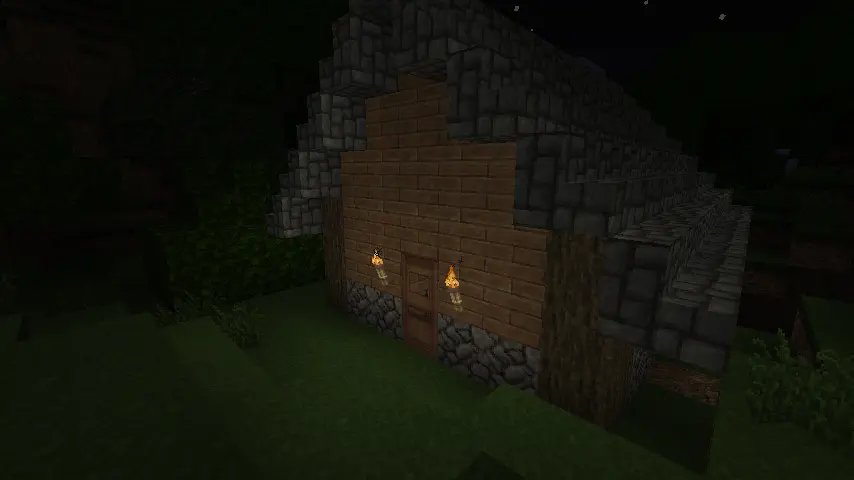
This texture pack was originally created by 4J Studios for the legacy console editions of the games. I extracted this from the texture files for the Xbox 360 edition and ported most of the textures (excluding console-exclusive GUI textures I’d have to make from scratch). This pack is soley for early release and beta versions of the game. If you want a modern port for the current version, the people behind Legacy4J maintain a port of the modern bedrock version with recreations of the missing GUI textures you can download [here](https://modrinth.com/resourcepack/natural-texture-pack)
### Due to being 32x, this pack needs mods to work (OptiFine, MCPatcher, StationAPI, etc.) on versions 1.5 and older. If they aren’t present, you will encounter issues like this:
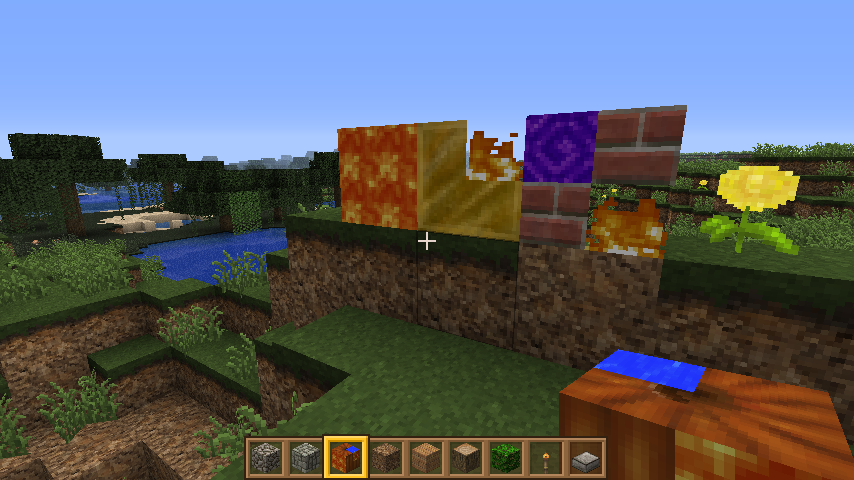
### This is not an issue of the pack. This is a game issue those mods fix.
Circular Logs
# Improve the look of your default Logs with… ↴

## Adds Vanilla-like circulated Logs Top | No Optifine or other Mods needed!
### It’s supports every Version of the game! (even including Legacy ones)
### And day-by-day will have more and more mods supported!
Supported Mods
• [Abundance](https://modrinth.com/mod/abundance) – by exoplanetary
• [Architect’s Palette](https://modrinth.com/mod/architects-palette) – by Jsburg
• [Biomes O’ Plenty](https://modrinth.com/mod/biomes-o-plenty) – by Forstride & Adubbz
• [The Aether](https://modrinth.com/mod/aether) – by Oz-Payn
• Vanilla Minecraft – by Mojang
• [Wilder Wild](https://modrinth.com/mod/wilder-wild) – by FrozenBlock
BuildCraft
BuildCraft – the all-encompassing transport/mining/building/power mod of the pre-1.6 era. Originally created by SpaceToad, it has received contributions from the who’s who of notable modders and is now maintained by AlexIIL.
Source code for really old versions is available here: https://sourceforge.net/projects/buildcraft/
Not all versions are features as part of this project! Some are available in modular form only, as part of the projects below. For this and licensing information, refer to the table below:
| Versions | License | Packaging |
| – | – | – |
| 1.4.1 ~ 1.5_01.3 | Public domain (1) | Non-modular only |
| 1.5_01.4 | Public domain (1) | Modular only |
| 1.6.5.1 ~ 2.2.4 | Unclear (2) | Modular only |
| 2.2.5 ~ 2.2.14 | MMPLv1 (3) | Modular only |
| 3.0.0 ~ 3.1.5 | MMPLv1 (3) | Modular only |
| 3.2.0 ~ 6.4.x, 7.0.0 | MMPLv1 | Non-modular only |
| 7.0.1 ~ 7.1.x, 7.2.x | MMPLv1 | Both |
| 7.99.0 ~ 7.99.4 | MMPLv1 + MPLv2 (4) | Non-modular only |
| 7.99.5 ~ 7.99.19 | MMPLv1 + MPLv2 (4) | Both |
| 7.99.20 onwards | MMPLv1 + MPLv2 (4) | Both (5) |
* (MMPLv1) – [Minecraft Mod Public License](https://raw.githubusercontent.com/BuildCraft/BuildCraft/refs/heads/8.0.x-1.12.2/LICENSE)
* (MPLv2) – [Mozilla Public License Version 2.0](https://www.mozilla.org/en-US/MPL/2.0/)
* (1) – Retroactively re-licensed by SpaceToad in 2016.
* (2) – Mostly public domain as per (1), but include contributions by hawkye and plashal whose licensing status is unknown.
* (3) – These may also be mostly public domain, however the source code history for these versions is lost.
* (4) – All licenses listed apply.
* (5) – All versions after 7.99.20 include the compat module inside the `all` file
This project is the non-modular, or “combined” version of BuildCraft, with every module *except* Compat. If you want to download only specific modules then you’ll need to go to these module projects:
* [Core](https://modrinth.com/mod/buildcraft-core) containing the wrench, gears, wooden engine, and a few other things that the other modules make use of. You always need this!
* [Builders](https://modrinth.com/mod/buildcraft-builders) has the Architect Table, Builder, Filler, and a few related things for building in-world.
* [Energy](https://modrinth.com/mod/buildcraft-energy) has Oil and Fuel, as well as Stirling and Combustion engines.
* [Factory](https://modrinth.com/mod/buildcraft-factory) containing the pump, tank, mining well, autoworkbench, etc.
* [Transport](https://modrinth.com/mod/buildcraft-transport) containing pipes!
* [Silicon](https://modrinth.com/mod/buildcraft-silicon) contains logic gates, a laser system and laser tables to make more advanced items.
* [Robotics](https://modrinth.com/mod/buildcraft-robotics) contains robots!
The following modules are separate from BuildCraft itself before 7.99.20, and as such serve the role of add-ons:
* [Compat](https://modrinth.com/mod/buildcraft-compat) for enhanced compatibility with other mods.
There’s also a separate [Lib](https://modrinth.com/mod/buildcraft-lib) module, containing only code used by the rest of buildcraft. You only need to download it if another mod requires it but you don’t have Core/All.
Blinding Pumpkin Overlay
You ever wanted to completely blind your foes with a curse of binding pumpkin? Then this is the resource pack for you!
Should work for every version.
It just makes the pumpkin overlay completely black, thats it.
[Alternative Download [PlanetMinecraft]](https://www.planetminecraft.com/texture-pack/blinding-pumpkin-overlay)
Black Hole Moon
# 
Thanks for checking out Black Hole Moon! This Resource Pack will change the boring moon to a Black Hole. Great to prank your friends, or just to change the moon to something else.
## FAQ
### Does this require any external mods?
Nope. This Resource Pack does not need any external mods for it to function properly.
### Can you put this pack on CurseForge?
I do not plan to put this pack on CurseForge, and probably never will.
### On some versions of Minecraft it either says “The pack is too new” or “The pack is too old”
On these versions “supported_formats” in pack.mcmeta was not introduced yet, because of that it looks at “pack_format” and says on the lines of “Pack format 5? (pack format for 1.15.2) That is old. This pack must not work on me anymore” even though the pack supports that version. Best you can do is just ignore it and enable the pack anyway, do the same if it says “pack is too new”.
### Did you make the Pixel Art yourself?
Yes! and you are free to use it on whatever project your working on. Credit would be appreciated, but its not mandatory, just dont copy the Resource Pack outright and publish it claiming its your own.
BeTPA
A somewhat simple TPA (Teleport Request) plugin for Minecraft Beta (most versions), with way too many features! Probably supports other versions too…
Feel free to customize the messages to your liking, as well as adjust the request time limit.
| Commands | Description | Permission* |
|———————|—————————————————————————–|————-|
| `tpa ` | Sends a teleport request to a player | tpa.request |
| `tpaccept [player]` | Accepts a teleport request from one or more players (if none are specified) | tpa.answer |
| `tpadeny [player]` | Denies a teleport request from one or more players (if none are specified) | tpa.answer |
| `tpareload` | Reloads the plugin | tpa.reload |
> ⚠️ The permissions are, by default, disabled (except for the /tpareload command). Enable them in the config.
**Minimum Java required:** 8
Beta+
A simple texture pack to enhanced your beta world.
## Features
– Outlined ores
– Dark GUI
– Old cobblestone & Old Mossy cobblestone
– Newer developer art dispenser, mob spawner and, Coco **Beans**
– Wool from 1.12
– Translucent Pumpkin (b1.8+)
and more to come in the future
Message me on discord for whatever @ Minix#4977
## What’s “New beta+?”
New beta+ was created to be used for version beta 1.8 and beta 1.9
Beta+ is for “old school” beta 1.0 – 1.7.3
Bedwars Ultimate
This Resource Pack focuses on Bedwars and PvP Textures, like tiny Swords or some simple Block Textures.
Tools and Weapons:
25
Blocks:
128
Items:
11
Armor and Equipment:
21
Coming soon: Item Textures 🙂
Bare Bones Moon Fix
it bothered me that the Bare Bones pack didnt have the same moon texture as the trailers. so I fixed that
Backport Everything

**Backport Everything** attempts to convert modern Minecraft into older versions!
If you want to see what older versions look like with new textures, _this is the pack for you_. Test them out on older versions for a laugh, play with updated textures for servers that aren’t at the latest version, or start a world in beta or alpha with a weird updated look.
Currently updated for **1.21.11 textures**, this pack aims to bring modern versions to older ones. Currently, the pack **supports versions 1.20.1 and older**, dating back to the first version in 2009 with the pre-classic build rd-132211, which features only grass and cobblestone.
There are other packs available, such as [MC New Textures](https://modrinth.com/resourcepack/mc-new-textures), [Modernity](https://modrinth.com/resourcepack/modernity) and [Modern Textures](https://modrinth.com/resourcepack/modern-textures), but I find that they either miss out some textures (e.g. leather armour, fast leaves) or don’t support the beta and alpha versions.
A couple of the things that this pack supports:
– Backported 1.21.11 textures to all versions (OptiFine, MCPatcher or equivalent required for some textures)
– New redstone repeater, comparator & torch (1.20.1 to 1.8)
– HD ghast texture from 1.21.6 (1.20.1 to 1.6.1)
– HD Minecraft logo (1.20.1 to b1.8)
– Unique spawn egg textures (1.20.1 to 1.8, OptiFine required before 1.13)
– Wolf colour variants (1.20.1 to 1.8, OptiFine/Entity Texture Features required)
– Bush texture (1.20.1 to 1.8)
– Cold & warm cow, pig & chickens (1.20.1 to 1.8, OptiFine/ETF required)
– Tall & short dry grass textures (1.20.1 to 1.8)
– [The Aether](https://modrinth.com/mod/aether) (b1.7.3 & 1.2.5) and [Aether on Station API](https://modrinth.com/mod/aether-stapi) (b1.7.3)
A few things this pack doesn’t support at the moment:
– New music released after 1.21.1, check out [Tunes : Backport](https://modrinth.com/resourcepack/tunes-backport) by wasabliss. I’d add it, but the zip file size would be huge.
– [Horse](https://modrinth.com/resourcepack/horse-backport), [vex](https://modrinth.com/resourcepack/vex-backport), [bat](https://modrinth.com/resourcepack/bat-backport) & [zombie piglin](https://modrinth.com/resourcepack/zombie-piglin-backport) model backports, see Scutoel’s packs linked. These models require OptiFine and break textures on vanilla versions. I’m not adding them because that would make OptiFine a dependency.
– Bogged models, see [Bogged Backport](https://modrinth.com/resourcepack/bogged-backport) by realllyrandommann. Not added for the same reason as above.
– [Leaf litter](https://modrinth.com/resourcepack/leaf-litter-backport) and [wildflowers](https://modrinth.com/resourcepack/wildflowers-backport), see ludo_silver_’s packs linked. Not added, as they are a little janky since they don’t work as a standalone block, but they are an alternative grass texture.
**For 1.5.2 and older, texture packs are not one-click install on Modrinth unlike resource packs, you’ll need to install them to your instance (which you may need to create), click the three dots to the right of the start button on the specific instance screen, click ‘Open folder’, and move the Backport Everything zip file from the ‘resourcepacks’ folder to the ‘texturepacks’ folder.**
**Texture packs are not supported natively before Alpha v1.2.2**, but earlier versions can have their textures swapped out using a jar mod. I don’t _really_ know why you’d want to play those versions, but it’s funny to see them working with the latest textures. **If you need help installing versions that don’t support texture packs natively, please check the bottom of this page for a guide.**
Just a note, rd-20090515 kept crashing for me on launch, and so I can’t test it. But since it’s just 13 textures, you won’t be missing much if you can’t run it yourself.
This was a fun little project, but there are **probably a few texture issues here and there** from the conversion. If you notice any problems and are willing to let me know, please email [[email protected]](mailto:[email protected]), and I’ll address the issue.
OptiFine 1.7.2 and newer [can be found here](https://optifine.net/downloads). For archived versions of OptiFine, MCPatcher, and additional files, [click here to access my GitHub archive](https://github.com/backporteverything/Backport-Everything/tree/main/Supplementary%20Files). If you have any other suggestions for mods, feel free to email me.
### License
All original content is licensed under [CC BY-SA 4.0](https://creativecommons.org/licenses/by-sa/4.0/).
Vanilla Minecraft assets are © Mojang Studios and are not included under CC BY-SA 4.0.
Select assets from Qwuiblington’s [actually correct new default texture backport](https://www.curseforge.com/minecraft/texture-packs/actually-correct-1-14-texture-backport) are included under Public Domain.
OptiFine Custom Entity Model (.jem) files sourced from the pack: [Farm Animals Backport](https://modrinth.com/resourcepack/spring-to-life-textures-backport), included with permission from SirJumpy8772.
### How to add textures to versions older than Alpha v1.2.2
To add textures to old versions that don’t support texture packs, you’ll need to add them as a jar mod using [Prism Launcher](https://prismlauncher.org/) or [MultiMC](https://multimc.org/). They’re pretty much the same, but Prism Launcher has fancy extra features.
Unfortunately, Modrinth does not currently support jar mods for older versions.
1. Download the ZIP file for the version of Minecraft you want to change. You’ll need it for later.
2. Download and install either [Prism Launcher](https://prismlauncher.org/) or [MultiMC](https://multimc.org/); take your pick.
3. Open either Prism or MultiMC, log in to your Microsoft account and then click the ‘Add Instance’ button in the top-right corner.
4. In the ‘Custom’ (Prism) or ‘Vanilla’ (MultiMC) section, on the right-hand side, tick the checkboxes for ‘Betas’ and ‘Alphas’ in the filter list.
5. Scroll down to the version you want to play, select it and click the OK button in the bottom-right.
6. Once you’ve clicked OK, an icon will appear for the version you selected. Right-click the icon, then click ‘Edit…’ (Prism) or ‘Edit Instance’ (MultiMC).
7. Go to the ‘Version’ tab if you’re on Prism Launcher.
8. Once you’re on the version tab, you should see a list of actions on the right-hand side. Click the ‘Add to Minecraft.jar’ button.
9. A new window should appear, locate the Backport Everything file, select it and open it.
10. The jar mod should now be installed. You can then launch Minecraft, and the new textures should work!