shea’s simple Totem x bare bones
# shea’s simple Totem x bare bones
## what does this pack does
### it takes Totems and cleans it up
This pack does not include any bare bones textures
**Bare Bones is required for the intended look**
disclaimer if you use this pack make sure to place this pack above bare Bones in your resource pack list for it to use its own instead of bare bones
i recomend using other shader and resource packs like [bliss](https://github.com/X0nk/Bliss-Shader) to improve looks but that is optional
**you can showcase this if you want just dont redistrabute it**
RRDiscordBridge
# Retro-Release Discord Bridge
[](https://modrinth.com/plugin/RRDiscordBridge)
[](https://rrdiscordbridge.nostalgica.net/javadocs)
[](https://discord.gg/k2wGKEaCRA)
Discord bridge/relay plugin that [supports old Minecraft versions and server software](#tested-versions) (Beta 1.4-Release 1.21.1)
For config info, check out [this page](https://rrdiscordbridge.nostalgica.net/javadocs/me/dexrn/rrdiscordbridge/config/Settings.html#field-summary).
Download: https://modrinth.com/plugin/rrdiscordbridge
When reading the source code, you may notice that the projects have odd names, this is to make the source look slightly cleaner.
See [versions.md](https://github.com/DexrnZacAttack/RRDiscordBridge/tree/master/versions.md) for more info.
## Features
– Message Relay
– [Version support](#supported-versions)
– Broadcasting (/dcbroadcast)
– Server Stats from Discord (/about)
– Relays the following to Discord (configurable)
– Player Join
– Player Leave
– Player Kick
– Player Death
– Player Chat
– Player Advancements/Achievements
– Contains advancement description (if applicable) and link to wiki page
– Server Start
– Plugin Reload
– Server Stop
– /say
– /me
– [~~Server Console (if configured)~~](https://github.com/DexrnZacAttack/RRDiscordBridge/issues/12)
– Relays the following information from Discord (configurable)
– Channel message
– User join (if the relay channel is also the system messages channel)
– Server boost (if the relay channel is also the system messages channel)
– Thread creation
– Message pin
– Poll created/ended (with results)
– Slash commands used
– User app used (also activities)
– Message forwarded (probably not complete)
– Extensions (configurable)
– **Extra info available in-game by typing `/rdbext help`**.
– Built-in extensions:
– Waypoint embed (Waypoints)
– Allows for Xaero’s Minimap and JourneyMap/VoxelMap waypoints to be embedded in the relay channel.
– **[See config options](https://rrdiscordbridge.nostalgica.net/javadocs/me/dexrn/rrdiscordbridge/extensions/options/WaypointExtensionOptions.html#field-summary)**
– Operator Chat (OpChat)
– Allows for communicating between ops and optionally a (likely private) discord channel.
– Inspired by MCGalaxy’s OPChat feature.
– Syntax: ##
– **[See config options](https://rrdiscordbridge.nostalgica.net/javadocs/me/dexrn/rrdiscordbridge/extensions/options/OpChatExtensionOptions.html#field-summary)**
– ### For development info, see [the example repo](https://github.com/Nostalgica-Reverie/RRDiscordBridgeExampleExtension)
– Customizable [color palette](https://rrdiscordbridge.nostalgica.net/javadocs/me/dexrn/rrdiscordbridge/config/ColorPalette.html#field-summary) for messages sent to Discord
## Supported versions
### CraftBukkit (and forks)
– [X] [UberBukkit](https://github.com/Moresteck/uberbukkit)
– [X] b1.2_01-b1.3_01 (int. `bukkitCake` | Made for Bukkit Build 33)
– Missing many features, as build 33 was missing many events.
– No commands
– [X] b1.4-r1.0 (int. `bukkitCookie`)
– [X] [Project Poseidon](https://github.com/retromcorg/Project-Poseidon)
– [X] 1.1-1.2.5 (int. `bukkitFlat`)
– [X] 1.3.1-1.7.8 (int. `bukkitEmerald`)
– [X] 1.7.9-1.11.2 (int. `bukkitRealms`)
– [X] 1.12-1.19.1 (int. `bukkitColor`)
– [X] 1.19.2-Latest (int. `bukkitVex`)
### Fabric
– [ ] 1.14.4
– [ ] 1.15.2
– [X] 1.16.4-1.18.2
– [X] 1.19
– [X] 1.19.1-1.19.2
– [X] 1.19.3-1.20.1
– [X] 1.20.2
– [X] 1.20.3-1.20.5
– [X] 1.20.5-1.21.8
– [X] 1.21.9-Latest
### NeoForge
– [X] 1.20.2-1.20.4
– `neoforge.mods.toml` was unused until 1.20.5
– [X] 1.20.5-1.21.8
– [X] 1.21.9-Latest
### Forge
– [ ] 1.1-1.20
– [X] 1.20.1
– [X] 1.20.2
– [X] 1.20.3-1.20.5
– [X] 1.20.6-1.21.5
– [X] 1.21.6-1.21.8
– [X] 1.21.9-Latest
### Ornithe
– Coming soon (hopefully)
## Credits
– [placeholder.co](https://placeholder.co)
– Used for waypoint badges
– [MCHeads](https://www.mc-heads.net/)
– Used for player head avatar
– [p0t4t0sandwich](https://github.com/p0t4t0sandwich)
– Was very helpful in helping me set up gradle and helped me through every issue I had
Red Creepers
Are you tired of not seeing a creeper in the middle of a grass field? Just use this pack for more contrast between the creeper and the blocks around it.
– This [version](https://modrinth.com/resourcepack/red-creepers/version/1.0.0) is for [Fresh Animations](https://modrinth.com/project/50dA9Sha) and is not suitable for Vanilla Minecraft.
– This [version](https://modrinth.com/resourcepack/red-creepers/version/1.0.1) is for Vanilla Minecraft and is not suitable for [Fresh Animations](https://modrinth.com/project/50dA9Sha).
🗿QuiltGoSlightlyFasterLol🗿
Replaces KnotClassDelegate.getRawClassByteArray with a version that uses libdeflate so it goes slightly faster lmao.
Supported platforms:
* aarch64-linux-gnu
* aarch64-macos-none
* i386-linux-gnu
* i386-windows-gnu
* powerpc64le-linux-gnu
* x86_64-linux-gnu
* x86_64-macos-none
* x86_64-windows-gnu
QuiltedCraft
## Welcome to QuiltedCraft
Quilted Craft is a project that I’ve been working on for the better part of a week, following a recent obsession with the so-called “golden age” Minecraft versions. I have since become enamoured with the pack, and I use it on a daily basis, so I figured why not upload it for anyone to try!
I have it listed as a beta version right now, because I haven’t quite finished everything. There are a few mobs that still need to be done, a handful of blocks I haven’t gotten around to, and it’ll probably be a project I pick away at whenever I get the chance to.
### Version Support
As mentioned, this is a **golden age** Minecraft texturepack, **NOT** a resourcepack. Yes, those are different things. I have it listed for version a1.2.6 (i.e. the last version of Minecraft alpha), but I’ve also tested it on some early beta versions and it works fine.
If I am feeling really ambitious, I may some day port this to a modern minecraft version, but that’s a lot of work for one person, so don’t hold your breath.
### How To Use
For those of you unfamiliar, using texturepacks on the old versions of Minecraft is just as easy as on modern versions. You simply download the .zip file, open up your game, navigate to “Mods and Texture Packs” on the main menu, and then click “Open texture pack folder”. Then you just drag and drop the zip into there and it should pop up.
**Worth Noting**: If you have modern versions of minecraft installed, do not place this in the resourcepacks folder in your .minecraft filepath. **It will not work as a resource pack**. There have been a lot of changes to how resourcepacks are handled since the olden days, hence the difference in naming, but I just want to make absolutely clear that _this is not intended to work with modern versions of the game._
### Enjoy!
I hope anyone who finds this enjoys it. It’s kinda tough to find old Minecraft texturepacks these days, and I wanted one to use myself, so I made it! Anyone who wants to use this texturepack in Youtube videos is of course free to do so, and a shoutout would be cool if you feel like it. Overall, I just hope that it is an interesting change of pace for those who enjoy the golden age era of the game.
PvP particles
Most particles will have a yellow background. The only exceptions are :
– Strength (orange)
– Slowness (greenish)
– Regeneration (red)
– Weakness (dark greenish)
– Luck (green)
– Fire resistance (orange)
– Water breathing (green)
– Swiftness (flashy green)
– Poison (greenish)
Every other potion effect are yellow tints.
Prominence Of Minecraft
Prominence of Minecraft is a vanilla enhanced based texture pack aimed to improve upon the base game minecraft textures and add more detail and vibrance to the textures without losing the Minecraft-like quality to them.
Mostly every texture is changed in some way, shape, or form. Blocks like Glowstone see an overhaul with the kind of yellowish green that is inbetween the stones is replaced with brown color to make the glowstone look more appealing to the eye. Other textures like Netherrack have been taken from a very good texture pack, Cave Tweaks. I loved the netherrack texture from that and decided to improve it and make it fit into my texture pack.
One of the things I love most is the HUD and GUI, The HUD has some more detailed heart, armor and even bubble icons. The Hotbar is also different from vanilla with an enhanced look. One last thing to note about the GUI is that all interactable screens (i.e. inventory, crafting, furnace, etc.) resemble the old MCPE versions of the game with the yellow ish gray tint to them.
Some other things to point out are the use of the Original Cow, Spider, and Zombie Pigman textures which from the regular Minecraft textures today, I would personally say they look better. Also to note, the zombie and player (Steve) texture have been changed into some new clothing, sporting some kahki like pants and pink t-shirt (also the zombie has steve hair because I don’t like how the zombie is like bald but has the same hair as steve but its like the same color as the zombie’s skin.)
There is so much that I have changed and redid that its too much to cover here, I suggest you check this texture pack out yourself and see how you like it!
Pride GUI Legacy: Light Mode
# PrideGUI Legacy: Light Mode
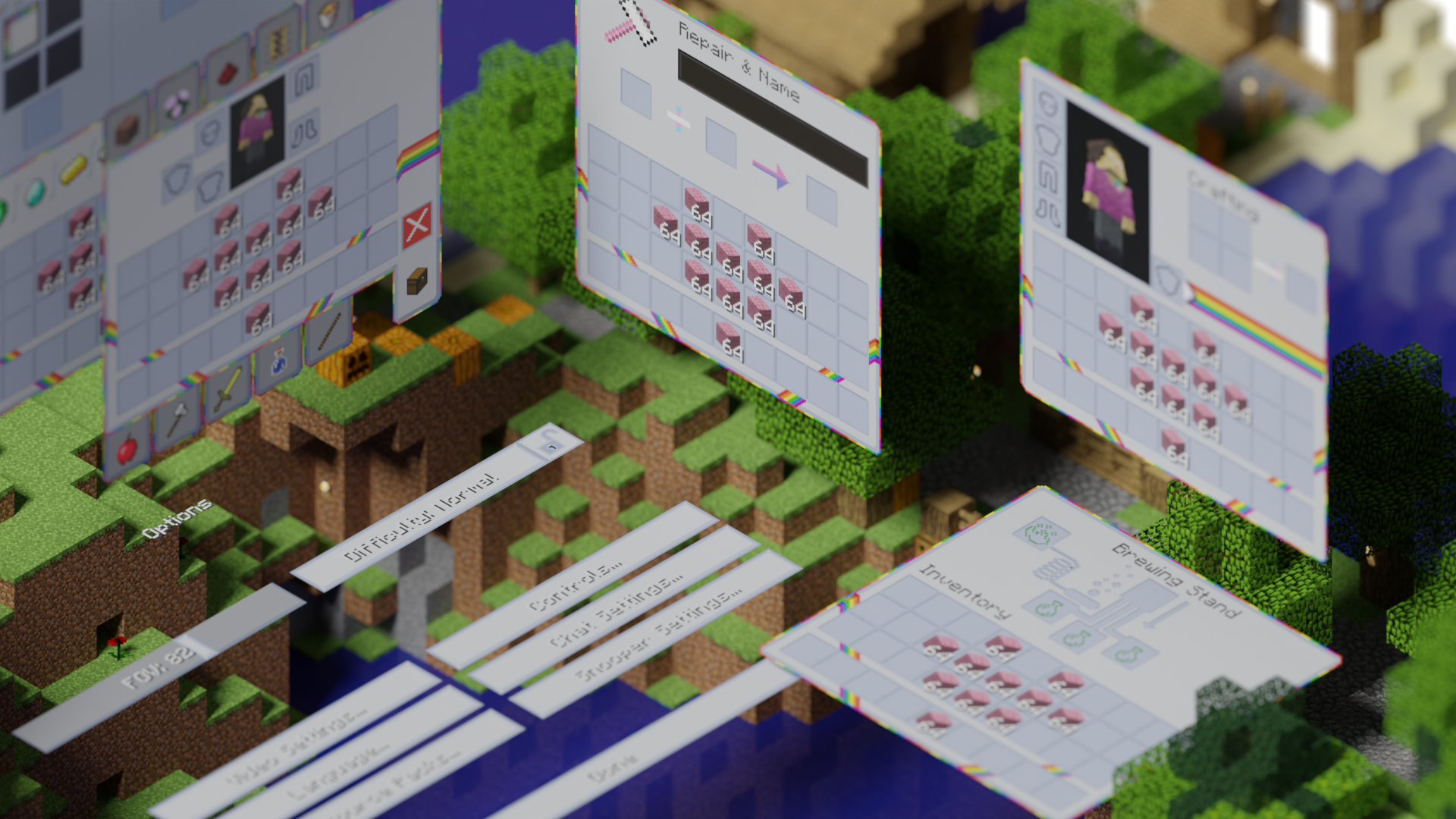
This is the official legacy version of Pride GUI, an official addon to [PridePack](https://modrinth.com/project/pridepack-legacy) that changes the Minecraft GUI to have a light theme, with LGBT details.
It is available for many versions, starting from beta 1.7.3.
## Donate
You can support the developers of Pridecraft Studios by donating on Patreon
[](https://donate.pridecraft.gay)
## Who
Pridecraft Studios is a collective modding group that creates resource packs, tooling, and our flagship mod, Joy. Our team of volunteers strive to create prideful content for the diverse Minecraft community <3. We target both Java and Bedrock editions, hoping to create memorable experiences for you.
**Dark Mode**
[](https://modrinth.com/project/pridegui) [](https://git.pridecraft.gay/pridegui)
**Dark Mode (Legacy)**
[](https://modrinth.com/project/pridegui-legacy) [](https://git.pridecraft.gay/pridegui/branches)
**Light Mode**
[](https://modrinth.com/project/pridegui-light) [](https://git.pridecraft.gay/pridegui/tree/light/main)
**Light Mode (Legacy)**
[](https://modrinth.com/project/pridegui-legacy-light) [](https://git.pridecraft.gay/pridegui/branches)
## Socials
[](https://discord.pridecraft.gay)
[](https://tech.lgbt/@pridecraft)
[](https://youtube.com/@pridecraftstudios)
[](https://bsky.app/profile/pridecraft.gay)
[](https://instagram.com/pridecraftstudios)
Pride GUI Legacy
# PrideGUI Legacy
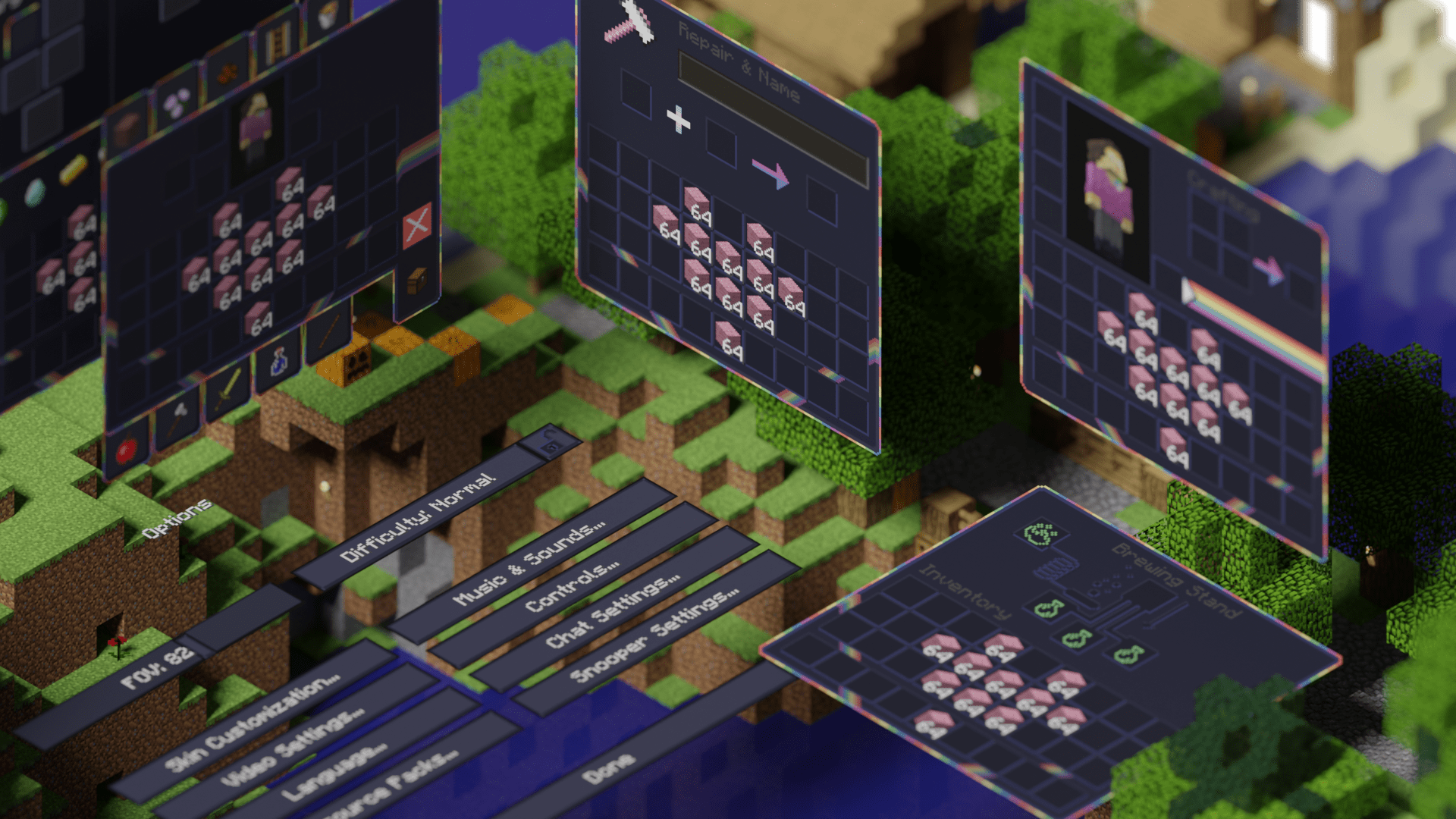
This is the official legacy version of Pride GUI, an official addon to [PridePack](https://modrinth.com/project/pridepack-legacy) that changes the Minecraft GUI to have a dark theme, with LGBT details.
It is available for many versions, starting from beta 1.7.3.
## Donate
You can support the developers of Pridecraft Studios by donating on Patreon
[](https://donate.pridecraft.gay)
## Who
Pridecraft Studios is a collective modding group that creates resource packs, tooling, and our flagship mod, Joy. Our team of volunteers strive to create prideful content for the diverse Minecraft community <3. We target both Java and Bedrock editions, hoping to create memorable experiences for you.
**Dark Mode**
[](https://modrinth.com/project/pridegui) [](https://git.pridecraft.gay/pridegui)
**Dark Mode (Legacy)**
[](https://modrinth.com/project/pridegui-legacy) [](https://git.pridecraft.gay/pridegui/branches)
**Light Mode**
[](https://modrinth.com/project/pridegui-light) [](https://git.pridecraft.gay/pridegui/tree/light/main)
**Light Mode (Legacy)**
[](https://modrinth.com/project/pridegui-legacy-light) [](https://git.pridecraft.gay/pridegui/branches)
## Socials
[](https://discord.pridecraft.gay)
[](https://tech.lgbt/@pridecraft)
[](https://youtube.com/@pridecraftstudios)
[](https://x.com/pridecraftreal)
[](https://bsky.app/profile/pridecraft.gay)
[](https://threads.net/@pridecraftstudios) [](https://instagram.com/pridecraftstudios)
(Old MC) Commands
# (Old MC) Commands
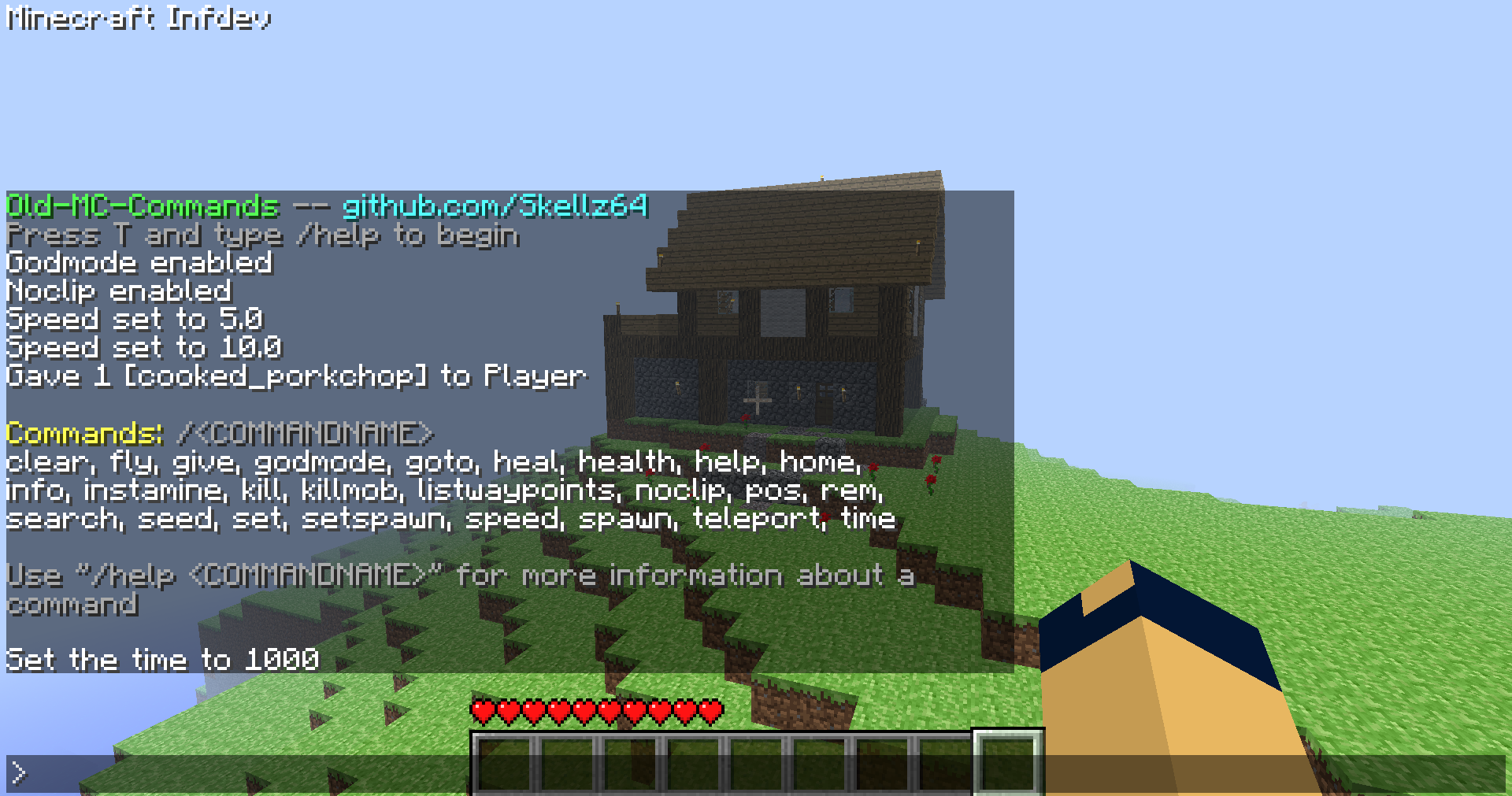
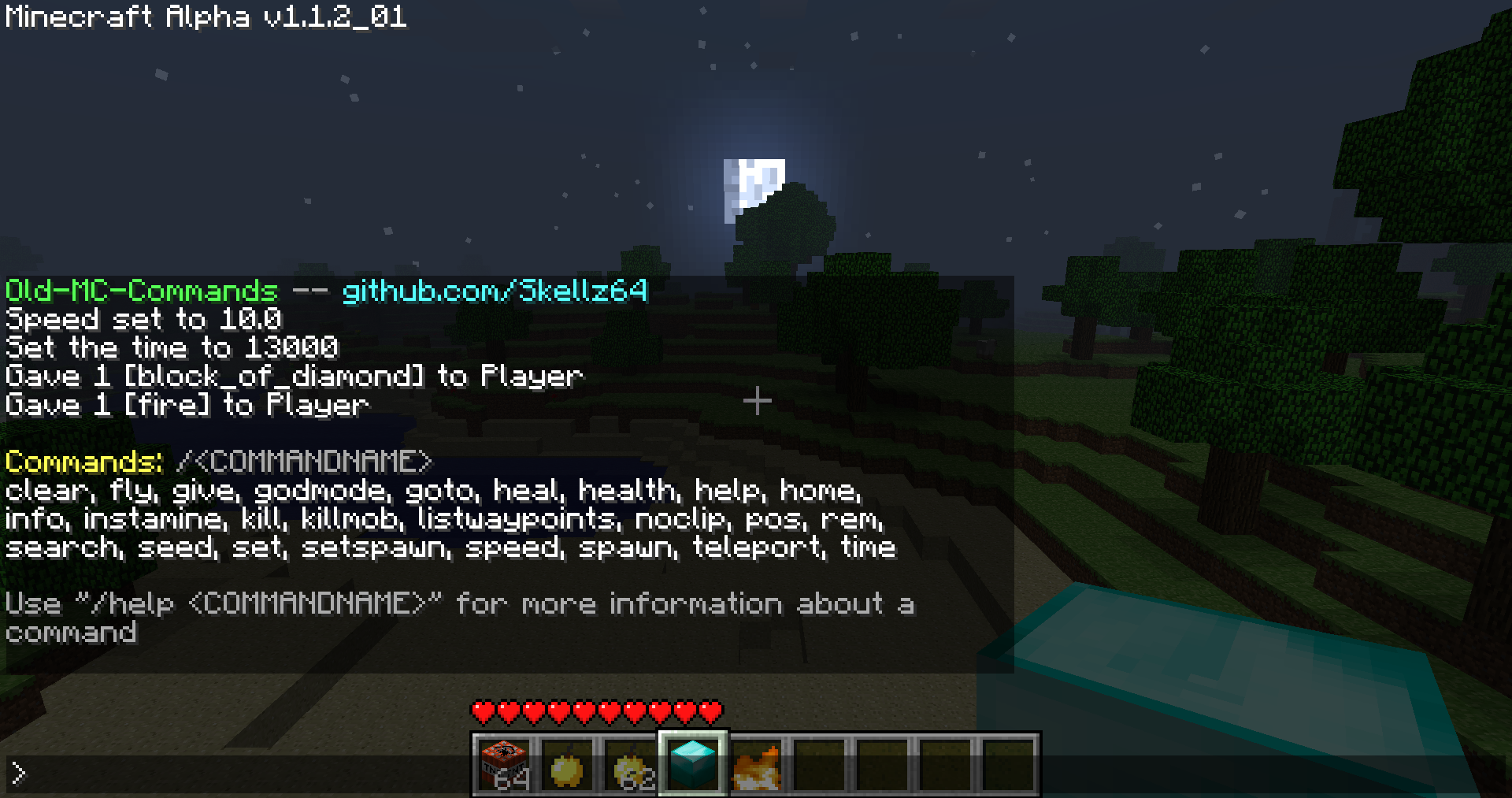
This is a jarmod that allows you to use commands (single player) for Minecraft Alpha and Infdev.
Works for Minecraft inf-20100630-1, a1.0.9, a1.1.2_01, and a1.2.6 **(see downloads)**
**will expand to versions ranging from inf-227 to a1.2.6, after addressing various bugs and recommendations**
# Features
**This mod is inspired by Mojang and Simo_415.** SPC by Simo_415 first begins development in a1.2.6, so my goal was to add commands in versions prior to this.
The interface leans more towards SPC, due to the nature of older versions. The differences are intended to make the mod easier to use for both old and new players.
**Commands: clear, fly, give, godmode, goto, heal, health, help, home, info, instamine, kill, killmob, listwaypoints, noclip, pos, rem, search, seed, set, setspawn, speed, spawn, teleport, time**
**A full video showcasing the mod:**
You can activate the interface by pressing T and typing / followed by a command name. Using /help will help you to get started. From there, /help "COMMANDNAME" will give you a command’s description, syntax, and an example. The UI should be able to guide you, without needing to look elsewhere for how to use the mod. Especially for players that have used any kind of MC command-line in the past.
That being said, I know of many highly specific details/problems I can’t summarize in a reasonable manner. I will address these as they are presented to me, so please report to my [github page](https://github.com/Skellz64/Old-MC-Commands) for issues…
**If you need commands past a1.2.6 use SPC, archived downloads for it are on [MCArchive](https://mcarchive.net/mods/singleplayercommands?gvsn=)**
# Compatibility
**The compatibility of the mod varies with different versions.**
**a1.0.17_04 to a1.2.6:** Activate the chat in single player with command functionality *(Minecraft.java, EntityPlayerSP.java, NEW CommandClass.java)*
**pre-a1.0.17_04:** A bug in world generation breaks the teleport command, nbt saving is a private variable and missing features *(Add World.java, and NBTTagCompound.java)*
**pre-a1.0.10:** Multiplayer features like chat, fonts, and gui either don’t exist or are early in development *(Add Gui.java, GuiChat.java, GuiIngame.java, and FontRenderer.java)*
The total class count is 9 in the oldest version, inf-630. My advice for users is to not use multiple mods unless you know what you are doing.
# Downloads
The current 4 versions were picked due to their popularity, stability, and relevance to my mod as a whole.
**The downloads are named “Commands_v1.0_” followed by “(version name)” ensure that you are downloading the correct version**
**Note: ONLY read my zip file names for versions.** To upload mods, Modrinth requires default MC launcher versions and mod loader fields to be filled out. *(ex: inf-630 is shown to support inf-618 and risugami’s modloader, which is false)*
# How to install
Install [Java 8](https://www.oracle.com/java/technologies/javase/javase8-archive-downloads.html), most mods for older versions use Java 8. So it’s always a good idea to have it.
This is a jarmod so I recommend using **MultiMC**, **PrismLauncher**, or **Betacraft v2.0**. These launchers allow for jarmods to be easily setup older versions. They all have similar ways of adding jarmods… Edit your instance in said launcher, locate the add to Minecraft.jar button, and open the downloaded commands.zip.
For **Betacraft v1.0**, it’s more complex as you will need to jarmod the version yourself. You will also need a zip explorer (I like [WinRAR](https://www.win-rar.com/download.html?&L=0) for Windows)
– after downloading commands.zip for prefered version, search and open your hidden %appdata% folder
– open the .betacraft folder
– open the versions folder
– highlight and right click on the version.jar you are using (ex: a1.1.2_01.jar)
– after right click, you can choose Open with WinRAR
– with the jar open, also open the downloaded commands.zip
– move the .class files (and folders) from the commands.zip to the opened version.jar.
– Press OK , done! You successfully replaced game files with my modded game files!
– Relaunch Betacraft v1.0 and play
# Extras
Any issues can be addressed on [Github](https://github.com/Skellz64/Old-MC-Commands).
You can also join the [Modification Station](https://discord.gg/8Qky5XY) discord server, a community dedicated to modding old minecraft!
Once you join the server, you can find my mod post by clicking on the mods tab and searching commands. This is where you can contact me directly with questions *(i.e. doesn’t warrant a ticket on Github)*
**Thanks for downloading my mod!**