Pride GUI Legacy
# PrideGUI Legacy
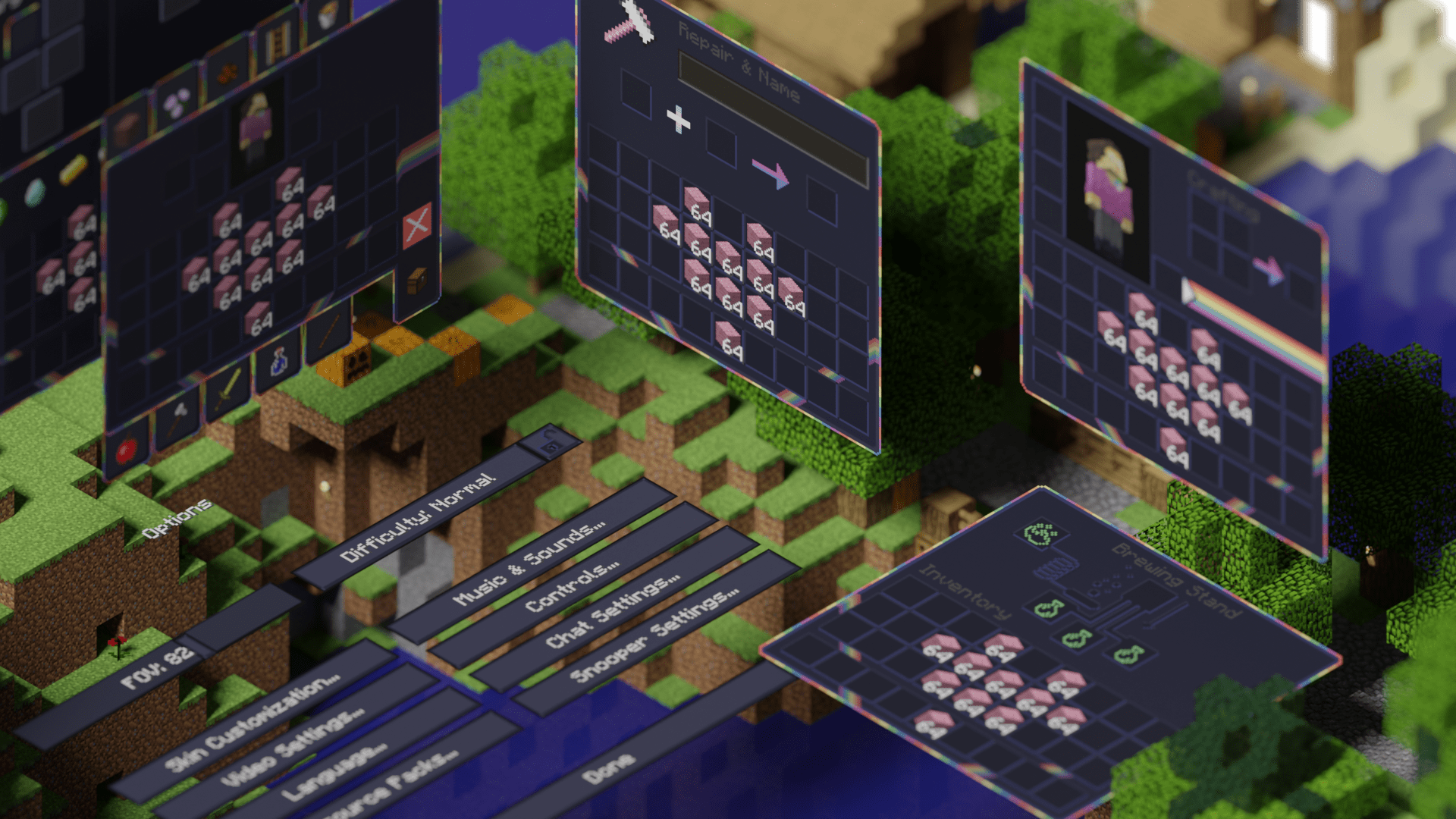
This is the official legacy version of Pride GUI, an official addon to [PridePack](https://modrinth.com/project/pridepack-legacy) that changes the Minecraft GUI to have a dark theme, with LGBT details.
It is available for many versions, starting from beta 1.7.3.
## Donate
You can support the developers of Pridecraft Studios by donating on Patreon
[](https://donate.pridecraft.gay)
## Who
Pridecraft Studios is a collective modding group that creates resource packs, tooling, and our flagship mod, Joy. Our team of volunteers strive to create prideful content for the diverse Minecraft community <3. We target both Java and Bedrock editions, hoping to create memorable experiences for you.
**Dark Mode**
[](https://modrinth.com/project/pridegui) [](https://git.pridecraft.gay/pridegui)
**Dark Mode (Legacy)**
[](https://modrinth.com/project/pridegui-legacy) [](https://git.pridecraft.gay/pridegui/branches)
**Light Mode**
[](https://modrinth.com/project/pridegui-light) [](https://git.pridecraft.gay/pridegui/tree/light/main)
**Light Mode (Legacy)**
[](https://modrinth.com/project/pridegui-legacy-light) [](https://git.pridecraft.gay/pridegui/branches)
## Socials
[](https://discord.pridecraft.gay)
[](https://tech.lgbt/@pridecraft)
[](https://youtube.com/@pridecraftstudios)
[](https://x.com/pridecraftreal)
[](https://bsky.app/profile/pridecraft.gay)
[](https://threads.net/@pridecraftstudios) [](https://instagram.com/pridecraftstudios)
(Old MC) Commands
# (Old MC) Commands
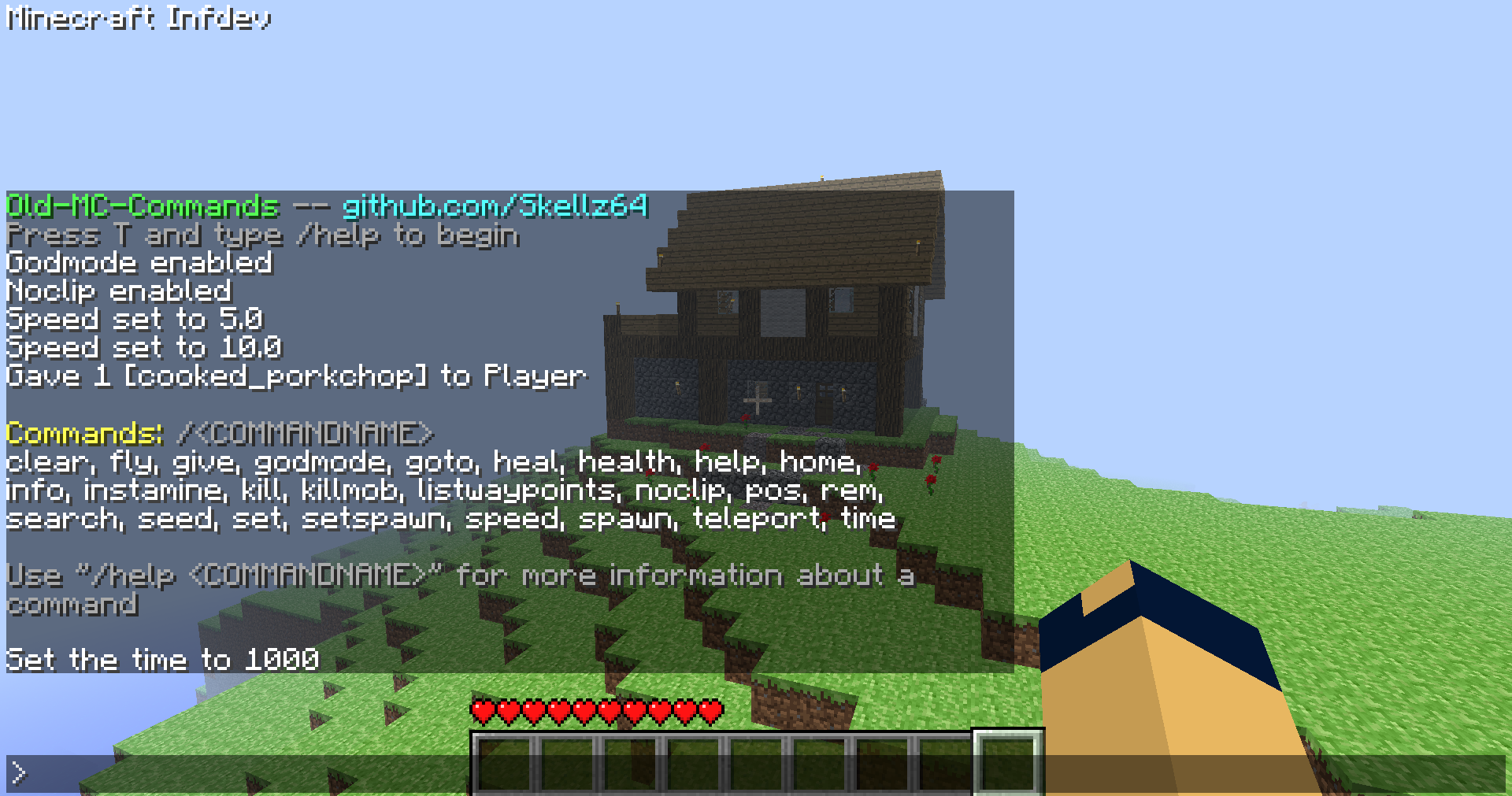
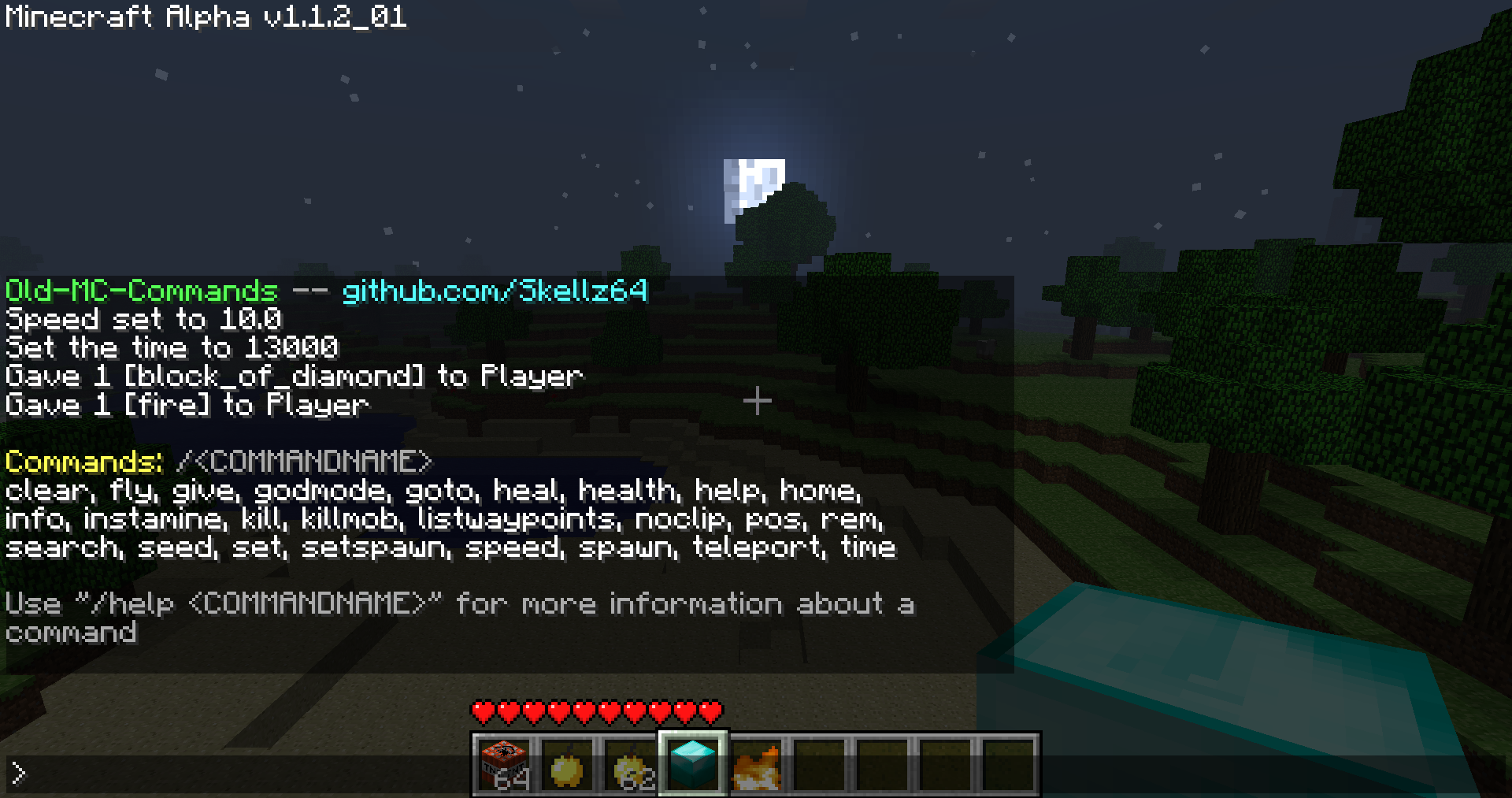
This is a jarmod that allows you to use commands (single player) for Minecraft Alpha and Infdev.
Works for Minecraft inf-20100630-1, a1.0.9, a1.1.2_01, and a1.2.6 **(see downloads)**
**will expand to versions ranging from inf-227 to a1.2.6, after addressing various bugs and recommendations**
# Features
**This mod is inspired by Mojang and Simo_415.** SPC by Simo_415 first begins development in a1.2.6, so my goal was to add commands in versions prior to this.
The interface leans more towards SPC, due to the nature of older versions. The differences are intended to make the mod easier to use for both old and new players.
**Commands: clear, fly, give, godmode, goto, heal, health, help, home, info, instamine, kill, killmob, listwaypoints, noclip, pos, rem, search, seed, set, setspawn, speed, spawn, teleport, time**
**A full video showcasing the mod:**
You can activate the interface by pressing T and typing / followed by a command name. Using /help will help you to get started. From there, /help "COMMANDNAME" will give you a command’s description, syntax, and an example. The UI should be able to guide you, without needing to look elsewhere for how to use the mod. Especially for players that have used any kind of MC command-line in the past.
That being said, I know of many highly specific details/problems I can’t summarize in a reasonable manner. I will address these as they are presented to me, so please report to my [github page](https://github.com/Skellz64/Old-MC-Commands) for issues…
**If you need commands past a1.2.6 use SPC, archived downloads for it are on [MCArchive](https://mcarchive.net/mods/singleplayercommands?gvsn=)**
# Compatibility
**The compatibility of the mod varies with different versions.**
**a1.0.17_04 to a1.2.6:** Activate the chat in single player with command functionality *(Minecraft.java, EntityPlayerSP.java, NEW CommandClass.java)*
**pre-a1.0.17_04:** A bug in world generation breaks the teleport command, nbt saving is a private variable and missing features *(Add World.java, and NBTTagCompound.java)*
**pre-a1.0.10:** Multiplayer features like chat, fonts, and gui either don’t exist or are early in development *(Add Gui.java, GuiChat.java, GuiIngame.java, and FontRenderer.java)*
The total class count is 9 in the oldest version, inf-630. My advice for users is to not use multiple mods unless you know what you are doing.
# Downloads
The current 4 versions were picked due to their popularity, stability, and relevance to my mod as a whole.
**The downloads are named “Commands_v1.0_” followed by “(version name)” ensure that you are downloading the correct version**
**Note: ONLY read my zip file names for versions.** To upload mods, Modrinth requires default MC launcher versions and mod loader fields to be filled out. *(ex: inf-630 is shown to support inf-618 and risugami’s modloader, which is false)*
# How to install
Install [Java 8](https://www.oracle.com/java/technologies/javase/javase8-archive-downloads.html), most mods for older versions use Java 8. So it’s always a good idea to have it.
This is a jarmod so I recommend using **MultiMC**, **PrismLauncher**, or **Betacraft v2.0**. These launchers allow for jarmods to be easily setup older versions. They all have similar ways of adding jarmods… Edit your instance in said launcher, locate the add to Minecraft.jar button, and open the downloaded commands.zip.
For **Betacraft v1.0**, it’s more complex as you will need to jarmod the version yourself. You will also need a zip explorer (I like [WinRAR](https://www.win-rar.com/download.html?&L=0) for Windows)
– after downloading commands.zip for prefered version, search and open your hidden %appdata% folder
– open the .betacraft folder
– open the versions folder
– highlight and right click on the version.jar you are using (ex: a1.1.2_01.jar)
– after right click, you can choose Open with WinRAR
– with the jar open, also open the downloaded commands.zip
– move the .class files (and folders) from the commands.zip to the opened version.jar.
– Press OK , done! You successfully replaced game files with my modded game files!
– Relaunch Betacraft v1.0 and play
# Extras
Any issues can be addressed on [Github](https://github.com/Skellz64/Old-MC-Commands).
You can also join the [Modification Station](https://discord.gg/8Qky5XY) discord server, a community dedicated to modding old minecraft!
Once you join the server, you can find my mod post by clicking on the mods tab and searching commands. This is where you can contact me directly with questions *(i.e. doesn’t warrant a ticket on Github)*
**Thanks for downloading my mod!**
PC Gamer Cow
It is the cow from the PC Gamer Demo! But with a slightly modified logo and it uses the new cow texture from 1.14
Ornithe Standard Libraries
Ornithe Standard Libraries (OSL) provides tools for modding with Ornithe.
## Libraries
### Core API
The Core API provides common utilities used by other modules, such as an events system and registries.
### Branding API
This module patches the title screen with mod loader information in 16w05a and below, emulating what you would see in 16w05b and above. This is done by parsing the run args for the `versionType` option.
### Config API
The Config API provides a framework for building and storing mod configs.
### Entrypoints API
The Entrypoints API allows mod developers to submit entrypoints that are called before the game is initialized.
### Keybinds API
The keybinds API provides events for registering keybinds.
### Lifecycle Events API
The Lifecycle Events API provides events to track the lifecycle of the Minecraft client and server.
### Networking API
The Networking API provides a framework for client-server communication.
### Resource Loader API
The Resource Loader API allows mods to load their own resources into the game.
## Information for developers
Our [Ploceus gradle plugin](https://github.com/OrnitheMC/ploceus) provides helper methods for adding OSL dependencies to your projects:
“`groovy
dependencies {
…
ploceus.dependOsl(‘0.17.1’)
}
“`
You can also add dependencies on individual OSL modules:
“`groovy
dependencies {
…
ploceus.dependOslModule(‘0.17.1’, ‘core’)
ploceus.dependOslModule(‘0.17.1’, ‘entrypoints’)
}
“`
NyaPack 🤺 Minimal Armor

**NyaPack 🦋** is a resource pack that lets you show off your skin even more!
Armor becomes more like **accessories** or **situational outfits**, helping you customize your appearance without covering your character entirely.
✨ **Features:**
– **Emissives** and **animations** support in newer versions, all **without additional mods**
– Support for the new **copper armor**
– Versions **without emissive** and **without animations** are also available for those who prefer a simpler look
Give your skin more personality and style! 🦋
No Hotbar
No Hotbar, Pretty Straight forward. Idk what this can be useful for tbh. Maybe clear hotbar? Just use idk.
Q&A:
Can I put this in my modpack?
Sure but add the credit. Or just paste the text below
No Hotbar
By Zacgamingpro1234
https://modrinth.com/resourcepack/nohotbar
If you want to redistribute to other websites just tell me and I’ll try.
You can use it in your modpack.
You can use it for personal use.
If you want to modify this resource you must ask me.
No GUI
No GUI,
A texture pack made for fun and as a challenge. Can you beat it? If you want you can record ur self beating it and I will put you below as a verified winner! (you should dm me on discord for notice)
Also the GUI isn’t black its invisible so you can see stuff under your current tab or something.
Q&A:
Can I put this in my modpack?
Sure but add the credit. Or just paste the text below
No GUI
By Zacgamingpro1234
https://modrinth.com/resourcepack/nogui
You can redistribute this resource but you may not monetize from it.
You can use it for personal use.
legacy-lwjgl3
# legacy-lwjgl3
A mod for [Ornithe](https://ornithemc.net) to run old versions of Minecraft with [lwjgl3](https://github.com/lwjgl/lwjgl3).
### Usage
#### Configuration
The mod offers optional configuration options via system properties or
environment variables.
A list of currently available options is provided below.
| Property Name | Environment variable name | Description |
|———————————————–|———————————————–|——————————————————|
| `legacy_lwjgl3.use_sdl` | `LEGACY_LWJGL3_USE_SDL` | Use SDL3 instead of GLFW for window & input handling |
### Unstable versions (CI)
Bleeding-Edge versions can be found in the Actions tab of the repository: https://github.com/moehreag/legacy-lwjgl3/actions.
### Building
This mod can be built using `./gradlew build`, jars can then be found at `build/libs/`.
### Dev
This mod is published to AxolotlClient’s maven, located at https://maven.axolotlclient.com.
“`kotlin
repositories {
maven(“https://maven.axolotlclient.com/releases”)
//maven(“https://maven.axolotlclient.com/snapshots”) // for unstable versions, optional
}
dependencies {
modImplementation(“io.github.moehreag:legacy-lwjgl3:“)
}
“`
### IME support for other mods
This mod provides IME preedit overlay functionality. If other mods provide independent text field implementations
they will not integrate with IME by default. legacy-lwjgl3 publishes a small API package which allows other mods
to integrate with IME input.
“`kotlin
repositories {
maven(“https://maven.axolotlclient.com/releases”)
//maven(“https://maven.axolotlclient.com/snapshots”) // for unstable versions, optional
}
dependencies {
modImplementation(“io.github.moehreag.legacy-lwjgl3:api:“)
}
“`
### Contributing
Contributions are welcome! Due to the project structure and its goal to support as many Minecraft versions
as possible working with the codebase is not trivial. If you are interested in contributing and need
assistance please join our [Discord server](https://discord.gg/BfmYmPw3Ts)
### Credits
This mod is forked from the version for legacyfabric authored by Zarzelcow: https://github.com/Zarzelcow/legacy-lwjgl3.
It is based on [lwjgl2](https://github.com/lwjgl/lwjgl) and a forge mod by gudenau: https://github.com/gudenau/MC-LWJGL3.
Additional Credits to:
– The OrnitheMC Project: https://ornithemc.net
– Contributors to this mod, especially: [Floweynt](https://github.com/Floweynt)
Mod Remapping API
# Mod Remapping API
Remaps non-Fabric mods made for a different environment (by default obfuscated) to the current runtime mappings.
Provides hooks to expand the remapping process from other mods.
This mod doesn’t depend on a specific Minecraft version and should work on any version that Fabric Loader can launch.
### Mods depending on this API:
– [Fabricated Legacy Forge](https://modrinth.com/mod/fabricated-forge)
– [Apron](https://modrinth.com/mod/Apron)
– [Fabricated-Rift](https://modrinth.com/mod/fabricated-rift)
## Credits
### Most of the original code of the mod remapper
– paulevsGitch’s mod BetaLoader
Mod Loading Screen
# Mod Loading Screen
An advanced loading screen with the loading progress of mods. It works on all Minecraft versions, as it doesn’t even require Minecraft. Its only requirement is Fabric Loader 0.12.0 or later or Quilt Loader (specific versions of Quilt support are unknown). Do note that if you run this mod on a game other than Minecraft, the loading screen may not close itself.
## Agent
Mod Loading Screen provides a Java agent, which allows opening the loading screen before even the mod loader itself loads. This feature is primarily targeted at modpack developers who want to make a seamless loading experience. The agent can be used by passing `-javaagent:mod-loading-screen-1.0.4.jar` as a JVM argument. If the agent is used, the loading screen should *not* be installed as a mod.
## API
To depend on the API, use the Modrinth Maven. The API should be JiJed, and doing so will not include Mod Loading Screen inside your mod (it will only include the API, which is only a few kilobytes). The API is designed to have both forwards and backwards binary compatibility with future Mod Loading Screen versions. An API is provided for checking which API calls will return stubs and which ones are real.
“`gradle
repositories {
exclusiveContent {
forRepository {
maven {
name = “Modrinth”
url = “https://api.modrinth.com/maven”
}
}
filter {
includeGroup(“maven.modrinth”)
}
}
}
dependencies {
// implementation, not modImplementation!
include(implementation(“maven.modrinth:mod-loading-screen:1.0.4:api”))
}
“`
The API has two top-level classes: `LoadingScreenApi` and `AvailableFeatures`. Full javadocs are available for both classes.