Ultimate Smooth FPS Booster
# ⚔️ Smooth PvP Pack
Enhance your PvP experience with smoother visuals and clearer gameplay.
Smooth PvP Pack is a lightweight texture pack designed to improve visibility and reduce visual clutter during combat. It helps players focus better in fights by simplifying effects and keeping the screen clean.
## ✨ Features
– 👁️ Clear and simple visuals for better PvP focus
– ⚡ Reduced unnecessary particles
– 🎯 Improved visibility in combat situations
– 📱 Lightweight and performance-friendly
– 🎮 Smooth gameplay experience
## 🎯 Why use this pack?
This pack is ideal for players who want a cleaner PvP experience without changing the core look of the game. It helps you react faster and play more consistently in battles.
—
🎨 Brand: Own Studio
🛠️ All textures are originally created or modified by Own Studio
—
## ⚡ ZEYRON CLOUD
Premium Game Hosting for Minecraft & Servers
## LINKS
**🌐 Website:**
https://zeyroncloud.com
**💬 DISCORD Server:**
https://discord.gg/QPSJzttKwn
Use code **OWNVERSE10** and get **10% OFF** on your **first month** of hosting!
smooth biome moss
add biome blending to moss block, donesnt work with moss carpet unfortunatly.
/! NEEDS either continuity OR optifine to work as it use theyre CTM feature /!
smoothing also need continuity or optiphine as it was not intentional at firs, i will have to remake the texture in the plain for everyone one day but for now, everything in this pack need continuity or optifine
Smaller Crosshair
Did you ever think: “_Why is the Crosshair so big_” ?. If yes, this Texturepack is the right choice!
It makes the Crosshair 1 pixel smaller and is good if you want to change the size of the crosshair, without changing the GUI Scale.
(works with the Crosshair Indicator Mod)

smaller totem pvp
This pack makes tems and shields smaller, allowing for better PvP performance.
Smaller Crit Particle
This Texturepack makes the Crit Particle smaller. It is perfect for PvP, or if you just want a better vision. If you also don’t like the size of the Crosshair, check out my other Packs!

Small Home
My social networks

—
## Description👀
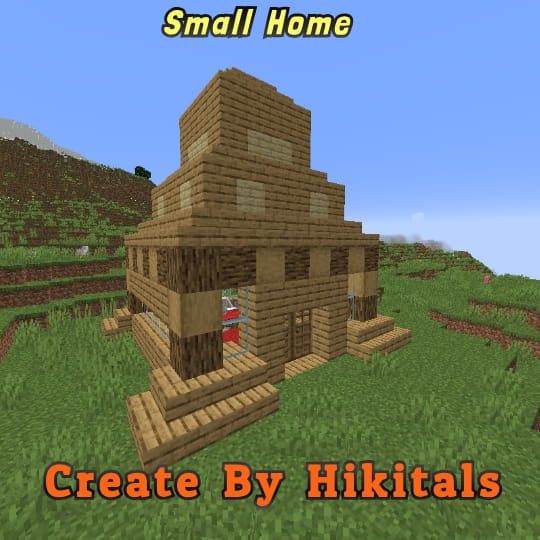
**This datapack adds a new dungeon to your world with a small house where there are a couple of chests of stoves and also beds with dogs**
—
## Useful Сommands🔧
– **Use /locate structure elysianfields:small_home for see dungeon coordinates**
– **Use /place structure elysianfields:small_home for spawn dungeon**
—
Small Tools
🔧 Small Tools Pack
This resource pack combines the best of all my mini-sized tool textures—Small Swords, Small Pickaxes, and Small Axes—into one clean, lightweight bundle. Perfect for PvP or anyone who prefers a less cluttered screen, each tool is carefully downsized to give you more visibility without losing that vanilla Minecraft feel.
✅ Features:
✔️ Smaller tools models for every tier (wood, stone, iron, gold, diamond, netherite)
✔️ Compact sword , pickaxe and axe textures for all materials
✔️ Faithful to the vanilla Minecraft art style
✔️ Ideal for PvP, survival, or aesthetic gameplay
📦 Compatibility:
Minecraft Java Edition
No mods required
Slim Totem Players
This Resource Pack make so your Totem is your Player Skin, but in Slim. SkinMC already made this, but only for Wide Skins. You only need to extract the zip file, when go into the new Folder and go to the textures, when change the Alex skin to your skin AND do not forgot to change the name of your skin in the Folder to:”totem_of_undying.png” Here is the Totem maker from SkinMC. MCTools has also a newer Generator with Slim and Bedrock Support, click here.
SKT’s Old Baby Eyes

### 
### 📖⠄Description
new baby textures with old eyes
### 🖼️⠄Ingame Screenshot
### 
### 
### 👋🏼⠄Follow Me

SimpleGUI
 |  |  | 

You can buy monthy subscription to get faster updates on KO-FI
****
#
**About**
This pack is all about making UI as clean and minimalistic as posible. If you ever played on Bare Bones before you probably know what im aiming for (btw those two packs work so well toghether). For now im testing bottom viev point like shading, let me know how you like this. Before instaling you can check gallery for ingame screenshots. I will try making updates ATLEAST once a month. No mods required (for now).
#
**FAQ**
> **How to install resourcepacks?**
– There are a lot of tutorial out there on youtube, that will explain this better than me, but just download something from trusted sites like modrinth or curseforge, then drag this file to folder that will pop out if you click “Open Pack Folder” in Minecraft.
> **Can i use some textures from SimpleGUI in my pack**
– As long as its not distributed, yes you can. If you want to publish it, just ask me before doing it.
> **Will you add compatibility with mods?**
– Yes, im going to do this with popular mods in form of add-on to this pack.
#
**Lists**
Containers
1. Anvil
2. Beacon
3. Blast Furnace
4. Brewing Stand
5. Cartography Table
6. Crafter
7. Crafting Table
8. Dispenser/Dropper
9. Enchanting Table
10. Furnance
11. Gamemode Switcher
12. Chests
13. Grindstone
14. Hopper
15. Horse
16. Donkey
17. LLama
18. Inventory
19. Creative Inv.
20. Loom
21. Nautilus
22. Shulker Box
23. Smithing
24. Smoker
25. Stonecutter
26. Villager
Plans for future
1. Adding something to crafting table, loom, villager texture so it wouldn’t be so plane (V)
2. Listening to your feedback
3. Redoing reciepe book
4. Fixing inconsistencies
###
 SimpleGUI
by NickShoof