Zilibobka (Зилибобка) Totem of Undying
– EN: **Zilibobka** is a popular Russian meme, which was also stimulated during post-ironic memes in 2017 on the social network VKontakte and Tiktok. Texture pack replaces Totem of Immortality with this meme
– RU: **Zilibobka (Зилибобка)** – популярный российский мем который также был зафоршен во времена постироничных мемов в 2017 году в соц сети ВКонтакте и Тиктоке. Текстурпак заменяет тотем бессмертия на этот мем
[ALL RESOURCEPACKS COLLECTION: MEMES + STREAMERS](https://modrinth.com/collection/sfDcDGAi)
Fast Noise
[Keep Android Open | Contact Regulators to stop Google’s lockdown of Android](https://keepandroidopen.org/)
Fast Noise is a modern optimization mod to improve world generation times. I regularly update the mod to latest minecraft versions, bring improvements to the mod, and provide stable releases.
**Does the mod change world generation?** The mod maintains **vanilla parity**, including with any datapacks. Do keep in mind, [Vanilla non-determinism](https://bugs.mojang.com/browse/MC-55596).
**Can I use custom worldgen mods with this?** Yes, I try my best to maintain mod compatibility, and only modify safe code. Specific optimizations that may affect mod compatibility are disabled by default.
**Forge / Neoforge?** Versions for minecraft 1.19.x – 1.21.8 are compatible with sinytra connector.
[](https://codeberg.org/ZenXArch/FastNoise) [](https://www.curseforge.com/minecraft/mc-mods/zfastnoise) [](https://modrinth.com/mod/zfastnoise) [](https://ko-fi.com/I2I31KW58I)
## How does this mod work?
Fast noise optimizes storing block and biome data into chunks for the duration of worldgen.
Technical Details
Fast noise replaces populateNoise,populateBiomes in NoiseChunkGenerator and surfaceBuilder in SurfaceBuilder.
Fast noise optimizes world generation by making several strong assumptions about how world generation works. By replacing vanilla’s generic and debug code for world storage with faster, more packed calculations, fast noise achieves faster throughput.
Some key methods used to achieve that are, **reducing allocations**, **avoiding palette resizing**, **delaying/packing block counting**, **precalculating data**,
**caching block state information** and more.
## How fast is it?
About 10-18% improvement to overall worldgen in overworld in 1.21.11 on latest versions.
Much higher improvement in nether, end
Here is a [Jmh Benchmark Software](https://codeberg.org/ZenXArch/FastNoise/src/branch/performance/perf/src/main/java/org/codeberg/zenxarch/fastnoise/PerfTest.java).
Chunky benchmark
12 threads w/ mod
“`
[12:39:32] [Server thread/INFO]: [Chunky] Task finished for minecraft:overworld. Processed: 16641 chunks (100.00%), Total time: 0:01:37
“`
W/o mod
“`
[12:43:08] [Server thread/INFO]: [Chunky] Task finished for minecraft:overworld. Processed: 16641 chunks (100.00%), Total time: 0:01:47
“`
4 threads w/ mod
“`
[12:56:23] [Server thread/INFO]: [Chunky] Task finished for minecraft:overworld. Processed: 9409 chunks (100.00%), Total time: 0:01:10
“`
W/o mod
“`
[13:01:11] [Server thread/INFO]: [Chunky] Task finished for minecraft:overworld. Processed: 9409 chunks (100.00%), Total time: 0:01:23
“`
With higher distance
W/o mod
“`
[13:11:01] [Server thread/INFO]: [Chunky] Task finished for minecraft:overworld. Processed: 19881 chunks (100.00%), Total time: 0:02:43
“`
W/ mod
“`
[13:16:03] [Server thread/INFO]: [Chunky] Task finished for minecraft:overworld. Processed: 19881 chunks (100.00%), Total time: 0:02:21
“`
Jmh Benchmark
“`
Mods used: Fast Noise 1.0.15+26.1 on 26.1 snapshot-6
ChunkPos: -16,-16 -> 16,16
End ChunkPos: 112,112 -> 144,144
Chunks: 1089
Mods used: (c2me)
With mod:
Benchmark (worldName) Mode Cnt Score Error Units
BiomesBenchmark.biomegen end avgt 5 11.786 ± 0.168 ms/op
BiomesBenchmark.biomegen nether avgt 5 174.833 ± 1.166 ms/op
BiomesBenchmark.biomegen overworld avgt 5 2401.797 ± 31.629 ms/op
NoiseBenchmark.noisegen end avgt 5 3052.242 ± 12.358 ms/op
NoiseBenchmark.noisegen nether avgt 5 1039.086 ± 6.467 ms/op
NoiseBenchmark.noisegen overworld avgt 5 8441.811 ± 41.396 ms/op
With only c2me:
Benchmark (worldName) Mode Cnt Score Error Units
BiomesBenchmark.biomegen end avgt 5 26.058 ± 0.245 ms/op
BiomesBenchmark.biomegen nether avgt 5 185.957 ± 2.203 ms/op
BiomesBenchmark.biomegen overworld avgt 5 2464.937 ± 29.007 ms/op
NoiseBenchmark.noisegen end avgt 5 3925.059 ± 14.292 ms/op
NoiseBenchmark.noisegen nether avgt 5 1920.705 ± 9.864 ms/op
NoiseBenchmark.noisegen overworld avgt 5 11552.674 ± 54.112 ms/op
Vanilla:
Benchmark (worldName) Mode Cnt Score Error Units
BiomesBenchmark.biomegen end avgt 5 27.051 ± 0.118 ms/op
BiomesBenchmark.biomegen nether avgt 5 239.634 ± 1.702 ms/op
BiomesBenchmark.biomegen overworld avgt 5 4589.322 ± 80.331 ms/op
NoiseBenchmark.noisegen end avgt 5 4477.113 ± 36.133 ms/op
NoiseBenchmark.noisegen nether avgt 5 1951.438 ± 5.748 ms/op
NoiseBenchmark.noisegen overworld avgt 5 14249.612 ± 57.388 ms/op
Vanilla:
Benchmark (worldName) Mode Cnt Score Error Units
SurfaceBenchmark.surface overworld avgt 5 5982.828 ± 17.992 ms/op
SurfaceBenchmark.surface nether avgt 5 2677.115 ± 9.293 ms/op
SurfaceBenchmark.surface end avgt 5 924.604 ± 5.376 ms/op
With Mod:
Benchmark (worldName) Mode Cnt Score Error Units
SurfaceBenchmark.surface overworld avgt 5 4820.672 ± 24.669 ms/op
SurfaceBenchmark.surface nether avgt 5 1914.289 ± 644.099 ms/op
SurfaceBenchmark.surface end avgt 5 0.014 ± 0.003 ms/op
Speedup
Overworld: Biome: 1.026x Noise: 1.368x Surface: 1.241x
Nether: Biome: 1.063x Noise: 1.847x Surface: 1.398x
End: Biome: 2.21x Noise: 1.285x Surface: 66357x
“`
The benchmarks may have some inaccuracies.
## Socials
[](https://discord.gg/RFSmd7debX) [](https://mastodon.social/@ZenXArch) [](https://matrix.to/#/#zenxarchs-modding-server:gitter.im)
## FAQ and Help
Q- What Minecraft versions will the mod be supporting?
A- I’ll try to support the latest minecraft version.
Q- Are backports planned?
A- No backports are planned, current backports were a one time thing.
Q- What other mods/dependencies do I need?
A- No dependencies are required.
Q- Will there be a neoforge version?
A- Yes, a NeoForge variant is planned post 26.1.
Versions for 1.19.x,1.20.x,1.21 – 1.21.8 works with sinytra connector

Q- XYZ mod crashes, or generates incorrectly with Fast Noise?
A- Report the issue on codeberg or my socials.
## Incompatible mods
Moonrise is incompatible, as It changes minecraft internals drastically
Noisium is incompatible, as Fast Noise is intended as a replacement for noisium.
Anti-Xray is incompatible for now, as it needs to put extra data in minecraft block storage, which breaks fastnoise
## Credits
– Stevenplays, for developing noisium mod, I started developing fast noise while trying to port noisium to latest minecraft.
– Ishland, for helping with mod, and modern-yarn and neo-loom
ZenXArch’s Zombie Apocalypse
## Data Driven zombies?
This mod adds data driven zombies since version 0.0.15.
What this means is that the variants of a zombie can be added using datapacks.
“Download the mod on modrinth”
Github link
https://github.com/offbeat-stuff/zombies
How the data driven system works
The mod adds a dynamic registry like for enchantments
Currently the mod adds the following configuration to variants
– lootTableInfo contains a field for spawn armor and loot drop
– events -> 7 event handlers (spawn,tick,death,kill etc.)
– Runs like an enchantment effect when event fires
– BiomePredicate -> what biomes the variant spawns in
– Requirements -> a loot condition for mob to spawn
– attribute (base and modifiers) to add on spawn
– weight (contains weight and quality) -> similiar to loot table entries (uses difficulty)
My plans for additional fields
– texture (would require client side changes) which isn’t plan so I will make a seperate to allow for that to be done in more portable way.
– spawn weight (How much the mob counts towards internal zombie cap) (unlikely)
– attachments to mob ai
What event handlers are there?
– apply status effect to target
– swap positions
– single target
– freeze
– ignite
– spawn effect cloud
– spawn particle effect
– apply status effect
Installation
Just install the main jar alongside smartbrainlib 1.16.7+ and fabric api 0.118+
## What about the apocalypse?
This mod continually spawns zombies around the players in overworld.
Also currently gives small leaping ability to zombies.
There is a seperate difficulty system that takes into account player weapons,armor,food.
And time spent in the world. But has a inverse effect based on time spent in a chunk.
Meaning that if you spent too much time in a chunk (8 hours on easy 35 hours on hard)
that place will no longer be apocalyptic. (I will be adding a gamerule to control this.
Certain things I want to implement over long period:
– Give various abilities to zombies: Like [Eldritch Mobs](https://modrinth.com/mod/eldritch-mobs) (not exactly the same but like)
– Give various intelligence to zombies: jump over gaps (Probably not, its hard to implement), and mob behaviour (grouping around the player) (also hard to implement but could be)
Certain things I want to implement right now:
– Different zombies for different places (drowned for water, zombie piglins for lava, husk for the sun)
– Make use of various creative mode tools (like /ride /tp) to give zombies a edge
– Add mechanics for zombies to escape mob farms
– Make zombies not group together in small spaces
## Didn’t you make a similiar mod ?
Yeah I did [Zombie Apocalypse](https://codeberg.org/ZenXArch/zombie-apocalypse), It was a good experience. This mod is still available as source, so you can use it if you compile the code. (Feel free to use the source code in your own mods.)
## So what went wrong with the old mod ?
Well It was a hassle to maintain. My mistake,I know. The worst thing was config. I had to spend way too much time to write the config code. Also the mod kinda felt not like what it name was.
It didn’t feel like the zombies were very good. So this time I wanna make the zombie low in density and high in damage and abilities. And also not limit myself to some config options.
One of the thing that was kinda wrong the last time. Everything was a config and that made it hard for me to try doing funky that were hard to write config for.
## So No config this time?
Yep, At least for a long time.
But I will be making simple stuff controllable via datapacks.
## So this is a all zombies mod.
Maybe, maybe not. I am open to ideas.
## Will you add client side content?
~~No. (Maybe textures using a seperate client side mod… maybe)~~
Zombie variants will use `{namespace}/textures/entity/zombie/{id}.png` as texture.I won’t be adding any other client side features.
Yggdrasil Proxy
# YggdrasilProxy
When starting the game, the proxy in the device is automatically read to speed up Yggdrasil verification.
It extends Vanilla’s behavior and is more automated.
## Specific implementation
There is a setting in Windows, and its path is: “settings-> network-> proxy-> manual settings”.
YggdrasilProxy automatically reads them from the registry and verifies it, if it works, then use it immediately.
It basically works with network tools like Clash, you don’t need to proxy all traffic across the entire network card, you can easily connect to Yggdrasil Server through the proxy.
When registry data is not read, or is a non-Windows operating system, then YggdrasilProxy falls back to read environment variables (it does not need to be set in the JVM startup parameters, because they are annoying enough), it reads the following environment variables in the system and selects a valid variable to set to Proxy:
– http_proxy
– https_proxy
– no_proxy
## Defect
When the proxy server/tool is shut down, you may need to restart Minecraft.
Looking for a solution if I have time…
## Compatibility
Basically compatible with all operating systems.
Specially optimized for Windows.
## Which ModLoaders are supported?
– Fabric (Support, 1.18+)
– Quilt (Built with Fabric, 1.18+)
– Forge (Support, 1.19+)
– NeoForge (Support, 1.21.4+)
YggdrasilProxy is designed to be available for both Server and Client and is compatible with the most ModLoader and Minecraft versions.
If there is no compatibility, then I have not done it yet. If you’re in a hurry, join my DC server and send your ModLoader as well as Minecraft versions, I’ll be there soon.
## I want to use it in Plugin Server
Unfortunately, plugin servers are usually not compatible with mods, and I’m reluctant to use the Mixin framework to write them on the plugin server.
If you have relevant needs, please use two patches I made specifically for this, you only need to comply with GPL 3.0.
– [Patch 1](https://github.com/404Setup/Sewlia/blob/dev/1.21.4/sewlia-server/minecraft-patches/features/0005-Merge-YggdrasilProxy.patch)
– [Patch 2](https://github.com/404Setup/Sewlia/blob/dev/1.21.4/sewlia-server/paper-patches/features/0006-Merge-YggdrasilProxy.patch)
## For Modpack
If you comply with the license, you can use it freely for Modpack.
Modpacks that redistribute Minecraft game body (i.e. packages that package the entire Minecraft game including Mod files, Config, ShaderPacks, ResourcePacks, Library and launcher into a whole zip file) are not allowed to use this mod.
## License
This work has a restrictive license in addition to the original license to prevent some unexpected behavior,
see [404Setup Public License](https://github.com/404Setup/404Setup/blob/main/LICENSE.md)
X Ray (no cheats)
## X Ray
Mod/Datapack that removes stone and other blocks to keep ores visible. Also works in the nether.
X-Ray is a powerful mod that radically changes the way you explore the world of Minecraft. It allows you to see through ordinary blocks, highlighting valuable resources, structures, and objects.
To use it, you need to take a filled map in any hand.

## Usage
The mod is activated automatically and requires no additional settings. However, if you want to temporarily disable the mod, use the command “`/trigger bizcub.x_ray.t“`. Information about the mod’s current status will then appear in the chat.
## Dependencies
– Fabric loader requires [Fabric API](https://modrinth.com/mod/fabric-api)
X Ray | Spectator xray
# **🕵️♂️ X-Ray for Spectator Mode**
**Enhance your Minecraft Java experience with a lightweight, “one-click by activating spectator” X-ray solution. By simply switching to Spectator Mode, this pack highlights ores and hidden structures, making resource gathering or world-checking a breeze.**
**🚀 How to Use**
For the best results, follow these simple steps:
– Import & Activate: Add the resource pack to your resourcepacks folder and enable it in-game.
– Optimize Visuals: Turn Smooth Lighting: OFF in your Video Settings to make ores glow and stand out against the darkness.
– Enter Spectator Mode:
– Type /gamemode spectator in the chat.
– Pro Tip: Use the shortcut F3 + N to toggle instantly.
–
* 📸 Results
Check out the visibility improvements
# **Results**


📜 Terms of Use
I want you to enjoy this pack, but please respect the following guidelines:
✅ Allowed
* Showcase: Use this pack in your videos or streams (please provide a link to the official download page).
* Personal Use: Feel free to edit the files for your own private use.
❌ Not Allowed
* Monetized Links: Do not redistribute this pack via AdFly, Linkvertise, or similar services.
* Re-uploading: Do not edit and re-share this project as your own.
> [!IMPORTANT]
> Feedback: If you feel the need to leave a low rating, please leave a comment explaining why so I can improve the pack for everyone!
>
❤️ Support the Creator
If you find this tool helpful, consider supporting my work:
Support me on Ko-fi
Would you like me to help you draft a specific “Frequently Asked Questions” section to help reduce common support queries?
Wynn Dark Pack (Wynncraft)
Note at the very top – PLEASE tell me if this thing breaks. Also please tell me if you’re using my resource pack for something or modifying it, it’s not required or anything but it’s cool to know. my discord is `endernon`.
# About
This is a resource pack that
– Makes the game’s GUIs dark purple themed
– Changes some GUI layouts to be more functional
– And also supports some wynntils menus (WIP)
The aim of this pack was to add a missing dark theme to Wynncraft after Rekindled dropped since I hadn’t seen anyone else make one, but now it also includes what I consider to be extremely useful GUI changes, like a better hotbar, and also guis with less clutter and more simplicity.
**NOTE – if some stuff is missing or is in the wrong place (e.g. the coordinates in top right are gone and the class select menu is wonky), press F3+T once to reload all textures. This is due to a bug from ImmediatelyFast.**
**ANOTHER NOTE – You will need to figure out some way of loading this resource pack above the Wynncraft resource pack.**
# Special thanks to
– Brilliantknight (this pack was originally a port of their Stone Tablet pack but has since detached from that)
– zatzou (for helping me with the resource pack crc metadata uncorrupter)
– People on the Wynncraft discord for being top 10 haters in my dms
Wooden and Stone Type Tools
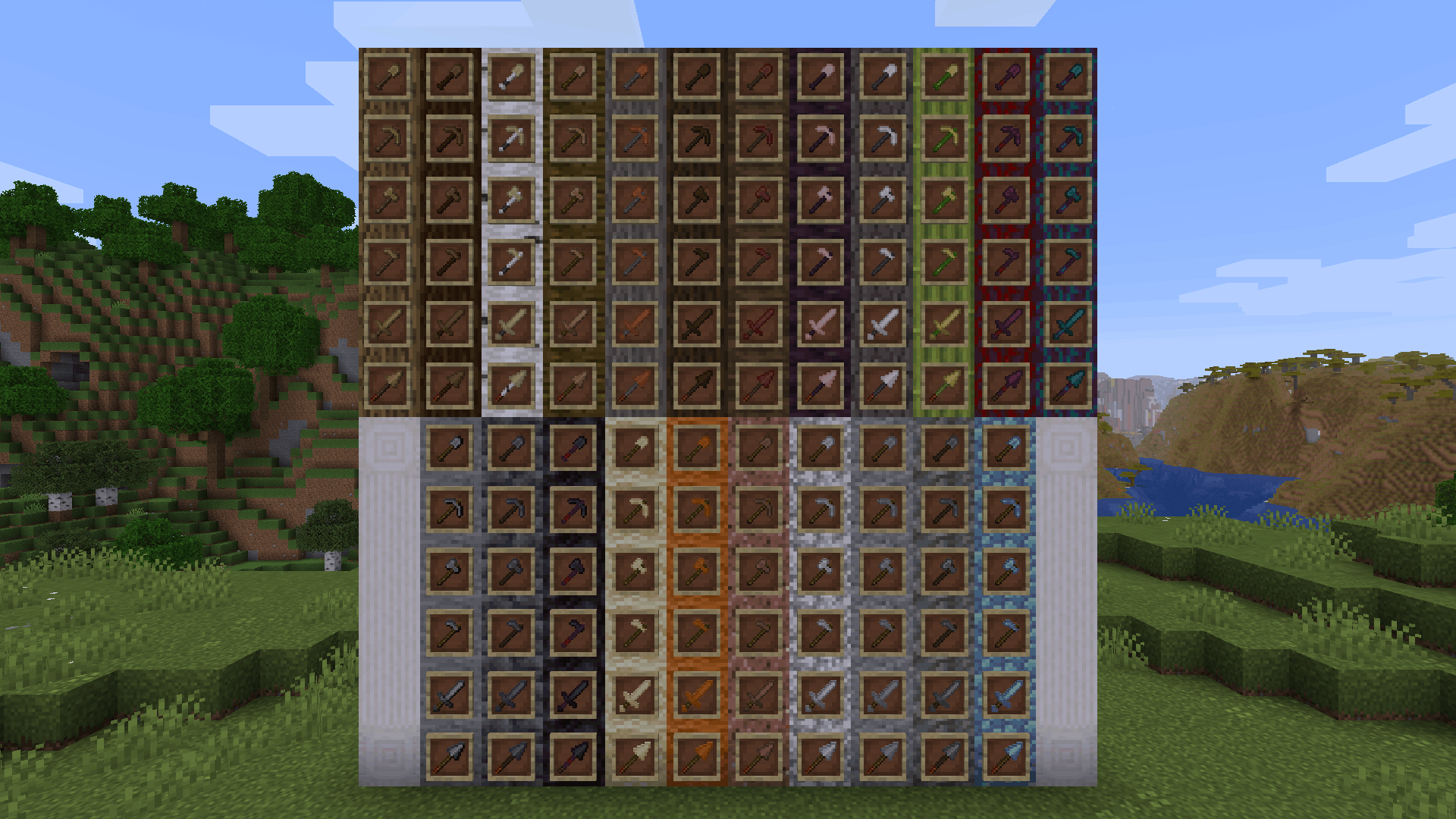
**Wooden and Stone Type Tools** lets you have wooden tools of all wood types and stone tools of many different stone types by renaming then in an anvil.
# Additions and Changes
* Adds many new textures for wooden and stone tools
* Default names for all wooden tools have been changed to “Oak [tool]”
* The default texture for all wooden tools have been changed to appear more oak-ish to reflect this name change
# How to Use
Place a wooden or stone tool inside an anvil and rename it to one of the following:
Wooden Tool Names
* Spruce [tool]
* Birch [tool]
* Jungle [tool]
* Acacia [tool]
* Dark Oak [tool]
* Mangrove [tool]
* Cherry [tool]
* Pale Oak [tool]
* Bamboo [tool]
* Crimson [tool]
* Warped [tool]
Stone Tool Names
* Deepslate [tool]
* Blackstone [tool]
* Sandstone [tool]
* Red Sandstone [tool]
* Granite [tool]
* Diorite [tool]
* Andesite [tool]
* Tuff [tool]
* Prismarine [tool]
Check out the gallery to see examples of each wood and stone type.
# Different Languages!
I saw that the model .json files allowed for a list of different strings to produce the same result, meaning I could add support for different languages. Open the list below to see the 100+ languages besides American English that you can use this resource pack in. If you’d like to correct any translations (because I am *confident* that I botched at least one of these) or provide your own for any languages not on this list, contact me at [email protected] or click [here.](https://crowdin.com/project/minecraft)
Supported Languages
* العربية (Arabic)
* Azərbaycanca (Azerbaijani)
* Boarisch (Bavarian)
* Беларуская кірыліца (Cyrillic Belarusian)
* Biełaruskaja łacinka (Latin Belarusian)
* Български (Bulgarian)
* Brezhoneg (Breton)
* Braobans (Brabantian)
* Català (Catalan)
* Čeština (Czech)
* Чӑвашла (Chuvash)
* Cymraeg (Welsh)
* Dansk (Danish)
* Deitsch (Austrian German)
* Schwiizerdütsch (Swiss German)
* Deutsch (German)
* Ελληνικά (Greek)
* Australian English
* British English
* Canadian English
* New Zealand English
* Pirate Speak
* ɥsᴉꞁᵷuƎ uʍoᗡ ǝpᴉsd∩
* Anglish (Modern English minus loanwords)
* Shakespearean English (Early Modern English)
* Esperanto (Constructed language created by L. L. Zamenhof)
* Español argentino (Argentine Spanish)
* Español chileno (Chilean Spanish)
* Español ecuatoriano (Ecuadorian Spanish)
* Español (European Spanish)
* Español mexicano (Mexican Spanish)
* Español uruguayo (Uruguayan Spanish)
* Español venezolano (Venezuelan Spanish)
* Andalûh (Andalusian)
* Eesti keel (Estonian)
* Euskara (Basque)
* فارسی (Persian)
* Suomi (Finnish)
* Filipino (hulaan ang wika)
* Français canadien (Canadian French)
* Français de Suisse (Swiss French)
* Français (Metropolitan French)
* Furlan (Friulian)
* Gaeilge (Irish)
* Galego (Galician)
* Galo (Gallo)
* Галицка (Halychian)
* ʻŌlelo Hawaiʻi (Hawaiian)
* עִברִית (Hebrew)
* हिंदी (Hindi)
* Høgnorsk (High Norwegian)
* Hrvatski (Croatian)
* Magyar (Hungarian)
* Հայերեն (Armenian)
* Bahasa Indonesia (Indonesian)
* Íslenska (Icelandic)
* Italiano (Italian)
* 日本語 (Japanese)
* la .lojban. (Lojban, constructed language)
* ქართული (Georgian)
* Қазақша (Kazakh)
* 한국어 (Korean)
* Kölsch/Ripoarisch (Kölsch/Ripuarian)
* Kernewek (Cornish)
* Кыргызча (Kyrgyz)
* Latina (Latin)
* Lëtzebuergesch (Luxembourgish)
* LOLCAT
* Lietuvių (Lithuanian)
* Latviešu (Latvian)
* 文言 (Literary Chinese)
* Монгол (Mongolian)
* Bahasa Melayu (Malay, Latin script)
* Malti (Maltese)
* Mēxikatlahtōlli (Nahuatl)
* Vlaams (Flemish Dutch)
* Nederlands (Dutch)
* Norsk nynorsk (Nynorsk Norwegian)
* Norsk bokmål (Bokmål Norwegian)
* Övdalska (Elfdalian)
* Polski (Polish)
* Ngiiwa (Popoloca)
* Português brasileiro (Brazilian Portuguese)
* Português (European Portuguese)
* Cántabru/Montañés (Cantabrian)
* Bahasa Indonesia edjaän lama (Pre-reform spelling Indonesian)
* Quenya (Constructed language created by J. R. R. Tolkien)
* Română (Romanian)
* Русскій дореформенный (Pre-revolutionary Russian)
* Русский (Russian)
* Руснацькый (Rusyn)
* Сахалыы (Yakut)
* Davvisámegiella (Northern Sámi)
* Slovenčina (Slovak)
* Slovenščina (Slovenian)
* Shqip (Albanian)
* Svenska (Swedish)
* Säggs’sch (Upper Saxon German)
* Ślōnski (Silesian)
* ไทย (Thai)
* Tagalog (hulaan ang wika)
* tlhIngan Hol (Klingon, constructed language created by Marc Okrand)
* toki pona (Constructed language created by Sonja Lang)
* Türkçe (Turkish)
* Татарча (Tatar)
* Bats’i k’op (Tzotzil)
* Українська (Ukrainian)
* O’zbekcha (Uzbek)
* Català valencià (Valencian)
* Tiếng Việt (Vietnamese)
* Viossa (Constructed language created by [the conlangs subreddit](https://www.reddit.com/r/conlangs/))
* Võro kiil (Voro)
* 简体中文 (Simplified Chinese)
* 繁體中文香港 (Traditional Chinese, Hong Kong)
* 繁體中文台灣 (Traditional Chinese, Taiwan)
* بهاس ملايو (Jawi Malay)
WingAuth

[
](https://github.com/Elytrium)
# WingAuth
WingAuth is a modern Velocity authentication plugin for offline/hybrid networks.
## How it works
It runs login/register protection before players reach backend servers, using a Limbo-based auth flow.
Designed for server admins who want strong account protection with flexible setup.
## Key features
– Velocity-only architecture (runs the login on a virtual world)
– Session handling and brute-force protection
– Premium/hybrid and Floodgate-compatible scenarios (Bedrock support)
– Configurable messages and behavior
– Database-backed account storage (legacy-compatible migration path)
WI Zoom
# WI Zoom (Wurst-Imperium Zoom)
The WI Zoom Minecraft mod lets you zoom in and out with the mouse wheel, providing up to 50x magnification without the need for a spyglass. This mod is fully compatible with OptiFine and Sodium, but unlike OptiFine’s zoom, WI Zoom lets the camera move in a logical way, without making it wobble around. WI Zoom supports all of the latest Minecraft versions, including snapshots.

## Features
– Up to 50x zoom!
– No spyglass needed!
– Zoom in and out with the mouse wheel!
– No wobbly camera nonsense!
– Dynamic mouse sensitivity! (since v1.1)
– Fully compatible with OptiFine / Sodium!
## How To Zoom
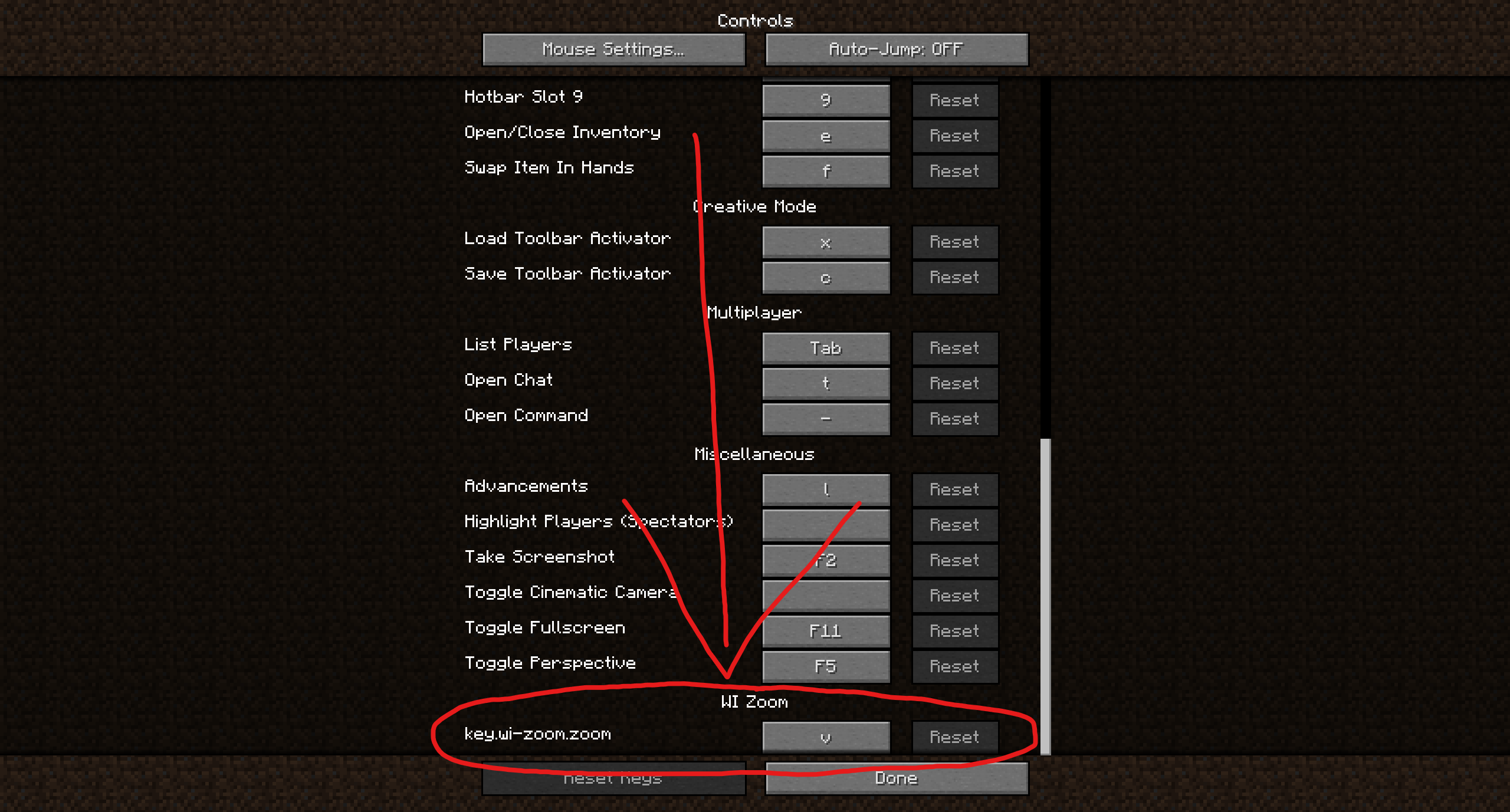
Hold down the V key to activate the zoom (this keybind can be changed).
While zooming, you can use the mouse wheel to zoom in further.
## Changing The Zoom Keybind
How to change the keybind (click to expand)
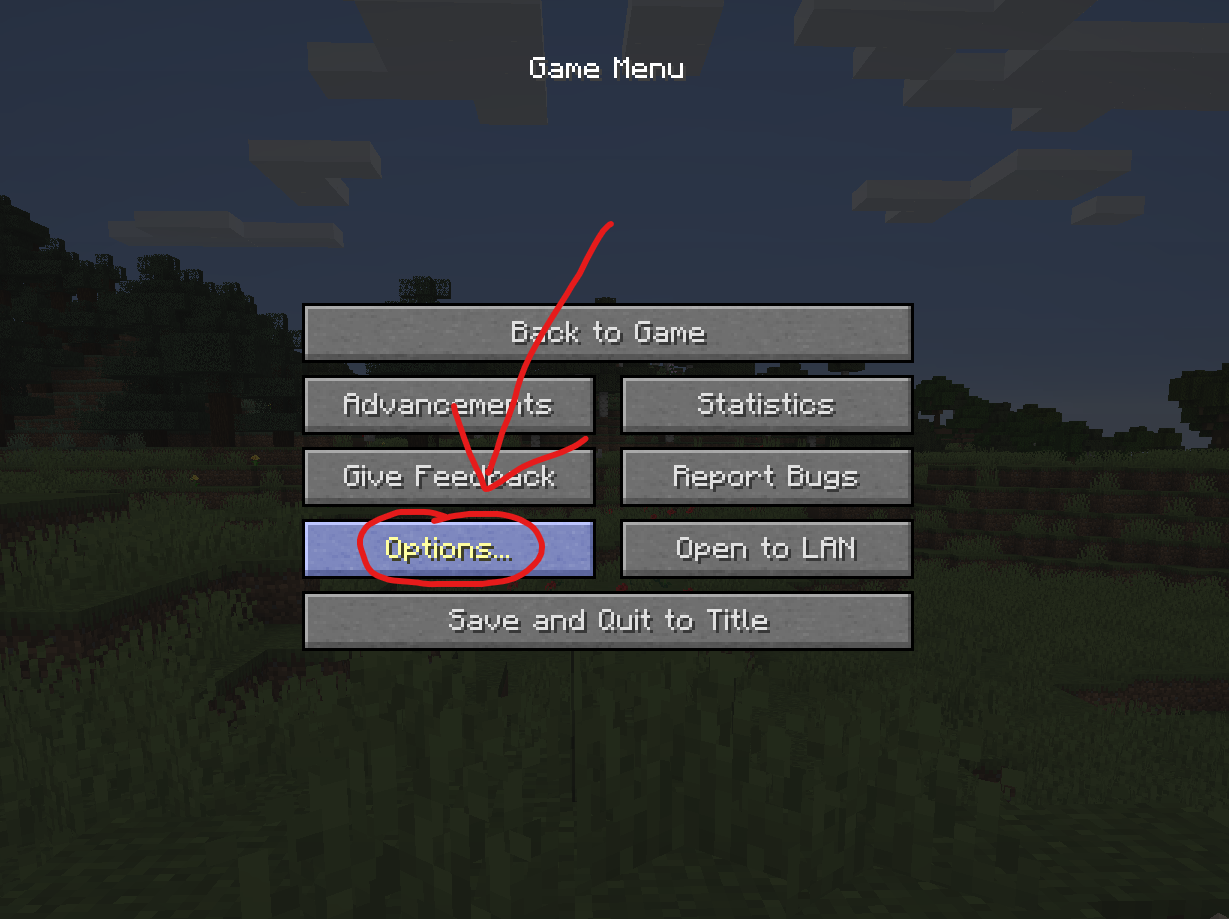
In the pause menu, click on “Options…”.
In the Options menu, click on “Controls…”.

In the Controls menu, scroll down to the “WI Zoom” section. If you don’t have any other mods installed, you will find this section at the very bottom.
## Supported Languages
– Azerbaijani (Azerbaijan) (since v1.5)
– Chinese (Simplified/Mainland) (since v1.4)
– Chinese (Traditional/Taiwan) (since v1.4)
– Cantonese (Hong Kong) (since v1.4)
– Classical Chinese (since v1.4)
– Dutch (Netherlands) (since v1.5)
– English (US)
– Estonian (Estonia) (since v1.4)
– French (France) (since v1.4)
– German (Germany)
– Kurdish (since v1.5)
– Portuguese (Brazil) (since v1.5)
– Russian (Russia) (since v1.3)
– Turkish (Turkey) (since v1.5)
– Ukrainian (Ukraine) (since v1.5)