Fancy Sand | Wavy Dunes

—

**Fancy Sand** is a small Resource Pack that replaces the texture of **Sand, Red Sand and their derivate blocks**, updating their looks to appear much wavier, softer and more in line with the current **Vanilla style**.
Also, the two main blocks of this Resource Pack (Sand and Red Sand) have received a completely new look that creates **small dunes and waves** to make them fit their biomes more!
Red Sand and Red Sandstone have a completely **new palette**, while Sand and Sandstone have an **updated version of the old one**.
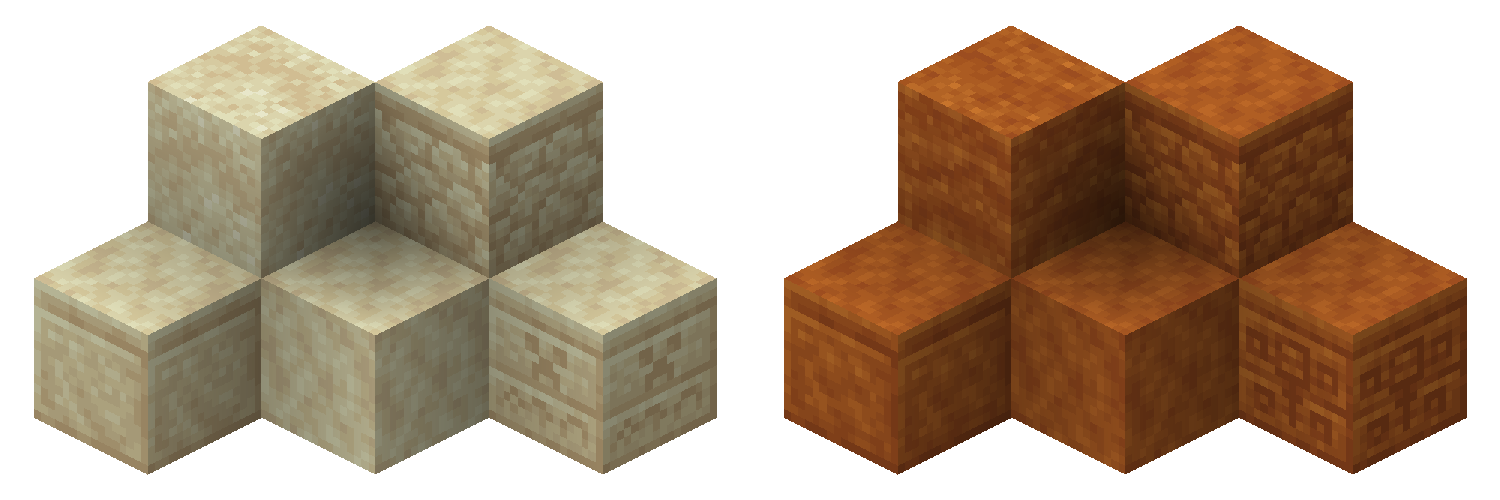
Specifically, here is a list of all the blocks that have been updated:
– **Sand** and **Red Sand** blocks.
– **Sandstone** and its **Cut and Chiseled variants**.
– **Red Sandstone** and its **Cut and Chiseled variants**.
—
The Resource Pack is fully compatible with **MC 1.9-1.21.8**, with **support planned** for any future versions!
—
### Support
If you like my Data Packs, Resource Packs or textures, consider **donating**, it would really mean a lot to me. If you are interested in **commissioning** any content, **contact me** on any available platform, I’ll try to reach out to you as fast as I can.
**Suggestions** for future Minecraft content are also well received. Thank you for taking a look at my content. 🙂
Fancy Dirt!

—

**Fancy Grass!** is a small Resource Pack that replaces the texture of **Dirt and every Dirt-related block**, updating their looks to appear fresher, and more in line with the current **Vanilla style**.
Because of this, most blocks in this Resource Pack are much **more colorful** and have **less overall contrast**!
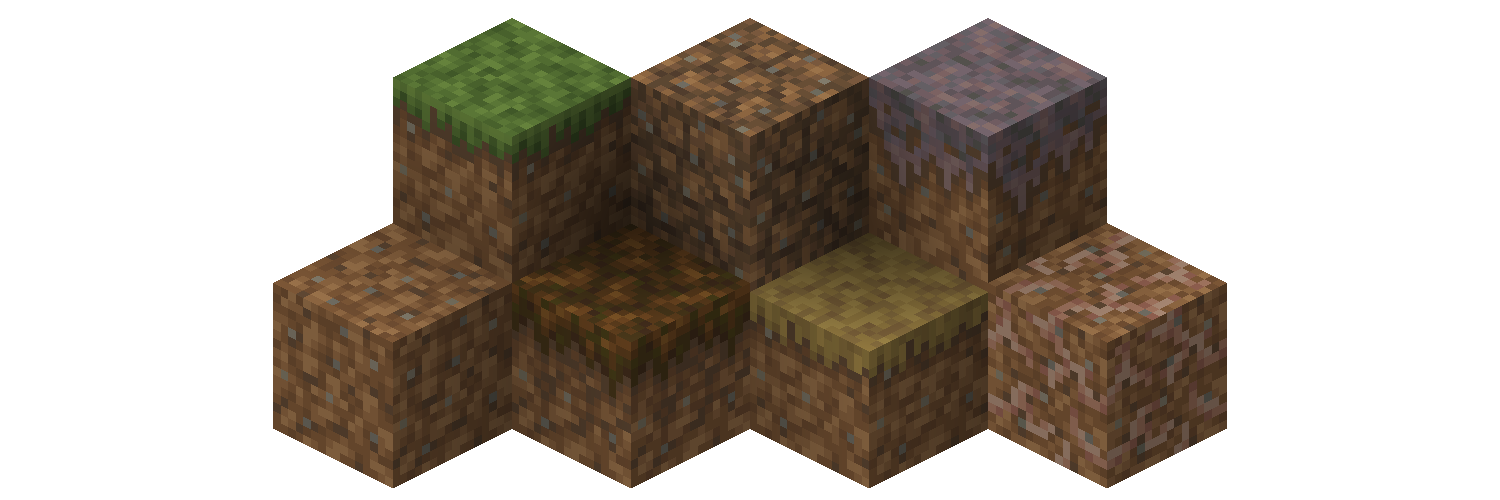
Specifically, here is a list of all the blocks that have been updated:
– **Dirt, Coarse Dirt** and **Rooted Dirt** blocks.
– **Grass Block, Short Grass** and **Tall Grass** blocks.
– **Mycelium** and **Podzol** blocks.
– **Dirt Paths**.
—
The Resource Pack is fully compatible with **MC 1.9-1.21.8**, with **support planned** for any future versions!
—
### Support
If you like my Data Packs, Resource Packs or textures, consider **donating**, it would really mean a lot to me. If you are interested in **commissioning** any content, **contact me** on any available platform, I’ll try to reach out to you as fast as I can.
**Suggestions** for future Minecraft content are also well received. Thank you for taking a look at my content. 🙂
Fabric API
# Fabric API
Essential hooks for modding with Fabric.
Fabric API is the library for essential hooks and interoperability mechanisms for Fabric mods. Examples include:
– Exposing functionality that is useful but difficult to access for many mods such as particles, biomes and dimensions
– Adding events, hooks and APIs to improve interoperability between mods.
– Essential features such as registry synchronization and adding information to crash reports.
– An advanced rendering API designed for compatibility with optimization mods and graphics overhaul mods.
Also check out Fabric Loader, the (mostly) version-independent mod loader that powers Fabric. Fabric API is a mod like any other Fabric mod which requires Fabric Loader to be installed.
For support and discussion for both developers and users, visit the Fabric Discord server.
## Using Fabric API to play with mods
Make sure you have installed fabric loader first. More information about installing Fabric Loader can be found here.
The downloaded jar file should be placed in your `mods` folder.
Euphoria Patches
##  A Complementary Shaders Add-On
– **Euphoria Patches**, an add-on for Complementary Shaders (Reimagined/Unbound), developed by SpacEagle17.
– Expands Complementary with optional handcrafted features.
– All options are disabled by default but can be individually enabled.
A “Popular Settings” tab and preset profile make it easy to apply commonly used options.
**Important notice: Please don’t report any bugs while using this add-on to Emin, contact information is below.**
## 📥 How To Install:
If you don’t know how to Install Euphoria Patches, read these instructions: **euphoriapatches.com/how-to-install/**!
## 🔗 Links
* **Support SpacEagle17 on Patreon and get access to Preview Versions!**
* **Website** of Euphoria Patches!
* **Changelogs** of Euphoria Patches!
* **Contact:** **https://euphoriapatches.com/contact**
* Add **Modded Blocks** or **Translation Files** to Euphoria Patches!
## ❓ FAQ
Got anymore questions? Frequently Asked Questions Page: **euphoriapatches.com/faq/**!
## Sponsored by Ember Host
Looking for an affordable and reliable Minecraft server host? Ember Host offers incredible value and top-tier support!
Click the banner or use code **EUPHORIA** at checkout for **10%** off your first purchase. Plus, **70%** of your purchase supports Euphoria Patches!
Special thanks to Emin the developer of Complementary Shaders and all testers on Discord! This project would have been impossible without you! Credits For Euphoria Patches: https://www.euphoriapatches.com/credits/
Entity Cleaner
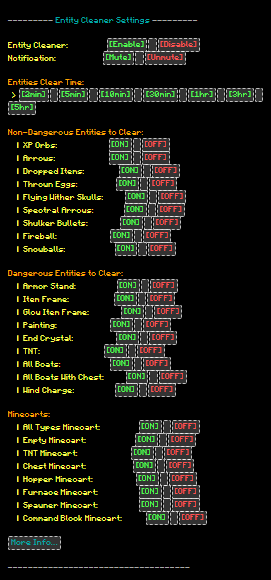
This standalone datapack/mod is a powerful upgrade to the original Lag Sweeper, designed to work seamlessly across multiple Minecraft versions. It efficiently clears a wide range of entities, including dropped items, eggs, snow, arrows, shulker bullets, wither skulls, and more, reducing lag and keeping your world running smoothly.
# Key Features:
– Multi-version compatibility – Works reliably on different Minecraft versions without errors.
– Comprehensive entity cleanup – Removes common lag-causing entities automatically (Every 5min).
– Lightweight and easy to use – Install and run without affecting gameplay performance.
– Optimized for servers and singleplayer – Keeps both worlds and servers smooth, even with high entity counts.
# **Multiplayer Support / SinglePlayer Support**
– Added toggle notification.
– Added toggle mod/datapack.
– Added toggle entity.
– To get Op Run `tag @s add ec_operator`
– To mute sendCommandFeedback Run `/gamerule sendCommandFeedback false` or `/gamerule send_command_feedback true` or Download↗
If you notice any missing entities or any error related to version, feel free to DM Planet Minecraft ↗!
Enhanced Default
# Minecraft’s unOfficial Enhanced Default
This resource pack enhances the feel of Minecraft. It is a part of the Minecraft unOfficial Proyect.
By the combination of different packs, we (I) bring the unOfficial enhanced default pack. With the most subtle (yet fundamental) additions and changes, this pack doesn’t intent to transform Minecraft, just enhanced it with all the following features:
# List of Features
## Additions:
* Bushy Leaves, three different variants
* Heavy Core 3D model when holding by a player
* Petrified Oak Slab unique texture
* Enhanced Golden Apple unique texture
* Debug Stick unique texture
* Every Double Slab Block unique textures
* Every Bed flat texture
## Changes:
* Complete GUI overhaul
* Paper, Map & Filled Map texture change, combining the pre1.14 with the actual one for the perfect silhouette
* Structure Void texture change, to align with the Operator Items style
* Tipped Arrow texture change, to be more realistic and less obstructive.
* Every Piston arm model overhaul, making it similar to bedrock
* Block breaking & ice breaking animation overhauled, making it more blocky and minecrafty
* Every disc (including fragment) rework, making them more JAPPAfied.
# License
This project is licensed under the GNU Lesser General Public License v2.1.
You may use, modify, and redistribute it under the terms of the LGPL v2.1.
This software is provided “as is”, without warranty of any kind.
See the LICENSE file or https://www.gnu.org/licenses/old-licenses/lgpl-2.1.txt
for full license text.
Embellish Chat
—
Embellish Chat enhances Minecraft chat with item and inventory showcases, built-in icons, mentions, and rich formatting. Players can show off gear, open showcased inventories, and use more expressive chat features without requiring the mod on their client.
—
## ✨ Key Features
* **Item and Inventory Showcases**
Showcase your held item, inventory, or ender chest directly in chat with `[i]`, `[inv]`, and `[end]`, allowing other players to inspect them interactively.
* **Built-in Chat Icons**
Use `:name:` syntax to insert built-in Minecraft-based icons into messages.
* **Rich Chat Formatting**
Style messages with bold, italic, underline, strikethrough, custom fonts, hex colors, gradients, presets, and rainbow effects.
* **Smart Mention System**
Mention players, `@here`, `@team(name)`, `@world(name)`, or `@everyone` with clear notifications. LuckPerms group mentions are also supported.
* **Useful Chat Utilities**
Hover messages to see exact timestamps and click them to copy their content with the timestamp.
—
## 🛠️ Styling System
Use the following patterns directly in the chat window to apply styles:
| Feature | Syntax | Example | Showcase |
|:—————–|:————————|:————————————————————–|:——————————————————————————————|
| Bold | `**Text**` | `**You really need to read this!**` |  |
| Italic | `_Text_` | `_This is top secret…_` |  |
| Underline | `__Text__` | `__Check this out__` |  |
| Strikethrough | `~~Text~~` | `~~We don’t talk about this anymore~~` |  |
| Obfuscated | `||Text||` | `||Unreadable text||` |  |
| Color (Hex) | `[Text]<#RRGGBB>` | `[Blue]<#0000FF> like the deep ocean` |  |
| Color (Gradient) | `[Text]<#RRGGBB #R...>` | `[Grraaaaaaadieeeeent]<#ffaaaa #aaaaff #aaffaa>` |  |
| Color (Preset) | `[Text]` | `[pink] pig` |  |
| Color (Rainbow) | `[Text]` | `look at this [rainbow]` |  |
| Link | `[Text](URL)` | `Download it here` | 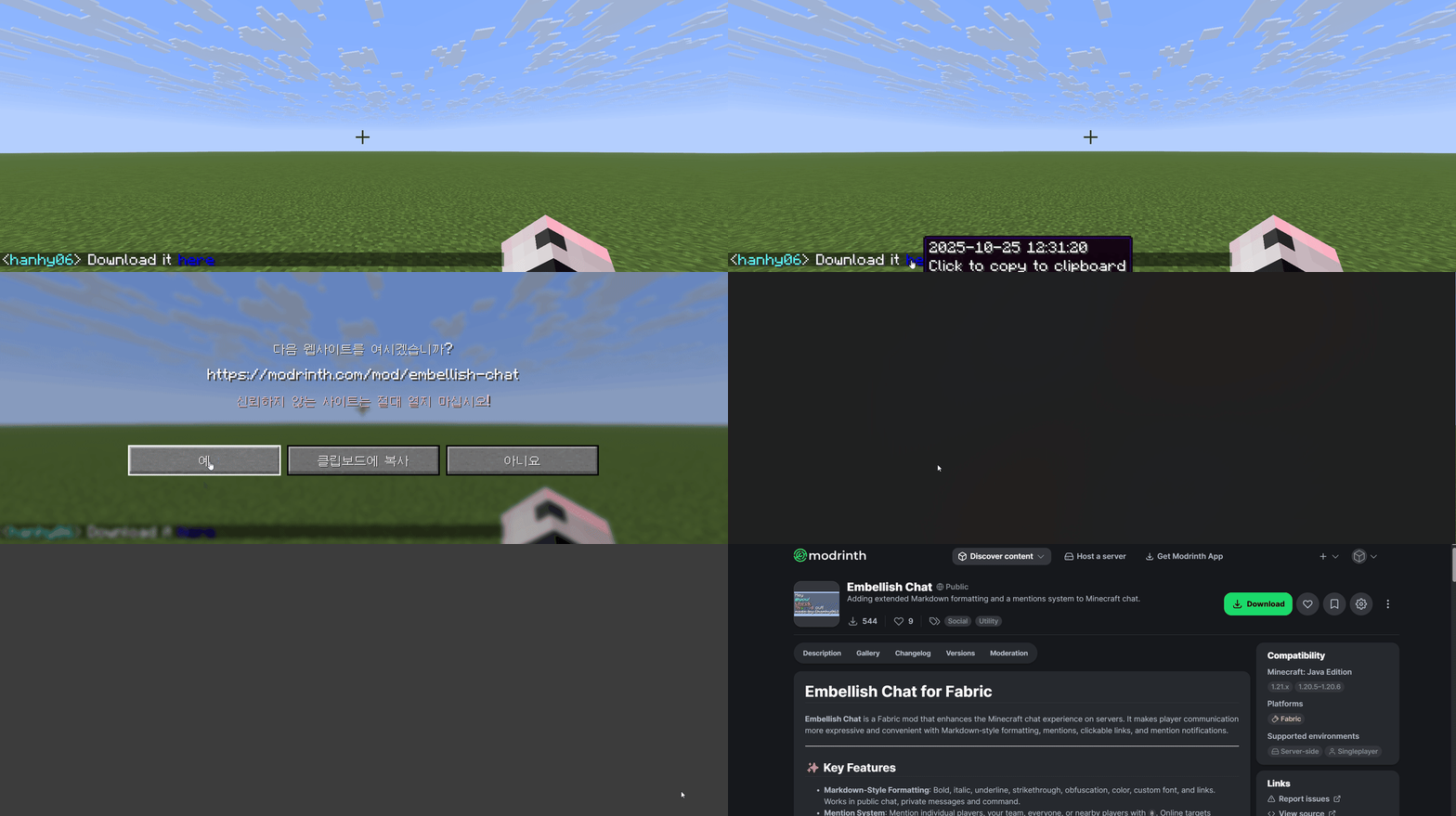 |
| Font | `[Text]{path}` | `[Blorp Zorp]{minecraft:alt}` |  |
| Item | `[i]` | `Look at my [i]` | 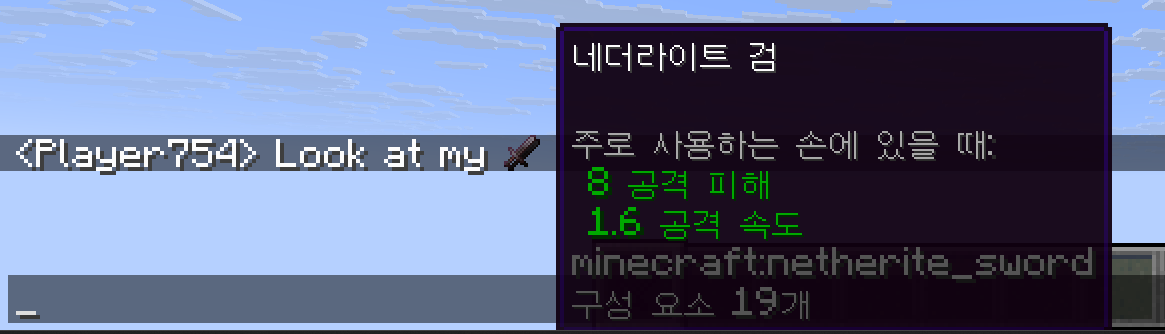 |
| Inventory | `[inv]` | `Look at my [inv]` | 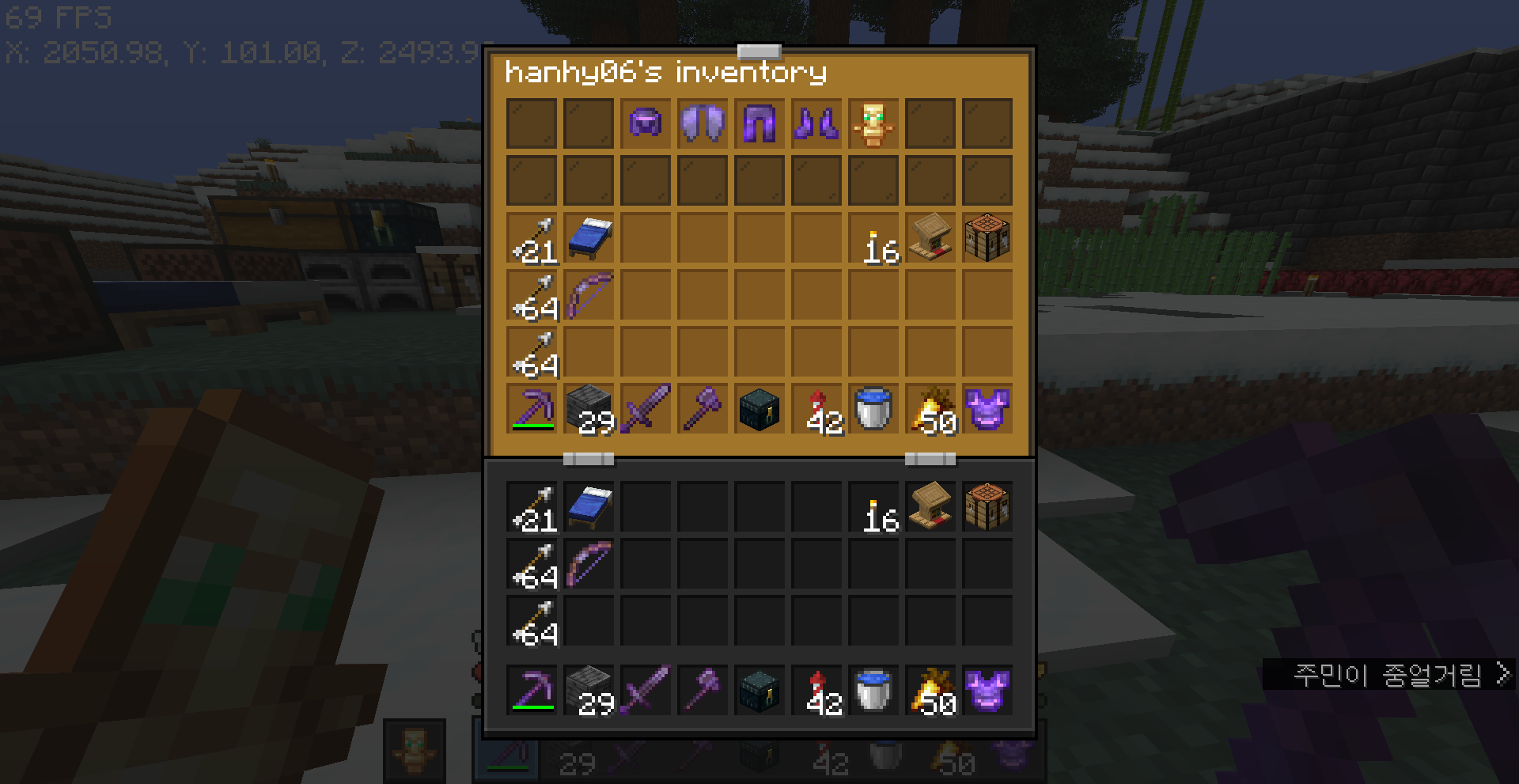 |
| Ender Chest | `[end]` | `Look at my [end]` | 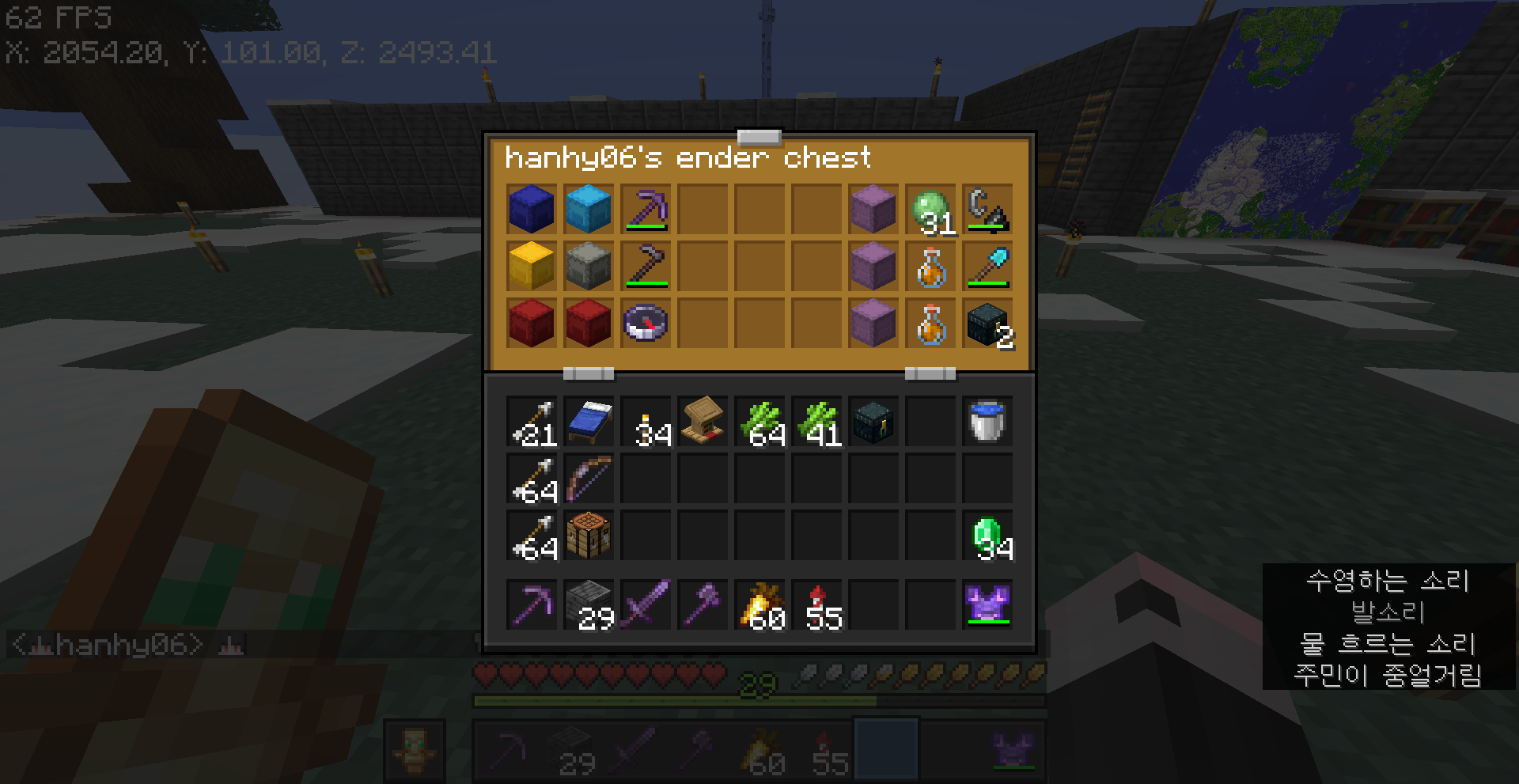 |
| Icon | `:name:` | `I :love: you` |  |
| Mention | `@PlayerName` | `Hello, @User` |  |
> **Notes**
>
> * **Links:** The built-in default link rules only match `https://` URLs.
> * **Colors:** Presets (e.g., `pink`) are defined in `presets.json/color`.
> * **Fonts:** The `path` requires a namespaced ID (e.g., `minecraft:alt`).
> * **Icons & Item Sprites:** Icon presets and item sprite rendering use atlas-backed components, so they are not supported on older Minecraft versions.
> * **More Info:** For advanced syntax, style combinations, and detailed rules, refer to `/embellish-chat help style` or the StyleWiki.
—
## 🗣️ Mention System
| Target | Behavior |
|:—————|:——————————————————————————————|
| `@PlayerName` | Mentions a specific player. |
| `@team(name)` | Mentions all players in the specified team. |
| `@group(name)` | Mentions all players in the specified **LuckPerms** group. |
| `@world(name)` | Mentions all players in the specified world. |
| `@everyone` | Mentions every player on the server. |
| `@here` | Mentions players within a configurable radius (default: **64 blocks**) in the same world. |
> **Notes**
>
> * **Behavior:** Successful mentions send a notification sound to the target and automatically tint the text (e.g., to the team color).
> * **Dependencies:** `@group` requires **LuckPerms**. Without it, the mention will be ignored.
> * **Colors:** `@team` and `@Player` mentions start from the `team_color` value in `config.json`, then use the target’s team/display styling when available. If `team_color` is `null`, the mention text is left uncolored.
> * **Sound:** The notification sound uses the **UI** category (falls back to the **PLAYER** category on Minecraft 1.21.5 and earlier).
> * **More Info:** For a full list of mention types and advanced usage, refer to MentionWiki.
—
## ⌨️ Commands
### Admin Commands
> Requires **OP Level 2** (or `GAMEMASTERS_CHECK` on 1.21.11+).
* **`/embellish-chat reload`** Reloads all configuration files under `/config/embellish-chat/` immediately.
* **`/embellish-chat ban/pardon `** Blocks or restores a player’s access to all mod features.
* **`/embellish-chat stress_test `** Repeatedly simulates `` messages for `` to stress-test the server’s message-processing performance.
* **`/embellish-chat regex_test `** Tests the provided `` against `` and highlights capture groups to analyze the match result.
### User Commands
> Available to **all players** (no permission required).
* **`/embellish-chat open `** Opens the last shared inventory/ender/item of the specified player.
* **`/embellish-chat help mention`** Displays the mention rules available to you based on your permissions.
* **`/embellish-chat help style`** Displays the styling rules available to you based on your permissions.
* **`/embellish-chat help icon`** Displays available icon presets from `presets.json/icon` in `name – icon` format.
* **`/embellish-chat notification`** Toggles your personal mention notification preferences. *(Enabled/disabled globally by `notify_command_enabled` in the config).*
—
## ⚙️ Configuration
Embellish Chat provides powerful functionality through the use of regular expressions.
Because regular expressions are inherently difficult, it is recommended to leverage various AI tools for rule creation and optimization.
### Config
The configuration file is located at `config/embellish-chat/config.json`.
“`
{
//version
“version”: “current mod version”,
//setting
“delimiter”: “,”,
“timestamp”: “yyyy-MM-dd HH:mm:ss”,
“command_alias”: “ec”,
“url_color”: “#0000EE”,
“team_color”: “#FF55FF”,
“notify_command_enabled”: true,
“notify_mention_enabled”: true,
“require_same_channel”: true,
“disable_vanilla_chat_format”: false,
//player list
“banned_players”: [],
“notify_off_players”: []
}
“`
* The `version` field must not be modified manually.
* `ConfigManager` writes `config.json`, `styles.json`, `mentions.json`, and `presets.json` separately, then merges them into one runtime `Config` when loading.
* Missing sections are restored from the built-in defaults during that merge step.
* If the stored `version` does not match the running mod version, the mod keeps the current in-memory configuration and ignores the mismatched load.
* The core configuration logic is defined in `style_rules` and `mention_rules`.
* Rules are processed from top to bottom, so placing a catch-all rule earlier may override more specific rules defined below.
* The `delimiter` value is internally handled as a regular expression; special characters such as `|` must be properly escaped.
* `command_alias` registers an additional root command that redirects to `/embellish-chat` when the config is loaded with a non-blank value.
* `team_color` is the base color used when styling `@team` and `@Player` mentions.
* If `team_color` is missing or set to `null`, those mentions are left without an automatic color.
* `require_same_channel` limits `ADVANCED_CHAT_CHANNEL` mentions to the sender’s current Advanced Chat channel when enabled.
* Reloading the config refreshes the runtime style and mention processors, so updated `style_rules`, `mention_rules`, `timestamp`, `url_color`, `whitelist`, `color`, `icon`, and `item` values take effect immediately.
* To avoid JSON syntax errors and ensure valid configurations, using the **Web Config Generator** is strongly recommended.
### Styling
The configuration file is located at `config/embellish-chat/styles.json`.
“`
{
“style_rules”: {
“embellish-chat.chat”: [
{
“pattern”: ” … “,
“comment”: “…”,
“styles”: [
{
“styleType”: ” … “,
“preset”: ” … ”
}
]
}
…
]
}
}
“`
* **`pattern`**: This is a regular expression for scanning text. It must have two capture groups.
* `group 1`: This is text to be styled.
* `group 2`: This is text passed as an option.
* **`comment`**: This comment is used in `/embellish-chat help style`.
* **`styles`**: Defines the styles to be applied to captured group 1.
* `styleType`: This is the style type. You can use all types listed in the StyleWiki.
* `preset`: This is a preset value. If a value is provided, it is always used; if it is empty, the content of the user’s captured group 2 is used instead.
* Each top-level key such as `embellish-chat.chat` is also treated as a permission node.
* Each `styleType` name must match a handler registered in the runtime `StyleRegistry`.
### Mention
The configuration file is located at `config/embellish-chat/mentions.json`.
“`
{
“mention_rules”: {
“embellish-chat.mention”: [
{
“pattern”: ” … “,
“comment”: “…”,
“title”: ” … “,
“sound”: { … },
“cooldown”: 0,
“onlyTarget”: false,
“mentions”: [
{
“mentionType”: ” … “,
“preset”: ” … ”
}
],
“styles”: [ … ]
}
…
]
}
}
“`
* **`pattern`**: This is a regular expression for scanning text. It must have one capture group.
* This is the mention option (e.g. team name, LuckPerms group).
* **`comment`**: This comment is used in `/embellish-chat help mention`.
* **`title`**: This is the title shown on the mentioned player’s screen.
* `%player:displayname%` is the display name of the player who sent the mention.
* **`sound`**: Defines the notification sound settings.
* `id`: Sound identifier.
* `category`: Sound category.
* `volume`: Sound volume.
* `pitch`: Sound pitch.
* **`cooldown`**: This is the mention cooldown time in seconds.
* Set to `0` to disable the cooldown.
* **`onlyTarget`**:
* When set to `true`, prevents the message from being broadcast globally and sends it only to the target.
* **`mentions`**: Defines the mention actions to be executed.
* `mentionType`: This is the mention type. You can use all types listed in the MentionWiki.
* `preset`: This is an optional preset value.
* **`styles`**: Defines the styles to be applied when the mention is triggered.
* Works the same way as in the styling rules section.
### Presets
The configuration file is located at `config/embellish-chat/presets.json`.
“`
{
“prefix”: {
” … “: ” … ”
},
“whitelist”: [
” … ”
],
“icon”: {
” … “: {
“atlas”: ” … “,
“sprite”: ” … ”
}
},
“item”: {
” … “: {
“atlas”: ” … “,
“sprite”: ” … ”
}
},
“color”: {
” … “: ” … ”
}
}
“`
* **`prefix`**: Uses permission nodes as its keys, and each value is a string parsed as a text component with placeholder tags.
* **`whitelist`**: This is used in the `URL` style type. If left empty, all URLs are allowed.
* **`icon`**: This is used by `ICON_PRESET` and `/embellish-chat help icon`.
* **`item`**: This overrides atlas sprites used by `SHOW_ITEM` for specific item IDs.
* **`color`**: This is used in the color presets for styling.
—
## 📜 Compatibility
### ✅ Fully Supported
* **Fabric Permissions API (Embedded)**
* The keys defined in `style_rules` and `mention_rules` directly function as permission nodes.
* Rules are evaluated from top to bottom based on the player’s permissions.
* **Text Placeholder API (Embedded)**
* Supports dynamic placeholders in mention titles and style presets.
* **Exclusive:** Use `%embellish-chat:content%` to access the raw, unparsed chat message.
* **Styled Nicknames**
* Supports mentioning players by nickname.
* **LuckPerms**
* **Required** for the `@group` mention type. Without it, group mentions will be ignored.
* **Advanced Chat**
* **Required** for the `@channel` mention type. Without it, channel mentions will be ignored.
* **Geyser (Bedrock Edition)**
* Mentions between Java and Bedrock editions work seamlessly.
* *Note:* Advanced styling (hover text, click events) may not fully render on Bedrock clients.
* **Minecraft P2P Play**
* Compatible with Minecraft P2P play, including 26.2 Snapshot 7+.
* Since Embellish Chat is server-side, players can use its chat features without installing the mod on their client.
### ❗ Known Conflicts
* **Styled Chat**
* **Styled Chat takes priority.** If installed, Embellish Chat’s *styling* features will be overridden.
* **Mentions still work:** The mention and notification system remains functional.
* **Performance Tip:** If you must use both, remove all entries in Embellish Chat’s `style_rules` to prevent unnecessary background processing.
—
## 📜 License & Links
This project is licensed under the **Apache License 2.0**.
Please download the mod from the official sources below to ensure you have the latest, safest version. Linking to these pages is appreciated; please avoid re‑hosting files.
* **Official Download (Modrinth):** https://modrinth.com/mod/embellish-chat
* **Source Code (GitHub):** https://github.com/hanhy06/embellish-chat
—
## ✨ Feedback & Support
Found a bug or have a feature request? Please open an issue or reach out on the project’s Discord server.
If you want to receive updates sooner, please press the heart ❤️ on our Modrinth page! Your support means a lot!
elytra pitch helper
this modrinth page (modrinth[dot]com/mod/elytrapitchhelper) and github releases are the only officially maintained places to download
While gliding, it shows subtle guide lines at +40° and –40° pitch, so you don’t have to rely on the cluttered F3 debug screen. This makes it easier to stay focused on smooth and efficient flight. The indicators appear only when you’re wearing Elytra and are close to these pitch angles, keeping your screen clean the rest of the time.
Starting with 1.1.0, configuration options availlable:
targetUpMinecraft (float, degrees)
What: Desired pitch target when gliding “nose up.”
Default: -40.0 (Minecraft uses negative for up)
Change when: You prefer a gentler/steeper climb target.
Suggested range: -60.0 to -10.0
targetDownMinecraft (float, degrees)
What: Desired pitch target when gliding “nose down.”
Default: 40.0 (positive is down)
Change when: You prefer faster dives or milder descents.
Suggested range: 10.0 to 60.0
toleranceDegrees (float, degrees)
What: Angle window around a target where the guide fades in. Smaller = stricter “on target” cue.
Default: 6.0
Change when: The guide feels too sensitive or too forgiving.
Suggested range: 2.0 to 12.0
maxOffsetPixels (int, px)
What: Maximum distance the guide line can move from the screen center.
Default: 42
Change when: On high/low resolutions the guide travels too far or too little.
Suggested range: 24 to 80
offsetPerDegree (float, px/deg)
What: Sensitivity mapping; how many pixels the guide moves per degree of pitch
difference.
Default: 2.0
Change when: You want finer/coarser motion of the guides.
Suggested range: 0.8 to 3.5
lineColorRgb (int, RGB 0xRRGGBB)
What: Color of the horizontal guide line.
Default: 16777215 (white, 0xFFFFFF)
Change when: You want better contrast with your resource pack or sky.
Tips: Use hex in the GUI (e.g., FFFFFF, 00FF00) or decimal in json.
centerTickColorRgb (int, RGB 0xRRGGBB)
What: Color of the small center tick marker.
Default: 16744703 (magenta-ish, 0xFF80FF)
Change when: You want the center tick to pop or match your HUD theme.
1.1.2-lite, added:
showOnlyWithFirework (bool, true/false)
What: Show guide lines only when firework present in hand.
Default: false
Change when: You fly with fireworks and want minimal setup.
this mod is 
Effective Trims
Effective Trims!
A Serverside Mod that gives Trims a bigger use!
A Full-Set of Every Armor Trim now gives you a Potion Effect when worn.
Fully Configurable to allow changes to Armor Material, Trim and Trim Material!
(Example Below)
Trim Effects:
Trim Effects
Sentry: Hero of the Village
Vex: Strength
Wild: Jump Boost 2
Coast: Water Breathing
Dune: Speed
Wayfinder: Luck 2
Raiser, Shaper & Host: Regeneration
Ward: Absorption 2
Silence: Conduit Power
Tide: Dolphins Grace
Snout: Fire Resistance
Rib: Resistance
Eye: Night Vision
Spire: Slow Falling
Flow: Speed 2
Bolt: Haste
Configuration:
You can completely configure your own Trim Combinations with different Armor Materials, Trims and Trim Materials to give different Effects and Effect Strengths.
Examples are spoilered below.
Any field left empty means ANY, so any type of Armor, any type of Trim and any type of Trim Material.
You can also use multiple effects and amplifier 0 is Effect Level 1.
It should be pretty self-explanatory!
Config Example
{
“trimsets”: [
{
“helmet”: “”,
“helmetTrim”: “minecraft:tide”,
“helmetTrimMaterial”: “minecraft:copper”,
“chestplate”: “”,
“chestTrim”: “minecraft:coast”,
“chestTrimMaterial”: “minecraft:copper”,
“leggings”: “”,
“legTrim”: “minecraft:coast”,
“legTrimMaterial”: “minecraft:copper”,
“boots”: “”,
“bootsTrim”: “minecraft:coast”,
“bootsTrimMaterial”: “minecraft:copper”,
“effects”: [
{
“identifier”: “minecraft:conduit_power”,
“amplifier”: 0
}
]
},
{
“helmet”: “minecraft:netherite_helmet”,
“helmetTrim”: “minecraft:rib”,
“helmetTrimMaterial”: “minecraft:gold”,
“chestplate”: “minecraft:netherite_chestplate”,
“chestTrim”: “minecraft:rib”,
“chestTrimMaterial”: “minecraft:gold”,
“leggings”: “minecraft:netherite_leggings”,
“legTrim”: “minecraft:rib”,
“legTrimMaterial”: “minecraft:gold”,
“boots”: “minecraft:netherite_boots”,
“bootsTrim”: “minecraft:rib”,
“bootsTrimMaterial”: “minecraft:gold”,
“effects”: [
{
“identifier”: “minecraft:resistance”,
“amplifier”: 1
}
]
},
{
“helmet”: “minecraft:iron_helmet”,
“helmetTrim”: “minecraft:silence”,
“helmetTrimMaterial”: “minecraft:amethyst”,
“chestplate”: “minecraft:iron_chestplate”,
“chestTrim”: “minecraft:silence”,
“chestTrimMaterial”: “minecraft:amethyst”,
“leggings”: “minecraft:iron_leggings”,
“legTrim”: “minecraft:silence”,
“legTrimMaterial”: “minecraft:amethyst”,
“boots”: “minecraft:iron_boots”,
“bootsTrim”: “minecraft:silence”,
“bootsTrimMaterial”: “minecraft:amethyst”,
“effects”: [
{
“identifier”: “minecraft:speed”,
“amplifier”: 1
},
{
“identifier”: “minecraft:strength”,
“amplifier”: 0
}
]
},
{
“helmet”: “minecraft:diamond_helmet”,
“helmetTrim”: “minecraft:eye”,
“helmetTrimMaterial”: “minecraft:netherite”,
“chestplate”: “minecraft:diamond_chestplate”,
“chestTrim”: “minecraft:eye”,
“chestTrimMaterial”: “minecraft:diamond”,
“leggings”: “minecraft:diamond_leggings”,
“legTrim”: “minecraft:spire”,
“legTrimMaterial”: “minecraft:netherite”,
“boots”: “minecraft:diamond_boots”,
“bootsTrim”: “minecraft:spire”,
“bootsTrimMaterial”: “minecraft:diamond”,
“effects”: [
{
“identifier”: “minecraft:slow_falling”,
“amplifier”: 0
},
{
“identifier”: “minecraft:night_vision”,
“amplifier”: 0
}
]
},
{
“helmet”: “”,
“helmetTrim”: “minecraft:snout”,
“helmetTrimMaterial”: “minecraft:netherite”,
“chestplate”: “”,
“chestTrim”: “minecraft:ward”,
“chestTrimMaterial”: “minecraft:netherite”,
“leggings”: “”,
“legTrim”: “minecraft:ward”,
“legTrimMaterial”: “minecraft:netherite”,
“boots”: “”,
“bootsTrim”: “minecraft:snout”,
“bootsTrimMaterial”: “minecraft:netherite”,
“effects”: [
{
“identifier”: “minecraft:fire_resistance”,
“amplifier”: 0
},
{
“identifier”: “minecraft:resistance”,
“amplifier”: 1
}
]
}
]
}
Eating Animations for Farmer’s Delight
**This pack truly adds eating animations for Farmer’s Delight in newer versions.**
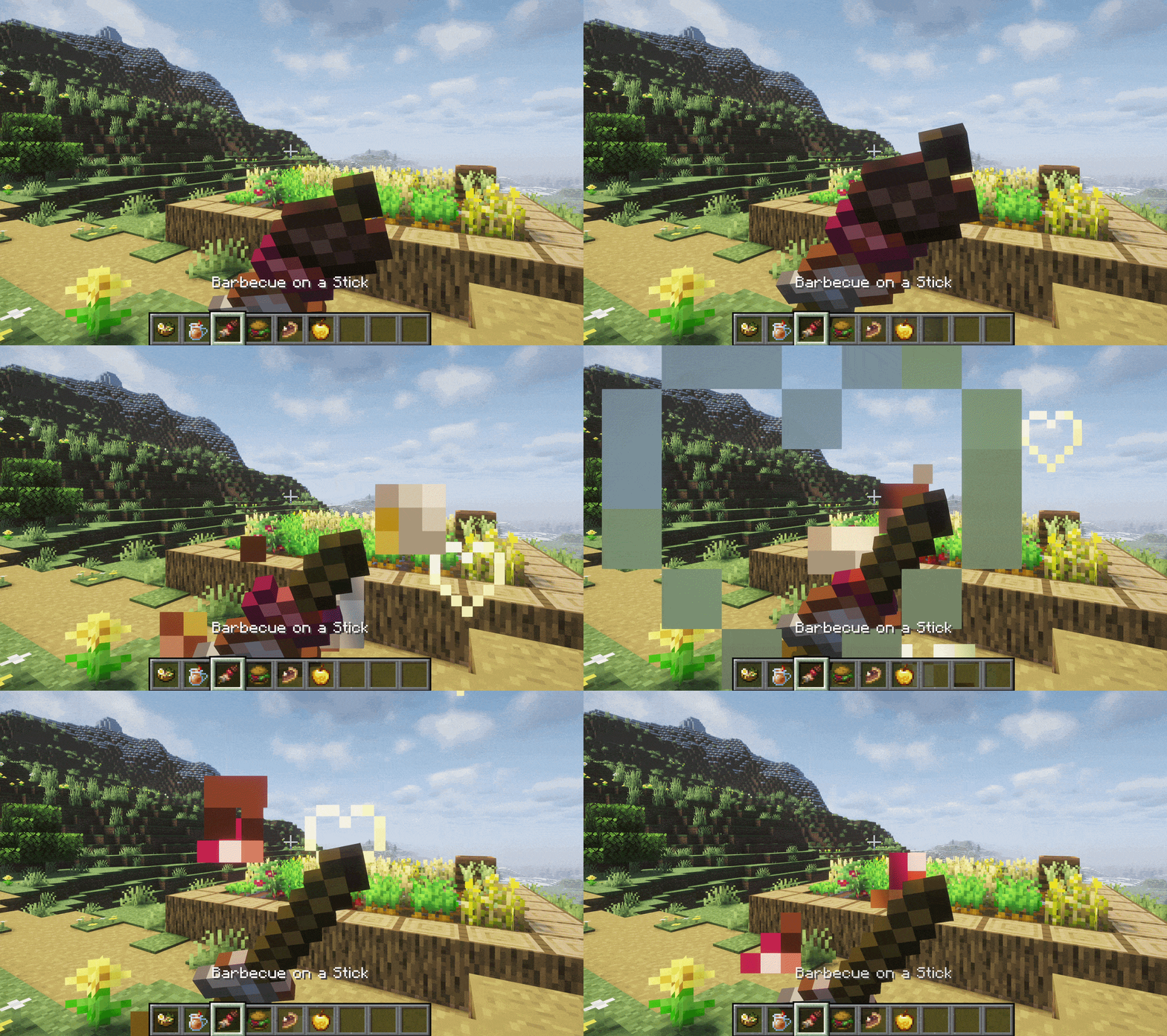
**Also contains vanilla Food animations so you’re all set with just this pack :)**

&labelColor=f091f6&color=rgb(4%2C%2011%2C%2020)&link=ttps://discord.gg/5N45SAsC3XF)
&labelColor=f091f6&color=rgb(4%2C%2011%2C%2020)&link=https%3A%2F%2Fgithub.com%2FEuphoriaPatches%2FChangelogs)







