
—
Ice Cream is a resource pack that refreshes the looks of Minecraft while maintaining the vanilla feel of the game.
This pack features a bunch of new textures that remain similair to the base game. The perfect resource pack for those who want to stay true to vanilla! (hence why it’s name :P)
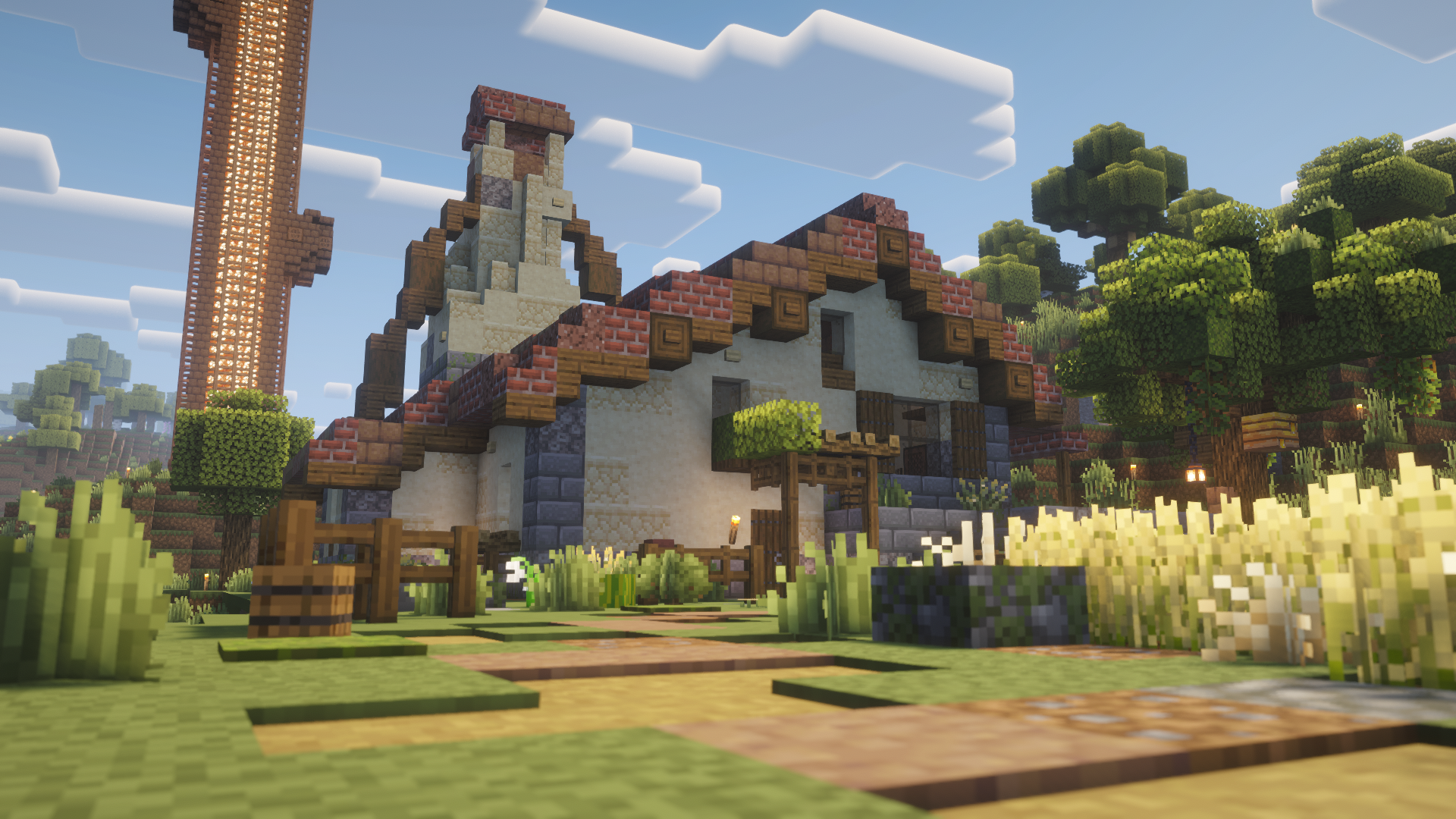
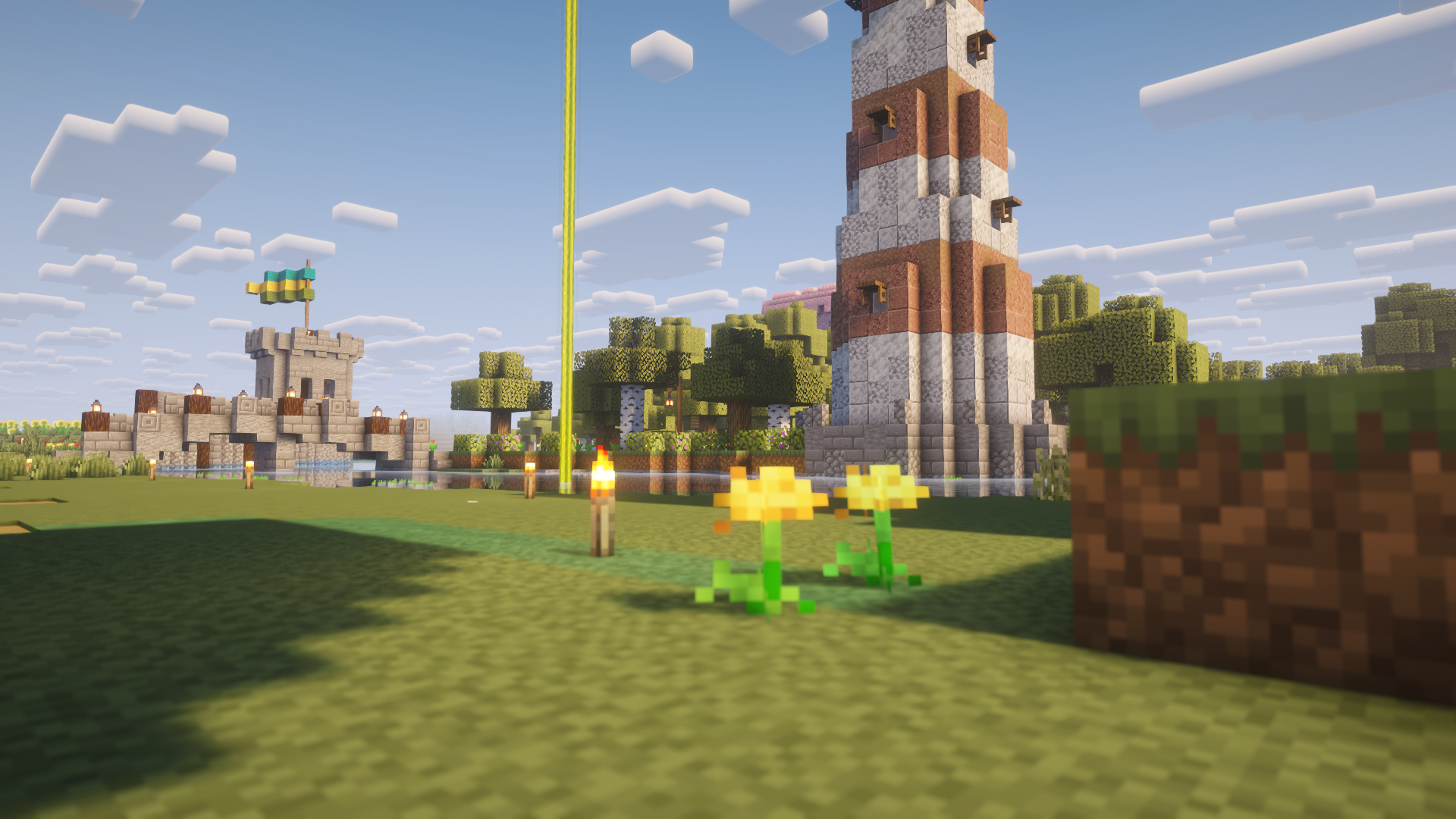
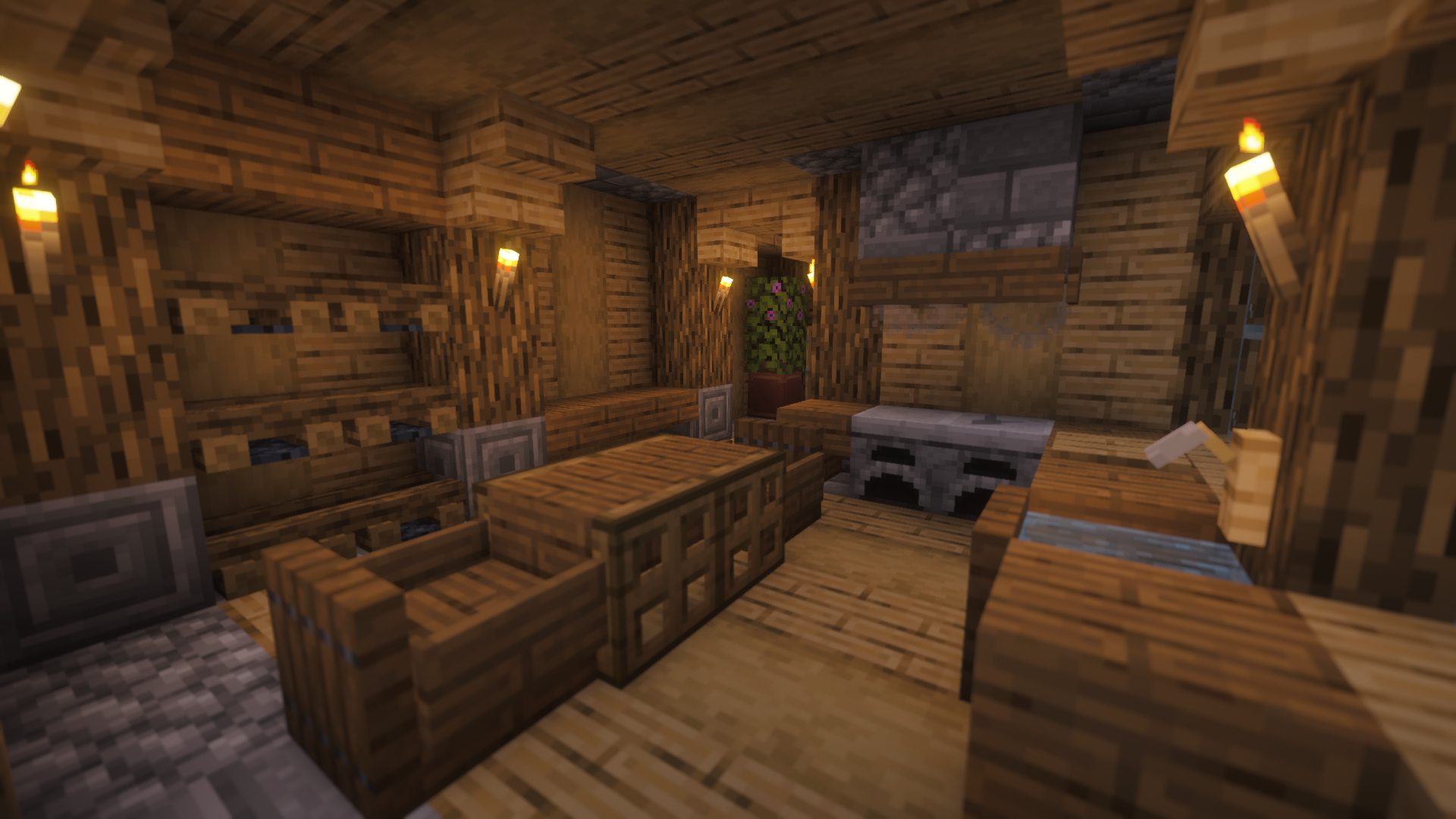

**Please note:** This resource pack is currently in a beta stage. This means that some textures may or may not be changed in a future version. During the beta period, Ice Cream will receive multiple updates.
I Editor
## ⚡ I Editor: A Revolution in the World of Minecraft and Customization

### 🚀 Open a New Era of Creativity in Minecraft
**I Editor (Item Editor)** is not just a datapack, it’s a true breakthrough in the possibilities of item editing! 🛠️ Forget the boring limitations of vanilla Minecraft. Now you can become a true Master Smith, controlling every tiny detail of your inventory. Turn an ordinary sword into a legendary artifact or create a potion with unique properties — it’s all in your hands! ✨
——
⚠️ **Important:** All editing functions are performed through commands. Make sure command usage is allowed on your server or world to unlock the full potential of this datapack.
——
### 🔥 Key Features
* **💯 Full Customization:** Change *absolutely everything*: durability, enchantments, name, description, and even potion effects!
* **🎮 Intuitive Interface:** A clear menu and easy-to-use controls that even beginners can understand.
* **⚙️ Powerful Tools:** Create truly unique items that don’t exist in the standard game.
* **🖱️ Flexible Settings:** Adjust all parameters through a user-friendly graphical interface — no more confusing commands.

Hibernate Fabric

Hibernate Fabric
Lets your Minecraft Fabric server snooze when idle, slashing CPU usage without missing a block!
[![Issues][issues-shield]][issues-url]
[![Forks][forks-shield]][forks-url]
[![Stargazers][stars-shield]][stars-url]
[![LGPL v3.0 License][license-shield]][license-url]
[Download on Modrinth](https://modrinth.com/project/hibernate-fabric/versions) |
[Download from Releases](https://github.com/BJTMastermind/hibernate-fabric/releases)

## About The Project
**Hibernate Fabric** is a lightweight tool that automatically puts your Minecraft Fabric server to sleep when no players are online. By reducing CPU usage during idle times, it helps save server resources, lowers your electricity bill, and makes your server more eco-friendly. It’s a simple way to keep your Minecraft world running smoothly without wasting power when it’s not needed.
### Built With
This project is built with the following technologies:
* ![Java][java-icon]
* 
* ![Fabric][fabric-icon]
## Run
You will need a Minecraft Fabric server.
1. Download `hibernate-fabric-x.x.x+mc1.x.x.jar` from one of the places at the top of this README.
2. Copy the downloaded jar file to the `mods` folder of your Minecraft Fabric server.
Don’t forget to set `pause-when-empty-seconds` to `0` in your `server.properties` file to disable the vanilla hibernation system.
## Getting Started With Development
To get a local copy up and running, follow these simple steps.
### Prerequisites
Ensure you have the following installed on your machine:
* **Java Development Kit (JDK)**: Version 21 or higher.
* [Download JDK](https://adoptium.net/)
* **Gradle**: Version 9.1 or higher.
* [Install Gradle](https://gradle.org/install/)
* **Minecraft**: Version 1.21.11
### Build
1. **Clone the repository**
“`sh
git clone https://github.com/BJTMastermind/hibernate-fabric.git
“`
2. Navigate to the project directory
“`sh
cd hibernate-fabric
“`
3. Build the project with Gradle
“`sh
./gradlew clean build
“`
You can find the built mod at `hibernate-fabric/build/libs/hibernate-fabric-x.x.x+mc1.x.x.jar`.
## Configuration
The mod automatically creates a configuration file at `config/hibernate-fabric.json` on first run. Here are the available settings:
### Basic Settings
“`js
{
“startEnabled”: true,
“ticksToSkip”: 400,
“permissionLevel”: 2,
“sleepTimeMs”: 75,
…
“`
| Setting | Default | Description |
|———|———|————-|
| `startEnabled` | `true` | Whether hibernation activates automatically when server starts with no players |
| `ticksToSkip` | `400` | Number of ticks to process before applying sleep during hibernation |
| `permissionLevel` | `2` | Required permission level to use hibernation commands (0=all, 4=owner) |
| `sleepTimeMs` | `75` | Milliseconds to sleep between tick processing cycles |
### Memory Optimization
“`js
…
“enableMemoryOptimization”: true,
“memoryCleanupIntervalSeconds”: 30,
“memoryThresholdPercent”: 80.0,
“forceGarbageCollection”: true,
“gcIntervalSeconds”: 30,
“saveBeforeHibernation”: true,
“removeEntities”: [
“minecraft:item”,
“minecraft:firework_rocket”,
“minecraft:arrow”,
“minecraft:experience_orb”
],
“droppedItemMaxAgeSeconds”: 300,
“logMemoryUsage”: true,
…
“`
| Setting | Default | Description |
|———|———|————-|
| `enableMemoryOptimization` | `true` | Enable memory cleanup during hibernation |
| `memoryCleanupIntervalSeconds` | `30` | How often to run memory cleanup routines |
| `memoryThresholdPercent` | `80.0` | Memory usage percentage that triggers cleanup |
| `forceGarbageCollection` | `true` | Force Java garbage collection during hibernation |
| `gcIntervalSeconds` | `30` | Minimum time between garbage collection runs |
| `saveBeforeHibernation` | `true` | Save world data before entering hibernation |
| `removeEntities` | `item`, `firework_rocket`, `arrow`, `experience_orb` | List of entities to remove during hibernation (ignores entities with custom names) |
| `droppedItemMaxAgeSeconds` | `300` | Age in seconds after which items are removed (5 minutes) |
| `logMemoryUsage` | `true` | Log memory usage information to console |
### CPU Optimization
“`js
…
“aggressiveCpuSaving”: true,
“minSleepInterval”: 1500,
“highLoadSleepMultiplier”: 1.5,
“yieldInterval”: 8,
…
“`
| Setting | Default | Description |
|———|———|————-|
| `aggressiveCpuSaving` | `true` | Enable more aggressive CPU saving measures |
| `minSleepInterval` | `1500` | Minimum time in milliseconds between sleep cycles |
| `highLoadSleepMultiplier` | `1.5` | Multiplier for sleep time when system load is high |
| `yieldInterval` | `8` | How often to yield CPU to other threads (every N ticks) |
### Gamerule Values When Not Hibernating
“`js
…
“restoreGameRulesAs”: {
“advance_time”: true,
“advance_weather”: true,
“random_tick_speed”: 3,
“spawn_mobs”: true,
“fire_spread_radius_around_player”: 128
}
}
“`
| Setting | Default | Description |
|———|———|————-|
| `advance_time` | `true` | The value to restore the gamerule `advance_time` as when coming out of hibernation |
| `advance_weather` | `true` | The value to restore the gamerule `advance_weather` as when coming out of hibernation |
| `random_tick_speed` | `3` | The value to restore the gamerule `random_tick_speed` as when coming out of hibernation |
| `spawn_mobs` | `true` | The value to restore the gamerule `spawn_mobs` as when coming out of hibernation |
| `fire_spread_radius_around_player` | `128` | The value to restore the gamerule `fire_spread_radius_around_player` as when coming out of hibernation |
## Contributing
Contributions are what make the open source community such an amazing place to learn, inspire, and create. Any contributions you make are **greatly appreciated**.
If you don’t have any coding experience, testing other platforms and configurations is also very welcome!
If you have a suggestion that would make this better, please fork the repo and create a pull request. You can also simply open an issue with the tag “enhancement”.
Don’t forget to give the project a star! Thanks again!
1. Fork the Project
2. Create your Feature Branch (`git checkout -b feature/AmazingFeature`)
3. Commit your Changes (`git commit -m ‘Add some AmazingFeature’`)
4. Push to the Branch (`git push origin feature/AmazingFeature`)
5. Open a Pull Request
## License
Distributed under the **GNU Lesser General Public License v3.0 or later (LGPL-3.0-or-later)**.
This project is a fork of [Hibernateforge](https://github.com/Thadah/Hibernateforge) which was distributed under the **European Union Public License v1.2 (EUPL-1.2)**.
Relicensing has been done in accordance with the compatibility clause of the EUPL (Article 5).
See `LICENSE` for more information.
[issues-shield]: https://img.shields.io/github/issues/BJTMastermind/hibernate-fabric.svg?style=for-the-badge
[issues-url]: https://github.com/BJTMastermind/hibernate-fabric/issues
[forks-shield]: https://img.shields.io/github/forks/BJTMastermind/hibernate-fabric.svg?style=for-the-badge
[forks-url]: https://github.com/BJTMastermind/hibernate-fabric/network/members
[stars-shield]: https://img.shields.io/github/stars/BJTMastermind/hibernate-fabric.svg?style=for-the-badge
[stars-url]: https://github.com/BJTMastermind/hibernate-fabric/stargazers
[license-shield]: https://img.shields.io/github/license/BJTMastermind/hibernate-fabric.svg?style=for-the-badge
[license-url]: https://github.com/BJTMastermind/hibernate-fabric/blob/master/LICENSE
[java-icon]: https://img.shields.io/badge/Java-D5D5D5.svg?style=for-the-badge&logo=data:image/svg%2bxml;base64,PHN2ZyB4bWxucz0iaHR0cDovL3d3dy53My5vcmcvMjAwMC9zdmciIHdpZHRoPSI2NCIgaGVpZ2h0PSI2NCIgdmlld0JveD0iMCAwIDMyIDMyIj48cGF0aCBkPSJNMTEuNjIyIDI0Ljc0cy0xLjIzLjc0OC44NTUuOTYyYzIuNTEuMzIgMy44NDcuMjY3IDYuNjI1LS4yNjdhMTAuMDIgMTAuMDIgMCAwIDAgMS43NjMuODU1Yy02LjI1IDIuNjcyLTE0LjE2LS4xNi05LjI0NC0xLjU1em0tLjgtMy40NzNzLTEuMzM2IDEuMDE1Ljc0OCAxLjIzYzIuNzI1LjI2NyA0Ljg2Mi4zMiA4LjU1LS40MjdhMy4yNiAzLjI2IDAgMCAwIDEuMjgyLjgwMWMtNy41MzQgMi4yNDQtMTUuOTc2LjIxNC0xMC41OC0xLjYwM3ptMTQuNzQ3IDYuMDlzLjkwOC43NDgtMS4wMTUgMS4zMzZjLTMuNTggMS4wNy0xNS4wMTQgMS4zOS0xOC4yMiAwLTEuMTIyLS40OCAxLjAxNS0xLjE3NSAxLjctMS4yODIuNjk1LS4xNiAxLjA3LS4xNiAxLjA3LS4xNi0xLjIzLS44NTUtOC4xNzUgMS43NjMtMy41MjYgMi41MSAxMi43NyAyLjA4NCAyMy4yOTYtLjkwOCAxOS45ODMtMi40MDR6TTEyLjIgMTcuNjMzcy01LjgyNCAxLjM5LTIuMDg0IDEuODdjMS42MDMuMjE0IDQuNzU1LjE2IDcuNjk0LS4wNTMgMi40MDQtLjIxNCA0LjgxLS42NCA0LjgxLS42NHMtLjg1NS4zNzQtMS40NDMuNzQ4Yy01LjkzIDEuNTUtMTcuMzEyLjg1NS0xNC4wNTItLjc0OCAyLjc3OC0xLjMzNiA1LjA3Ni0xLjE3NSA1LjA3Ni0xLjE3NXptMTAuNDIgNS44MjRjNS45ODQtMy4xIDMuMjA2LTYuMDkgMS4yODItNS43MTctLjQ4LjEwNy0uNjk1LjIxNC0uNjk1LjIxNHMuMTYtLjMyLjUzNC0uNDI3YzMuNzk0LTEuMzM2IDYuNzg2IDQuMDA3LTEuMjMgNi4wOSAwIDAgLjA1My0uMDUzLjEwNy0uMTZ6bS05LjgzIDguNDQyYzUuNzcuMzc0IDE0LjU4Ny0uMjE0IDE0LjgtMi45NCAwIDAtLjQyNyAxLjA3LTQuNzU1IDEuODctNC45MTYuOTA4LTExLjAwNy44LTE0LjU4Ny4yMTQgMCAwIC43NDguNjQgNC41NDIuODU1eiIgZmlsbD0iIzRlNzg5NiIvPjxwYXRoIGQ9Ik0xOC45OTYuMDAxczMuMzEzIDMuMzY2LTMuMTUyIDguNDQyYy01LjE4MyA0LjExNC0xLjE3NSA2LjQ2NSAwIDkuMTM3LTMuMDQ2LTIuNzI1LTUuMjM2LTUuMTMtMy43NC03LjM3M0MxNC4yOTQgNi44OTMgMjAuMzMyIDUuMyAxOC45OTYuMDAxem0tMS43IDE1LjMzNWMxLjU1IDEuNzYzLS40MjcgMy4zNjYtLjQyNyAzLjM2NnMzLjk1NC0yLjAzIDIuMTM3LTQuNTQyYy0xLjY1Ni0yLjQwNC0yLjk0LTMuNTggNC4wMDctNy41ODcgMCAwLTEwLjk1MyAyLjcyNS01LjcxNyA4Ljc2M3oiIGZpbGw9IiNmNTgyMTkiLz48L3N2Zz4=
[fabric-icon]: https://img.shields.io/badge/Fabric-DBD0B4.svg?style=for-the-badge&logo=data:image/svg%2bxml;base64,PHN2ZyB4bWxucz0iaHR0cDovL3d3dy53My5vcmcvMjAwMC9zdmciIHdpZHRoPSIxNiIgaGVpZ2h0PSIxNiIgdmlld0JveD0iMCAwIDE2IDE2Ij48cGF0aCBmaWxsPSIjMzgzNDJhIiBkPSJNOSAxaDF2MWgxdjFoMXYxaDF2MWgxdjFoMXYyaC0xdjFoLTJ2MWgtMXYxaC0xdjFIOXYySDh2MUg2di0xSDV2LTFINHYtMUgzdi0xSDJWOWgxVjhoMVY3aDFWNmgxVjVoMVY0aDFWMmgxeiIvPjxwYXRoIGZpbGw9IiNkYmQwYjQiIGQ9Ik00IDlWOGgxVjdoMVY2aDFsMS0xVjRoMVYyaDF2MWgxdjFoMXYxaDF2MWwtMSAxLTIgMy0zIDMtMy0zeiIvPjxwYXRoIGZpbGw9IiNiY2IyOWMiIGQ9Ik05IDNoMXYxaDF2MWgxdjFoMXYxaC0xTDkgNHpNMTAgMTBoMVY5aDFWN2gtMXYxaC0xekg4djJoMXYtMWgxek04IDEySDd2MWgxeiIvPjxwYXRoIGZpbGw9IiNjNmJjYTUiIGQ9Ik03IDVoMXYyaDN2MUg5VjZIN3pNNiA4aDF2MmgyVjlINnoiLz48cGF0aCBmaWxsPSIjYWVhNjk0IiBkPSJNMyA5djFsMyAzaDF2LTFINnYtMUg1di0xSDRWOXoiLz48cGF0aCBmaWxsPSIjOWE5MjdlIiBkPSJNMyAxMHYxaDJ2MmgydjFINnYtMkg0di0yeiIvPjxwYXRoIGZpbGw9IiM4MDdhNmQiIGQ9Ik0xMyA3aDF2MWgtMXoiLz48cGF0aCBmaWxsPSIjMzgzNDJhIiBkPSJNOSA0djFoMnYyaDFWNmgtMlY0eiIvPjwvc3ZnPgo=




 | **[Jade](https://modrinth.com/mod/jade)** | **Block and Entity Descriptions** — Jade will show block and entity descriptions in its informational HUD. |
 | **[WTHIT](https://modrinth.com/mod/wthit)** | **Block and Entity Descriptions** — WTHIT will show block and entity descriptions in its informational HUD. |
 | **[Field Guide](https://modrinth.com/mod/field-guide)** | **Entry Descriptions** — Automatically fills in entry lore. |
 | **[Reliable Recipe Viewer](https://modrinth.com/mod/rrv)** | **Tag Descriptions** — Tags shown by this mod will show Item Descriptions. |
 | **[Enchiridion](https://modrinth.com/mod/enchiridion)** | **Enchantment Descriptions** — Enchiridion’s default enchantment descriptions are replaced with Item Descriptions. |
 | **[Penchant](https://modrinth.com/resourcepack/penchant)** | **Enchantment Descriptions** — Penchant’s modified Enchantment Table shows Item Descriptions. |
 | **[Quark](https://modrinth.com/mod/quark)** | **Enchantment Descriptions** — Quark’s Matrix Enchantment Table shows Item Descriptions. |
 | **[Matrix Enchanting](https://modrinth.com/mod/matrix-enchanting)** | **Enchantment Descriptions** — The Matrix Enchantment Table shows Item Descriptions. |
 | **[Useful Spyglass](https://modrinth.com/mod/useful-spyglass)** | **Block and Entity Descriptions** — Useful Spyglass will show block and entity descriptions in its informational HUD. |
 | **[Limelight](https://modrinth.com/mod/limelight)** | **Block and Entity Descriptions** — Searching for a block or item in Limelight will show block and entity descriptions. |
 | **[ToolTipFix](https://modrinth.com/mod/tooltipfix)** | **Tooltip Wrapping** — This mod’s wrapping is used instead of the built in wrapper.. |