RPGAmbientMusic
# 🌸 Immersive Ambient & Music Pack
**Let thy world breathe, whisper, and sing.**
—
## 🎧 Overview
This resource pack reshapes Minecraft into a living soundscape, where every step, storm, cave, shore, forest, desert, mountain, and distant realm carries its own voice.
Gentle winds move through leaves, rain falls in richer layers, waves answer the shore, caverns murmur below the earth, and wild creatures call from unseen places. Footsteps gain weight and texture, while custom ambient music follows the mood of forests, deserts, snowy peaks, caves, oceans, the Nether, the End, menus, and creative journeys.
Built for exploration, survival, RPG worlds, and cinematic servers, this pack adds depth without noise — turning silence into atmosphere, and travel into memory.
—
## ✨ Features
### 🌿 Living Ambience
From leaf-shadowed woods to open deserts and frost-bitten peaks, the world is woven with birdsong, crows, owls, wolves, crickets, cicadas, frogs, seagulls, and distant wild calls. Each place feels less like a backdrop, and more like a land with breath of its own.
### 🍃 Wind, Weather & Wild Skies
Gentle breezes stir through leaves, desert winds sweep across dry sands, and high mountains answer with heavy, howling gusts. Rain falls in layered tones, while thunder and storm winds bring a deeper sense of distance, danger, and skyborne power.
### 👣 Ground Beneath Thy Feet
Footsteps are reshaped with richer texture across grass, gravel, sand, snow, stone, deepslate, dripstone, and sculk. Every path, cavern floor, frozen slope, and ancient dark place carries a more grounded and tactile sound.
### 🌊 Shores, Oceans & Hidden Depths
Beaches murmur with waves and gulls, oceans roll with wide ambient layers, and underwater spaces gain a calm, submerged presence. Rivers, coasts, and deep waters become quieter realms of motion, mist, and memory.
### 🕯 Caves, Stone & Deep Dark
Beneath the earth, caves echo with low drones, vast hollow tones, dripping water, lush underground ambience, and deep dark resonance. Stone no longer lies silent — it listens, trembles, and answers.
### 🐺 Creatures of the World
Wolves howl through the wilderness, frogs and crickets haunt the wetlands, parrots fill jungles with life, and ocean creatures carry the sound of shore and sea around them. Several mobs also receive subtle atmospheric layers, adding character without overwhelming the vanilla feel.
### 🎶 Music for Every Realm
A curated fantasy soundtrack follows the journey through forests, jungles, deserts, meadows, snowy heights, caves, oceans, the Nether, the End, and the dragon’s final domain. Menu and creative music are also reshaped for a more cinematic beginning and a gentler building experience.
### 🪶 Small Details, Greater Immersion
Custom item pickup and button sounds give the pack a more polished feel, while subtle player ambience and special creature variants add quiet touches of life for RPG, survival, exploration, and cinematic worlds.
—
## 📖 Usage
1. Place the `.zip` file in your `resourcepacks` folder.
2. Enable it in Minecraft and move it to the top of the list.
3. Wander forth, and hear the world awaken.
—
## 🌍 A quieter world no more — but one of wind, stone, water, and song.
Debrand
Convinces Minecraft it is unmodded.
This is most useful for QoL setups, where there is no need to change the brand of the game.
### Notes on hiding mods from servers
This mod is most useful against passive detections (since by default, the Minecraft client volunteers its brand to the server) and cursory glances (that don’t notice modified behavior).
However, know that it does **not** protect against:
– **Behavioral observation:** If a mod allows you to take actions that a vanilla client would not, this is obvious and will be visible (such as to anticheat).
**Examples:** Proximity chat; swing through grass; any changes to player movement or reach; etc. Note that not all of these can be detected with 100% accuracy, but they can raise suspicion or create evidence.
– **Active detection:** If the server probes for a specific behavior that differs with a mod installed, such as using the translated sign exploit in versions that had it, that difference will be detectable.
**Examples:** Any mod whose translation keys are known; any mod that communicates with the server using custom packets; any mod that creates packets or responses that differ from vanilla; etc. Any of these will create certainty that your client is modded.
– **Chatty mods:** If you have mods installed that reveal their presence to the server, that will be detectable.
**Examples:** Fabric API / Fabric Registry Sync; proximity chat / other mods that send data from the client; etc. Any of these will also create certainty that your client is modded.
– **Screen sharing:** If you have mods installed that change anything on-screen, anyone looking at the screen will be able to tell it’s not vanilla.
**Examples:** Minimaps; waypoints; indicators; menus of any kind; etc.
As a result, this mod is most useful for players that **develop their own modifications** with raw Mixin and without depending on Fabric API. It does **not** insulate between a detectable mod and the detection; all it does is prevent the client from admitting **up front** that it is Fabric.
### Notes on hiding mods from clients
Many of the same rules apply, though clients are likely to be less of a risk to a server than the other way around. Still, hiding the fact that a server is modded may still be desirable in some cases.
Lava Source
✨ Features
🔥 Main description
This feature introduces renewable lava sources, similar to how water behaves in Minecraft.
By placing lava in specific configurations, players can generate infinite lava over time.
This system transforms lava from a limited resource into a sustainable one, opening new possibilities for automation and large-scale builds.
⚙️ Use and benefits
This mechanic provides a reliable way to farm lava without constant exploration.
It enables efficient fuel generation, automated smelting systems, and advanced resource management.
Players can create scalable lava farms, reducing dependency on natural lava pools.
🧩 Gameplay integration
Designed to feel natural within Minecraft, this feature builds upon familiar fluid mechanics.
It integrates smoothly into survival gameplay while enhancing technical and automation playstyles.
Whether used for energy, traps, or industry, lava becomes a core renewable resource.
Wiki
📥 Installation
📁 Datapack
Drop the .zip file into your world’s datapacks folder.
Reload the world or use /reload.
Enjoy your enchanted adventure!
⚙️ Mod
Drop the .jar file into the mods folder of your instance.
Restart your game.
Have fun!
Ksyxis
# Ksyxis
Speed up your world loading by removing unneeded chunks.
## Language
– **English** ([Extended Version](https://github.com/VidTu/Ksyxis/blob/main/docs/README.md))
– [Русский](https://github.com/VidTu/Ksyxis/blob/main/docs/README_ru.md)
## Downloads
– [Modrinth](https://modrinth.com/mod/ksyxis)
– [CurseForge](https://curseforge.com/minecraft/mc-mods/ksyxis)
– [GitHub Releases](https://github.com/VidTu/Ksyxis/releases)
## Dependencies
– Fabric, Forge, NeoForge, Quilt, Legacy Fabric, or Ornithe
– Minecraft (1.8 or newer)
– **Forge 1.8-1.14.4 only**: Any Mixin provider, at your choice (such as
[MixinBootstrap](https://modrinth.com/mod/mixinbootstrap),
[MixinBooter](https://modrinth.com/mod/mixinbooter),
[UniMixins](https://modrinth.com/mod/unimixins), or any other)
## About
Depending on your game version, Minecraft loads some
[chunks](https://minecraft.wiki/w/Chunks) when you create your world.
Sometimes, these chunks are always loaded in the background. Either
way, whether these chunks being loaded is a one-time performance slowdown,
or a constant performance penalty, most players don’t need any of these
chunks. This mod completely disables unneeded chunks in the game.
*Note*: Unneeded chunks are sometimes used by farms and
technical contraptions. If you’ll need these chunks, you
can always delete the mod later to re-enable these chunks.

## Versions
| Version | Effect | Note |
|—————|—————|————————————————————————————————————————————————|
| 1.21.9+ | Insignificant | A 7×7 area of chunks won’t be loaded around the player when they join, and a fake 500ms world creation delay in single-player will be removed. |
| 1.20.5-1.21.8 | Low | A 5×5 area of spawn chunks won’t be loaded constantly in the background. |
| 1.8-1.20.4 | Extreme | A 21×21 area of spawn chunks won’t be loaded constantly in the background. |
## FAQ
**Q**: I need help, have some questions, or have some other feedback.
**A**: You can join the [Discord server](https://discord.gg/Q6saSVSuYQ).
**Q**: Where can I download this mod?
**A**: [Modrinth](https://modrinth.com/mod/ksyxis),
[CurseForge](https://curseforge.com/minecraft/mc-mods/ksyxis),
or [GitHub Releases](https://github.com/VidTu/Ksyxis/releases).
You can also find unstable builds at
[GitHub Actions](https://github.com/VidTu/Ksyxis/actions).
You will need a GitHub account to download these.
**Q**: Which mod loaders are supported?
**A**: Fabric, Forge, NeoForge, Quilt, Legacy Fabric, and Ornithe.
**Q**: Which Minecraft versions are supported?
**A**: Minecraft versions 1.8 and newer.
**Q**: Why support so many Minecraft versions?
**A**: Because I can.
**Q**: Do I need Fabric API or Quilt Standard Libraries?
**A**: Not necessarily.
**Q**: Where are the Fabric, Forge, NeoForge, Quilt, etc. versions?
**A**: All in the same file.
**Q**: Is this mod client-side or server-side?
**A**: This mod works on the server and on the client in singleplayer.
It has no effect on the client when playing multiplayer.
**Q**: Is this mod stable for use?
**A**: Should be fine. If it breaks something,
just delete it and your worlds will be fine.
**Q**: I’ve found a bug.
**A**: Report it [here](https://github.com/VidTu/Ksyxis/issues). If you are not
sure whether this is a bug or a simple question, you can join the
[Discord](https://discord.gg/Q6saSVSuYQ). Report security vulnerabilities
[here](https://github.com/VidTu/Ksyxis/security).
**Q**: Can I use this in my modpack?
**A**: Sure. Credit (e.g., a link to the mod’s GitHub page) is appreciated but
is not required. Monetization and redistribution are allowed as per the
[MIT License](https://github.com/VidTu/Ksyxis/blob/main/LICENSE).
**Q**: This mod doesn’t speed up anything.
**A**: The effect may not be noticeable on high-end PCs. This mod
is designed primarily for low-end devices. Nevertheless, there is
[a video](https://www.youtube.com/watch?v=PXWdDoVU1C4).
**Q**: How to force-load chunks if the spawn chunks have been removed?
**A**: If you really need to force-load chunks, load individual
chunks with the `/forceload` command in 1.13 or newer. For older
versions, you can search for some mod that force-loads chunks.
**Q**: It says *Ksyxis: No Mixin found*.
**A**: If you’re using Forge 1.15.2 or older, you may need to install
[MixinBootstrap](https://modrinth.com/mod/mixinbootstrap),
[MixinBooter](https://modrinth.com/mod/mixinbooter),
[UniMixins](https://modrinth.com/mod/unimixins), or any other
Mixin provider of your choice. If you’re using Forge 1.16
or newer, or any version of Fabric/NeoForge/Quilt/Ornithe,
you don’t need to install anything, and this is a bug.
See [README](https://github.com/VidTu/Ksyxis/blob/main/docs/README.md#for-developers)
on GitHub for FAQ on mod’s technical aspects.
## License
This project is provided under the MIT License.
Check out [LICENSE](https://github.com/VidTu/Ksyxis/blob/main/LICENSE)
for more information.
## Credits
This mod is developed primarily by [VidTu](https://github.com/VidTu),
but it wouldn’t be possible without
[contributors](https://github.com/VidTu/Ksyxis/graphs/contributors) and
some [technologies](https://github.com/VidTu/Ksyxis/blob/main/docs/README.md#credits)
used.
## Development
See [README](https://github.com/VidTu/Ksyxis/blob/main/docs/README.md#development)
on GitHub for details about developing this mod.
Kaleidoscope Cookery Refabricated
## About
# Kaleidoscope Cookery Refabricated
# 森罗物语:厨房-重织
> A Minecraft mod that adds immersive cooking systems and delicious recipes to enhance your culinary adventure.





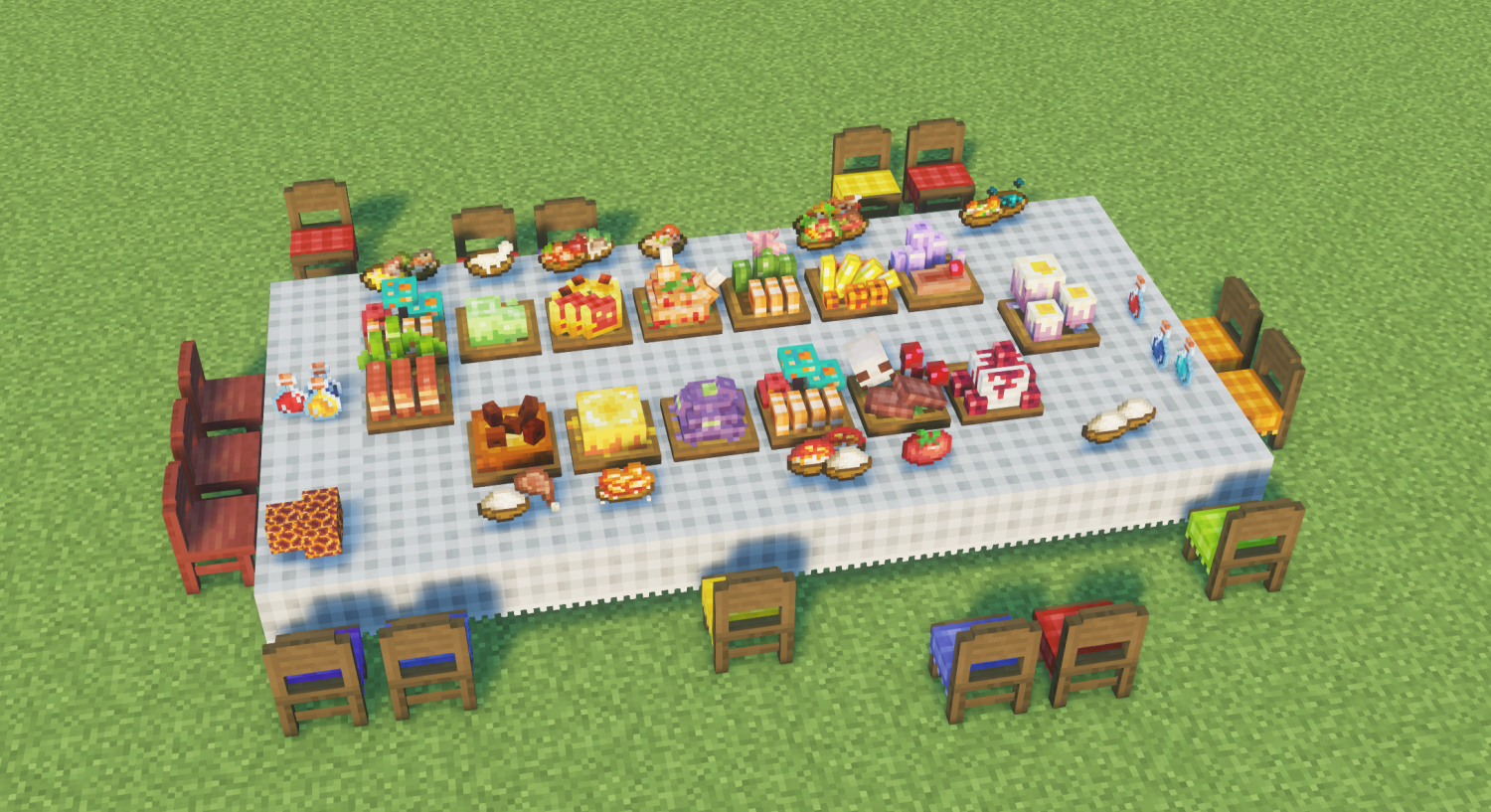
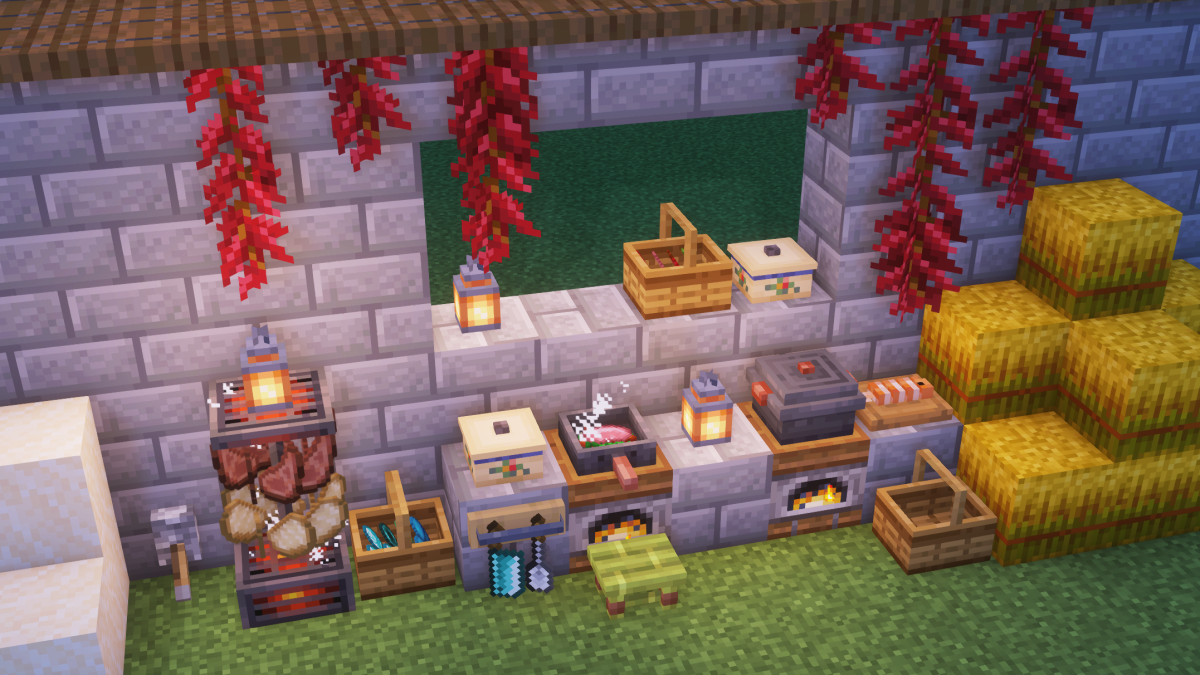
– This is the **unofficial fabric port** for [**Kaleidoscope Cookery mod**](https://modrinth.com/mod/kaleidoscope-cookery), currently supports 1.20-26.1.
– The official fabric version stagnated on version 1.0.1, this fork branch will provide the further update contents for fabric players.
## Introduction
This is a mod developed for Minecraft Java Edition. This mod is committed to bringing a rich cooking experience and new game content to Minecraft.
## Features
– 🍳 Brand new cooking system
– 🥘 Rich food recipes
– 🔥 Innovative cooking equipment
– 🎮 Immersive gaming experience
### Image
### Fork permission form the official team

JustinDB’s Simple Beds
Make your beds more realistic with this texture pack! No mods needed!


NOTE: Only works with 26.2-snapshot-3 or above versions. Because bed block models came with the 26.2-snapshot-3 and older versions don’t have bed block modelling.
Just Hotbar
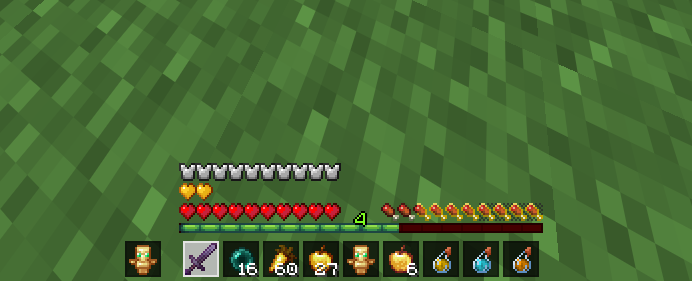
# Just Hotbar
This texture pack changes the hearts and hotbar, making them simpler
Join AutoSprint Mod
# Join AutoSprint Mod
Just put this mod in your mods folder and now you no longer need to press your sprint key before having your togglesprint work. (backbreaking work, I know)
This mod will also re-enable sprint when you respawn
Ixeris
# Ixeris
## Overview
Ixeris is a mod that optimizes event polling to improve client performance.
You might have noticed a visible drop of the FPS when you move your mouse. Part of the FPS drop is because the game does have additional jobs to do when you turn the camera, like calculating the visibility of chunks. However, because of the inefficiency in the native code that polls events and the JNI upcall overhead, some of the CPU time, otherwize can be utilized for rendering, are unnecessarily spent on event polling. This is most noticeable on Windows, especially when your mouse has a high polling rate.
Ixeris resolves the issue mainly through two measures:
– **Threaded Event Polling**. Instead of performing rendering and event polling on the same thread, Ixeris performs event polling on the *main thread* and kicks rendering to a separate *render thread*.
– **Buffered Raw Input** (Windows-only). Switches the method used for input polling from the inefficient `GetRawInputData` (one call for each input event) to `GetRawInputBuffer` which allows reading raw input messages in batches (one call for all events). Additionally, performing this work in Java code has allowed us to eliminate the JNI upcall overhead.
## Benchmarks
These tests are done after the world has fully loaded and the framerate has stabilized.
### Test 1: In Game
This test compares the performance when the mouse is grabbed, i.e. cursor invisible. This test is performed in a superflat world with no entities.
This test is done on Windows, where Ixeris uses buffered raw input by default to improve performance. The “Ixeris, Non-buffered” column shows the FPS with that option disabled.
| Polling Rate | Without Ixeris | Ixeris, Non-buffered | Ixeris, Buffered |
|————–|—————-|———————-|——————|
| 8000 Hz | 12 FPS | 83 FPS (6.9x) | 121 FPS (10.1x) |
| 2000 Hz | 76 FPS | 114 FPS (1.50x) | 135 FPS (1.78x) |
| 500 Hz | 134 FPS | 145 FPS (1.08x) | 151 FPS (1.13x) |
### Test 2: In Menus
This test compares the performance when the mouse is not grabbed, i.e. cursor visible, as in F3+Esc pause screen. In this case, raw input is never used as the game needs to know the *actual* cursor position, not the raw relative movement. The polling rate is 1000Hz.
The “Idle FPS” column shows the FPS when not moving the mouse, and the next two columns show the FPS when moving the mouse quickly over the game window, without Ixeris and with Ixeris, respectively. Note that this test was performed at the initial release of Ixeris, and many improvements have been made since then.
| | Idle FPS | Without Ixeris | With Ixeris |
|—————–|———-|—————-|—————–|
| Windows | 233 FPS | 133 FPS | 165 FPS (1.24x) |
| Linux (X11) | 358 FPS | 320 FPS | 355 FPS (1.11x) |
| Linux (Wayland) | 364 FPS | 289 FPS | 298 FPS (1.03x) |
## Technical Details
### Thread Satefy
In its current state Ixeris should not break thread safety. Callbacks registered with “`glfwSet*Callback“` are executed on the render thread. Calls to GLFW functions that are required to be called on the main thread, if made on other threads, are dispatched to the main thread. These calls may immediately return if they can be safely delayed, or otherwise may block the caller until the call is finished.
As of version 3.1.0, the requirements of thread safety in the GLFW documentation are strictly obeyed.
### GLFW State Caching
Most GLFW functions are required to be called from the main thread. However, many mods may call them from the render thread. To avoid performance degradation introduced by thread communications, Ixeris caches frequently used GLFW states for fast access from any thread, without having to route the call to the main thread. The caches are safe and do not introduce extra lag.
### Enhanced FPS Limiter
The vanilla FPS limiter (prior to 26.1) is flawed, using `glfwWaitEventsTimeout` to sleep. This function, however, cannot be called from the render thread and thus does not work optimally with Ixeris.
Ixeris rewrites the FPS limiter in a hybrid way, sleeping precisely and starting spin waiting when the wait time is very low.
### Glossary
– The **main thread** is the thread that the game is started on. Most GLFW functions are required to be called on this thread, and it is responsible for event polling.
– The **render thread** does everything the game normally does, except event polling.
These two terms are synonymous in vanilla Minecraft.
Item Registry
## Introduction
Item Registry (IR) aims to provide a reliable source of truth regarding Minecraft’s item system. This is accomplished by providing item component data (e.g. stack size and rarity attributes) as well as various forms of sorted and filtered item lists. Once the registry has been imported, item data may be queried using commands such as “`/data get storage“`.
## How it works
At its core, IR consists solely of a single function called import_registry.mcfunction, which takes two arguments when executed:
– storage: arbitrary NBT storage that the registry is loaded into
– path: arbitrary NBT path inside storage
Item data is generally accessible via two compound tags:
– item_components: stores item attributes such as stack size, rarity, translation key
– item_lists: stores item IDs in various sorted and filtered lists
To ensure that IR is always up-to-date, the entire generation and publishing process is fully automated. Minecraft releases are checked regularly. If the latest version has changed, IR is re-built automatically before being published to Modrinth. See the “Generator Script” section for more information regarding this topic.
## Usage
First of all, IR needs to be imported. This can be accomplished using the following command:
“`/function item-registry:import_registry {storage:”foo:bar”,path:”baz”}“`
Note: Since this function’s size is tremendous (2000+ lines), it is recommended to only run it once, e.g. at #minecraft:load.
After the import has finished, IR is ready to serve data. The following command may be used to fetch component data of an arbitrary item, such as “minecraft:allium”:
“`/data get storage foo:bar baz.item_components.”minecraft:allium”“`
**Result:** _{“max_stack_size”: 64, “obtained_via”: {“loot_table”: 1b, “recipe”: 0b, “gamemode_survival”: 1b}, “rarity”: “common”, “translation_key”: “block.minecraft.allium”, “translations”: {“en_us”: “Allium”}}_
Furthermore, you are also able to extract specific item attributes using “`/data modify“`. By running the following command, some component data of a smithing template is saved to a temporary location:
“`/data modify storage foo:bar temp.vex_template_rarity set from storage foo:bar baz.item_components.”minecraft:vex_armor_trim_smithing_template”.rarity“`
As IR also contains item lists, these may be queried too. Use this command to obtain a complete, alphabetically sorted list of all items in Minecraft:
“`/data get storage foo:bar baz.item_lists.sorted_alphabetically.entries“`
**Result:** _[“minecraft:acacia_boat”, “minecraft:acacia_button”, “minecraft:acacia_chest_boat”, “minecraft:acacia_door”, “minecraft:acacia_fence”, “minecraft:acacia_fence_gate”, …]_
In addition, IR also maintains filtered lists for specific item attributes, such as:
– filtered_by_stack_size_1
– filtered_by_stack_size_16
– filtered_by_stack_size_64
– filtered_by_loot_table_obtained
– filtered_by_loot_table_unobtained
– filtered_by_recipe_obtained
– filtered_by_recipe_unobtained
– filtered_by_survival_obtained
– filtered_by_survival_unobtained
– filtered_by_rarity_common
– filtered_by_rarity_uncommon
– filtered_by_rarity_rare
– filtered_by_rarity_epic
To retrieve the first few items with “uncommon” rarity, run the following commands:
“`/data get storage foo:bar baz.item_lists.filtered_by_rarity_uncommon.entries[0]“`
**Result:** _”minecraft:angler_pottery_sherd”_
“`/data get storage foo:bar baz.item_lists.filtered_by_rarity_uncommon.entries[1]“`
**Result:** _”minecraft:archer_pottery_sherd”_
“`/data get storage foo:bar baz.item_lists.filtered_by_rarity_uncommon.entries[2]“`
**Result:** _”minecraft:arms_up_pottery_sherd”_
## Examples
The following list contains a few more examples. IR was imported using:
“`/function item-registry:import_registry {storage:”example:data”,path:”ir”}“`
Get stack size of “minecraft:cake”
“`/data get storage example:data ir.item_components.”minecraft:cake”.max_stack_size“`
**Result:** _1_
Get translation key of “minecraft:hopper”
“`/data get storage example:data ir.item_components.”minecraft:hopper”.translation_key“`
**Result:** _”block.minecraft.hopper”_
Get en_us translation of “minecraft:experience_bottle”
“`/data get storage example:data ir.item_components.”minecraft:experience_bottle”.translations.en_us“`
**Result:** _”Bottle o’ “Enchanting”_
Get number of entries (length) of list “filtered_by_stack_size_16”
“`/data get storage example:data ir.item_lists.filtered_by_stack_size_16.count“`
**Result:** _49_
## Structure
“`json
{
“item_components”: {
“minecraft:lime_dye”: {
“max_stack_size”: 64,
“obtained_via”: {
“loot_table”: 0b,
“recipe”: 1b,
“gamemode_survival”: 1b
},
“rarity”: “common”,
“translation_key”: “item.minecraft.lime_dye”,
“translations”: {
“en_us”: “Lime Dye”
}
},
[…]
},
“item_lists”: {
“sorted_alphabetically”: {
“count”: 1506,
“entries”: [
“minecraft:acacia_boat”,
“minecraft:acacia_button”,
“minecraft:acacia_chest_boat”,
“minecraft:acacia_door”,
[…]
]
},
[…]
}
}
“`
## Generator script
IR’s generator script enables fully automated creation of import_registry.mcfunction and therefore streamlines the generation process to the point where no human intervention is necessary. It is written in bash and is shipped directly with this data pack to enable IR’s users to generate their own independent copy of the import function.
Before running the generator script, unzip this data pack and make sure the following applications are installed on your (Linux-based) system:
– bash
– curl
– java
– jq
– unzip
– wget
Next, navigate to the extracted directory and run the following two commands to enable execution permissions and then execute it:
“`
$ chmod +x generateItemRegistry.sh
$ ./generateItemRegistry.sh
“`
IR’s generator script should be self-explanatory as it interactively guides you through the whole generation process.




