Zilibobka (Зилибобка) Totem of Undying
– EN: **Zilibobka** is a popular Russian meme, which was also stimulated during post-ironic memes in 2017 on the social network VKontakte and Tiktok. Texture pack replaces Totem of Immortality with this meme
– RU: **Zilibobka (Зилибобка)** – популярный российский мем который также был зафоршен во времена постироничных мемов в 2017 году в соц сети ВКонтакте и Тиктоке. Текстурпак заменяет тотем бессмертия на этот мем
[ALL RESOURCEPACKS COLLECTION: MEMES + STREAMERS](https://modrinth.com/collection/sfDcDGAi)
Fast Noise
[Keep Android Open | Contact Regulators to stop Google’s lockdown of Android](https://keepandroidopen.org/)
Fast Noise is a modern optimization mod to improve world generation times. I regularly update the mod to latest minecraft versions, bring improvements to the mod, and provide stable releases.
**Does the mod change world generation?** The mod maintains **vanilla parity**, including with any datapacks. Do keep in mind, [Vanilla non-determinism](https://bugs.mojang.com/browse/MC-55596).
**Can I use custom worldgen mods with this?** Yes, I try my best to maintain mod compatibility, and only modify safe code. Specific optimizations that may affect mod compatibility are disabled by default.
**Forge / Neoforge?** Versions for minecraft 1.19.x – 1.21.8 are compatible with sinytra connector.
[](https://codeberg.org/ZenXArch/FastNoise) [](https://www.curseforge.com/minecraft/mc-mods/zfastnoise) [](https://modrinth.com/mod/zfastnoise) [](https://ko-fi.com/I2I31KW58I)
## How does this mod work?
Fast noise optimizes storing block and biome data into chunks for the duration of worldgen.
Technical Details
Fast noise replaces populateNoise,populateBiomes in NoiseChunkGenerator and surfaceBuilder in SurfaceBuilder.
Fast noise optimizes world generation by making several strong assumptions about how world generation works. By replacing vanilla’s generic and debug code for world storage with faster, more packed calculations, fast noise achieves faster throughput.
Some key methods used to achieve that are, **reducing allocations**, **avoiding palette resizing**, **delaying/packing block counting**, **precalculating data**,
**caching block state information** and more.
## How fast is it?
About 10-18% improvement to overall worldgen in overworld in 1.21.11 on latest versions.
Much higher improvement in nether, end
Here is a [Jmh Benchmark Software](https://codeberg.org/ZenXArch/FastNoise/src/branch/performance/perf/src/main/java/org/codeberg/zenxarch/fastnoise/PerfTest.java).
Chunky benchmark
12 threads w/ mod
“`
[12:39:32] [Server thread/INFO]: [Chunky] Task finished for minecraft:overworld. Processed: 16641 chunks (100.00%), Total time: 0:01:37
“`
W/o mod
“`
[12:43:08] [Server thread/INFO]: [Chunky] Task finished for minecraft:overworld. Processed: 16641 chunks (100.00%), Total time: 0:01:47
“`
4 threads w/ mod
“`
[12:56:23] [Server thread/INFO]: [Chunky] Task finished for minecraft:overworld. Processed: 9409 chunks (100.00%), Total time: 0:01:10
“`
W/o mod
“`
[13:01:11] [Server thread/INFO]: [Chunky] Task finished for minecraft:overworld. Processed: 9409 chunks (100.00%), Total time: 0:01:23
“`
With higher distance
W/o mod
“`
[13:11:01] [Server thread/INFO]: [Chunky] Task finished for minecraft:overworld. Processed: 19881 chunks (100.00%), Total time: 0:02:43
“`
W/ mod
“`
[13:16:03] [Server thread/INFO]: [Chunky] Task finished for minecraft:overworld. Processed: 19881 chunks (100.00%), Total time: 0:02:21
“`
Jmh Benchmark
“`
Mods used: Fast Noise 1.0.15+26.1 on 26.1 snapshot-6
ChunkPos: -16,-16 -> 16,16
End ChunkPos: 112,112 -> 144,144
Chunks: 1089
Mods used: (c2me)
With mod:
Benchmark (worldName) Mode Cnt Score Error Units
BiomesBenchmark.biomegen end avgt 5 11.786 ± 0.168 ms/op
BiomesBenchmark.biomegen nether avgt 5 174.833 ± 1.166 ms/op
BiomesBenchmark.biomegen overworld avgt 5 2401.797 ± 31.629 ms/op
NoiseBenchmark.noisegen end avgt 5 3052.242 ± 12.358 ms/op
NoiseBenchmark.noisegen nether avgt 5 1039.086 ± 6.467 ms/op
NoiseBenchmark.noisegen overworld avgt 5 8441.811 ± 41.396 ms/op
With only c2me:
Benchmark (worldName) Mode Cnt Score Error Units
BiomesBenchmark.biomegen end avgt 5 26.058 ± 0.245 ms/op
BiomesBenchmark.biomegen nether avgt 5 185.957 ± 2.203 ms/op
BiomesBenchmark.biomegen overworld avgt 5 2464.937 ± 29.007 ms/op
NoiseBenchmark.noisegen end avgt 5 3925.059 ± 14.292 ms/op
NoiseBenchmark.noisegen nether avgt 5 1920.705 ± 9.864 ms/op
NoiseBenchmark.noisegen overworld avgt 5 11552.674 ± 54.112 ms/op
Vanilla:
Benchmark (worldName) Mode Cnt Score Error Units
BiomesBenchmark.biomegen end avgt 5 27.051 ± 0.118 ms/op
BiomesBenchmark.biomegen nether avgt 5 239.634 ± 1.702 ms/op
BiomesBenchmark.biomegen overworld avgt 5 4589.322 ± 80.331 ms/op
NoiseBenchmark.noisegen end avgt 5 4477.113 ± 36.133 ms/op
NoiseBenchmark.noisegen nether avgt 5 1951.438 ± 5.748 ms/op
NoiseBenchmark.noisegen overworld avgt 5 14249.612 ± 57.388 ms/op
Vanilla:
Benchmark (worldName) Mode Cnt Score Error Units
SurfaceBenchmark.surface overworld avgt 5 5982.828 ± 17.992 ms/op
SurfaceBenchmark.surface nether avgt 5 2677.115 ± 9.293 ms/op
SurfaceBenchmark.surface end avgt 5 924.604 ± 5.376 ms/op
With Mod:
Benchmark (worldName) Mode Cnt Score Error Units
SurfaceBenchmark.surface overworld avgt 5 4820.672 ± 24.669 ms/op
SurfaceBenchmark.surface nether avgt 5 1914.289 ± 644.099 ms/op
SurfaceBenchmark.surface end avgt 5 0.014 ± 0.003 ms/op
Speedup
Overworld: Biome: 1.026x Noise: 1.368x Surface: 1.241x
Nether: Biome: 1.063x Noise: 1.847x Surface: 1.398x
End: Biome: 2.21x Noise: 1.285x Surface: 66357x
“`
The benchmarks may have some inaccuracies.
## Socials
[](https://discord.gg/RFSmd7debX) [](https://mastodon.social/@ZenXArch) [](https://matrix.to/#/#zenxarchs-modding-server:gitter.im)
## FAQ and Help
Q- What Minecraft versions will the mod be supporting?
A- I’ll try to support the latest minecraft version.
Q- Are backports planned?
A- No backports are planned, current backports were a one time thing.
Q- What other mods/dependencies do I need?
A- No dependencies are required.
Q- Will there be a neoforge version?
A- Yes, a NeoForge variant is planned post 26.1.
Versions for 1.19.x,1.20.x,1.21 – 1.21.8 works with sinytra connector

Q- XYZ mod crashes, or generates incorrectly with Fast Noise?
A- Report the issue on codeberg or my socials.
## Incompatible mods
Moonrise is incompatible, as It changes minecraft internals drastically
Noisium is incompatible, as Fast Noise is intended as a replacement for noisium.
Anti-Xray is incompatible for now, as it needs to put extra data in minecraft block storage, which breaks fastnoise
## Credits
– Stevenplays, for developing noisium mod, I started developing fast noise while trying to port noisium to latest minecraft.
– Ishland, for helping with mod, and modern-yarn and neo-loom
Xmas meowl Totem of Undying
– ENG: **Meowl** (in Russian, “Myaowl” or “Myaul”) is a creature with a cat’s head and an owl’s body, sitting on a branch. Initially, it was a fun photoshop creation.
The first images of the cat owl appeared in 2013 on the Chinese platform Weibo. However, it gained popularity only in October 2025 on TikTok
– RU: **Meowl** (в рунете — «Мяовл» или «Мяул») — существо с кошачьей головой и телом совы, сидящее на ветке. Изначально — это весёлое творение фотошопа.
Первые изображения с котосовой появились в 2013 году на китайской платформе Weibo. Но популярность они обрели только в октябре 2025 года в TikTok
[Meowl Totem](https://modrinth.com/resourcepack/meowl-totem-of-undying/versions)
[ALL RESOURCEPACKS COLLECTION: MEMES + STREAMERS](https://modrinth.com/collection/sfDcDGAi)
Wooden and Stone Type Tools
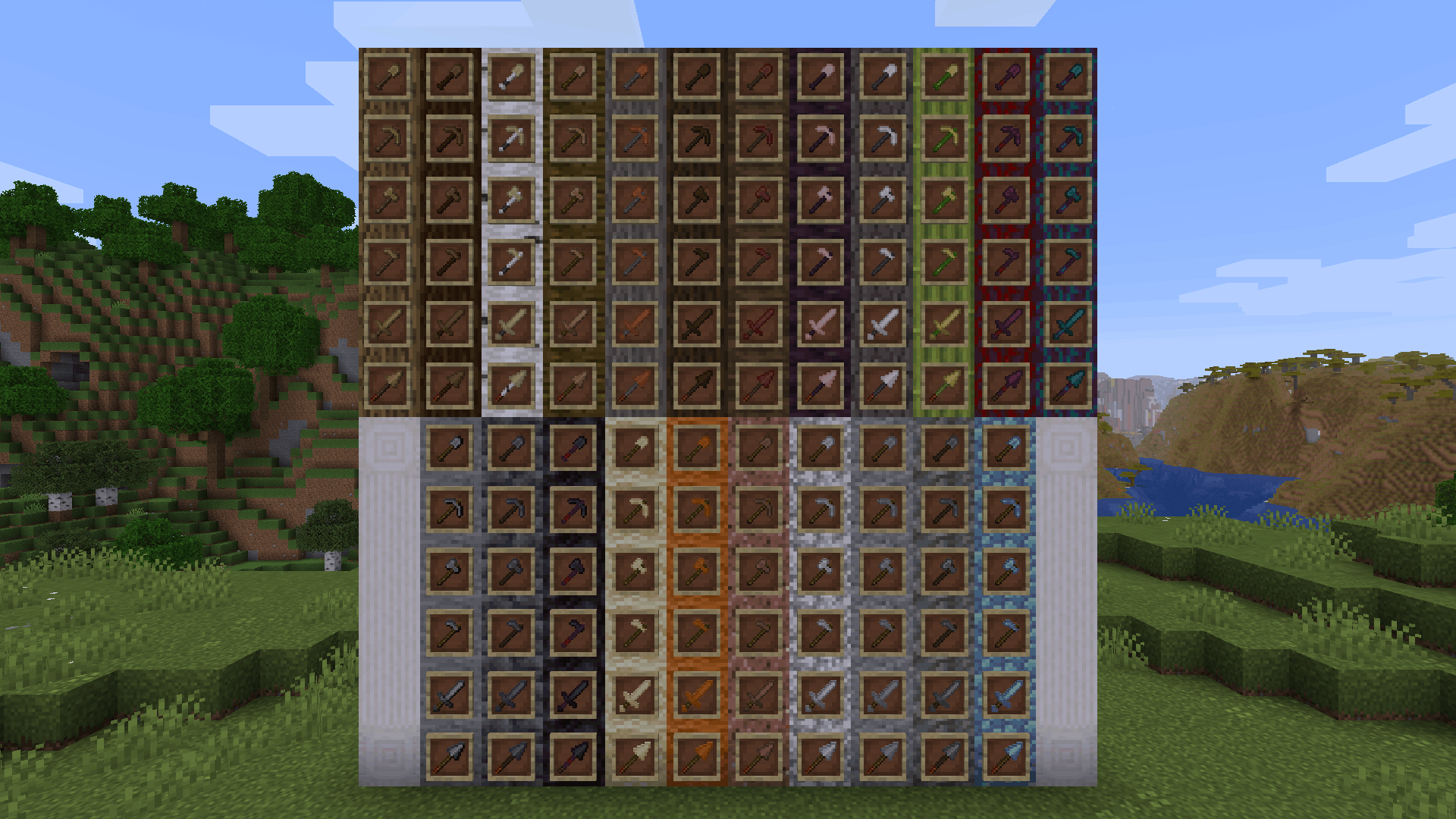
**Wooden and Stone Type Tools** lets you have wooden tools of all wood types and stone tools of many different stone types by renaming then in an anvil.
# Additions and Changes
* Adds many new textures for wooden and stone tools
* Default names for all wooden tools have been changed to “Oak [tool]”
* The default texture for all wooden tools have been changed to appear more oak-ish to reflect this name change
# How to Use
Place a wooden or stone tool inside an anvil and rename it to one of the following:
Wooden Tool Names
* Spruce [tool]
* Birch [tool]
* Jungle [tool]
* Acacia [tool]
* Dark Oak [tool]
* Mangrove [tool]
* Cherry [tool]
* Pale Oak [tool]
* Bamboo [tool]
* Crimson [tool]
* Warped [tool]
Stone Tool Names
* Deepslate [tool]
* Blackstone [tool]
* Sandstone [tool]
* Red Sandstone [tool]
* Granite [tool]
* Diorite [tool]
* Andesite [tool]
* Tuff [tool]
* Prismarine [tool]
Check out the gallery to see examples of each wood and stone type.
# Different Languages!
I saw that the model .json files allowed for a list of different strings to produce the same result, meaning I could add support for different languages. Open the list below to see the 100+ languages besides American English that you can use this resource pack in. If you’d like to correct any translations (because I am *confident* that I botched at least one of these) or provide your own for any languages not on this list, contact me at [email protected] or click [here.](https://crowdin.com/project/minecraft)
Supported Languages
* العربية (Arabic)
* Azərbaycanca (Azerbaijani)
* Boarisch (Bavarian)
* Беларуская кірыліца (Cyrillic Belarusian)
* Biełaruskaja łacinka (Latin Belarusian)
* Български (Bulgarian)
* Brezhoneg (Breton)
* Braobans (Brabantian)
* Català (Catalan)
* Čeština (Czech)
* Чӑвашла (Chuvash)
* Cymraeg (Welsh)
* Dansk (Danish)
* Deitsch (Austrian German)
* Schwiizerdütsch (Swiss German)
* Deutsch (German)
* Ελληνικά (Greek)
* Australian English
* British English
* Canadian English
* New Zealand English
* Pirate Speak
* ɥsᴉꞁᵷuƎ uʍoᗡ ǝpᴉsd∩
* Anglish (Modern English minus loanwords)
* Shakespearean English (Early Modern English)
* Esperanto (Constructed language created by L. L. Zamenhof)
* Español argentino (Argentine Spanish)
* Español chileno (Chilean Spanish)
* Español ecuatoriano (Ecuadorian Spanish)
* Español (European Spanish)
* Español mexicano (Mexican Spanish)
* Español uruguayo (Uruguayan Spanish)
* Español venezolano (Venezuelan Spanish)
* Andalûh (Andalusian)
* Eesti keel (Estonian)
* Euskara (Basque)
* فارسی (Persian)
* Suomi (Finnish)
* Filipino (hulaan ang wika)
* Français canadien (Canadian French)
* Français de Suisse (Swiss French)
* Français (Metropolitan French)
* Furlan (Friulian)
* Gaeilge (Irish)
* Galego (Galician)
* Galo (Gallo)
* Галицка (Halychian)
* ʻŌlelo Hawaiʻi (Hawaiian)
* עִברִית (Hebrew)
* हिंदी (Hindi)
* Høgnorsk (High Norwegian)
* Hrvatski (Croatian)
* Magyar (Hungarian)
* Հայերեն (Armenian)
* Bahasa Indonesia (Indonesian)
* Íslenska (Icelandic)
* Italiano (Italian)
* 日本語 (Japanese)
* la .lojban. (Lojban, constructed language)
* ქართული (Georgian)
* Қазақша (Kazakh)
* 한국어 (Korean)
* Kölsch/Ripoarisch (Kölsch/Ripuarian)
* Kernewek (Cornish)
* Кыргызча (Kyrgyz)
* Latina (Latin)
* Lëtzebuergesch (Luxembourgish)
* LOLCAT
* Lietuvių (Lithuanian)
* Latviešu (Latvian)
* 文言 (Literary Chinese)
* Монгол (Mongolian)
* Bahasa Melayu (Malay, Latin script)
* Malti (Maltese)
* Mēxikatlahtōlli (Nahuatl)
* Vlaams (Flemish Dutch)
* Nederlands (Dutch)
* Norsk nynorsk (Nynorsk Norwegian)
* Norsk bokmål (Bokmål Norwegian)
* Övdalska (Elfdalian)
* Polski (Polish)
* Ngiiwa (Popoloca)
* Português brasileiro (Brazilian Portuguese)
* Português (European Portuguese)
* Cántabru/Montañés (Cantabrian)
* Bahasa Indonesia edjaän lama (Pre-reform spelling Indonesian)
* Quenya (Constructed language created by J. R. R. Tolkien)
* Română (Romanian)
* Русскій дореформенный (Pre-revolutionary Russian)
* Русский (Russian)
* Руснацькый (Rusyn)
* Сахалыы (Yakut)
* Davvisámegiella (Northern Sámi)
* Slovenčina (Slovak)
* Slovenščina (Slovenian)
* Shqip (Albanian)
* Svenska (Swedish)
* Säggs’sch (Upper Saxon German)
* Ślōnski (Silesian)
* ไทย (Thai)
* Tagalog (hulaan ang wika)
* tlhIngan Hol (Klingon, constructed language created by Marc Okrand)
* toki pona (Constructed language created by Sonja Lang)
* Türkçe (Turkish)
* Татарча (Tatar)
* Bats’i k’op (Tzotzil)
* Українська (Ukrainian)
* O’zbekcha (Uzbek)
* Català valencià (Valencian)
* Tiếng Việt (Vietnamese)
* Viossa (Constructed language created by [the conlangs subreddit](https://www.reddit.com/r/conlangs/))
* Võro kiil (Voro)
* 简体中文 (Simplified Chinese)
* 繁體中文香港 (Traditional Chinese, Hong Kong)
* 繁體中文台灣 (Traditional Chinese, Taiwan)
* بهاس ملايو (Jawi Malay)
wood plus
a mod that adds new bookshelfs and crafting table versions and ladder and sticks and fletching tables and cartography and composters and framed glass and tinted glass and lecterns for every wood type made from the same type
of wood all been done for now
for fabric and as I am still adding everything I am sticking to snapshots for 1.20.5 until I am done then there will be a main version and a snapshot one
i use a texture artist so the textures are placeholders from each type of block
you now can craft wood sticks made form that wood ladder crafting soon
the original versions are now have oak in the name
can use any stick type in some crafts working on that if it does not work use oak sticks the original
sorry the textures are taking so long i recommend you use or make a resource pack if you can since i have no idea how long this is going to take
the unknown wood type is for mods to map there own woods with the minecraft:unknown_planks for everything but composters and minecraft:unknown_slabs for composters item tags based on the april fools potato wood
use sticks for framed glass crafts
WI Zoom
# WI Zoom (Wurst-Imperium Zoom)
The WI Zoom Minecraft mod lets you zoom in and out with the mouse wheel, providing up to 50x magnification without the need for a spyglass. This mod is fully compatible with OptiFine and Sodium, but unlike OptiFine’s zoom, WI Zoom lets the camera move in a logical way, without making it wobble around. WI Zoom supports all of the latest Minecraft versions, including snapshots.

## Features
– Up to 50x zoom!
– No spyglass needed!
– Zoom in and out with the mouse wheel!
– No wobbly camera nonsense!
– Dynamic mouse sensitivity! (since v1.1)
– Fully compatible with OptiFine / Sodium!
## How To Zoom
Hold down the V key to activate the zoom (this keybind can be changed).
While zooming, you can use the mouse wheel to zoom in further.
## Changing The Zoom Keybind
How to change the keybind (click to expand)
In the pause menu, click on “Options…”.
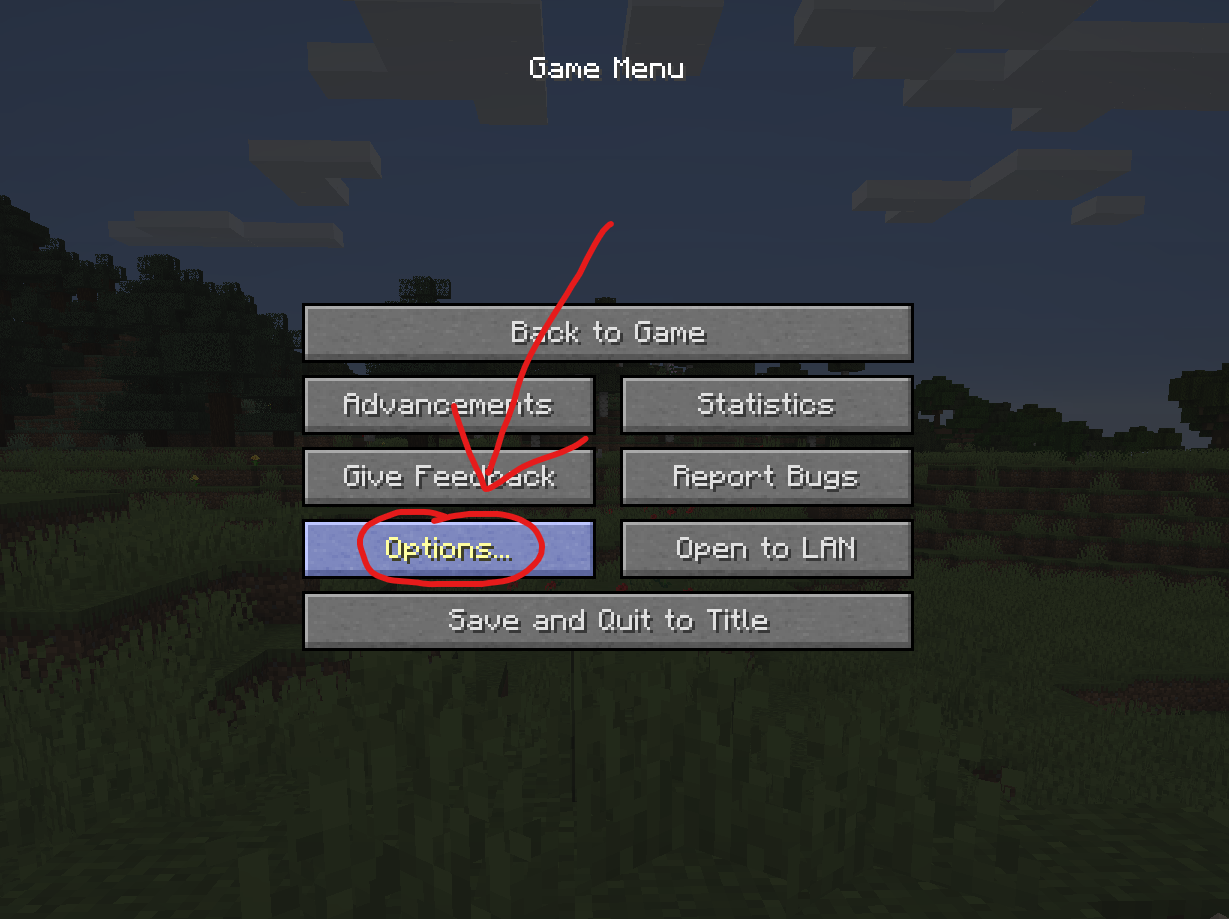
In the Options menu, click on “Controls…”.

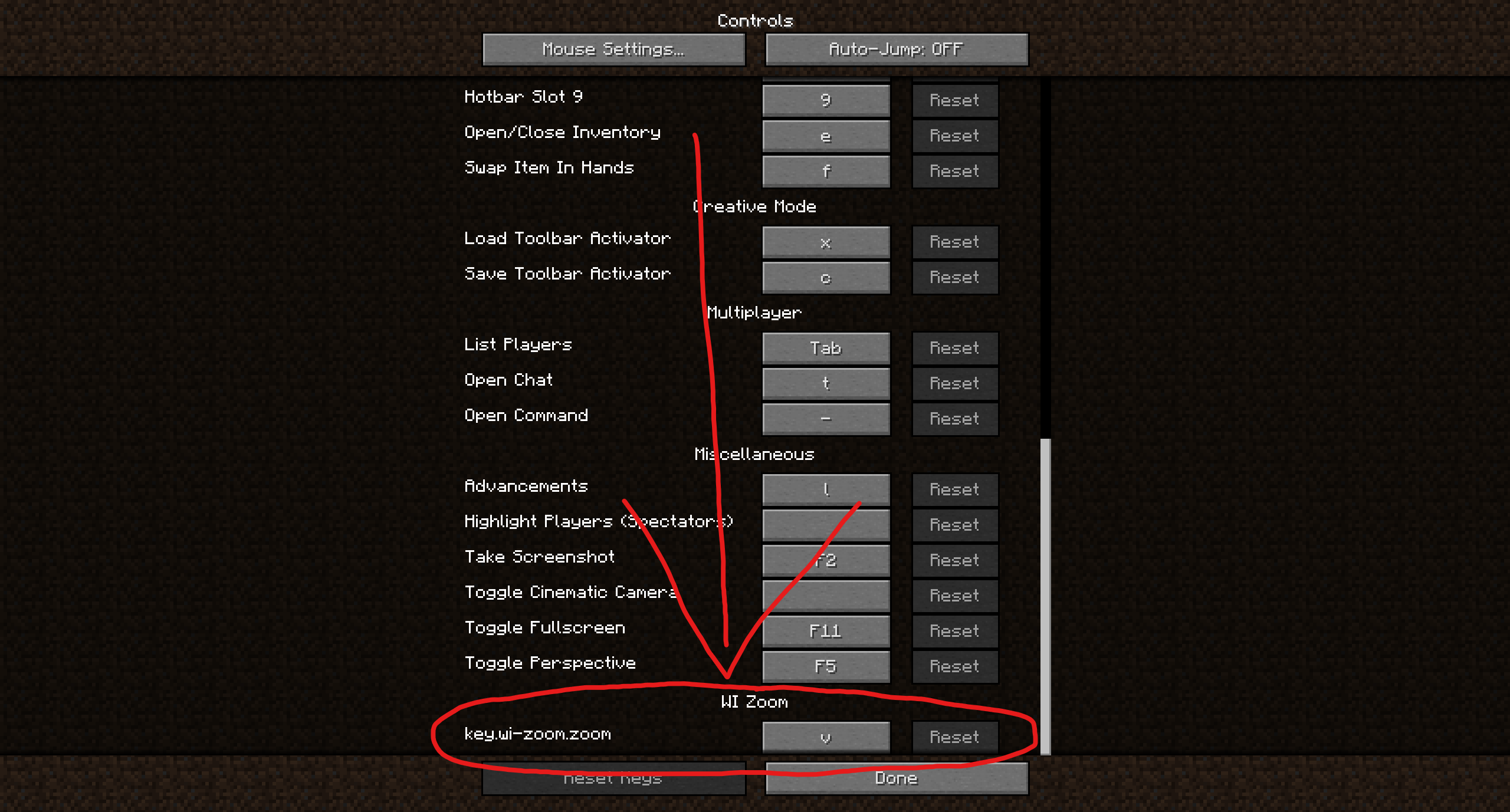
In the Controls menu, scroll down to the “WI Zoom” section. If you don’t have any other mods installed, you will find this section at the very bottom.
## Supported Languages
– Azerbaijani (Azerbaijan) (since v1.5)
– Chinese (Simplified/Mainland) (since v1.4)
– Chinese (Traditional/Taiwan) (since v1.4)
– Cantonese (Hong Kong) (since v1.4)
– Classical Chinese (since v1.4)
– Dutch (Netherlands) (since v1.5)
– English (US)
– Estonian (Estonia) (since v1.4)
– French (France) (since v1.4)
– German (Germany)
– Kurdish (since v1.5)
– Portuguese (Brazil) (since v1.5)
– Russian (Russia) (since v1.3)
– Turkish (Turkey) (since v1.5)
– Ukrainian (Ukraine) (since v1.5)
WI Freecam

# WI Freecam (Wurst-Imperium Freecam)
WI Freecam allows you to detach your camera and move it around freely while your character stays in place. It’s the photo mode that Mojang never added. Spectator mode except it doesn’t move your character and works on any server. The literal perspective shift you need to become a better builder.
Have you ever built a giant dirt tower just to get a better view of your village? Ever wasted half a stack of rockets trying to take a screenshot of your skyscraper from the perfect angle? Ever dug up all your hidden redstone because you forgot how it works? These are common signs that you need a Freecam.
## Why choose WI Freecam
### Movement controls that don’t suck
You shouldn’t have to fight your tools to position a camera.
– WASD is for horizontal movement only. Pressing W won’t send you diagonally downward just because your crosshair isn’t perfectly level. You have space and shift for that.
– Your camera stops moving the moment you release the button. No sliding past your target as if you’re on ice.
– Scroll to change speed, but with precision. You can quickly adjust your speed, but you can also scroll it to an exact value. The on-screen indicator displays your current speed so that there’s no guessing (unlike vanilla spectator mode).
– Vertical speed that actually makes sense. WI Freecam stores your preferred _ratio_ between horizontal and vertical speed, not an absolute value that you then have to re-adjust every time. Set it to 50% once and it will always be half as fast as your horizontal speed.
– Precise input mode. CTRL-click on any slider and type in the exact number you want, instead of fiddling with the mouse for 20 minutes because you’re one pixel off.
### Always up to date
I’m tired of mods that take forever to update when a new Minecraft version comes out. You should be too. “Long term modding version” is a made-up concept by modders who either can’t escape dependency hell or stopped playing Minecraft years ago.
WI Freecam provides day one support for every new Minecraft version, usually within **30 minutes** of release. That’s right, minutes, not weeks! Snapshots are supported too, though those can take a bit longer if they break something.
How is this possible?
First, through lots of automation. As soon as a new Minecraft version is released, a robot compiles the mod against that version, runs it, and goes through a big testing routine where it does everything you could possibly do in the mod at a ridiculously fast speed ([it’s quite fun to watch](https://www.youtube.com/watch?v=fKRFiPcDbfw)). If all tests pass, it then also releases the mod automatically. But if even one pixel looks different, it instead tells me what went wrong so I can get straight to fixing it.
Second, because I built WI Freecam using my own custom settings engine instead of relying on an off-the-shelf config library. You can have the best snapshot automation in the world, but that won’t help you at all if you’re stuck waiting for Cloth Config to update (as I found out the hard way in my last mod).
### A proper modern Freecam
Most Freecam mods are built on decade-old workarounds. Some freeze your movement packets, others spawn a fake camera entity. Both methods mess up the game’s physics, which then requires dozens of messy patches to deal with the side effects.
WI Freecam does something radically simpler: **it just moves the camera**. No fake entities. No frozen packets. No physics workarounds. The camera is just a coordinate: no hitbox, no collision, no name tag, no problems. This wasn’t possible in older Minecraft versions, but clinging to outdated fakery today is unnecessary. WI Freecam is what Freecam should have always been.
## Feature List
– Free camera movement
– Full player physics while in Freecam
– No fake entities or movement packet shenanigans
– On-the-fly switching between camera control and character control (keybindable too)
– Separate horizontal and vertical speed sliders (ratio-based)
– Scroll to change speed (optional)
– On-screen speed indicator (optional)
– Adjustable initial camera position (inside, in front, on top)
– Optional tracer line to help you find your character
– Hide hand for clean screenshots (optional)
– Disable on damage for safety (optional)
– Works on snapshots, updates instantly to new releases
– No third-party dependencies other than Fabric API
– Automated testing to ensure it works reliably
**Disclosure:** This mod collects anonymous statistics to help me decide which versions and environments are still worth supporting. It reports the mod/Minecraft/Fabric version, versions of Mod Menu, Sodium, and Sinytra Connector (if installed), game language, and basic OS info on startup, when you open the mod’s settings, and when you enter a world. When entering a world, it also reports the world type (singleplayer, multiplayer, LAN, or Realms). No personal data such as usernames or IPs is ever collected. You can opt out at any time in the settings menu.
## Installation
> ⚠ Always make sure that your modloader and all of your mods are made for the same Minecraft version. Your game will crash if you mix different versions.
### Installation using Fabric
1. Install Fabric Loader.
2. Add Fabric API to your mods folder.
3. Add WI Freecam to your mods folder.
(NeoForge is not yet supported.)
## Chat Commands
– `/freecam`: Opens the settings menu
## Keybinds
– Toggle Freecam (default: `U`)
– Switch Camera/Player Control (default: not bound)
– Open Settings (default: `Right CTRL`)
## Supported languages
– English (US)
– German (Germany)
Pull requests welcome – [add your native language](https://github.com/Wurst-Imperium/WI-Freecam/tree/master/src/main/resources/assets/wi_freecam/translations)!
White Anime Girl Totem
A clean and stylish Totem of Undying texture pack featuring a white-haired anime girl. This pack replaces the default Minecraft totem with a cute high-quality anime design while keeping the vanilla style smooth and lightweight. Perfect for PvP, survival, and aesthetic gameplay
Wednesday Frogs
# Wednesday Frogs 🐸
Mimics the Wednesday Frogs mine modifier from the craftmine update.
Making frogs now eat players, which instantly kills said player, dealing 1000 damage on Normal difficulty. The damage does scale with difficulty, though that is mostly irrelevant.
## Notes:
– Side effects include the base attack damage attribute of frogs being unchangeable.
Vulkan PostFX
# Vulkan PostFX
**Vulkan PostFX is a lightweight post-processing shader pack loader for Minecraft’s Vulkan renderer.**
It allows external **VPFX shader packs** to add screen-space visual effects such as color grading, vignette, tone mapping, highlight compression, and cinematic look adjustments.
## Start here
For the best first experience, install:
– **Vulkan PostFX** — the loader
– **VerdantVK** — the official example shader pack
Vulkan PostFX is still experimental, but it can already load external ZIP-based VPFX packs through Minecraft’s resource pipeline.
The current goal is not to fully replicate Iris / OptiFine pipeline compatibility in one step.
—
## Current Progress
The project already supports the following core features:
– scanning external ZIP shader packs under `run/shaderpacks/`
– reading and parsing `pack.json` inside shader packs
– explicitly selecting the active pack via `active_pack_id`
– materializing external ZIP packs into runtime resource packs
– injecting external `post_effect/main.json` into the game resource pipeline
– actually loading external post chains through `ShaderManager`
– an **initial translated wrapper** of **Verdant Light 1.3.0**
This means the project is no longer at the stage of merely “reading ZIP files” or “pretending to load them.” It already implements:
**external ZIP shader pack -> runtime resource pack -> external post chain execution**
—
## Project Positioning
### What this is
This is an experimental shader pack loader for the **modern Minecraft Vulkan backend**.
### What this is not
This is **not** yet a mature drop-in replacement for Iris / OptiFine with full shader semantic compatibility.
A more accurate description of the current state would be:
– a **ZIP shader pack loader prototype**
– a **post-effect-driven shader translator**
– a **working proof of concept for the Vulkan path**
—
## Implemented Features
### 1. External Pack Loading
Supports loading the following from ZIP shader packs:
– `pack.json`
– `post_effect/main.json`
– `shaders/post/*.vsh`
– `shaders/post/*.fsh`
### 2. Runtime Namespace Rewriting
External packs are rewritten into isolated runtime namespaces to avoid conflicts with built-in resources.
### 3. Runtime Resource Pack Injection
External ZIP contents are materialized into runtime resource packs during startup / resource reload and injected into the client resource system.
### 4. External Post Chain Execution
The project can now confirm that external post chains are actually found and executed, rather than simply falling back to built-in debug effects.
### 5. Initial Shader Porting
It is already possible to extract and translate the **final look layer** from traditional shader packs into a runnable Vulkan post-effect version.
—
## Current Limitations
The current version still has clear boundaries. Please keep them in mind before use.
### Not fully supported yet
The following traditional shader pipeline components are not fully supported at this stage:
– `gbuffers_*`
– `shadow.*`
– `composite.*`
– screen-space reflections (SSR)
– volumetric fog
– depth-driven material separation
– full dimension-specific shader routing (such as `world1/`, `world-1/`)
### Currently suitable for porting
The most suitable parts to port right now are:
– `final.fsh`
– final grading
– vignette
– highlight compression
– tonemapping
– screen-space look layers
### Known Issues
– Some translated packs still have **brightness mismatch**
– Some color tones may still deviate from the original pack’s intended style
– runtime resource pack metadata is still being refined and standardized
– not every original shader pack can simply be used as-is
—
## Current Available Sample
### Verdant Light 1.3.0 Vulkan Wrapper
The repository already includes an **initial Vulkan-translated version** based on **Verdant Light 1.3.0**.
This is not a full lossless recreation of the original shader pack. Instead, it:
– keeps the original pack resources as reference material
– extracts the most portable final look layer
– runs the external ZIP pack through the current loader’s real post-effect pipeline
—
## Usage
### 1. Place a shader pack
Put the ZIP shader pack into:
`run/shaderpacks/`
**_I have uploaded the template pack on the detail page._**
### 2. Select the active pack
Edit the config file:
`run/config/vulkanpostfx.json`
Example:
“`json
{
“active_pack_id”: “verdantlight130vulkan”
}
““
### 3. Launch the game
When the client starts, the loader will:
* scan ZIP files
* parse the active pack
* materialize runtime resources
* inject them into the client resource system
* attempt to load the corresponding external post chain
### 4. Toggle the debug / external effect
By default, press `F8` to toggle the current debug / external post-effect.
—
## Architecture Overview
“`text
[shaderpacks/*.zip]
|
v
[Manifest Parse]
|
v
[Active Pack Selection]
|
v
[Runtime Materialization]
|
v
[Runtime Resource Pack Injection]
|
v
[post_effect/main.json]
|
v
[ShaderManager Post Chain Loading]
|
v
[External ZIP Shader Execution]
“`
—
## Most Suitable Development Direction Right Now
The recommended next steps are not to keep stuffing more traditional shader files into the project, but to:
1. continue improving `final`-path translation quality
2. correct brightness / exposure mismatches
3. improve fidelity for sky, water, and highlights
4. gradually introduce more complex `composite` semantics
5. eventually explore a more complete Vulkan shader compatibility layer
—
## Design Philosophy
The core idea of this project is not to force all traditional shader semantics into Vulkan at once, but rather:
**first establish a truly executable chain, then gradually bring back the visual logic that matters**
In other words:
* first make external packs actually run
* then gradually make the visuals resemble the original shader pack
* only after that pursue larger-scale compatibility
—
## Notes
This is still a fast-evolving experimental project.
If you are looking for a ready-made, fully compatible replacement for Iris / OptiFine, the current version is not there yet.
But if you care about:
* Vulkan shader workflows
* external ZIP shader pack loading
* an experimental translation framework for modern Minecraft
* gradually migrating traditional shader semantics into a new rendering path
then this project is built exactly for that.
—
## **_This mod updates weekly, maybe one time or more._**