VerdantLight
# VerdantLight
—
**VerdantLight** is a lightweight, high-quality shader pack for Minecraft 1.21.4, designed to deliver natural and realistic lighting while maintaining smooth performance. Featuring path-traced lighting, dynamic shadows, day-night cycles, realistic sun and moon halos, and smart plant shadow detection to prevent small plants from casting unnatural shadows.
**Outstanding Performance:**
* On Intel Iris Plus 640, with render distance 6 and simulation distance 8, standing still gives around **75 FPS**.
* Walking across open plains maintains around **45 FPS**, providing a smooth experience without sacrificing visual quality.
**Key Features:**
* **Lightweight Optimization**: Designed for low-end hardware and high performance.
* **Dynamic Shadows**: Path-traced lighting ensures smooth, stable shadows without jittering.
* **Natural Sky**: Day-night cycle with realistic sunset/sunrise transitions, glowing sun square, and subtle moon halos.
* **Smart Plant Shadows**: Small plants cast no unnatural shadows, trees cast realistic shadows.
* **Enhanced Lighting**: Compatible with Minecraft’s native lightmaps, adds ambient occlusion for richer scene depth.
* **Rain Effects**: Sky color dynamically adjusts in rain, enhancing immersion.
**Perfect For:**
* Players seeking a lightweight, high-performance shader experience
* Builders who enjoy natural, soft lighting effects
* Low-end hardware users who want smooth FPS without compromising visuals
—
# VerdantLight
**中文介绍:**
**VerdantLight** 是专为 Minecraft 1.21.4 打造的轻量级高质量光影包,旨在在保持流畅性能的同时呈现自然、真实的光影效果。它采用路径追踪光照算法,支持动态阴影、昼夜循环、真实的太阳与月亮光晕效果,并通过智能植物阴影识别技术,让小型植物不会投射不自然的阴影,从而保证视觉的自然与细腻。
**性能表现极佳**:
* 在 Intel Iris Plus 640 上,渲染距离 6、模拟距离 8 时,玩家站立即可达到约 **75 FPS**。
* 在草原环境行走时,也能保持约 **45 FPS**,兼顾了流畅体验与光影品质。
**核心特点:**
* **轻量优化**:专为低配硬件和轻量化体验设计,减少不必要的计算负载。
* **动态阴影**:路径追踪光照算法实现实时阴影,无跳动问题。
* **自然天空**:昼夜循环、日落/日出色彩过渡,太阳正方形发光和月亮光晕自然呈现。
* **智能植物阴影**:小型植物不会投射不合理的阴影,树叶投射真实阴影。
* **光照贴图增强**:兼容 Minecraft 原生光照贴图,同时加入环境光遮蔽,使场景层次更丰富。
* **雨天效果**:雨天时天空颜色自动调整,增加沉浸感。
**适用人群**:
* 想要轻量、高性能光影体验的玩家
* 喜欢自然柔和光影效果的建造者
* 在低配硬件上追求流畅帧率的玩家
—
If there is a problem or advice, just say in the Discord Server.
Variety
Im also active here!
[
](https://www.planetminecraft.com/member/nickshoof/) [](https://www.curseforge.com/members/svrve/projects) [](https://modrinth.com/user/Svrve) [](https://discord.com/) [](https://https://ko-fi.com/svrve)
##

**Pack that will randomize blocks and entities textures in your world to make it more unique and pleasing to the eye. Textures that are randomized or have variants by default ~~(blocks: stone, grass; mobs: chicken, cow)~~ stays without a change. You can see the difference at pictures in gallery. If you have an idea contact me.**
Here is a [quick guide to how to install texture packs](https://www.youtube.com/watch?v=I8BmnjowFrE) by _GuideRealm._
No mods required.
##

Now available on CURSEFORGE!
You can contact me on my PMC page!
Get EARLY ACCES to all of my packs [HERE](https://ko-fi.com/svrve).
All rights reserved.
#
**10% of the texturepack completed.**
List of Textures
– Birch Log
– Cobblestone+
– Cobbled Deepslate+
– Gravel
– Oak Log
– Granite+
– Andesite+
– Diorite+
– Mossy Cobblestone+
– Tuff
(“+” means cutouts)
Variants cakes
# **Variants cakes**
**The texture pack adds 26 cake variants. Cake textures can be swapped using OptiFine or CIT Resewn.**
**Contents:**
Spoiler
1. 6 cakes with sweet berries on a milk glaze
1. 6 cakes with glow berries on a milk glaze
1. 6 cakes with sweet berries on a chocolate glaze
1. 6 cakes with glow berries on a chocolate glaze
1. 1 cake with milk glaze and no berries
1. 1 cake with chocolate glaze and no berries
**Renamings:**
Spoiler
1. Cake 2
1. Cake 3
1. Cake 4
1. Cake 5
1. Cake no berries
1. Cake with glow berries 1
1. Cake with glow berries 2
1. Cake with glow berries 3
1. Cake with glow berries 4
1. Cake with glow berries 5
1. Cake with one glow berry
1. Cake with one sweet berry
1. Choco cake 1
1. Choco cake 2
1. Choco cake 3
1. Choco cake 4
1. Choco cake 5
1. Choco cake no berries
1. Choco cake with glow berries 1
1. Choco cake with glow berries 2
1. Choco cake with glow berries 3
1. Choco cake with glow berries 4
1. Choco cake with glow berries 5
1. Choco cake with one glow berry
1. Choco cake with one sweet berry
VO: Better Dogs




# 🐕 Better Dogs
**No Backports:** This mod targets **Minecraft 26.1+**. Older versions are unsupported.
> **Make Wolves Worthy Companions. Smarter, Safer, Livelier.**
Every Minecraft player knows the pain: you spend hours finding a wolf, tame it, and five minutes later it jumps into lava or walks off a cliff. **Better Dogs** overhauls wolf AI to make them effective partners. Powered by a high-performance **Event-Driven AI Scheduler**, they act efficiently without sacrificing performance.
Part of the **Vanilla Outsider Collection** — mods that refine the vanilla experience with modern standards.
—
## ✨ Features
### 🧠 Personality Intelligence
When tamed, wolves develop one of three permanent personalities, visible via custom particles:


– 💢 **Aggressive**: The Guardian. Proactively attacks hostile mobs and scouts ahead.
– ❤️ **Pacifist**: The Healer. Avoids combat unless you are hurt. High health, low damage.
– ✨ **Normal**: The Classic. Balanced stats and standard vanilla-plus behavior.
### 🤝 Advanced Social AI
– **Social Bonding (Affinity)**: Dogs form relationships within their pack. Socializing builds trust and reduces accidental infighting.
– **Adult Correction**: Aggressive adults discipline misbehaving puppies, preventing death loops.
– **Pack Genetics**: Puppies inherit personality traits and stats from their parents.
### 🛡️ Smart Survival AI
– **Cliff Safety**: Wolves detect fatal drops and airborne targets, stopping dangerous chases.
– **Hazard Awareness**: Improved pathfinding around lava, fire, and drowning hazards.
– **Creeper Awareness**: Wolves flee from hissing Creepers!
### 📡 Behavioral Specialization
– **Scouting**: Aggressive dogs proactively range ahead to clear your path.
– **Silent Alarm**: Pacifist dogs emit a high-pitched whine when they detect nearby monsters.
– **Gift System**: Loyal dogs bring you treasures based on their personality.
– **Debug Tools**: Use `/betterdogs debug territory` to test pack interactions.
### 🏰 Wild Wolf Territoriality
Wild wolf packs are now dynamic, territorial entities led by a dominant leader:
– **Territorial Disputes (The Handshake)**: When rival packs meet, leaders negotiate. If both want war, they engage in a **Territorial War**. If only one wants war, the other may **Yield & Merge** immediately or retreat based on a configurable chance.
– **1v1 Leader Duels**: During a war, rival leaders engage in a cinematic 1v1 duel to settle dominance, while pack members participate in a secondary brawl.
– **Yield & Merge**: Defeated packs are not lost; they yield and **merge** with the winning pack, allowing for the natural formation of massive wolf colonies.
– **Wild Personality AI (New Default)**: Out of the box, wild pack members exhibit unique behaviors (like Aggressive hunting or Pack Retreats) while anchored to their leader.
– **Performance Hardened**: All AI logic is performance-optimized using **DasikLibrary 1.7.0**, ensuring zero console spam and smooth server TPS even with massive packs.
—
## ⚙️ Configuration (Native Game Rules)
No messy config files. Better Dogs uses the **Native Minecraft Game Rules** system. All 40+ mod parameters are grouped into a dedicated **”Better Dogs”** category in the official UI.

—
## ☕ Support
If you enjoy the **Vanilla Outsider** collection, consider fueling the next update!
[](https://ko-fi.com/dasikigaijin/tip)
[](https://sociabuzz.com/dasikigaijin/tribe)
[](https://saweria.co/DasikIgaijinn)
> [!NOTE]
> **Indonesian Users:** SocioBuzz and Saweria support local payment methods (Gopay, OVO, Dana, etc.) if you want to support me without using PayPal/Ko-fi!
—
## 📜 Credits
| Role | Author |
| :— | :— |
| **Creator** | **Rifaditya** (Dasik) |
| **Collection** | Vanilla Outsider |
| **License** | GPLv3 |
—
**Made with ❤️ for the Minecraft community**
*Part of the Vanilla Outsider Collection*
Vanilla Food Hunger Bar HUD Hotbar
Reverts the HUD Food/Hunger Icons to the default, vanilla ones when put above other Resourcepacks. Useful for overriding the textures when using other resource packs that might make them look worse.
Now with [Appleskin](https://modrinth.com/mod/appleskin/versions) and [Farmer’s Delight](https://modrinth.com/mod/farmers-delight) COMPATS!

I mainly made this to revert these food/hunger textures from [Unique Dark](https://modrinth.com/resourcepack/unique-dark):


Click here or on the image above for the Health/Hearts version
**You might also want to use:**
|[](https://modrinth.com/resourcepack/old-water)|[](https://modrinth.com/resourcepack/old-bedrock)|[](https://modrinth.com/resourcepack/new-bedrock)|[](https://modrinth.com/resourcepack/mute-pistons)|[](https://modrinth.com/resourcepack/quieter-pistons)|[](https://modrinth.com/resourcepack/mute-dispensers-and-droppers)|[](https://modrinth.com/resourcepack/quieter-dispensers-and-droppers)
|:-:|:-:|:-:|:-:|:-:|:-:|:-:|
|[Old Water](https://modrinth.com/resourcepack/old-water)|[Old Bedrock](https://modrinth.com/resourcepack/old-bedrock)|[New Bedrock](https://modrinth.com/resourcepack/new-bedrock)|[Mute Pistons](https://modrinth.com/resourcepack/mute-pistons)|[Quieter Pistons](https://modrinth.com/resourcepack/quieter-pistons)|[Mute Dispensers and Droppers](https://modrinth.com/resourcepack/mute-dispensers-and-droppers)|[Quieter Dispensers and Droppers](https://modrinth.com/resourcepack/quieter-dispensers-and-droppers)
user flags
> **communicating with non-friends in 26.2**
>
> first, open the game at least once to generate the config. then open `config/user-flags.properties` and put `false` next to the line reading `chat_friends_only=`.
>
> this will also allow you to see your own messages. an upcoming update will make this the default option.
# user flags
unblock chat, disable telemetry, and more. configure your safety settings!
by default, this mod simply prevents chat from being disabled by account settings. see below for more configuration information!
this mod works on all versions from 1.18 to 26.1!
## how it works
when starting up the game, minecraft gets [some information about what privileges your account has](https://minecraft.wiki/w/Mojang_API#Query_player_attributes), known internally as user flags. this is what controls various account features such as whether you can see chat. this mod simply changes those values to whatever you want!
## configuration
this mod creates a `config/user-flags.properties` file which can be used to make local changes to your account’s safety settings. simply put true/false next to the values you want to change.
users may want to configure these settings:
– chat allowed — bypasses account chat restrictions
– telemetry enabled — disable all minecraft telemetry
developers may want to use these settings for debugging:
– servers allowed — can be disabled (cannot bypass bans)
– profanity filter enabled — enables use of `text-filtering-config`
for more information about what all the flags do, check out [this document](https://codeberg.org/orifu/user-flags#readme)!
default config:
“`properties
#use true/false to override
chat_allowed=true
telemetry_enabled=
optional_telemetry_available=
servers_allowed=
realms_allowed=
profanity_filter_enabled=
“`
Useless Upgrade Template
# About Mod


[AVAILABLE ON HANGAR](https://hangar.papermc.io/break08/Useless-Upgrade-Teamplate)
This mod will keep the Netherite Upgrade Template but make it useless, you don’t need it to get Netherite Tools. Instead of, you can replace the template with a gold ingot; therefore, you don’t need to go to the dangerous bastion for the template and upgrading armor =)
### Note (especially 1.20.1 version)
**If the gold ingot can’t go in the template slot in smithing table when you hold Shift and click, try drag and drop in in the template slot**. Like this:
If shift + click don’t put gold ingot in template slot

### Support 26.1 and 26.2-snapshot
**Now support MC 26.1 + 26.2-snapshot (Fabric and Datapack)**

# Support removing **UPGRADE TEMPLATE** for other mods
Enderite Mod Support (1.20.1 and 1.21.11 Fabric)
Support for [Enderite Mod](https://modrinth.com/mod/enderite-mod)
No longer require **Enderite Upgrade TEMPLATE**, replace it with a **diamond** !

1.21.11 Fabric mods support list
> [Enderite Mod](https://modrinth.com/mod/enderite-mod) by Nic4Las
> [Advanced Netherite](https://modrinth.com/mod/advanced-netherite) by Autovw
> [Reinforced Barrels](https://modrinth.com/mod/reinforced-barrels) by Aton-Kish
> [Reinforced Chests](https://modrinth.com/mod/reinforced-chests) by Aton-Kish
> [Reinforced Shulker Boxes](https://modrinth.com/mod/reinforced-shulker-boxes) by Aton-Kish
> [Traveler’s Backpack](https://modrinth.com/mod/travelersbackpack) by Tiviacz1337
Just for Fabric 1.21.11
### More supported mod:
You can suggest me mod which you want to be supported, but not all mod will be accepted. Condition (Even if all these conditions are met, some mods may not be supported):
> Popularity (10 000 downloads or above)
> Mod uses recipe that includes **NETHERITE UPGRADE TEMPLATE** or anything that is similar to **UPGRADE TEMPLATE**
Go to ISSUES tab on GITHUB (Report bugs page), create new “Issues”, choose **Enhancement** label and provide mods’ name and link.
# Bugs and issues
**Report here:** https://github.com/break08/UselessUpgradeTemplate/issues
# Try my other mod
[New NameTag Recipe](https://modrinth.com/datapack/new-nametag-recipe): **Backport 26.1 Name Tag Recipe**
# Credit
Credit to MCreator for these version
List
**Forge**: 1.20.1
**NeoForge**: 1.20.4, 1.20.6, 1.21.1, 1.21.4, 1.21.8
**Fabric**: 1.21.8
**Datapack**: 1.20-1.20.1, 1.20.3-1.20.4, 1.20.5-1.20.6, 1.21-1.21.1, 1.21.4-1.21.5, 1.21.7-1.21.8
Unlimited Enchantments
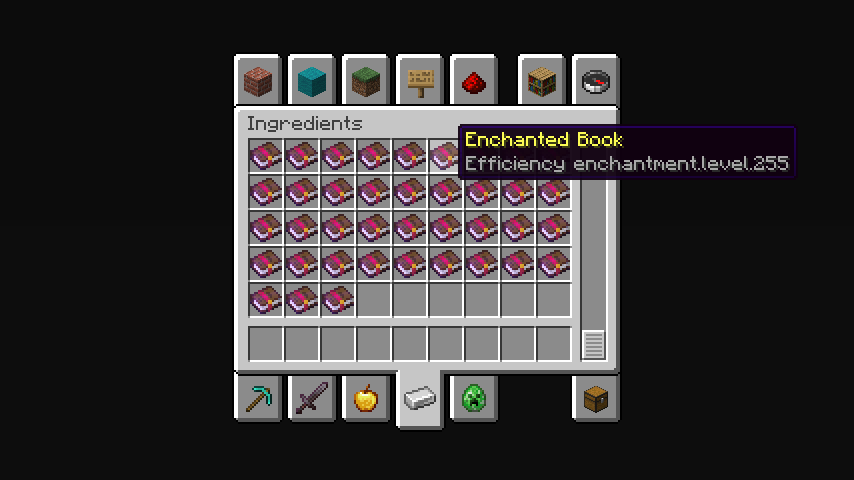
## **The maximum limit is 255 levels.**
In the Creative Mode Ingredients tab, enchantments with level 255 will be displayed. To take a certain book with the desired enchantment level, you need to write the name of the enchantment in the search tab and there will be enchantment levels from 1 to 255.
**Note:**
You can only get enchantments exceeding the game limit by finding them in structures or buying them from residents.
—
**Possible disadvantages:**
When trying to combine two books of a high enchantment level, it may not be possible due to the too expensive amount of experience. If anyone knows how to fix this, please upload the solution to our [Github](https://github.com/SayNooty/Unlimited-Enchantments).
Вряд ли (Unlikely) Totem Of Undying
– ENG: It’s unlikely (doubtful, 50-50) – a series of pictures with colorful birds, on which expressions conveying doubt are written. The meme went viral in December 2025 on TikTok.
– RU: Вряд ли (сомнительно, 50 на 50) – серия картинок с разноцветными птицами, на которых написаны выражения, передающие сомнение. Мем завирусился в декабре 2025 года в Тиктоке
[ALL RESOURCEPACKS COLLECTION: MEMES + STREAMERS](https://modrinth.com/collection/sfDcDGAi)
TrueLight FX Lite
## Showcase/Tutorial:
Huge thanks to [@Titanaraa](https://www.youtube.com/@Titanaraa) for creating this awesome video!
# TrueLightFX Lite
– Looking like Vibrant-visuals without the FPS cost. A lightweight shader built for low to mid-range PCs that refuses to look boring.
## What You Get:
### – Realistic Waves – animated water surface with adjustable size and speed
### – God Rays – light shafts through trees and windows, with intensity control
### – Dynamic Fog – golden daylight tones, naturally dark nights and caves
### – Glowing Ores – real additive emission that cuts through cave darkness
### – Underwater Caustics – animated light patterns via fast sine-wave math
### – Wavy Plants – wind-affected leaves, sand, and vegetation
### – Bloom – adjustable post-processing glow
### – TAA + FXAA – your choice of anti-aliasing
### – Two Cloud Styles – Standard or Enhanced
### – Smart Profiles – instant presets from “low” to “your pc isnt that slow isnt it”.
Credits to Ukrech for the [Source Project](https://github.com/mateuskreuch/minecraft-miniature-shader).
Compatibility:
TrueLightFX works with Minecraft versions 1.8.2 – 1.17, but older versions may experience bugs and reduced smoothness. For the best experience, it is strongly recommended to use Minecraft 1.17 or newer.
