Ksyxis
# Ksyxis
Speed up your world loading by removing unneeded chunks.
## Language
– **English** (Extended Version)
– Русский
## Downloads
– Modrinth
– CurseForge
– GitHub Releases
## Dependencies
– Fabric, Forge, NeoForge, Quilt, Legacy Fabric, or Ornithe
– Minecraft (1.8 or newer)
– **Forge 1.8-1.14.4 only**: Any Mixin provider, at your choice (such as
MixinBootstrap,
MixinBooter,
UniMixins, or any other)
## About
Depending on your game version, Minecraft loads some
chunks when you create your world.
Sometimes, these chunks are always loaded in the background. Either
way, whether these chunks being loaded is a one-time performance slowdown,
or a constant performance penalty, most players don’t need any of these
chunks. This mod completely disables unneeded chunks in the game.
*Note*: Unneeded chunks are sometimes used by farms and
technical contraptions. If you’ll need these chunks, you
can always delete the mod later to re-enable these chunks.

## Versions
| Version | Effect | Note |
|—————|—————|————————————————————————————————————————————————|
| 1.21.9+ | Insignificant | A 7×7 area of chunks won’t be loaded around the player when they join, and a fake 500ms world creation delay in single-player will be removed. |
| 1.20.5-1.21.8 | Low | A 5×5 area of spawn chunks won’t be loaded constantly in the background. |
| 1.8-1.20.4 | Extreme | A 21×21 area of spawn chunks won’t be loaded constantly in the background. |
## FAQ
**Q**: I need help, have some questions, or have some other feedback.
**A**: You can join the Discord server.
**Q**: Where can I download this mod?
**A**: Modrinth,
CurseForge,
or GitHub Releases.
You can also find unstable builds at
GitHub Actions.
You will need a GitHub account to download these.
**Q**: Which mod loaders are supported?
**A**: Fabric, Forge, NeoForge, Quilt, Legacy Fabric, and Ornithe.
**Q**: Which Minecraft versions are supported?
**A**: Minecraft versions 1.8 and newer.
**Q**: Why support so many Minecraft versions?
**A**: Because I can.
**Q**: Do I need Fabric API or Quilt Standard Libraries?
**A**: Not necessarily.
**Q**: Where are the Fabric, Forge, NeoForge, Quilt, etc. versions?
**A**: All in the same file.
**Q**: Is this mod client-side or server-side?
**A**: This mod works on the server and on the client in singleplayer.
It has no effect on the client when playing multiplayer.
**Q**: Is this mod stable for use?
**A**: Should be fine. If it breaks something,
just delete it and your worlds will be fine.
**Q**: I’ve found a bug.
**A**: Report it here. If you are not
sure whether this is a bug or a simple question, you can join the
Discord. Report security vulnerabilities
here.
**Q**: Can I use this in my modpack?
**A**: Sure. Credit (e.g., a link to the mod’s GitHub page) is appreciated but
is not required. Monetization and redistribution are allowed as per the
MIT License.
**Q**: This mod doesn’t speed up anything.
**A**: The effect may not be noticeable on high-end PCs. This mod
is designed primarily for low-end devices. Nevertheless, there is
a video.
**Q**: How to force-load chunks if the spawn chunks have been removed?
**A**: If you really need to force-load chunks, load individual
chunks with the `/forceload` command in 1.13 or newer. For older
versions, you can search for some mod that force-loads chunks.
**Q**: It says *Ksyxis: No Mixin found*.
**A**: If you’re using Forge 1.15.2 or older, you may need to install
MixinBootstrap,
MixinBooter,
UniMixins, or any other
Mixin provider of your choice. If you’re using Forge 1.16
or newer, or any version of Fabric/NeoForge/Quilt/Ornithe,
you don’t need to install anything, and this is a bug.
See README
on GitHub for FAQ on mod’s technical aspects.
## License
This project is provided under the MIT License.
Check out LICENSE
for more information.
## Credits
This mod is developed primarily by VidTu,
but it wouldn’t be possible without
contributors and
some technologies
used.
## Development
See README
on GitHub for details about developing this mod.
JustinDB’s Simple Beds
Make your beds more realistic with this texture pack! No mods needed!


NOTE: Only works with 26.2-snapshot-3 or above versions. Because bed block models came with the 26.2-snapshot-3 and older versions don’t have bed block modelling.
Just Hotbar
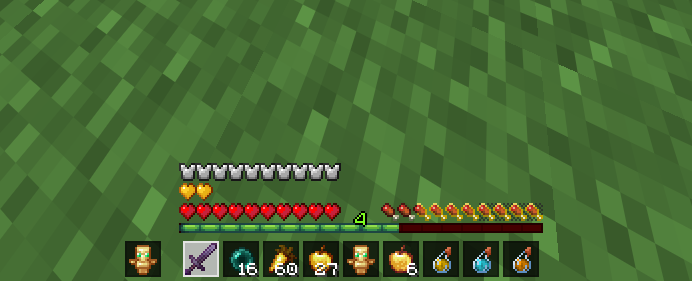
# Just Hotbar
This texture pack changes the hearts and hotbar, making them simpler
Join AutoSprint Mod
# Join AutoSprint Mod
Just put this mod in your mods folder and now you no longer need to press your sprint key before having your togglesprint work. (backbreaking work, I know)
This mod will also re-enable sprint when you respawn
No Java Edition Branding – Remove from Start-Title Screen
Removes the Java Edition Text under The “Minecraft” Logo from the Title Screen!


Also works for with other resourcepacks!


Ixeris
# Ixeris
## Overview
Ixeris is a mod that optimizes event polling to improve client performance.
You might have noticed a visible drop of the FPS when you move your mouse. Part of the FPS drop is because the game does have additional jobs to do when you turn the camera, like calculating the visibility of chunks. However, because of the inefficiency in the native code that polls events and the JNI upcall overhead, some of the CPU time, otherwize can be utilized for rendering, are unnecessarily spent on event polling. This is most noticeable on Windows, especially when your mouse has a high polling rate.
Ixeris resolves the issue mainly through two measures:
– **Threaded Event Polling**. Instead of performing rendering and event polling on the same thread, Ixeris performs event polling on the *main thread* and kicks rendering to a separate *render thread*.
– **Buffered Raw Input** (Windows-only). Switches the method used for input polling from the inefficient `GetRawInputData` (one call for each input event) to `GetRawInputBuffer` which allows reading raw input messages in batches (one call for all events). Additionally, performing this work in Java code has allowed us to eliminate the JNI upcall overhead.
## Benchmarks
These tests are done after the world has fully loaded and the framerate has stabilized.
### Test 1: In Game
This test compares the performance when the mouse is grabbed, i.e. cursor invisible. This test is performed in a superflat world with no entities.
This test is done on Windows, where Ixeris uses buffered raw input by default to improve performance. The “Ixeris, Non-buffered” column shows the FPS with that option disabled.
| Polling Rate | Without Ixeris | Ixeris, Non-buffered | Ixeris, Buffered |
|————–|—————-|———————-|——————|
| 8000 Hz | 12 FPS | 83 FPS (6.9x) | 121 FPS (10.1x) |
| 2000 Hz | 76 FPS | 114 FPS (1.50x) | 135 FPS (1.78x) |
| 500 Hz | 134 FPS | 145 FPS (1.08x) | 151 FPS (1.13x) |
### Test 2: In Menus
This test compares the performance when the mouse is not grabbed, i.e. cursor visible, as in F3+Esc pause screen. In this case, raw input is never used as the game needs to know the *actual* cursor position, not the raw relative movement. The polling rate is 1000Hz.
The “Idle FPS” column shows the FPS when not moving the mouse, and the next two columns show the FPS when moving the mouse quickly over the game window, without Ixeris and with Ixeris, respectively. Note that this test was performed at the initial release of Ixeris, and many improvements have been made since then.
| | Idle FPS | Without Ixeris | With Ixeris |
|—————–|———-|—————-|—————–|
| Windows | 233 FPS | 133 FPS | 165 FPS (1.24x) |
| Linux (X11) | 358 FPS | 320 FPS | 355 FPS (1.11x) |
| Linux (Wayland) | 364 FPS | 289 FPS | 298 FPS (1.03x) |
## Technical Details
### Thread Satefy
In its current state Ixeris should not break thread safety. Callbacks registered with “`glfwSet*Callback“` are executed on the render thread. Calls to GLFW functions that are required to be called on the main thread, if made on other threads, are dispatched to the main thread. These calls may immediately return if they can be safely delayed, or otherwise may block the caller until the call is finished.
As of version 3.1.0, the requirements of thread safety in the GLFW documentation are strictly obeyed.
### GLFW State Caching
Most GLFW functions are required to be called from the main thread. However, many mods may call them from the render thread. To avoid performance degradation introduced by thread communications, Ixeris caches frequently used GLFW states for fast access from any thread, without having to route the call to the main thread. The caches are safe and do not introduce extra lag.
### Enhanced FPS Limiter
The vanilla FPS limiter (prior to 26.1) is flawed, using `glfwWaitEventsTimeout` to sleep. This function, however, cannot be called from the render thread and thus does not work optimally with Ixeris.
Ixeris rewrites the FPS limiter in a hybrid way, sleeping precisely and starting spin waiting when the wait time is very low.
### Glossary
– The **main thread** is the thread that the game is started on. Most GLFW functions are required to be called on this thread, and it is responsible for event polling.
– The **render thread** does everything the game normally does, except event polling.
These two terms are synonymous in vanilla Minecraft.
ItemLimiter
## What ItemLimiter Does
ItemLimiter is a lightweight Paper plugin that gives server owners full control over how many of each item players can hold. Whether it’s rare gear, powerful tools, or any resource you want to regulate, ItemLimiter keeps gameplay balanced and fair.
With an easy-to-use GUI, you can quickly add, view, or remove limits without touching config files or restarting your server.
## Why You Should Download This
– **Prevent Item Hoarding** – Stop players from carrying excessive amounts of powerful items
– **Balance PvP Combat** – Limit totems, potions, and overpowered gear for fair fights
– **GUI Management** – Add or remove limits instantly through an intuitive interface
– **No Config Editing** – Everything is managed in-game with simple commands
– **Performance Friendly** – Runs checks seamlessly without causing lag
## How to Use
**Adding Item Limits:**
1. Use `/limit` to open the GUI
2. Drag the item you want to limit into the interface
3. Set the maximum amount players can carry
4. Confirm – that’s it!
**Removing Limits:**
1. Open `/limit` GUI
2. View current limits
3. Click to remove any item restriction
**Bypass Limits:**
Use `/limitbypass` to toggle bypass mode for operators or special ranks
## Commands
“`
/limit – Open the item limit management GUI
/limitbypass – Toggle bypass mode for item limits
“`
## Permissions
“`
itemlimiter.admin – Access to limit management GUI
itemlimiter.bypass – Bypass all item restrictions
“`
Default: OP for admin commands
## Key Features
**Custom Item Limits**
Set how many of any specific item players can carry in their inventory.
**Real-Time Management**
Add, update, or remove limits at any time directly through the GUI – no restart needed.
**Bypass Support**
Allow operators or special ranks to ignore item restrictions when needed.
**Lightweight & Efficient**
Runs inventory checks seamlessly without impacting server performance.
**Plug-and-Play**
Just drop it into your plugins folder – no complicated setup or configuration required.
## Installation
1. Download the latest version for your Minecraft version
2. Place the `.jar` file in your server’s `plugins` folder
3. Restart your server
4. Use `/limit` to start adding item restrictions
## Use Cases
**SMP Servers**
Prevent resource hoarding and keep the economy balanced by limiting valuable items.
**PvP Servers**
Stop overpowered loadouts by capping totems of undying, ender pearls, potions, and more.
**Competitive Gameplay**
Ensure fair fights by restricting how much gear players can bring into battle.
**Custom Game Modes**
Create unique challenges by limiting specific items for events or minigames.
## Other Plugins You Might Like
| Plugin | Description |
|——–|————-|
| MTS AntiCheat | Keep your server cheat-free by blocking unauthorized mods |
| InstaRestock | Instantly restock villager trades for smoother economy |
## Support
If you encounter any issues or have feature requests, please use the Report button or reach out through the discussion section.
Note: Item limits apply to player inventories and are checked automatically. Bypass permission allows certain players to exceed limits when needed.
Item Registry
## Introduction
Item Registry (IR) aims to provide a reliable source of truth regarding Minecraft’s item system. This is accomplished by providing item component data (e.g. stack size and rarity attributes) as well as various forms of sorted and filtered item lists. Once the registry has been imported, item data may be queried using commands such as “`/data get storage“`.
## How it works
At its core, IR consists solely of a single function called import_registry.mcfunction, which takes two arguments when executed:
– storage: arbitrary NBT storage that the registry is loaded into
– path: arbitrary NBT path inside storage
Item data is generally accessible via two compound tags:
– item_components: stores item attributes such as stack size, rarity, translation key
– item_lists: stores item IDs in various sorted and filtered lists
To ensure that IR is always up-to-date, the entire generation and publishing process is fully automated. Minecraft releases are checked regularly. If the latest version has changed, IR is re-built automatically before being published to Modrinth. See the “Generator Script” section for more information regarding this topic.
## Usage
First of all, IR needs to be imported. This can be accomplished using the following command:
“`/function item-registry:import_registry {storage:”foo:bar”,path:”baz”}“`
Note: Since this function’s size is tremendous (2000+ lines), it is recommended to only run it once, e.g. at #minecraft:load.
After the import has finished, IR is ready to serve data. The following command may be used to fetch component data of an arbitrary item, such as “minecraft:allium”:
“`/data get storage foo:bar baz.item_components.”minecraft:allium”“`
**Result:** _{“max_stack_size”: 64, “obtained_via”: {“loot_table”: 1b, “recipe”: 0b, “gamemode_survival”: 1b}, “rarity”: “common”, “translation_key”: “block.minecraft.allium”, “translations”: {“en_us”: “Allium”}}_
Furthermore, you are also able to extract specific item attributes using “`/data modify“`. By running the following command, some component data of a smithing template is saved to a temporary location:
“`/data modify storage foo:bar temp.vex_template_rarity set from storage foo:bar baz.item_components.”minecraft:vex_armor_trim_smithing_template”.rarity“`
As IR also contains item lists, these may be queried too. Use this command to obtain a complete, alphabetically sorted list of all items in Minecraft:
“`/data get storage foo:bar baz.item_lists.sorted_alphabetically.entries“`
**Result:** _[“minecraft:acacia_boat”, “minecraft:acacia_button”, “minecraft:acacia_chest_boat”, “minecraft:acacia_door”, “minecraft:acacia_fence”, “minecraft:acacia_fence_gate”, …]_
In addition, IR also maintains filtered lists for specific item attributes, such as:
– filtered_by_stack_size_1
– filtered_by_stack_size_16
– filtered_by_stack_size_64
– filtered_by_loot_table_obtained
– filtered_by_loot_table_unobtained
– filtered_by_recipe_obtained
– filtered_by_recipe_unobtained
– filtered_by_survival_obtained
– filtered_by_survival_unobtained
– filtered_by_rarity_common
– filtered_by_rarity_uncommon
– filtered_by_rarity_rare
– filtered_by_rarity_epic
To retrieve the first few items with “uncommon” rarity, run the following commands:
“`/data get storage foo:bar baz.item_lists.filtered_by_rarity_uncommon.entries[0]“`
**Result:** _”minecraft:angler_pottery_sherd”_
“`/data get storage foo:bar baz.item_lists.filtered_by_rarity_uncommon.entries[1]“`
**Result:** _”minecraft:archer_pottery_sherd”_
“`/data get storage foo:bar baz.item_lists.filtered_by_rarity_uncommon.entries[2]“`
**Result:** _”minecraft:arms_up_pottery_sherd”_
## Examples
The following list contains a few more examples. IR was imported using:
“`/function item-registry:import_registry {storage:”example:data”,path:”ir”}“`
Get stack size of “minecraft:cake”
“`/data get storage example:data ir.item_components.”minecraft:cake”.max_stack_size“`
**Result:** _1_
Get translation key of “minecraft:hopper”
“`/data get storage example:data ir.item_components.”minecraft:hopper”.translation_key“`
**Result:** _”block.minecraft.hopper”_
Get en_us translation of “minecraft:experience_bottle”
“`/data get storage example:data ir.item_components.”minecraft:experience_bottle”.translations.en_us“`
**Result:** _”Bottle o’ “Enchanting”_
Get number of entries (length) of list “filtered_by_stack_size_16”
“`/data get storage example:data ir.item_lists.filtered_by_stack_size_16.count“`
**Result:** _49_
## Structure
“`json
{
“item_components”: {
“minecraft:lime_dye”: {
“max_stack_size”: 64,
“obtained_via”: {
“loot_table”: 0b,
“recipe”: 1b,
“gamemode_survival”: 1b
},
“rarity”: “common”,
“translation_key”: “item.minecraft.lime_dye”,
“translations”: {
“en_us”: “Lime Dye”
}
},
[…]
},
“item_lists”: {
“sorted_alphabetically”: {
“count”: 1506,
“entries”: [
“minecraft:acacia_boat”,
“minecraft:acacia_button”,
“minecraft:acacia_chest_boat”,
“minecraft:acacia_door”,
[…]
]
},
[…]
}
}
“`
## Generator script
IR’s generator script enables fully automated creation of import_registry.mcfunction and therefore streamlines the generation process to the point where no human intervention is necessary. It is written in bash and is shipped directly with this data pack to enable IR’s users to generate their own independent copy of the import function.
Before running the generator script, unzip this data pack and make sure the following applications are installed on your (Linux-based) system:
– bash
– curl
– java
– jq
– unzip
– wget
Next, navigate to the extracted directory and run the following two commands to enable execution permissions and then execute it:
“`
$ chmod +x generateItemRegistry.sh
$ ./generateItemRegistry.sh
“`
IR’s generator script should be self-explanatory as it interactively guides you through the whole generation process.
Item Descriptions




This mod adds a unique description to all blocks, items, and entities that is displayed when pressing the Ctrl key. These descriptions sum up what it can be used for, its source, and/or any other useful info. It strikes a compromise between not knowing anything about an item and constantly checking the Minecraft Wiki for detailed in-depth descriptions.
Item Descriptions includes all vanilla blocks and items. For mod support, also add Mod Descriptions!
## Item Descriptions
By default, holding down Ctrl when hovering over an item will show a short description of what it can do. Unique descriptions have been written for every item, and generic descriptions are also supported for various tags so many modded blocks come with built-in descriptions.
## Block and Entity Descriptions
If you have Jade or WTHIT installed, blocks and entities will also show descriptions when Ctrl is held.
## Enchantment Descriptions
Item Descriptions supports descriptions for enchantments as well, with descriptions for every vanilla enchantments included. Item Descriptions prefers its own descriptions, but will support mods that support Enchantment Descriptions out of the box.
Enchantment Descriptions are also shown in the Enchanting Table, including Quark’s Matrix Enchanting Table and Penchant’s reworked Enchanting Table.
## Effect Descriptions
Item Descriptions supports descriptions for enchantments as well, with descriptions for every vanilla enchantments included. Item Descriptions prefers its own descriptions, but will support mods that support Effect Descriptions out of the box.
## Installation
Item Descriptions is a completely clientside mod for Fabric and NeoForge.
– On Fabric, only Fabric API is required.
– On NeoForge, there are no dependencies.
– Mod settings are available with Mod Menu (only required on Fabric) and Cloth Config or YACL. Built in options include the tooltip key, hints, tooltip colour, “always on” mode, toggles for description types, and more.
## Mod Support
Item Descriptions includes all vanilla blocks and items. For mod support, also add the Mod Descriptions resource pack! Additionally, compatibility exists for specific features in the following mods:
| Icon | Link | Feature Added |
|——————————————————|—————————————————————————-|———————————————————————-|
|  | **Jade** | **Block and Entity Descriptions** — Jade will show block and entity descriptions in its informational HUD. |
|  | **WTHIT** | **Block and Entity Descriptions** — WTHIT will show block and entity descriptions in its informational HUD. |
|  | **Field Guide** | **Entry Descriptions** — Automatically fills in entry lore. |
|  | **Reliable Recipe Viewer** | **Tag Descriptions** — Tags shown by this mod will show Item Descriptions. |
|  | **Enchiridion** | **Enchantment Descriptions** — Enchiridion’s default enchantment descriptions are replaced with Item Descriptions. |
|  | **Penchant** | **Enchantment Descriptions** — Penchant’s modified Enchantment Table shows Item Descriptions. |
|  | **Quark** | **Enchantment Descriptions** — Quark’s Matrix Enchantment Table shows Item Descriptions. |
 | **Matrix Enchanting** | **Enchantment Descriptions** — The Matrix Enchantment Table shows Item Descriptions. |
|  | **Useful Spyglass** | **Block and Entity Descriptions** — Useful Spyglass will show block and entity descriptions in its informational HUD. |
|  | **Limelight** | **Block and Entity Descriptions** — Searching for a block or item in Limelight will show block and entity descriptions. |
|  | **ToolTipFix** | **Tooltip Wrapping** — This mod’s wrapping is used instead of the built in wrapper.. |
## Adding New Descriptions

By default, the mod provides descriptions for all blocks, items, and entities – including supported April Fools versions, but it has been designed in a way that makes it extensible for use in modpacks or when using other custom content. To add or replace a description for a block or item, just add the following entry to your mod or resource pack’s language file.
“`json
“lore..“: “A mysterious modded block.”
“`
For more information, including details on support for entities and Custom Model Data, see the information on the Item Descriptions Wiki.
## FAQ
– What versions does this mod actively support? Are ports planned?
– New updates will only support 26.1 and latest (currently 26.2-snapshot-6). There is no plan to backport to older versions or any other loaders.
## Credits
The descriptions present in the mod are inspired by the Minecraft Legacy Console Editions. The interface used was inspired by the one present in the Better Than Adventure mod for Minecraft b1.7.3. Mod Menu/Cloth Config integration is based on the integration present in idwtialsimmoedm under its MIT License.
Invis Particle+
# ✨ InvisParticle+
This texture pack makes invisibility particles much easier to see — perfect for PvP, Bedwars, or minigames where invisible players can be hard to spot.
# 💡 Features
– Recolored invisibility particles for better visibility
– Subtle but clear
– Great for competitive gameplay
✅ Works with all PvP packs and shaders
**Please give me your feedback here.**