Vanilla Food Hunger Bar HUD Hotbar
Reverts the HUD Food/Hunger Icons to the default, vanilla ones when put above other Resourcepacks. Useful for overriding the textures when using other resource packs that might make them look worse.
Now with [Appleskin](https://modrinth.com/mod/appleskin/versions) and [Farmer’s Delight](https://modrinth.com/mod/farmers-delight) COMPATS!

I mainly made this to revert these food/hunger textures from [Unique Dark](https://modrinth.com/resourcepack/unique-dark):


Click here or on the image above for the Health/Hearts version
**You might also want to use:**
|[](https://modrinth.com/resourcepack/old-water)|[](https://modrinth.com/resourcepack/old-bedrock)|[](https://modrinth.com/resourcepack/new-bedrock)|[](https://modrinth.com/resourcepack/mute-pistons)|[](https://modrinth.com/resourcepack/quieter-pistons)|[](https://modrinth.com/resourcepack/mute-dispensers-and-droppers)|[](https://modrinth.com/resourcepack/quieter-dispensers-and-droppers)
|:-:|:-:|:-:|:-:|:-:|:-:|:-:|
|[Old Water](https://modrinth.com/resourcepack/old-water)|[Old Bedrock](https://modrinth.com/resourcepack/old-bedrock)|[New Bedrock](https://modrinth.com/resourcepack/new-bedrock)|[Mute Pistons](https://modrinth.com/resourcepack/mute-pistons)|[Quieter Pistons](https://modrinth.com/resourcepack/quieter-pistons)|[Mute Dispensers and Droppers](https://modrinth.com/resourcepack/mute-dispensers-and-droppers)|[Quieter Dispensers and Droppers](https://modrinth.com/resourcepack/quieter-dispensers-and-droppers)
Vanilla Hearts Health Bar HUD Hotbar
Reverts the HUD Hearts/Health Icons to the default, vanilla ones when put above other Resourcepacks. Useful for overriding the textures when using other resource packs that might make them look worse.


Click here or on the image above for the Food/Hunger version
**You might also want to use:**
|[](https://modrinth.com/resourcepack/old-water)|[](https://modrinth.com/resourcepack/old-bedrock)|[](https://modrinth.com/resourcepack/new-bedrock)|[](https://modrinth.com/resourcepack/mute-pistons)|[](https://modrinth.com/resourcepack/quieter-pistons)|[](https://modrinth.com/resourcepack/mute-dispensers-and-droppers)|[](https://modrinth.com/resourcepack/quieter-dispensers-and-droppers)
|:-:|:-:|:-:|:-:|:-:|:-:|:-:|
|[Old Water](https://modrinth.com/resourcepack/old-water)|[Old Bedrock](https://modrinth.com/resourcepack/old-bedrock)|[New Bedrock](https://modrinth.com/resourcepack/new-bedrock)|[Mute Pistons](https://modrinth.com/resourcepack/mute-pistons)|[Quieter Pistons](https://modrinth.com/resourcepack/quieter-pistons)|[Mute Dispensers and Droppers](https://modrinth.com/resourcepack/mute-dispensers-and-droppers)|[Quieter Dispensers and Droppers](https://modrinth.com/resourcepack/quieter-dispensers-and-droppers)
UUID Hex
## ✅ Features
– **Efficiently** converts UUIDs to hex format
– Optimized for speed by relying on a precomputated hexadecimal range (`0000-FFFF`), increasing static data usage
## 📖 Usage
Call the `uuid:_` function as an entity and use its output in `storage uuid:out plain`
Alternatively, assign a 4-integer array to `storage uuid:in UUID`, then call the `uuid:convert` function to format it.
user flags
> **communicating with non-friends in 26.2**
>
> first, open the game at least once to generate the config. then open `config/user-flags.properties` and put `false` next to the line reading `chat_friends_only=`.
>
> this will also allow you to see your own messages. an upcoming update will make this the default option.
# user flags
unblock chat, disable telemetry, and more. configure your safety settings!
by default, this mod simply prevents chat from being disabled by account settings. see below for more configuration information!
this mod works on all versions from 1.18 to 26.1!
## how it works
when starting up the game, minecraft gets [some information about what privileges your account has](https://minecraft.wiki/w/Mojang_API#Query_player_attributes), known internally as user flags. this is what controls various account features such as whether you can see chat. this mod simply changes those values to whatever you want!
## configuration
this mod creates a `config/user-flags.properties` file which can be used to make local changes to your account’s safety settings. simply put true/false next to the values you want to change.
users may want to configure these settings:
– chat allowed — bypasses account chat restrictions
– telemetry enabled — disable all minecraft telemetry
developers may want to use these settings for debugging:
– servers allowed — can be disabled (cannot bypass bans)
– profanity filter enabled — enables use of `text-filtering-config`
for more information about what all the flags do, check out [this document](https://codeberg.org/orifu/user-flags#readme)!
default config:
“`properties
#use true/false to override
chat_allowed=true
telemetry_enabled=
optional_telemetry_available=
servers_allowed=
realms_allowed=
profanity_filter_enabled=
“`
Useless Upgrade Template
# About Mod


[AVAILABLE ON HANGAR](https://hangar.papermc.io/break08/Useless-Upgrade-Teamplate)
This mod will keep the Netherite Upgrade Template but make it useless, you don’t need it to get Netherite Tools. Instead of, you can replace the template with a gold ingot; therefore, you don’t need to go to the dangerous bastion for the template and upgrading armor =)
### Note (especially 1.20.1 version)
**If the gold ingot can’t go in the template slot in smithing table when you hold Shift and click, try drag and drop in in the template slot**. Like this:
If shift + click don’t put gold ingot in template slot

### Support 26.1 and 26.2-snapshot
**Now support MC 26.1 + 26.2-snapshot (Fabric and Datapack)**

# Support removing **UPGRADE TEMPLATE** for other mods
Enderite Mod Support (1.20.1 and 1.21.11 Fabric)
Support for [Enderite Mod](https://modrinth.com/mod/enderite-mod)
No longer require **Enderite Upgrade TEMPLATE**, replace it with a **diamond** !

1.21.11 Fabric mods support list
> [Enderite Mod](https://modrinth.com/mod/enderite-mod) by Nic4Las
> [Advanced Netherite](https://modrinth.com/mod/advanced-netherite) by Autovw
> [Reinforced Barrels](https://modrinth.com/mod/reinforced-barrels) by Aton-Kish
> [Reinforced Chests](https://modrinth.com/mod/reinforced-chests) by Aton-Kish
> [Reinforced Shulker Boxes](https://modrinth.com/mod/reinforced-shulker-boxes) by Aton-Kish
> [Traveler’s Backpack](https://modrinth.com/mod/travelersbackpack) by Tiviacz1337
Just for Fabric 1.21.11
### More supported mod:
You can suggest me mod which you want to be supported, but not all mod will be accepted. Condition (Even if all these conditions are met, some mods may not be supported):
> Popularity (10 000 downloads or above)
> Mod uses recipe that includes **NETHERITE UPGRADE TEMPLATE** or anything that is similar to **UPGRADE TEMPLATE**
Go to ISSUES tab on GITHUB (Report bugs page), create new “Issues”, choose **Enhancement** label and provide mods’ name and link.
# Bugs and issues
**Report here:** https://github.com/break08/UselessUpgradeTemplate/issues
# Try my other mod
[New NameTag Recipe](https://modrinth.com/datapack/new-nametag-recipe): **Backport 26.1 Name Tag Recipe**
# Credit
Credit to MCreator for these version
List
**Forge**: 1.20.1
**NeoForge**: 1.20.4, 1.20.6, 1.21.1, 1.21.4, 1.21.8
**Fabric**: 1.21.8
**Datapack**: 1.20-1.20.1, 1.20.3-1.20.4, 1.20.5-1.20.6, 1.21-1.21.1, 1.21.4-1.21.5, 1.21.7-1.21.8
Unlimited Enchantments
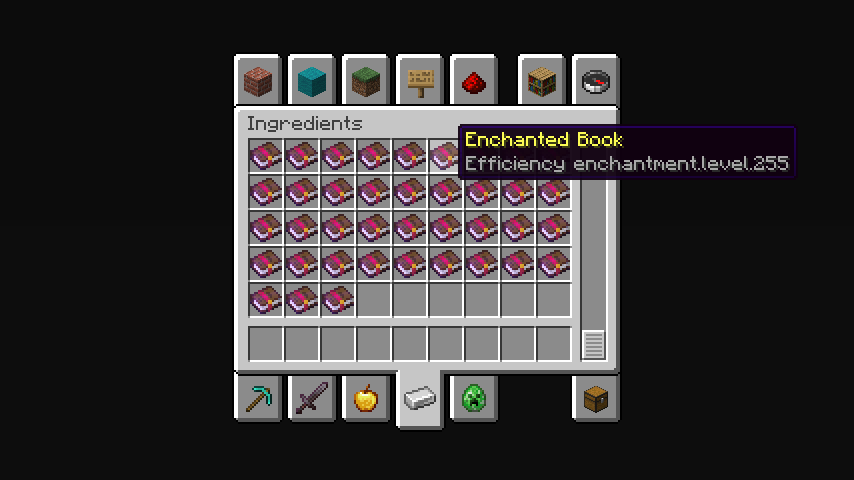
## **The maximum limit is 255 levels.**
In the Creative Mode Ingredients tab, enchantments with level 255 will be displayed. To take a certain book with the desired enchantment level, you need to write the name of the enchantment in the search tab and there will be enchantment levels from 1 to 255.
**Note:**
You can only get enchantments exceeding the game limit by finding them in structures or buying them from residents.
—
**Possible disadvantages:**
When trying to combine two books of a high enchantment level, it may not be possible due to the too expensive amount of experience. If anyone knows how to fix this, please upload the solution to our [Github](https://github.com/SayNooty/Unlimited-Enchantments).
Вряд ли (Unlikely) Totem Of Undying
– ENG: It’s unlikely (doubtful, 50-50) – a series of pictures with colorful birds, on which expressions conveying doubt are written. The meme went viral in December 2025 on TikTok.
– RU: Вряд ли (сомнительно, 50 на 50) – серия картинок с разноцветными птицами, на которых написаны выражения, передающие сомнение. Мем завирусился в декабре 2025 года в Тиктоке
[ALL RESOURCEPACKS COLLECTION: MEMES + STREAMERS](https://modrinth.com/collection/sfDcDGAi)
U.P.E. Addon – Neither Portal
Adds a visual effect to the portal in the style of the portals from the snapshot 20w14infinite.
Simply dye and rename one of the pieces of leather armor using any dye, and your portal will become colored.
For proper operation on versions BELOW 1.21.5, a mod implementing CIT (Custom Item Textures) is required.
For versions ABOVE 1.21.5+, no modifications are required (except perhaps the U.P.E. Addon – Connector Ultima, if you want to play with multiple addons).
U.P.E. Addon – Jeb_ Portal
Adds a visual effect to the portal in the style of the renamed sheep jeb_ .
Simply rename one of the pieces of leather armor, and your portal will shimmer with the colors of a “jeb_” sheep.
For proper operation on versions BELOW 1.21.5, a mod implementing CIT (Custom Item Textures) is required.
For versions ABOVE 1.21.5+, no modifications are required (except perhaps the U.P.E. Addon – Connector Ultima, if you want to play with multiple addons).
U.P.E. Addon – Connector Ultima
U.P.E. – Connector Ultima.
This connector is required to ensure that add-ons for the Unreal Portal Engine are compatible with one another. This connector was created due to the priority order of resource packs within Minecraft. Because of this priority, only one add-on can be loaded alongside the Unreal Portal Engine.
To add compatibility between your add-on and other add-ons, please submit a request here – https://discord.gg/BHEjGaVX83