Debrand
Convinces Minecraft it is unmodded.
This is most useful for QoL setups, where there is no need to change the brand of the game.
### Notes on hiding mods from servers
This mod is most useful against passive detections (since by default, the Minecraft client volunteers its brand to the server) and cursory glances (that don’t notice modified behavior).
However, know that it does **not** protect against:
– **Behavioral observation:** If a mod allows you to take actions that a vanilla client would not, this is obvious and will be visible (such as to anticheat).
**Examples:** Proximity chat; swing through grass; any changes to player movement or reach; etc. Note that not all of these can be detected with 100% accuracy, but they can raise suspicion or create evidence.
– **Active detection:** If the server probes for a specific behavior that differs with a mod installed, such as using the translated sign exploit in versions that had it, that difference will be detectable.
**Examples:** Any mod whose translation keys are known; any mod that communicates with the server using custom packets; any mod that creates packets or responses that differ from vanilla; etc. Any of these will create certainty that your client is modded.
– **Chatty mods:** If you have mods installed that reveal their presence to the server, that will be detectable.
**Examples:** Fabric API / Fabric Registry Sync; proximity chat / other mods that send data from the client; etc. Any of these will also create certainty that your client is modded.
– **Screen sharing:** If you have mods installed that change anything on-screen, anyone looking at the screen will be able to tell it’s not vanilla.
**Examples:** Minimaps; waypoints; indicators; menus of any kind; etc.
As a result, this mod is most useful for players that **develop their own modifications** with raw Mixin and without depending on Fabric API. It does **not** insulate between a detectable mod and the detection; all it does is prevent the client from admitting **up front** that it is Fabric.
### Notes on hiding mods from clients
Many of the same rules apply, though clients are likely to be less of a risk to a server than the other way around. Still, hiding the fact that a server is modded may still be desirable in some cases.
Lava Source
✨ Features
🔥 Main description
This feature introduces renewable lava sources, similar to how water behaves in Minecraft.
By placing lava in specific configurations, players can generate infinite lava over time.
This system transforms lava from a limited resource into a sustainable one, opening new possibilities for automation and large-scale builds.
⚙️ Use and benefits
This mechanic provides a reliable way to farm lava without constant exploration.
It enables efficient fuel generation, automated smelting systems, and advanced resource management.
Players can create scalable lava farms, reducing dependency on natural lava pools.
🧩 Gameplay integration
Designed to feel natural within Minecraft, this feature builds upon familiar fluid mechanics.
It integrates smoothly into survival gameplay while enhancing technical and automation playstyles.
Whether used for energy, traps, or industry, lava becomes a core renewable resource.
Wiki
📥 Installation
📁 Datapack
Drop the .zip file into your world’s datapacks folder.
Reload the world or use /reload.
Enjoy your enchanted adventure!
⚙️ Mod
Drop the .jar file into the mods folder of your instance.
Restart your game.
Have fun!
Lava Chicken in HD
**This resource pack will add better disk quality for Lava Chicken**
– **IF YOU SEE THIS:  CHECK IF YOU HAVE 1.0.1 OR 1.0.0 hotfix**
Spoiler
Spoiler: If you watch the Minecraft movie to the end, it’s already a spoiler.
Ksyxis
# Ksyxis
Speed up your world loading by removing unneeded chunks.
## Language
– **English** (Extended Version)
– Русский
## Downloads
– Modrinth
– CurseForge
– GitHub Releases
## Dependencies
– Fabric, Forge, NeoForge, Quilt, Legacy Fabric, or Ornithe
– Minecraft (1.8 or newer)
– **Forge 1.8-1.14.4 only**: Any Mixin provider, at your choice (such as
MixinBootstrap,
MixinBooter,
UniMixins, or any other)
## About
Depending on your game version, Minecraft loads some
chunks when you create your world.
Sometimes, these chunks are always loaded in the background. Either
way, whether these chunks being loaded is a one-time performance slowdown,
or a constant performance penalty, most players don’t need any of these
chunks. This mod completely disables unneeded chunks in the game.
*Note*: Unneeded chunks are sometimes used by farms and
technical contraptions. If you’ll need these chunks, you
can always delete the mod later to re-enable these chunks.

## Versions
| Version | Effect | Note |
|—————|—————|————————————————————————————————————————————————|
| 1.21.9+ | Insignificant | A 7×7 area of chunks won’t be loaded around the player when they join, and a fake 500ms world creation delay in single-player will be removed. |
| 1.20.5-1.21.8 | Low | A 5×5 area of spawn chunks won’t be loaded constantly in the background. |
| 1.8-1.20.4 | Extreme | A 21×21 area of spawn chunks won’t be loaded constantly in the background. |
## FAQ
**Q**: I need help, have some questions, or have some other feedback.
**A**: You can join the Discord server.
**Q**: Where can I download this mod?
**A**: Modrinth,
CurseForge,
or GitHub Releases.
You can also find unstable builds at
GitHub Actions.
You will need a GitHub account to download these.
**Q**: Which mod loaders are supported?
**A**: Fabric, Forge, NeoForge, Quilt, Legacy Fabric, and Ornithe.
**Q**: Which Minecraft versions are supported?
**A**: Minecraft versions 1.8 and newer.
**Q**: Why support so many Minecraft versions?
**A**: Because I can.
**Q**: Do I need Fabric API or Quilt Standard Libraries?
**A**: Not necessarily.
**Q**: Where are the Fabric, Forge, NeoForge, Quilt, etc. versions?
**A**: All in the same file.
**Q**: Is this mod client-side or server-side?
**A**: This mod works on the server and on the client in singleplayer.
It has no effect on the client when playing multiplayer.
**Q**: Is this mod stable for use?
**A**: Should be fine. If it breaks something,
just delete it and your worlds will be fine.
**Q**: I’ve found a bug.
**A**: Report it here. If you are not
sure whether this is a bug or a simple question, you can join the
Discord. Report security vulnerabilities
here.
**Q**: Can I use this in my modpack?
**A**: Sure. Credit (e.g., a link to the mod’s GitHub page) is appreciated but
is not required. Monetization and redistribution are allowed as per the
MIT License.
**Q**: This mod doesn’t speed up anything.
**A**: The effect may not be noticeable on high-end PCs. This mod
is designed primarily for low-end devices. Nevertheless, there is
a video.
**Q**: How to force-load chunks if the spawn chunks have been removed?
**A**: If you really need to force-load chunks, load individual
chunks with the `/forceload` command in 1.13 or newer. For older
versions, you can search for some mod that force-loads chunks.
**Q**: It says *Ksyxis: No Mixin found*.
**A**: If you’re using Forge 1.15.2 or older, you may need to install
MixinBootstrap,
MixinBooter,
UniMixins, or any other
Mixin provider of your choice. If you’re using Forge 1.16
or newer, or any version of Fabric/NeoForge/Quilt/Ornithe,
you don’t need to install anything, and this is a bug.
See README
on GitHub for FAQ on mod’s technical aspects.
## License
This project is provided under the MIT License.
Check out LICENSE
for more information.
## Credits
This mod is developed primarily by VidTu,
but it wouldn’t be possible without
contributors and
some technologies
used.
## Development
See README
on GitHub for details about developing this mod.
KryptonReno’s Fabric Patcher
# KryptonReno’s Fabric Patcher


This is an extension mod for Krypton Fabric, ported from KryptonReno.
## Feature
– More basic optimizations
– RecastLib provides acceleration features for **Windows** (x64/arm64)
## Install
Install directly as a Mod.
Starting from version 26.1.2, the Mod body no longer includes the Patcher and JavaAgent modules. If you still want them
to take effect, please see README.
## Config
Add the following parameters to the Java startup parameters to control the mixin enablement:
| Parameter | Description | Default value | Configuration in file form |
|————————–|—————-|—————|—————————-|
| velocity.natives-disable | Disable Native | false | Not supported |
example:
“`shell
java -Dvelocity.natives-disable=true -jar neoforge_launcher.jar
“`
## Dependencies
– Krypton Fabric – Optional dependency. I put some optimizations here.
## License
> This work has a restrictive license in addition to the original license to prevent some unexpected behavior,
> see 404Setup Public License
2025-2026 404Setup. All rights reserved. Source code is licensed under a LGPL-3.0 Only.
JustinDB’s Simple Beds
Make your beds more realistic with this texture pack! No mods needed!


NOTE: Only works with 26.2-snapshot-3 or above versions. Because bed block models came with the 26.2-snapshot-3 and older versions don’t have bed block modelling.
Just Hotbar
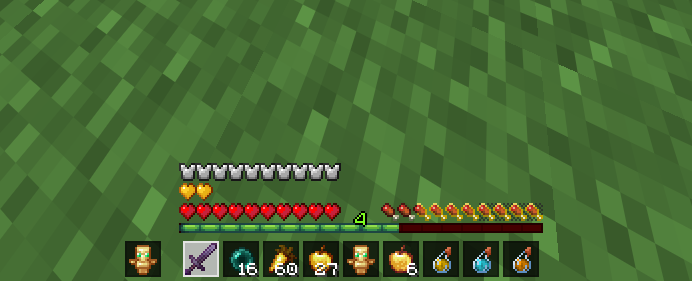
# Just Hotbar
This texture pack changes the hearts and hotbar, making them simpler
Join AutoSprint Mod
# Join AutoSprint Mod
Just put this mod in your mods folder and now you no longer need to press your sprint key before having your togglesprint work. (backbreaking work, I know)
This mod will also re-enable sprint when you respawn
JM’s Fixes

Many item, block, and mob textures were left unchanged after the 1.14 texture update. This recoursepack is a collection of texture and model updates/tweaks to bring everything in line with Minecraft’s modern style.
## **Reccomended Resourcepacks**
OreUI Recreation
Sexy Stev’s Bussin’ Banners
Dark OreUI Recreation
Cube Nautilus Shell
I’m not exactly an artist so all the “new” textures are just edited versions of other textures. I’m having trouble making new textures for fire, lava, water, stripped logs, banners, shield banners, nether portal, ghast, wither, elder guardian and ender dragon so if they look a bit odd, thats why.
Contact me here for questions and suggestions.
JM’s 3D Dripstone
I wanted a resourcepack that makes pointed dripstone 3D but most of them are over-detailed and dont match Minecrafts style. So I made this. Enjoy!




