PackTimer
# PackTimer
## Update
If you update, run the function “`/function timer:update“` if there are any problems!
## Features
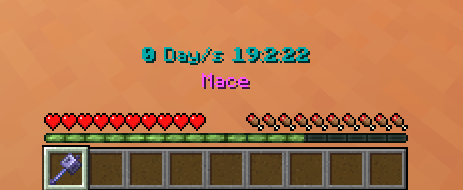
– Timer with Day Counter
– Milliseconds Counter 😀
– Easy to use
– English and german language options
– 16 different colors supported
– Simple to install and update
## Tags
Disabling the interface:
“`
/tag PLAYERNAME add timer.disable_interface
“`
Disabling the timer:
“`
/tag PLAYERNAME add timer.disable_timer
“`
## How to use
– Make sure you have commands enabled or have OP on a server.
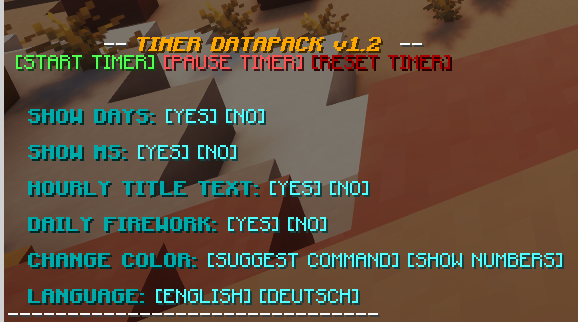
– Type: “`/trigger timer.interface“`
– Change some settings or start the timer!
### Installation
1. Install the Datapack
(note: In Minecraft the Datapack may appear to be “unsupported”, but it still works if you downloaded the correct version.)
2. Make sure you have commands enabled
3. Run the command “`/trigger timer.interface“`
Pack Tools
# Pack Tools
PackTools adds features, utilities and fixes that are commonly used by most modpacks. Most of these are QOL features and can be disabled in real time through the config screen, the features should be compatible with most mods but with the amount of features ensuring compatibility is an ongoing process.
## Configuration Guide
This guide covers all available settings for PackTools. You can modify these via the in-game config menu or by editing the config file directly.
—
## Values
Core gameplay variables.
* **Mending Repair XP Ratio**: Sets how much durability is restored per XP point. (Range: 1–100, Default: 2)
* **Piglin Trade Duration**: How many ticks a Piglin takes to examine an item before bartering. (Range: 1–200, Default: 34)
—
## Features
Toggleable mechanics and quality-of-life tweaks.
### World & Gameplay
* **Dragon Egg Respawner**: Allows the Dragon Egg to spawn every time the dragon is killed.
* **XP Clumping**: Groups experience orbs together to reduce lag.
* **Easy Harvesting**: Right click harvesting for crops.
* **Jump Over**: Lets you hop over fences and walls without carpet or potions.
* **Double Doors**: Automatically opens or closes both sides of a double door at once, works for fences as well.
* **No Trample**: Prevents players and mobs from destroying farmland by jumping on it.
* **(Experimental)** **Elytra Replenisher**: Ensures End Ships are re-stocked with Elytra and Dragon head for every new player that enters an end ship.
### Combat & Movement
* **Swing Through**: Allows you to attack mobs through grass, flowers, and other non-solid foliage.
* **Quick Zoom**: A dedicated zoom function.
* **Reacher**: Adds “reach-around” block placement (similar to Quark).
* **Stack Maxxer**: Increases certain item stack limits.
### Utilities & Notifications
* **Startup Ping**: Plays a notification sound when the game finishes loading.
* **Global Sound Suppressor**: Only plays global sounds (like the Wither spawn) for nearby players.
* **Experimental Suppressor**: Hides the warning screen when loading experimental worlds.
* **Toast Suppressor**: Disables tutorial and recipe “toast” popups in the corner.
* **Rapid Piglin Trading**: Speeds up the bartering process.
* **Restocker**: Automatically moves items from your inventory to your hotbar when a stack runs out.
* **Mouse and Key Tweaks**: Various input tweaks and shortcuts using the scroll wheel and quick stacking.
—
## Tooltips
Additional info added to item hover text.
* **Mod Name Display**: Shows which mod an item belongs to.
* **Durability Tooltip**: Shows exact durability numbers on tools and armor.
* **Tag Tooltips**: Displays item tags (requires F3+H to be active).
* **Food Information**: Shows hunger and saturation values.
* **Effect Information**: Details the potion effects a consumable item provides.
—
## HUD
Visual overlays for your main display.
* **Status Effects**: Lists active potion effects on the HUD.
* **Armor Value**: Displays your current armor level on the HUD.
* **Armor Toughness**: Displays the toughness stat above the armor bar on the HUD.
* **Health Overlay**: Changes how hearts are rendered when the health bar overflows for better visibility.
* **Restoration Preview**: Shows a pulsing preview of how much health or food you’ll gain when holding a consumable.
## Block tags and Item tags for customization
You can add blocks and items to tags to add them to certain features or blacklist them.
All of these tags are under the `packtools` namespace.
* `harvest_blacklist`: Blacklists crops from being harvested through right clicks.
* `tall_harvestable`: Adds additional cactus or sugarcane like crops to be harvestable through right clicks.
* `jumpable`: Adds blocks the player can jump over like walls, fences etc.
* `swingthrough_blacklist`: Blacklists blocks players shouldn’t be able to swing through.
* `restocker_blacklist`: Blacklists items from being restocked onto the players hand.
* `stackmaxxer_blacklist`: Blacklists items from having their stack size increased like shulker boxes etc.
* `end_city`: Structures the elytra replenisher will try to replenish elytra and dragon head in.
### I will be adding further features, blocks and items that are commonly required in a modpack, if you find any bugs or have any suggestions for features or tweaks in the existing features you can create an issue on github or reach out to me through discord.
Outstanding Outlined Ores!
Outstanding Outlined Ores changes the textures of Minecraft ores to add a small border around them, so you can see the ores much easier and faster so you don’t get fooled by other blocks.
This pack works best with shaders, as they can even glow!
Outstanding Outlined Ores is your best choice for Outlined Ores Resource Packs, as Outstanding Outlined Ores updates for EVERY VERSION (including Snapshots!) and as fast as we can!
This pack just changes ores, no clutter, no extra blocks, no “incompatables version” messages.
EXTREMELY IMPORTANT DISCLAIMER: If you downloaded this from KLauncher or any site other than CurseForge, Modrinth, MCreator or NexusMods, or MinecraftStorage, you are using an unauthorized copy that may be outdated or unsafe. These “mod reposting” websites may contain malacious code or adverts that are intrusive.
Important disclaimer: VERSIONS BELOW 1.19 ARE NOT SUPPORTED! These versions of the resource pack have not been tested, and might break textures while using the pack.
Oustanding Outlined Ores changes:
All Coal Ores
All Copper Ores
All Iron Ores
All Redstone Ores
All Gold Ores
All Emerald Ores
All Lapis Ores
All Diamond Ores
Nether Gold
Nether Quartz
Ancient Debris
Gilded Blackstone
Outlined Ores
# Outlined Ores
### 1.20.2 and below are discontinued
The Outlined Ores texture pack is one of the most useful texture packs available. While exploring caves or strip mining, it is easy to overlook a surprising number of ore blocks. With the Outlined Ores texture pack, ores become highly visible even from a distance, making resource gathering far more efficient. The outlines are vibrant and clear, and best of all, the pack does not require any additional mods.
Despite its enhanced visibility, the texture pack maintains a natural appearance. All ore outlines are created using the existing colors of each ore block, ensuring they blend seamlessly with the game’s original style. This prevents the pack from looking unnatural or distracting, an issue commonly found in similar texture packs.
## Looking for a server to play on with your friends?
Look no further, because CloudNord is by far the best server hosting site I’ve found. Really. I actually used their servers back when I used to host a Minecraft server and the pricing was literally the best out of ANY server hosting provider I saw. Their customer service is outstanding and they respond within minutes. Click the image (or link) below to order a server for as low as only $2.67 a month!
cloudnord.net/r0k3tkutt3r

Optimum Realism
# **Optimum Realism**
**The realistic Minecraft resource pack with PBR, POM, and custom 3D models. 3M+ downloads across all platforms. Actively updated monthly.**
—
## **What is Optimum Realism?**
Optimum Realism replaces Minecraft’s blocks, items, and mobs with their real-world counterparts. It’s built with a focus on visual depth, shader compatibility, and consistent performance. The goal is a pack for players who want their world to feel grounded and tactile without the framerate cost that usually comes with realistic textures.
Over 650+ blocks reworked. Custom 3D mob models. PBR maps, parallax occlusion mapping, emissive textures, and depth-write POM, all in a single pack that runs on a GTX 1050.
—
## **Features**
– **650+ blocks reworked** with realistic PBR textures
– **Custom 3D models** for mobs and items (spiders, chickens, and more added monthly)
– **Parallax Occlusion Mapping, depth-write POM, emissive blocks, and full PBR support**
– **Compatible with Minecraft 1.21.x** and earlier versions back to 1.16
– **Works with all major shaders**: Kappa, BSL, SEUS PTGI, Complementary, and more
– **Java + Bedrock support**, with a dedicated **Bedrock RTX edition** launching soon
– **Performance-first design**. 64x runs smoothly on mid-range hardware
– **Actively updated monthly** with new textures, models, and features
– **3M+ total downloads** across CurseForge, Modrinth, and direct distribution
—
## **How Optimum Realism is different**
– **Real 3D models, not just retextures.** Mobs and blocks have actual geometry, not painted-on detail.
– **Depth-write POM.** Textures genuinely interact with each other. Sand fills the crevices between planks instead of sitting flat on top.
– **Performance balance.** Most realistic packs sacrifice framerate. Optimum Realism is built to run on hardware that other realistic packs choke on.
– **Consistent monthly updates.**

—
## **What’s free and what’s paid?**
– **64x edition: Free.** Fully featured, available here on Modrinth. Updated monthly.
– **128x edition: Patreon.** Higher-resolution textures, early access to monthly updates, and exclusive previews. **Subscribe on Patreon** (preferred)
– **Alternative :** Available at **store.optimumrealism.com**


—
## **Before you install**
**Playing with Iris / Sodium?** You’ll need additional mods to run Optimum Realism properly. Two easy options:
– **Full installation guide**: step by step, with all required mods listed
– **Ultimate PBR Essentials modpack**: one-click install of everything you need
—
## **System requirements**

Optimum Realism runs well on a decent gaming computer. You don’t need an RTX card unless you’re using the Bedrock RTX edition.
– **64x version:** GTX 1050 or equivalent, 8GB RAM minimum
– **128x version:** GTX 1060 / RTX 2060 recommended for shaders at higher resolutions
– **Bedrock RTX edition:** RTX 2060 or better
—
## **Community & support**
If Optimum Realism has improved your game, leaving a **review here on Modrinth** genuinely helps the project grow.

– **Join the Discord**: WIP previews, monthly polls on what gets reworked next, screenshot showcases, and direct support from the dev
– **Visit the wiki**: installation guides, troubleshooting, and feature breakdowns
– **Instagram @optimum_realism**: behind-the-scenes block previews and dev updates
Optifine的文言文翻译
# ~~一个没啥用的介绍~~
大家都知道,Minecraft在**1.17.1-pre2**的时候支持了对**文言文**的支持,~~这让从古代穿越过来的古人流程游玩Minecraft的可能性大大增强~~
**但是**,根据调查,发现只有**一部分模组**支持了文言文,而**大众模组Optifine却没有支持文言文**,于是,_Optifine-Lzh_应然而生,我们使用了AI将Optifine的语言进行~~翻译~~,确保它能在大部分的版本下运行.所以,理论上来讲,Optifine-Lzh是支持**1.17.1-pre2以上所有Optifine版本的**.
介绍视频(Bilibili)
Old Ore Textures
This resource pack brings back the old ore textures from versions before 1.17.
It replaces the new ore textures with the classic ones that were used in older versions of Minecraft.
Works with modern Minecraft versions and keeps the original vanilla style.
Old Clouds
# About
This Resource pack brings back the old clouds from pre 25w21a and that is basicly it
Ohmygod (Омайгад) Mellstroy Totem of Undying
– RU: «Омайгад» — это мем, связанный с стримером Меллстроем. В его основе — реакция Меллстроя на стриме, когда он производит эмоциональную жестикуляцию и произносит: «О май гад. Них.., красавчик».
Фраза вместе с выражением лица стали частью Меллстрой-мем-вселенной. Например, появился персонаж Омайгадность в сезоне «Село Молочное»
– EN: “Omaygad” is a meme associated with the streamer Mellstroy. It is based on Mellstroy’s reaction on the stream, when he makes emotional gestures and says, “Oh my god. Nikh.., handsome.”
The phrase, along with the facial expression, has become part of the Mellstroy meme universe. For example, the character Omaygadnost appeared in the “Molochnoye Village” season.
– Тотем я уже красный со звуком-totem-of-undying)
– Тотем Меллстрой
– ПОЛНАЯ КОЛЛЕКЦИЯ РЕСУРСПАКОВ – МЕМЫ + СТРИМЕРЫ
Oaks Better Beds
## Disclaimer
This Resource Pack will only work for version 26.2 snapshot 3 and above
## Description
Upgrade your Minecraft beds with a redesigned custom bed model that adds detail, and personality to your builds. This resource pack enhances the classic be, while still preserving the familiar vanilla style.
## Changelog
### v1.0
– Full Release
### v1.1
– Fixed Minor Z-Fighting issue with beds against walls.
### v1.2
– Fixed Z-Fighting issue when beds where side by side
– Replaced bed_down texture with oaks_planks inside the json for better resource pack compat