Rename Item


Unlock custom item textures by renaming items in-game. This resource pack is built for builders and creative players, allowing you to create detailed decorations, unique item, and immersive builds using simple vanilla mechanics. No mods required just rename item and start building.


1. 🎨 Rename-Based Textures
Change an item’s appearance instantly by renaming it in an anvil.
2. 🏗️ Builder-Focused Design
Perfect for creating custom decorations, props, and themed builds.
3. 🧩 Vanilla-Friendly
Works entirely in vanilla Minecraft no mods or external tools needed.
4. ⚡ Lightweight & Efficient
No performance impact purely texture-based.
5. 🧠 Creative Freedom
Turn simple items into detailed assets for storytelling and builds.


1. This pack uses Minecraft’s built-in custom model system.
1. Take a supported item (e.g. stick, paper, etc.)
1. Rename it in an anvil to a specific name.
1. The item will automatically change its texture/model.


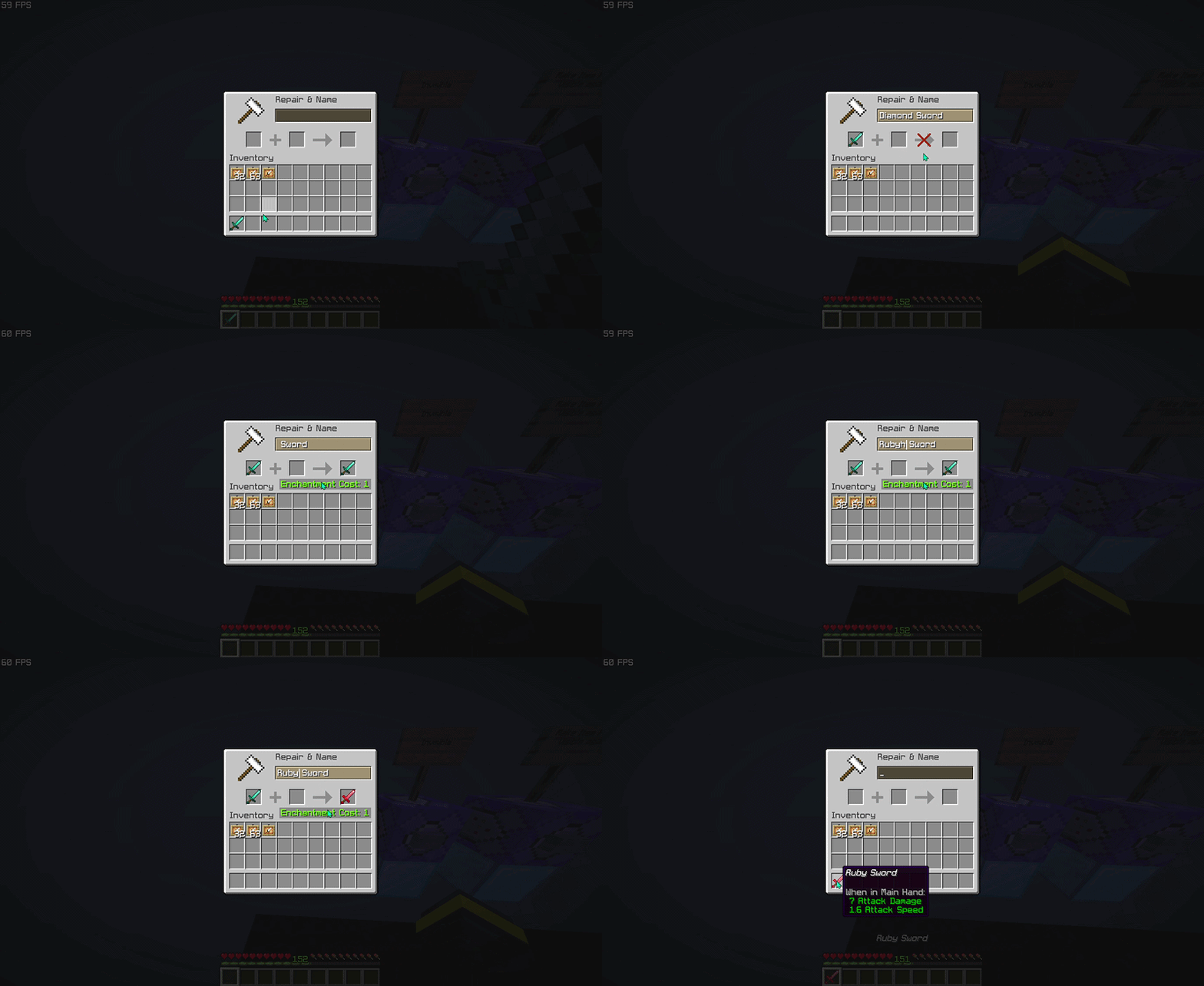
> This pack focuses on visual customization, not gameplay changes!


Do I need any mods to use this pack?
No. This resource pack works entirely in vanilla Minecraft. Just install it, rename items in an anvil, and the textures will change automatically.
How do I activate the custom textures?
Rename a supported item to the correct name using an anvil. Once renamed, the item will instantly use its custom texture.
Why isn’t my texture changing?
Common causes: The name is not typed exactly (check spelling, spaces, and capitalization), The item is not supported by the pack, Another resource pack is overriding the same item model.
Does this work in multiplayer?
Yes, the resource pack works in multiplayer.
Does this pack affect performance?
No. This is a lightweight resource pack that only changes item models and textures, so it has little to no impact on performance.
What Minecraft versions are supported?
Works on versions that support custom item models and rename-based overrides. Using the latest version is recommended for best compatibility (>1.21.5).
Is it visible to other players?
Yes, as long as they have the same resource pack installed and enabled.


| ━━━━━━━━━━ Item ━━━━━━━━━━ | ━━━━━━━━━━ Rename ━━━━━━━━━━ |
|——|——–|
| baked_potato | Golden Baked Potato |
| beetroot | Golden Beetroot |
| beetroot_soup | Golden Beetroot Soup |
| bread | Golden Bread |
| chorus_fruit | Golden Chorus Fruit |
| cooked_beef | Golden Steak |
> View the full item list here: Wiki Page


Want to see all available custom items in-game?
Check out the companion tool that lets you browse every supported anvil rename item and resource pack entry directly in-game. Download RP Rename Mod


– Thanks for using this pack! 🎉
– If you find this resource pack useful, consider give a heart to the project ❤.
– More custom items, improvements, and expansions will be added in future updates. Stay tuned!
Reduce the Vignette Effect – Less intense Shadow Borders/Corners
Reduces the Vignette Effect (The dark corners effect of the screen).
## New Effect:

## Vanilla Effect:

Red String
This resource pack will colour the string (tripwire) red when it placed. You now can see the string clearly and cannot be trapped by tripwire hook trap.
I don’t have chance for testing the new version of this resource pack, if there is any issues, please report here : https://github.com/break08/red-string/issues and you can also try download tested older versions (which doesn’t support many versions of minecraft).
If errors happened, try to…
Go to .zip file of resource pack -> pack.mcmeta
**Method 1**: In pack.mcmeta, remove
“supported_formats”: {
“min_inclusive”: x,
“max_inclusive”: x
}
and remove the `,` from description line
**Method 2**: Remove
“meta”: {
“game_version”: “x”
}
and remove `,` next to `}` above these removed lines
**Method 3**: Do both Method 1 and 2
**Method 4**: Report issues for me and use one of these versions:

**List of not tested versions: 1.0.1-mc1.13-1.21.11, 0.0.1-mc1.6.1, 0.0.1-mc1.9**
**Before using this:**

**After using this resource pack:**

Try my other resource packs:
**1**. Lined Redstone – Replace the vanilla dusty redstone lines with straight-line designed redstone
**2**. Mark the Powder Snow – Border the powder snow blocks and help you to avoid falling into them
and mods =):
**1**. New NameTag Recipe – Backport the Name Tag recipe of Minecraft 26.1
Red Shield
# Red Shield
This resource pack replaces the default shield with a custom 3D model.
The design uses a red theme.
No OptiFine required. Vanilla compatible.
## More Shield Themes
– Black
– Blue
– Creeper
– Dark Red
– Mirror
– Navy Blue
– Rabbit
Red Enchantment Glint
Simple texture pack that changes the enchantment glint color from the **normal color** to **red** including all items such as enchanted books, enchanted golden apples, armors, tools and any enchantable item you can think of.
Recycling
✨ Features
♻️ Main description
This datapack adds a variety of simple and intuitive crafting recipes, with a key feature: recycling armor, tools, and items using a furnace or blast furnace.
These can be smelted to recover the base material they are made from.
⚙️ Use and benefits
No more waste! Unused or damaged equipment can be turned back into valuable resources.
This helps optimize materials, extend their usefulness, and make progression more efficient and satisfying.
🧩 Gameplay integration
The system integrates naturally with existing mechanics by using familiar in-game blocks.
Easy to understand, it encourages smarter resource management while maintaining overall game balance.
🧪 Recipes
🔲 Input
Armor (helmet / chestplate / leggings / boots) – Leather / Copper / Chainmail / Iron / Gold / Diamond / Netherite
Tools (sword / pickaxe / axe / shovel / hoe / spear) – Copper / Iron / Gold / Diamond / Netherite
Horse Armor – Leather / Copper / Iron / Gold / Diamond / Netherite
Nautilus Armor – Copper / Iron / Gold / Diamond / Netherite
Wolf Armor
Tutle Helmet
🔥 Smelted in
 Furnace
 Blast Furnace
🎁 Output
Leather -> 1x Leather
Iron / Chainmail -> 1x Iron Ingot
Copper -> 1x Copper Ingot
Gold -> 1x Gold Ingot
Diamond -> 1x Diamond
Netherite -> 1x Netherite Scrap
Wolf Armor -> 1x Armadillo Scute
Turtle Helmet -> 1x Turtle Scute
📥 Installation
📁 Datapack
Drop the .zip file into your world’s datapacks folder.
Reload the world or use /reload.
Enjoy your enchanted adventure!
⚙️ Mod
Drop the .jar file into the mods folder of your instance.
Restart your game.
Have fun!
Recipes Plus

### Join the discord to interact with me and others about Minecraft
##  OVERVIEW 
This datapack intends to add common sense additions like dye mixing or slabs to blocks. Minecraft recipes could use a reboot and this is perfect for that.
| Included |
| :-: |
|   |
##  FEATURES 
– *Visit the wiki for more information*
Recipes
– 20+ dye related recipes
– 100+ more stonecutting recipes
– Armor Stand, Painting, and Shelf modification
– Chain armor recipes
– Coral bleaching and rejuvenating
– Elytra fortifying
– Flower duplicating
– Horse & Nautilus armor recipes
– Ice recipe
– Pottery sherd copying
– Resource salvaging
– Stairs to slabs and slabs to blocks
– Woodcutting
– Many more recipes not listed
##  ALSO CHECK OUT 
| Datapacks |
| :-: |
|      |
—
| Projects | Social | Support |
| :-: | :-: | :-: |
|     |   |   |
Realistic Gunpowder Craft
## Realistic Gunpowder Craft
### Takes gunpowder craft to another level with the new sulfur blocks
andesite + rotten flesh + wheat = saltpeter base
saltpeter base in furnace = potassium nitrate
5x potassium nitrate + sulfur + charcoal = 7x gunpowder


## Why is the recipe so strange?
In real life, the gunpowder is made up of 75% potassium nitrate, 15% charcoal and 10% sulfur.
Charcoal and sulfur are already in minecraft, so I tried implementing potassium nitrate.
According to Wikipedia, in medieval times people got potassium nitrate by mixing manure with either mortar or wood ashes, common earth and organic materials such as straw to give porosity to a compost pile and also mixed with limestone (nearest – andesite. I did not find the mention of limestone in English wiki, but there is a Russian page that says about it).
Btw, this is my first published mod and it was made without anything like MCCreator, just using the fabric documentation 🙂
Real Invisibility: Sulfur Cube
# Real Invisibility: Sulfur Cube


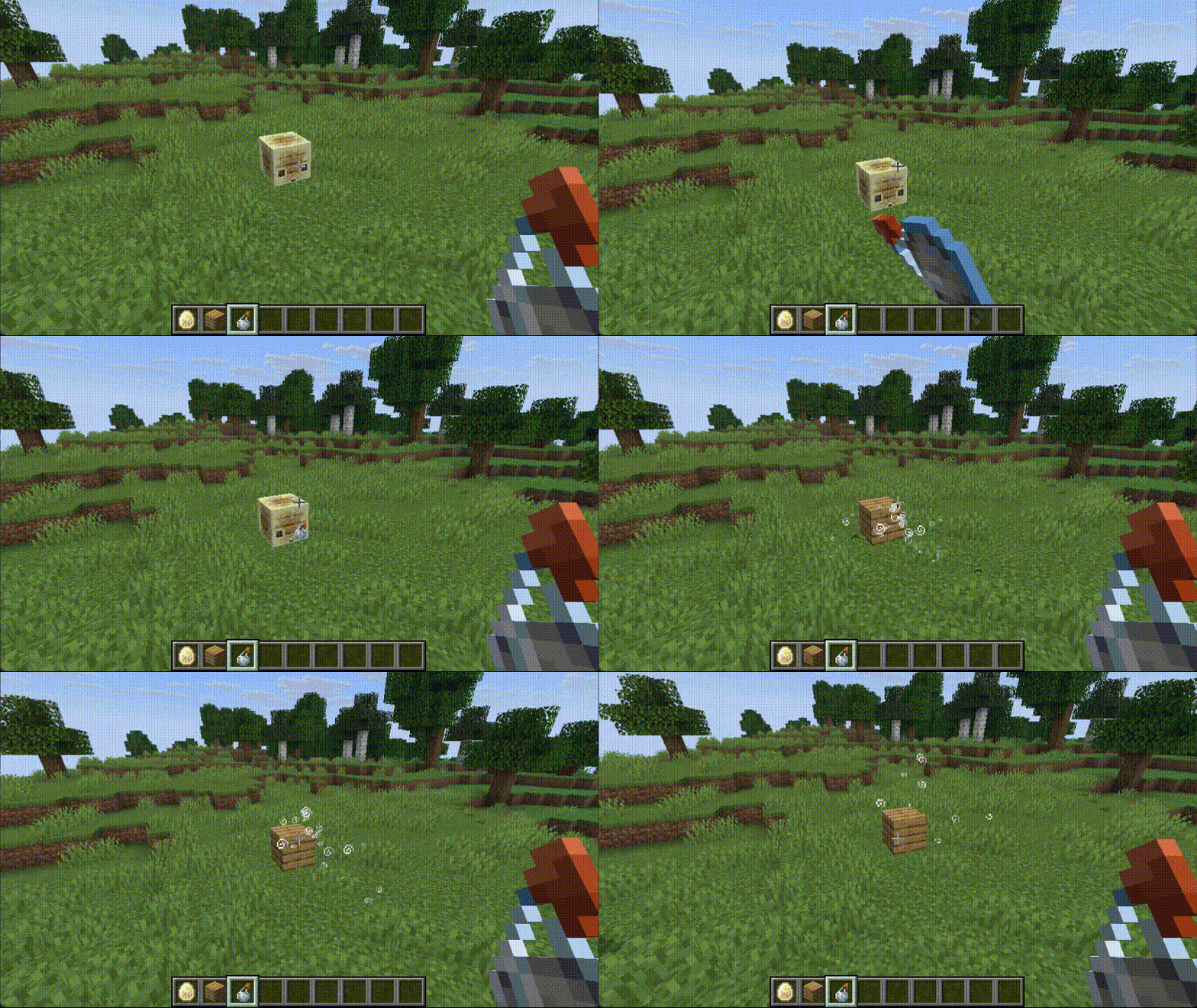
An extension plugin for Real Invisibility that does not hide the blocks inside the bodies of sulfur cubes.
When `realinvisibility` hiding items in body slot:
“`properties
# Hide animals’ armors?
body=true
“`
The block in Sulfur Cube’s body will be hidden,
this plugin will revert to the vanilla behavior.
## License
This project is licensed under the [MIT License](LICENSE) © 2026 557.
Reader

### Join the discord to interact with me and others about Minecraft
##  OVERVIEW 
This datapack is inspired by the WAILA series. It is compatible with mods and has support for custom blocks from datapacks.
Notes:
Requires:
– Data API
##  FEATURES 
– *Visit the wiki for more information*
Custom Delevopment Support
– Add the tag `data.block` to an entity so that its name can be displayed as a block
Gameplay
– The names of `blocks/entities` are displayed on your `actionbar` when looking at them
##  ALSO CHECK OUT 
| Datapacks |
| :-: |
|     |
—
| Projects | Social | Support |
| :-: | :-: | :-: |
|     |   |   |




