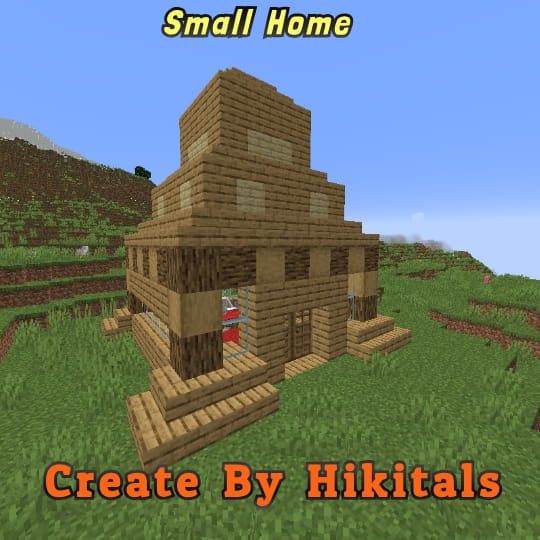
Small Home
My social networks

—
## Description👀
**This datapack adds a new dungeon to your world with a small house where there are a couple of chests of stoves and also beds with dogs**
—
## Useful Сommands🔧
– **Use /locate structure elysianfields:small_home for see dungeon coordinates**
– **Use /place structure elysianfields:small_home for spawn dungeon**
—
Small Tools
🔧 Small Tools Pack
This resource pack combines the best of all my mini-sized tool textures—Small Swords, Small Pickaxes, and Small Axes—into one clean, lightweight bundle. Perfect for PvP or anyone who prefers a less cluttered screen, each tool is carefully downsized to give you more visibility without losing that vanilla Minecraft feel.
✅ Features:
✔️ Smaller tools models for every tier (wood, stone, iron, gold, diamond, netherite)
✔️ Compact sword , pickaxe and axe textures for all materials
✔️ Faithful to the vanilla Minecraft art style
✔️ Ideal for PvP, survival, or aesthetic gameplay
📦 Compatibility:
Minecraft Java Edition
No mods required
Small Swords
🗡️ Smaller Swords – PvP Optimized Texture Pack
Tired of bulky swords blocking your view in combat? This texture pack replaces the default Minecraft swords with sleeker, shorter versions—giving you a clearer line of sight, faster reaction time, and a cleaner look for competitive PvP.
🔧 Features:
– 🔪 Reduced sword size without losing detail or readability
– 👀 Improved visibility in close combat and tight spaces
– 🎨 Compatible with most resource packs – just load it on top!
– 👑 Support for 1.8.9 and newer versions like 1.21.8 and above
[YouTube Channel](https://youtube.com/@modsinth?si=WjByvH1jdxuJLdVc)

Truly Small Items
### Features
– Smallified equipment and miscellaneous items.
– Fixes multiple texture issues, such as the end crystal offset.
– Blends in well with vanilla textures.
– Fully compatible with other smallifying resource packs!
– Fully functional in any version from 1.5!
### Questions?
Be sure to make suggestions and report bugs or inconsistencies to the [Jotform](https://form.jotform.com/260524716060046)!
### What Version?
If you are using the Modrinth loader, it should automatically select the resource pack for your version!
In case you are not using the Modrinth loader, the letter determines which pack to install:
* P: 1.5 – 18w43a
* T: 18w43a – Latest
skywhywalker Totem of Undying
– ENG: Skywhywalker is a Twitch streamer who streams CS:GO and other games, particularly matches of famous teams and ELO boosts. This resource pack replaces the totem with a meme photo of him (from an anime).
– RU: Skywhywalker это стример на твиче который стримит КСГО и другие игры, в частности матчи известных команд и буст ЭЛО. Этот ресурспак заменяет тотем на его мемное фото (из аниме)
[ALL RESOURCEPACKS COLLECTION: MEMES + STREAMERS](https://modrinth.com/collection/sfDcDGAi)

SKT’s Brimstone
### 
### 📖⠄Description
Rename all Sulfur related items and biome into Brimstone (Another name for Sulfur)
Inspired by [Mogswamp](https://youtube.com/shorts/-YguEYsl-A8)
### 🗃️⠄Renamed items and biome
– All sulfur block variant
– All polished sulfur variant
– All sulfur bricks variant
– Chiseled sulfur
– Potent sulfur
– Sulfur spike (renamed into Pointed Brimstone)
– Bucket of sulfur cube
– Sulfur cude spawn egg
– Sulfur cube
– Sulfur Caves (biome name)
### 
### 👋🏼⠄Follow Me
[](https://byskt.carrd.co)
SKT’s Old Baby Eyes

### 
### 📖⠄Description
new baby textures with old eyes
### 🖼️⠄Ingame Screenshot
### 
### 
### 👋🏼⠄Follow Me
[](https://bento.me/skt)
Skipping
# Skipping🌊
Lets you skip eggs, experience bottles, splash potions, lingering potions, and ender pearls across water by throwing them at specific angles. Skipping an item makes it bounce above the water, an item can be skipped multiple times until eventually either sinking or hitting something.
## Notes
– If you angle it right you can make a skippable item not skip over water.
## Updates
– 1.3 Slightly modified the function used for skipping.
Simple Structures: Mushroom Fields
🌿This modification adds **17** small structures to the mushroom biome.🌿


_______________________________________________________________________________________________
### [All projects are Simple Structures](https://modrinth.com/collection/vinouI3O)
_______________________________________________________________________________________________
**License** – you can use the data pack materials in any of your projects, just specify the authorship.
_______________________________________________________________________________________________
**AI** – only the project icon was generated
SimplesorterR
# SimpleSorter
> A lightweight client-side inventory sorting mod.
—
## Features
### One-Key Smart Sorting
Open an inventory or container and press **R** to sort items.
– **Auto Stack Merging** — Automatically consolidates partial stacks of the same item into full stacks, freeing up valuable slots
– **Creative Tab Native Sorting** — Items are arranged using Minecraft’s Creative Mode tab order and support modded items
– **Custom Sort Order** — Adjust `tabOrder` in the config file to change tab priority
– **Pinned Items** — Configure `pinnedItems` to keep specific items always sorted first
– **Dynamic Container Blacklist** — All storage containers are sortable by default (including modded containers like Reinforced Chests). Functional containers are excluded by exact class names in `blockedContainers`; you can also press **B** while a container is open to toggle it automatically
– **Config Hot-Reload** — Edit `simplesorter.json` directly, changes take effect on the next R-key sort without restarting the game
– **Pure Client-Side** — Sorting is performed by simulated clicks, so the server does not need the mod
—
### Mouse Tweaks
#### Shift + Drag to Quick-Move
Hold **Shift** and **left-click drag** across multiple slots — every slot you pass over will be instantly quick-moved to the opposite inventory.
> Useful when moving many slots at once.
#### Shift + Double-Click to Move All Same Items
While **holding an item** on your cursor, **Shift + Double-Click** on a matching item to instantly quick-move **all identical items** from that inventory to the other side.
> Useful for pulling all matching items out of a chest.
#### Space + Double-Click to Move Everything
Hold **Space** and **Double-Click** any slot in a container to instantly quick-move **every single item** from that inventory to the opposite side.
> Useful for quickly emptying a chest.
—
### Slot Locking
Hold **Alt** and **click** any slot to **lock** it — locked slots display an overlay.
– Locked slots are **never moved** when sorting with R
– Locked hotbar slots are **protected from Q-key drops** (prevents accidental discarding)
– Lock state is **automatically saved** and independent per save file
– **Alt + click** again to unlock
– Hold **Alt + left-click drag** to lock or unlock multiple slots in one sweep. The first slot decides whether the drag locks or unlocks
– Overlay color can be customized with `lockOverlayColor`, supporting both `#RRGGBB` and `#AARRGGBB`
Color values use **Hex color codes**. Both `#RRGGBB` and `#AARRGGBB` are supported. The 8-digit format uses `ARGB` order: `AA` opacity, `RR` red, `GG` green, `BB` blue. It is not `RGBA`.
Common `AA` values: `40` very transparent, `80` half transparent, `C0` mostly opaque, `FF` fully opaque. Examples: `#80FF0000` half-transparent red, `#8000FF00` half-transparent green, `#800000FF` half-transparent blue.
> Useful for keeping tools in fixed slots and reducing accidental drops.
—
### Auto Replacer
– **Tool Break Replacement** — When a held tool breaks, automatically equips a replacement of the same type from your inventory
– **Stackable Item Refill** — When a held stackable item runs out (e.g. placing blocks), automatically refills from your inventory
– Can be **toggled on/off** in the settings screen
> Useful when building or mining with repeated item replacement.
—
### Caps Lock + Double-Click to Batch Drop
Hold **Caps Lock** and **double-click** any slot to **drop all identical items** in that inventory (using the Q-key drop action).
> Useful for clearing large quantities of one item.
—
### In-Game Configuration
Press **Z + I** (default combo) to open a graphical settings panel in-game:
– **Tab Sort Order (tabOrder)** — Customize the priority of Creative Mode tabs
– **Pinned Items (pinnedItems)** — Specify item IDs that always sort to the front
– **Container Blacklist (blockedContainers)** — Add container class names to exclude from sorting, or press **B** while a container is open to write the current class name automatically
– **Lock Overlay Color (lockOverlayColor)** — Customize locked-slot overlay color, for example `#80FF0000`
– **Z-Key Guard Toggle** — Disable the Z-key requirement to open settings with just I
– **Auto Replacer Toggle** — Enable/disable automatic tool and item replacement
– **Localized UI** — Settings interface automatically adapts to your game language (English / Chinese)
Also accessible from **Mod Menu** if installed.
> Advanced settings can be edited directly in `config/simplesorter.json`. Changes take effect on the next R-key sort.
> ⚠️ `blockedContainers` uses **exact class-name matching**, not fuzzy matching. Depending on mappings and Minecraft version, class names may look like `GenericContainerScreenHandler` instead of `ChestMenu`; the safest workflow is opening the target container and pressing **B** so the mod writes the correct name for you.
—
## Requirements
| Dependency | Required? | Notes |
|—|—|—|
| **Fabric Loader** ≥ 0.16.5 | ✅ Required | Mod loader |
| **Fabric API** | ✅ Required | Core API library |
| **Fabric Language Kotlin** | ✅ Required | Kotlin runtime support |
| **Cloth Config API** | ❌ Bundled | Config screen framework (already included in the mod jar) |
| **Mod Menu** | ❌ Optional | Adds a settings entry in the mod list |
—
## Installation
1. Install **Fabric Loader** and **Fabric API**
2. Download **Fabric Language Kotlin** and place it in your `mods` folder
3. Pick the jar matching your Minecraft version and drop it into your `mods` folder
4. Launch the game
—
## Keybind Reference
All keybinds appear under the **SimpleSorter** category in Minecraft’s Controls screen and can be changed there.
| Key | Action | Context |
|:—:|—|—|
| **R** | Sort & organize inventory | While any container is open |
| **Alt + Click** | Lock / Unlock slot | Prevents that slot from being sorted |
| **Alt + Left-Drag** | Batch lock / unlock slots | Drag across multiple slots |
| **B** | Toggle current container blacklist | When the current container should not be sorted |
| **Caps Lock + Double-Click** | Batch drop identical items | Quickly clear large stacks |
| **Shift + Drag** | Quick-move multiple slots | Drag across slots while holding Shift |
| **Shift + Double-Click** | Move all identical items | While holding an item on cursor |
| **Space + Double-Click** | Move all items from container | Empty an entire inventory at once |
| **Z + I** | Open settings screen | Available anytime |
—
## Technical Details
– **Client-Side Only** — No server modifications; sorting is achieved by simulating player click actions
– **Creative Tab Native Sorting** — Reads Minecraft’s Creative Mode tabs directly to build a sort index, perfectly matching the game’s native item order and automatically supporting all modded items
– **Multi-Version Architecture** — Built with a `core` + `shared` + `platform` layered architecture, allowing one codebase to support multiple Minecraft versions
– **Dynamic Config System** — Supports config file hot-reload, no game restart needed after edits
– **Exact Container Matching** — `blockedContainers` matches exact container class names to avoid accidental fuzzy matches
– **Modular Mouse Tweaks** — Each mouse enhancement is an independent `MouseTweakModule`, making it easy to add or modify features
– **License** — All Rights Reserved (See LICENSE file for strict usage terms)
—
SimpleSorter
A simple Minecraft inventory sorting tool.