SP6 Ultimate – textures for SP Server
This resource pack is designed to improve the quality of the game on the SP5 – SP6 server (**5opka** Server). It includes modified diamond ore, totems, weapons, sounds, and more. It will perfectly transform you, and everyone will know that you are a premium SP5 player!
Currently, we have
– modified totem
– modified diamond ore
– and much more, which will be made for the SP6 drop (next year)
Этот ресурспак предназначен для улучшения качества игры на сервере СП5 – СП6 (Сервер Пятерки, SP5 – SP6). Включает в себя измененную алмазную руду, тотемы, оружия, звуки и т.п. Идеально преобразит вас и все точно будут знать что вы – премиум игрок СП5!
Щас у нас есть
изменен тотем
измененная алмазная руда
и многое другое, будет сделано под дроп сп6 (в след году)
[ALL RESOURCEPACKS COLLECTION: MEMES + STREAMERS](https://modrinth.com/collection/sfDcDGAi)
– [Тотем Я уже Красный](https://modrinth.com/resourcepack/mellstroy-(-)-totem-of-undying)
– [Тотем Меллстрой](https://modrinth.com/resourcepack/mellstroy-totem-of-undying)
– [Colored Bricks](https://modrinth.com/mod/colored-bricks-mod)
– [MACAN Music Discs](https://modrinth.com/resourcepack/macan-music-discs)
– [MACAN Totem of Undying](https://modrinth.com/resourcepack/macan-totem-of-undying)
SnowyGUI
A mod adding a GUI with some features geared at QoL, like command macros.
It has both a fabric* and a (neo)forge version; for the fabric version, [fabric-language-kotlin](https://www.curseforge.com/minecraft/mc-mods/fabric-language-kotlin) mod is required, or [kotlinforforge](https://modrinth.com/mod/kotlin-for-forge) if you wish to use the forge one.
If you want to use the configuration screen, please install the cloth config mod or a mod that bundles it.
Snowy Weather
### **Snowy Weather** – Now it will snow instead of rain in all biomes, even in the desert!
A cold winter has overtaken the world, which covers the whole world with snow and cold, even in hot biomes. Water freezes everywhere and snow appears. You can only escape in caves or other dimensions.
**When it starts to rain or thunderstorm, it will always snow! The temperature in all biomes is below 0!**
Each new generated chunk will be frozen. If your chunks were uploaded before you installed the datapack, then the snowy weather will also happen and everything will gradually freeze.
❗_If, after adding a datapack/mod to your world or server, you want to delete it, then the biomes will return to their original state, but the fallen snow and ice will remain on the meset!_
—
**For those who like a lot of snow:**
Can you activate the function “`unlimited_snow_accumulation_height“` which removes the accumulated snow limit. That is, when the snow layer reaches a maximum value of 8, it is automatically replaced by a block of snow. Applies to players within a radius of 8 blocks in all directions.
_**❗ Attention! The function may affect the performance of your world or server.**_
– Enter command to enable function: “`/function snowy_weather:unlimited_snow_accumulation_height“`
– Enter command to disable function: “`/schedule clear snowy_weather:unlimited_snow_accumulation_height“`
SnifferBeGONE – Remove the sniffer sound
A resource pack that removes every sniffer sound, except for it’s death.
### Version support
– Every version after 1.20 is supported. As the sniffer was released that version.
**If you have any issues, please contact me through Discord.**
@zemewtf
SnapshotXBR
# SnapshotXBR
Automatic upscales of the latest textures using [xBRZ](https://sourceforge.net/projects/xbrz/), designed for use under [VanillaXBR](https://modrinth.com/resourcepack/vanillaxbr).
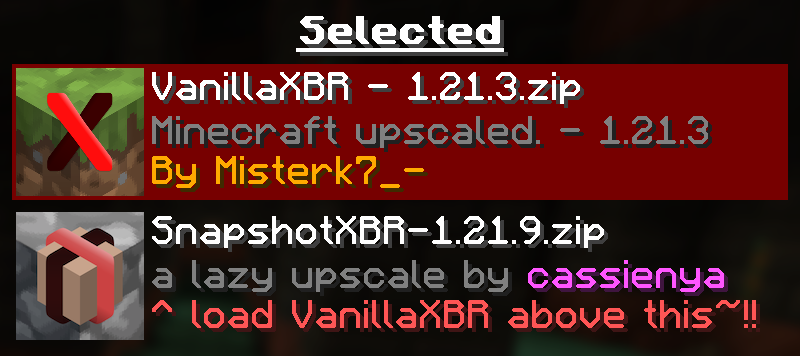
Ensure [VanillaXBR](https://modrinth.com/resourcepack/vanillaxbr) is loaded above SnapshotXBR for the best experience
## Why?
[Misterk7_-](https://modrinth.com/user/misterk7_-) is busy and [VanillaXBR](https://modrinth.com/resourcepack/vanillaxbr) doesnt get updates very quickly, so this is designed to be a sort of bleeding edge build that people can use day 1 as a fallback for textures not yet given [Misterk7_-‘s](https://modrinth.com/user/misterk7_-) touch
### You will notice…
– Gaps in-between block models (ex. missing corners of torches)
– Unnatural pixel blending (ex. the eyes of mobs may morph into the rest of the body)
– Clipped textures in the user interface (ex. the dimming is broken in the world menu)
These are issues that come with a ‘lazy upscale’ of the Minecraft textures, and so will not be fixed as a part of this pack. To fix them, read the recommended usage guidelines below.
### Recommended usage
– Use the latest version of [VanillaXBR](https://modrinth.com/resourcepack/vanillaxbr).
– Enable VanillaXBR above SnapshotXBR in the resource pack menu (as seen above).
– Create and/or improve automatically scaled versions of the textures yourself
## What if I want xBR versions of textures from [insert mod or resource pack]
[PackXBR](https://packxbr.f53.dev/) is the easiest way to make your own textures fit with VanillaXBR.
[](https://packxbr.f53.dev)
Smooth Entity Shadows
Makes the Shadows under Entities Smooth. The closest you can get without shaders and optifine!

VS Vanilla:

smooth biome moss
add biome blending to moss block, donesnt work with moss carpet unfortunatly.
/! NEEDS either continuity OR optifine to work as it use theyre CTM feature /!
smoothing also need continuity or optiphine as it was not intentional at firs, i will have to remake the texture in the plain for everyone one day but for now, everything in this pack need continuity or optifine
Smaller Crosshair
Did you ever think: “_Why is the Crosshair so big_” ?. If yes, this Texturepack is the right choice!
It makes the Crosshair 1 pixel smaller and is good if you want to change the size of the crosshair, without changing the GUI Scale.
(works with the Crosshair Indicator Mod)

smaller totem pvp
This pack makes tems and shields smaller, allowing for better PvP performance.
Smaller Crit Particle
This Texturepack makes the Crit Particle smaller. It is perfect for PvP, or if you just want a better vision. If you also don’t like the size of the Crosshair, check out my other Packs!
