Unlimited Enchantments
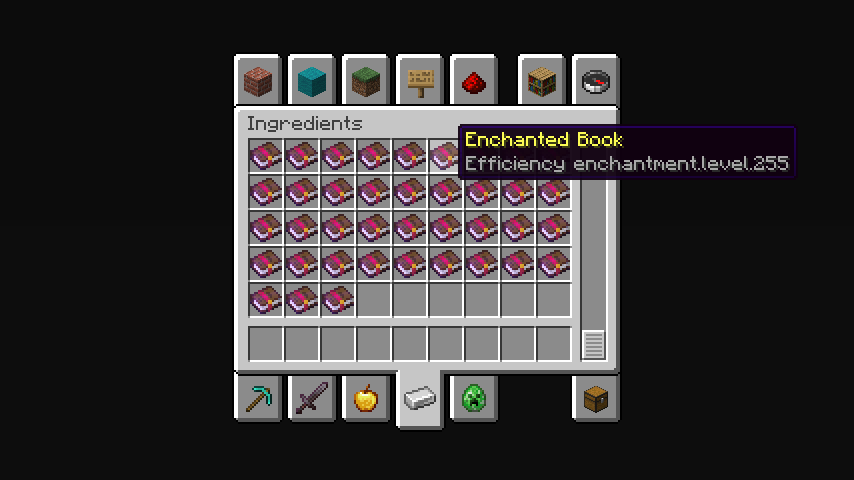
## **The maximum limit is 255 levels.**
In the Creative Mode Ingredients tab, enchantments with level 255 will be displayed. To take a certain book with the desired enchantment level, you need to write the name of the enchantment in the search tab and there will be enchantment levels from 1 to 255.
**Note:**
You can only get enchantments exceeding the game limit by finding them in structures or buying them from residents.
—
**Possible disadvantages:**
When trying to combine two books of a high enchantment level, it may not be possible due to the too expensive amount of experience. If anyone knows how to fix this, please upload the solution to our [Github](https://github.com/SayNooty/Unlimited-Enchantments).
Вряд ли (Unlikely) Totem Of Undying
– ENG: It’s unlikely (doubtful, 50-50) – a series of pictures with colorful birds, on which expressions conveying doubt are written. The meme went viral in December 2025 on TikTok.
– RU: Вряд ли (сомнительно, 50 на 50) – серия картинок с разноцветными птицами, на которых написаны выражения, передающие сомнение. Мем завирусился в декабре 2025 года в Тиктоке
[ALL RESOURCEPACKS COLLECTION: MEMES + STREAMERS](https://modrinth.com/collection/sfDcDGAi)
Universal Outlined Ores
This is a Minecraft resource pack that adds outlines to ores in mods, making them more visible.
It is trying to be compatible with all mods that add ores (work also with vanilla ores) and for all versions of Minecraft.
It will probably be compatible with OptiFine’s connected textures.
Links : [Github](https://github.com/Seltade-MC/UniversalOutlinedOres)/[Modrinth](https://modrinth.com/resourcepack/universal-outlined-ores)
# Compatible mods :
Available=✅ Not Tested=❓ Work in progress=⏳ Impossible=❌
|Mods|Links|Status|
|—|—|—|
|AdAstra|[Github](https://github.com/terrarium-earth/Ad-Astra)/[Modrinth](https://modrinth.com/mod/ad-astra)/[CurseForge](https://www.curseforge.com/minecraft/mc-mods/ad-astra)|⏳|
|Aether Addon: Overworld Ores|[Github](https://github.com/The-Aether-Team/Overworld-Ores)/[Modrinth](https://modrinth.com/mod/aether-overworld-ores)/[CurseForge](https://www.curseforge.com/minecraft/mc-mods/aether-overworld-ores)|⏳|
|Alex’s Caves|[Github](https://github.com/AlexModGuy/AlexsCaves)/[Modrinth](https://modrinth.com/mod/alexs-caves)/[CurseForge](https://www.curseforge.com/minecraft/mc-mods/alexs-caves)|⏳|
|Ancient Aether|[Github](https://github.com/Builderdog841/Ancient-Aether)/[Modrinth](https://modrinth.com/mod/ancient-aether)/[CurseForge](https://www.curseforge.com/minecraft/mc-mods/ancient-aether)|⏳|
|Better End|[Github](https://github.com/quiqueck/BetterEnd)/[Modrinth](https://modrinth.com/mod/betterend)/[CurseForge](https://www.curseforge.com/minecraft/mc-mods/betterend)|⏳|
|Better Nether|[Github](https://github.com/quiqueck/BetterNether)/[Modrinth](https://modrinth.com/mod/betternether)/[CurseForge](https://www.curseforge.com/minecraft/mc-mods/betternether)|⏳|
|Bewitchment|[Github](https://github.com/MoriyaShiine/bewitchment)/[Modrinth](https://modrinth.com/mod/bewitchment)/[CurseForge](https://www.curseforge.com/minecraft/mc-mods/bewitchment)|⏳|
|Cobblemon|[Gitlab](https://gitlab.com/cable-mc/cobblemon)/[Modrinth](https://modrinth.com/mod/cobblemon)/[CurseForge](https://www.curseforge.com/minecraft/mc-mods/cobblemon)|⏳|
|Create|[Github](https://github.com/Creators-of-Create/Create)/[Modrinth](https://modrinth.com/mod/create)/[CurseForge](https://www.curseforge.com/minecraft/mc-mods/create)|⏳|
|Create Fabric|[Github](https://github.com/Fabricators-of-Create/Create)/[Modrinth](https://modrinth.com/mod/create-fabric)/[CurseForge](https://www.curseforge.com/minecraft/mc-mods/create-fabric)|⏳|
|Create: Metallurgy|[Github](https://github.com/Lucreeper74/Create-Metallurgy)/[Modrinth](https://modrinth.com/mod/create-metallurgy)/[CurseForge](https://www.curseforge.com/minecraft/mc-mods/create-metallurgy)|⏳|
|Create: New Age|[Gitlab](https://gitlab.com/antarcticgardens/create-new-age)/[Modrinth](https://modrinth.com/mod/create-new-age)/[CurseForge](https://www.curseforge.com/minecraft/mc-mods/create-new-age)|⏳|
|Deep Aether|[Github](https://github.com/RazorDevs/Deep-Aether)/[Modrinth](https://modrinth.com/mod/deep-aether)/[CurseForge](https://www.curseforge.com/minecraft/mc-mods/deep-aether)|⏳|
|Deeper and Darker|[Github](https://github.com/KyaniteMods/DeeperAndDarker)/[Modrinth](https://modrinth.com/mod/deeperdarker)/[CurseForge](https://www.curseforge.com/minecraft/mc-mods/deeperdarker)|⏳|
|ExtraGems|[Github](https://github.com/XxRexRaptorxX/ExtraGems)/[Modrinth](https://modrinth.com/mod/extragems)/[CurseForge](https://www.curseforge.com/minecraft/mc-mods/extra-gems)|⏳|
|Galosphere|[Github](https://github.com/0rc1nus/Galosphere-Main)/[Modrinth](https://modrinth.com/mod/galosphere)/[CurseForge](https://www.curseforge.com/minecraft/mc-mods/galosphere)|⏳|
|Ice and Fire: Dragons|[Github](https://github.com/AlexModGuy/Ice_and_Fire)/[Modrinth](https://modrinth.com/mod/ice-and-fire-dragons)/[CurseForge](https://www.curseforge.com/minecraft/mc-mods/ice-and-fire-dragons)|⏳|
|Immersive Engineering|[Github](https://github.com/BluSunrize/ImmersiveEngineering)/[Modrinth](https://modrinth.com/mod/immersiveengineering)/[CurseForge](https://www.curseforge.com/minecraft/mc-mods/immersive-engineering)|⏳|
|Industrial Craft|[Modrinth](https://modrinth.com/mod/industrial-craft)/[CurseForge](https://www.curseforge.com/minecraft/mc-mods/industrial-craft)|⏳|
|Industrial Revolution|[Github](https://github.com/GabrielOlvH/Industrial-Revolution)/[Modrinth](https://modrinth.com/mod/industrial-revolution)/[CurseForge](https://www.curseforge.com/minecraft/mc-mods/industrial-revolution)|⏳|
|Infernal Expansion|[Github](https://github.com/infernalstudios/Infernal-Expansion)/[Modrinth](https://modrinth.com/mod/infernal-expansion)/[CurseForge](https://www.curseforge.com/minecraft/mc-mods/infernal-expansion)|⏳|
|Infinite Abyss|[Modrinth](https://modrinth.com/mod/infinite-abyss)/[CurseForge](https://www.curseforge.com/minecraft/mc-mods/infinite-abyss)|⏳|
|Magneticraft|[Github](https://github.com/Magneticraft-Team/Magneticraft)/[CurseForge](https://www.curseforge.com/minecraft/mc-mods/magneticraft)|⏳|
|Marium’s Soulslike Weaponry|[Github](https://github.com/mariumbacchus/Soulslike-Weaponry)/[Modrinth](https://modrinth.com/mod/mariums-soulslike-weaponry)/[CurseForge](https://www.curseforge.com/minecraft/mc-mods/mariums-soulslike-weaponry)|⏳|
|Mekanism|[Github](https://github.com/mekanism/Mekanism)/[Modrinth](https://modrinth.com/mod/mekanism)/[CurseForge](https://www.curseforge.com/minecraft/mc-mods/mekanism)|⏳|
|Mekanism: AdAstraOres|[Gitlab](https://gitlab.com/libertymods/mekanism-ad-astra-ores)/[Modrinth](https://modrinth.com/mod/mekanism-ad-astra-ores)/[CurseForge](https://www.curseforge.com/minecraft/mc-mods/mekanism-ad-astra-ores)|⏳|
|Modern Industrialization|[Github](https://github.com/AztechMC/Modern-Industrialization)/[Modrinth](https://modrinth.com/mod/modern-industrialization)/[CurseForge](https://www.curseforge.com/minecraft/mc-mods/modern-industrialization)|⏳|
|Mythic Metals|[Github](https://github.com/Noaaan/MythicMetals)/[Modrinth](https://modrinth.com/mod/mythicmetals)/[CurseForge](https://www.curseforge.com/minecraft/mc-mods/mythicmetals)|⏳|
|NetherEx|[Github](https://github.com/LogicTechCorp/NetherEx)/[Modrinth](https://modrinth.com/mod/netherex)/[CurseForge](https://www.curseforge.com/minecraft/mc-mods/netherex)|⏳|
|Oh The Biomes You’ll Go|[Github](https://github.com/Potion-Studios/BYG)/[Modrinth](https://modrinth.com/mod/biomesyougo)/[CurseForge](https://www.curseforge.com/minecraft/mc-mods/oh-the-biomes-youll-go)|⏳|
|Oritech|[Github](https://github.com/Rearth/Oritech)/[Modrinth](https://modrinth.com/mod/oritech)/[CurseForge](https://www.curseforge.com/minecraft/mc-mods/oritech)|⏳|
|Palladium|[Github](https://github.com/ThreeTAG/Palladium)/[Modrinth](https://modrinth.com/mod/threetag-palladium)/[CurseForge](https://www.curseforge.com/minecraft/mc-mods/threetag-palladium)|⏳|
|Pixelmon|[Modrinth](https://modrinth.com/mod/pixelmon)/[CurseForge](https://www.curseforge.com/minecraft/mc-mods/pixelmon)|⏳|
|Powah!|[Github](https://github.com/Technici4n/Powah)/[Modrinth](https://modrinth.com/mod/powah)/[CurseForge](https://www.curseforge.com/minecraft/mc-mods/powah-rearchitected)|⏳|
|Railcraft|[Github](https://github.com/Railcraft/Railcraft)/[CurseForge](https://www.curseforge.com/minecraft/mc-mods/railcraft)|⏳|
|Samurai Dynasty|[Github](https://github.com/VeroxUniverse/SamuraiDynasty-neoforge)/[Modrinth](https://modrinth.com/mod/epic-samurais)/[CurseForge](https://www.curseforge.com/minecraft/mc-mods/samurai-dynasty)|⏳|
|Tech Reborn|[Github](https://github.com/TechReborn/TechReborn)/[Modrinth](https://modrinth.com/mod/techreborn)/[CurseForge](https://www.curseforge.com/minecraft/mc-mods/techreborn)|⏳|
|Thaumcraft|[CurseForge](https://www.curseforge.com/minecraft/mc-mods/thaumcraft)|⏳|
|Thermal Foundation|[Modrinth](https://modrinth.com/mod/thermal-foundation)/[CurseForge](https://www.curseforge.com/minecraft/mc-mods/thermal-foundation)|⏳|
|Things|[Github](https://github.com/wisp-forest/things)/[Modrinth](https://modrinth.com/mod/things)/[CurseForge](https://www.curseforge.com/minecraft/mc-mods/things-fabric)|⏳|
|Tinkers Construct|[Github](https://github.com/SlimeKnights/TinkersConstruct)/[CurseForge](https://www.curseforge.com/minecraft/mc-mods/tinkers-construct)|⏳|
|Traincraft|[Github](https://github.com/EternalBlueFlame/Traincraft-5)/[CurseForge](https://www.curseforge.com/minecraft/mc-mods/traincraft)|⏳|
|Universal Ores|[Github](https://github.com/DawnTeamMC/UniversalOres)/[Modrinth](https://modrinth.com/mod/universal_ores)/[CurseForge](https://www.curseforge.com/minecraft/mc-mods/universal-ores-fabric)|✅|
|Werewolves|[Github](https://github.com/TeamLapen/Werewolves)/[Modrinth](https://modrinth.com/mod/werewolves)/[CurseForge](https://www.curseforge.com/minecraft/mc-mods/werewolves-become-a-beast)|⏳|
### If the ore mod you want is not listed above, please report it [here](https://github.com/Seltade-MC/UniversalOutlinedOres/issues).
Uncraft Everything
# ♻️ Uncraft Everything
*A powerful utility mod that lets players reverse the crafting process — and reclaim their resources.*
—
## 🧱 What This Mod Does
**Uncraft Everything** adds a **uncrafting mechanic** to Minecraft, allowing players to take crafted items and break them back down into their original components.
Whether you accidentally crafted the wrong item, need to recycle old tools (With full durability), or want to get value out of loot, this mod gives you an intuitive way to recover materials — all while maintaining balance.
### Features:
– ✅ Supports **vanilla and modded items**
### Configs:
– Experience Point for Uncrafting
– Prevent certain items from Uncrafting
Modify in `/config/uncrafteverything_common.toml`
—
## 💡 Why Download This?
In survival gameplay, every resource matters. With *Uncraft Everything*, you can:
– 🪓 Recover materials from unused or extra tools, armor, and blocks
– 🏹 Undo accidental crafts and wasted resources
– ♻️ Improve inventory management and reduce item clutter
– 🧩 Build modpacks with more player agency and creativity
This mod is perfect for **tech-based**, **RPG**, **skyblock**, **hardcore**, or **builder-focused packs** — or just everyday Minecraft survival.
—
## 📥 Installation & Setup
**Mod Loaders:** Fabric and NeoForge are supported.
1. Download and install your preferred mod loader.
2. Place `Uncraft Everything` in your `/mods` folder.
3. Launch the game — you’re ready to go!
4.
—
## ⚙️ How It Works
**Base Functionality:**
– Place a crafted item into the **Uncrafting Table**.
—
## 🖥 Compatibility
– ✅ 100% vanilla compatible
– ✅ Works with most modded items (standard crafting recipes)
– ✅ Multiplayer and server-compatible
—
## 🐛 Bug Reports & Contributions
Have a bug to report, feature request, or translation to contribute?
Please open an issue or submit a PR on the [Github issue tracker](https://github.com/CoolerProYT/UncraftEverything/issues)
—
## 🚧 Important Notes
– ❌ **Enchanted items will not return enchanted book**.
– 🪓 **Damaged tools unable to uncraft**.
– 🔒 **Balance-focused:** The goal is utility, not duplication exploits.
– 🧩 Designed for survival, challenge, and tech gameplay — not cheat mode.
—
U.P.E. Addon – Neither Portal

Adds a visual effect to the portal in the style of the portals from the snapshot 20w14infinite.
Simply dye and rename one of the pieces of leather armor using any dye, and your portal will become colored.
For proper operation on versions BELOW 1.21.5, a mod implementing CIT (Custom Item Textures) is required.
For versions ABOVE 1.21.5+, no modifications are required (except perhaps the U.P.E. Addon – Connector Ultima, if you want to play with multiple addons).
U.P.E. Addon – Jeb_ Portal

Adds a visual effect to the portal in the style of the renamed sheep jeb_ .
Simply rename one of the pieces of leather armor, and your portal will shimmer with the colors of a “jeb_” sheep.
For proper operation on versions BELOW 1.21.5, a mod implementing CIT (Custom Item Textures) is required.
For versions ABOVE 1.21.5+, no modifications are required (except perhaps the U.P.E. Addon – Connector Ultima, if you want to play with multiple addons).
U.P.E. Addon – Connector Ultima

U.P.E. – Connector Ultima.
This connector is required to ensure that add-ons for the Unreal Portal Engine are compatible with one another. This connector was created due to the priority order of resource packs within Minecraft. Because of this priority, only one add-on can be loaded alongside the Unreal Portal Engine.
To add compatibility between your add-on and other add-ons, please submit a request here – https://discord.gg/BHEjGaVX83
Tweakable Sulfur Cubes
### Tweakable Sulfur Cubes
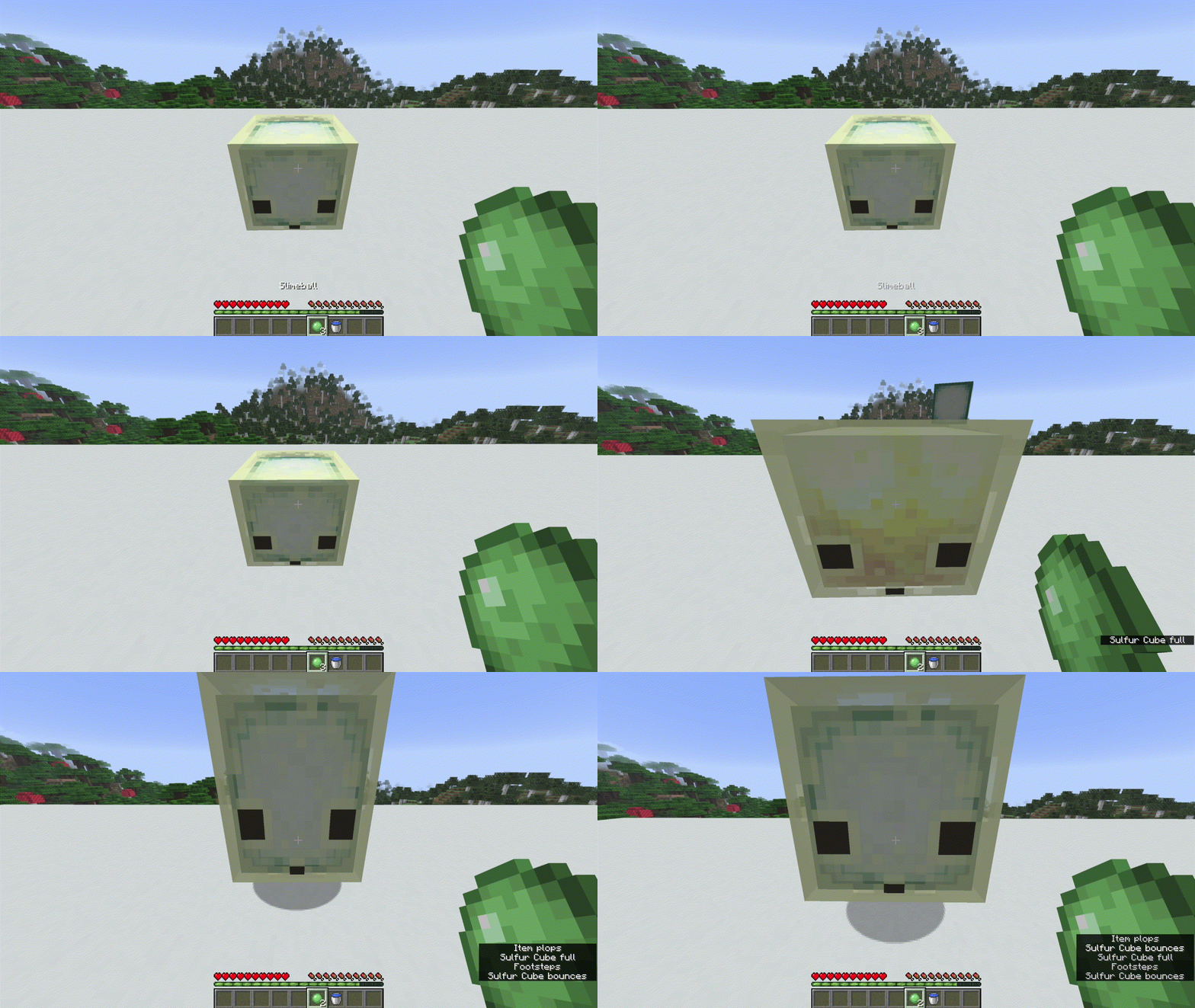
Adds various ways to customize your Sulfur Cubes to your liking
– Redstone Dust makes the Effects on a Sulfur Cube permanent
– Milk Buckets can cleanse the Effects of a Sulfur Cube
– Slime Balls enlarge Sulfur Cubes (will be replaced by the Sulfur Ball if/when it gets added)
– Water Buckets shrink Sulfur Cube
**Known Bugs:**
– Picking up Sulfur Cubes with buckets reset their size (mojang fix)
– Sulfur Cubes may appear to be fully transparent on the inside after using an item on them
Contact me on Discord for any issues! @hexasan
TrueLight FX Lite
## Showcase/Tutorial:
Huge thanks to [@Titanaraa](https://www.youtube.com/@Titanaraa) for creating this awesome video!
# TrueLightFX Lite
– Looking like Vibrant-visuals without the FPS cost. A lightweight shader built for low to mid-range PCs that refuses to look boring.
## What You Get:
### – Realistic Waves – animated water surface with adjustable size and speed
### – God Rays – light shafts through trees and windows, with intensity control
### – Dynamic Fog – golden daylight tones, naturally dark nights and caves
### – Glowing Ores – real additive emission that cuts through cave darkness
### – Underwater Caustics – animated light patterns via fast sine-wave math
### – Wavy Plants – wind-affected leaves, sand, and vegetation
### – Bloom – adjustable post-processing glow
### – TAA + FXAA – your choice of anti-aliasing
### – Two Cloud Styles – Standard or Enhanced
### – Smart Profiles – instant presets from “low” to “your pc isnt that slow isnt it”.
Credits to Ukrech for the [Source Project](https://github.com/mateuskreuch/minecraft-miniature-shader).
Compatibility:
TrueLightFX works with Minecraft versions 1.8.2 – 1.17, but older versions may experience bugs and reduced smoothness. For the best experience, it is strongly recommended to use Minecraft 1.17 or newer.
Old String & Tripwire Transparent Again!
# Transparent Tripwires Again!
In Minecraft 26.1 Snapshot 3, Mojang changed tripwires to be translucent, which disturbs their primary usecase which is mostly to not be seen. Many players use tripwires to block off snow from falling, or placing carpets in the air, relying on the fact that they were basically invisible.
This pack reverts this change, keeping tripwires barely visible while not disturbing you.
