Op Dirt

**Description:**
The Op Dirt Datapack for Minecraft to enhance your gameplay by allowing you to switch to Creative mode simply by holding a dirt block in your hand. This datapack automatically loads even in Hardcore mode, ensuring you have access to Creative mode when needed.
**Features:**
– **Creative Mode Activation:** Hold a dirt block in your main hand to instantly switch to Creative mode.
– **Seamless Transition:** Release the dirt block or switch to another item to revert back to Survival mode.
– **Automatic Loading:** The datapack is automatically loaded in your world, including Hardcore mode, for uninterrupted gameplay.
– **Easy Installation:** Simple and quick setup process to get you started.
**Installation Steps:**
1. **Place the Datapack:**
Place the `Op_Dirt` folder in the `datapacks` folder of your Minecraft world.
2. **Load the Datapack:**
Start Minecraft and load your world. Use the `/reload` command if necessary to ensure the datapack is loaded.
3. **Activate Creative Mode:**
Hold a dirt block in your main hand to switch to Creative mode. Release the dirt block or switch to another item to revert back to Survival mode.
The Op Dirt Datapack provides a convenient and efficient way to switch to Creative mode in Minecraft , even in Hardcore mode, by simply holding a dirt block. Enjoy enhanced building and exploration capabilities with this easy-to-use datapack!
Omnilook
# Omnilook
_A simple freelook/perspective mod for Minecraft._
Omnilook implements a small utility function for your player camera, which lets you rotate which way the third-person camera faces independent of your player’s head movement. This lets you take fancy cinematic shots or aim your cursor in a specific direction while not having to be locked to looking in that direction too!
## Version Support
Omnilook will support pretty much any and every mod loader and version of Minecraft you can think of. The table for this is kind of big, so please see the GitHub readme for the full thing.
## Why Omnilook?
Omnilook is not the first mod to do this. Here’s why you should try it out:
– **It’s lightweight.** Unlike other mods, Omnilook is small and lightweight in about every way possible. It depends on other mods minimally, doesn’t interrupt your game in the slightest, and the mod jar weighs in at far under 100 kilobytes.
– **It’s compatible.** Omnilook will *just work* anywhere you put it. It uses as few injections as possible to get the job done, and often uses mod loaders’ events and APIs to make sure it functions well with other mods.
– …that’s about it for now.
## Configuration
Omnilook at its core is a pretty simple mod, so there aren’t too many configuration options right now. Besides the activation key binding (by default bound to the grave key, `), the one other option to configure is if pressing it toggles the effect, or if holding it keeps it activated.
## Issues?
See me on GitHub. I’d love to help!
Old Ore Textures
This resource pack brings back the old ore textures from versions before 1.17.
It replaces the new ore textures with the classic ones that were used in older versions of Minecraft.
Works with modern Minecraft versions and keeps the original vanilla style.
Old Clouds
# About
This Resource pack brings back the old clouds from pre 25w21a and that is basicly it
Ohmygod (Омайгад) Mellstroy Totem of Undying
– RU: «Омайгад» — это мем, связанный с стримером Меллстроем. В его основе — реакция Меллстроя на стриме, когда он производит эмоциональную жестикуляцию и произносит: «О май гад. Них.., красавчик».
Фраза вместе с выражением лица стали частью Меллстрой-мем-вселенной. Например, появился персонаж Омайгадность в сезоне «Село Молочное»
– EN: “Omaygad” is a meme associated with the streamer Mellstroy. It is based on Mellstroy’s reaction on the stream, when he makes emotional gestures and says, “Oh my god. Nikh.., handsome.”
The phrase, along with the facial expression, has become part of the Mellstroy meme universe. For example, the character Omaygadnost appeared in the “Molochnoye Village” season.
– Тотем я уже красный со звуком-totem-of-undying)
– Тотем Меллстрой
– ПОЛНАЯ КОЛЛЕКЦИЯ РЕСУРСПАКОВ – МЕМЫ + СТРИМЕРЫ
Oaks Flower Pots
## **What does it change**
Oaks Flower Pots is a small lightweight resource pack that improves the visuals and models of the vanilla flower pots without changing the overall vanilla feel.
This resourcepack should be compatible with all versions that have flower pots.
Oaks Better Beds
## Disclaimer
This Resource Pack will only work for version 26.2 snapshot 3 and above
## Description
Upgrade your Minecraft beds with a redesigned custom bed model that adds detail, and personality to your builds. This resource pack enhances the classic be, while still preserving the familiar vanilla style.
## Changelog
### v1.0
– Full Release
### v1.1
– Fixed Minor Z-Fighting issue with beds against walls.
### v1.2
– Fixed Z-Fighting issue when beds where side by side
– Replaced bed_down texture with oaks_planks inside the json for better resource pack compat
o7 7TV Totem of Undying
– ENG: **O7** is an emoji that represents giving a salute. O represents a person’s head, and 7 represents a raised hand with a bent elbow
– RU: **O7** это эмодзи, который означает отдание чести. О символизирует голову человека, а 7 — поднятую руку с согнутым локтем
– Тотем Я уже Красный-totem-of-undying)
– Тотем Меллстрой
– Colored Bricks
– MACAN Music Discs
– MACAN Totem of Undying
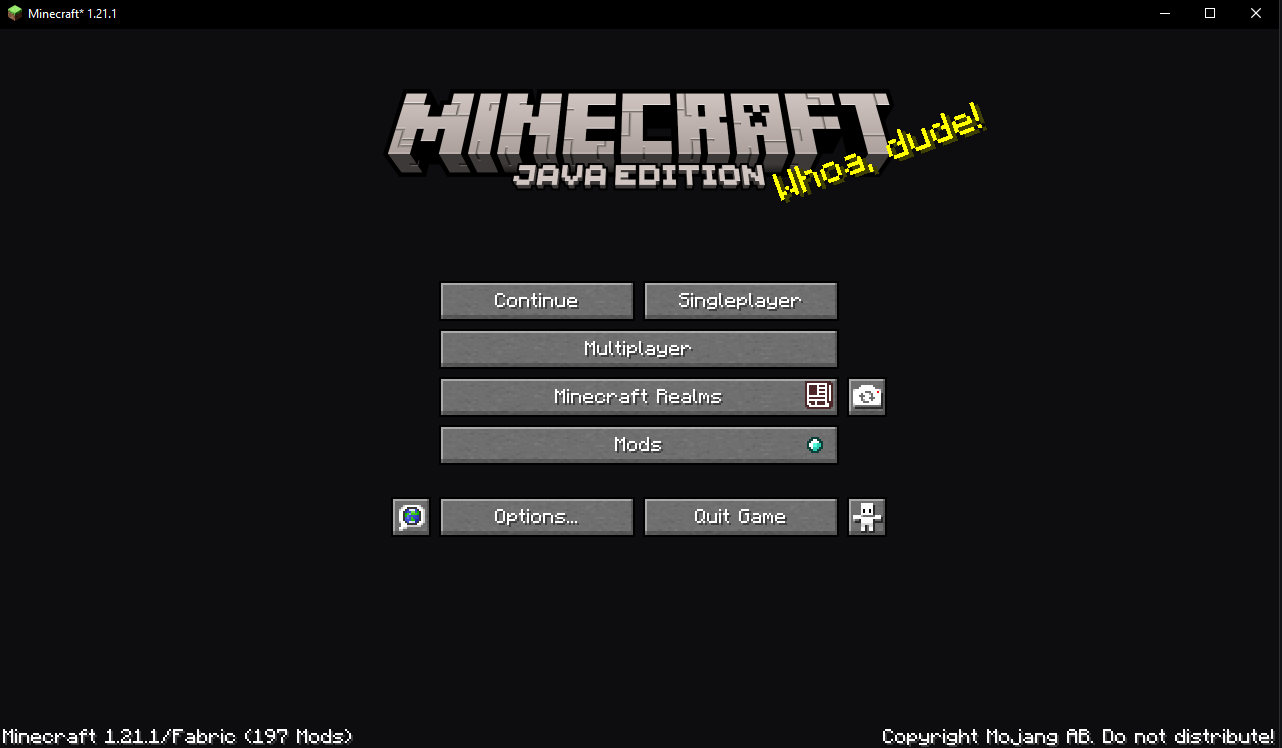
NoPanorama
The game’s main menu changes to a minimalistic gray and blue
No More Pumpkin Blur
**🎃 No more Pumpkin Blur**
**✨ Say goodbye to the pumpkin blur!**
Tired of the annoying blurry overlay when wearing a carved pumpkin?
This pack removes the blur effect so you can finally see clearly while staying safe from Endermen 👀💥
**🔧 What it does:**
– ✅ Removes the carved pumpkin overlay
– ✅ Keeps everything else vanilla-friendly
– ✅ Perfect for survival, PvP, or just looking cool!
**🧩 Works with:**
Minecraft Java Edition
Compatible with Vanilla, OptiFine, Sodium, and more
Plug-and-play — no setup needed!
**📦 Installation:**
Download the pack
Drop it into your resourcepacks folder
Enable it in-game
Done! 🎉
💬 Feedback welcome! Enjoy a clearer Minecraft experience!