Resolution

### Join the discord to interact with me and others about Minecraft
##  OVERVIEW 
Over the years I’ve made a lot of packs for personal use and have done item textures for a number of mods, so I thought it was time to finally make a resourcepack to release to the public.
Notes:
– This is **VERY** [WIP] but I’ll be updating this periodically as I go
##  FEATURES 
– *Visit the wiki for more information*
Changes
– Banners
– Blocks
– GUIs
– Font
– Items
##  ALSO CHECK OUT 
| Resourcepacks |
| :-: |
| TBA |
—
| Projects | Social | Support |
| :-: | :-: | :-: |
|     |   |   |
Resin Brick Recipe
🧱 Resin Brick Recipe Datapack
Craft sticky structure—no smelter science required!
This datapack introduces a custom recipe for Resin Bricks, combining natural resin with standard bricks for modded or lore-rich builds.
✨ Features
✅ Shapeless recipe using 1 Brick + 1 Resin Clump
🧩 Lore-friendly integration with organic materials and alchemical construction
🔁 Modular JSON structure for easy editing and expansion
🛠️ Compatible with Minecraft 1.21.4+
Rena’s Cassettes
# What is this pack?
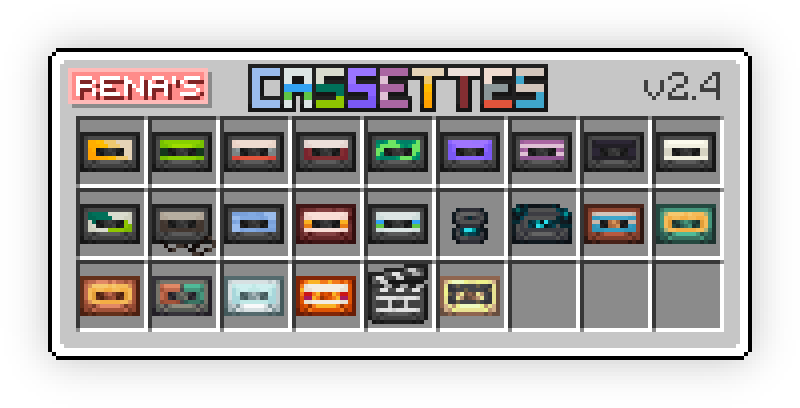
This pack replaces all Discs with Cassettes! (Including Disc Fragments)
I plan on trying to support this pack way into the future, along with giving as much mod support as possible!
Idea comes from _Waradu_ & _lost_my_marbles_ (Celeste Music Discs))
## Pack Features
– Emissive textures if you’re using Continuity
– Renames all discs to “Cassettes Tapes”
– Supports a couple languages at the moment, more will be added! (Refer to the Languages Section for compatable languages]
– Animated textures for disc 5
### *Support For Mods*
– **Gipples Galore** [[Modrinth Link]](https://modrinth.com/project/QYfKDJOV)
– **Vista** [[Modrinth Link]](https://modrinth.com/project/zuARv1N7)
### *Languages*
– English (All variants other than Pirate and Cat)
– Français (Both Québécois and French)
– Español (España, Mexicano)
– Portuguese (Brazilian)
Rename Item


Unlock custom item textures by renaming items in-game. This resource pack is built for builders and creative players, allowing you to create detailed decorations, unique item, and immersive builds using simple vanilla mechanics. No mods required just rename item and start building.


1. 🎨 Rename-Based Textures
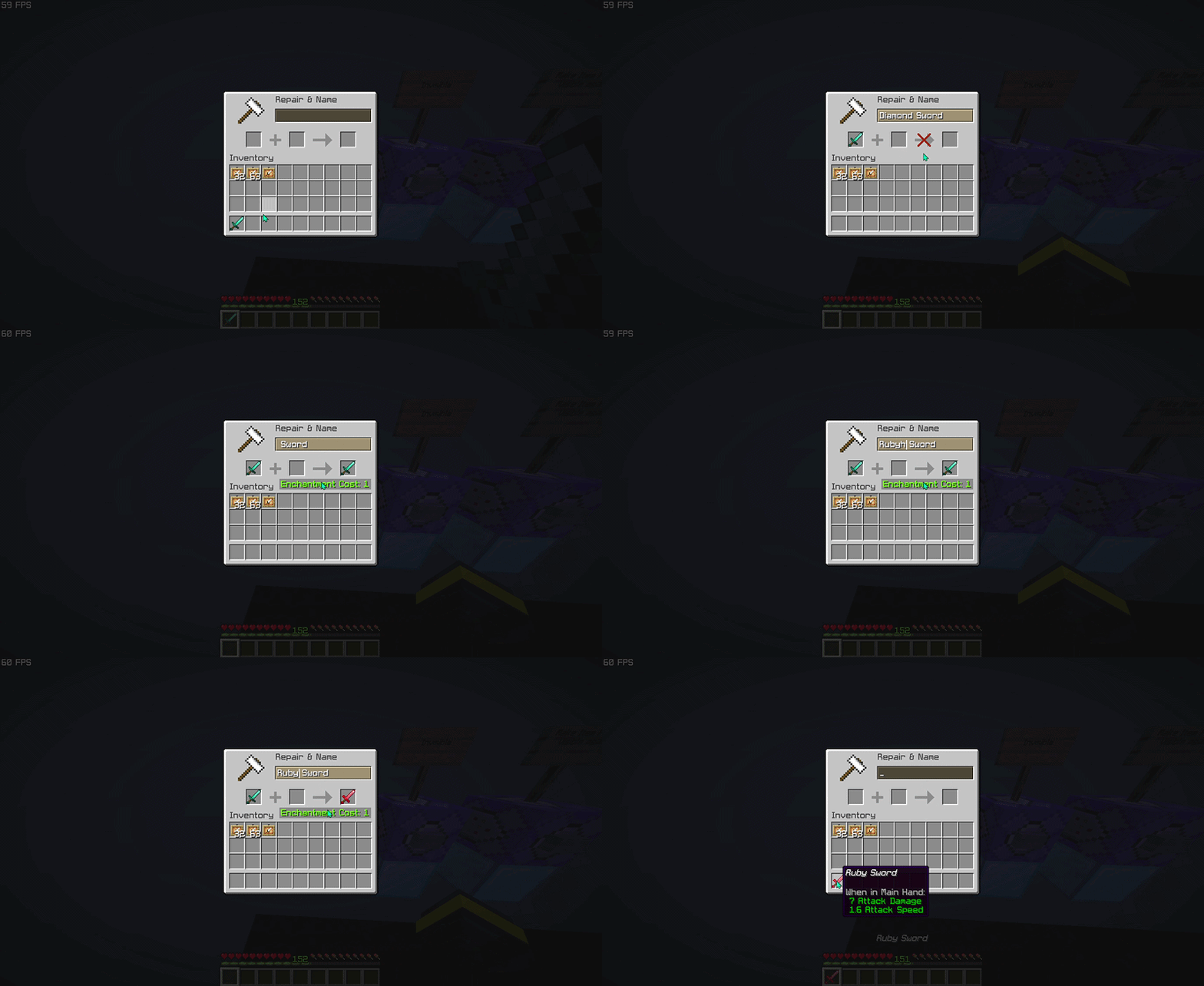
Change an item’s appearance instantly by renaming it in an anvil.
2. 🏗️ Builder-Focused Design
Perfect for creating custom decorations, props, and themed builds.
3. 🧩 Vanilla-Friendly
Works entirely in vanilla Minecraft no mods or external tools needed.
4. ⚡ Lightweight & Efficient
No performance impact purely texture-based.
5. 🧠 Creative Freedom
Turn simple items into detailed assets for storytelling and builds.


1. This pack uses Minecraft’s built-in custom model system.
1. Take a supported item (e.g. stick, paper, etc.)
1. Rename it in an anvil to a specific name.
1. The item will automatically change its texture/model.


> This pack focuses on visual customization, not gameplay changes!


Do I need any mods to use this pack?
No. This resource pack works entirely in vanilla Minecraft. Just install it, rename items in an anvil, and the textures will change automatically.
How do I activate the custom textures?
Rename a supported item to the correct name using an anvil. Once renamed, the item will instantly use its custom texture.
Why isn’t my texture changing?
Common causes: The name is not typed exactly (check spelling, spaces, and capitalization), The item is not supported by the pack, Another resource pack is overriding the same item model.
Does this work in multiplayer?
Yes, the resource pack works in multiplayer.
Does this pack affect performance?
No. This is a lightweight resource pack that only changes item models and textures, so it has little to no impact on performance.
What Minecraft versions are supported?
Works on versions that support custom item models and rename-based overrides. Using the latest version is recommended for best compatibility (>1.21.5).
Is it visible to other players?
Yes, as long as they have the same resource pack installed and enabled.


| ━━━━━━━━━━ Item ━━━━━━━━━━ | ━━━━━━━━━━ Rename ━━━━━━━━━━ |
|——|——–|
| baked_potato | Golden Baked Potato |
| beetroot | Golden Beetroot |
| beetroot_soup | Golden Beetroot Soup |
| bread | Golden Bread |
| chorus_fruit | Golden Chorus Fruit |
| cooked_beef | Golden Steak |
> View the full item list here: Wiki Page


Want to see all available custom items in-game?
Check out the companion tool that lets you browse every supported anvil rename item and resource pack entry directly in-game. Download RP Rename Mod


– Thanks for using this pack! 🎉
– If you find this resource pack useful, consider give a heart to the project ❤.
– More custom items, improvements, and expansions will be added in future updates. Stay tuned!
Remastered Wither
# Wither Remastered: A Resource Pack for Minecraft
## Features
– Bright, glowing Wither Heads
– Energy Cracks, which are glowing lines that indicate unstable energy
– Elements of the Rage Theme (hints of chaos and corruption)
– A vanilla-style resource pack that fits in with the Minecraft Art Style
>Vanilla… but better.
This resource pack was created for the Wither Remastered datapack; however it can be used alone.
* Will work in any world
* Enhances every Wither battle
* Visual only; no change to gameplay.
## Installation Instructions
1. Download the resource pack
2. Open Minecraft
3. Go to Options > Resource Packs
4. Click Open Pack Folder
5. Move the pack into the folder
6. Enable it in-game
## Recommended Setup
To ensure maximum enjoyment:
* Use with the Wither Boss Fight Remastered
* Enable particles in Video Settings > All
* Play with sound on
## Frequently Asked Questions
Q: Do I need Optifine to use this?
A: No, it works with vanilla Minecraft.
Q: Will this cause changes to other mobs or creatures?
A: No, only the Wither will be changed.
Q: Is this resource pack compatible with multiplayer?
A: Yes, it works on the client’s side.
Reinforced Deepslate Recipe
🦴 Reinforced Deepslate Recipe Datapack
Craft the ancient city’s core—no Warden required!
This datapack introduces a custom recipe for Reinforced Deepslate, letting players access this unbreakable block through survival-friendly means.
✨ Features
✅ Shaped recipe using 6 Bone Blocks + 3 Deepslate
🧩 Lore-friendly integration with ancient city and bone-based rituals
🔁 Modular JSON structure for easy editing and expansion
🛠️ Compatible with Minecraft 1.19+
Reduce the Vignette Effect – Less intense Shadow Borders/Corners
Reduces the Vignette Effect (The dark corners effect of the screen).
## New Effect:

## Vanilla Effect:

RedstoneToolkit
# RedstoneToolkit


A collection of technical and performance‑oriented mods designed to support Technical Minecraft builds
### Platform Notice
The CurseForge version is a Trimmed Edition due to platform rules. For the full modlist, we highly recommend using the Modrinth version instead.
### Note
This pack includes several disabled mods, which are optional and can be enabled by the user if desired
– This pack is built based on mods listed at CommandLeo’s Mod List
## Mods

This is a list of all the mods in this pack:
### Enabled Mods
These mods are enabled by default and recommended to the user
Carpet
– Carpet Igny Addition – A Carpet extension adding various technical features including bot management rules
– Carpet Mod – The most important mod for technical Minecraft; it comes with tons of useful features and commands
– Carpet TIS Addition – Very useful Carpet extension with lots of new rules and tools, in particular for doing stuff in creative mode
– JoaCarpet – A small Carpet extension with a few useful features for redstone and storage tech
– SubTick – Allows freezing and stepping through block ticks, fluid ticks, block events, entities, and block entities individually, with HUD visualization and configurable defaults
– Yet Another Carpet Addition – Adds a lot of useful features, including visualization for scheduled ticks, hopper cooldowns, random ticks, block updates, etc. Provides GUI interfaces for Carpet rule management and hopper counter tracking
Fixes
– Model Gap Fix – Fixes gaps in block models and item models
– PacketFixer – Fixes various problems with packets, nbt, and timeouts
– ToolTip Fix – Stops tooltips that are too large to fit on the screen from running off the screen
Libraries
– Cloth Config API – Configuration library required by some mods
– Fabric API – Library required by a lot of mods
– Fabric Language Kotlin – Library required by Too Many Shortcuts
– Fzzy Config – Configuration library required by Particle Core
– MagicLib – Library required by MasaGadget
– MaLiLib – Library required by Masa’s mods
– oωo – Library required by Isometric Renders and WikiRenderer
– YetAnotherConfigLib – Configuration library required by multiple mods
Performance
– BadOptimizations – Micro optimizations that improve client performance without altering gameplay
– Better Block Entities – Optimizes block entity rendering for smoother performance and reduced lag on versions ≥1.21.6
– Enhanced Block Entities [[1]](#ref-1) – Reduces block entity FPS lag and improves their visuals on versions ≤1.21.4
– EntityCulling – Hides entities and block entities that are not visible
– Fast Noise – Replaces the vanilla noise generator with a faster implementation to speed up world generation
– FerriteCore – Memory usage optimizations
– ImmediatelyFast – Speeds up the immediate mode rendering performance of the client
– Ixeris – Offloads event polling to a separate thread, freeing CPU for rendering
– Krypton – Optimises the Minecraft networking stack
– Lithium – Improves server-side performance without affecting vanilla game logic
– ModernFix [[2]](#ref-2) – Improves performance and reduces memory usage
– ModernFix-mVUS – A fork of ModernFix that adds minor version update support on versions >=1.21.5
– More Culling – Changes how multiple types of culling are handled to improve performance
– Smooth Boot – Optimize Minecraft loading performance to be smoother on low end systems and scale better on high end systems
– Particle Core – Optimises particle rendering
– Sodium – The fastest rendering optimization mod for Minecraft
– Sodium Extra – Ports most of Optifine’s options over to Sodium
Quality of Life
– Auth Me – Makes it possible to authenticate yourself and re-validate your session without having to close the game
– Better Suggestions – Makes command suggestions more useful
– CarpetGUI – A GUI for managing Carpet rules with favorites, rule groups, and a version-control-like history stack
– Client Commands – Adds lots of useful client-side commands
– CommandKeys – A powerful command macro mod
– Hold That Chunk – Keeps chunks in memory longer after they are out of render distance
– Hold That Chunk V2 – A re-implementation of Hold That Chunk for versions >=1.21 that keeps rendered chunks in memory longer
– Isometric Renders – Allows the creation high-resolution isometric images of items, blocks, and entities
– Item Scroller – Adds many shortcuts to move items more easily and craft faster in inventory screens
– MaLiBind – Imports vanilla Minecraft keybinds into MaLiLib’s configuration system
– MiniHUD – A “mini F3” HUD mod, also with various overlays like light level, spawn chunks, slime chunks etc.
– Mod Menu – Adds a mod menu to view the list of mods you have installed
– NBT Autocomplete – Adds suggestions for NBT tags in commands
– Packed Packs – Pack resource and data packs into profiles
– Pick Block Pro – Advanced client-side picker for blocks, entities, NBT, tools, and IDs
– Reese’s Sodium Options – Alternative options menu for Sodium
– Suggestion Tweaker – Improves the way suggestions are filtered and sorted when writing a command
– Vanilla Keybind Manager – Manages conflicts between Vanilla and Malilib keybinds
– WikiRenderer – Allows rendering entities, items, and blocks as high-resolution images for versions >=1.21.11
Technical
– ChunkDebug – Adds a map with information about the currently loaded chunks
– EssentialClient – Adds many utilities and provides a GUI to modify carpet rules
– G4mespeed – Utility mod that improves the reliability and experience of changing tick rate, and adds many quality of life features
– Litematica – A client-side schematic mod with extra features for creative mode work
– Litematica Server Paster – Lets Litematica paste tile entity data and entity data on servers
– Litemoretica – Adds features and fixes to Litematica
– Masa Gadget – Additional features for Masa’s mods
– MasaAdditions – Addon mod for Tweakeroo, MiniHUD and Litematica
– NBT Copy – Adds a button to the chat to easily copy NBT data from the `/data get` command.
– spark – A performance profiler for Minecraft clients, servers and proxies
– Syncmatica – Enables sharing litematic placements with other players
– Technical Utilities – Provides an Inventory Verifier for Litematica schematics and various other small technical utilities
– TweakerMore – Adds even more client-side tweaks to the game
– Tweakeroo – Adds a whole bunch of client-side “tweaks” to the game
### Disabled Mods
These mods are disabled by default and can be enabled if desired
Aesthetics
– Continuity – Connected textures and emissive textures
– Iris – The best shaders mod
Carpet
– Carpet Extra – Adds Carpet rules that introduce non‑vanilla mechanics for technical play. Extends dispenser behavior to place blocks, feed and interact with animals, while enabling renewable conversions.
– Doormat – Provides Carpet rules for experimental redstone mechanics. Introduces a Tinker Kit system that allows per‑component configuration of quasi‑connectivity, block update emissions, etc.
– Essential Addons – Integrates the functionality of the Spigot plugin Essentials alongside additional features. Adds mechanics such as stackable shulkers and nesting shulkers inside shulkers
Fixes
– WeCuiFix – Fixes WorldEdit compatibility with WorldEditCUI on versions 1.20.5-1.21.4
– WorldEdit Hang Fix – Prevents the client from freezing when performing large operations with WorldEdit
Libraries
– Indium – Allowing Continuity to work with Sodium
– LibJF – Library required by Respackopts
Performance
– Concurrent Chunk Management Engine – Improves chunk generation, I/O, and loading performance by utilizing multiple CPU cores
– Dynamic FPS – Reduces resource usage by lowering the frame rate when the game window is inactive or backgrounded on versions <1.21.2
- ScalableLux - Optimizes lighting engine performance for improved FPS
- Starlight - Rewrites the lighting engine to significantly improve performance and fix lighting errors
- Voxy - Light-weight LoD rendering mod enabling extreme render distances
- Worldthreader - Allows multi-threaded processing of multiple dimensions simultaneously to improve performance
Quality of Life
– AppleSkin – Adds food/hunger-related HUD improvements
– ClearDespawn – Makes items blink when they are about to despawn
– ClearDespawn Reworked – A rework of the ClearDespawn mod for Fabric 1.21.x
– Cubes Without Borders – Allows playing Minecraft in a borderless fullscreen window
– DashLoader [[1]](#ref-1) [[2]](#ref-2) – Speeds up Minecraft startup by caching and reusing resource loading
– Disable Custom Worlds Advice – Disables the annoying “Experimental Features” advice
– Fabrishot – Allows taking high-resolution screenshots
– FastQuit – Makes it possible to return to the title screen early while a world is still saving in the background
– InvView – Allows opening and manipulating the inventories and ender chests of online and offline players
– kennytv’s epic force close loading screen – Disables world loading/reconfiguration screens and removes forced fades for faster resource pack loading
– No Chat Reports – Makes chat unreportable (where possible)
– Respackopts – Adds config menus for resource packs; recommended for Redstone Tweaks users
– SchematicPreview – Adds 3D previews and a material “replace” button to Litematica
– Sound Controller – Provides complete control over the volume of every sound in the game
– ViaFabricPlus – Allows connecting to almost any Minecraft server version and includes various client-side fixes for older protocol versions.
Technical
– Axiom – An all-in-one tool for Minecraft editing
– G4mespeed Capture & Playback – Addon for G4mespeed that adds recording and playback capabilities for tick-warped gameplay
– Rail Placement Fix – Allows precise rail placement
– Redstone Multimeter Fabric – An intuitive redstone debugging tool
– Unobtainable Blocks – Adds items for unobtainable blocks like fires and portals
– WorldEdit – A tool to make building a lot faster
– WorldEditCUI – Adds visual outlines for WorldEdit areas
### Notes
[[1]](#ref-1) DashLoader and Enhanced Block Entities are not compatible in versions 1.16.5 and 1.19.4
[[2]](#ref-2) DashLoader and ModernFix are not compatible in versions 1.16.5 – 1.18.2
[[3]](#ref-3) Essential Addons are not compatible with ChunkDebug and EssentialClient in version 1.16.5
## Resource Packs
This is a list of all the resource packs in this pack:
Resource Packs
– Redstone Tweaks – Vanilla-style resource pack made to improve redstone experience
Red String
This resource pack will colour the string (tripwire) red when it placed. You now can see the string clearly and cannot be trapped by tripwire hook trap.
I don’t have chance for testing the new version of this resource pack, if there is any issues, please report here : https://github.com/break08/red-string/issues and you can also try download tested older versions (which doesn’t support many versions of minecraft).
If errors happened, try to…
Go to .zip file of resource pack -> pack.mcmeta
**Method 1**: In pack.mcmeta, remove
“supported_formats”: {
“min_inclusive”: x,
“max_inclusive”: x
}
and remove the `,` from description line
**Method 2**: Remove
“meta”: {
“game_version”: “x”
}
and remove `,` next to `}` above these removed lines
**Method 3**: Do both Method 1 and 2
**Method 4**: Report issues for me and use one of these versions:

**List of not tested versions: 1.0.1-mc1.13-1.21.11, 0.0.1-mc1.6.1, 0.0.1-mc1.9**
**Before using this:**

**After using this resource pack:**

Try my other resource packs:
**1**. Lined Redstone – Replace the vanilla dusty redstone lines with straight-line designed redstone
**2**. Mark the Powder Snow – Border the powder snow blocks and help you to avoid falling into them
and mods =):
**1**. New NameTag Recipe – Backport the Name Tag recipe of Minecraft 26.1
Red Shield
# Red Shield
This resource pack replaces the default shield with a custom 3D model.
The design uses a red theme.
No OptiFine required. Vanilla compatible.
## More Shield Themes
– Black
– Blue
– Creeper
– Dark Red
– Mirror
– Navy Blue
– Rabbit