Simple Structures: Mushroom Fields
🌿This modification adds **17** small structures to the mushroom biome.🌿


_______________________________________________________________________________________________
### All projects are Simple Structures
_______________________________________________________________________________________________
**License** – you can use the data pack materials in any of your projects, just specify the authorship.
_______________________________________________________________________________________________
**AI** – only the project icon was generated
SimplesorterR
# SimpleSorter
> A lightweight client-side inventory sorting mod.
—
## Features
### One-Key Smart Sorting
Open an inventory or container and press **R** to sort items.
– **Auto Stack Merging** — Automatically consolidates partial stacks of the same item into full stacks, freeing up valuable slots
– **Creative Tab Native Sorting** — Items are arranged using Minecraft’s Creative Mode tab order and support modded items
– **Custom Sort Order** — Adjust `tabOrder` in the config file to change tab priority
– **Pinned Items** — Configure `pinnedItems` to keep specific items always sorted first
– **Dynamic Container Blacklist** — All storage containers are sortable by default (including modded containers like Reinforced Chests). Functional containers are excluded by exact class names in `blockedContainers`; you can also press **B** while a container is open to toggle it automatically
– **Config Hot-Reload** — Edit `simplesorter.json` directly, changes take effect on the next R-key sort without restarting the game
– **Pure Client-Side** — Sorting is performed by simulated clicks, so the server does not need the mod
—
### Mouse Tweaks
#### Shift + Drag to Quick-Move
Hold **Shift** and **left-click drag** across multiple slots — every slot you pass over will be instantly quick-moved to the opposite inventory.
> Useful when moving many slots at once.
#### Shift + Double-Click to Move All Same Items
While **holding an item** on your cursor, **Shift + Double-Click** on a matching item to instantly quick-move **all identical items** from that inventory to the other side.
> Useful for pulling all matching items out of a chest.
#### Space + Double-Click to Move Everything
Hold **Space** and **Double-Click** any slot in a container to instantly quick-move **every single item** from that inventory to the opposite side.
> Useful for quickly emptying a chest.
—
### Slot Locking
Hold **Alt** and **click** any slot to **lock** it — locked slots display an overlay.
– Locked slots are **never moved** when sorting with R
– Locked hotbar slots are **protected from Q-key drops** (prevents accidental discarding)
– Lock state is **automatically saved** and independent per save file
– **Alt + click** again to unlock
– Hold **Alt + left-click drag** to lock or unlock multiple slots in one sweep. The first slot decides whether the drag locks or unlocks
– Overlay color can be customized with `lockOverlayColor`, supporting both `#RRGGBB` and `#AARRGGBB`
Color values use **Hex color codes**. Both `#RRGGBB` and `#AARRGGBB` are supported. The 8-digit format uses `ARGB` order: `AA` opacity, `RR` red, `GG` green, `BB` blue. It is not `RGBA`.
Common `AA` values: `40` very transparent, `80` half transparent, `C0` mostly opaque, `FF` fully opaque. Examples: `#80FF0000` half-transparent red, `#8000FF00` half-transparent green, `#800000FF` half-transparent blue.
> Useful for keeping tools in fixed slots and reducing accidental drops.
—
### Auto Replacer
– **Tool Break Replacement** — When a held tool breaks, automatically equips a replacement of the same type from your inventory
– **Stackable Item Refill** — When a held stackable item runs out (e.g. placing blocks), automatically refills from your inventory
– Can be **toggled on/off** in the settings screen
> Useful when building or mining with repeated item replacement.
—
### Caps Lock + Double-Click to Batch Drop
Hold **Caps Lock** and **double-click** any slot to **drop all identical items** in that inventory (using the Q-key drop action).
> Useful for clearing large quantities of one item.
—
### In-Game Configuration
Press **Z + I** (default combo) to open a graphical settings panel in-game:
– **Tab Sort Order (tabOrder)** — Customize the priority of Creative Mode tabs
– **Pinned Items (pinnedItems)** — Specify item IDs that always sort to the front
– **Container Blacklist (blockedContainers)** — Add container class names to exclude from sorting, or press **B** while a container is open to write the current class name automatically
– **Lock Overlay Color (lockOverlayColor)** — Customize locked-slot overlay color, for example `#80FF0000`
– **Z-Key Guard Toggle** — Disable the Z-key requirement to open settings with just I
– **Auto Replacer Toggle** — Enable/disable automatic tool and item replacement
– **Localized UI** — Settings interface automatically adapts to your game language (English / Chinese)
Also accessible from **Mod Menu** if installed.
> Advanced settings can be edited directly in `config/simplesorter.json`. Changes take effect on the next R-key sort.
> ⚠️ `blockedContainers` uses **exact class-name matching**, not fuzzy matching. Depending on mappings and Minecraft version, class names may look like `GenericContainerScreenHandler` instead of `ChestMenu`; the safest workflow is opening the target container and pressing **B** so the mod writes the correct name for you.
—
## Requirements
| Dependency | Required? | Notes |
|—|—|—|
| **Fabric Loader** ≥ 0.16.5 | ✅ Required | Mod loader |
| **Fabric API** | ✅ Required | Core API library |
| **Fabric Language Kotlin** | ✅ Required | Kotlin runtime support |
| **Cloth Config API** | ❌ Bundled | Config screen framework (already included in the mod jar) |
| **Mod Menu** | ❌ Optional | Adds a settings entry in the mod list |
—
## Installation
1. Install **Fabric Loader** and **Fabric API**
2. Download **Fabric Language Kotlin** and place it in your `mods` folder
3. Pick the jar matching your Minecraft version and drop it into your `mods` folder
4. Launch the game
—
## Keybind Reference
All keybinds appear under the **SimpleSorter** category in Minecraft’s Controls screen and can be changed there.
| Key | Action | Context |
|:—:|—|—|
| **R** | Sort & organize inventory | While any container is open |
| **Alt + Click** | Lock / Unlock slot | Prevents that slot from being sorted |
| **Alt + Left-Drag** | Batch lock / unlock slots | Drag across multiple slots |
| **B** | Toggle current container blacklist | When the current container should not be sorted |
| **Caps Lock + Double-Click** | Batch drop identical items | Quickly clear large stacks |
| **Shift + Drag** | Quick-move multiple slots | Drag across slots while holding Shift |
| **Shift + Double-Click** | Move all identical items | While holding an item on cursor |
| **Space + Double-Click** | Move all items from container | Empty an entire inventory at once |
| **Z + I** | Open settings screen | Available anytime |
—
## Technical Details
– **Client-Side Only** — No server modifications; sorting is achieved by simulating player click actions
– **Creative Tab Native Sorting** — Reads Minecraft’s Creative Mode tabs directly to build a sort index, perfectly matching the game’s native item order and automatically supporting all modded items
– **Multi-Version Architecture** — Built with a `core` + `shared` + `platform` layered architecture, allowing one codebase to support multiple Minecraft versions
– **Dynamic Config System** — Supports config file hot-reload, no game restart needed after edits
– **Exact Container Matching** — `blockedContainers` matches exact container class names to avoid accidental fuzzy matches
– **Modular Mouse Tweaks** — Each mouse enhancement is an independent `MouseTweakModule`, making it easy to add or modify features
– **License** — All Rights Reserved (See LICENSE file for strict usage terms)
—
SimpleSorter
A simple Minecraft inventory sorting tool.
SimpleOres Fabric

# Simple Ores Fabric
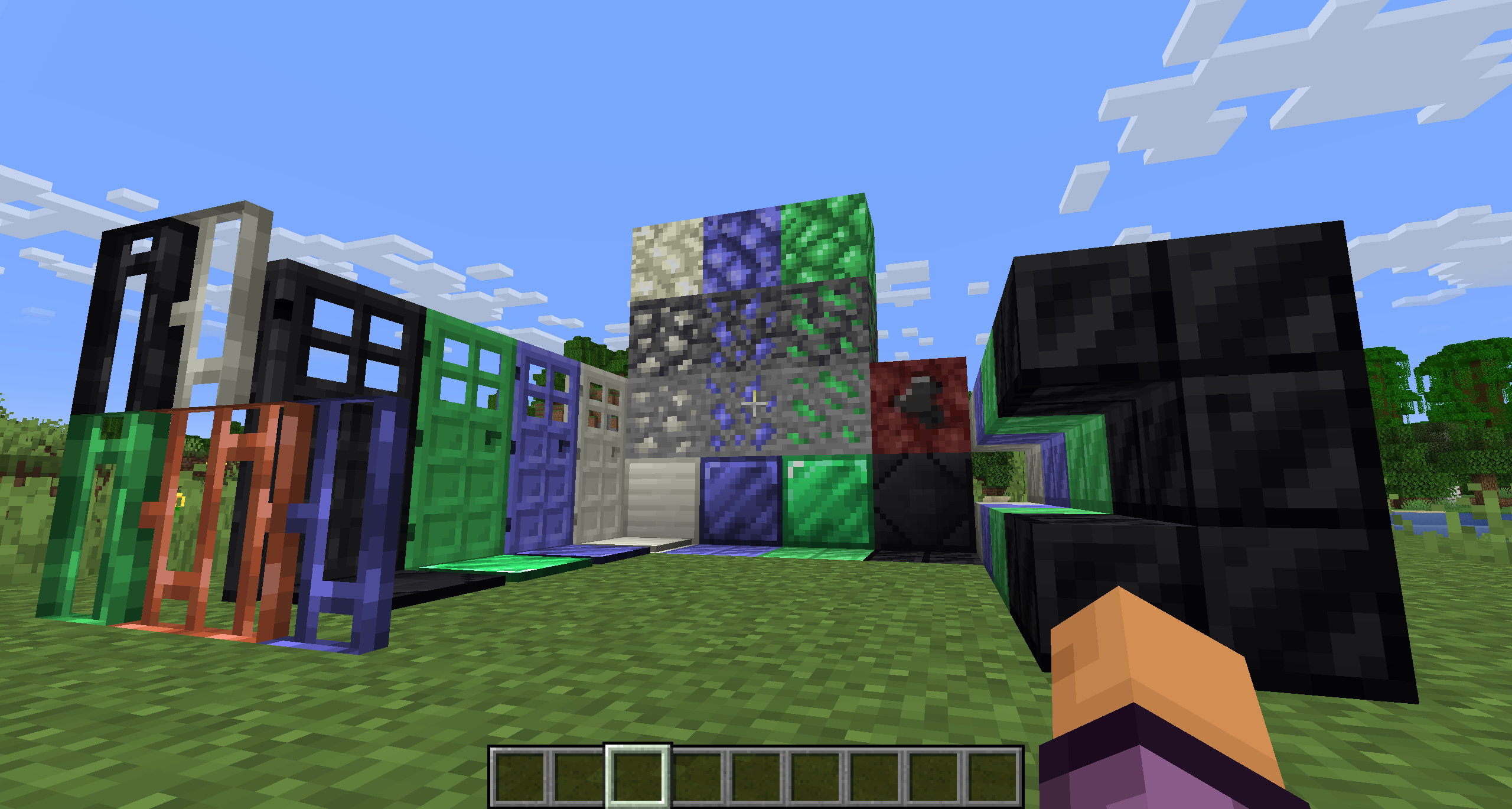
SimpleOres Fabric is an unofficial port of the original Forge mod by skrallexy to Fabric/Quilt that adds 4 new ores to the base game: Tin, Mythril, Adamantium and Onyx. All except Onyx can be found in the overworld, while Onyx can be found only in the Nether.
Each ore has its own unique properties, armor and tool sets, and more.
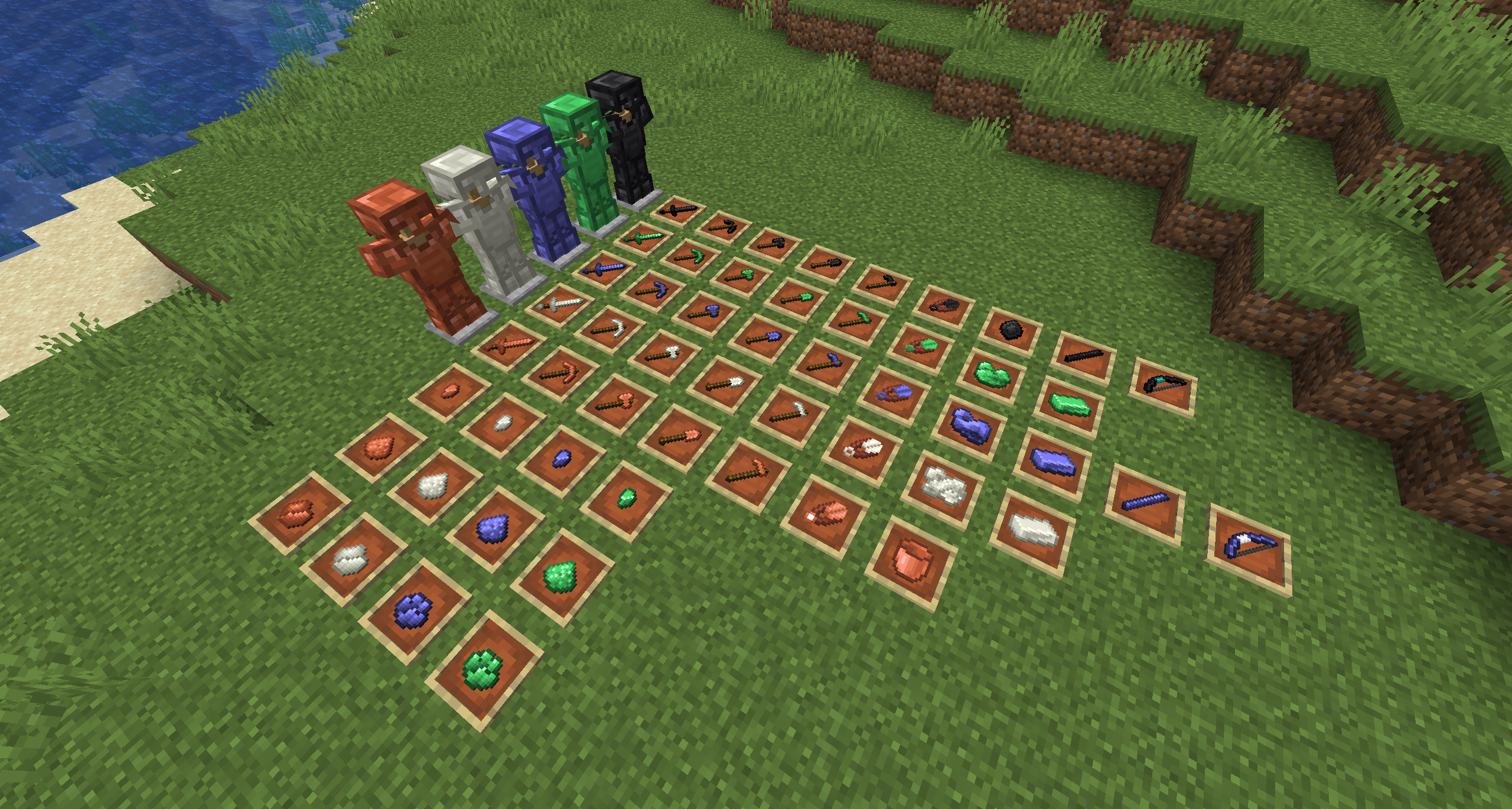

SimpleOres Fabric does not add copper ore or ingots to the game, as vanilla has added them. However, since vanilla did not add copper tools or armor, SimpleOres Fabric still has them (before 1.21.9). SimpleOres Fabric’s ores drop raw metal, like vanilla ores, except for onyx ore, which drops the gem, of course.
Copper doors (before 1.21), mythril, tin, adamantium and onyx bars, doors, bricks, and brick stairs are added too.
SimpleOres Fabric requires Fabric API
The textures are those from the original mod, you should take a look 😉
The original Minecraft Forum thread is here. The original mod was by AleXndrTheGr8st, aka Skrallexy. Sinhika is the current off-and-on maintainer for Forge. The current code of this project is also licensed under LGPL 3.0, so go wild, modpack makers!
## Developers
If you want to add support of SimpleOres Fabric to your mod, crushed and powder versions of ores are available natively, Support of Energized Power has been added in 1.3.1 (and 1.3.2 for 1.20.1+) !
simplehud
Have you wanted to have your FPS, coordinates and more always visible?
Well look no further as you can now have this!!
# Features:
– FPS
– Coordinates
– Server IP
– Biome
– Ping
– TPS
– Position Customization
– You can make everything™ gay now
There’s not really anything else to say, except for that you can toggle everything in the config (modmenu required to access config screen)
~~moving the hud is not supported yet™~~
nvm that, moving the hud is supported now, tho only horizontal no vertical
Notes:
– NeoForge 1.20.x support is currently unavailable. Don’t post issues about it
– NeoForge support has been dropped starting with 3.0.0
– TPS Display seems to be a bit broken, will fix soon™
SimpleGUI
 |  |  | 

You can buy monthy subscription to get faster updates on KO-FI
****
#
**About**
This pack is all about making UI as clean and minimalistic as posible. If you ever played on Bare Bones before you probably know what im aiming for (btw those two packs work so well toghether). For now im testing bottom viev point like shading, let me know how you like this. Before instaling you can check gallery for ingame screenshots. I will try making updates ATLEAST once a month. No mods required (for now).
#
**FAQ**
> **How to install resourcepacks?**
– There are a lot of tutorial out there on youtube, that will explain this better than me, but just download something from trusted sites like modrinth or curseforge, then drag this file to folder that will pop out if you click “Open Pack Folder” in Minecraft.
> **Can i use some textures from SimpleGUI in my pack**
– As long as its not distributed, yes you can. If you want to publish it, just ask me before doing it.
> **Will you add compatibility with mods?**
– Yes, im going to do this with popular mods in form of add-on to this pack.
#
**Lists**
Containers
1. Anvil
2. Beacon
3. Blast Furnace
4. Brewing Stand
5. Cartography Table
6. Crafter
7. Crafting Table
8. Dispenser/Dropper
9. Enchanting Table
10. Furnance
11. Gamemode Switcher
12. Chests
13. Grindstone
14. Hopper
15. Horse
16. Donkey
17. LLama
18. Inventory
19. Creative Inv.
20. Loom
21. Nautilus
22. Shulker Box
23. Smithing
24. Smoker
25. Stonecutter
26. Villager
Plans for future
1. Adding something to crafting table, loom, villager texture so it wouldn’t be so plane (V)
2. Listening to your feedback
3. Redoing reciepe book
4. Fixing inconsistencies
###
 SimpleGUI
by NickShoof
Simple Voice Chat
Modrinth
|
CurseForge
|
Discord
|
Wiki
|
FAQ
|
Credits
|
API
# Simple Voice Chat
A proximity voice chat for Minecraft with a variety of addons that offer additional features and functionalities.
⚠️ **NOTE** This mod requires special setup on the server in order to work.
Please read the wiki for more information.

Please join the Discord if you have questions!
## Downloads
– Fabric
– NeoForge
– Forge
– Bukkit/Spigot/Paper
– Quilt
– Velocity
– BungeeCord/Waterfall
## Features
– Push to talk
– Voice activation
– Proximity voice chat
– Password protected groups
– Automatic voice activity detection
– Automatic microphone gain adjustment
– Opus codec
– RNNoise recurrent neural network noise suppression
– OpenAL audio
– Cross compatibility between Fabric, NeoForge, Forge, Quilt, Bukkit, Spigot and Paper
– Support for Velocity, BungeeCord and Waterfall
– Compatibility with ModMenu (Use ClothConfig for a better configuration UI)
– Configurable push to talk key
– Microphone and speaker test playback
– Configurable voice distance
– Whispering
– Individual player volume adjustment
– Microphone amplification
– 3D sound
– AES encryption
– Audio recording with separate audio tracks
– A powerful API
– Many addons
## Icons
| Icon | Description |
|:————————————:|——————————————————-|
|  | You are talking |
|  | You are whispering |
|  | Player is talking |
|  | Player is whispering |
|  | Microphone muted |
|  | Voice chat disabled |
|  | Voice chat not connected
Voice chat not installed |
## The GUI
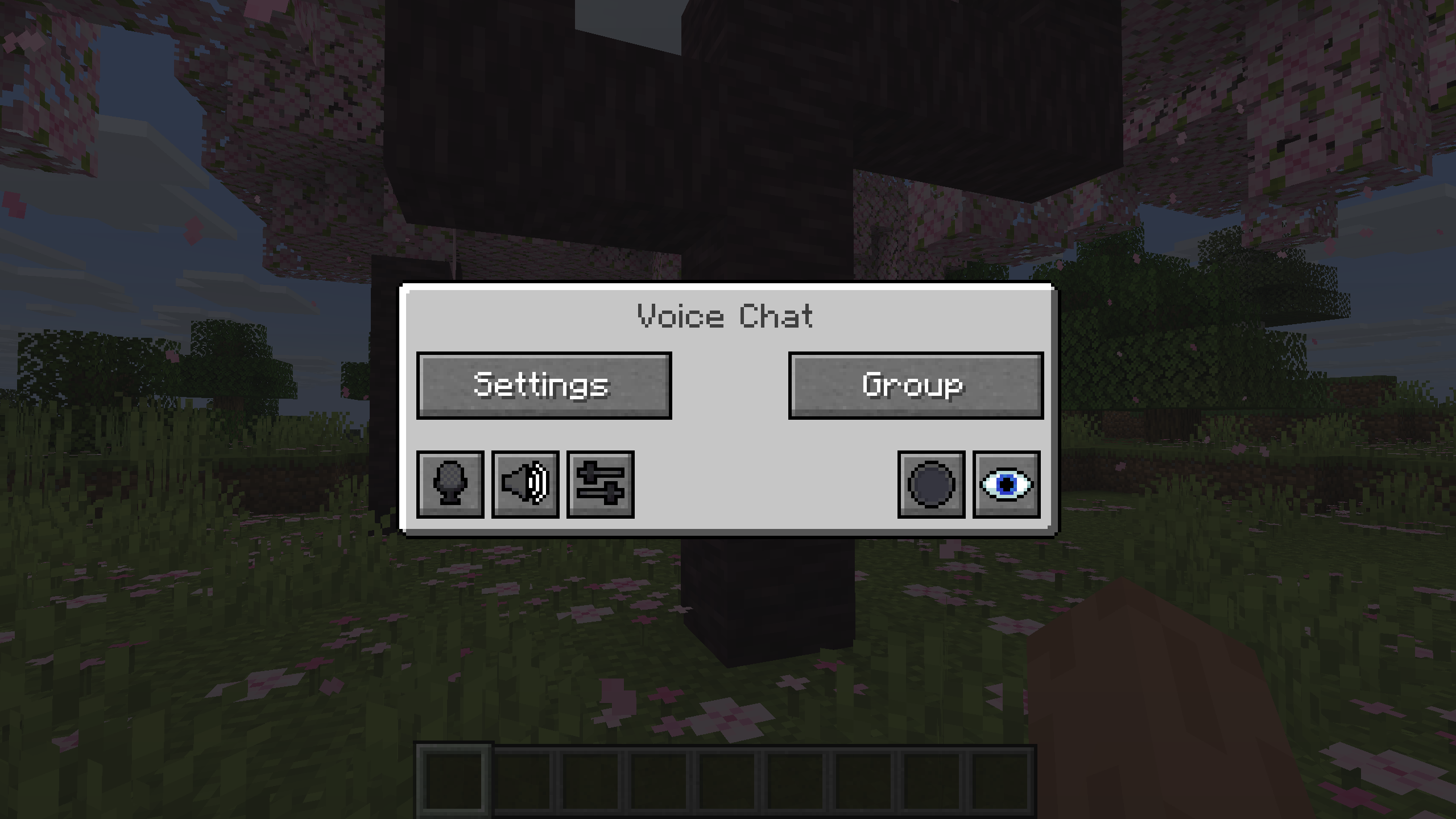
You can open the voice chat GUI by pressing the `V` key.
This allows you to open the settings, group chats, mute yourself, disable the voice chat, start/stop a recording and hide all icons.
### Group Chats
Group chats allow you to talk to players that are not in your vicinity.
To open the group chat interface, either press the group button in the voice chat GUI or just press the group key.
To create a new group, just type a name in the text field and press the button at the bottom.
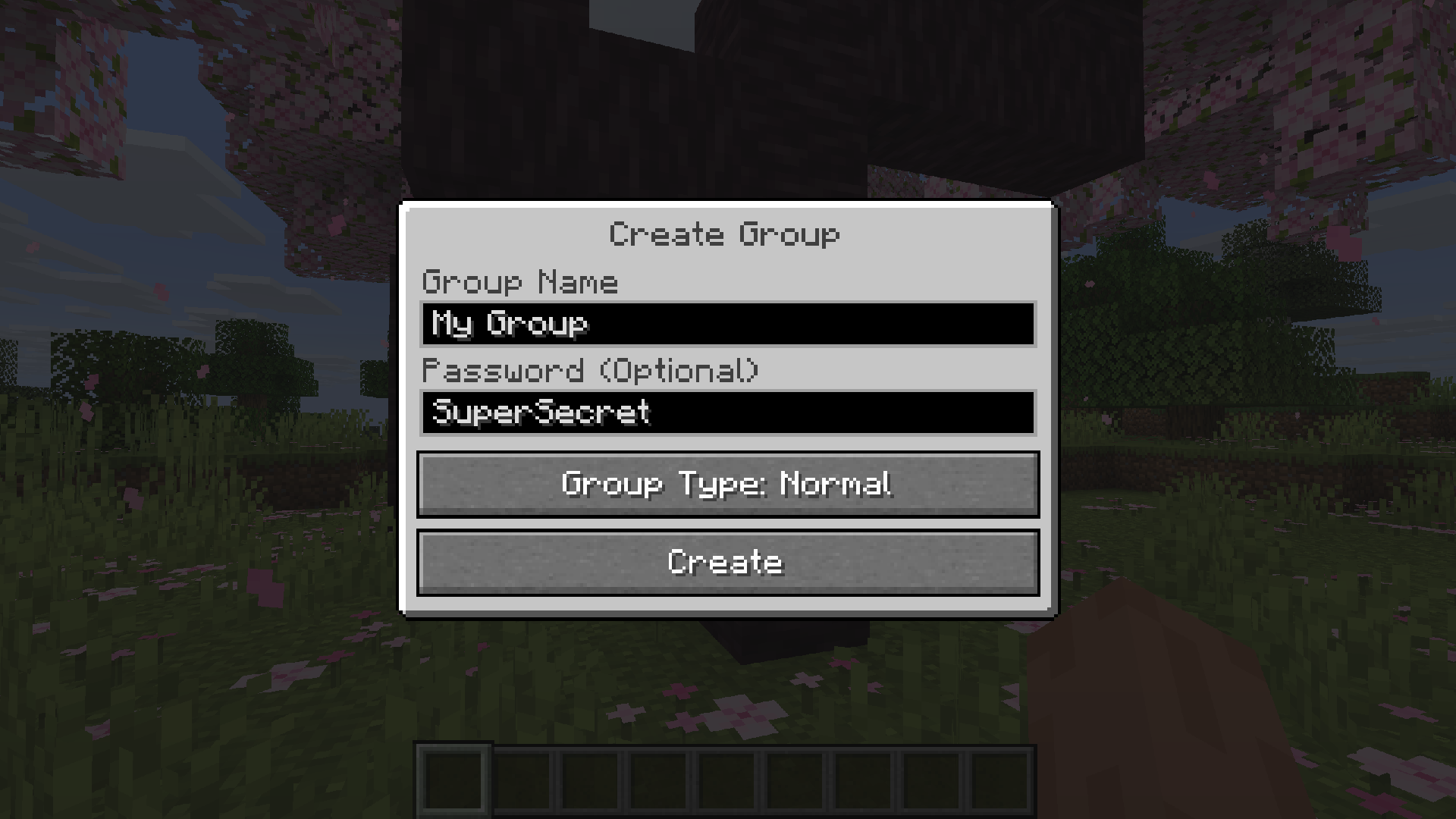
Creating or joining a group will bring you into the group chat interface.
You will also see the heads of the group members in the top left corner of your screen.
Talking players will be outlined.
You can disable these icons by pressing the third button from the left.
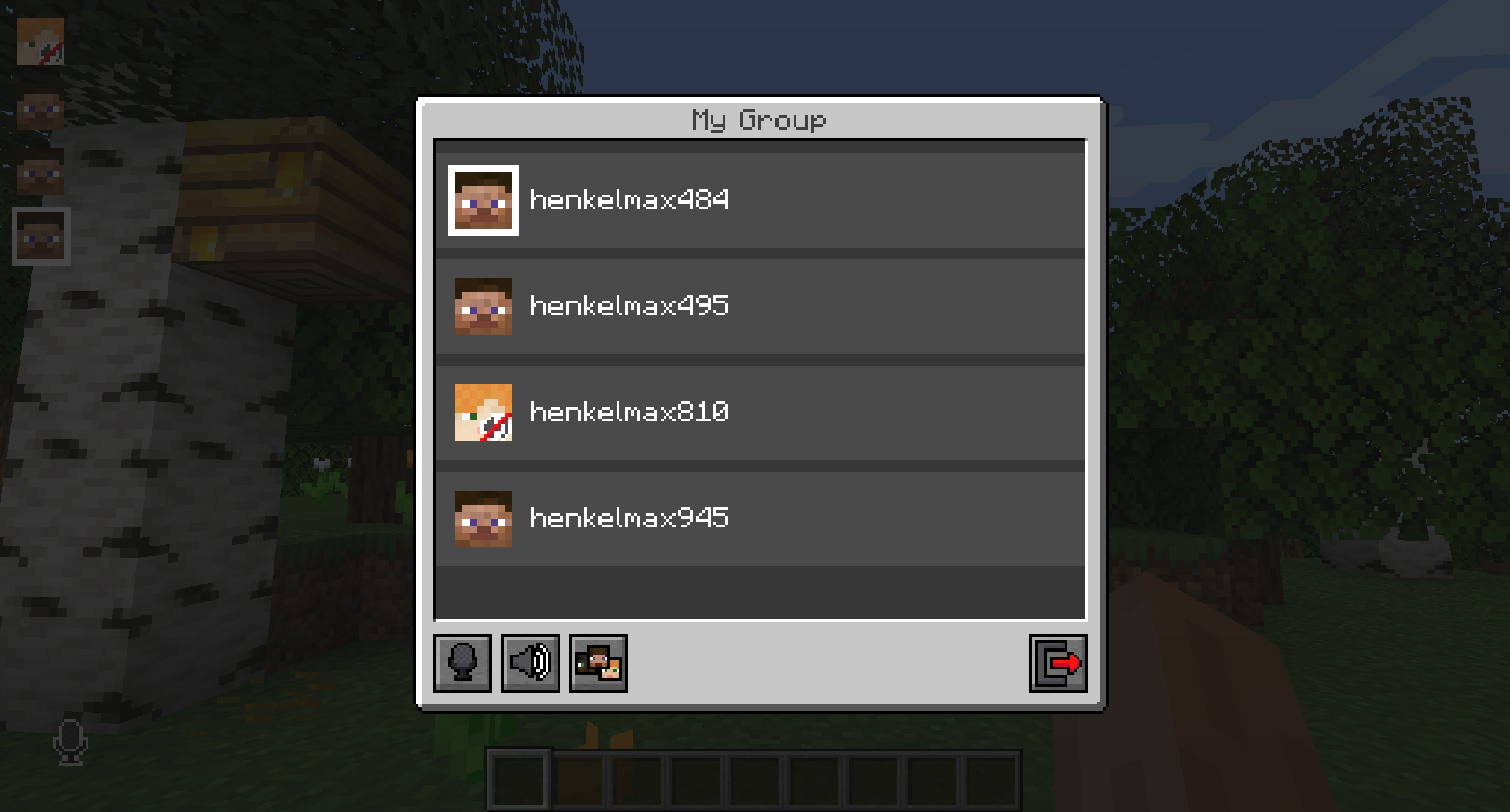
Players that are not in a group will see a group icon next to your head, indicating that you are in a group.
You can invite players to your group chat by entering the command `/voicechat invite ` or from the social interactions screen.
### Settings
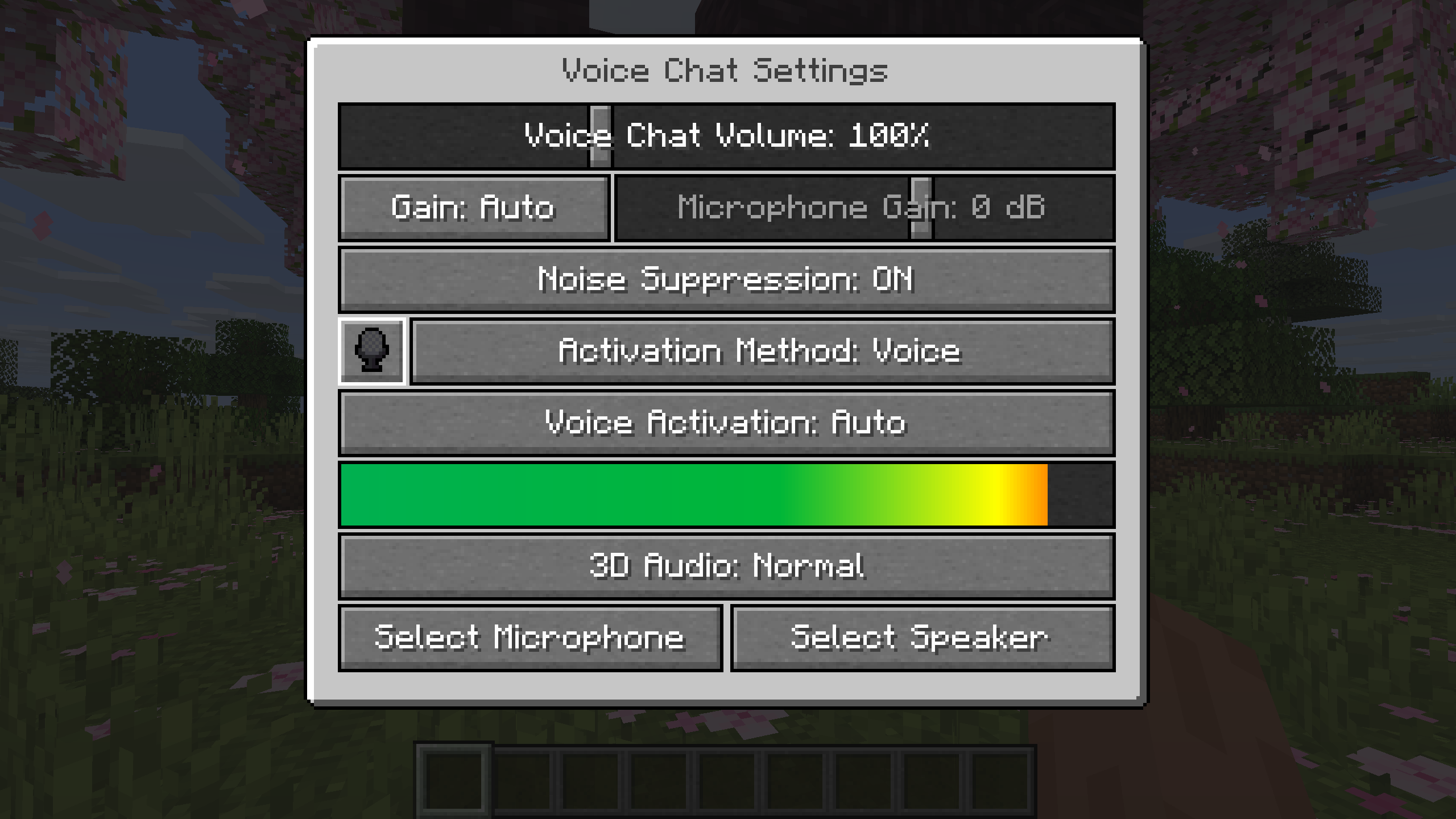
You can access the voice chat settings by pressing the `V` key and pressing the settings button.
This menu offers the ability to set up your voice chat audio settings.
By clicking the microphone button, you can test your microphone activation.
## Important Notes
You need to open a port on the server. This is port `24454` `UDP` by default.
Without opening this port, the voice chat will not work.
This port can be changed in the server config.
More information here.
The voice chat is encrypted, but we don’t guarantee the security of it. Use at your own risk!
Simple Structures: Desert
This modification adds **30** structures to the minecraft world for the Desert biome.


_______________________________________________________________________________________________
### All projects are Simple Structures
_______________________________________________________________________________________________
### Compatibility
– Biomes O’ Plenty
– Terralith.
_______________________________________________________________________________________________
**License** – you can use the data pack materials in any of your projects, just specify the authorship.
_______________________________________________________________________________________________
**AI** – only the project icon was generated
Simple Structures: Caves
Adds small decorative structures, shelters, halts, and dungeons to the cave. At the moment, **34** structures have been added
_______________________________________________________________________________________________

_______________________________________________________________________________________________
### All projects are Simple Structures
_______________________________________________________________________________________________
### Roadmap
In the future, I plan to add:
“`
Compatible with other cave mods
New structures and more variations.
more custom mobs and loot tables
“`
_______________________________________________________________________________________________
### **Integration:**
– > Vanilla Biome
– > Terralith
– > Biomes O’ Plenty
_______________________________________________________________________________________________
Simple Structures: Pale Garden
Adds small structures to the Pale Garden biome, making it diverse. At the moment,**20** structures have been added
_______________________________________________________________________________________________


_______________________________________________________________________________________________
### All projects are **Simple Structure**:
Simple Structure: Desert
Simple Structure: Mushroom Fields
Simple Structure: Bewitchment
Simple Structure: Botania
_______________________________________________________________________________________________
### **License**
you can use the data pack materials in any of your projects, just specify the authorship.
Simple Structures: Nostalgia
This modification adds the classic buildings of the novice players from the first versions.
Strictly speaking, this is part of another project, but I decided to share these materials.
_______________________________________________________________________________________________

### All projects are Simple Structures
_______________________________________________________________________________________________
### **Integration:**
– Terralith
– Biomes O’ Plenty