Rename Item


Unlock custom item textures by renaming items in-game. This resource pack is built for builders and creative players, allowing you to create detailed decorations, unique item, and immersive builds using simple vanilla mechanics. No mods required just rename item and start building.


1. 🎨 Rename-Based Textures
Change an item’s appearance instantly by renaming it in an anvil.
2. 🏗️ Builder-Focused Design
Perfect for creating custom decorations, props, and themed builds.
3. 🧩 Vanilla-Friendly
Works entirely in vanilla Minecraft no mods or external tools needed.
4. ⚡ Lightweight & Efficient
No performance impact purely texture-based.
5. 🧠 Creative Freedom
Turn simple items into detailed assets for storytelling and builds.


1. This pack uses Minecraft’s built-in custom model system.
1. Take a supported item (e.g. stick, paper, etc.)
1. Rename it in an anvil to a specific name.
1. The item will automatically change its texture/model.


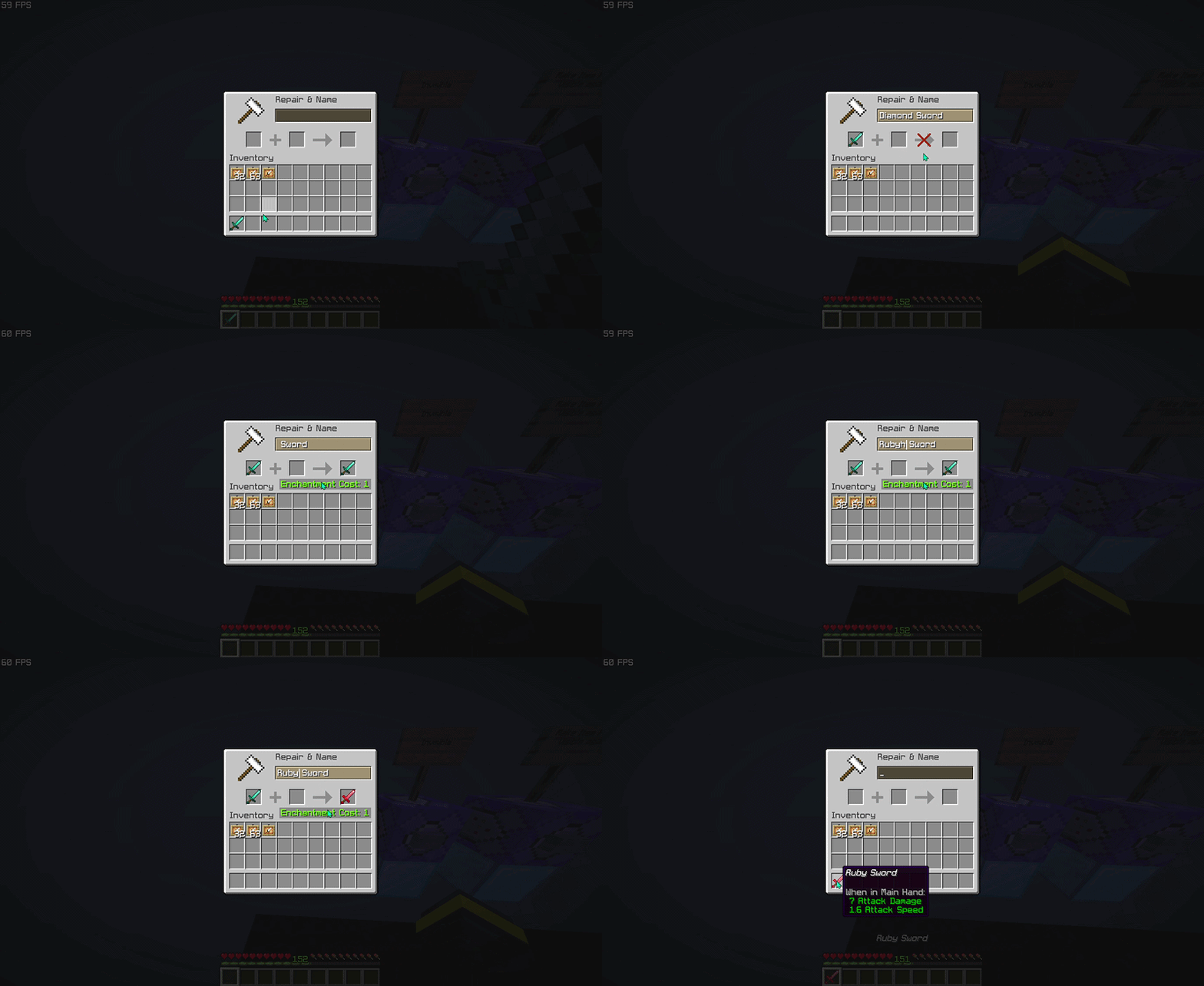
> This pack focuses on visual customization, not gameplay changes!


Do I need any mods to use this pack?
No. This resource pack works entirely in vanilla Minecraft. Just install it, rename items in an anvil, and the textures will change automatically.
How do I activate the custom textures?
Rename a supported item to the correct name using an anvil. Once renamed, the item will instantly use its custom texture.
Why isn’t my texture changing?
Common causes: The name is not typed exactly (check spelling, spaces, and capitalization), The item is not supported by the pack, Another resource pack is overriding the same item model.
Does this work in multiplayer?
Yes, the resource pack works in multiplayer.
Does this pack affect performance?
No. This is a lightweight resource pack that only changes item models and textures, so it has little to no impact on performance.
What Minecraft versions are supported?
Works on versions that support custom item models and rename-based overrides. Using the latest version is recommended for best compatibility (>1.21.5).
Is it visible to other players?
Yes, as long as they have the same resource pack installed and enabled.


| ━━━━━━━━━━ Item ━━━━━━━━━━ | ━━━━━━━━━━ Rename ━━━━━━━━━━ |
|——|——–|
| baked_potato | Golden Baked Potato |
| beetroot | Golden Beetroot |
| beetroot_soup | Golden Beetroot Soup |
| bread | Golden Bread |
| chorus_fruit | Golden Chorus Fruit |
| cooked_beef | Golden Steak |
> View the full item list here: Wiki Page


Want to see all available custom items in-game?
Check out the companion tool that lets you browse every supported anvil rename item and resource pack entry directly in-game. Download RP Rename Mod


– Thanks for using this pack! 🎉
– If you find this resource pack useful, consider give a heart to the project ❤.
– More custom items, improvements, and expansions will be added in future updates. Stay tuned!
Remastered Wither
# Wither Remastered: A Resource Pack for Minecraft
## Features
– Bright, glowing Wither Heads
– Energy Cracks, which are glowing lines that indicate unstable energy
– Elements of the Rage Theme (hints of chaos and corruption)
– A vanilla-style resource pack that fits in with the Minecraft Art Style
>Vanilla… but better.
This resource pack was created for the Wither Remastered datapack; however it can be used alone.
* Will work in any world
* Enhances every Wither battle
* Visual only; no change to gameplay.
## Installation Instructions
1. Download the resource pack
2. Open Minecraft
3. Go to Options > Resource Packs
4. Click Open Pack Folder
5. Move the pack into the folder
6. Enable it in-game
## Recommended Setup
To ensure maximum enjoyment:
* Use with the Wither Boss Fight Remastered
* Enable particles in Video Settings > All
* Play with sound on
## Frequently Asked Questions
Q: Do I need Optifine to use this?
A: No, it works with vanilla Minecraft.
Q: Will this cause changes to other mobs or creatures?
A: No, only the Wither will be changed.
Q: Is this resource pack compatible with multiplayer?
A: Yes, it works on the client’s side.
Reduce the Vignette Effect – Less intense Shadow Borders/Corners
Reduces the Vignette Effect (The dark corners effect of the screen).
## New Effect:

## Vanilla Effect:

Red String
This resource pack will colour the string (tripwire) red when it placed. You now can see the string clearly and cannot be trapped by tripwire hook trap.
I don’t have chance for testing the new version of this resource pack, if there is any issues, please report here : https://github.com/break08/red-string/issues and you can also try download tested older versions (which doesn’t support many versions of minecraft).
If errors happened, try to…
Go to .zip file of resource pack -> pack.mcmeta
**Method 1**: In pack.mcmeta, remove
“supported_formats”: {
“min_inclusive”: x,
“max_inclusive”: x
}
and remove the `,` from description line
**Method 2**: Remove
“meta”: {
“game_version”: “x”
}
and remove `,` next to `}` above these removed lines
**Method 3**: Do both Method 1 and 2
**Method 4**: Report issues for me and use one of these versions:

**List of not tested versions: 1.0.1-mc1.13-1.21.11, 0.0.1-mc1.6.1, 0.0.1-mc1.9**
**Before using this:**

**After using this resource pack:**

Try my other resource packs:
**1**. Lined Redstone – Replace the vanilla dusty redstone lines with straight-line designed redstone
**2**. Mark the Powder Snow – Border the powder snow blocks and help you to avoid falling into them
and mods =):
**1**. New NameTag Recipe – Backport the Name Tag recipe of Minecraft 26.1
Red Shield
# Red Shield
This resource pack replaces the default shield with a custom 3D model.
The design uses a red theme.
No OptiFine required. Vanilla compatible.
## More Shield Themes
– Black
– Blue
– Creeper
– Dark Red
– Mirror
– Navy Blue
– Rabbit
Red Creepers
Are you tired of not seeing a creeper in the middle of a grass field? Just use this pack for more contrast between the creeper and the blocks around it.
– This version is for Fresh Animations and is not suitable for Vanilla Minecraft.
– This version is for Vanilla Minecraft and is not suitable for Fresh Animations.
Reality City Construction
Reality City Construction
Reality City Construction added some Decoration blocks for City Construction in Minecraft.
After 1.0.2 version, this mod no longer support Forge/NeoForge, You can use this to use Reality City Construction in Forge/NeoForge loader.
In 1.0.2 version, many block textures are refreshed! added culling and remove some unnecessary faces to improve performance.
Features
- Redstone Sound Player
- Railings for roads
- Blind Sidewalk
- Conveyer belt
Links
Visit our QQ Group to download the latest snapshot build!
Credits
CodeCat: Created, update, and debug this mod.
Yaoxiansen: Built some blocks model for the mod.
realistic planks
Credits: I (Warer) dont own the texture it was made by: Charlotte Baglioni and Dario Barresi
texture is from Poly haven website called: Laminate Floor 02 license is CC0 I dont have any connection to these people.
I am sharing this in good faith because I really like how the texture looks.
shaders used for screenshots :Photon
CC0 Texture is from : https://polyhaven.com/a/laminate_floor_02

donation link has no connection to me (Warer) and is pointed to poly haven patreon in case you want to support them
License from poly haven website: https://polyhaven.com/license
text from license:
(You can redistribute them, share them around, include them when sharing your own work)
The textures have been modified to fit the minecraft size x512x512 also to fit the screenshot size limit 5mb the resoultion has been lowered to below 1920×1080. if you want higher quality texture then you should visit poly haven. (what you see on screenshot does not show the full quality that is on poly haven.
another modification is to make the texture connect with each other as block better using seamless texture example.
the max distance to view the texture is 4 blocks so its not good for any far away builds.
if for some reasons the authors want this texture gone contact me and I will respect their choice and delete this “resource pack”.
the texture is CC0 but if you want to credit anybody dont credit me (Warer) and instead credit Charlotte Baglioni and Dario Barresi and other authors mentioned in here.
Mangrove planks texture is from https://polyhaven.com/a/dirty_tiles
made by:
Jenelle van Heerden and Matterfield
same modifications and same license.
Iron block texture is from https://polyhaven.com/a/blue_metal_plate
made by:
Rob Tuytel
same modifications and same license. (used grey version not blue)
lime_wool (change name to whatever plank you want this texture to replace) texture is from https://polyhaven.com/a/worn_mossy_plasterwall
made by:
Amal Kumar
same modifications and same license. (x1024)
Dark Planks texture is from:
https://polyhaven.com/a/dark_planks
made by:
Rob Tuytel
same modifications and same license.
(10 different colors but its the same texture, use photon shaders for better color vibrance)
change the name to whatever plank you want Dark_planks (or its color variant) to replace you can also use these textures to replace biomes of plenty planks. (just copy paste them into mod.zip)
Wooden Rough Planks texture is from:
https://polyhaven.com/a/wooden_rough_planks
made by:
Rob Tuytel
same modifications and same license.
(replaces bamboo planks)
Stone Pathway texture is from:
https://polyhaven.com/a/stone_pathway
made by: Amal Kumar
same modifications and same license
(change name to whatever plank you want this texture to replace)
Rock Wall texture is from:
https://polyhaven.com/a/rock_wall_03
made by: Dario Barresi and Charlotte Baglioni
same modifications and same license
(change name to whatever plank you want this texture to replace)
Patio Tiles texture is from:
https://polyhaven.com/a/patio_tiles
made by: Dario Barresi
same modifications and same license
(change name to whatever plank you want this texture to replace)
Square Cobblestone texture is from:
https://polyhaven.com/a/square_cobblestone
made by: bSơn Nguyễn
same modifications and same license
(change name to whatever plank you want this texture to replace)
dirt texture is from:
https://polyhaven.com/a/gravel
made by: Dimitrios Savva
same modifications and same license
Rainbow Diamond Sword eo
Rainbow Diamond Sword
A simple and vibrant resource pack that transforms the diamond sword into a glowing rainbow (RGB) weapon.
This pack replaces the default diamond sword texture with a smooth animated rainbow gradient, making your combat look more colorful and stylish in-game.
Rabbit Shield
# Rabbit Shield
This resource pack replaces the default shield with a custom 3D model.
The design uses a rabbit theme.
No OptiFine required. Vanilla compatible.
## More Shield Themes
– Black
– Blue
– Creeper
– Dark Red
– Mirror
– Navy Blue
– Red