SimpleGUI
 |  |  | 

You can buy monthy subscription to get faster updates on KO-FI
****
#
**About**
This pack is all about making UI as clean and minimalistic as posible. If you ever played on Bare Bones before you probably know what im aiming for (btw those two packs work so well toghether). For now im testing bottom viev point like shading, let me know how you like this. Before instaling you can check gallery for ingame screenshots. I will try making updates ATLEAST once a month. No mods required (for now).
#
**FAQ**
> **How to install resourcepacks?**
– There are a lot of tutorial out there on youtube, that will explain this better than me, but just download something from trusted sites like modrinth or curseforge, then drag this file to folder that will pop out if you click “Open Pack Folder” in Minecraft.
> **Can i use some textures from SimpleGUI in my pack**
– As long as its not distributed, yes you can. If you want to publish it, just ask me before doing it.
> **Will you add compatibility with mods?**
– Yes, im going to do this with popular mods in form of add-on to this pack.
#
**Lists**
Containers
1. Anvil
2. Beacon
3. Blast Furnace
4. Brewing Stand
5. Cartography Table
6. Crafter
7. Crafting Table
8. Dispenser/Dropper
9. Enchanting Table
10. Furnance
11. Gamemode Switcher
12. Chests
13. Grindstone
14. Hopper
15. Horse
16. Donkey
17. LLama
18. Inventory
19. Creative Inv.
20. Loom
21. Nautilus
22. Shulker Box
23. Smithing
24. Smoker
25. Stonecutter
26. Villager
Plans for future
1. Adding something to crafting table, loom, villager texture so it wouldn’t be so plane (V)
2. Listening to your feedback
3. Redoing reciepe book
4. Fixing inconsistencies
###
 SimpleGUI
by NickShoof
Simple Voice Chat
Modrinth
|
CurseForge
|
Discord
|
Wiki
|
FAQ
|
Credits
|
API
# Simple Voice Chat
A proximity voice chat for Minecraft with a variety of addons that offer additional features and functionalities.
⚠️ **NOTE** This mod requires special setup on the server in order to work.
Please read the wiki for more information.

Please join the Discord if you have questions!
## Downloads
– Fabric
– NeoForge
– Forge
– Bukkit/Spigot/Paper
– Quilt
– Velocity
– BungeeCord/Waterfall
## Features
– Push to talk
– Voice activation
– Proximity voice chat
– Password protected groups
– Automatic voice activity detection
– Automatic microphone gain adjustment
– Opus codec
– RNNoise recurrent neural network noise suppression
– OpenAL audio
– Cross compatibility between Fabric, NeoForge, Forge, Quilt, Bukkit, Spigot and Paper
– Support for Velocity, BungeeCord and Waterfall
– Compatibility with ModMenu (Use ClothConfig for a better configuration UI)
– Configurable push to talk key
– Microphone and speaker test playback
– Configurable voice distance
– Whispering
– Individual player volume adjustment
– Microphone amplification
– 3D sound
– AES encryption
– Audio recording with separate audio tracks
– A powerful API
– Many addons
## Icons
| Icon | Description |
|:————————————:|——————————————————-|
|  | You are talking |
|  | You are whispering |
|  | Player is talking |
|  | Player is whispering |
|  | Microphone muted |
|  | Voice chat disabled |
|  | Voice chat not connected
Voice chat not installed |
## The GUI
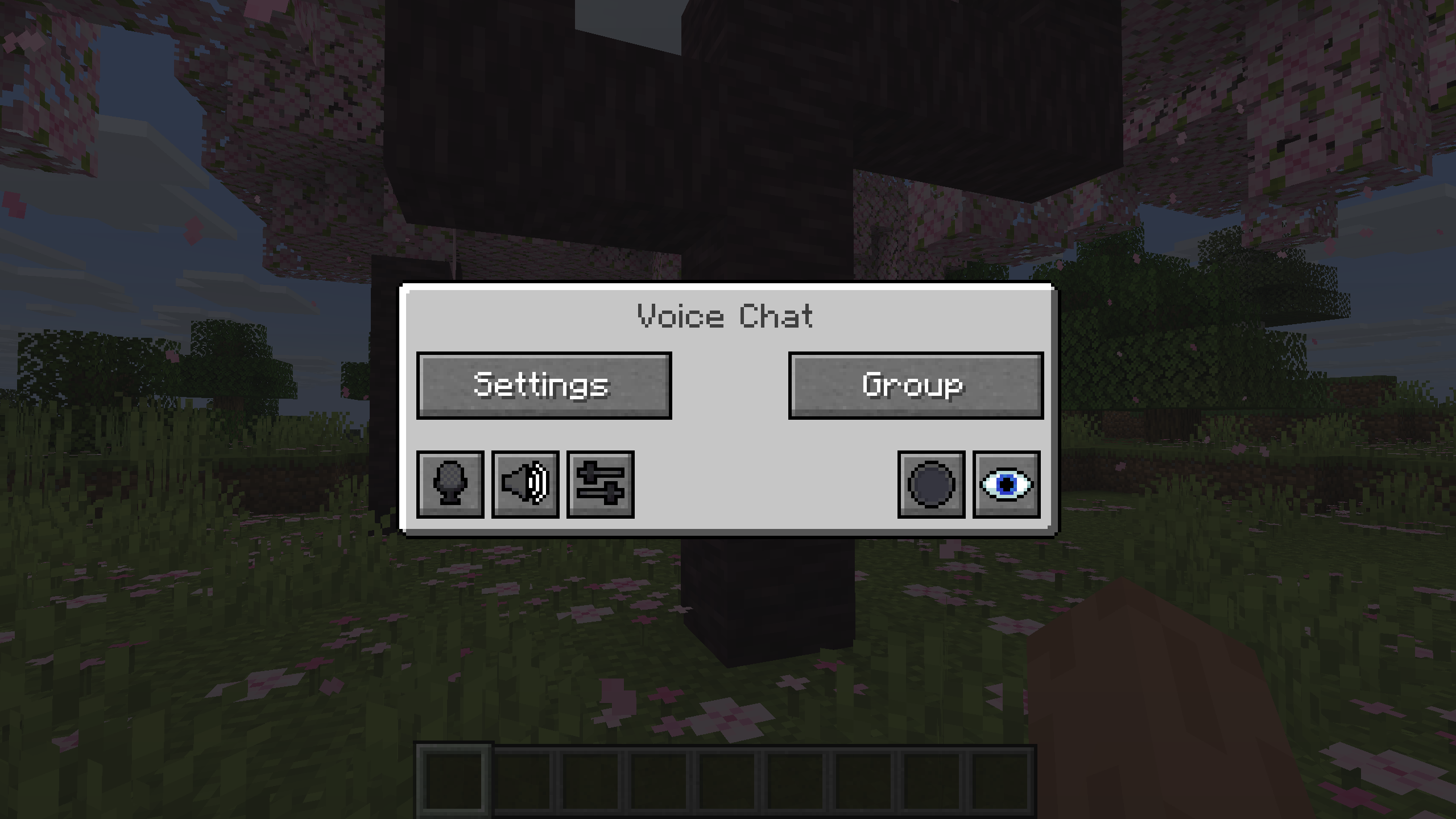
You can open the voice chat GUI by pressing the `V` key.
This allows you to open the settings, group chats, mute yourself, disable the voice chat, start/stop a recording and hide all icons.
### Group Chats
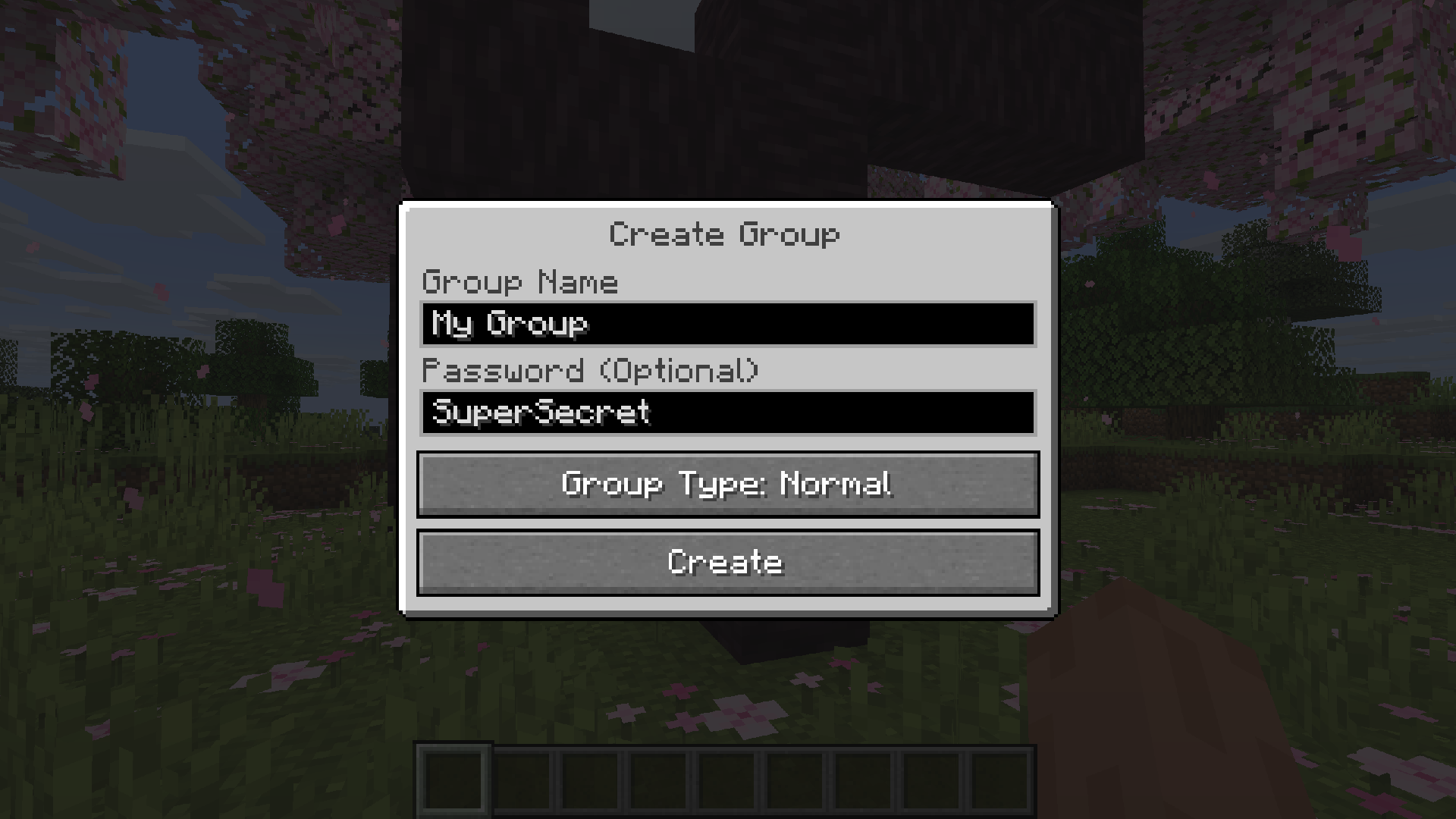
Group chats allow you to talk to players that are not in your vicinity.
To open the group chat interface, either press the group button in the voice chat GUI or just press the group key.
To create a new group, just type a name in the text field and press the button at the bottom.
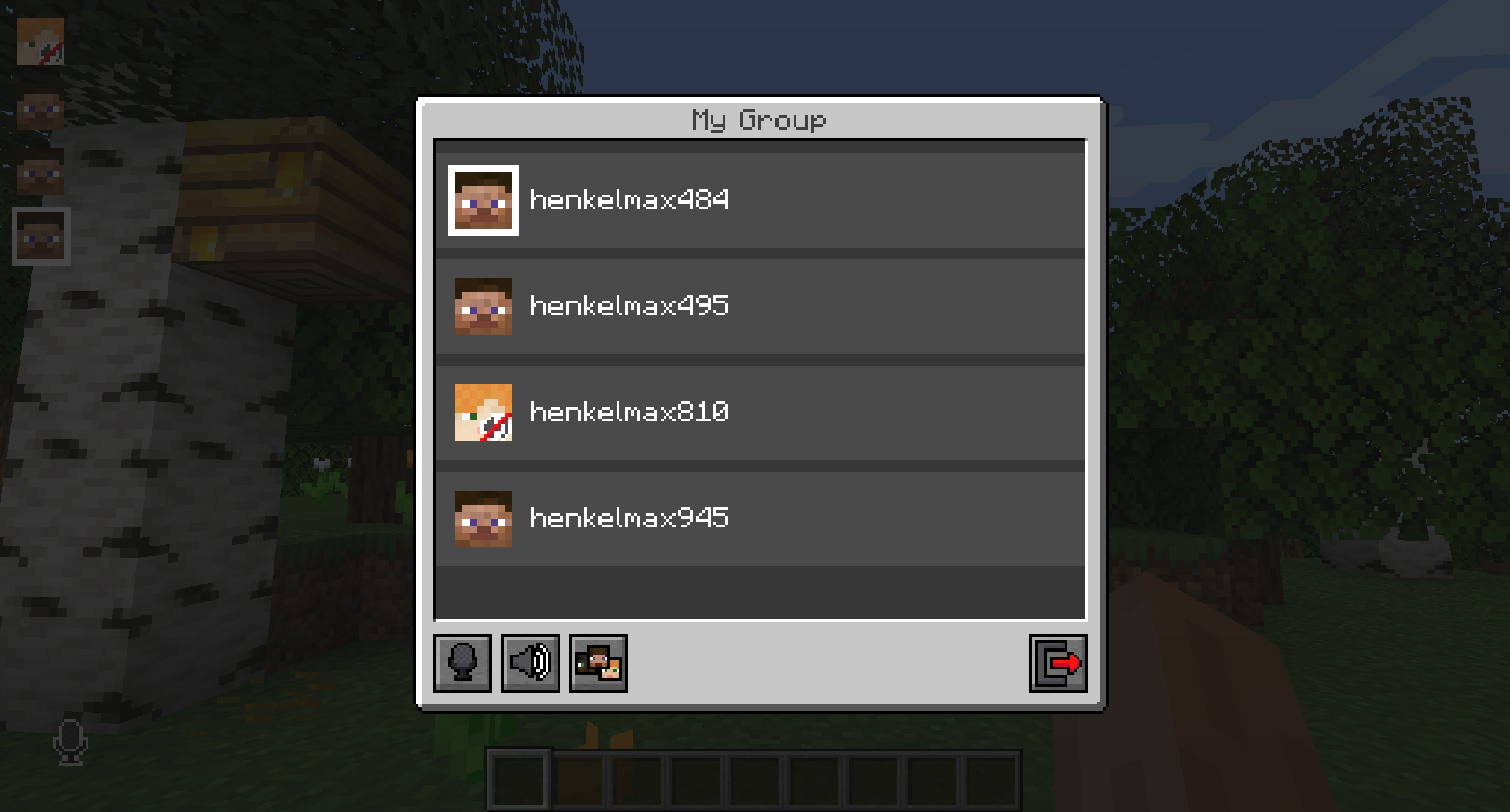
Creating or joining a group will bring you into the group chat interface.
You will also see the heads of the group members in the top left corner of your screen.
Talking players will be outlined.
You can disable these icons by pressing the third button from the left.
Players that are not in a group will see a group icon next to your head, indicating that you are in a group.
You can invite players to your group chat by entering the command `/voicechat invite ` or from the social interactions screen.
### Settings
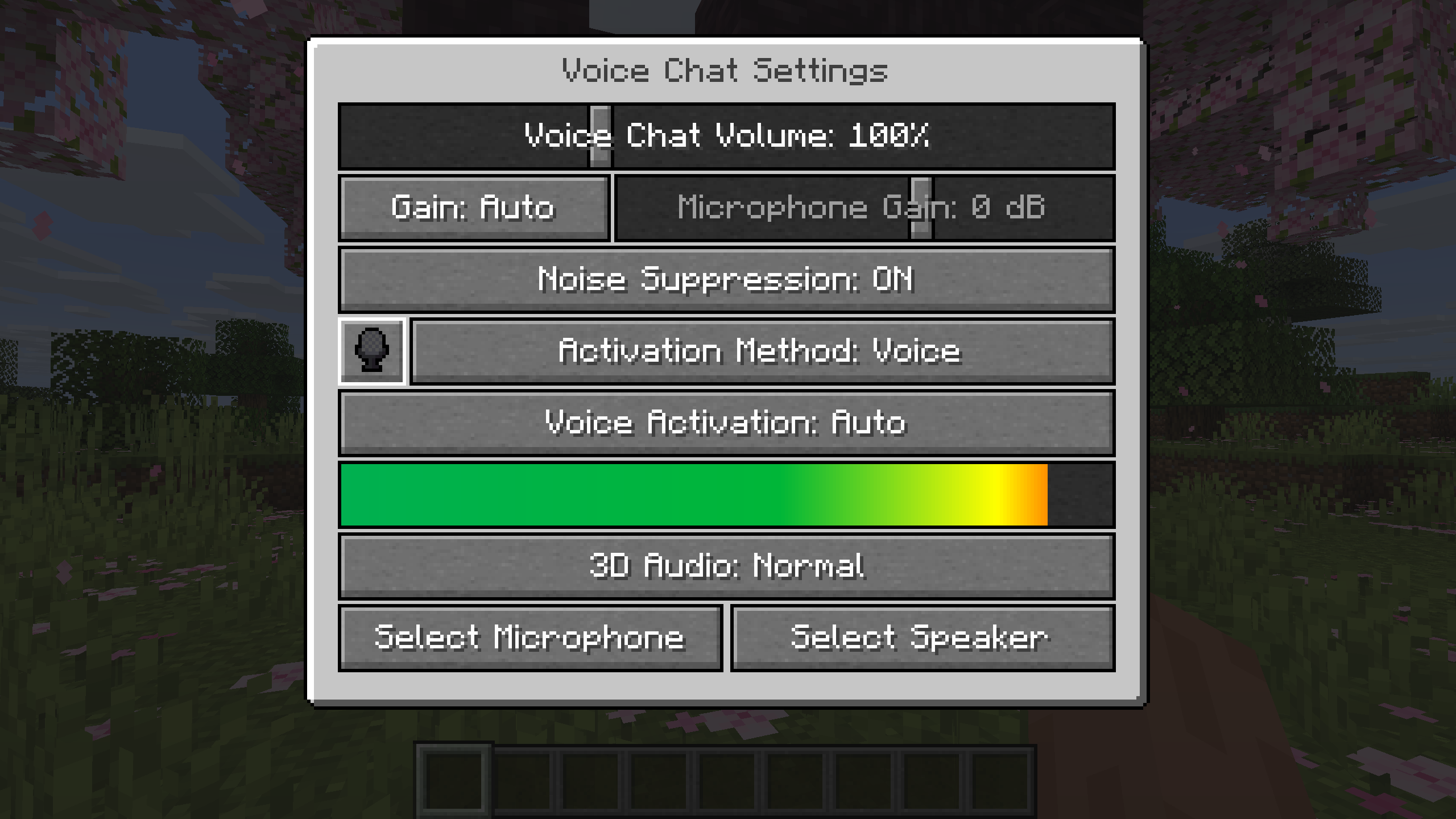
You can access the voice chat settings by pressing the `V` key and pressing the settings button.
This menu offers the ability to set up your voice chat audio settings.
By clicking the microphone button, you can test your microphone activation.
## Important Notes
You need to open a port on the server. This is port `24454` `UDP` by default.
Without opening this port, the voice chat will not work.
This port can be changed in the server config.
More information here.
The voice chat is encrypted, but we don’t guarantee the security of it. Use at your own risk!
Simple Spawn Immunity
This super simple datapack emulates the 3-second spawn immunity that was removed in 1.21.4.
Simple hit sound
This resource pack enhances PvP hit sounds to make combat feel more responsive and satisfying ⚔️🔥 The sounds are clearer and less distracting, helping you stay focused and track your hits better 🎯 Perfect for players looking for a smoother, more engaging PvP experience 🚀
No Spear Charge Attack
# Description
The idea, is simple. so you like the spear, with its cool features, but you hate the charge attack? well then, this is the perfect datapack for you!
## Commands
You can change the settings for the diffrent modes with this command:
“`
/function no_spear_charge_attack:cmd/open_config
“`
## How it works
Basically the spears are made equipable to your feet.
unfortunately the only way i found that didn’t have any draw backs, was un-revertable
Side Eyed Rabbits
### **Side Eyed Rabbits**
Makes the eyes of rabbits on the side instead of the front, making them more realistic
(And cuter in my opinion)
Shulkerwave | End Music Disc
This small Data Pack adds a new music disc that can be found in End Cities that plays a new End-themed song called Shulkerwave!
—
Shulkerwave is a music track originally made in 2024 for an old Data Pack focused on overhauling the End dimension, which was then discontinued. However, I still wanted to release Shulkerwave in some way and finally ended up releasing it in the form of a smaller Data Pack to make it appear as loot in the End Cities!
—
### INSTALLATION
To work properly and play the new track, the Data Pack requires the installation of a Resource Pack. In the Versions page, be sure to go in the specific Release page and download both the Data Pack and the Resource Pack!
—
### COMPATIBILITY
On the technical side, the Data Pack replaces vanilla loot tables by adding an extra entry for the music disc, that way no existing loot is replaced by the Music Disc, however, this makes the Data Pack incompatible with any other packs that change the End City loot table.
Ship With Robber
My social networks

—
## Description👀
**This datapack adds a pirate ship with robbers to your world. The upper chests contain raw cod, fried cod, charcoal, gunpowder, crossbow, fishing rod, ore iron. The middle chests contain tnt, fried cod, raw cod, charcoal, ore iron, gunpowder, fishing rod, trident with a small chance. In the lower chests there is a blacksmith template Shore, gunpowder, tnt, iron ingot, ore iron, charcoal, raw cod, fried cod, with a small chance you can drop a trident and a raid bottle (and there is also a secret barrel with good loot!)**
—
## Useful Сommands🔧
– **Use /locate structure elysianfields:ship_woth_robber for see dungeon coordinates**
– **Use /place structure elysianfields:ship_with_robber for spawn dungeon**
—

shea’s simple Totem x bare bones
# shea’s simple Totem x bare bones
## what does this pack does
### it takes Totems and cleans it up
This pack does not include any bare bones textures
**Bare Bones is required for the intended look**
disclaimer if you use this pack make sure to place this pack above bare Bones in your resource pack list for it to use its own instead of bare bones
i recomend using other shader and resource packs like bliss to improve looks but that is optional
**you can showcase this if you want just dont redistrabute it**
Shadowfangs Texturepack
Shadowfang’s Texture Pack enhances your Minecraft experience with a clean, performance-friendly design focused on visibility and a sleek purple aesthetic. Built for both PvP and survival, it removes visual clutter while keeping the game stylish and smooth.
Features:
– Unobstructive Particles
– Unobstructive Purple Enchant Glint
– Certain Blocks were made more visible
– Low Fire
– Low Shield
– Small Totem Pop
– Transparent Gui
– Purple Button Textures
– Better Longer Mace
– Mace Parry Sounds
– Black Hotbar Selector
– And Much More
Perfect for PvP & Survival:
Optimized for clarity and fast reactions while maintaining a clean look.
Updates:
Updates Only when adding or removing stuff
Credits:


