ZyveraWeb-lite
A lightweight, no-fuss web server plugin for Paper Minecraft servers — host static websites directly from your server with zero external setup.
## What is this?
ZyveraWeb Lite lets you serve static web content (HTML, CSS, JavaScript, images, and more) straight from your Minecraft server. No need for Apache, Nginx, or other external web servers — just install the plugin and go.
## Features
– 🌐 Serve static files via HTTP or HTTPS
– 🔒 Optional HTTPS support with custom SSL certificates
– 📂 Automatic default web file generation on first launch
– 🛡️ Built-in path traversal protection to keep your server safe
– 📄 Automatically serves `index.html` when accessing directories
– 🏷️ Branded footer automatically added to HTML pages
## Getting Started
1. Drop the plugin jar into your server’s `plugins/` folder and restart.
2. Default web files are created automatically in `plugins/ZyveraWeb-lite/www/`.
3. Tweak settings in `plugins/ZyveraWeb-lite/config.yml` (see below).
4. Access your site at `http://your-server-ip:8080` (default) or the HTTPS port if enabled.
## Configuration
Edit `plugins/ZyveraWeb-lite/config.yml` to adjust settings:
^^^yaml
server:
host: “0.0.0.0”
domain: “” # Just to display. Leave empty for loopback (localhost)
http:
enabled: true
port: 8080
https:
enabled: false
port: 8443
SSLPubl: fullchain.pem
SSLPriv: privkey.pem
^^^
### HTTPS Setup
Enable HTTPS by setting `https.enabled` to `true`, then place your SSL certificate (`fullchain.pem`) and private key (`privkey.pem`) in `plugins/ZyveraWeb-lite/ssl/`.
ZStaffChatPro

—
*The most advanced staff communication plugin for Minecraft networks.*
**[Wiki & Documentation](https://docs.zenyxdev.org)** | **[Bridge Addon](https://modrinth.com/plugin/zstaffchatpro-bridge-(addon))** | **[Discord](https://discord.com/invite/ZGd6Mvacuf)**
—
## What is ZStaffChatPro?
ZStaffChatPro is a powerful and lightweight staff chat plugin designed for Minecraft server networks. It allows your staff team to communicate privately across multiple servers using fully customizable chat channels.
Whether you run a small survival server or a large network with dozens of backends, ZStaffChatPro provides everything your staff needs — private channels, playtime tracking, AFK detection, Discord integration, and much more.
The plugin works on **Spigot**, **Paper**, **Folia**, **BungeeCord**, and **Velocity**, supporting Minecraft **1.8.x — 1.21.x** and **26.1.1**.
—
## Features
### Unlimited Custom Channels
Create as many staff chat channels as you need — Staff, Admin, Builder, Helper, or anything you can think of. Each channel is fully independent with its own:
– Display name and color prefix
– Permission node
– Command and aliases (e.g. `/sc`, `/ac`, `/bchat`)
– Chat prefix shortcut (e.g. type `!hello` in chat to send “hello” to the Staff channel)
– Message format with full placeholder support
– Priority system for staff list ordering
Want just one channel? Keep only “staff” in the config and you’re done.
### Cross-Network Support
Full BungeeCord and Velocity proxy support. Staff can chat across all backend servers seamlessly.
– See which server each staff member is on
– Track server switches in the activity log
– Disable staff chat on specific servers (e.g. lobby, minigames)
– Custom server display names via aliases (e.g. `hub-01` shows as `Hub`)
– Bridge addon for accurate AFK detection and signed chat support on backends
### Discord Integration
Connect your staff chat to Discord with two available modes:
**Webhook Mode** — Simple one-way setup (Minecraft -> Discord). Just paste a webhook URL and you’re done. Each channel can have its own Discord channel. Supports rich embeds with customizable colors, authors, and footers.
**Bot Mode** — Full two-way integration (Minecraft <-> Discord). Staff can send messages from Discord directly into the in-game staff chat. Supports role-based permissions, custom bot status, and rich embeds.
Both modes include an **Activity Log** that sends staff joins, leaves, server switches, vanish, and AFK events to Discord — with per-event embed colors.
### Staff List
View all online staff members with `/stafflist`. Three display modes available:
**Default** — Compact, one line per channel:
“`
Staff (2): player1, player2
“`
**Grouped** — One player per line:
“`
Staff (2)
player1
player2
“`
**Server** — Grouped by backend server (proxy only):
“`
Staff (3)
Hub (1)
player1
Survival (2)
player2
player3
“`
Player format is fully customizable — show LuckPerms prefix, server name, or any combination.
### Staff Management
**Playtime Tracking** — Track how long each staff member spends online. View daily, weekly, and total playtime with AFK breakdown using `/stafftime`.
**AFK Detection** — Automatically marks inactive staff as AFK after a configurable timeout. AFK status is shown in the staff list and reported in the activity log. Staff can also manually toggle AFK with `/staffafk`.
**Spy Mode** — Allows authorized staff to see messages from all channels, even ones they don’t have permission for. Toggle with `/staffspy`.
**Toggle Mode** — Use `/sc` without a message to toggle auto-redirect. When enabled, all your regular chat messages are automatically sent to that staff channel.
**Activity Log** — Track staff activity directly in the staff chat channel:
– Player joins and leaves
– Server switches (with previous and current server)
– Vanish on/off
– AFK on/off
No extra permission needed — works for any player with access to a channel.
### Integrations
**LuckPerms** — Automatic support for prefix, suffix, group, and rank placeholders. Use `{luckperms_prefix}`, `{luckperms_rank}`, etc. in any message format. Full hex color support including `&#RRGGBB` format.
**PremiumVanish / SuperVanish** — Vanished players are shown with a [Vanished] tag in the staff list and vanish events are tracked in the activity log. Cross-server sync via Bridge addon.
**Chat Filter** — Built-in word filter with two modes: censor (replace with obfuscated text or custom string) or block (prevent the message entirely). Supports word lists and regex patterns.
### Customization
Everything is configurable. Clean config files with detailed comments for every option.
– Full hex color support (`{#FF5555}text`)
– Gradient support (`{#FF0000>>#0000FF}text{/}`)
– 20+ placeholders across all formats
– Multi-line message support
– Customizable help, about, and staff list output
– Auto-backup and regeneration when config version changes
—
## Quick Start
1. Drop the plugin JAR into your server’s `plugins/` folder
2. For proxy setups: install on the proxy + [Bridge addon](https://modrinth.com/plugin/zstaffchatpro-bridge-(addon)) on each backend server
3. Start the server — default channels work out of the box
4. Customize channels, formats, and features in `config.yml`
For detailed setup guides, all configuration options, and troubleshooting visit the **[Wiki](https://docs.zenyxdev.org)**.
—
## Commands
| Command | Description |
|———|————-|
| `/sc ` | Send a message to the Staff channel |
| `/ac ` | Send a message to the Admin channel |
| `/stafflist` | View all online staff members |
| `/staffspy` | Toggle spy mode (see all channels) |
| `/stafftime [player]` | View playtime statistics |
| `/staffafk` | Toggle AFK status |
| `/zscp reload` | Reload all configuration files |
| `/zscp about` | Show plugin info and status |
Full command list, permissions, and placeholders available on the [Wiki](https://docs.zenyxdev.org).
—
## Supported Platforms
| Platform | Versions |
|———-|———-|
| Spigot / Paper | 1.8.x — 1.21.x and 26.1.1 |
| Folia | 1.19.4+ |
| BungeeCord / Waterfall | All versions |
| Velocity | 3.0+ |
—
Need help? Visit the **[Wiki](https://docs.zenyxdev.org)** or join our **[Discord](https://discord.com/invite/ZGd6Mvacuf)**.
ZoomX Smooth
# ZoomX Smooth – Smooth Zoom for Minecraft
**ZoomX Smooth** is an enhanced version of ZoomX, designed for players who want a more cinematic and customizable zoom experience. It keeps everything lightweight and performance-friendly, while adding adjustable smoothness and zoom speed controls.
Built for **Fabric**, and fully compatible with **vanilla**, **Sodium**, and other performance mods, ZoomX Smooth gives you complete control over how your zoom feels.
—
## What Makes ZoomX Smooth Different?
Unlike the standard ZoomX, this version allows you to customize:
– **Zoom Smoothness (ms)**
– **Zoom Speed (multiplier)**
You can fine-tune the zoom transition exactly how you like it. whether you want instant zoom or a slow, cinematic camera effect.
—
## Adjustable Settings
By using keybinds (default B), you can configure:
### Smoothness (ms)
Control how smoothly the zoom transitions in and out.
– Lower values = faster transition
– Higher values = slower, more cinematic effect
### Zoom Speed (x)
Adjust how fast the zoom effect is.
– Lower multiplier = slower zoom
– Higher multiplier = faster zoom
All settings are easy to modify using simple sliders inside the menu.
—
## Features
– 🔍 Smooth adjustable zoom
– 🎚 Customizable transition timing
– 🎯 Adjustable zoom strength
– ⚡ Lightweight & optimized
– 🧩 Built for Fabric
– 🟩 Fully compatible with Sodium
– 🎮 Clean and simple UI
– 🚀 No FPS drops
ZoomX
# ZoomX – A Simple & Lightweight Zoom Mod
**ZoomX** is a simple, lightweight, and performance-friendly zoom mod for **Minecraft Fabric**. It adds a zoom feature to the game without changing the vanilla feel. The mod works perfectly with **vanilla Minecraft**, **Sodium**, and other popular Fabric optimization mods.
If you are looking for a clean zoom experience without heavy features or FPS drops, ZoomX is the perfect choice.
### Want Smooth Zoom? Try ZoomX Smooth 👇
[](https://modrinth.com/mod/zoomx-smooth)
—
## What is ZoomX?
ZoomX allows players to zoom in and out while playing Minecraft. It is designed to be minimal and efficient, focusing only on zoom functionality. There are no unnecessary settings or complex menus—just install and use.
—
## Features
### ⚡ Lightweight & High Performance
ZoomX is extremely lightweight and has minimal impact on FPS, even on low-end systems.
### 🧩 Fabric Based
Built specifically for the Fabric mod loader, ensuring fast load times and modern mod compatibility. (Will add more compatible loaders in future)
### 🟩 Vanilla & Sodium Compatible
– Works with vanilla-style gameplay
– Fully compatible with Sodium
– Safe to use with other Fabric performance mods
### 🎮 Easy to Use
No complicated configuration. Install the mod and start zooming instantly.
—
Got issues? Join [Discord](https://discord.com/invite/spunky-insaan-851780887271571456)
ZoomUtils



Supported Versions:

Smooth, configurable zoom mod
—
Hold the zoom key (default: `C`) to zoom in. Scroll the mouse wheel while zoomed to adjust the level. Release to zoom back out.
ZoomLens
🔍 Zoomify – The Ultimate Zoom Mod for Minecraft! 🔍
Previously known as Zoomify!
🌍Experience distant structures, mesmerizing landscapes, and stunning views with exceptional clarity! Whether you’re a traveler, a creator, or a scenery enthusiast, Zoomify’s adjustable zoom feature enhances every moment!🌍
—
🖱️ Easy to Use:
Hold C + scroll the middle mouse button to adjust the zoom level.
—
🎥 Video Showcase:
—
Zoomglass
A Fabric mod that quickly puts a spyglass into your hand with a press of a button.
Made for people who prefer roleplaying aspects of a spyglass but don’t want to miss out on convenience!
Additionally, you can use a fake spyglass while in Spectator gamemode, or in Creative when you don’t have
it in your inventory.
The default keybind is `z`, and you can find it under the “Inventory” section in keybinding settings.
Requires Fabric API
Zone Miner Single Use
## Zone Miner is a NeoForge mod that adds configurable area mining.
Switch between simple mining, 3x3x3, 5x5x5, or a fully custom mining shape, all while keeping vanilla-style durability handling and tool restrictions.
### Features
– Multiple mining modes:
– `1×1`
– `3x3x3`
– `5x5x5`
– `Custom`
– In-game keybinds to switch modes and open the custom area settings
– Mining direction follows the player’s look direction
– Live white block outline preview before breaking
– Only breaks extra blocks when the held tool is appropriate
– Ore vein support
– Vanilla block breaking logic is preserved for drops and interactions
## Two Versions Available
This project is available in two separate versions for NeoForge :
### Zone Miner
The standard version uses `legacy durability`.
Your tool loses durability based on the number of blocks actually broken.
[You’ll find it here!](https://modrinth.com/mod/zone-miner-legacy)
### Zone Miner Single Use
This version keeps the same mining features, but only uses `one durability point` for the whole area break.
_You’re on the right page!_
## Controls
– `Y` : Cycle mining mode
– `U` : Open custom area settings
## Custom Area Settings
The custom mode lets you configure:
– Left
– Right
– Up
– Down
– Depth
**Zone Miner is designed to stay simple and practical**
no enchantment requirement, no complicated setup, just configurable area mining with two durability variants depending on how you want to play.
Zone Miner Legacy
## Zone Miner is a NeoForge mod that adds configurable area mining.
Switch between simple mining, 3x3x3, 5x5x5, or a fully custom mining shape, all while keeping vanilla-style durability handling and tool restrictions.
### Features
– Multiple mining modes:
– `1×1`
– `3x3x3`
– `5x5x5`
– `Custom`
– In-game keybinds to switch modes and open the custom area settings
– Mining direction follows the player’s look direction
– Live white block outline preview before breaking
– Only breaks extra blocks when the held tool is appropriate
– Ore vein support
– Vanilla block breaking logic is preserved for drops and interactions
## Two Versions Available
This project is available in two separate versions for NeoForge :
### Zone Miner
The standard version uses `legacy durability`.
Your tool loses durability based on the number of blocks actually broken.
_You’re on the right page!_
### Zone Miner Single Use
This version keeps the same mining features, but only uses `one durability point` for the whole area break.
[You’ll find it here!](https://modrinth.com/mod/zone-miner-single-use)
## Controls
– `Y` : Cycle mining mode
– `U` : Open custom area settings
## Custom Area Settings
The custom mode lets you configure:
– Left
– Right
– Up
– Down
– Depth
**Zone Miner is designed to stay simple and practical**
no enchantment requirement, no complicated setup, just configurable area mining with two durability variants depending on how you want to play.
Zombified Player – Kill Your Inner Zombie
[](https://www.curseforge.com/minecraft/mc-mods/zombified-player) [](https://modrinth.com/mod/zombified-player) [.svg)](https://www.curseforge.com/minecraft/mc-mods/zombified-player) [](https://discord.gg/rSVp3nCpPx) [](https://ko-fi.com/D1D71EVQVC)
# Zombified Player
This Mod **spawns a zombified version of the player after death**.
**Beta Version!** Please report any problems you find under: [issues](https://github.com/MC-Mods-Pete/ZombifiedPlayer/issues)
## Features
– spawns a zombified version of the player after death
– uses the players actuall skin (uses the steve skin as fallback)
– applies a zombified overlay to the skin
– the dead players inventory can be tranfered to his zombified version
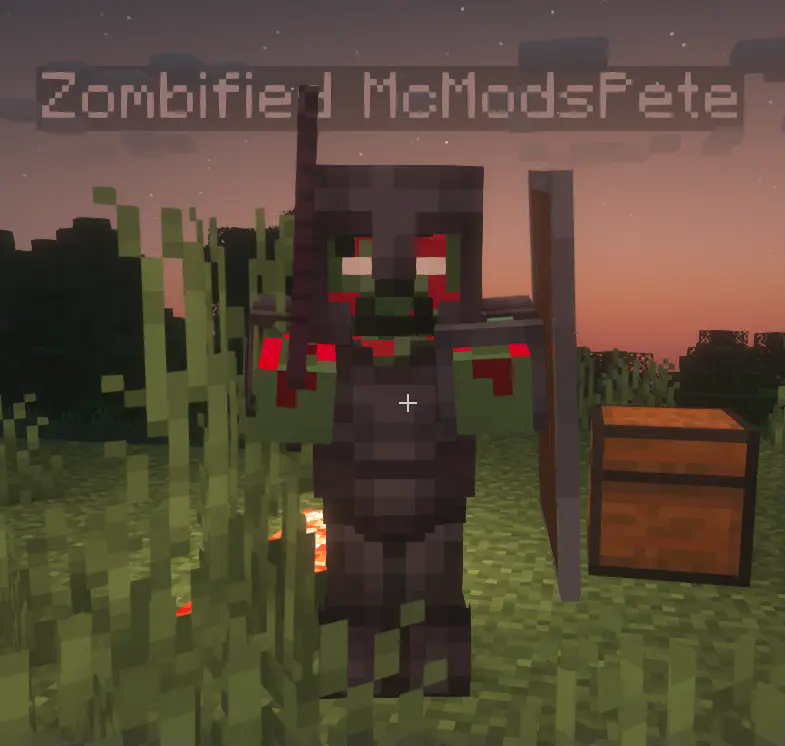
The zombified player mob will use the same skin as the player (with a zombify overlay). Besides that the mob behaves like a regular zombie, but it will not burn in sunlight and it will not despawn.
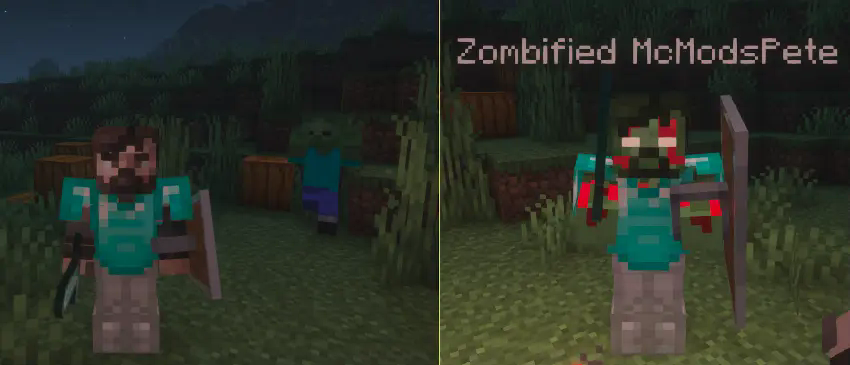
With a config option it is possible to **transfer the players inventory to the zombified player**. The player will have to fight and defeat the zombified version of himself to get back the items he lost after dying.
Needed Mods:
– Fabric API
– Cloth Config
Optional Mods:
– Mod Menu