Dark Green Tooltip (Monochrome)
#
Dark Green Tooltip (Monochrome)

Replaces the default Minecraft Tooltip with a **Dark Green Tooltip (Monochrome)**.
Looking for different colors/flags or styles? Check out the Pride Tooltips Organization Page!
Looking for packs with the same color(s)/flag but with different styles?
Can’t find a color, flag, or style you are looking for?
Feel free to open an issue on GitHub or join the Pridecraft Discord and ping `@rotgruengelb`!
Color Palette
The following colors where used to create this pack:
* #006400
Style
Monochrome = A simple monochrome style with one color.
Additional Information
* build_time: `2026-02-26T18:59:25+01:00`
* build_user: `rotgruengelb`
## Installation
Download and place into your `resourcepacks` folder. (Only works in versions **after 1.21.1**)
## About Pride Tooltips
A collection of resource packs that change tooltips to be colorful and/or pride themed.
### Rotgruengelb (Developer & Artist):


### Pridecraft Studios:
If you also want other bits of your UI to be themed with pride:

You can chat with us and check out the source of our projects here:


### Additional Credit
* Cursor texture, used in the banner, from the Minecraft Cursor Mod by fishstiz.
* The Pridecraft team for all their support and help.
Dark Gray Tooltip (Monochrome)
#
Dark Gray Tooltip (Monochrome)

Replaces the default Minecraft Tooltip with a **Dark Gray Tooltip (Monochrome)**.
Looking for different colors/flags or styles? Check out the Pride Tooltips Organization Page!
Looking for packs with the same color(s)/flag but with different styles?
Can’t find a color, flag, or style you are looking for?
Feel free to open an issue on GitHub or join the Pridecraft Discord and ping `@rotgruengelb`!
Color Palette
The following colors where used to create this pack:
* #232323
Style
Monochrome = A simple monochrome style with one color.
Additional Information
* build_time: `2026-02-26T18:58:59+01:00`
* build_user: `rotgruengelb`
## Installation
Download and place into your `resourcepacks` folder. (Only works in versions **after 1.21.1**)
## About Pride Tooltips
A collection of resource packs that change tooltips to be colorful and/or pride themed.
### Rotgruengelb (Developer & Artist):


### Pridecraft Studios:
If you also want other bits of your UI to be themed with pride:

You can chat with us and check out the source of our projects here:


### Additional Credit
* Cursor texture, used in the banner, from the Minecraft Cursor Mod by fishstiz.
* The Pridecraft team for all their support and help.
Dark Gray Tooltip (Frame-only Monochrome)
#
Dark Gray Tooltip (Frame-only Monochrome)

Replaces the default Minecraft Tooltip with a **Dark Gray Tooltip (Frame-only Monochrome)**.
Looking for different colors/flags or styles? Check out the Pride Tooltips Organization Page!
Looking for packs with the same color(s)/flag but with different styles?
Can’t find a color, flag, or style you are looking for?
Feel free to open an issue on GitHub or join the Pridecraft Discord and ping `@rotgruengelb`!
Color Palette
The following colors where used to create this pack:
* #232323
Style
Frame-only Monochrome = A simple monochrome style with one color. This style only applies the color to the frame, leaving the background black.
Additional Information
* build_time: `2026-02-26T18:58:59+01:00`
* build_user: `rotgruengelb`
## Installation
Download and place into your `resourcepacks` folder. (Only works in versions **after 1.21.1**)
## About Pride Tooltips
A collection of resource packs that change tooltips to be colorful and/or pride themed.
### Rotgruengelb (Developer & Artist):


### Pridecraft Studios:
If you also want other bits of your UI to be themed with pride:

You can chat with us and check out the source of our projects here:


### Additional Credit
* Cursor texture, used in the banner, from the Minecraft Cursor Mod by fishstiz.
* The Pridecraft team for all their support and help.
Cyan Tooltip (Monochrome)
#
Cyan Tooltip (Monochrome)

Replaces the default Minecraft Tooltip with a **Cyan Tooltip (Monochrome)**.
Looking for different colors/flags or styles? Check out the Pride Tooltips Organization Page!
Looking for packs with the same color(s)/flag but with different styles?
Can’t find a color, flag, or style you are looking for?
Feel free to open an issue on GitHub or join the Pridecraft Discord and ping `@rotgruengelb`!
Color Palette
The following colors where used to create this pack:
* #00ffff
Style
Monochrome = A simple monochrome style with one color.
Additional Information
* build_time: `2026-02-26T18:59:05+01:00`
* build_user: `rotgruengelb`
## Installation
Download and place into your `resourcepacks` folder. (Only works in versions **after 1.21.1**)
## About Pride Tooltips
A collection of resource packs that change tooltips to be colorful and/or pride themed.
### Rotgruengelb (Developer & Artist):


### Pridecraft Studios:
If you also want other bits of your UI to be themed with pride:

You can chat with us and check out the source of our projects here:


### Additional Credit
* Cursor texture, used in the banner, from the Minecraft Cursor Mod by fishstiz.
* The Pridecraft team for all their support and help.
Blue Tooltip (Monochrome)
#
Blue Tooltip (Monochrome)

Replaces the default Minecraft Tooltip with a **Blue Tooltip (Monochrome)**.
Looking for different colors/flags or styles? Check out the Pride Tooltips Organization Page!
Looking for packs with the same color(s)/flag but with different styles?
Can’t find a color, flag, or style you are looking for?
Feel free to open an issue on GitHub or join the Pridecraft Discord and ping `@rotgruengelb`!
Color Palette
The following colors where used to create this pack:
* #0038a8
Style
Monochrome = A simple monochrome style with one color.
Additional Information
* build_time: `2026-02-26T18:58:54+01:00`
* build_user: `rotgruengelb`
## Installation
Download and place into your `resourcepacks` folder. (Only works in versions **after 1.21.1**)
## About Pride Tooltips
A collection of resource packs that change tooltips to be colorful and/or pride themed.
### Rotgruengelb (Developer & Artist):


### Pridecraft Studios:
If you also want other bits of your UI to be themed with pride:

You can chat with us and check out the source of our projects here:


### Additional Credit
* Cursor texture, used in the banner, from the Minecraft Cursor Mod by fishstiz.
* The Pridecraft team for all their support and help.
Black Tooltip (Monochrome)
#
Black Tooltip (Monochrome)

Replaces the default Minecraft Tooltip with a **Black Tooltip (Monochrome)**.
Looking for different colors/flags or styles? Check out the Pride Tooltips Organization Page!
Looking for packs with the same color(s)/flag but with different styles?
Can’t find a color, flag, or style you are looking for?
Feel free to open an issue on GitHub or join the Pridecraft Discord and ping `@rotgruengelb`!
Color Palette
The following colors where used to create this pack:
* #000000
Style
Monochrome = A simple monochrome style with one color.
Additional Information
* build_time: `2026-02-26T18:59:00+01:00`
* build_user: `rotgruengelb`
## Installation
Download and place into your `resourcepacks` folder. (Only works in versions **after 1.21.1**)
## About Pride Tooltips
A collection of resource packs that change tooltips to be colorful and/or pride themed.
### Rotgruengelb (Developer & Artist):


### Pridecraft Studios:
If you also want other bits of your UI to be themed with pride:

You can chat with us and check out the source of our projects here:


### Additional Credit
* Cursor texture, used in the banner, from the Minecraft Cursor Mod by fishstiz.
* The Pridecraft team for all their support and help.
Black Tooltip (Frame-only Monochrome)
#
Black Tooltip (Frame-only Monochrome)

Replaces the default Minecraft Tooltip with a **Black Tooltip (Frame-only Monochrome)**.
Looking for different colors/flags or styles? Check out the Pride Tooltips Organization Page!
Looking for packs with the same color(s)/flag but with different styles?
Can’t find a color, flag, or style you are looking for?
Feel free to open an issue on GitHub or join the Pridecraft Discord and ping `@rotgruengelb`!
Color Palette
The following colors where used to create this pack:
* #000000
Style
Frame-only Monochrome = A simple monochrome style with one color. This style only applies the color to the frame, leaving the background black.
Additional Information
* build_time: `2026-02-26T18:59:00+01:00`
* build_user: `rotgruengelb`
## Installation
Download and place into your `resourcepacks` folder. (Only works in versions **after 1.21.1**)
## About Pride Tooltips
A collection of resource packs that change tooltips to be colorful and/or pride themed.
### Rotgruengelb (Developer & Artist):


### Pridecraft Studios:
If you also want other bits of your UI to be themed with pride:

You can chat with us and check out the source of our projects here:


### Additional Credit
* Cursor texture, used in the banner, from the Minecraft Cursor Mod by fishstiz.
* The Pridecraft team for all their support and help.
Bisexual Pride Flag Tooltip (Tricolor)
#
Bisexual Pride Flag Tooltip (Tricolor)

Replaces the default Minecraft Tooltip with a **Bisexual Pride Flag Tooltip (Tricolor)**.
Looking for different colors/flags or styles? Check out the Pride Tooltips Organization Page!
Looking for packs with the same color(s)/flag but with different styles?
Can’t find a color, flag, or style you are looking for?
Feel free to open an issue on GitHub or join the Pridecraft Discord and ping `@rotgruengelb`!
Color Palette
The following colors where used to create this pack:
* #d60270
* #9b4f96
* #0038a8
Style
Tricolor = A simple tricolor flag with three colors.
Additional Information
* build_time: `2026-02-26T18:57:29+01:00`
* build_user: `rotgruengelb`
## Installation
Download and place into your `resourcepacks` folder. (Only works in versions **after 1.21.1**)
## About Pride Tooltips
A collection of resource packs that change tooltips to be colorful and/or pride themed.
### Rotgruengelb (Developer & Artist):


### Pridecraft Studios:
If you also want other bits of your UI to be themed with pride:

You can chat with us and check out the source of our projects here:


### Additional Credit
* Cursor texture, used in the banner, from the Minecraft Cursor Mod by fishstiz.
* The Pridecraft team for all their support and help.
Baby Pink Tooltip (Frame-only Alt-BG Monochrome)
#
Baby Pink Tooltip (Frame-only Alt-BG Monochrome)

Replaces the default Minecraft Tooltip with a **Baby Pink Tooltip (Frame-only Alt-BG Monochrome)**.
Looking for different colors/flags or styles? Check out the Pride Tooltips Organization Page!
Looking for packs with the same color(s)/flag but with different styles?
Can’t find a color, flag, or style you are looking for?
Feel free to open an issue on GitHub or join the Pridecraft Discord and ping `@rotgruengelb`!
Color Palette
The following colors where used to create this pack:
* #ffd7fc
Style
Frame-only Alt-BG Monochrome = A simple monochrome style with one color. This style only applies the color to the frame, leaving the background as the default Minecraft texture.
Additional Information
* build_time: `2026-02-26T18:59:08+01:00`
* build_user: `rotgruengelb`
## Installation
Download and place into your `resourcepacks` folder. (Only works in versions **after 1.21.1**)
## About Pride Tooltips
A collection of resource packs that change tooltips to be colorful and/or pride themed.
### Rotgruengelb (Developer & Artist):


### Pridecraft Studios:
If you also want other bits of your UI to be themed with pride:

You can chat with us and check out the source of our projects here:


### Additional Credit
* Cursor texture, used in the banner, from the Minecraft Cursor Mod by fishstiz.
* The Pridecraft team for all their support and help.
Tool Trims Mod
# Tool Trims Mod

A fabric port of JoeFly’s Tool Trims datapack. Check the project page for more details.
Making it a mod allows a few improvements:
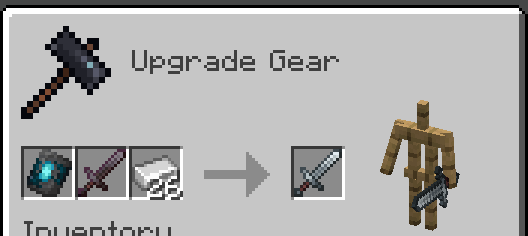
– Recipes are now done through the vanilla smithing table and crafting recipe, so the toolsmithing table no longer exists.
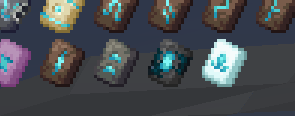
– The trim templates show up in the creative inventory and recipe viewers like EMI or REI
– Loot tables are injected into instead of overwritten
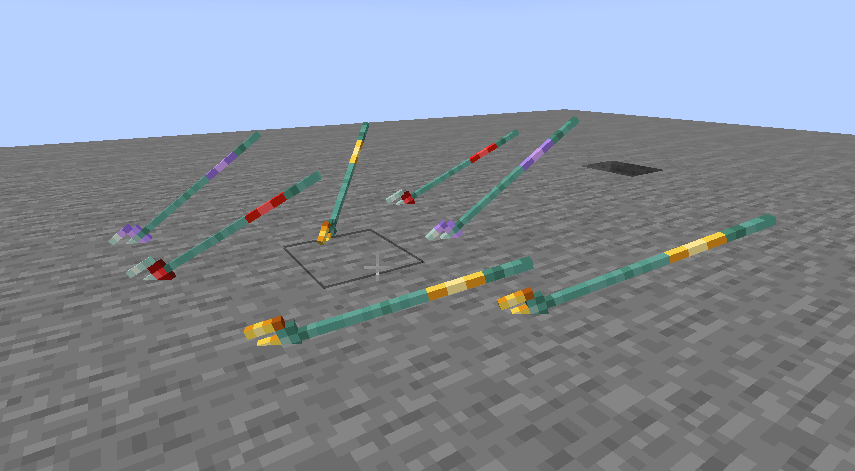
– Trident trims display on thrown tridents
Migrating from the Datapack
The mod contains backwards compatability mechanics for the datapack.
First, you should remove the datapack, as the mod and datapack are not intended to be used in tandem (It doesn’t matter if you remove the datapack before or after installing the mod).
If it detects the datapack was previously used, it will enable the `tooltrims_deleteToolsmithingTable` gamerule, which destroys smithing tables within 6 blocks of players and drops its ingredients (2 copper and 4 planks). This can be reversed using `/gamerule tooltrims_deleteToolsmithingTable false`. You can also enable the legacy resource pack, which makes templates and toolsmithing tables look right before they are upgraded or deleted.
You can use the command `/tooltrims migrate` to migrate the tool or template you are holding so it uses the modded trim system instead of the datapack trim system. Templates from the datapack cannot be used in the smithing table until you upgrade them. For tools, the difference is only noticeable if you look at the NBT/component data or if you try to re-trim the tool, in which case both the old and new trims will show up in the tooltip.
Demigrating from the mod
If you want to revert back to using the datapack, install the datapack at the same time as the mod (ignoring the warning message), enable the legacy resource pack, and use the command `/tooltrims demigrate` to demigrate your tool or template. Once you have demigrated all your items, uninstall the mod and install the normal tool trims resourcepack.
## Compatability
Compatible with EMI (trimming recipes show up) and Enchancement (crossbow texture works correctly). Currently incompatible with Trimmable Tools.
## Credits
The Enchancement compat textures were created by doctor4t and cybercat5555 for the mod Enchancement, and were edited and used with permission.
All other textures were created or otherwise owned by JoeFly and used with permission.
## Support
For now I support the latest version of Minecraft (currently 26.1.2) and its corresponding hotfix versions (26.1, 26.1.1). All other versions are unsupported. All issues pertaining to unsupported versions will not be addressed.
It is *possible*, although **not promised**, that in the future there will be trims for modded tools.
—
Please report issues on my repository and not to JoeFly.