Baby Pink Tooltip (Frame-only Alt-BG Monochrome)
#
Baby Pink Tooltip (Frame-only Alt-BG Monochrome)

Replaces the default Minecraft Tooltip with a **Baby Pink Tooltip (Frame-only Alt-BG Monochrome)**.
Looking for different colors/flags or styles? Check out the Pride Tooltips Organization Page!
Looking for packs with the same color(s)/flag but with different styles?
Can’t find a color, flag, or style you are looking for?
Feel free to open an issue on GitHub or join the Pridecraft Discord and ping `@rotgruengelb`!
Color Palette
The following colors where used to create this pack:
* #ffd7fc
Style
Frame-only Alt-BG Monochrome = A simple monochrome style with one color. This style only applies the color to the frame, leaving the background as the default Minecraft texture.
Additional Information
* build_time: `2026-02-26T18:59:08+01:00`
* build_user: `rotgruengelb`
## Installation
Download and place into your `resourcepacks` folder. (Only works in versions **after 1.21.1**)
## About Pride Tooltips
A collection of resource packs that change tooltips to be colorful and/or pride themed.
### Rotgruengelb (Developer & Artist):


### Pridecraft Studios:
If you also want other bits of your UI to be themed with pride:

You can chat with us and check out the source of our projects here:


### Additional Credit
* Cursor texture, used in the banner, from the Minecraft Cursor Mod by fishstiz.
* The Pridecraft team for all their support and help.
Tool Trims Mod
# Tool Trims Mod

A fabric port of JoeFly’s Tool Trims datapack. Check the project page for more details.
Making it a mod allows a few improvements:
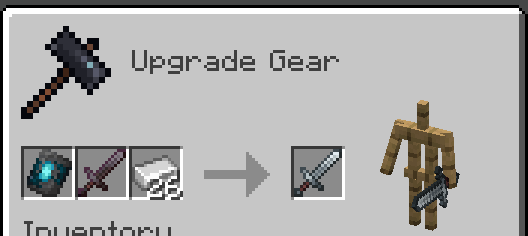
– Recipes are now done through the vanilla smithing table and crafting recipe, so the toolsmithing table no longer exists.
– The trim templates show up in the creative inventory and recipe viewers like EMI or REI
– Loot tables are injected into instead of overwritten
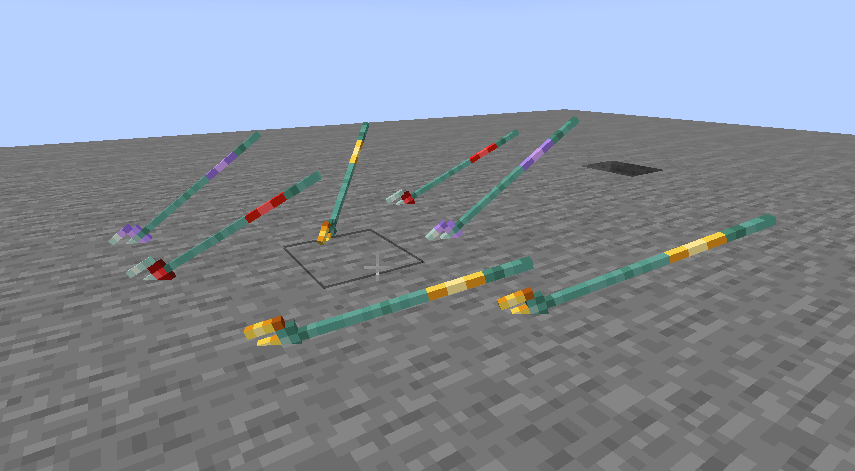
– Trident trims display on thrown tridents

Migrating from the Datapack
The mod contains backwards compatability mechanics for the datapack.
First, you should remove the datapack, as the mod and datapack are not intended to be used in tandem (It doesn’t matter if you remove the datapack before or after installing the mod).
If it detects the datapack was previously used, it will enable the `tooltrims_deleteToolsmithingTable` gamerule, which destroys smithing tables within 6 blocks of players and drops its ingredients (2 copper and 4 planks). This can be reversed using `/gamerule tooltrims_deleteToolsmithingTable false`. You can also enable the legacy resource pack, which makes templates and toolsmithing tables look right before they are upgraded or deleted.
You can use the command `/tooltrims migrate` to migrate the tool or template you are holding so it uses the modded trim system instead of the datapack trim system. Templates from the datapack cannot be used in the smithing table until you upgrade them. For tools, the difference is only noticeable if you look at the NBT/component data or if you try to re-trim the tool, in which case both the old and new trims will show up in the tooltip.
Demigrating from the mod
If you want to revert back to using the datapack, install the datapack at the same time as the mod (ignoring the warning message), enable the legacy resource pack, and use the command `/tooltrims demigrate` to demigrate your tool or template. Once you have demigrated all your items, uninstall the mod and install the normal tool trims resourcepack.
## Compatability
Compatible with EMI (trimming recipes show up) and Enchancement (crossbow texture works correctly). Currently incompatible with Trimmable Tools.
## Credits
The Enchancement compat textures were created by doctor4t and cybercat5555 for the mod Enchancement, and were edited and used with permission.
All other textures were created or otherwise owned by JoeFly and used with permission.
## Support
For now I support the latest version of Minecraft (currently 26.1.2) and its corresponding hotfix versions (26.1, 26.1.1). All other versions are unsupported. All issues pertaining to unsupported versions will not be addressed.
It is *possible*, although **not promised**, that in the future there will be trims for modded tools.
—
Please report issues on my repository and not to JoeFly.
Tool Trim TP
# Tool Trim TP
Free and open-source resourcepack for Minecraft 1.21 and higher that works with Tool Trim datapack.
## Features
This resourcepack adds models for tool items.
This resource pack is currently only supported in 16x format.
Tool Trim DP
# More Tool Trim DP
Free and open-source datapack for Minecraft 1.21 and higher that adds tool customisation as with armor trim.
## Features
All types of swords, pickaxes, shovels, axes and hoes can be trimmed.
Bow, crossbow, trident and mace will be supported in a future version.
This datapack requires the installation of the Tool Trim resourcepack.
Tool Switcher
# Tool Switcher


Tool Switcher is a simple utility mod that enables you to automatically switch tools depending on what block you are trying to break.
### Features
– Automatically selects the optimal tool for mining, taking into account factors such as efficiency.
– Switches to tools outside the hotbar by temporarily swapping them into your current slot.
– Disables itself while you are sneaking, if enabled.
– Optionally prevents switching if the current tool has Silk Touch or Fortune.
– Fully customizable list of disabled blocks and tools.
### Config
All configuration options can be edited in the config file at `config/tool-switcher.toml` or through **Mod Menu & McQoy** (recommended).
#### General Settings
| Option | Type | Default | Description |
|———————|————|———|—————————————————————————|
| `enabled` | true/false | `true` | Enable/disable the mod. Can be toggled with a keybind (default: Period). |
| `showMessage` | true/false | `true` | Whether to show a message on the screen when keybind is pressed. |
#### Behavior Settings
| Option | Type | Default | Description |
|———————-|————|———|—————————————————————————|
| `sneaking` | true/false | `true` | Whether Tool Switcher turns off while sneaking. |
| `goBack` | true/false | `true` | Whether to restore the previous tool/slot after releasing the attack key. |
| `respectSilkFortune` | true/false | `true` | Whether to not switch tools if you are holding a silk touch/fortune tool. |
#### Filter Settings
| Option | Type | Default | Description |
|——————–|————–|———|————————————————|
| `disabledTools` | String Array | `[]` | Tools that don’t get switched to. |
| `disabledBlocks` | String Array | `[]` | Blocks that don’t trigger tool switching. |
How to Configure Filters
Tools and blocks must be specified using Minecraft’s resource location format in the TOML array syntax.
**Example config file (`config/tool-switcher.toml`):**
“`toml
# Enable or disable the mod. Can be toggled with a keybind.
enabled = true
# Whether Tool Switcher turns off while sneaking
sneaking = true
# Whether to show a message on the screen when keybind is pressed
showMessage = true
# Whether to restore the previous tool/slot after releasing the attack key
goBack = true
# Whether to not switch tools if you are holding a Silk Touch or Fortune Tool
respectSilkFortune = true
# Tools that don’t get switched to
disabledTools = [
“minecraft:wooden_pickaxe”,
“minecraft:wooden_shovel”,
“minecraft:golden_pickaxe”
]
# Blocks that don’t trigger tool switcher
disabledBlocks = [
“minecraft:diamond_block”,
“minecraft:emerald_ore”,
“minecraft:ancient_debris”
]
“`
**Format:**
– Each entry must be in quotes
– Entries are separated by commas
– Use Minecraft’s resource location format: `”namespace:id”`
– Works with modded items: `”create:wrench”`, `”botania:mana_tablet”`
**Common Tool IDs:**
– `minecraft:wooden_pickaxe`, `minecraft:stone_pickaxe`, `minecraft:iron_pickaxe`
– `minecraft:wooden_shovel`, `minecraft:stone_shovel`, `minecraft:iron_shovel`
– `minecraft:wooden_axe`, `minecraft:stone_axe`, `minecraft:iron_axe`
– `minecraft:golden_pickaxe`, `minecraft:golden_shovel`, `minecraft:golden_axe`
**Common Block IDs:**
– `minecraft:diamond_ore`, `minecraft:deepslate_diamond_ore`
– `minecraft:ancient_debris`, `minecraft:gilded_blackstone`
– `minecraft:spawner`, `minecraft:end_portal_frame`
### How It Works
**Hotbar Tools:** If the best tool is in your hotbar, Tool Switcher selects that slot.
**Inventory Tools:** If the best tool is outside your hotbar, Tool Switcher temporarily swaps it into your current slot. When you release the attack key (or finish mining), it swaps back automatically (if `goBack` is enabled).
Tom’s New Painting Textures
# New Textures (Paintings)
This texture pack **replaces** the latent **Minecraft paintings** with new ones **or simply increases the resolution of the existing** paintings. If the modpack is not available in one version, try the next or previous version; perhaps they are compatible.
# Important:
If you want to use the texture pack for your modpacks, feel free to do so, but please write the following in the description below:
**Important: _Contains the resource pack [Tom’s New Painting Textures] by [GuSchu Gaming], licensed under CC BY 4.0._**
Tommy’s Custom music
This is to add my own custom music to minecraft, if you know coding, you can edit the resurce pack too! added music that fits a calm theme, took some music that i have no idea of they are copyrighted, if so, please dm me on my discord server!
Toil and Trouble



This mod empowers Cauldrons with additional functionality, including the ability to brew Potions.
## Installation
Toil and Trouble is a client and server mod for Fabric and NeoForge 1.21.1 and Fabric 1.21.11. Its dependencies are listed below.
#### Dependencies
– Fabric API is required on Fabric Loader.
– McQoy is recommended to configure the mod.
– RRV is recommended to see data-driven cauldron recipes.
## Features
– Cauldrons can now be used for brewing! Fill a cauldron up with water and insert a Nether Wart to brew it into an Awkward Potion, and then add a reagent like Blaze Powder to brew a Potion (Fire Resistance, in the case of Blaze Powder).
– Unlike Brewing Stands, Cauldrons do not require fuel. This is intentional, but a config option can be changed to make them require heating, or to allow heating to speed up the brewing process.
– Potions can be retrieved with Bottles, and Arrows can be dipped into Potion Cauldrons in order to turn them into Tipped Arrows. You can even throw items directly into the Cauldron to automate the brewing process.
– Cauldron Brewing recipes are also data-driven. Cauldrons prefer their own data-driven recipes, but will use recipes meant for the brewing stand if present. You can also disable this behaviour to solely have Cauldrons use their own recipes.
## Mod Compatibility
– Modded brewing recipes will work out of the box, as this mod allows cauldrons to craft anything a Brewing Stand can.
– Jade and WTHIT shows the contents of Potion Cauldrons.
– JEI, EMI, and RRV show data-driven Cauldron Brewing recipes.
– If you are using this mod alongside Amendments, it’s recommended to disable its Improved Cauldron functionality, as its changes to the cauldron intersect with this mod’s.
– Chorus Honey can be crafted via this mod.
## FAQ
– Will this mod be ported to other versions/loaders?
– The mod actively supports the latest version of Minecraft (currently 26.1). There is no plan to backport to older versions or any other loaders, as the mod relies extensively on 1.21+ features.
## License

Toil and Trouble is available under the open source MIT License. Note that this means you are required to attribute the mod if you use any content from it in your own projects.
## Credits
Designed alongside feedback from the ModFest and Raspberry Flavoured Discord servers, special thanks in particular to Bagels and Sisby folk.
TofuCraftReload
# TofuCraftReload
## Summary
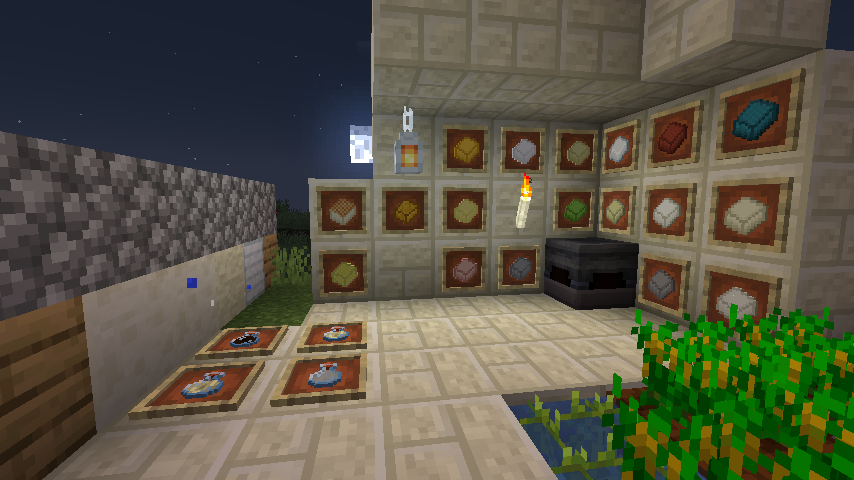
A farming mod that starts with soybeans and allows you to cook and build with tofu.
soy food is make good your health for survival
There are even armor and weapons made from solidified tofu!
There is also the world of tofu and industries that use tofu!
大豆から始まり、料理をしつつ豆腐で建築もできちゃう農業mod
大豆からできた食品は、あなたのサバイバルの手助けになるでしょう
さらには豆腐を固めて作る防具や武器まで!
そして豆腐ワールドや豆腐を使った工業も!?
If you want Discussion about this mod? join that discord!
## Discord
If you want Discussion about this mod? join that discord!
このmodについて話し合いたい?ディスコードでディスカッションしよう!
https://discordapp.com/invite/BMy4CX5
## Supported Mod:
Farmer’s delight (Add More Food)
Patchouli
Create(Suppport Automation)
### Credit:
The Aether Team. who made original Music Manager Source Code (https://www.curseforge.com/minecraft/mc-mods/aether)
iduki and turtton helping Revamped Content
46mofu for add new texture.
@siu_lab helping translation and making showcase
Rutl-Tri made tofu world music! (https://twitter.com/RoundDelta)
@MajinThorin753 make classic texture!
@uind_w helped Texture too!
RizaSTAR helped new items!
azzy helped new mob!
moromorochan allowed me to use some renderings from his secret project!
Timer for Speedrun
## Description
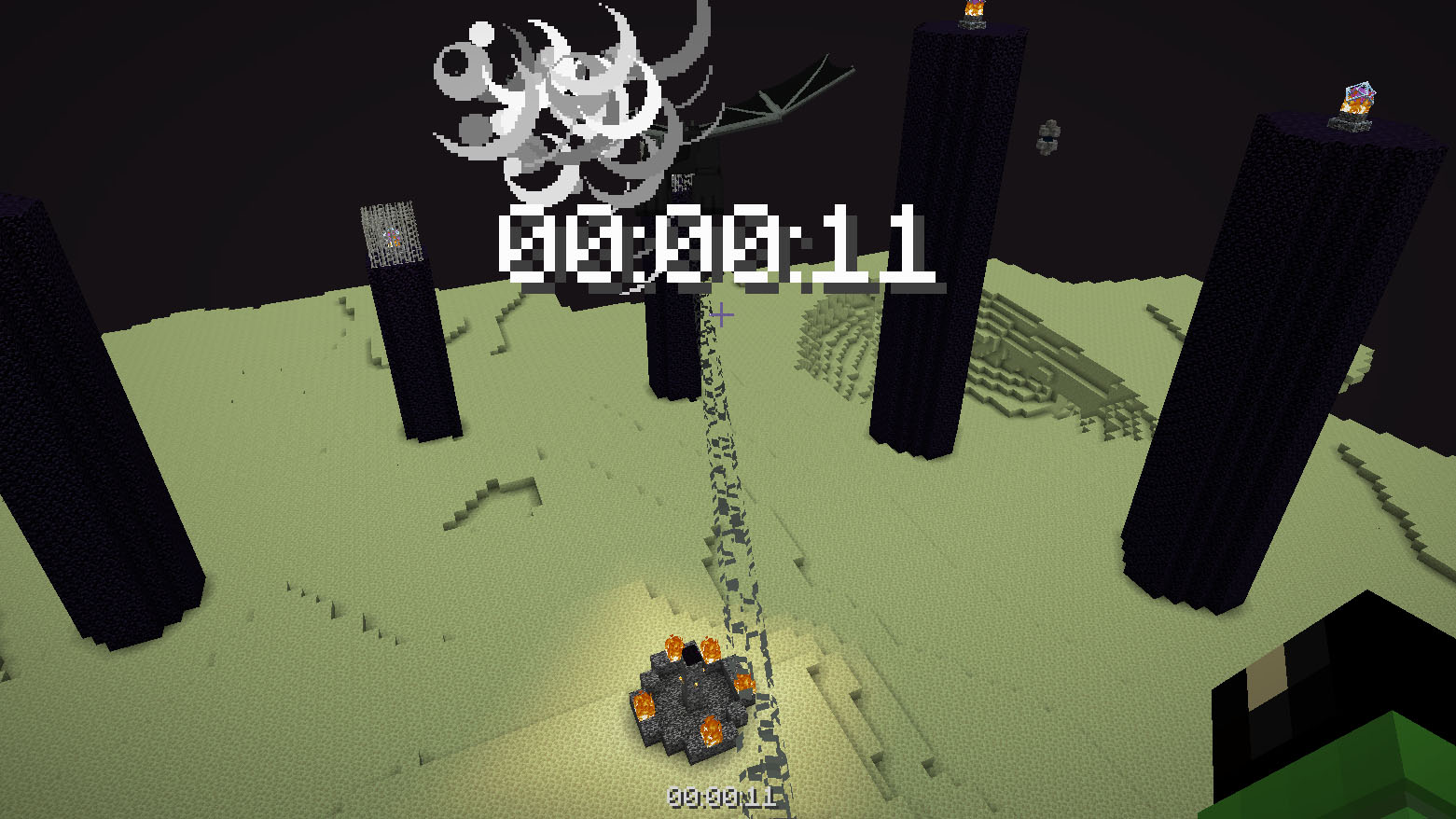
Datapack or mod adds an automatic timer for speedrunning.
## How to use
The timer is activated automatically when you enter the world. The timer stops when you enter the end portal.
## Dependencies
– Fabric loader requires Fabric API