TPA datapack
# Minecraft-TPA-Datapack
—
Optional Dependencies
**English(United States)** · [简体中文(中国大陆)](https://github.com/Xiao-tu233/Minecraft-TPA-Datapack/blob/main/README_zhcn.md) · [正體中文(臺灣)](https://github.com/Xiao-tu233/Minecraft-TPA-Datapack/blob/main/README_zhtw.md) · [日本語(日本)](https://github.com/Xiao-tu233/Minecraft-TPA-Datapack/blob/main/README_jp.md) · [More Languages](https://github.com/Xiao-tu233/Minecraft-TPA-Datapack/blob/main/languages.md)
TPA datapack is a Minecraft Datapack which allows non-OP players to teleport each others easily, multiple additional features like Back, Home, Warp, Languages for different regions, etc. are also provided.
Join or follow our social media for more information or giving some ideas!
](https://discord.gg/QgkpxsFahw) · [](https://www.youtube.com/channel/UCMOgi9XLPgVjLJRV6-YqQmg) · [](https://www.bilibili.com/space/433412367) · [](https://space.bilibili.com/433412367)
## Advantage
– All options are editable using `/function tpa:options`. No more worries about bad experience caused by bad presets.
– We use the simplest way to install: Datapacks. Datapacks are the easiest type of content to install into Minecraft.
– We are also willing to actively ensure compatibility with any other datapacks/mods/plugins/resourcepacks. So even if you met some bugs which’s probably not caused by TPA datapack, you can still report this to us with full contexts and show us how you can reproduce that.
– We provide two versions for you to choose from: the Extra version and the Light version. The Extra version includes all features we’ve developed, while the Light version includes only the basic features to suit different needs.
## How it Works?
It works through the Vanilla Interface since Minecraft 1.13.
## How can I Choose which to Download?
Use the table below to determine which file suffix matches your Minecraft version:
Mapping Between Minecraft Versions and Datapack Filename *Suffixes*
| Game Versions | Extra | Light |
| :– | –: | –: |
| 1.13 – 1.14.4 | +mc1.13 | light+mc1.13 |
| 1.15 – 1.20.1 | +mc1.15 | light+mc1.13 |
| 1.20.2 – 1.20.6 | +mc1.20.2 | light+mc1.13 |
| 1.21 – 1.21.4 | +mc1.20.2 | light+mc1.21 |
| 1.21.5 – | +mc1.20.2 | light+mc1.21.5 |
Lastest version for Light: v2.0.6
Lastest version for Extra: v2.0.6
1. Check your current game version.
2. Decide if you want to use the Extra version or the Light version, here’s the difference:
the Light version only contains basic feature: teleports and menus.
the Extra version contains every features we’ve written like Back, Home, Warp and Languages. (Maybe more in the future)
3. Go *Releases* page and download.
e.g.
If my Minecraft version is 1.20.1 and I want to use the Extra version, I’ll choose the file named `TPA_datapack-v2.0.6+mc1.15.zip`.
## How to Install?
So here’s basically the same as how you can install any other datapacks, if you have already learnt that before, just skip this paragraph.
### In Cloud-hosted Servers
1. Open the server console of your hosted server.
2. Find and click a button labeled *File Manager*.
3. The following steps are the same as installing In local Server.
### In Local Server
1. Find the server folder containing the server JAR file
2. If there is a `world` folder, open the `./world/datapacks/` directory
3. If there’s not or it doesn’t work after doing step 4, check `server.properties -> level-name` and find the correct level folder
4. Put Datapack File into the `datapacks` folder.
5. Enter the server and do `/reload`, and then do `/datapack list` to make sure datapack’s been recognised.
### In Singleplayer levels
1. Quit the world.
2. Go to the World Selection Menu and select the world.
3. Click the left bottom button `Edit`
4. Click the Button `Open World Folder`, if you do have the button, skip and go step 8
5. Go back to the World Selection Menu and memorize the gray title below the level in-game title.
6. Go Main Menu and then `Options… -> Resource Packs… -> Open Pack Folder…`
7. And then switch to the parent folder (It should be `.minecraft` btw) , go `saves` folder, and then the gray text you’ve memorized. (The directory will be like: `../saves/(Your Level)/datapacks`)
8. Go `datapacks` folder and then put Datapack File into the `datapacks` folder.
9. Enter the level, do `/datapack list` to make sure datapack is recognised.
### In the Level You’re Creating
1. Go `More -> Data Packs -> Open Pack Folder`.
2. Put Datapack file inside.
3. Create
4. Do `/datapack list` to make sure datapack is recognised.
## How to Use?
Go documents for usage: [Docs](https://github.com/Xiao-tu233/Minecraft-TPA-Datapack/docs/en-us/index.md)
## Ending
Thank you for using the TPA Datapack!
Latest version: v2.0.6 Extra version, v2.0.6 Light version
Last edit time: Apr 27th, 2026
Tower Crane Totem of Undying
– ENG: **Tower Crane** is a famous meme in Reddit and type of crane with a vertical mast and a horizontal boom, designed to lift and move loads to great heights and distances. Resource pack replaces the Totem of Immortality with this Building item
– RU: **Башенный кран** это популярный мем из реддита тип подъёмного крана с вертикальной мачтой и горизонтальной стрелой, предназначенный для подъёма и перемещения грузов на большую высоту и расстояние. Ресурспак заменяет тотем бессмертия на этот предмет
[ALL RESOURCEPACKS COLLECTION: MEMES + STREAMERS](https://modrinth.com/collection/sfDcDGAi)
Totem No Shading
—
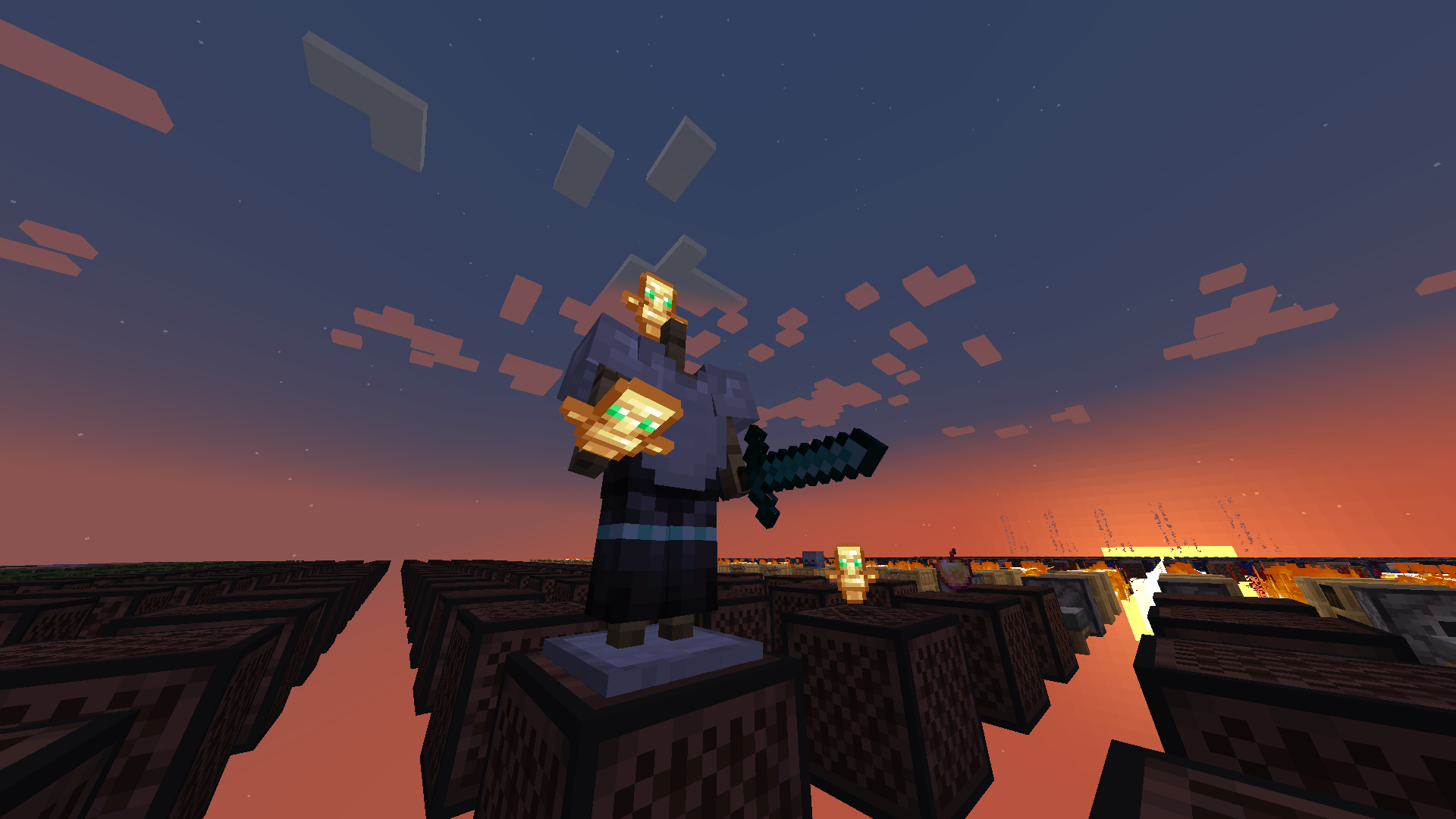
**Totem No Shading** is a simple Minecraft mod that removes [directional shading](https://en.wikipedia.org/wiki/Shading) and block and sky lighting effects to **[Totem of Undying](https://minecraft.wiki/w/Totem_of_Undying)** items. Holding totems in either hands, worn on head (through commands), or on the ground will render said items to **full brightness**.
Totem No Shading is a subset of [Simply No Shading](https://modrinth.com/mod/simply-no-shading) (SNS), concepts and technologies thereof aided in realizing this mod. The creation of [issue 119 for SNS at Github](https://github.com/StartsMercury/simply-no-shading/issues/119) requests supporting selective application, specifically the Totem of Undying item; at that time there was no clear way to implement this. After SNS‘ entity shading now exiting its experimental phase, the aforementioned issue was reconsidered and now released as its separate mod, **Totem No Shading**.
Yellow Tooltip (Monochrome)
#
Yellow Tooltip (Monochrome)

Replaces the default Minecraft Tooltip with a **Yellow Tooltip (Monochrome)**.
Looking for different colors/flags or styles? Check out the [Pride Tooltips Organization Page](https://modrinth.com/organization/pride-tooltips)!
Looking for packs with the same color(s)/flag but with different styles?
Can’t find a color, flag, or style you are looking for?
Feel free to [open an issue on GitHub](https://github.com/Pridecraft-Studios/pridetooltips/issues) or [join the Pridecraft Discord](https://discord.pridecraft.gay/) and ping `@rotgruengelb`!
Color Palette
The following colors where used to create this pack:
* #ffd800
Style
Monochrome = A simple monochrome style with one color.
Additional Information
* build_time: `2026-02-26T18:58:59+01:00`
* build_user: `rotgruengelb`
## Installation
Download and place into your `resourcepacks` folder. (Only works in versions **after 1.21.1**)
## About Pride Tooltips
A collection of resource packs that change tooltips to be colorful and/or pride themed.
### Rotgruengelb (Developer & Artist):
[](https://youtube.com/rotgruengelb)
[](https://github.com/rotgruengelb)
### Pridecraft Studios:
If you also want other bits of your UI to be themed with pride:
[](https://modrinth.com/project/pridegui)
You can chat with us and check out the source of our projects here:
[](https://discord.pridecraft.gay)
[](https://github.com/Pridecraft-Studios/pridetooltips?tab=readme-ov-file#pride-tooltips)
### Additional Credit
* Cursor texture, used in the banner, from the [Minecraft Cursor Mod by fishstiz](https://modrinth.com/mod/minecraft-cursor).
* The Pridecraft team for all their support and help.
White Tooltip (Frame-only Monochrome)
#
White Tooltip (Frame-only Monochrome)

Replaces the default Minecraft Tooltip with a **White Tooltip (Frame-only Monochrome)**.
Looking for different colors/flags or styles? Check out the [Pride Tooltips Organization Page](https://modrinth.com/organization/pride-tooltips)!
Looking for packs with the same color(s)/flag but with different styles?
Can’t find a color, flag, or style you are looking for?
Feel free to [open an issue on GitHub](https://github.com/Pridecraft-Studios/pridetooltips/issues) or [join the Pridecraft Discord](https://discord.pridecraft.gay/) and ping `@rotgruengelb`!
Color Palette
The following colors where used to create this pack:
* #ffffff
Style
Frame-only Monochrome = A simple monochrome style with one color. This style only applies the color to the frame, leaving the background black.
Additional Information
* build_time: `2026-02-26T18:59:01+01:00`
* build_user: `rotgruengelb`
## Installation
Download and place into your `resourcepacks` folder. (Only works in versions **after 1.21.1**)
## About Pride Tooltips
A collection of resource packs that change tooltips to be colorful and/or pride themed.
### Rotgruengelb (Developer & Artist):
[](https://youtube.com/rotgruengelb)
[](https://github.com/rotgruengelb)
### Pridecraft Studios:
If you also want other bits of your UI to be themed with pride:
[](https://modrinth.com/project/pridegui)
You can chat with us and check out the source of our projects here:
[](https://discord.pridecraft.gay)
[](https://github.com/Pridecraft-Studios/pridetooltips?tab=readme-ov-file#pride-tooltips)
### Additional Credit
* Cursor texture, used in the banner, from the [Minecraft Cursor Mod by fishstiz](https://modrinth.com/mod/minecraft-cursor).
* The Pridecraft team for all their support and help.
TV Test Pattern Themed Tooltip (7-Color)
#
TV Test Pattern Themed Tooltip (7-Color)

Replaces the default Minecraft Tooltip with a **TV Test Pattern Themed Tooltip (7-Color)**.
Looking for different colors/flags or styles? Check out the [Pride Tooltips Organization Page](https://modrinth.com/organization/pride-tooltips)!
Looking for packs with the same color(s)/flag but with different styles?
Can’t find a color, flag, or style you are looking for?
Feel free to [open an issue on GitHub](https://github.com/Pridecraft-Studios/pridetooltips/issues) or [join the Pridecraft Discord](https://discord.pridecraft.gay/) and ping `@rotgruengelb`!
Color Palette
The following colors where used to create this pack:
* #c1c1c1
* #c1c109
* #0bc1c1
* #00c108
* #c100c1
* #c10605
* 0c00c1
Style
7-Color = A simple 7-color flag with seven colors.
Additional Information
* build_time: `2026-02-26T18:57:34+01:00`
* build_user: `rotgruengelb`
## Installation
Download and place into your `resourcepacks` folder. (Only works in versions **after 1.21.1**)
## About Pride Tooltips
A collection of resource packs that change tooltips to be colorful and/or pride themed.
### Rotgruengelb (Developer & Artist):
[](https://youtube.com/rotgruengelb)
[](https://github.com/rotgruengelb)
### Pridecraft Studios:
If you also want other bits of your UI to be themed with pride:
[](https://modrinth.com/project/pridegui)
You can chat with us and check out the source of our projects here:
[](https://discord.pridecraft.gay)
[](https://github.com/Pridecraft-Studios/pridetooltips?tab=readme-ov-file#pride-tooltips)
### Additional Credit
* Cursor texture, used in the banner, from the [Minecraft Cursor Mod by fishstiz](https://modrinth.com/mod/minecraft-cursor).
* The Pridecraft team for all their support and help.
Transgender Pride Flag Tooltip (5-Color Turned)
#
Transgender Pride Flag Tooltip (5-Color Turned)

Replaces the default Minecraft Tooltip with a **Transgender Pride Flag Tooltip (5-Color Turned)**.
Looking for different colors/flags or styles? Check out the [Pride Tooltips Organization Page](https://modrinth.com/organization/pride-tooltips)!
Looking for packs with the same color(s)/flag but with different styles?
Can’t find a color, flag, or style you are looking for?
Feel free to [open an issue on GitHub](https://github.com/Pridecraft-Studios/pridetooltips/issues) or [join the Pridecraft Discord](https://discord.pridecraft.gay/) and ping `@rotgruengelb`!
Color Palette
The following colors where used to create this pack:
* #5bcffa
* #f5abb9
* #ffffff
* #f5abb9
* #5bcffa
Style
5-Color Turned = A simple 5-color flag with five colors, turned by 90 degrees.
Additional Information
* build_time: `2026-02-26T18:58:40+01:00`
* build_user: `rotgruengelb`
## Installation
Download and place into your `resourcepacks` folder. (Only works in versions **after 1.21.1**)
## About Pride Tooltips
A collection of resource packs that change tooltips to be colorful and/or pride themed.
### Rotgruengelb (Developer & Artist):
[](https://youtube.com/rotgruengelb)
[](https://github.com/rotgruengelb)
### Pridecraft Studios:
If you also want other bits of your UI to be themed with pride:
[](https://modrinth.com/project/pridegui)
You can chat with us and check out the source of our projects here:
[](https://discord.pridecraft.gay)
[](https://github.com/Pridecraft-Studios/pridetooltips?tab=readme-ov-file#pride-tooltips)
### Additional Credit
* Cursor texture, used in the banner, from the [Minecraft Cursor Mod by fishstiz](https://modrinth.com/mod/minecraft-cursor).
* The Pridecraft team for all their support and help.
Transgender Pride Flag Tooltip (5-Color)
#
Transgender Pride Flag Tooltip (5-Color)

Replaces the default Minecraft Tooltip with a **Transgender Pride Flag Tooltip (5-Color)**.
Looking for different colors/flags or styles? Check out the [Pride Tooltips Organization Page](https://modrinth.com/organization/pride-tooltips)!
Looking for packs with the same color(s)/flag but with different styles?
Can’t find a color, flag, or style you are looking for?
Feel free to [open an issue on GitHub](https://github.com/Pridecraft-Studios/pridetooltips/issues) or [join the Pridecraft Discord](https://discord.pridecraft.gay/) and ping `@rotgruengelb`!
Color Palette
The following colors where used to create this pack:
* #5bcffa
* #f5abb9
* #ffffff
* #f5abb9
* #5bcffa
Style
5-Color = A simple 5-color flag with five colors.
Additional Information
* build_time: `2026-02-26T18:58:39+01:00`
* build_user: `rotgruengelb`
## Installation
Download and place into your `resourcepacks` folder. (Only works in versions **after 1.21.1**)
## About Pride Tooltips
A collection of resource packs that change tooltips to be colorful and/or pride themed.
### Rotgruengelb (Developer & Artist):
[](https://youtube.com/rotgruengelb)
[](https://github.com/rotgruengelb)
### Pridecraft Studios:
If you also want other bits of your UI to be themed with pride:
[](https://modrinth.com/project/pridegui)
You can chat with us and check out the source of our projects here:
[](https://discord.pridecraft.gay)
[](https://github.com/Pridecraft-Studios/pridetooltips?tab=readme-ov-file#pride-tooltips)
### Additional Credit
* Cursor texture, used in the banner, from the [Minecraft Cursor Mod by fishstiz](https://modrinth.com/mod/minecraft-cursor).
* The Pridecraft team for all their support and help.
Transgender Pride Flag Tooltip (Frame-only Alt-BG 5-Color)
#
Transgender Pride Flag Tooltip (Frame-only Alt-BG 5-Color)

Replaces the default Minecraft Tooltip with a **Transgender Pride Flag Tooltip (Frame-only Alt-BG 5-Color)**.
Looking for different colors/flags or styles? Check out the [Pride Tooltips Organization Page](https://modrinth.com/organization/pride-tooltips)!
Looking for packs with the same color(s)/flag but with different styles?
Can’t find a color, flag, or style you are looking for?
Feel free to [open an issue on GitHub](https://github.com/Pridecraft-Studios/pridetooltips/issues) or [join the Pridecraft Discord](https://discord.pridecraft.gay/) and ping `@rotgruengelb`!
Color Palette
The following colors where used to create this pack:
* #5bcffa
* #f5abb9
* #ffffff
* #f5abb9
* #5bcffa
Style
Frame-only Alt-BG 5-Color = A simple 5-color flag with five colors. This style only applies the colors to the frame, leaving the background as the default Minecraft texture.
Additional Information
* build_time: `2026-02-26T18:58:41+01:00`
* build_user: `rotgruengelb`
## Installation
Download and place into your `resourcepacks` folder. (Only works in versions **after 1.21.1**)
## About Pride Tooltips
A collection of resource packs that change tooltips to be colorful and/or pride themed.
### Rotgruengelb (Developer & Artist):
[](https://youtube.com/rotgruengelb)
[](https://github.com/rotgruengelb)
### Pridecraft Studios:
If you also want other bits of your UI to be themed with pride:
[](https://modrinth.com/project/pridegui)
You can chat with us and check out the source of our projects here:
[](https://discord.pridecraft.gay)
[](https://github.com/Pridecraft-Studios/pridetooltips?tab=readme-ov-file#pride-tooltips)
### Additional Credit
* Cursor texture, used in the banner, from the [Minecraft Cursor Mod by fishstiz](https://modrinth.com/mod/minecraft-cursor).
* The Pridecraft team for all their support and help.
Soft Blue Tooltip (Monochrome)
#
Soft Blue Tooltip (Monochrome)

Replaces the default Minecraft Tooltip with a **Soft Blue Tooltip (Monochrome)**.
Looking for different colors/flags or styles? Check out the [Pride Tooltips Organization Page](https://modrinth.com/organization/pride-tooltips)!
Looking for packs with the same color(s)/flag but with different styles?
Can’t find a color, flag, or style you are looking for?
Feel free to [open an issue on GitHub](https://github.com/Pridecraft-Studios/pridetooltips/issues) or [join the Pridecraft Discord](https://discord.pridecraft.gay/) and ping `@rotgruengelb`!
Color Palette
The following colors where used to create this pack:
* #7bade2
Style
Monochrome = A simple monochrome style with one color.
Additional Information
* build_time: `2026-02-26T18:58:57+01:00`
* build_user: `rotgruengelb`
## Installation
Download and place into your `resourcepacks` folder. (Only works in versions **after 1.21.1**)
## About Pride Tooltips
A collection of resource packs that change tooltips to be colorful and/or pride themed.
### Rotgruengelb (Developer & Artist):
[](https://youtube.com/rotgruengelb)
[](https://github.com/rotgruengelb)
### Pridecraft Studios:
If you also want other bits of your UI to be themed with pride:
[](https://modrinth.com/project/pridegui)
You can chat with us and check out the source of our projects here:
[](https://discord.pridecraft.gay)
[](https://github.com/Pridecraft-Studios/pridetooltips?tab=readme-ov-file#pride-tooltips)
### Additional Credit
* Cursor texture, used in the banner, from the [Minecraft Cursor Mod by fishstiz](https://modrinth.com/mod/minecraft-cursor).
* The Pridecraft team for all their support and help.


