UniLink
## 🔗 UniLink
A mod that allows you to use resources from other directories
## 💼 Usage
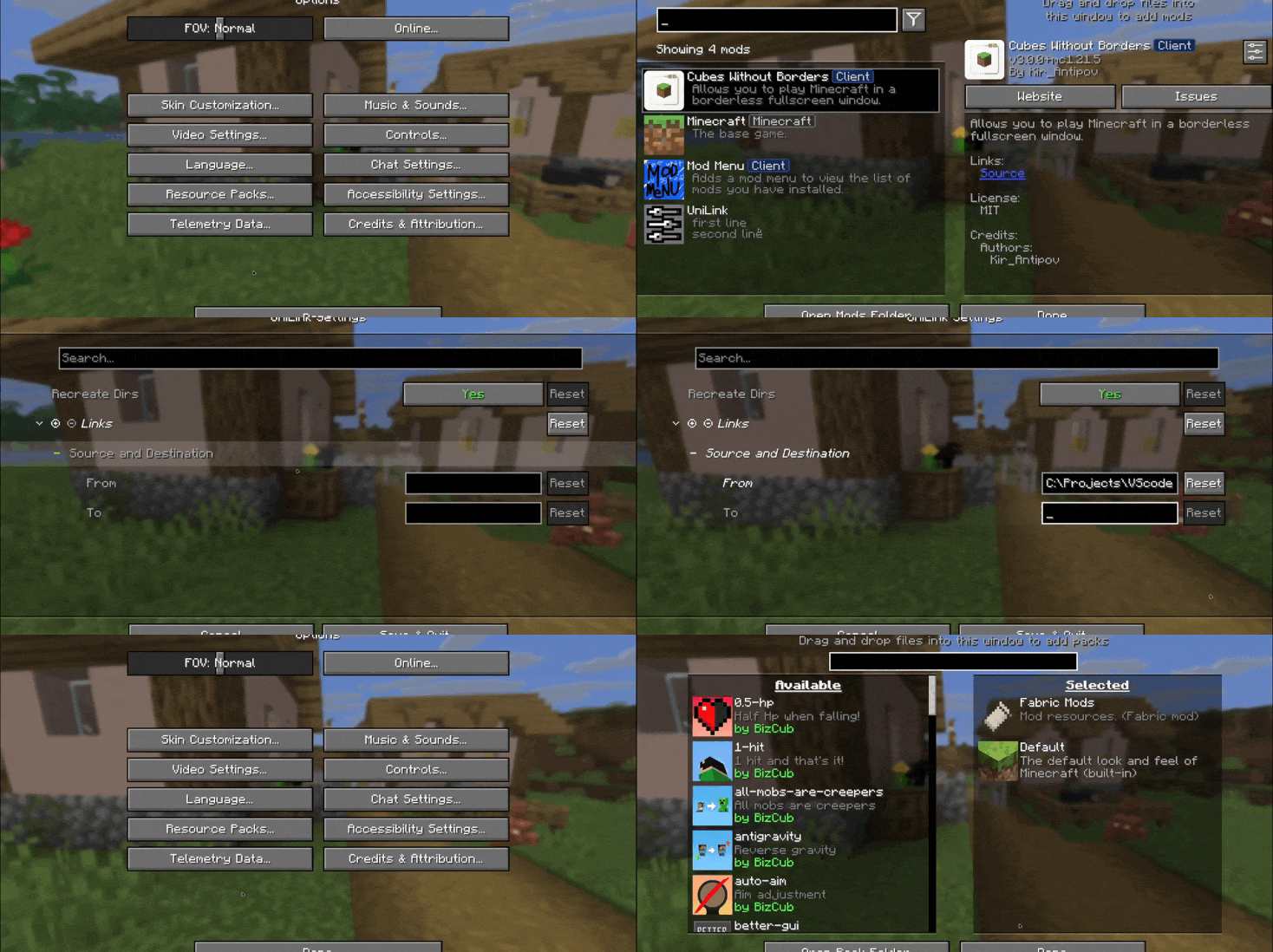
This mod works using symbolic links, which can be used like a folder but don’t require reusing (copying) resources. Some launchers also use symbolic links, but the mod works independently of them. It’s a configuration file. The first field specifies the path to the directory to use, and the second field specifies the path to the folder where the symbolic link should be placed. The final path can be absolute (e.g., “`C:….minecraftsaves“`) or abbreviated (“`saves“`).

If you change the directory used for worlds and then revert the change, the game may freeze while searching for and failing to find the required folder. For this purpose, the configuration file has an option to recreate the folders used by the game.
## 🛠️ How it works
By default, the mod does nothing. However, you can add data to the configuration to create a link: the path from which resources will be used and the path where the symbolic link will be created.
### What follows from this:
* After changing the configuration, new links will be added. Therefore, old, unused links will be deleted.
* Since Minecraft creates some folders, the mod will have to delete the existing folder before creating the link. However, since the mod deletes folders without asking, it has a limitation on deleting directories with files inside. This means that if a folder contains any files, it won’t be deleted and the link won’t be created.
Creating symbolic links requires certain permissions. Therefore, some launchers that don’t have them won’t be able to create links. Solution: Run the launcher as administrator.
## 🤝 Support

ULTRA small totem

[](https://dsc.gg/spectrr3)
[](https://modrinth.com/resourcepack/ultra-small-totem/gallery)
Makes the totem ULTRA small.
I saw that a lot of people were playing with it, so I decided to post it on Modrinth (totem size 0.2).
Version 1.15-26.1 Snapshot 7.
Credits
[Bages](https://github.com/intergrav/devins-badges)
U.P.E. Addon – Neither Portal
Adds a visual effect to the portal in the style of the portals from the snapshot 20w14infinite.
Simply dye and rename one of the pieces of leather armor using any dye, and your portal will become colored.
For proper operation on versions BELOW 1.21.5, a mod implementing CIT (Custom Item Textures) is required.
For versions ABOVE 1.21.5+, no modifications are required (except perhaps the U.P.E. Addon – Connector Ultima, if you want to play with multiple addons).
U.P.E. Addon – Jeb_ Portal
Adds a visual effect to the portal in the style of the renamed sheep jeb_ .
Simply rename one of the pieces of leather armor, and your portal will shimmer with the colors of a “jeb_” sheep.
For proper operation on versions BELOW 1.21.5, a mod implementing CIT (Custom Item Textures) is required.
For versions ABOVE 1.21.5+, no modifications are required (except perhaps the U.P.E. Addon – Connector Ultima, if you want to play with multiple addons).
U.P.E. Addon – Connector Ultima
U.P.E. – Connector Ultima.
This connector is required to ensure that add-ons for the Unreal Portal Engine are compatible with one another. This connector was created due to the priority order of resource packs within Minecraft. Because of this priority, only one add-on can be loaded alongside the Unreal Portal Engine.
To add compatibility between your add-on and other add-ons, please submit a request here – https://discord.gg/BHEjGaVX83
Turtle Scute Recipe
🐢 Turtle Scute Recipe Datapack
Reclaim the shell—no hatchling waiting required!
This datapack introduces a reverse recipe for Turtle Scutes, letting you convert Armadillo Scutes back into turtle gear with a splash of dye.
✨ Features
✅ Shapeless recipe using 1 Armadillo Scute + 1 Green Dye → yields 1 Turtle Scute
🧩 Lore-friendly integration with dye mechanics and mob-based progression
🔁 Modular JSON structure for easy editing and expansion
🛠️ Compatible with Minecraft 1.21+
Tuff Recipe
🪨 Tuff Recipe Datapack
Craft the overlooked building block—no cave spelunking required!
This datapack introduces a simple recipe for Tuff, making it accessible for builders and stonemasons in any biome.
✨ Features
✅ Shapeless recipe using 1 Stone + 1 Deepslate
🧩 Lore-friendly integration with underground progression and stone variants
🔁 Modular JSON structure for easy editing and expansion
🛠️ Compatible with Minecraft 1.17+
Checkout my other projects:
[Enchanted Golden Apple](https://modrinth.com/datapack/enchantd-golden-apple-recipe)
[Amethyst Shard](https://modrinth.com/datapack/amethyst-shard)
[Horse Armour Recipe](https://modrinth.com/datapack/horse-armour-recipe)
[Froglight Recipe](https://modrinth.com/datapack/froglights-recipes)
[Music Disc Recipe](https://modrinth.com/datapack/music-discs)
[Heavy Core Recipe](https://modrinth.com/datapack/heavy-core-recipe)
[Echo Shard Recipe](https://modrinth.com/datapack/echo-shard-recipes)
OverGrown Tools
OverGrown Tools — A nature-themed resource pack that reclaims your gear for the forest. Every tool and weapon is now entwined with lush leaves, vines, and crawling ivy.
Features:
Complete overhaul of all material tiers: from Wood to Netherite.
Netherite gear is wrapped in glowing Warped vines from the Nether.
Perfect for “Lost Civilization”, “Ancient”, or “Druid” playstyles.
Supported versions: 1.16 through 1.21.11.
No Armor Trims
**Remove Armor Trims** is texture pack designed to remove all armor trims from Minecraft.
## Before

## After

Trident Recipe
🔱 Trident Recipe Datapack
Forge the power of the sea—no drowned hunting required!
This datapack introduces a custom recipe for the Trident, giving players a renewable way to access this iconic weapon in survival mode.
✨ Features
✅ Shaped recipe using 3 Quartz + 2 Prismarine Shardst
🧩 Lore-friendly integration with ocean and Nether progression
🔁 Modular JSON structure for easy editing and expansion
🛠️ Compatible with Minecraft 1.13+