Old String & Tripwire Transparent Again!
# Transparent Tripwires Again!
In Minecraft 26.1 Snapshot 3, Mojang changed tripwires to be translucent, which disturbs their primary usecase which is mostly to not be seen. Many players use tripwires to block off snow from falling, or placing carpets in the air, relying on the fact that they were basically invisible.
This pack reverts this change, keeping tripwires barely visible while not disturbing you.

Transparent GUI
This texture pack makes **all GUIs transparent**, this allows for **better visibility** while in the inventory menu or in any GUI. as far as i know this **isn’t banned** in any major PVP servers or competitions. this is mainly made to help **competitive** players and for **convenience**.
and also compatible with Modmenu
Transparent Buttons
Simple **transparent buttons** in menus, compatible with **older AND newer versions** of the game. So yes, it works in **1.8**, just **ignore the red Incompatible marker** in the pack selection screen.
Have any specific mods you would like me to add support for? Join the [**discord**](https://discord.gg/cjBypn33tZ)!
Translucent Glass Border

**Translucent Glass Border** makes the borders of regular glass the same translucency as stained glass.

Connected Textures

somehow works in older versions too
Trailier Tales
# Minecraft: Java Edition – Trailier Tales
After the Wild Update controversy passed, Trails & Tales came along and effectively accomplished the same thing. Although it didn’t overpromise, it felt as though it had under-delivered on the content side of things.
We’re back once again to hopefully remedy this, with Trailier Tales!
**DISCLAIMER**
Do not use this mod in attempt to harass Mojang. They are hard workers and know what’s best for their game; We’re simply adding and changing features as we see fit.
# NEW FEATURES
– Added new Ruins structures
– Added new Pottery Sherds
– Added new Armor Trims
– Added Suspicious Red Sand
– Added Suspicious Clay
– Added Suspicious Dirt
– Added Cyan Roses
– Added Manedrops
– Added Dawntrails
– Added the Surveyor block
– Added Catacombs
– Added Haunt mob effect
– Added Transfiguring mobb effect
– Added Siege Omen
– Added the Coffin block
– Added Apparition mob
– Added the Rebrush enchantment
– Added the Reaping enchantment
– Added Music Disc Fausse Vie
– Expanded and finished many building block sets
– Banners can now be placed on Boats
## RUINS
– Added Ruins in all Plains and Forest biomes
– Added Jungle Ruins in all Jungle biomes
– Added Savanna Ruins in Savanna and Savanna Plateau biomes
– Added Desert Ruins in all Desert biomes
– Added Badlands Ruins in Badlands, Wooded Badlands, and Eroded Badlands biomes
– Added Deepslate Ruins in the Deep Dark biome
– Will usually generate in clusters
– Suspicious blocks will these structures contain new pottery sherds
– From most to least common, each building can be either partially buried, on the surface, or completely buried
– New structure pieces for each ruin type can easily be added by dragging and dropping a piece in `.nbt` format into one of the existing subfolders in their respective `trailiertales:structure/ruins/` folder
## POTTERY SHERDS
– Added Bait Pottery Sherd
– Added Bloom Pottery Sherd
– Added Bolt Pottery Sherd
– Added Bullseye Pottery Sherd
– Added Cluck Pottery Sherd
– Added Crawl Pottery Sherd
– Added Crescent Pottery Sherd
– Added Cultivator Pottery Sherd
– Added Essence Pottery Sherd
– Added Eye Pottery Sherd
– Added Focus Pottery Sherd
– Added Height Pottery Sherd
– Added Hump Pottery Sherd
– Added Illuminator Pottery Sherd
– Added Incidence Pottery Sherd
– Added Lumber Pottery Sherd
– Added Navigator Pottery Sherd
– Added Needles Pottery Sherd
– Added Omen Pottery Sherd
– Added Plume Pottery Sherd
– Added Protection Pottery Sherd
– Added Shed Pottery Sherd
– Added Shine Pottery Sherd
– Added Shower Pottery Sherd
– Added Spade Pottery Sherd
– Added Sprout Pottery Sherd
– Added Vessel Pottery Sherd
– Added Wither Pottery Sherd
## ARMOR TRIMS
– Added Undead Armor Trim, found in Catacombs
– Added Matrix Armor Trim, found in Catacombs
– Added Martyr Armor Trim, found in Badlands Ruins
– Added Zephyr Armor Trim, found in Desert Ruins
– Added Cot Armor Trim, found in Savanna Ruins
– Added Overgrowth Armor Trim, found in Jungle Ruins
– Added Geode Armor Trim, found in Deepslate Ruins
## CYAN ROSE
– Sniffers can now dig up Cyan Rose Seeds
– Seeds can be planted, growing into the Cyan Rose flower
– Can be crafted into Cyan Dye
## MANEDROP
– Sniffers can now dig up Manedrop Germs
– Germs can be planted, and grow into the Manedrop flower
– Can be crafted into Purple Dye
## DAWNTRAIL
– Sniffers can now dig up Dawntrail Seeds
– Seeds can be planted, growing into the Dawntrail
– Dawntrails will slowly spread outwards at a maximum of 3 blocks
– Each new Dawntrail will not have flowers, as those grow randomly with time
– A Dawntrail with flowers can be sheared to obtain Dawntrail Seeds
– Seeds can be crafted into Purple Dye
## SURVEYOR
– A new redstone component that detects a player in its line of sight
– Will output a full signal when detecting a player, and a decreasing signal based on the player’s distance when used with a Redstone Comparator
– Other mobs can block the Surveyor’s view of the player
– Invisible players cannot be detected, unless wearing armor
## CATACOMBS
– A maze-like, difficult underground structure from a long-lost civilization
– Skeleton skulls line the walls of the Catacombs
– Supicious Gravel occasionally generates on the floor
– Contains many corridors and tombs
– Each tomb contains at least one Coffin, and may contain a Chest
– Each Chest has a chance to reward very valuable loot, including but not limited to the new Rebrush enchantment, Reaping enchantment, Undead armor trim, and the new “Fausse Vie” music disc by Zhen
– Some tombs are laid out as puzzles, while others strictly focus on combat
– Being so difficult and dark, it is recommended to bring strong tools, armor, and a lot of torches
– Catacombs Explorer Maps can be found in Trail Ruins, and traded for with Cartographer Villagers
## HAUNT
– A new mob effect
– Much like the Darkness mob effect, brings dark fog inwards and dampens light
– Blocks out health, armor, hunger, and air supply stats, becoming either invisible or unreadable to the player
– Halves the distance sounds can be heard from
– Coffins can detect any player with this mob effect
## TRANSFIGURING
– A new mob effect obtained through brewing
– Potion is brewed with Ectoplasm and an Awkward Potion
– Spawns an Apparition upon the effected mob’s death
– If used on an Apparition, vanquishes it
## SIEGE OMEN
– Triggered when being close to a Coffin with Bad Omen
– Each nearby Coffin will activate and spawn up to two mobs per-player simultaneously
– Spawned mobs will constantly track the closest player
– Coffins will have a spawning cooldown of only 150 ticks
– Coffins will also be able to spawn two Apparitions
## COFFIN
– A new block that spawns mobs
– The mob can be changed by using a spawn egg on the Coffin
– Is inactive by default, but will spawn an Apparition occasionally
– One the Apparition has targeted a player, the Coffin will activate and begin spawning mobs
– Once the Apparition has been killed, the Coffin will become inactive and the cycle will repeat
– Each time a spawned mob its killed, will increase the Coffin’s power along three stages
– Active
– The default strength
– 400 ticks between spawns
– Only one mob can spawn at a time
– Irritated
– An intermediate strength triggered at a power of 4
– 300 ticks between spawns
– The amount of simultaneous spawned mobs per extra player increases to one
– Irritated
– The highest strength triggered at a power of 12
– 200 ticks between spawns
– A Coffin’s power will reset after 12000 ticks, or 10 minutes
– If all spawned mobs from each stage are defeated in a timely manner, the Coffin will remain inactive for the next 30 minutes
## APPARITION
– A new mysterious mob that spawns from Coffins
– Can travel through blocks and other mobs
– Detects players at relatively far distances
– Will occasionally “hypnotize” nearby mobs, causing them to target the player
– Finds dropped items and throws them to damage the player
– Is invisible in the darkness, aside from a particle trail
– Will apply the Haunt mob effect if it has been in direct contact with a player for long enough
– Drops Ectoplasm upon death, which can be used as a potion ingredient or to craft the Surveyor block
## REBRUSH
– A new enchantment found from Chests in Catacombs
– At a rate of 10% per level, has a chance to let a Suspicious block be looted again
– Has a 3% chance per level to let a Suspicious block be looted again after the first excavation
– Goes up to level 3
## REAPING
– A new enchantment found from Chests in Catacombs
– Increases XP drops from mobs by 20%
– An additional 30% is applied per-level past the first
– Goes up to level 3
## BUILDING BLOCKS
– Added Polished Granite Wall
– Added Granite Bricks
– Added Chiseled Granite Bricks
– Added Cracked Granite Bricks
– Added Granite Brick Stairs
– Added Granite Brick Slab
– Added Granite Brick Wall
– Added Mossy Granite Bricks
– Added Mossy Granite Brick Stairs
– Added Mossy Granite Brick Slab
– Added Mossy Granite Brick Wall
– Added Polished Diorite Wall
– Added Diorite Bricks
– Added Chiseled Diorite Bricks
– Added Cracked Diorite Bricks
– Added Diorite Brick Stairs
– Added Diorite Brick Slab
– Added Diorite Brick Wall
– Added Mossy Diorite Bricks
– Added Mossy Diorite Brick Stairs
– Added Mossy Diorite Brick Slab
– Added Mossy Diorite Brick Wall
– Added Polished Andesite Wall
– Added Andesite Bricks
– Added Chiseled Andesite Bricks
– Added Cracked Andesite Bricks
– Added Andesite Brick Stairs
– Added Andesite Brick Slab
– Added Andesite Brick Wall
– Added Mossy Andesite Bricks
– Added Mossy Andesite Brick Stairs
– Added Mossy Andesite Brick Slab
– Added Mossy Andesite Brick Wall
– Added the Calcite block family
– Added Calcite Stairs
– Added Calcite Slab
– Added Calcite wall
– Added Polished Calcite
– Added Polished Calcite Stairs
– Added Polished Calcite Slab
– Added Polished Calcite wall
– Added Calcite Bricks
– Added Chiseled Calcite Bricks
– Added Cracked Calcite Bricks
– Added Calcite Brick Stairs
– Added Calcite Brick Slab
– Added Calcite Brick Wall
– Added Mossy Calcite Bricks
– Added Mossy Calcite Brick Stairs
– Added Mossy Calcite Brick Slab
– Added Mossy Calcite Brick Wall
– Finished the Tuff block family
– Added Cracked Tuff Bricks
– Added Mossy Tuff Bricks
– Added Mossy Tuff Brick Stairs
– Added Mossy Tuff Brick Slab
– Added Mossy Tuff Brick Wall
– Finished the Bricks block family
– Added Cracked Bricks
– Added Mossy Bricks
– Added Mossy Brick Stairs
– Added Mossy Brick Slab
– Added Mossy Brick Wall
– Finished the Cobbled Deepslate block family
– Added Mossy Cobbled Deepslate
– Added Mossy Cobbled Deepslate Stairs
– Added Mossy Cobbled Deepslate Slab
– Added Mossy Cobbled Deepslate Wall
– Finished the Deepslate Bricks block family
– Added Mossy Deepslate Bricks
– Added Mossy Deepslate Brick Stairs
– Added Mossy Deepslate Brick Slab
– Added Mossy Deepslate Brick Wall
– Finished the Deepslate Tiles block family
– Added Mossy Deepslate Tiles
– Added Mossy Deepslate Tile Stairs
– Added Mossy Deepslate Tile Slab
– Added Mossy Deepslate Tile Wall
– Finished the Sandstone block family
– Added Smooth Sandstone Wall
– Added Cut Sandstone Stairs
– Added Cut Sandstone Wall
– Finished the Red Sandstone block family
– Added Smooth Red Sandstone Wall
– Added Cut Red Sandstone Stairs
– Added Cut Red Sandstone Wall
– Added Prismarine Brick Wall
– Added Dark Prismarine Wall
– Finished the End Stone block family
– Added End Stone Stairs
– Added End Stone Slab
– Added End Stone Wall
– Added Choral End Stone
– Added Choral End Stone Stairs
– Added Choral End Stone Slab
– Added Choral End Stone Wall
– Finished the End Stone Bricks block family
– Added Cracked End Stone Bricks
– Added Chiseled End Stone Bricks
– Added Choral End Stone Bricks
– Added Choral End Stone Brick Stairs
– Added Choral End Stone Brick Slab
– Added Choral End Stone Brick Wall
– Finished the Purpur block family
– Added Cracked Purpur Block
– Added Chiseled Purpur Block
– Added Purpur Wall
## BANNER BOATS
– Created by sneaking and using a Banner item on a Boat
– Banner can be taken off by sneaking and interacting with the Boat a second time
# CHANGES
## ARCHAEOLOGY
– The third person brushing animation is now smooth
– Items now smoothly inch out of suspicious blocks
– Particles are now created when a brush is moving backwards
– A softer sound is now played when a brush is moving backwards
– Revamped the distribution of pottery sherds
– Angler Pottery Sherd -> Warm Ocean Ruins (No Change)
– Archer Pottery Sherd -> Desert Pyramid (No Change)
– Arms Up Pottery Sherd -> Desert Pyramid
– Bait Pottery Sherd -> Warm Ocean Ruins
– Blade Pottery Sherd -> Ruins
– Bloom Pottery Sherd -> Jungle Ruins
– Bolt Pottery Sherd -> Jungle Ruins
– Brewer Pottery Sherd -> Desert Well (No Change)
– Bullseye Pottery Sherd -> Catacombs
– Burn Pottery Sherd -> Badlands Ruins
– Carrier Pottery Sherd -> Desert Well
– Cluck Pottery Sherd -> Savanna Ruins
– Crawl Pottery Sherd -> Savanna Ruins
– Crescent Pottery Sherd -> Trail Ruins
– Cultivator Pottery Sherd -> Ruins
– Danger Pottery Sherd -> Desert Ruins
– Drought Pottery Sherd -> Badlands Ruins
– Eye Pottery Sherd -> Catacombs
– Explorer Pottery Sherd -> Cold Ocean Ruins (No Change)
– Focus Pottery Sherd -> Cold Ocean Ruins
– Friend Pottery Sherd -> Trail Ruins (No Change)
– Heart Pottery Sherd -> Trail Ruins (No Change)
– Heartbreak Pottery Sherd -> Trail Ruins (No Change)
– Height Pottery Sherd -> Deepslate Ruins
– Howl Pottery Sherd -> Trail Ruins (No Change)
– Hump Pottery Sherd -> Desert Ruins
– Illuminator Pottery Sherd -> Deepslate Ruins
– Incidence Pottery Sherd -> Cold Ocean Ruins
– Lumber Pottery Sherd -> Ruins
– Miner Pottery Sherd -> Deepslate Ruins
– Mourner Pottery Sherd -> Deepslate Ruins
– Navigator Pottery Sherd -> Jungle Ruins
– Needles Pottery Sherd -> Desert Ruins
– Omen Pottery Sherd -> Catacombs
– Plenty Pottery Sherd -> Catacombs
– Plume Pottery Sherd -> Savanna Ruins
– Prize Pottery Sherd -> Desert Pyramid (No Change)
– Protection Pottery Sherd -> Trail Ruins
– Sheaf Pottery Sherd -> Trail Ruins (No Change)
– Shed Pottery Sherd -> Badlands Ruins
– Shelter Pottery Sherd -> Savanna Ruins
– Shine Pottery Sherd -> Desert Ruins
– Shower Pottery Sherd -> Jungle Ruins
– Spade Pottery Sherd -> Desert Pyramid
– Sprout Pottery Sherd – Ruins
– Skull Pottery Sherd -> Catacombs
– Snort Pottery Sherd -> Warm Ocean Ruins (No Change)
– Vessel Pottery Sherd -> Cold Ocean Ruins
– Wither Pottery Sherd -> Badlands Ruins
## DECORATED POTS
– The wobbling animation now mirrors each time it plays
## END CITIES
– Choral End Stone Bricks will now generate
– Cracked End Stone Bricks will now generate
– Chiseled Purpur Blocks will now generate
## ARMOR STANDS
– Armor Stands now have their arms enabled by default
## CAMELS
– Now rarely spawn in Desert biomes
[](https://tinyurl.com/3xhmk7fb)
TPA datapack
# Minecraft-TPA-Datapack
—
Optional Dependencies
**English(United States)** · [简体中文(中国大陆)](https://github.com/Xiao-tu233/Minecraft-TPA-Datapack/blob/main/README_zhcn.md) · [正體中文(臺灣)](https://github.com/Xiao-tu233/Minecraft-TPA-Datapack/blob/main/README_zhtw.md) · [日本語(日本)](https://github.com/Xiao-tu233/Minecraft-TPA-Datapack/blob/main/README_jp.md) · [More Languages](https://github.com/Xiao-tu233/Minecraft-TPA-Datapack/blob/main/languages.md)
TPA datapack is a Minecraft Datapack which allows non-OP players to teleport each others easily, multiple additional features like Back, Home, Warp, Languages for different regions, etc. are also provided.
Join or follow our social media for more information or giving some ideas!
](https://discord.gg/QgkpxsFahw) · [](https://www.youtube.com/channel/UCMOgi9XLPgVjLJRV6-YqQmg) · [](https://www.bilibili.com/space/433412367) · [](https://space.bilibili.com/433412367)
## Advantage
– All options are editable using `/function tpa:options`. No more worries about bad experience caused by bad presets.
– We use the simplest way to install: Datapacks. Datapacks are the easiest type of content to install into Minecraft.
– We are also willing to actively ensure compatibility with any other datapacks/mods/plugins/resourcepacks. So even if you met some bugs which’s probably not caused by TPA datapack, you can still report this to us with full contexts and show us how you can reproduce that.
– We provide two versions for you to choose from: the Extra version and the Light version. The Extra version includes all features we’ve developed, while the Light version includes only the basic features to suit different needs.
## How it Works?
It works through the Vanilla Interface since Minecraft 1.13.
## How can I Choose which to Download?
Use the table below to determine which file suffix matches your Minecraft version:
Mapping Between Minecraft Versions and Datapack Filename *Suffixes*
| Game Versions | Extra | Light |
| :– | –: | –: |
| 1.13 – 1.14.4 | +mc1.13 | light+mc1.13 |
| 1.15 – 1.20.1 | +mc1.15 | light+mc1.13 |
| 1.20.2 – 1.20.6 | +mc1.20.2 | light+mc1.13 |
| 1.21 – 1.21.4 | +mc1.20.2 | light+mc1.21 |
| 1.21.5 – | +mc1.20.2 | light+mc1.21.5 |
Lastest version for Light: v2.0.6
Lastest version for Extra: v2.0.6
1. Check your current game version.
2. Decide if you want to use the Extra version or the Light version, here’s the difference:
the Light version only contains basic feature: teleports and menus.
the Extra version contains every features we’ve written like Back, Home, Warp and Languages. (Maybe more in the future)
3. Go *Releases* page and download.
e.g.
If my Minecraft version is 1.20.1 and I want to use the Extra version, I’ll choose the file named `TPA_datapack-v2.0.6+mc1.15.zip`.
## How to Install?
So here’s basically the same as how you can install any other datapacks, if you have already learnt that before, just skip this paragraph.
### In Cloud-hosted Servers
1. Open the server console of your hosted server.
2. Find and click a button labeled *File Manager*.
3. The following steps are the same as installing In local Server.
### In Local Server
1. Find the server folder containing the server JAR file
2. If there is a `world` folder, open the `./world/datapacks/` directory
3. If there’s not or it doesn’t work after doing step 4, check `server.properties -> level-name` and find the correct level folder
4. Put Datapack File into the `datapacks` folder.
5. Enter the server and do `/reload`, and then do `/datapack list` to make sure datapack’s been recognised.
### In Singleplayer levels
1. Quit the world.
2. Go to the World Selection Menu and select the world.
3. Click the left bottom button `Edit`
4. Click the Button `Open World Folder`, if you do have the button, skip and go step 8
5. Go back to the World Selection Menu and memorize the gray title below the level in-game title.
6. Go Main Menu and then `Options… -> Resource Packs… -> Open Pack Folder…`
7. And then switch to the parent folder (It should be `.minecraft` btw) , go `saves` folder, and then the gray text you’ve memorized. (The directory will be like: `../saves/(Your Level)/datapacks`)
8. Go `datapacks` folder and then put Datapack File into the `datapacks` folder.
9. Enter the level, do `/datapack list` to make sure datapack is recognised.
### In the Level You’re Creating
1. Go `More -> Data Packs -> Open Pack Folder`.
2. Put Datapack file inside.
3. Create
4. Do `/datapack list` to make sure datapack is recognised.
## How to Use?
Go documents for usage: [Docs](https://github.com/Xiao-tu233/Minecraft-TPA-Datapack/docs/en-us/index.md)
## Ending
Thank you for using the TPA Datapack!
Latest version: v2.0.6 Extra version, v2.0.6 Light version
Last edit time: Apr 27th, 2026
Tower Crane Totem of Undying
– ENG: **Tower Crane** is a famous meme in Reddit and type of crane with a vertical mast and a horizontal boom, designed to lift and move loads to great heights and distances. Resource pack replaces the Totem of Immortality with this Building item
– RU: **Башенный кран** это популярный мем из реддита тип подъёмного крана с вертикальной мачтой и горизонтальной стрелой, предназначенный для подъёма и перемещения грузов на большую высоту и расстояние. Ресурспак заменяет тотем бессмертия на этот предмет
[ALL RESOURCEPACKS COLLECTION: MEMES + STREAMERS](https://modrinth.com/collection/sfDcDGAi)
Totem No Shading
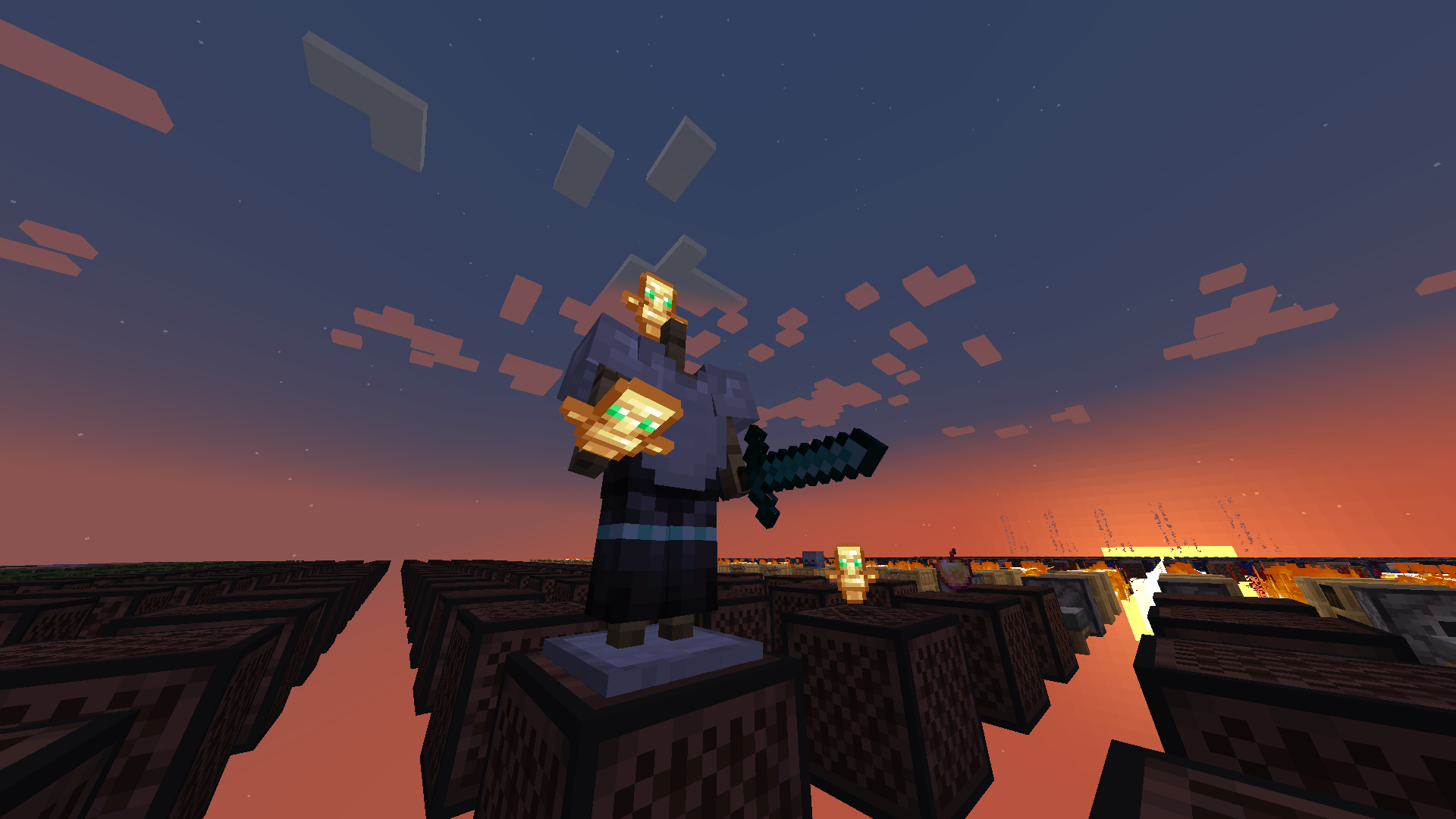
—
**Totem No Shading** is a simple Minecraft mod that removes [directional shading](https://en.wikipedia.org/wiki/Shading) and block and sky lighting effects to **[Totem of Undying](https://minecraft.wiki/w/Totem_of_Undying)** items. Holding totems in either hands, worn on head (through commands), or on the ground will render said items to **full brightness**.
Totem No Shading is a subset of [Simply No Shading](https://modrinth.com/mod/simply-no-shading) (SNS), concepts and technologies thereof aided in realizing this mod. The creation of [issue 119 for SNS at Github](https://github.com/StartsMercury/simply-no-shading/issues/119) requests supporting selective application, specifically the Totem of Undying item; at that time there was no clear way to implement this. After SNS‘ entity shading now exiting its experimental phase, the aforementioned issue was reconsidered and now released as its separate mod, **Totem No Shading**.
Yellow Tooltip (Monochrome)
#
Yellow Tooltip (Monochrome)

Replaces the default Minecraft Tooltip with a **Yellow Tooltip (Monochrome)**.
Looking for different colors/flags or styles? Check out the [Pride Tooltips Organization Page](https://modrinth.com/organization/pride-tooltips)!
Looking for packs with the same color(s)/flag but with different styles?
Can’t find a color, flag, or style you are looking for?
Feel free to [open an issue on GitHub](https://github.com/Pridecraft-Studios/pridetooltips/issues) or [join the Pridecraft Discord](https://discord.pridecraft.gay/) and ping `@rotgruengelb`!
Color Palette
The following colors where used to create this pack:
* #ffd800
Style
Monochrome = A simple monochrome style with one color.
Additional Information
* build_time: `2026-02-26T18:58:59+01:00`
* build_user: `rotgruengelb`
## Installation
Download and place into your `resourcepacks` folder. (Only works in versions **after 1.21.1**)
## About Pride Tooltips
A collection of resource packs that change tooltips to be colorful and/or pride themed.
### Rotgruengelb (Developer & Artist):
[](https://youtube.com/rotgruengelb)
[](https://github.com/rotgruengelb)
### Pridecraft Studios:
If you also want other bits of your UI to be themed with pride:
[](https://modrinth.com/project/pridegui)
You can chat with us and check out the source of our projects here:
[](https://discord.pridecraft.gay)
[](https://github.com/Pridecraft-Studios/pridetooltips?tab=readme-ov-file#pride-tooltips)
### Additional Credit
* Cursor texture, used in the banner, from the [Minecraft Cursor Mod by fishstiz](https://modrinth.com/mod/minecraft-cursor).
* The Pridecraft team for all their support and help.
White Tooltip (Frame-only Monochrome)
#
White Tooltip (Frame-only Monochrome)

Replaces the default Minecraft Tooltip with a **White Tooltip (Frame-only Monochrome)**.
Looking for different colors/flags or styles? Check out the [Pride Tooltips Organization Page](https://modrinth.com/organization/pride-tooltips)!
Looking for packs with the same color(s)/flag but with different styles?
Can’t find a color, flag, or style you are looking for?
Feel free to [open an issue on GitHub](https://github.com/Pridecraft-Studios/pridetooltips/issues) or [join the Pridecraft Discord](https://discord.pridecraft.gay/) and ping `@rotgruengelb`!
Color Palette
The following colors where used to create this pack:
* #ffffff
Style
Frame-only Monochrome = A simple monochrome style with one color. This style only applies the color to the frame, leaving the background black.
Additional Information
* build_time: `2026-02-26T18:59:01+01:00`
* build_user: `rotgruengelb`
## Installation
Download and place into your `resourcepacks` folder. (Only works in versions **after 1.21.1**)
## About Pride Tooltips
A collection of resource packs that change tooltips to be colorful and/or pride themed.
### Rotgruengelb (Developer & Artist):
[](https://youtube.com/rotgruengelb)
[](https://github.com/rotgruengelb)
### Pridecraft Studios:
If you also want other bits of your UI to be themed with pride:
[](https://modrinth.com/project/pridegui)
You can chat with us and check out the source of our projects here:
[](https://discord.pridecraft.gay)
[](https://github.com/Pridecraft-Studios/pridetooltips?tab=readme-ov-file#pride-tooltips)
### Additional Credit
* Cursor texture, used in the banner, from the [Minecraft Cursor Mod by fishstiz](https://modrinth.com/mod/minecraft-cursor).
* The Pridecraft team for all their support and help.


