Rename Item


Unlock custom item textures by renaming items in-game. This resource pack is built for builders and creative players, allowing you to create detailed decorations, unique item, and immersive builds using simple vanilla mechanics. No mods required just rename item and start building.


1. 🎨 Rename-Based Textures
Change an item’s appearance instantly by renaming it in an anvil.
2. 🏗️ Builder-Focused Design
Perfect for creating custom decorations, props, and themed builds.
3. 🧩 Vanilla-Friendly
Works entirely in vanilla Minecraft no mods or external tools needed.
4. ⚡ Lightweight & Efficient
No performance impact purely texture-based.
5. 🧠 Creative Freedom
Turn simple items into detailed assets for storytelling and builds.


1. This pack uses Minecraft’s built-in custom model system.
1. Take a supported item (e.g. stick, paper, etc.)
1. Rename it in an anvil to a specific name.
1. The item will automatically change its texture/model.


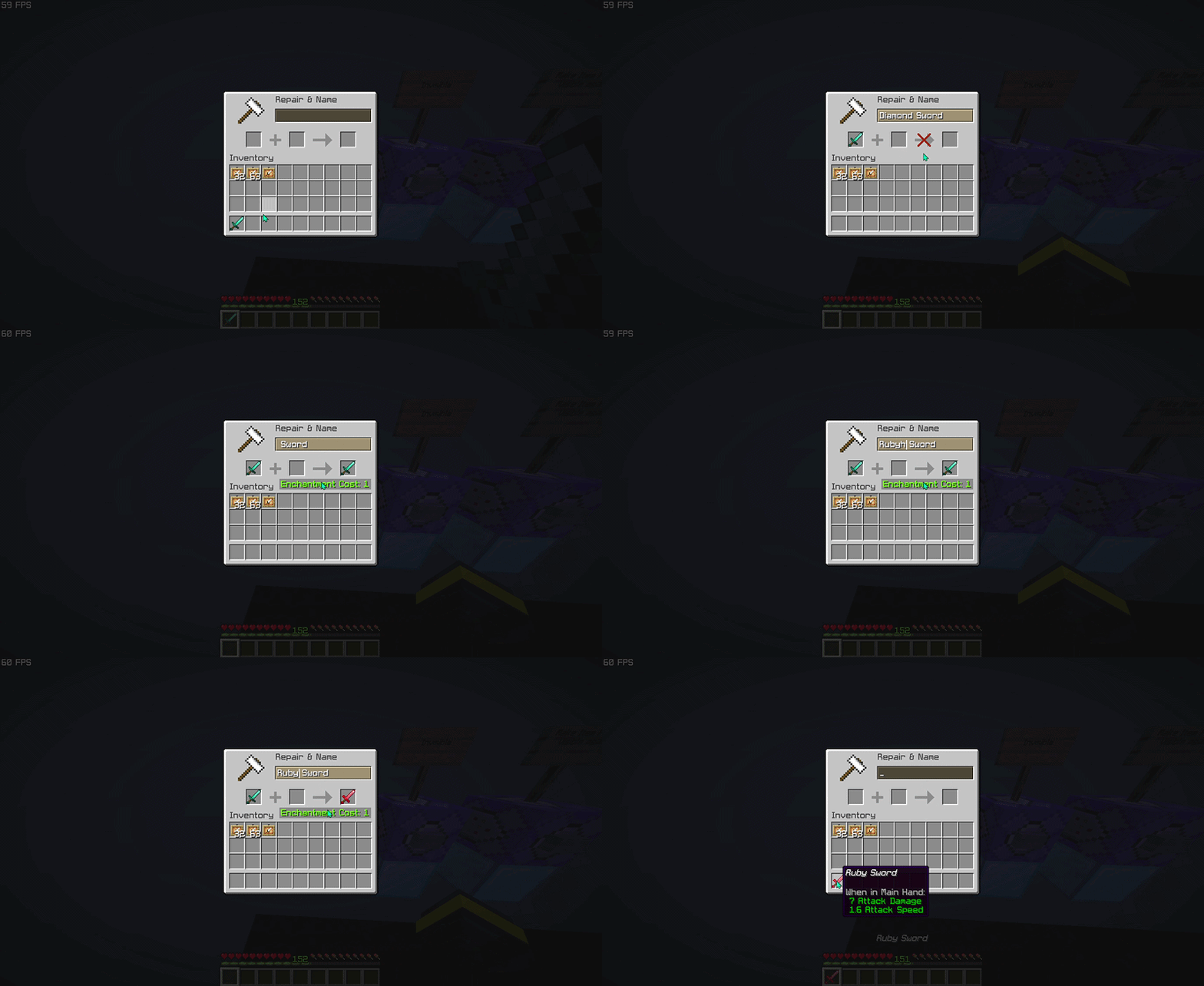
> This pack focuses on visual customization, not gameplay changes!


Do I need any mods to use this pack?
No. This resource pack works entirely in vanilla Minecraft. Just install it, rename items in an anvil, and the textures will change automatically.
How do I activate the custom textures?
Rename a supported item to the correct name using an anvil. Once renamed, the item will instantly use its custom texture.
Why isn’t my texture changing?
Common causes: The name is not typed exactly (check spelling, spaces, and capitalization), The item is not supported by the pack, Another resource pack is overriding the same item model.
Does this work in multiplayer?
Yes, the resource pack works in multiplayer.
Does this pack affect performance?
No. This is a lightweight resource pack that only changes item models and textures, so it has little to no impact on performance.
What Minecraft versions are supported?
Works on versions that support custom item models and rename-based overrides. Using the latest version is recommended for best compatibility (>1.21.5).
Is it visible to other players?
Yes, as long as they have the same resource pack installed and enabled.


| ━━━━━━━━━━ Item ━━━━━━━━━━ | ━━━━━━━━━━ Rename ━━━━━━━━━━ |
|——|——–|
| baked_potato | Golden Baked Potato |
| beetroot | Golden Beetroot |
| beetroot_soup | Golden Beetroot Soup |
| bread | Golden Bread |
| chorus_fruit | Golden Chorus Fruit |
| cooked_beef | Golden Steak |
> View the full item list here: Wiki Page


Want to see all available custom items in-game?
Check out the companion tool that lets you browse every supported anvil rename item and resource pack entry directly in-game. Download RP Rename Mod


– Thanks for using this pack! 🎉
– If you find this resource pack useful, consider give a heart to the project ❤.
– More custom items, improvements, and expansions will be added in future updates. Stay tuned!
Remotely

#
Remotely – The Minecraft IDE
Remotely is a **Client-Side** Minecraft Powertool for Minecraft servers and developers.
Want to create a server? Sure! Want to create a modpack server? Also no problem!
It’s built using ReScreen, a custom UI framework that enables max productivity while looking awesome.
### Features:
– Server Managment, Creation (Custom, Modpacks, or Import), And Configuration.
– Full Featured Terminal (Tab Completion, Colors, Optmizied Renderer)
– Built-In Reverse Proxy For **Port Forwarding**, Free, And Re-Routable.
– Zero Friction: Copy/Paste/Cut From And To Local, SSH, Reactor Servers, Open Any Remote File Locally (Yes, You Can Use NBT Explorer)
– Server Player Management (Players List, OPs, Bans, Kick, And Custom Actions)
– Mods/Plugins Management/Browser From Modrinth/CurseForge/Spigot/Hangar, Downloads, Auto-Update, Backups, And More!
– MSMP Support: Edit Server Settings And Gamerules IN REAL TIME Without Restarting!
– Full File Explorer, And File Editor.
– Smart Backup Manager.
– Java JRE Manager And Downloader.
– World Map Renderer For Your Server (Chunkbase-Like Structure Estimation Planned!)
– Feedback Tracker (Bugs, And Suggestions)
– Powerful Themeing Engine
– Remotely Support Remote SSH Servers (Duh), Yet you **only need the client-side mod**!
– Multi-Tabs Everywhere! Manage Servers/Terminals/Resources/Players, And Files Editors/Explorers At A Multi-Tabs Level.
– Desktop Mode Available! Each screen can be a window that have multi-tabs and grouped tab views.
– Secure, Everything Is Saved Using OS-Level Keyrings.
– And WAAAAAY MORE, seriously, look for the details below!
Server Manager
### Server Creation:

– Create: Takes You to the configuration screen:

Here, you can configure a LOT of stuff, this screen is the same as the edit option.
– Features are for runtime server management, this inlcudes the server life cycle, player management, and gamerule/server.properties (MSMP), I recommend keeping all of them as true.
## Icon Customization

Server Details (Terminal)

Remotely has a multi-tab design that allows you to manage more than one server in one place.
The terminal is the main highlight, it’s a full featured terminal, you can do whatever you want! including command input color highlight & tab completion.!
You can use it in local mode, basically a normal terminal, allowing you to open whatever CLI app you want, it was optmized for such tasks too!


It also support selection, copy/paste, and mouse reporting.
Server Details (Resources)
## Resources

Here, you can manage your plugins/mode:
– Group resources together.
– Update one resource
– Update all resources
– Double-Click to view reosurce
– Filters & Sort options.


Server Details (Player Management)
### In Game Player Management

You can view offline players, banned players, and OPed players
Most importantly, are actions! You can ban, unban, kick, op, and create your own custom stuff!

### Custom Actions Example:


Resource Browsing
## Resource Browser

Beautiful and compact resource browser that has some hiddle features, like **already installed resources and the one that needs update**
You can `shift+click` to:
– Install a new resource
– Update an installed resource
## Resource Overview


You can browse the gallery, zoom, pan, and copy images!


MSMP Support


File Explorer

Basically a file explorer, fast as hell, support sftp/local files, and you can copy/paste between **local and ssh**!
File Editor
## IDE-Like Workflow!

### Edit code with indent-friendly way, and manage everything in workspaces!

Port Forwarding
### You can port forward any server with just 1 click!

You can customize the SSH reverse proxy host as you wish:

Backup Manager
## Backups Made Easy!
### Manual Backup Manager

### Suggestive Backups


World Map Viewer
## See Everything!

You can pan and zoom of course
Java Manager
Feedback Tracker
## Custom Built Isssue Tracker!


Themeing Engine


LuckPerms Integration (WIP)
### It’s functional and real, yet I can’t showcase it right now :D, And the UI needs some work.
##
Remotely Is Also A Native App!
Download the latest Windows `exe` or Crossplatform Java `jar` From Here
There’s Still Way More Stuff! I’m just not gonna make this a wiki 😀
##
Reactor Hosting – Get The Most Out Of Remotely!

Remob
# REMOB(Rework Mobs – Beta V 1.0)
**Keep in mind this is a beta version**, so **bugs and unfinished features are expected**. **If you found a bug, please tell me through the form.**
**Also note that if you have any unique ideas or things you want to add to this datapack, feel free to leave it on the feedback form, any new ideas will help with the datapack progression.**
This datapack will completely **alter your gameplay experience**, from **subtle changes to massive overhauls!** Most mob now has its own **weaknesses**, and **unique resistances** to specific attack types, making every encounter **more strategic** and **engaging**. Some enemies can’t just be **brute-forced**, you’ll need to **plan your approach carefully** to take them down.
Before you dive in, **make sure to check some important mob reworks in the wiki!(mobs with bold names)** Understanding their abilities is the key to survive these **new and improved threats** roaming around the world.(Check out the gallery for visualized info)
## Wiki for mobs reworks(important)
– https://github.com/notgamer-modrinth/remob_description
## Changelogs
Alpha V 1.1
# **Alpha V 1.1**
– Added a brand new alpha mob, Orvana the witch, and also considered as a frog rider.
– Rework witches so they are now immune to poison.
– Added allay rework, now they act more as a support, when they got hurt, they stun all hostile mobs nearby.
– Rework frogs, so that they can support the role of prog and hostile frogs.
– Changes the loot of shulker so now they drop shulker shell, also change some bugs before.
That’s it for the 1.1 changes, note that this is still an alpha version so bugs are expected, and it would really help if you report any bugs immediately.
Alpha V 1.2
# **Alpha V 1.2**
– Added a brand new alpha mob, Baisy the Beehemoth(I should bee adding less puns) and Stug the humongous Slime.
– Added rework to spectral arrow, now they can pierce through entities and be ridirectable like a ghast fireball, though now they deal less damage than regular arrows and break upon landing.
– Rework bats so they are now can steal any items on the ground and ride nearby redirectable projectile.
– Rework cats so now they spawn in different collar colour and they now have chances to be phobia to water, pickles or both.
– Rework turtles and slimes(including magma cubes) so now they can deflect projectiles.
Alpha V 1.3
# **Alpha V 1.3**
– Change piglin brute appearances so that they resemble a brute more, they will have a bone on their head, but this doesn’t change anything for the gameplay.
– Added rework for zombies and skeletons variants, to make them differ than their original variant.
– Makes skeleton wield axes rarer, since they can be very deadly.
– Added Warped and Crimson tribe piglin as well as a chief to make the piglins even more differ, also changed the golden piglin into trader since golden piglin doesn’t make much sense.
– Make it so zombie(s) can now ride mobs other than chicken, just like in bedrock, but more mobs.
– Fixed some issue with baisy(before the angry bees won’t attack you)
– Heavily nerf silverfishes, since the baby can enter the stone and become a bigger silverfish, hence the cycle continues.
– Added new loot from alpha mobs, which is alpha items, items that can be crafted after you defeat an alpha mobs.
Alpha V 1.4
# **Alpha V 1.4**
– Give loot tables to many mobs that previously didn’t have loot.
– Reworked many loot tables, also the xp dropped by mobs.
– Make nuclear creeper spawn less frequently.
– Improved phantom, so they work as intended. They no longer spawn from insomnia:)
– Change strider behaviour when it takes damage, as the old one doesn’t make sense.
– Added a new mob called the Observer, which spawns alongside illagers and Haunted Armors in the end.
– Gave the wandering trader a chance to wear a unique head item (purely cosmetic).
– Added new particle effects when entities are hurt..
– Added giant zombies that are tankier than regular ones (not actual giants though).
– Reworked enderman in the nether and end dimensions to blind you when hit.
– Heavily reworked endermites into parasites that assist the enderman it is riding.
– Heavily reworked Silverfish now they burrow into stone and respawn later, making slime-like mechanics incompatible.
– Reworked Blazes due to the blazelings being too annoying.
– Piglins and hoglins won’t zombified in the night and they won’t fight each other again.
– Melee skeletons now detect players only at half their usual range.
– Nerfed the damage dealt by cave spiders, since they poison you now.
– Make Breeze no longer spawn alongside pillagers.
– Make some new advancements for the new and reworked mobs.
– Made several much-needed improvements to visuals and overall polish.
Beta V 1.0
# **Beta V 1.0**
– **Remove Alpha Mobs from this datapack** as they aren’t fit well into this datapack, they will be moved to **another datapack/mods**(soon)
– Reworked the ender dragon and wither. You can see the reworks on the boss section.
– Fix many bugs regarding the advancement and loot.
– Fix evoker’s rework so it battles with many tricks up his sleeves.
– Fix creaking and warden reworks so when they hit you, many experience orb comes out(basicly they steal some xp)
– Add llamas and camel rework.
– Add new trade to wandering trader’s trade pool, they basically can trade loot chests found in structures now.
– Fix and rework zombie villagers so now they naturally gain weakness I when its health is low enough
– Add skeleton variants, the creeper, enderman and piglin but they spawn rarely and won’t affect much of your gameplay.
– Add a stronger skeleton, the hunter, symbolized by the bone it has on its mouth, now it can switch between melee and ranged weapons according to its distance from the player.
– Rework shuker so they act more like a lucky block, giving a surprise when defeated.
– Fix chicken’s ability so they now correspond to their variants.
– Make a huge rework to breeze, now they can spawn in mountain and frozen biomes, replacing the witch position.
– Add a rework for the copper golem mob, to make it more lively.
– Adds small copper golem which hides in trial chamber chests.
– Nerf creepling’s follow range attributes to make it easier to avoid them.
– Make a huge rework to Trial Chamber trial spawners, so they fit the datapack more.
– Rework piglin chiefs(both variants) into fungi-infected piglin based on their location, which acts as a spawner class in the nether.
– Fix a bug where you used to get the effects you should have get when hurt by mobs, even when you’re blocking the hit with a shield.
– Give massive buff to shulker, making them invulnerable when hiding and make their loot overall more random. This change is made to give shulker a more end-game vibe.
– Nerf royal piglin absorption health, they were too tanky and overall not-enjoyable to fight.
– Fix armorstand gimmick, so you can change their pose much easier.
– Change pillager leader so their ability matches more like an illusioner.
– Added more plush(10 in total) to make the wandering trader more unique, also 6 of them are plushies with characters from outside the game, sold only in the end dimension.
– Rework the blaze so it feels more like a mid-end game mob.
– Buff the Elder Guardian by giving it a fix 1.5 hearts(3 damage) of follow-up damage, not affected by armor, enchant and potion effects to give it a “mini-boss tier ability”
– Wandering traders can now be located through the locator bar.
– Slightly nerfed the killer rabbit to deal less damage.
– Reworks for new mobs(nautilus, parched and zombie camel)
– Rework for zombies, now if it attacks you without holding any weapon, it bites you which can give you negative effect(s).
– Make three new elite variants for piglin brutes, making them an actual threat.
– Change the evoker’s totem ability so it is now a held item instead of an ability.
– Make a huge rework for wither skeletons so now they differ from the rest of the skeletons, also added elite variants, which spawns a soul everytime they attack.
– Also buff zombified piglins, so they are more ‘elite’ than the rest of the zombie crew.
– Make a big change for the observer to give them an actual purpose(observing you a little too much) and also renaming the to be ‘Observer Unit’
– Added leader variants to every zombie which can spawn reinforcement
– GIve witches, illusioner and evoker massive reworks so they are more challenging
– Reworks Slimes and Magma cube so they are challenging and gives a unique fight
Remastered Wither
# Wither Remastered: A Resource Pack for Minecraft
## Features
– Bright, glowing Wither Heads
– Energy Cracks, which are glowing lines that indicate unstable energy
– Elements of the Rage Theme (hints of chaos and corruption)
– A vanilla-style resource pack that fits in with the Minecraft Art Style
>Vanilla… but better.
This resource pack was created for the Wither Remastered datapack; however it can be used alone.
* Will work in any world
* Enhances every Wither battle
* Visual only; no change to gameplay.
## Installation Instructions
1. Download the resource pack
2. Open Minecraft
3. Go to Options > Resource Packs
4. Click Open Pack Folder
5. Move the pack into the folder
6. Enable it in-game
## Recommended Setup
To ensure maximum enjoyment:
* Use with the Wither Boss Fight Remastered
* Enable particles in Video Settings > All
* Play with sound on
## Frequently Asked Questions
Q: Do I need Optifine to use this?
A: No, it works with vanilla Minecraft.
Q: Will this cause changes to other mobs or creatures?
A: No, only the Wither will be changed.
Q: Is this resource pack compatible with multiplayer?
A: Yes, it works on the client’s side.
Reintroduced Breakable End Portal Frame
# Reintroduced Breakable End Portal Frame
Free and open-source datapack for Minecraft 1.21.5 (25w02a) and higher that reintroduced the mechanics of breaking end portal frames with the growth of a mushroom
This was previously a bug that was fixed in snapshot 25w02a, but in which it is also possible to change which blocks are replaced by mushroom blocks when a red mushroom grows
Reimagined
### Want early access to new updates, behind the scenes content or some extra goodies while supporting me and Reimagined’s development? Consider donating to my Patreon! <3

### Reimagined, a love letter to Minecraft
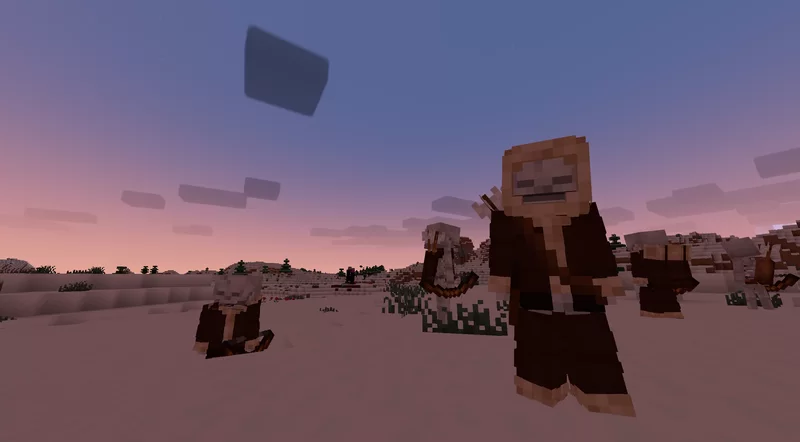
Reimagined is a constant work in progress which is an extensive overhaul changing as much as possible in big and subtle ways. From hundreds of new block variants, completely new remade guis, new sounds, animations, biome colors, mobs, particles and so on! Reimagined should hopefully have a bit of everything people can enjoy.
It'll hopefully will give your pixel world a bit more of an immersive feel, while keeping that cozy familiar Minecraft charm.

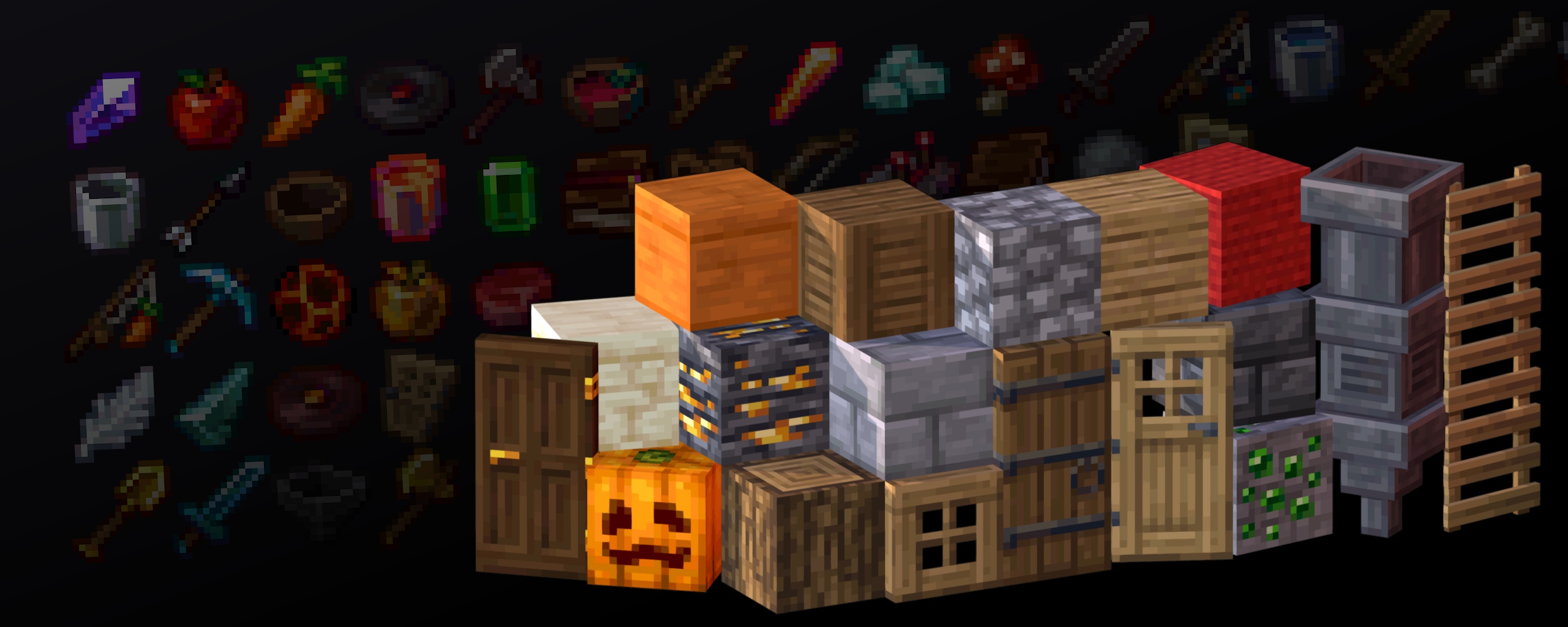

### TO GET ALL OF THE REIMAGINED FEATURES, PLEASE USE THESE MODS:
Mod List
Required mods for the full Reimagined experience, Pack may or may not break if missing any of these:
EMF & ETF
Needed for custom Mob models
POLYTONE
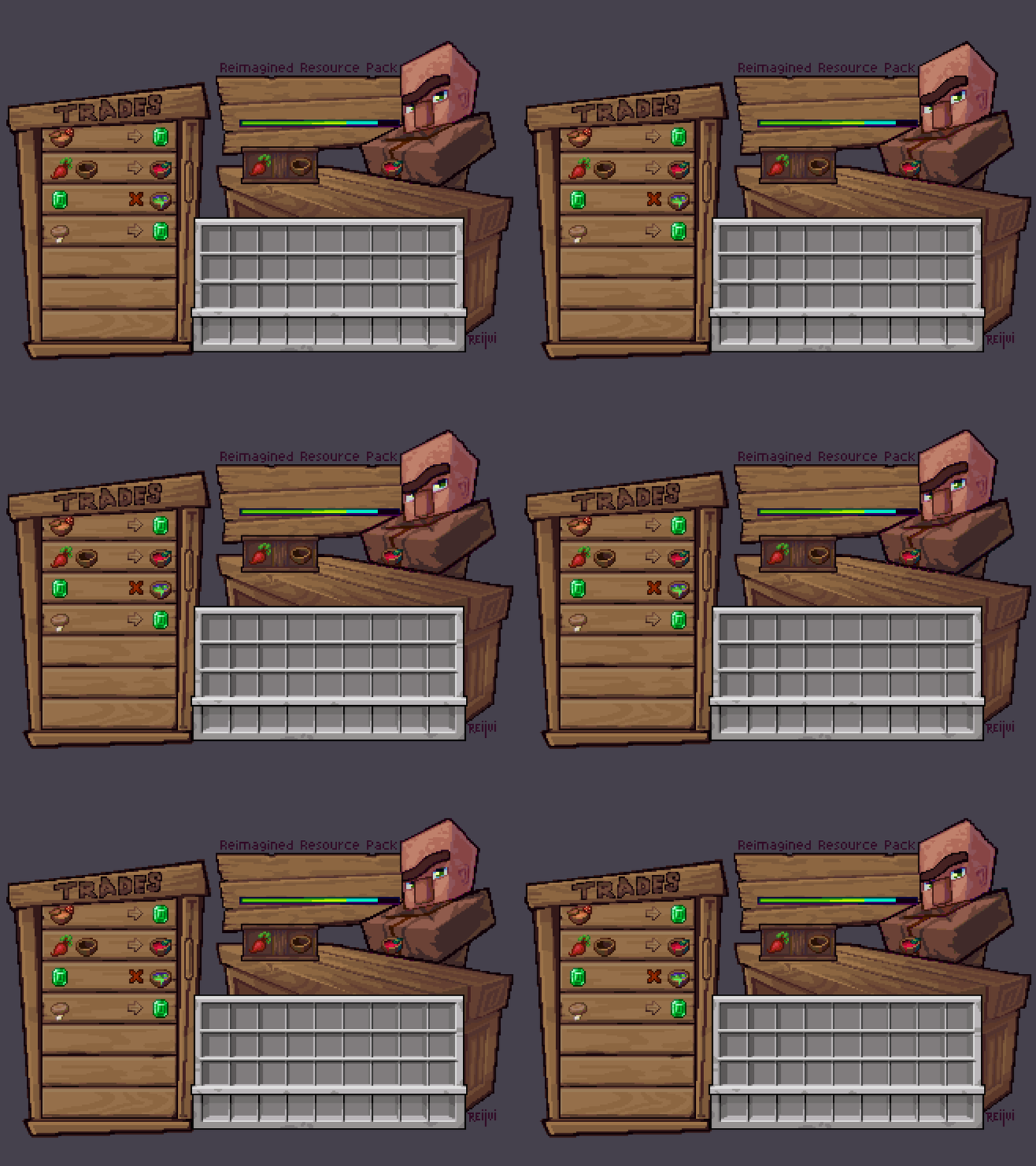
Used for a better colormap, better sodium parity and so on (Villager GUI for pre-1.21.6 versions)
CONTINUITY
Used for Connected Textures, like plank borders, carpet ctm, grass overlays, etc
RESPACKOPTS 1.21+
Used to further customise Reimagined with in-game settings. This one is needed currently for improved grass or bushy leaves since it’s enabled via a setting.
If you want Grassy Grass without Respackopts, be sure to use the Grassy Grass Addon
MODEFITE PRE-1.21.4
Needed to backport features from newer versions, this includes stuff like 3D buckets or items when held in hand. This one isn’t needed if you’re on 1.21.4+

Recommended mods for a smoother, more optimised Reimagined experience:
SODIUM

## Features

Show Features
# A couple of notable features:
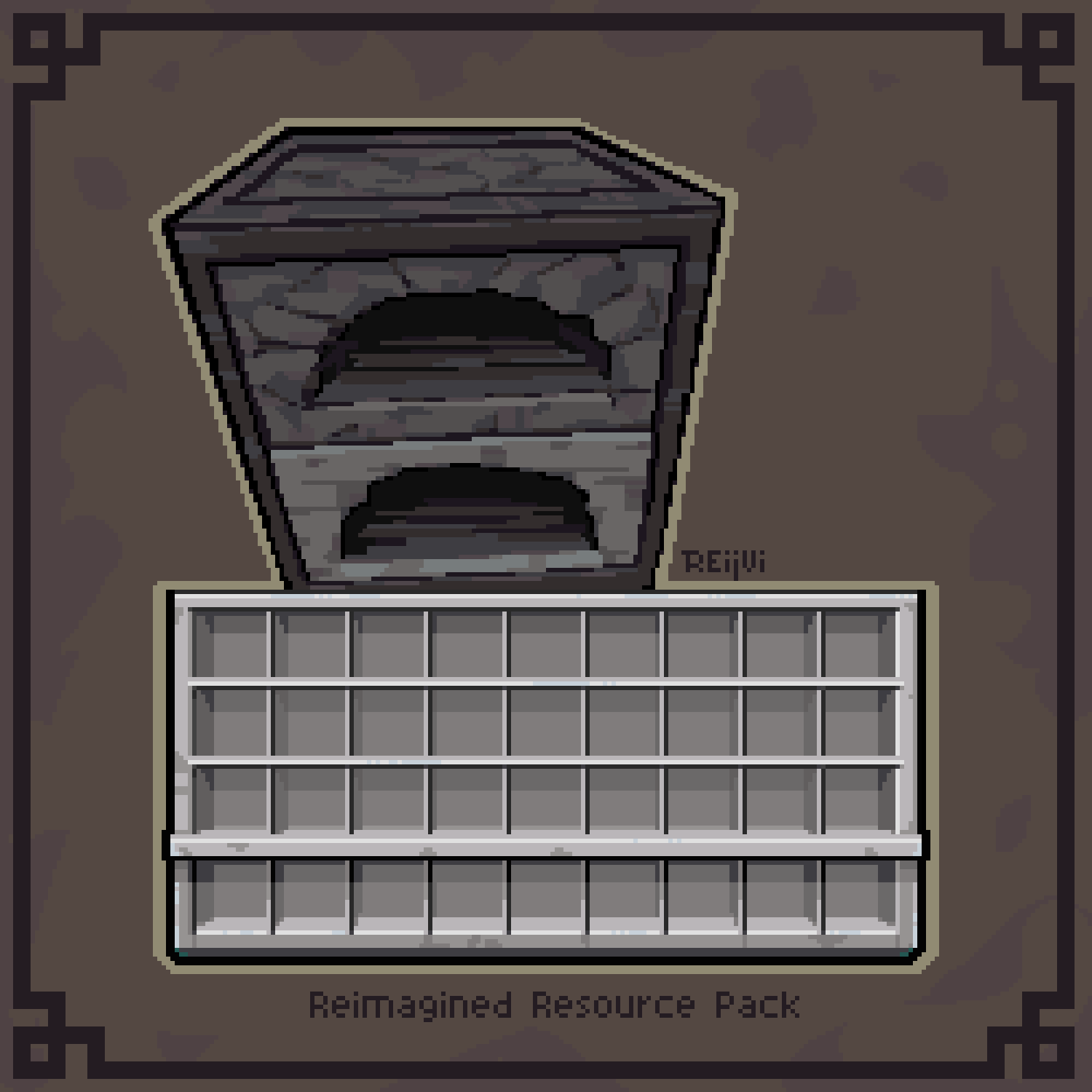
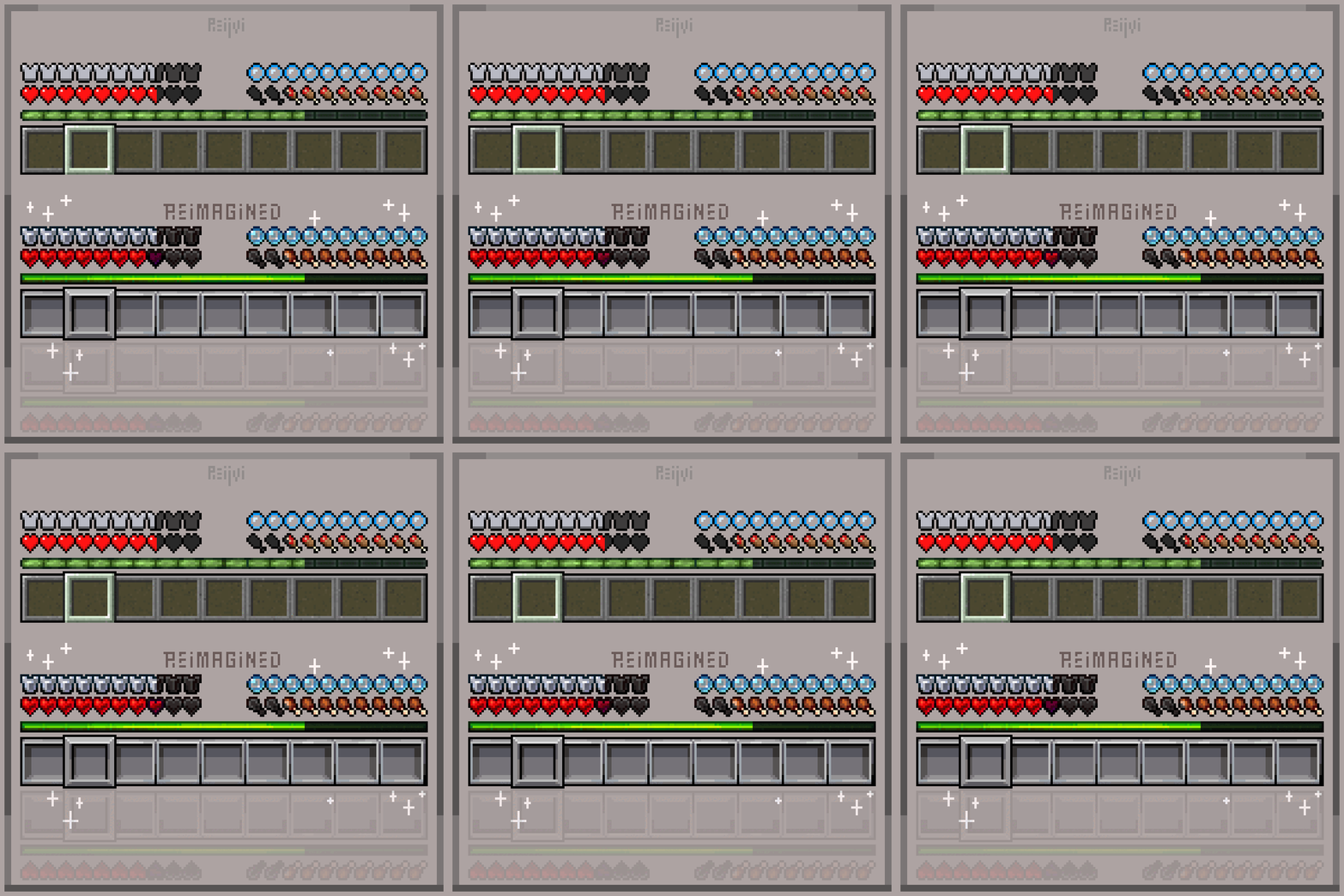
## A new Reimagined GUI

## Animated Features


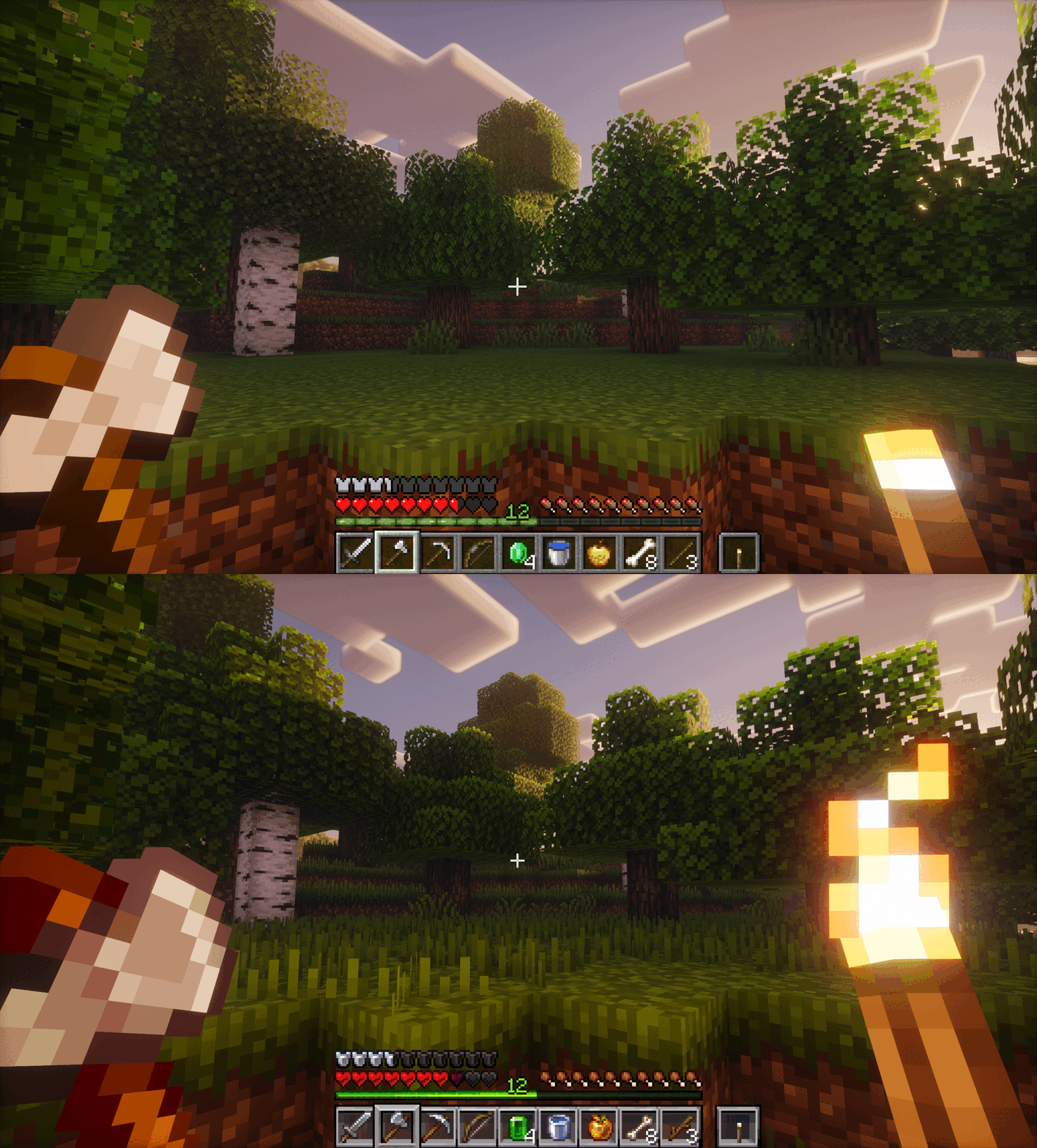
# An Immersive World
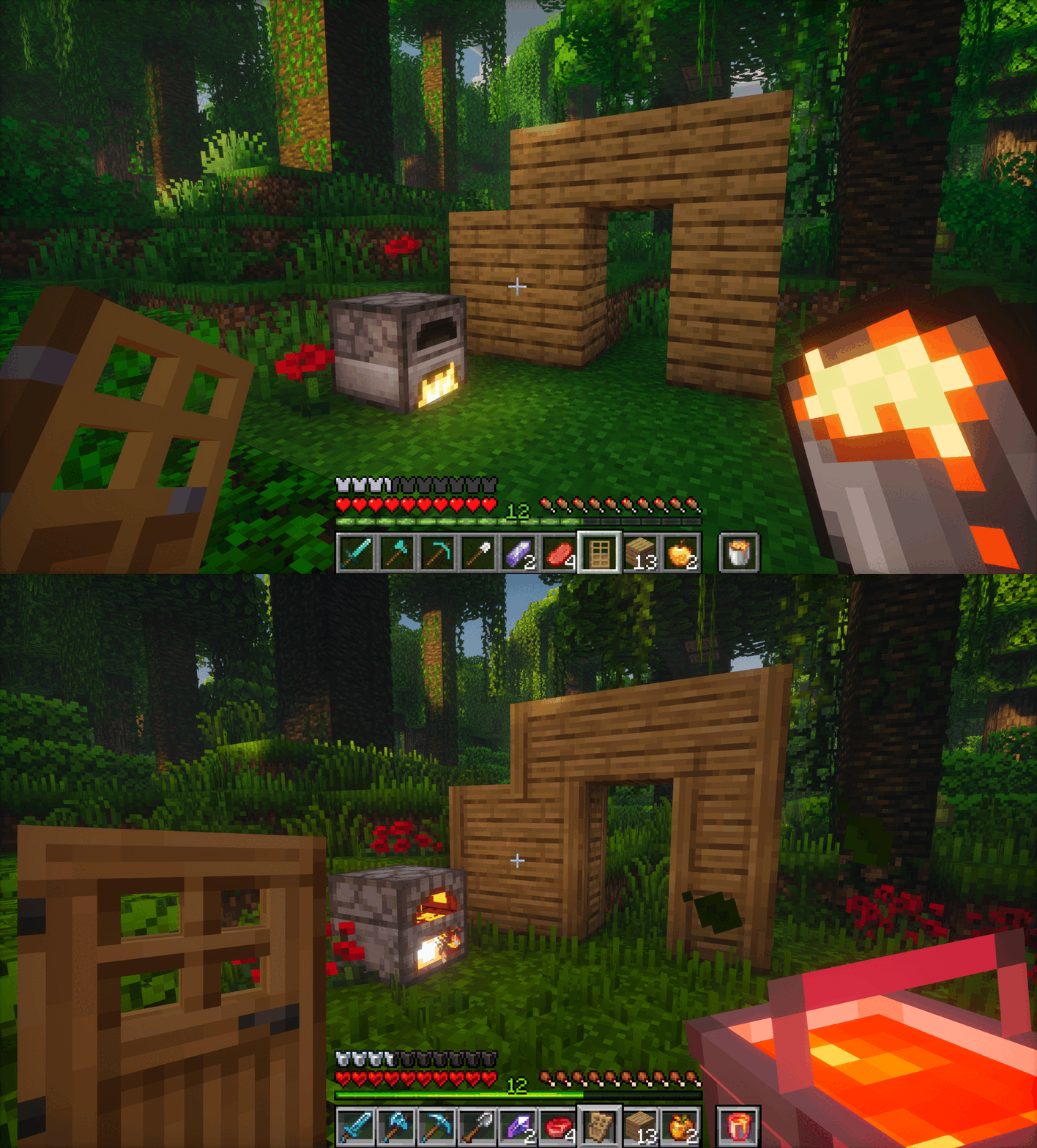

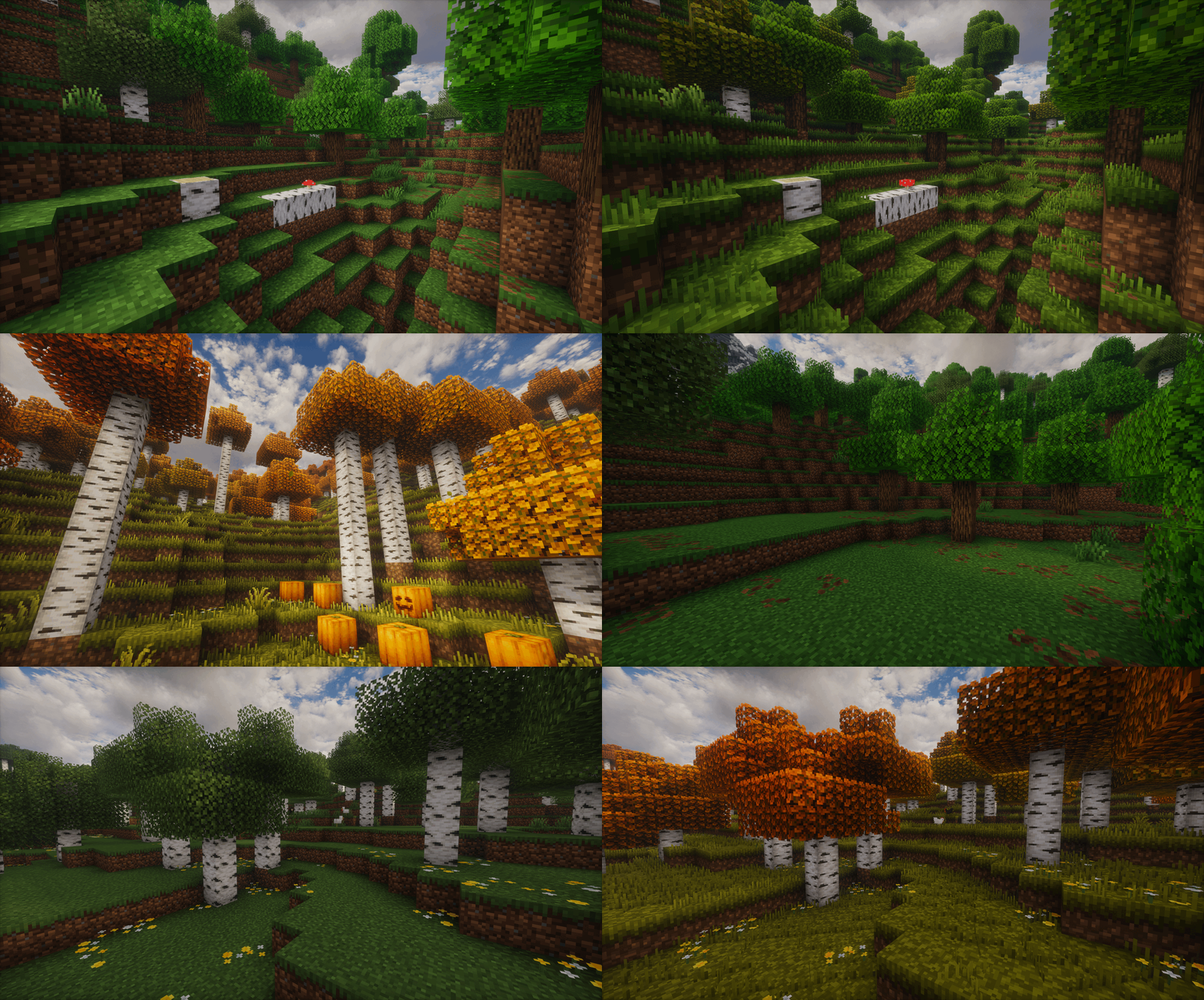
# New Foliage
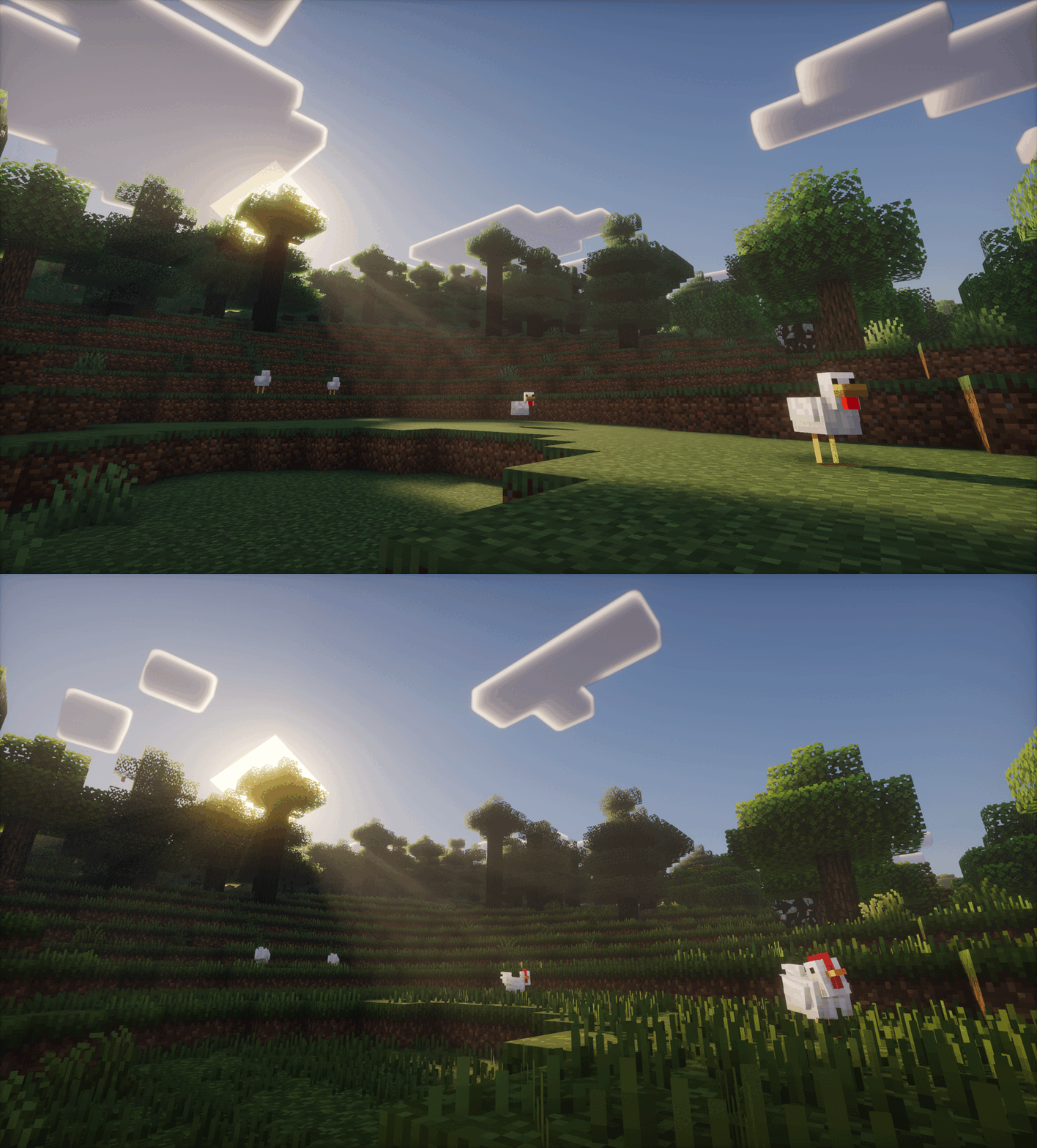

# Mob Variation
# And much, much more!


Show Addons
Official Addons:
Fresh Animations Compatibility Patch

Unofficial Addons:
Healthbars (Spryzeen’s Health bars compatibility addon)
Emissive Ores
Darkmode GUI

It is recommended to play on the US English language, since I’ve renamed and modified a few text colors and names, some of which affect the gui!

CREDITS
-un_roman (PMC) for being super kind and creating the Reimagined text logo!
-RickyMemester (PMC) for letting me borrow a few of his original ore texture variants which I’ve previously used in my older “Randomize It” and modified quite a bit.
-DartCat25 (PMC) for letting me borrow his “Menus – Enchanted”, as well as his “Rotating Items” shader for some of Reimagined’s features to work.
-Godlander (PMC) for letting me borrow his “Animated Skin” shader for some of Reimagined’s features to work.
-Cosmoman, (PMC) has helped and contributated with loads of textures, porting deepslate ores, consistency changes and so on.
-ShrimpSnail, (PMC) let me borrow and repurpose their enchanting book cem animation from their The Great Shrimpsby pack.
-EwanHowell, (PMC) has helped me with honestly more than I can count, biggest reason I even know how to make resource packs
-Complementary Reimagined for being the go to screenshot shader (ironic I know)




Want to support Reimagined? For no extra cost, I get a part of the revenue via the purchases made through this link
Reduce the Vignette Effect – Less intense Shadow Borders/Corners
Reduces the Vignette Effect (The dark corners effect of the screen).
## New Effect:

## Vanilla Effect:

RedstoneToolkit
# RedstoneToolkit


A collection of technical and performance‑oriented mods designed to support Technical Minecraft builds
### Platform Notice
The CurseForge version is a Trimmed Edition due to platform rules. For the full modlist, we highly recommend using the Modrinth version instead.
### Note
This pack includes several disabled mods, which are optional and can be enabled by the user if desired
– This pack is built based on mods listed at CommandLeo’s Mod List
## Mods

This is a list of all the mods in this pack:
### Enabled Mods
These mods are enabled by default and recommended to the user
Carpet
– Carpet Igny Addition – A Carpet extension adding various technical features including bot management rules
– Carpet Mod – The most important mod for technical Minecraft; it comes with tons of useful features and commands
– Carpet TIS Addition – Very useful Carpet extension with lots of new rules and tools, in particular for doing stuff in creative mode
– JoaCarpet – A small Carpet extension with a few useful features for redstone and storage tech
– SubTick – Allows freezing and stepping through block ticks, fluid ticks, block events, entities, and block entities individually, with HUD visualization and configurable defaults
– Yet Another Carpet Addition – Adds a lot of useful features, including visualization for scheduled ticks, hopper cooldowns, random ticks, block updates, etc. Provides GUI interfaces for Carpet rule management and hopper counter tracking
Fixes
– Model Gap Fix – Fixes gaps in block models and item models
– PacketFixer – Fixes various problems with packets, nbt, and timeouts
– ToolTip Fix – Stops tooltips that are too large to fit on the screen from running off the screen
Libraries
– Cloth Config API – Configuration library required by some mods
– Fabric API – Library required by a lot of mods
– Fabric Language Kotlin – Library required by Too Many Shortcuts
– Fzzy Config – Configuration library required by Particle Core
– MagicLib – Library required by MasaGadget
– MaLiLib – Library required by Masa’s mods
– oωo – Library required by Isometric Renders and WikiRenderer
– YetAnotherConfigLib – Configuration library required by multiple mods
Performance
– BadOptimizations – Micro optimizations that improve client performance without altering gameplay
– Better Block Entities – Optimizes block entity rendering for smoother performance and reduced lag on versions ≥1.21.6
– Enhanced Block Entities [[1]](#ref-1) – Reduces block entity FPS lag and improves their visuals on versions ≤1.21.4
– EntityCulling – Hides entities and block entities that are not visible
– Fast Noise – Replaces the vanilla noise generator with a faster implementation to speed up world generation
– FerriteCore – Memory usage optimizations
– ImmediatelyFast – Speeds up the immediate mode rendering performance of the client
– Ixeris – Offloads event polling to a separate thread, freeing CPU for rendering
– Krypton – Optimises the Minecraft networking stack
– Lithium – Improves server-side performance without affecting vanilla game logic
– ModernFix [[2]](#ref-2) – Improves performance and reduces memory usage
– ModernFix-mVUS – A fork of ModernFix that adds minor version update support on versions >=1.21.5
– More Culling – Changes how multiple types of culling are handled to improve performance
– Smooth Boot – Optimize Minecraft loading performance to be smoother on low end systems and scale better on high end systems
– Particle Core – Optimises particle rendering
– Sodium – The fastest rendering optimization mod for Minecraft
– Sodium Extra – Ports most of Optifine’s options over to Sodium
Quality of Life
– Auth Me – Makes it possible to authenticate yourself and re-validate your session without having to close the game
– Better Suggestions – Makes command suggestions more useful
– CarpetGUI – A GUI for managing Carpet rules with favorites, rule groups, and a version-control-like history stack
– Client Commands – Adds lots of useful client-side commands
– CommandKeys – A powerful command macro mod
– Hold That Chunk – Keeps chunks in memory longer after they are out of render distance
– Hold That Chunk V2 – A re-implementation of Hold That Chunk for versions >=1.21 that keeps rendered chunks in memory longer
– Isometric Renders – Allows the creation high-resolution isometric images of items, blocks, and entities
– Item Scroller – Adds many shortcuts to move items more easily and craft faster in inventory screens
– MaLiBind – Imports vanilla Minecraft keybinds into MaLiLib’s configuration system
– MiniHUD – A “mini F3” HUD mod, also with various overlays like light level, spawn chunks, slime chunks etc.
– Mod Menu – Adds a mod menu to view the list of mods you have installed
– NBT Autocomplete – Adds suggestions for NBT tags in commands
– Packed Packs – Pack resource and data packs into profiles
– Pick Block Pro – Advanced client-side picker for blocks, entities, NBT, tools, and IDs
– Reese’s Sodium Options – Alternative options menu for Sodium
– Suggestion Tweaker – Improves the way suggestions are filtered and sorted when writing a command
– Vanilla Keybind Manager – Manages conflicts between Vanilla and Malilib keybinds
– WikiRenderer – Allows rendering entities, items, and blocks as high-resolution images for versions >=1.21.11
Technical
– ChunkDebug – Adds a map with information about the currently loaded chunks
– EssentialClient – Adds many utilities and provides a GUI to modify carpet rules
– G4mespeed – Utility mod that improves the reliability and experience of changing tick rate, and adds many quality of life features
– Litematica – A client-side schematic mod with extra features for creative mode work
– Litematica Server Paster – Lets Litematica paste tile entity data and entity data on servers
– Litemoretica – Adds features and fixes to Litematica
– Masa Gadget – Additional features for Masa’s mods
– MasaAdditions – Addon mod for Tweakeroo, MiniHUD and Litematica
– NBT Copy – Adds a button to the chat to easily copy NBT data from the `/data get` command.
– spark – A performance profiler for Minecraft clients, servers and proxies
– Syncmatica – Enables sharing litematic placements with other players
– Technical Utilities – Provides an Inventory Verifier for Litematica schematics and various other small technical utilities
– TweakerMore – Adds even more client-side tweaks to the game
– Tweakeroo – Adds a whole bunch of client-side “tweaks” to the game
### Disabled Mods
These mods are disabled by default and can be enabled if desired
Aesthetics
– Continuity – Connected textures and emissive textures
– Iris – The best shaders mod
Carpet
– Carpet Extra – Adds Carpet rules that introduce non‑vanilla mechanics for technical play. Extends dispenser behavior to place blocks, feed and interact with animals, while enabling renewable conversions.
– Doormat – Provides Carpet rules for experimental redstone mechanics. Introduces a Tinker Kit system that allows per‑component configuration of quasi‑connectivity, block update emissions, etc.
– Essential Addons – Integrates the functionality of the Spigot plugin Essentials alongside additional features. Adds mechanics such as stackable shulkers and nesting shulkers inside shulkers
Fixes
– WeCuiFix – Fixes WorldEdit compatibility with WorldEditCUI on versions 1.20.5-1.21.4
– WorldEdit Hang Fix – Prevents the client from freezing when performing large operations with WorldEdit
Libraries
– Indium – Allowing Continuity to work with Sodium
– LibJF – Library required by Respackopts
Performance
– Concurrent Chunk Management Engine – Improves chunk generation, I/O, and loading performance by utilizing multiple CPU cores
– Dynamic FPS – Reduces resource usage by lowering the frame rate when the game window is inactive or backgrounded on versions <1.21.2
- ScalableLux - Optimizes lighting engine performance for improved FPS
- Starlight - Rewrites the lighting engine to significantly improve performance and fix lighting errors
- Voxy - Light-weight LoD rendering mod enabling extreme render distances
- Worldthreader - Allows multi-threaded processing of multiple dimensions simultaneously to improve performance
Quality of Life
– AppleSkin – Adds food/hunger-related HUD improvements
– ClearDespawn – Makes items blink when they are about to despawn
– ClearDespawn Reworked – A rework of the ClearDespawn mod for Fabric 1.21.x
– Cubes Without Borders – Allows playing Minecraft in a borderless fullscreen window
– DashLoader [[1]](#ref-1) [[2]](#ref-2) – Speeds up Minecraft startup by caching and reusing resource loading
– Disable Custom Worlds Advice – Disables the annoying “Experimental Features” advice
– Fabrishot – Allows taking high-resolution screenshots
– FastQuit – Makes it possible to return to the title screen early while a world is still saving in the background
– InvView – Allows opening and manipulating the inventories and ender chests of online and offline players
– kennytv’s epic force close loading screen – Disables world loading/reconfiguration screens and removes forced fades for faster resource pack loading
– No Chat Reports – Makes chat unreportable (where possible)
– Respackopts – Adds config menus for resource packs; recommended for Redstone Tweaks users
– SchematicPreview – Adds 3D previews and a material “replace” button to Litematica
– Sound Controller – Provides complete control over the volume of every sound in the game
– ViaFabricPlus – Allows connecting to almost any Minecraft server version and includes various client-side fixes for older protocol versions.
Technical
– Axiom – An all-in-one tool for Minecraft editing
– G4mespeed Capture & Playback – Addon for G4mespeed that adds recording and playback capabilities for tick-warped gameplay
– Rail Placement Fix – Allows precise rail placement
– Redstone Multimeter Fabric – An intuitive redstone debugging tool
– Unobtainable Blocks – Adds items for unobtainable blocks like fires and portals
– WorldEdit – A tool to make building a lot faster
– WorldEditCUI – Adds visual outlines for WorldEdit areas
### Notes
[[1]](#ref-1) DashLoader and Enhanced Block Entities are not compatible in versions 1.16.5 and 1.19.4
[[2]](#ref-2) DashLoader and ModernFix are not compatible in versions 1.16.5 – 1.18.2
[[3]](#ref-3) Essential Addons are not compatible with ChunkDebug and EssentialClient in version 1.16.5
## Resource Packs
This is a list of all the resource packs in this pack:
Resource Packs
– Redstone Tweaks – Vanilla-style resource pack made to improve redstone experience
Red String
This resource pack will colour the string (tripwire) red when it placed. You now can see the string clearly and cannot be trapped by tripwire hook trap.
I don’t have chance for testing the new version of this resource pack, if there is any issues, please report here : https://github.com/break08/red-string/issues and you can also try download tested older versions (which doesn’t support many versions of minecraft).
If errors happened, try to…
Go to .zip file of resource pack -> pack.mcmeta
**Method 1**: In pack.mcmeta, remove
“supported_formats”: {
“min_inclusive”: x,
“max_inclusive”: x
}
and remove the `,` from description line
**Method 2**: Remove
“meta”: {
“game_version”: “x”
}
and remove `,` next to `}` above these removed lines
**Method 3**: Do both Method 1 and 2
**Method 4**: Report issues for me and use one of these versions:

**List of not tested versions: 1.0.1-mc1.13-1.21.11, 0.0.1-mc1.6.1, 0.0.1-mc1.9**
**Before using this:**

**After using this resource pack:**

Try my other resource packs:
**1**. Lined Redstone – Replace the vanilla dusty redstone lines with straight-line designed redstone
**2**. Mark the Powder Snow – Border the powder snow blocks and help you to avoid falling into them
and mods =):
**1**. New NameTag Recipe – Backport the Name Tag recipe of Minecraft 26.1
Red Shield
# Red Shield
This resource pack replaces the default shield with a custom 3D model.
The design uses a red theme.
No OptiFine required. Vanilla compatible.
## More Shield Themes
– Black
– Blue
– Creeper
– Dark Red
– Mirror
– Navy Blue
– Rabbit