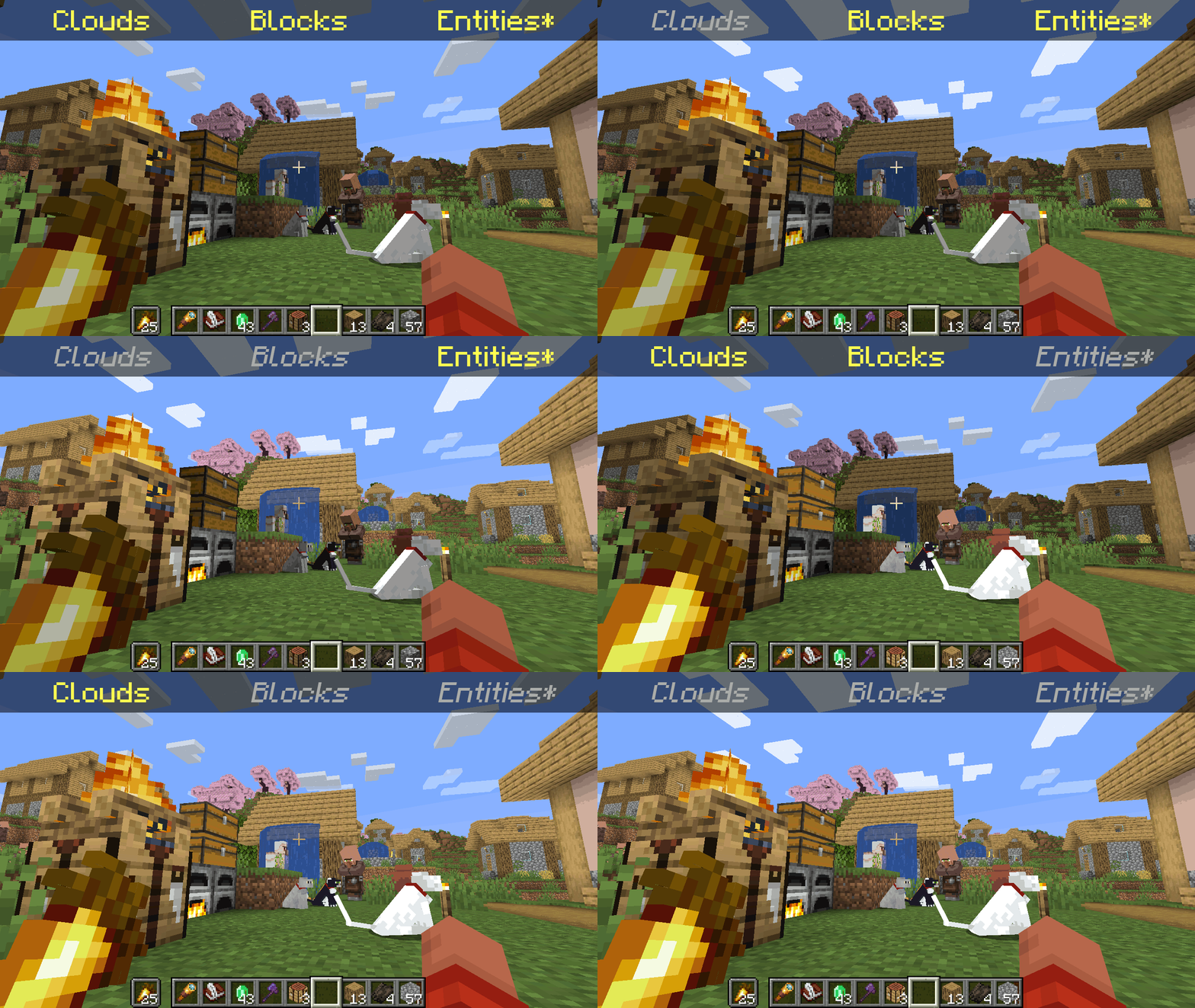
*Clarification that Entity shading is now stable and DOES NOT affect the inventory and in-game screens.
—
Simply No Shading is a [Fabric]-based [modification] (mod) for the [Minecraft] [client]. This mod removes the darkening on sides or faces (also known as [shading]) to in-game objects such as blocks, clouds, and entities as illustrated above.
[Fabric]: https://fabricmc.net
[modification]: https://minecraft.wiki/w/Mods
[Minecraft]: https://minecraft.net
[client]: https://minecraft.wiki/w/Mods#Client-based
[shading]: https://en.m.wikipedia.org/wiki/Shading
## Compatibility
Simply No Shading provides active compatibility for [BedrockIfy] and [Sodium]. Some mods that provide or replace stuff may work such as [Enhanced Block Entities] (EBE), where block entities act like blocks and are affected as such when toggling shading. Some mods that replace rendering are most likely incompatible; exceptions have active support such as Sodium, for example. One example of incompatibility is shaders, usually applied using [Iris], as they may not crash the game but would just render this mod ineffective when they are applied.
[BedrockIfy]: https://modrinth.com/mod/bedrockify
[Sodium]: https://modrinth.com/mod/sodium
[Enhanced Block Entities]: https://modrinth.com/mod/ebe
[Iris]: https://modrinth.com/mod/iris
## Similar Solutions
Simply No Shading is not the only effort to removing shading, there are other solutions such as:
– [Flat Lighting] is a simple Fabric mod that achieves the same results for blocks and supports Sodium.
– [internal-shaders](https://modrinth.com/shader/internal-shaders), though unlisted, is a simple Iris shader that removes shading on blocks and entities.
– [Lightingless] is a simple shader that removes shading on blocks and entities.
– [OptiFine]’s old lighting through the internal shader. Achieved by turning `Options > Video Settings > Shaders… > (internal) > Old Lighting` to `ON`.
– [New Lighting 1.18+ (Internal Shaders without Optifine)]. This resource pack achieves the similar results by setting the `shade` flag on block models to `false` (OFF).
[Flat Lighting]: https://modrinth.com/mod/flat-lighting
[Lightingless]: https://modrinth.com/shader/lightingless
[OptiFine]: https://optifine.net
[New Lighting 1.18+ (Internal Shaders without Optifine)]: https://www.planetminecraft.com/texture-pack/new-lighting-1-16/
## Features
Simply No Shading supports the following categories for toggling shading:
– Blocks — this includes blocks, liquids, and EBE‘s block entities
– Clouds — this includes clouds
– Entities ([`≥7.4.0`]) — this includes normal entities and block entities in the world
– ***Deprecated** Experimental Entities Built-in Resource Pack — this includes block entities, entities, and blocks, block entities, entities, and items in toasts (pop-ups, e.g. completing an [advancement]) and inventories and or Graphical User Interfaces (GUIs)*
[`≥7.4.0`]: https://modrinth.com/mod/simply-no-shading/version/7.4.0+mc1.21
[advancement]: https://minecraft.wiki/w/Advancement
## Configuration
Simply No Shading has a configuration screen and it’s accessible through:
– a key mapping. It’s unbound by default and can be bound at `Options > Controls > Keys > Simply No Shading > Open Config Screen`
– [Mod Menu]. `Mods > Simply No Shading > Configure…`
[Mod Menu]: https://modrinth.com/mod/modmenu
Simply No Shading stores its configuration as a formatted [JSON] file at `/config/simply-no-shading.json`.
[JSON]: https://en.m.wikipedia.org/wiki/JSON
[`1.2.0`]: https://modrinth.com/mod/flat-lighting/version/1.2.0
[core shaders]: https://minecraft.wiki/w/Shaders
[Fabric Loom]: https://github.com/FabricMC/fabric-loom
[MIT License]: https://github.com/simply-no-shading/blob/master/LICENSE
[Modrinth]: https://modrinth.com/mod/simply-no-shading/versions
[resource pack]: https://minecraft.wiki/w/Resource_Packs
## Versions
Simply No Shading follows semantic versioning. This mod aims to maintain the same feature across supported Minecraft versions. Given the version `X.Y.Z` where:
* `X` changes when breaking changes occur, such as with breaking config format changes.
* `Y` changes when features are added or changed (non-breaking).
* `Z` changes for bug and compatibility fixes and may not stay consistent across supported Minecraft versions.
Target versions is currently being reconsidered. Mod version `8.x` will likely only be maintained for the newest versions of the game. `7.x` will still remain maintained for bug-fixing and translations.
Simply No Shading aims to provide support for the latest minor updates to major releases along with some April Fool’s snapshots. All minor releases for the latest major version are supported. The latest snapshot versions also get temporary support before the next major release. Following are all those versions:
| # | Mod Version | Minecraft Version |
|—:|:———–:|:———————-:|
| 1 | `7.6.4` | `1.14.4` |
| 2 | `7.6.4` | `1.15.2` |
| 3 | `7.6.4` | `20w14infinite` |
| 4 | `7.6.4` | `1.16.5` |
| 5 | `7.6.4` | `1.17.1` |
| 6 | `7.6.4` | `1.18.2` |
| 7 | `7.6.4` | `22w13oneblockatatime` |
| 8 | `7.6.4` | `1.19.4` |
| 9 | `7.6.4` | `23w13a_or_b` |
| 10 | `7.6.4` | `1.20.1` |
| 11 | `7.6.4` | `24w14potato` |
| 12 | `7.6.4` | `1.20.6` |
| 13 | `7.6.4` | `1.21` |
| 14 | `7.6.4` | `1.21.1` |
| 15 | `7.6.4` | `1.21.2` |
| 16 | `7.6.4` | `1.21.3` |
| 17 | `7.6.4` | `1.21.4` |
| 18 | `7.6.4` | `25w14craftmine` |
| 19 | `7.6.4` | `1.21.5` |
| 20 | `7.6.4` | `1.21.6` |
| 21 | `7.6.4` | `1.21.7` |
| 22 | `7.6.4` | `1.21.8` |
| 23 | `7.6.6` | `1.21.9` |
| 24 |`8.0.0-alpha.1`| `1.21.10` |
| 25 |`8.0.0-alpha.3`| `1.21.11` |
| 26 |`8.0.0-alpha.3`| `26.1-snapshot-2` |
SimplesorterR
# SimpleSorter
> A lightweight client-side inventory sorting mod.
—
## Features
### One-Key Smart Sorting
Open an inventory or container and press **R** to sort items.
– **Auto Stack Merging** — Automatically consolidates partial stacks of the same item into full stacks, freeing up valuable slots
– **Creative Tab Native Sorting** — Items are arranged using Minecraft’s Creative Mode tab order and support modded items
– **Custom Sort Order** — Adjust `tabOrder` in the config file to change tab priority
– **Pinned Items** — Configure `pinnedItems` to keep specific items always sorted first
– **Dynamic Container Blacklist** — All storage containers are sortable by default (including modded containers like Reinforced Chests). Functional containers are excluded by exact class names in `blockedContainers`; you can also press **B** while a container is open to toggle it automatically
– **Config Hot-Reload** — Edit `simplesorter.json` directly, changes take effect on the next R-key sort without restarting the game
– **Pure Client-Side** — Sorting is performed by simulated clicks, so the server does not need the mod
—
### Mouse Tweaks
#### Shift + Drag to Quick-Move
Hold **Shift** and **left-click drag** across multiple slots — every slot you pass over will be instantly quick-moved to the opposite inventory.
> Useful when moving many slots at once.
#### Shift + Double-Click to Move All Same Items
While **holding an item** on your cursor, **Shift + Double-Click** on a matching item to instantly quick-move **all identical items** from that inventory to the other side.
> Useful for pulling all matching items out of a chest.
#### Space + Double-Click to Move Everything
Hold **Space** and **Double-Click** any slot in a container to instantly quick-move **every single item** from that inventory to the opposite side.
> Useful for quickly emptying a chest.
—
### Slot Locking
Hold **Alt** and **click** any slot to **lock** it — locked slots display an overlay.
– Locked slots are **never moved** when sorting with R
– Locked hotbar slots are **protected from Q-key drops** (prevents accidental discarding)
– Lock state is **automatically saved** and independent per save file
– **Alt + click** again to unlock
– Hold **Alt + left-click drag** to lock or unlock multiple slots in one sweep. The first slot decides whether the drag locks or unlocks
– Overlay color can be customized with `lockOverlayColor`, supporting both `#RRGGBB` and `#AARRGGBB`
Color values use **Hex color codes**. Both `#RRGGBB` and `#AARRGGBB` are supported. The 8-digit format uses `ARGB` order: `AA` opacity, `RR` red, `GG` green, `BB` blue. It is not `RGBA`.
Common `AA` values: `40` very transparent, `80` half transparent, `C0` mostly opaque, `FF` fully opaque. Examples: `#80FF0000` half-transparent red, `#8000FF00` half-transparent green, `#800000FF` half-transparent blue.
> Useful for keeping tools in fixed slots and reducing accidental drops.
—
### Auto Replacer
– **Tool Break Replacement** — When a held tool breaks, automatically equips a replacement of the same type from your inventory
– **Stackable Item Refill** — When a held stackable item runs out (e.g. placing blocks), automatically refills from your inventory
– Can be **toggled on/off** in the settings screen
> Useful when building or mining with repeated item replacement.
—
### Caps Lock + Double-Click to Batch Drop
Hold **Caps Lock** and **double-click** any slot to **drop all identical items** in that inventory (using the Q-key drop action).
> Useful for clearing large quantities of one item.
—
### In-Game Configuration
Press **Z + I** (default combo) to open a graphical settings panel in-game:
– **Tab Sort Order (tabOrder)** — Customize the priority of Creative Mode tabs
– **Pinned Items (pinnedItems)** — Specify item IDs that always sort to the front
– **Container Blacklist (blockedContainers)** — Add container class names to exclude from sorting, or press **B** while a container is open to write the current class name automatically
– **Lock Overlay Color (lockOverlayColor)** — Customize locked-slot overlay color, for example `#80FF0000`
– **Z-Key Guard Toggle** — Disable the Z-key requirement to open settings with just I
– **Auto Replacer Toggle** — Enable/disable automatic tool and item replacement
– **Localized UI** — Settings interface automatically adapts to your game language (English / Chinese)
Also accessible from **Mod Menu** if installed.
> Advanced settings can be edited directly in `config/simplesorter.json`. Changes take effect on the next R-key sort.
> ⚠️ `blockedContainers` uses **exact class-name matching**, not fuzzy matching. Depending on mappings and Minecraft version, class names may look like `GenericContainerScreenHandler` instead of `ChestMenu`; the safest workflow is opening the target container and pressing **B** so the mod writes the correct name for you.
—
## Requirements
| Dependency | Required? | Notes |
|—|—|—|
| **Fabric Loader** ≥ 0.16.5 | ✅ Required | Mod loader |
| **Fabric API** | ✅ Required | Core API library |
| **Fabric Language Kotlin** | ✅ Required | Kotlin runtime support |
| **Cloth Config API** | ❌ Bundled | Config screen framework (already included in the mod jar) |
| **Mod Menu** | ❌ Optional | Adds a settings entry in the mod list |
—
## Installation
1. Install **Fabric Loader** and **Fabric API**
2. Download **Fabric Language Kotlin** and place it in your `mods` folder
3. Pick the jar matching your Minecraft version and drop it into your `mods` folder
4. Launch the game
—
## Keybind Reference
All keybinds appear under the **SimpleSorter** category in Minecraft’s Controls screen and can be changed there.
| Key | Action | Context |
|:—:|—|—|
| **R** | Sort & organize inventory | While any container is open |
| **Alt + Click** | Lock / Unlock slot | Prevents that slot from being sorted |
| **Alt + Left-Drag** | Batch lock / unlock slots | Drag across multiple slots |
| **B** | Toggle current container blacklist | When the current container should not be sorted |
| **Caps Lock + Double-Click** | Batch drop identical items | Quickly clear large stacks |
| **Shift + Drag** | Quick-move multiple slots | Drag across slots while holding Shift |
| **Shift + Double-Click** | Move all identical items | While holding an item on cursor |
| **Space + Double-Click** | Move all items from container | Empty an entire inventory at once |
| **Z + I** | Open settings screen | Available anytime |
—
## Technical Details
– **Client-Side Only** — No server modifications; sorting is achieved by simulating player click actions
– **Creative Tab Native Sorting** — Reads Minecraft’s Creative Mode tabs directly to build a sort index, perfectly matching the game’s native item order and automatically supporting all modded items
– **Multi-Version Architecture** — Built with a `core` + `shared` + `platform` layered architecture, allowing one codebase to support multiple Minecraft versions
– **Dynamic Config System** — Supports config file hot-reload, no game restart needed after edits
– **Exact Container Matching** — `blockedContainers` matches exact container class names to avoid accidental fuzzy matches
– **Modular Mouse Tweaks** — Each mouse enhancement is an independent `MouseTweakModule`, making it easy to add or modify features
– **License** — All Rights Reserved (See LICENSE file for strict usage terms)
—
SimpleSorter
A simple Minecraft inventory sorting tool.
SimpleOres Fabric

# Simple Ores Fabric
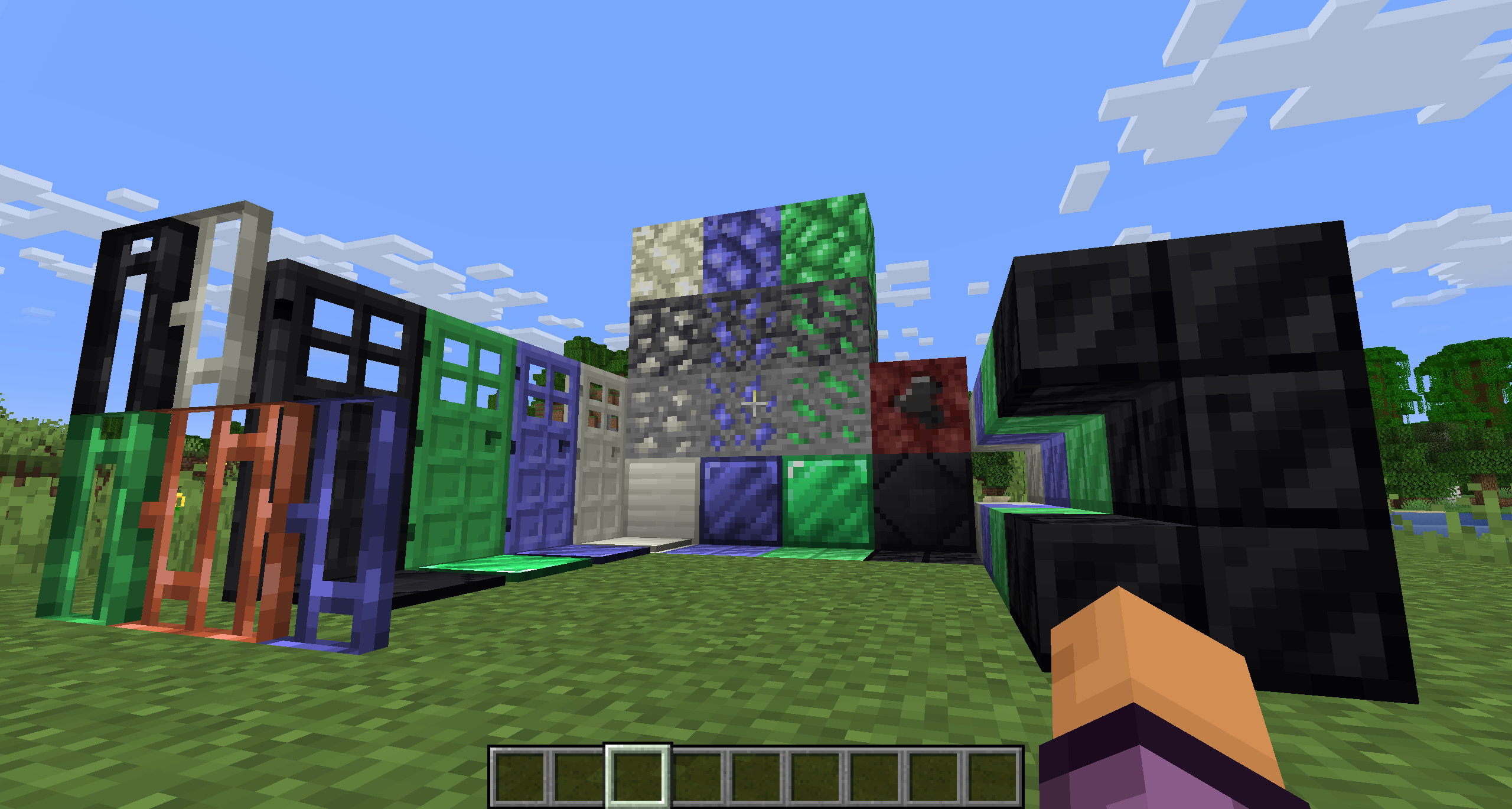
SimpleOres Fabric is an unofficial port of the original Forge mod by skrallexy to Fabric/Quilt that adds 4 new ores to the base game: Tin, Mythril, Adamantium and Onyx. All except Onyx can be found in the overworld, while Onyx can be found only in the Nether.
Each ore has its own unique properties, armor and tool sets, and more.
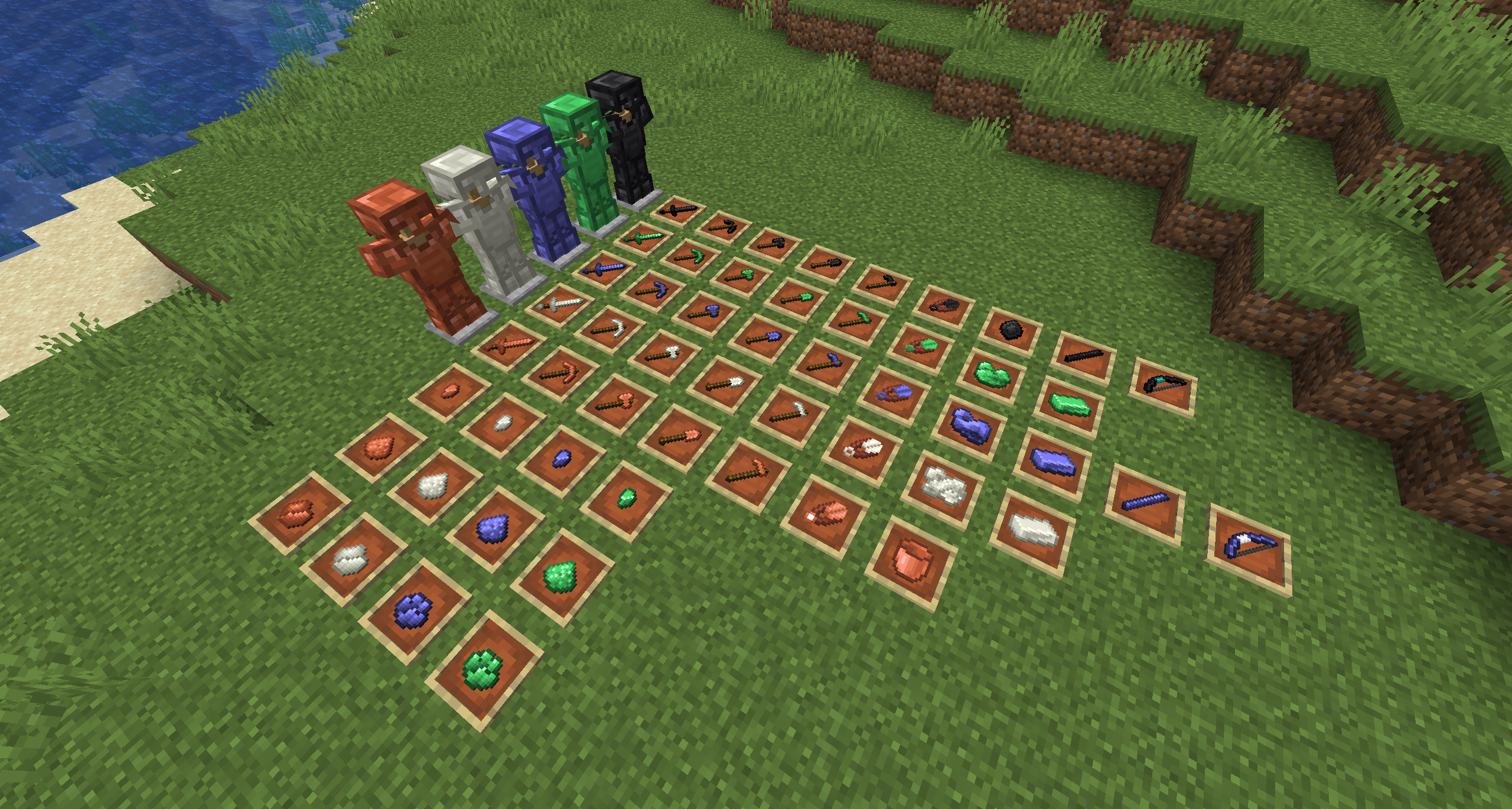

SimpleOres Fabric does not add copper ore or ingots to the game, as vanilla has added them. However, since vanilla did not add copper tools or armor, SimpleOres Fabric still has them (before 1.21.9). SimpleOres Fabric’s ores drop raw metal, like vanilla ores, except for onyx ore, which drops the gem, of course.
Copper doors (before 1.21), mythril, tin, adamantium and onyx bars, doors, bricks, and brick stairs are added too.
SimpleOres Fabric requires [Fabric API](https://modrinth.com/mod/fabric-api)
The textures are those from the [original mod](https://www.curseforge.com/minecraft/mc-mods/simpleores), you should take a look 😉
The original Minecraft Forum thread is [here](https://www.minecraftforum.net/forums/mapping-and-modding-java-edition/minecraft-mods/1279863-alexndrthegr8sts-mods-simplecore-api-simpleores). The original mod was by AleXndrTheGr8st, aka Skrallexy. Sinhika is the current off-and-on maintainer for Forge. The current code of this project is also licensed under LGPL 3.0, so go wild, modpack makers!
## Developers
If you want to add support of SimpleOres Fabric to your mod, crushed and powder versions of ores are available natively, Support of Energized Power has been added in 1.3.1 (and 1.3.2 for 1.20.1+) !
SimpleGUI
[
](https://www.planetminecraft.com/member/nickshoof/) | [](https://www.curseforge.com/members/nickshoof/projects) | [](https://modrinth.com/user/NickShoof) | [](https://discord.com/)
[
](https://ko-fi.com/nickshoof)
You can buy monthy subscription to get faster updates on KO-FI
****
#
**About**
This pack is all about making UI as clean and minimalistic as posible. If you ever played on [Bare Bones](https://modrinth.com/resourcepack/bare-bones) before you probably know what im aiming for (btw those two packs work so well toghether). For now im testing bottom viev point like shading, let me know how you like this. Before instaling you can check gallery for ingame screenshots. I will try making updates ATLEAST once a month. No mods required (for now).
#
**FAQ**
> **How to install resourcepacks?**
– There are a lot of tutorial out there on youtube, that will explain this better than me, but just download something from trusted sites like modrinth or curseforge, then drag this file to folder that will pop out if you click “Open Pack Folder” in Minecraft.
> **Can i use some textures from SimpleGUI in my pack**
– As long as its not distributed, yes you can. If you want to publish it, just ask me before doing it.
> **Will you add compatibility with mods?**
– Yes, im going to do this with popular mods in form of add-on to this pack.
#
**Lists**
Containers
1. Anvil
2. Beacon
3. Blast Furnace
4. Brewing Stand
5. Cartography Table
6. Crafter
7. Crafting Table
8. Dispenser/Dropper
9. Enchanting Table
10. Furnance
11. Gamemode Switcher
12. Chests
13. Grindstone
14. Hopper
15. Horse
16. Donkey
17. LLama
18. Inventory
19. Creative Inv.
20. Loom
21. Nautilus
22. Shulker Box
23. Smithing
24. Smoker
25. Stonecutter
26. Villager
Plans for future
1. Adding something to crafting table, loom, villager texture so it wouldn’t be so plane (V)
2. Listening to your feedback
3. Redoing reciepe book
4. Fixing inconsistencies
### [
](https://www.planetminecraft.com/member/nickshoof/) SimpleGUI
by NickShoof
Simple Spawn Immunity
This super simple datapack emulates the 3-second spawn immunity that was removed in 1.21.4.
Simple Snowy Fix (Forge / Fabric)
This mod is a multiloader port of [Simple Snowy Fix (fabric)](https://github.com/Apollounknowndev/simple-snowy-fix) by [Apollo](https://github.com/Apollounknowndev).
Differences with original mod:
– Added compatibility with many mods.
– Fixed many issues, like snow was generating on manually grown trees from saplings.
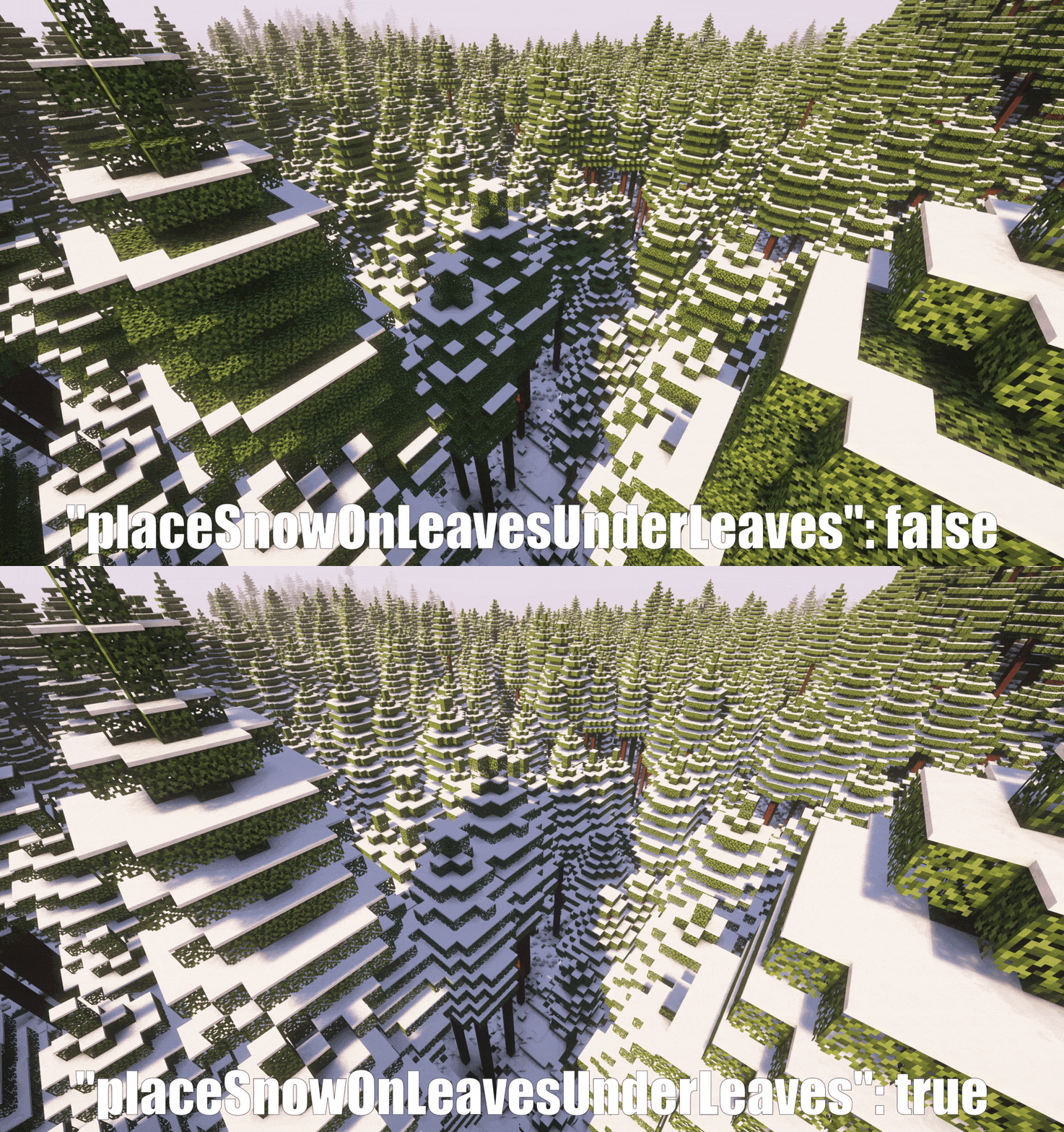
– Just fixes bug by default. Original mod was generating snow on leaves under leaves. We have config option for this,
not enabled by default.
– Doesn’t include the snow under trees feature, since it is implemented well
in [Snow Under Trees](https://github.com/bl4ckscor3/SnowUnderTrees) mod,
which has fixed many problems and compatibility issues. There is no reason to duplicate its function.
## Features
In Minecraft 1.12 and later, snow often doesn’t fully cover tree leaves in snowy biomes,
including modded ones, making trees look bad—especially large modded ones.
It’s because of a Vanilla bug, [MC-119599](https://bugs.mojang.com/browse/MC/issues/MC-119599).
When terrain is generated chunk by chunk, snow is placed in a chunk before trees are added in neighboring chunks.
If a tree’s leaves from a chunk generated later extend into a chunk generated earlier,
the snow in the earlier chunk ends up under those leaves because it was already placed before the leaves appeared.
This very simple mod fixes this issue. No dependencies, just drop it in and it works.
If you have any questions, feel free to join my Discord server: https://discord.gg/Qp2PKbtnp6
## Configuration
By default, it just fixes the bug.
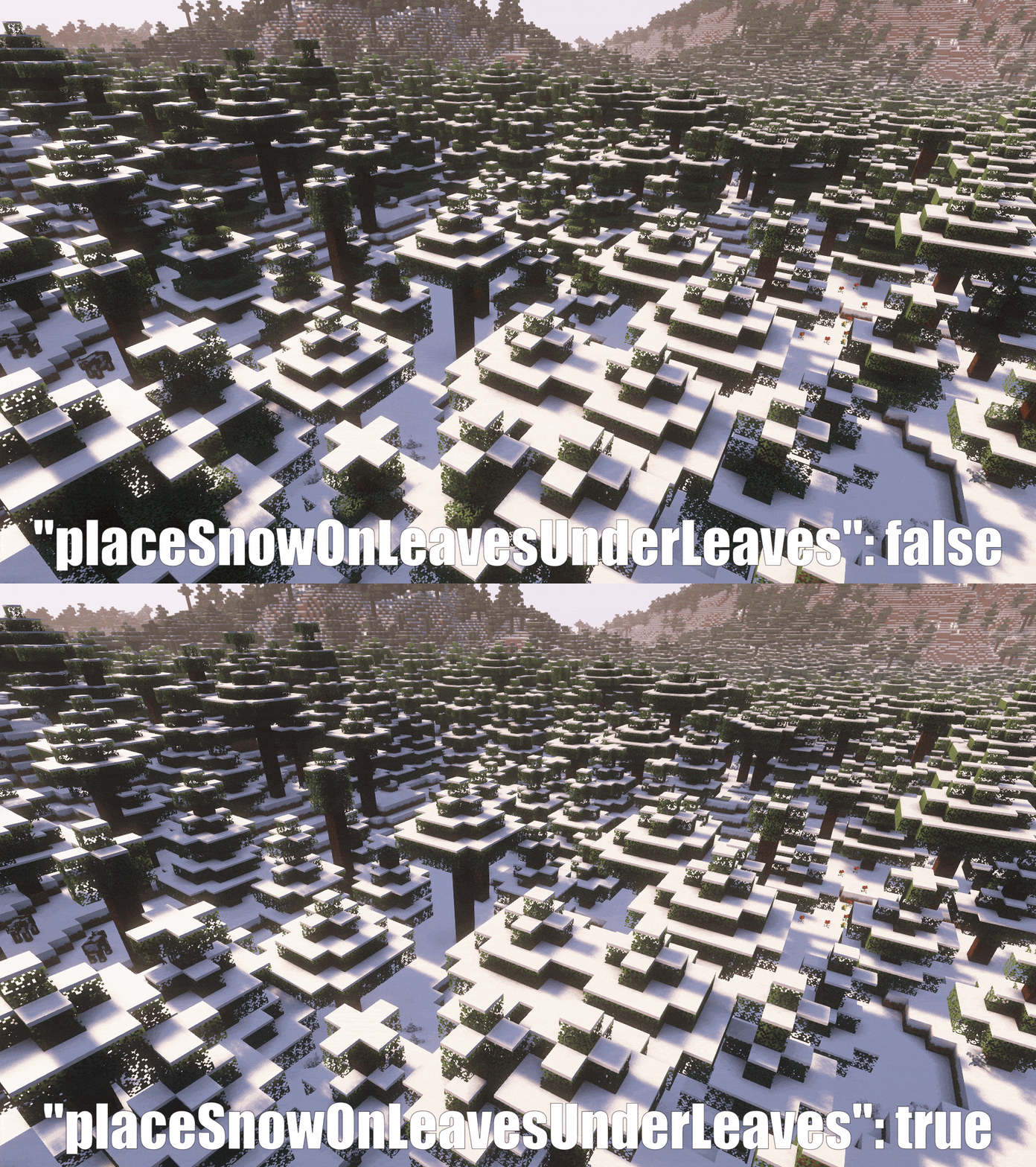
However, if you want snow to also generate on leaves under other leaves,
you can enable this feature in the mod config (If you want snow biomes to look snowier).
Demo:
## Compatibility
It should work out of the box with most worldgen mods that add new snowy biomes.
Tested:
– Biomes O’ Plenty
– Regions Unexplored
– Oh The Biomes We’ve Gone (and all other mods using Oh The Trees You’ll Grow)
If a mod implements trees in some cursed way, it might require a patch. Feel free to open an issue.
It won’t create problems. If there is some compatibility issue, the fix just won’t apply to those biomes.
## Performance
Very well, you will notice no difference. It takes less than an additional 100ms (0.1s) to generate a 32-chunk radius
of snowy biome with a lot of leaves. This was profiled directly from the code, ensuring 100% accuracy.
## Improve your Snow Generation
If you want a more perfect snow experience, I suggest also using these mods:
* [Snow Under Trees](https://github.com/bl4ckscor3/SnowUnderTrees) to let snow generate under trees.
* [Snow! Real Magic! ⛄](https://github.com/Snownee/SnowRealMagic) to let grass, flowers, etc. generate with snow.
## Demo:
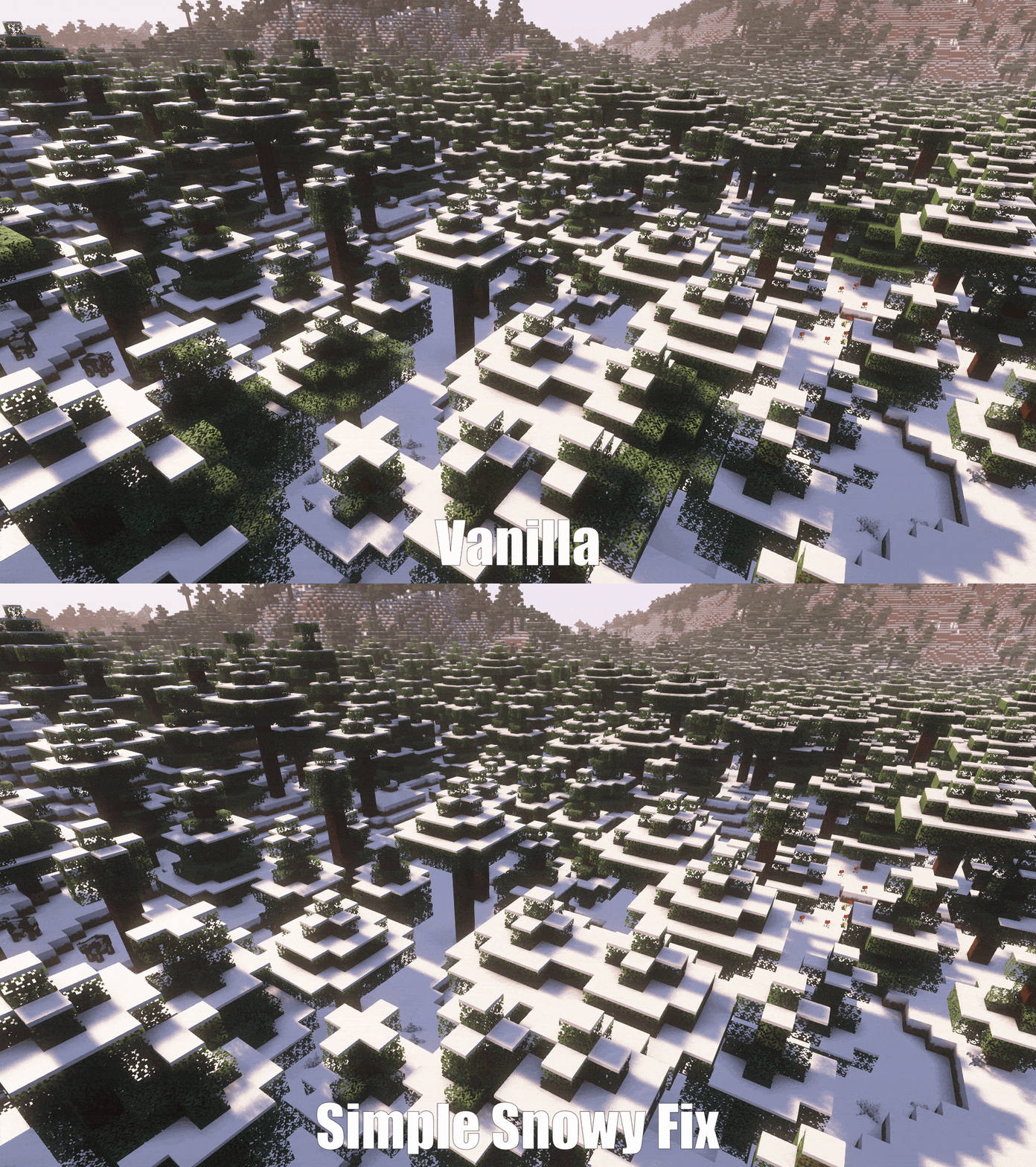
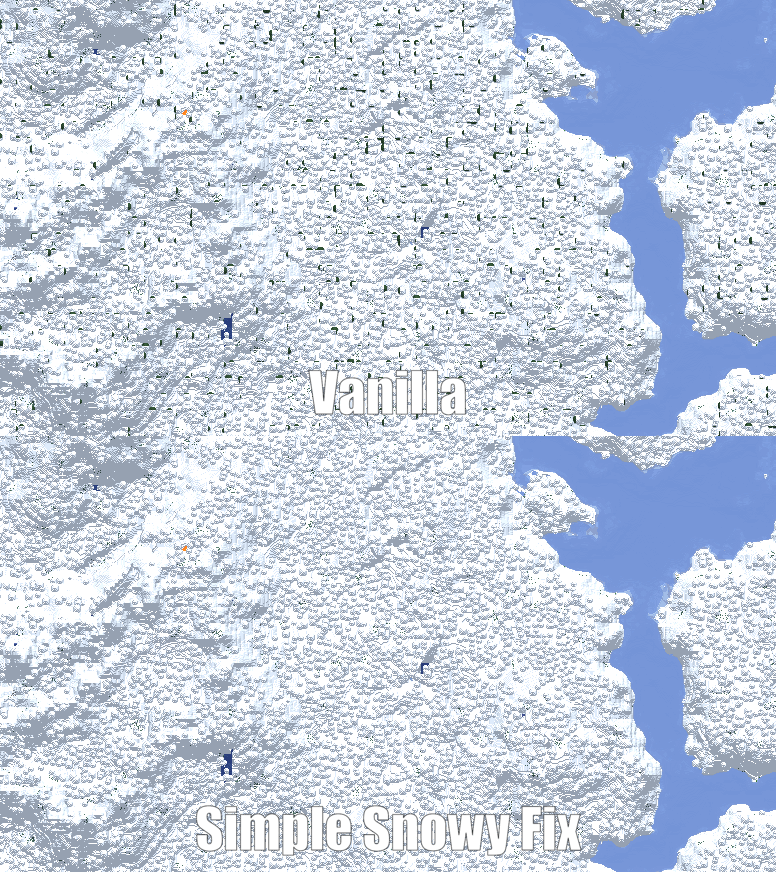
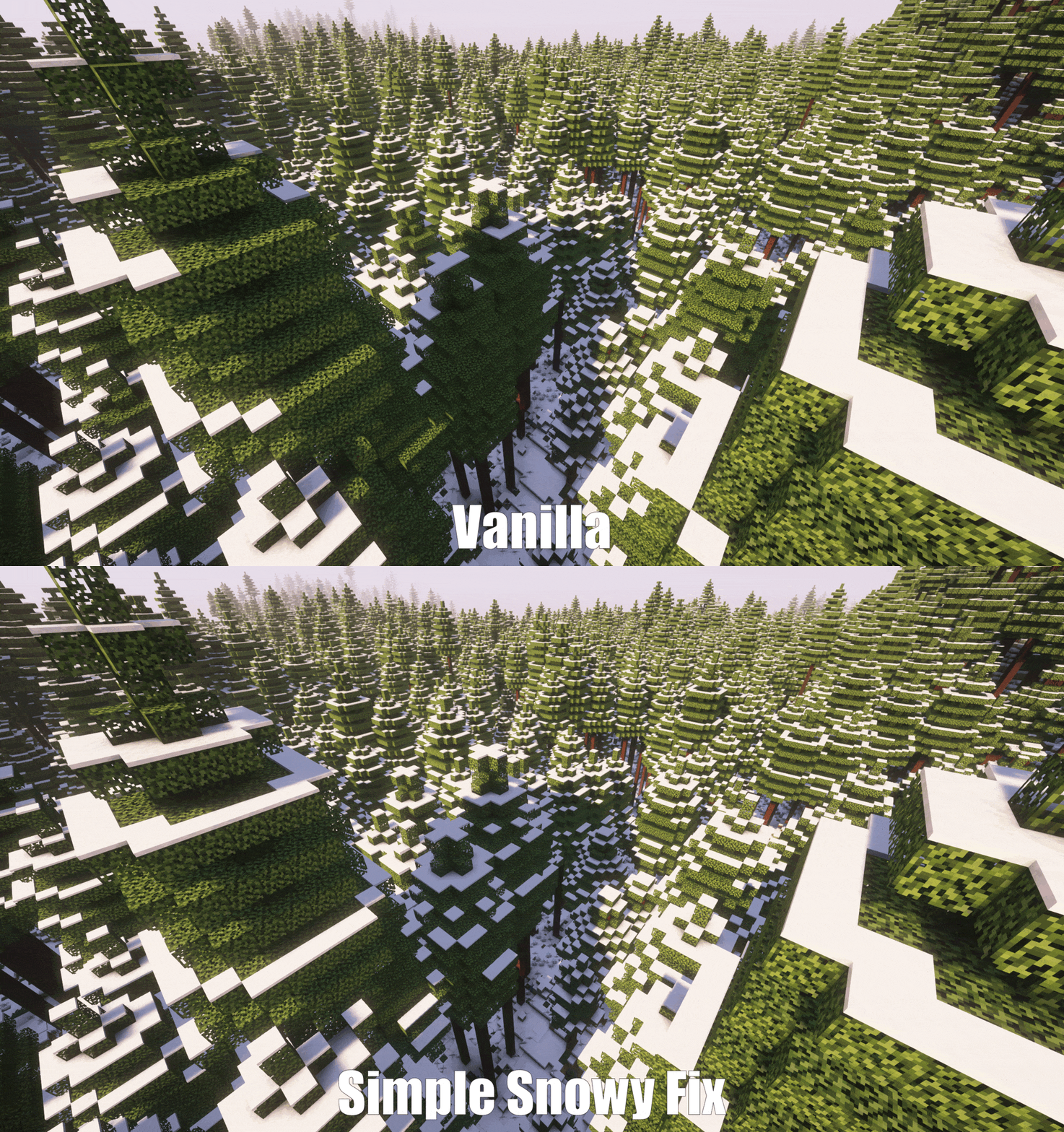
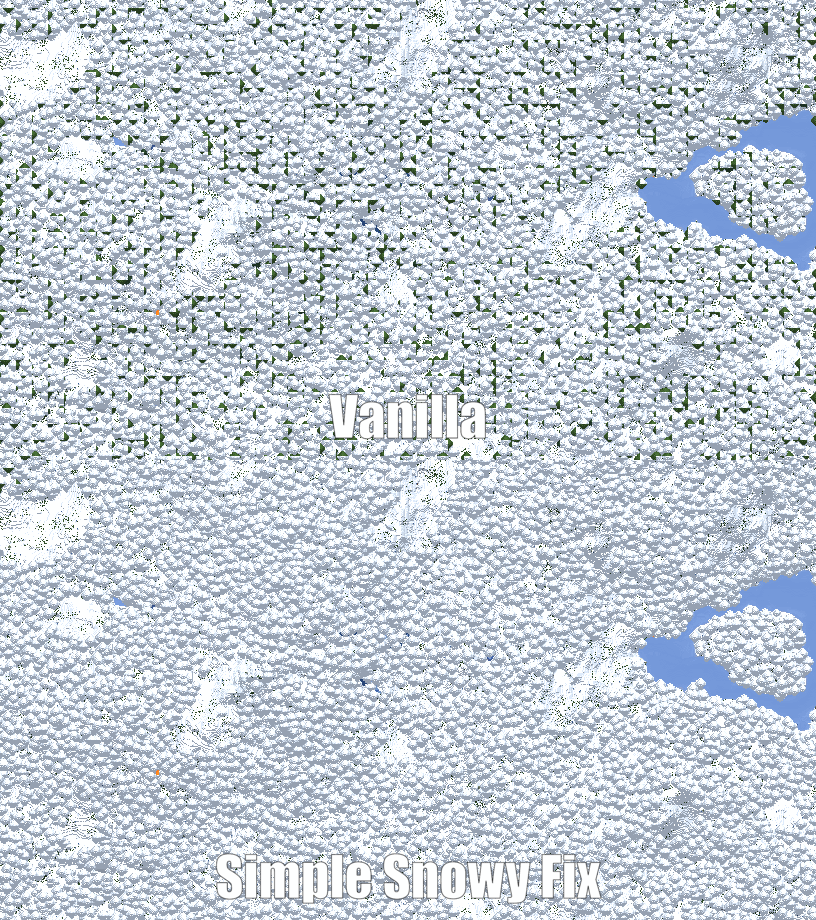
Note: Screenshots were taken with the [Snow Under Trees](https://github.com/bl4ckscor3/SnowUnderTrees) and [Snow! Real Magic! ⛄](https://github.com/Snownee/SnowRealMagic) mods installed.
Simple hit sound
This resource pack enhances PvP hit sounds to make combat feel more responsive and satisfying ⚔️🔥 The sounds are clearer and less distracting, helping you stay focused and track your hits better 🎯 Perfect for players looking for a smoother, more engaging PvP experience 🚀
Simple Datapacks
## 📂 Simple Datapacks
The purpose of this mod is to simplify the ways of adding datapacks to the game. To do this, the mod creates a folder in the root directory of Minecraft called datapacks. In my opinion, the capabilities of datapacks are underestimated by players, mostly because not everyone understands how to install datapacks into the game. This is more difficult to do than to install a mod or resource pack, although many datapacks bring a lot of content to the game.
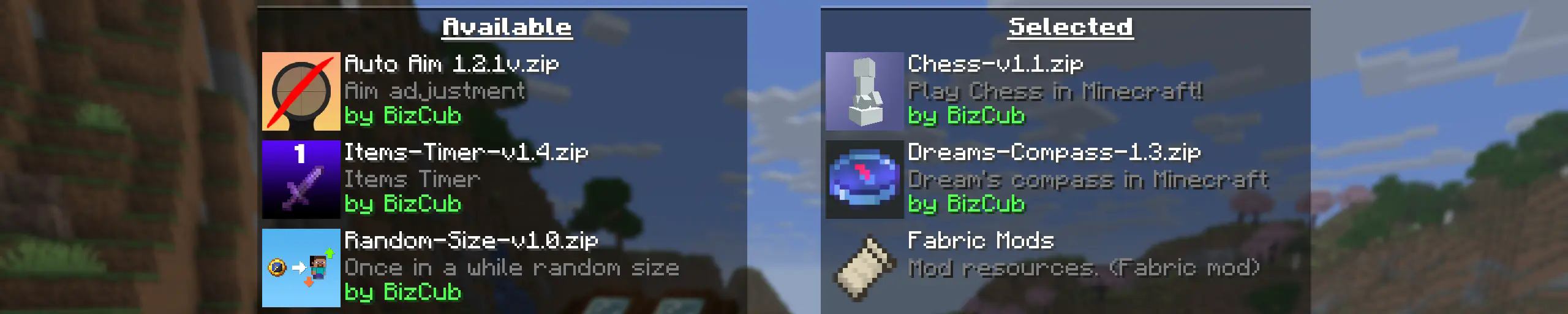
My goal is to make a mod that will help players with installing datapacks into the game so that they can get a new portion of unforgettable impressions.
## 💼 Usage

In order to launch a world with datapacks, you need to download any datapack that is compatible with the selected version of Minecraft, open and place the datapack in the datapacks folder, start creating a world and select the desired datapack from the list. However, when using Cloth Config, the mod settings specify the path to the downloads folder, so to use datapacks, you only need to download them, then simply open the datapack selection menu and enable the desired one.
## ✨ Features
Whenever possible, I added the most basic features for the mod that I could imagine.
Click to open
* Since the main thing for me is that as many players as possible start using datapacks, I made the mod available on 4 different loaders so that it can be launched from almost any modpack.
* The mod has a configuration. The values used by the mod can be changed in the mod menu (Fabric requires ModMenu), and can also be changed in the configuration file, which is available using the Cloth Config API.
* The mod allows players to add and load datapacks from different folders. To change the sources of these packs, you need to configure them in the mod settings. If you want to specify a folder in the game’s root directory, for example, “`my_datapacks“` instead of the full path “`C:Users{USERNAME}AppDataRoaming.minecraftmy_datapacks“`, simply enter the folder name in the field in the mod settings menu.
* By default, datapacks are loaded from the datapacks folder in the root directory and the downloads folder, allowing them to appear in the game immediately after installation (provided Cloth Config API is loaded; otherwise, only the datapacks folder will be used).
* The mod settings have two lists: one for required and one for optional datapacks. The first list specifies the paths to datapacks that are automatically applied when entering a world. The second list contains datapacks that remain inactive but can be enabled at any time using the “`/datapack enable“` command.
* The Simple Datapacks mod runs on the server. Since the mod settings are not accessible on the server, it automatically uses all datapacks from the datapacks folder.
* It’s possible to disable feature packs (experimental datapacks). If you don’t use feature packs, you can disable them to save space on the datapack selection screen. In the mod settings, function packages can be set to required, and then they will be applied when the world starts.
* Unlike similar mods, datapacks will continue to work in the world, even if you disable the mod. In the mod settings, you can enable copying datapacks to the world folder. In this case, the datapack will work without the mod, because the game will read it from the world.
## 🤝 Support
