Tommy’s Custom music
This is to add my own custom music to minecraft, if you know coding, you can edit the resurce pack too! added music that fits a calm theme, took some music that i have no idea of they are copyrighted, if so, please dm me on my discord server!
Timer for Speedrun
## Description
Datapack or mod adds an automatic timer for speedrunning.
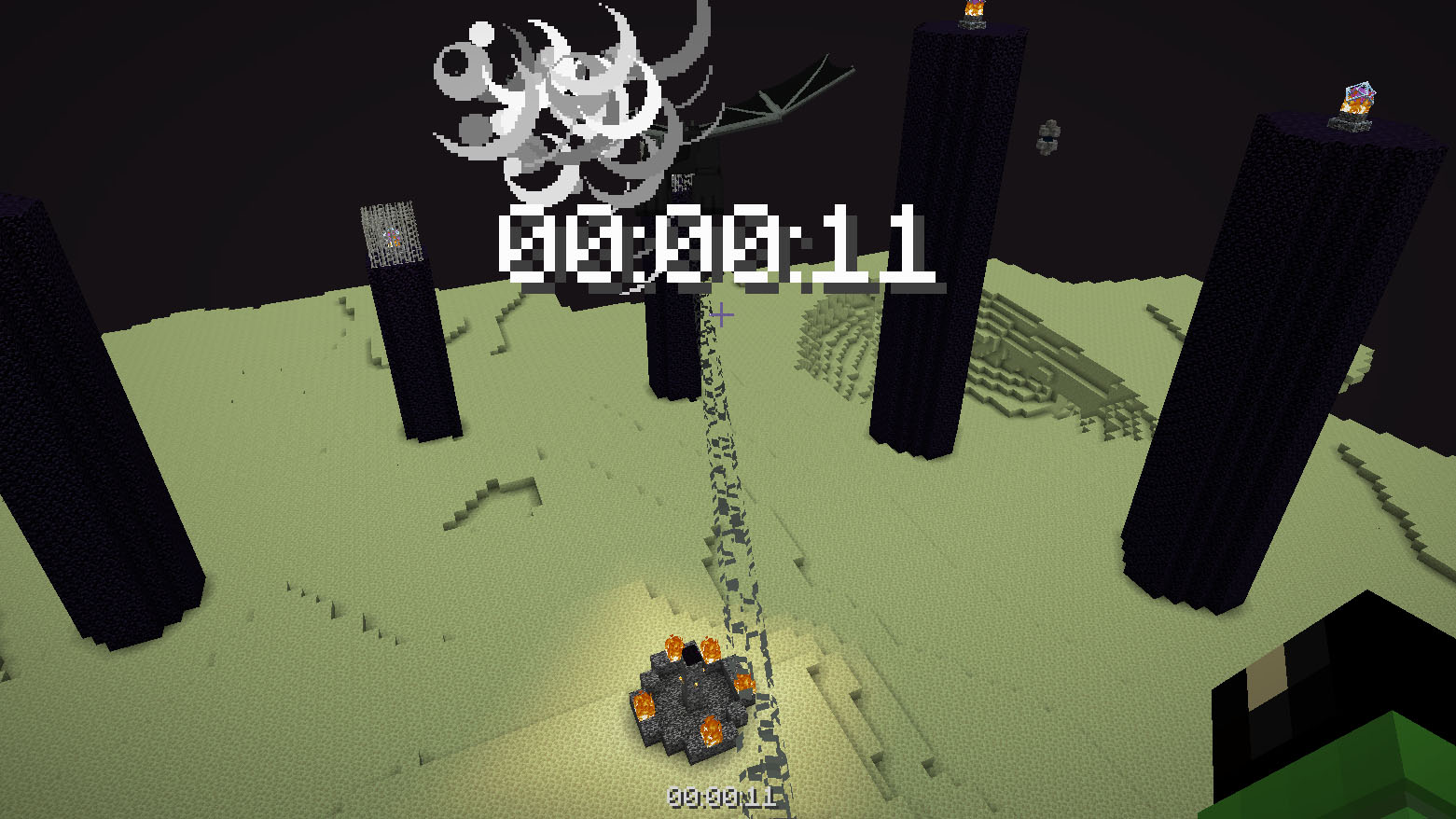
## How to use
The timer is activated automatically when you enter the world. The timer stops when you enter the end portal.
## Dependencies
– Fabric loader requires [Fabric API](https://modrinth.com/mod/fabric-api)
Time Adjustment
Time Adjustment


A simple mod/datapack that allows the player to change how long the Minecraft daylight cycle lasts.
It supports daylight cycle lengths 1 minute and longer.
🕹 Installation
Time Adjustment can be installed multiple ways. The simplest is through Modrinth, while Github can offer experimental versions.
Modrinth
Datapack
- Download the correct version of the datapack
- Follow this guide to complete installation
Mod
- Download the correct version of the mod
- If using the Modrinth app, you’re done. Otherwise, move the mod into your mods folder
Github
Releases
- Navigate to Github Releases
- Find the version of Time Adjustment you want
- In Assets, find and click the zip that has the version of Minecraft you’re playing on
- Follow this guide to complete installation
Continuous Updates
- Install Git
- Open a terminal in your datapacks folder (follow step 4 in Releases if you need help)
- In the terminal, enter
git clone https://github.com/Team-NPM/Time-Adjustment.git
- In the terminal, enter
git checkout $(VERSION), replacing $(VERSION) with the datapack version you want (run git branch -l to see all branches)
- If the datapack ever updates, open a terminal in your datapacks folder and run
git pull to update it quickly!
🎛 Running
When the datapack is installed, a message will appear in chat informing all users of the successful installation.
To begin using it, run /function config:timeadjust or /function timeadjust:.config to open the configuration menu.

- Day Length
- The length of the day shown in hours and minutes
- Daylight Cycle
- Easily enable or disable the daylight cycle (do not use
/gamerule doDaylightCycle or /gamerule advance_time in version below 26.1)
- Presets
- A set of preset daylight cycle lengths
- Manual Adjust
- A set of buttons to quickly adjust the time to the users liking. Clicking on the text in the middle allows the user to enter exact values
- Update Datapack
- A button to quickly run the update functionality for the pack and list update notes
- Uninstall Datapack
- A button that removes all datapack data from the world and gives instructions on how to finish cleanup
🖫 Updating
To update the datapack, simply enter the config and click the update option. It’ll automatically prepare the datapack for updating and will provide a set of instructions on how to finish updating. NOTE: Updating the datapack without running this option may cause problems during large update jumps.
🗑 Uninstalling
To uninstall the datapack, either enter the config and click the uninstall button, run /function uninstall:timeadjust, or run /function timeadjust:uninstall. Doing any of these options will remove all data from the world and give instructions on how to finish uninstallation.
🖇 Compatibility
For Minecraft 1.21.11 and below, most datapacks that rely on the default daylight cycle may not work as this datapack requires it to not run. If there are any problems with running other datapacks alongside this one, please follow the Reporting Issues section below.
🖂 Reporting Issues
Have a problem? Report it! There are 2 ways to report issues.
Github Issues
Head to https://github.com/Team-NPM/Time-Adjustment/issues and create an issue. You can also make suggestions there as well!
Discord
Join the Discord and make a bug report in the correct channel. Once it’s seen, a Github Issue will be created and linked.




Thigh Highs
# Thigh Highs
This is a resource pack that adds thigh-highs in black, blue, pink, red, and yellow instead of armor.
—

theBestHeight
这个数据包可以让你的世界高度范围变得更大,对于建筑与服务器很实用,特别是生电玩家,更高的高度能让你造出更大型的机器。我准备后续让世界生成范围也变得更大。欢迎下载我的数据包!
This data pack allows you to expand the height limit of your world, making it highly practical for building projects and servers. It is especially useful for technical players, as a greater height range enables the construction of larger-scale machines. I plan to further extend the world generation boundary in future updates. Feel free to download my data pack!
注意:使用此数据包时,须使用实验性设置!如果数据包没有效果,请尝试重启存档。
Note: When using this data pack, you must enable experimental settings!If the data pack doesn’t work, try restarting the save file.
PvP Essentials+
⚔️ PVP ESSENTIALS ⚔️
—
### 🚀 Core Features
– Low fire
– small items
– small swords
– small blocks
– small totem and shield
– small block fire
– no fire smoke
– animated crossbow
– animated bow
– bright ores
– clear water and lava
– no pumkin blur
– smaller Totem Pop
– smaller totem particles
– no explosion particles
– No Vignette
– No Eating Particles
—
𝖯𝖵𝖯 𝖤𝖲𝖲𝖤𝖭𝖳𝖨𝖠𝖫𝖲 𝗂𝗌𝗇’𝗍 𝗃𝗎𝗌𝗍 𝖺 𝗍𝖾𝗑𝗍𝗎𝗋𝖾 𝗉𝖺𝖼𝗄; 𝗂𝗍’𝗌 𝖺 𝖼𝗈𝗆𝗉𝖾𝗍𝗂𝗍𝗂𝗏𝖾 𝖺𝖽𝗏𝖺𝗇𝗍𝖺𝗀𝖾. 𝖣𝖾𝗌𝗂𝗀𝗇𝖾𝖽 𝖿𝗈𝗋 𝗍𝗁𝖾 𝗆𝗈𝖽𝖾𝗋𝗇 𝖯𝗏𝖯𝖾𝗋, 𝗍𝗁𝗂𝗌 𝗉𝖺𝖼𝗄 𝗌𝗍𝗋𝗂𝗉𝗌 𝖺𝗐𝖺𝗒 𝗍𝗁𝖾 𝖼𝗅𝗎𝗍𝗍𝖾𝗋 𝗈𝖿 𝗏𝖺𝗇𝗂𝗅𝗅𝖺 𝖬𝗂𝗇𝖾𝖼𝗋𝖺𝖿𝗍 𝖺𝗇𝖽 𝗋𝖾𝗉𝗅𝖺𝖼𝖾𝗌 𝗂𝗍 𝗐𝗂𝗍𝗁 𝗁𝗂𝗀𝗁-𝗏𝗂𝗌𝗂𝖻𝗂𝗅𝗂𝗍𝗒 𝗈𝗏𝖾𝗋𝗅𝖺𝗒𝗌, 𝗎𝗍𝗂𝗅𝗂𝗍𝗂𝖾𝗌 𝖺𝗇𝖽 𝗈𝗉𝗍𝗂𝗆𝗂𝗓𝖾𝖽 𝗏𝗂𝗌𝗎𝖺𝗅𝗌 𝗍𝗈 𝖾𝗇𝗌𝗎𝗋𝖾 𝗒𝗈𝗎 𝗇𝖾𝗏𝖾𝗋 𝗆𝗂𝗌𝗌 𝖺 𝗁𝗂𝗍.
Tab Player Health
# Tab Player Health
Free and open-source datapack for Minecraft 1.21 and higher that display players health.
## Features
By default the players health is displayed in the tab.
Svrve’s Dragon Egg
[
](https://www.planetminecraft.com/member/nickshoof/) | [](https://www.curseforge.com/members/nickshoof/projects) | [](https://modrinth.com/user/NickShoof) | [](https://discord.com/)
[
](https://ko-fi.com/nickshoof)
You can buy monthy subscription to get faster updates on KO-FI
****
#
**About**
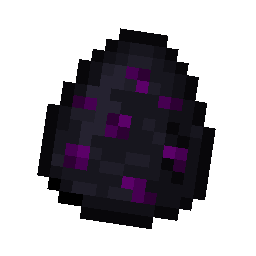
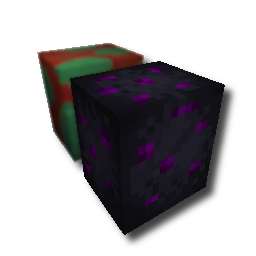
With this pack i modeled the dragon egg becouse why it its so old looking and different than sniffer’s.
.
#
**FAQ**
> **How to install resourcepacks?**
– There are a lot of tutorial out there on youtube, that will explain this better than me, but just download something from trusted sites like modrinth or curseforge, then drag this file to folder that will pop out if you click “Open Pack Folder” in Minecraft.
> **Can i use some textures from Svrve’s Dragon Egg in my pack**
– As long as its not distributed, yes you can. If you want to publish it, just ask me before doing it.
Immersive Torches
[
](https://www.planetminecraft.com/member/svrve/) | [](https://www.curseforge.com/members/svrve/projects) | [](https://modrinth.com/user/Svrve) | [](https://discord.com/)
[
](https://ko-fi.com/svrve)
You can buy monthy subscription to get faster updates on KO-FI
****
#
**About**
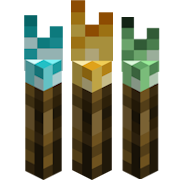
This pack is all about torches, make them an item texture, animate it, change model, also animate it. Thats all.
.
#
**FAQ**
> **How to install resourcepacks?**
There are a lot of tutorial out there on youtube, that will explain this better than me, but just download something from trusted sites like modrinth or curseforge, then drag this file to folder that will pop out if you click “Open Pack Folder” in Minecraft.
> **Can i use some resources from it in my pack?**
After installing it, open the file you downloaded (.zip). Here you will find licence. Read it.
Summit


> ### **THIS RESOURCE PACK REQUIRES THESE MODS TO FUNCTION:**
> 1. **[ETF](https://modrinth.com/mod/entitytexturefeatures)**
> 2. **[EMF](https://modrinth.com/mod/entity-model-features)**
> 3. **[Continuity](https://modrinth.com/mod/continuity)**
> 4. **[Polytone](https://modrinth.com/mod/polytone)**
# Summit: Minecraft At Its Peak
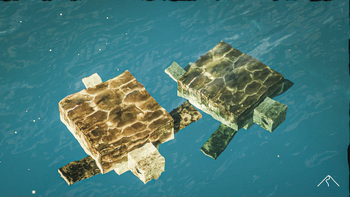
**Summit** is a realistic texture pack for Minecraft, designed to enhance your game with a touch of natural beauty. It’s subtle, refined, and compatible with a range of systems.
## Summit 64x is now free!




## Features:
– **Varied Resolutions:** Choose from 16x to 64x to match your system.
– **Balanced Realism:** Enhanced textures that feel right at home in Minecraft.
– **Optimized Performance:** Smooth and efficient gameplay experience.
**Rediscover Minecraft with Summit!**
[Patron]: https://patreon.com/Summitmc?utm_medium=clipboard_copy&utm_source=copyLink&utm_campaign=creatorshare_fan&utm_content=join_link
[1]: https://i.imgur.com/vZ1vIat.png
[2]: https://www.optifine.net/home “Redirect to Optifine”
[3]: https://i.imgur.com/a7UsCgN.png
[4]: https://irisshaders.dev/ “Redirect to Iris”
[5]: https://i.imgur.com/XCZiKxy.png
[6]: https://patreon.com/Summitmc?utm_medium=clipboard_copy&utm_source=copyLink&utm_campaign=creatorshare_fan&utm_content=join_link “Redirect to Patreon”