Useless Upgrade Template
# About Mod


[AVAILABLE ON HANGAR](https://hangar.papermc.io/break08/Useless-Upgrade-Teamplate)
This mod will keep the Netherite Upgrade Template but make it useless, you don’t need it to get Netherite Tools. Instead of, you can replace the template with a gold ingot; therefore, you don’t need to go to the dangerous bastion for the template and upgrading armor =)
### Note (especially 1.20.1 version)
**If the gold ingot can’t go in the template slot in smithing table when you hold Shift and click, try drag and drop in in the template slot**. Like this:
If shift + click don’t put gold ingot in template slot

### Support 26.1 and 26.2-snapshot
**Now support MC 26.1 + 26.2-snapshot (Fabric and Datapack)**

# Support removing **UPGRADE TEMPLATE** for other mods
Enderite Mod Support (1.20.1 and 1.21.11 Fabric)
Support for [Enderite Mod](https://modrinth.com/mod/enderite-mod)
No longer require **Enderite Upgrade TEMPLATE**, replace it with a **diamond** !

1.21.11 Fabric mods support list
> [Enderite Mod](https://modrinth.com/mod/enderite-mod) by Nic4Las
> [Advanced Netherite](https://modrinth.com/mod/advanced-netherite) by Autovw
> [Reinforced Barrels](https://modrinth.com/mod/reinforced-barrels) by Aton-Kish
> [Reinforced Chests](https://modrinth.com/mod/reinforced-chests) by Aton-Kish
> [Reinforced Shulker Boxes](https://modrinth.com/mod/reinforced-shulker-boxes) by Aton-Kish
> [Traveler’s Backpack](https://modrinth.com/mod/travelersbackpack) by Tiviacz1337
Just for Fabric 1.21.11
### More supported mod:
You can suggest me mod which you want to be supported, but not all mod will be accepted. Condition (Even if all these conditions are met, some mods may not be supported):
> Popularity (10 000 downloads or above)
> Mod uses recipe that includes **NETHERITE UPGRADE TEMPLATE** or anything that is similar to **UPGRADE TEMPLATE**
Go to ISSUES tab on GITHUB (Report bugs page), create new “Issues”, choose **Enhancement** label and provide mods’ name and link.
# Bugs and issues
**Report here:** https://github.com/break08/UselessUpgradeTemplate/issues
# Try my other mod
[New NameTag Recipe](https://modrinth.com/datapack/new-nametag-recipe): **Backport 26.1 Name Tag Recipe**
# Credit
Credit to MCreator for these version
List
**Forge**: 1.20.1
**NeoForge**: 1.20.4, 1.20.6, 1.21.1, 1.21.4, 1.21.8
**Fabric**: 1.21.8
**Datapack**: 1.20-1.20.1, 1.20.3-1.20.4, 1.20.5-1.20.6, 1.21-1.21.1, 1.21.4-1.21.5, 1.21.7-1.21.8
Unstable SMP Orbital Strike Cannon

—
**Adds Wemmbu’s “stabshot” and “nukeshot” orbital strike cannons from the Unstable SMP into the game**
_**For The Datapack -**_
To get the stabshot, run the command: “`/function nuke:give/stabshot“`
To get the nukeshot, run the command: “`/function nuke:give/nukeshot“`
To get a shulker full of both, run the command: “`/function nuke:give/shulker“`
_**For The Plugin -**_
To get the stabshot, run the command: “`/give_stabshot“`
To get the nukeshot, run the command: “`/give_nukeshot“`
To get a shulker full of both, run the command: “`/give_shulker“`
**_You’ll need to be opperator permissions to use these commands_**
[**Gameplay**](https://medal.tv/games/minecraft/clips/lZf57zQQ8PAd-mpGj?invite=cr-MSx2dFIsMzEzMzExMzI2&v=38)

Unreal Portal Engine
U.P.E. aka Unreal Portal Engine – is a resource engine designed to visually improve the portal(s) in Minecraft Java Edition.
Do you remember the colored portals from the 20w14infinite snapshot and jeb_ the sheep? I created resource packs using CIT (Custom Item Textures), in which I implemented the ability to paint portals using renamed leather armor and dye, and to apply absolutely any image to them.
Resource packs? Why not a resource pack? During development, I encountered difficulties due to the final resource pack size, model limitations in Minecraft, and name length limitations in older versions and in the OS itself. Therefore, I had to split the resource packs into separate components.
Core Engine (for all game versions)
[Add-ons](https://modrinth.com/user/Spazmanazer_Twins) (for Optifine versions from 1.9 to 1.21.4 and for versions starting from 1.21.5 and all future versions, including snapshots)
[Connector](https://modrinth.com/user/Spazmanazer_Twins) (for add-ons for game versions 1.21.5 and all future versions, including snapshots)
The core engine doesn’t do anything on its own. It’s just a collection of models. So, enabling it in-game won’t change anything.
Addons work alongside the engine. With them, you can paint portals or use any PNG image (or GIF after proper conversion). Or you can use any image and color it with a dye. It’s all up to your imagination.
Connector was created due to the priority of resource packs in the list. It’s needed to allow addons to work together on versions 1.21.5+.
Where is a resource pack useful? In singleplayer and on servers.
Since these are resource packs with item renaming, all visual changes will be visible to everyone who has them installed.
You can color-code portals to help you remember which one leads where or which one is connected to which.
You can create a portal gallery.
It’s all up to your imagination.
FAQ
Question 1: what does the engine do?
Answer: adds a set of .json models that, after renaming an item, can do the following:
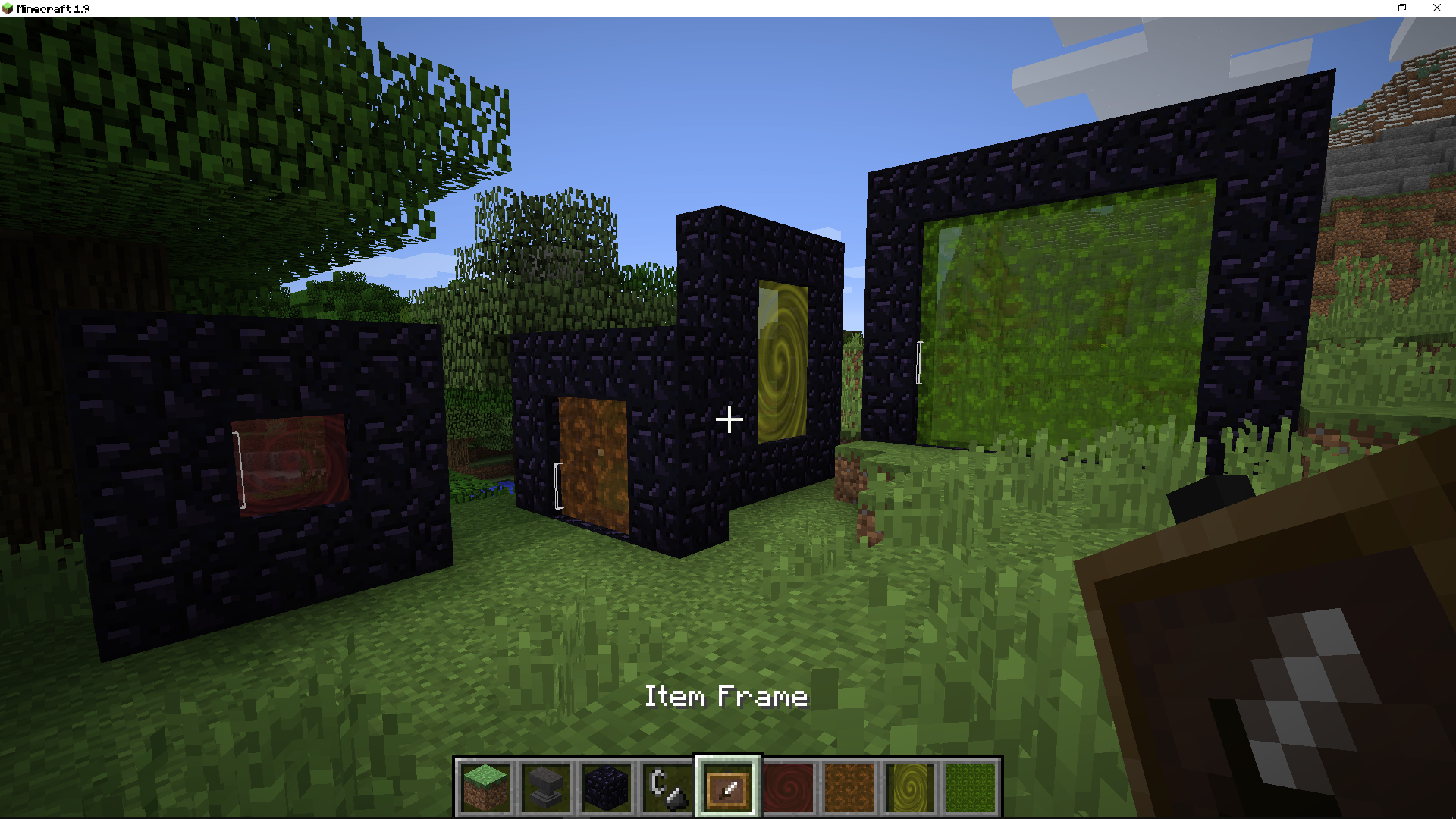
But if you just enable the resource pack, nothing will change in the game, since it is just a set of models.
Question 2: what is needed for the engine to work?
Answer: you need to create an addon for it using CIT (Custom Item Textures) technology, which is available in Optifine, in third-party mods like CIT Resewn, and starting with 1.21.5+, in the vanilla game.
Question 3: will addons work on the server too?
Answer: yes, because CIT (Custom Item Textures) is used exclusively on the game client and not on the server.
Question 4: how to create your own addon?
Answer: you need knowledge of resource packs, scripts for mass file renaming, and Notepad++ for mass character changes.
Question 5: what do you mean by mass renaming?
Answer: portal sizes. This engine supports all portal sizes, from the impossible 1×1 to the maximum 21×21.
Unlimited Enchantments
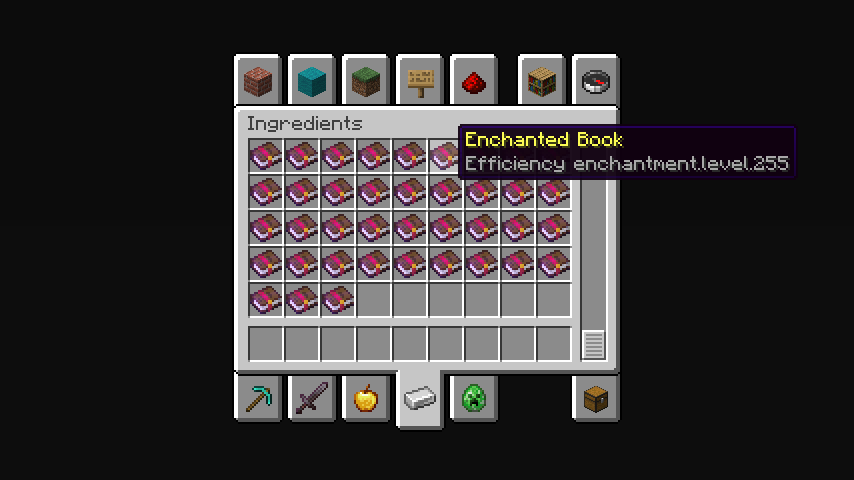
## **The maximum limit is 255 levels.**
In the Creative Mode Ingredients tab, enchantments with level 255 will be displayed. To take a certain book with the desired enchantment level, you need to write the name of the enchantment in the search tab and there will be enchantment levels from 1 to 255.
**Note:**
You can only get enchantments exceeding the game limit by finding them in structures or buying them from residents.
—
**Possible disadvantages:**
When trying to combine two books of a high enchantment level, it may not be possible due to the too expensive amount of experience. If anyone knows how to fix this, please upload the solution to our [Github](https://github.com/SayNooty/Unlimited-Enchantments).
Вряд ли (Unlikely) Totem Of Undying
– ENG: It’s unlikely (doubtful, 50-50) – a series of pictures with colorful birds, on which expressions conveying doubt are written. The meme went viral in December 2025 on TikTok.
– RU: Вряд ли (сомнительно, 50 на 50) – серия картинок с разноцветными птицами, на которых написаны выражения, передающие сомнение. Мем завирусился в декабре 2025 года в Тиктоке
[ALL RESOURCEPACKS COLLECTION: MEMES + STREAMERS](https://modrinth.com/collection/sfDcDGAi)
Universal Outlined Ores
This is a Minecraft resource pack that adds outlines to ores in mods, making them more visible.
It is trying to be compatible with all mods that add ores (work also with vanilla ores) and for all versions of Minecraft.
It will probably be compatible with OptiFine’s connected textures.
Links : [Github](https://github.com/Seltade-MC/UniversalOutlinedOres)/[Modrinth](https://modrinth.com/resourcepack/universal-outlined-ores)
# Compatible mods :
Available=✅ Not Tested=❓ Work in progress=⏳ Impossible=❌
|Mods|Links|Status|
|—|—|—|
|AdAstra|[Github](https://github.com/terrarium-earth/Ad-Astra)/[Modrinth](https://modrinth.com/mod/ad-astra)/[CurseForge](https://www.curseforge.com/minecraft/mc-mods/ad-astra)|⏳|
|Aether Addon: Overworld Ores|[Github](https://github.com/The-Aether-Team/Overworld-Ores)/[Modrinth](https://modrinth.com/mod/aether-overworld-ores)/[CurseForge](https://www.curseforge.com/minecraft/mc-mods/aether-overworld-ores)|⏳|
|Alex’s Caves|[Github](https://github.com/AlexModGuy/AlexsCaves)/[Modrinth](https://modrinth.com/mod/alexs-caves)/[CurseForge](https://www.curseforge.com/minecraft/mc-mods/alexs-caves)|⏳|
|Ancient Aether|[Github](https://github.com/Builderdog841/Ancient-Aether)/[Modrinth](https://modrinth.com/mod/ancient-aether)/[CurseForge](https://www.curseforge.com/minecraft/mc-mods/ancient-aether)|⏳|
|Better End|[Github](https://github.com/quiqueck/BetterEnd)/[Modrinth](https://modrinth.com/mod/betterend)/[CurseForge](https://www.curseforge.com/minecraft/mc-mods/betterend)|⏳|
|Better Nether|[Github](https://github.com/quiqueck/BetterNether)/[Modrinth](https://modrinth.com/mod/betternether)/[CurseForge](https://www.curseforge.com/minecraft/mc-mods/betternether)|⏳|
|Bewitchment|[Github](https://github.com/MoriyaShiine/bewitchment)/[Modrinth](https://modrinth.com/mod/bewitchment)/[CurseForge](https://www.curseforge.com/minecraft/mc-mods/bewitchment)|⏳|
|Cobblemon|[Gitlab](https://gitlab.com/cable-mc/cobblemon)/[Modrinth](https://modrinth.com/mod/cobblemon)/[CurseForge](https://www.curseforge.com/minecraft/mc-mods/cobblemon)|⏳|
|Create|[Github](https://github.com/Creators-of-Create/Create)/[Modrinth](https://modrinth.com/mod/create)/[CurseForge](https://www.curseforge.com/minecraft/mc-mods/create)|⏳|
|Create Fabric|[Github](https://github.com/Fabricators-of-Create/Create)/[Modrinth](https://modrinth.com/mod/create-fabric)/[CurseForge](https://www.curseforge.com/minecraft/mc-mods/create-fabric)|⏳|
|Create: Metallurgy|[Github](https://github.com/Lucreeper74/Create-Metallurgy)/[Modrinth](https://modrinth.com/mod/create-metallurgy)/[CurseForge](https://www.curseforge.com/minecraft/mc-mods/create-metallurgy)|⏳|
|Create: New Age|[Gitlab](https://gitlab.com/antarcticgardens/create-new-age)/[Modrinth](https://modrinth.com/mod/create-new-age)/[CurseForge](https://www.curseforge.com/minecraft/mc-mods/create-new-age)|⏳|
|Deep Aether|[Github](https://github.com/RazorDevs/Deep-Aether)/[Modrinth](https://modrinth.com/mod/deep-aether)/[CurseForge](https://www.curseforge.com/minecraft/mc-mods/deep-aether)|⏳|
|Deeper and Darker|[Github](https://github.com/KyaniteMods/DeeperAndDarker)/[Modrinth](https://modrinth.com/mod/deeperdarker)/[CurseForge](https://www.curseforge.com/minecraft/mc-mods/deeperdarker)|⏳|
|ExtraGems|[Github](https://github.com/XxRexRaptorxX/ExtraGems)/[Modrinth](https://modrinth.com/mod/extragems)/[CurseForge](https://www.curseforge.com/minecraft/mc-mods/extra-gems)|⏳|
|Galosphere|[Github](https://github.com/0rc1nus/Galosphere-Main)/[Modrinth](https://modrinth.com/mod/galosphere)/[CurseForge](https://www.curseforge.com/minecraft/mc-mods/galosphere)|⏳|
|Ice and Fire: Dragons|[Github](https://github.com/AlexModGuy/Ice_and_Fire)/[Modrinth](https://modrinth.com/mod/ice-and-fire-dragons)/[CurseForge](https://www.curseforge.com/minecraft/mc-mods/ice-and-fire-dragons)|⏳|
|Immersive Engineering|[Github](https://github.com/BluSunrize/ImmersiveEngineering)/[Modrinth](https://modrinth.com/mod/immersiveengineering)/[CurseForge](https://www.curseforge.com/minecraft/mc-mods/immersive-engineering)|⏳|
|Industrial Craft|[Modrinth](https://modrinth.com/mod/industrial-craft)/[CurseForge](https://www.curseforge.com/minecraft/mc-mods/industrial-craft)|⏳|
|Industrial Revolution|[Github](https://github.com/GabrielOlvH/Industrial-Revolution)/[Modrinth](https://modrinth.com/mod/industrial-revolution)/[CurseForge](https://www.curseforge.com/minecraft/mc-mods/industrial-revolution)|⏳|
|Infernal Expansion|[Github](https://github.com/infernalstudios/Infernal-Expansion)/[Modrinth](https://modrinth.com/mod/infernal-expansion)/[CurseForge](https://www.curseforge.com/minecraft/mc-mods/infernal-expansion)|⏳|
|Infinite Abyss|[Modrinth](https://modrinth.com/mod/infinite-abyss)/[CurseForge](https://www.curseforge.com/minecraft/mc-mods/infinite-abyss)|⏳|
|Magneticraft|[Github](https://github.com/Magneticraft-Team/Magneticraft)/[CurseForge](https://www.curseforge.com/minecraft/mc-mods/magneticraft)|⏳|
|Marium’s Soulslike Weaponry|[Github](https://github.com/mariumbacchus/Soulslike-Weaponry)/[Modrinth](https://modrinth.com/mod/mariums-soulslike-weaponry)/[CurseForge](https://www.curseforge.com/minecraft/mc-mods/mariums-soulslike-weaponry)|⏳|
|Mekanism|[Github](https://github.com/mekanism/Mekanism)/[Modrinth](https://modrinth.com/mod/mekanism)/[CurseForge](https://www.curseforge.com/minecraft/mc-mods/mekanism)|⏳|
|Mekanism: AdAstraOres|[Gitlab](https://gitlab.com/libertymods/mekanism-ad-astra-ores)/[Modrinth](https://modrinth.com/mod/mekanism-ad-astra-ores)/[CurseForge](https://www.curseforge.com/minecraft/mc-mods/mekanism-ad-astra-ores)|⏳|
|Modern Industrialization|[Github](https://github.com/AztechMC/Modern-Industrialization)/[Modrinth](https://modrinth.com/mod/modern-industrialization)/[CurseForge](https://www.curseforge.com/minecraft/mc-mods/modern-industrialization)|⏳|
|Mythic Metals|[Github](https://github.com/Noaaan/MythicMetals)/[Modrinth](https://modrinth.com/mod/mythicmetals)/[CurseForge](https://www.curseforge.com/minecraft/mc-mods/mythicmetals)|⏳|
|NetherEx|[Github](https://github.com/LogicTechCorp/NetherEx)/[Modrinth](https://modrinth.com/mod/netherex)/[CurseForge](https://www.curseforge.com/minecraft/mc-mods/netherex)|⏳|
|Oh The Biomes You’ll Go|[Github](https://github.com/Potion-Studios/BYG)/[Modrinth](https://modrinth.com/mod/biomesyougo)/[CurseForge](https://www.curseforge.com/minecraft/mc-mods/oh-the-biomes-youll-go)|⏳|
|Oritech|[Github](https://github.com/Rearth/Oritech)/[Modrinth](https://modrinth.com/mod/oritech)/[CurseForge](https://www.curseforge.com/minecraft/mc-mods/oritech)|⏳|
|Palladium|[Github](https://github.com/ThreeTAG/Palladium)/[Modrinth](https://modrinth.com/mod/threetag-palladium)/[CurseForge](https://www.curseforge.com/minecraft/mc-mods/threetag-palladium)|⏳|
|Pixelmon|[Modrinth](https://modrinth.com/mod/pixelmon)/[CurseForge](https://www.curseforge.com/minecraft/mc-mods/pixelmon)|⏳|
|Powah!|[Github](https://github.com/Technici4n/Powah)/[Modrinth](https://modrinth.com/mod/powah)/[CurseForge](https://www.curseforge.com/minecraft/mc-mods/powah-rearchitected)|⏳|
|Railcraft|[Github](https://github.com/Railcraft/Railcraft)/[CurseForge](https://www.curseforge.com/minecraft/mc-mods/railcraft)|⏳|
|Samurai Dynasty|[Github](https://github.com/VeroxUniverse/SamuraiDynasty-neoforge)/[Modrinth](https://modrinth.com/mod/epic-samurais)/[CurseForge](https://www.curseforge.com/minecraft/mc-mods/samurai-dynasty)|⏳|
|Tech Reborn|[Github](https://github.com/TechReborn/TechReborn)/[Modrinth](https://modrinth.com/mod/techreborn)/[CurseForge](https://www.curseforge.com/minecraft/mc-mods/techreborn)|⏳|
|Thaumcraft|[CurseForge](https://www.curseforge.com/minecraft/mc-mods/thaumcraft)|⏳|
|Thermal Foundation|[Modrinth](https://modrinth.com/mod/thermal-foundation)/[CurseForge](https://www.curseforge.com/minecraft/mc-mods/thermal-foundation)|⏳|
|Things|[Github](https://github.com/wisp-forest/things)/[Modrinth](https://modrinth.com/mod/things)/[CurseForge](https://www.curseforge.com/minecraft/mc-mods/things-fabric)|⏳|
|Tinkers Construct|[Github](https://github.com/SlimeKnights/TinkersConstruct)/[CurseForge](https://www.curseforge.com/minecraft/mc-mods/tinkers-construct)|⏳|
|Traincraft|[Github](https://github.com/EternalBlueFlame/Traincraft-5)/[CurseForge](https://www.curseforge.com/minecraft/mc-mods/traincraft)|⏳|
|Universal Ores|[Github](https://github.com/DawnTeamMC/UniversalOres)/[Modrinth](https://modrinth.com/mod/universal_ores)/[CurseForge](https://www.curseforge.com/minecraft/mc-mods/universal-ores-fabric)|✅|
|Werewolves|[Github](https://github.com/TeamLapen/Werewolves)/[Modrinth](https://modrinth.com/mod/werewolves)/[CurseForge](https://www.curseforge.com/minecraft/mc-mods/werewolves-become-a-beast)|⏳|
### If the ore mod you want is not listed above, please report it [here](https://github.com/Seltade-MC/UniversalOutlinedOres/issues).
UniLink
## 🔗 UniLink
A mod that allows you to use resources from other directories
## 💼 Usage
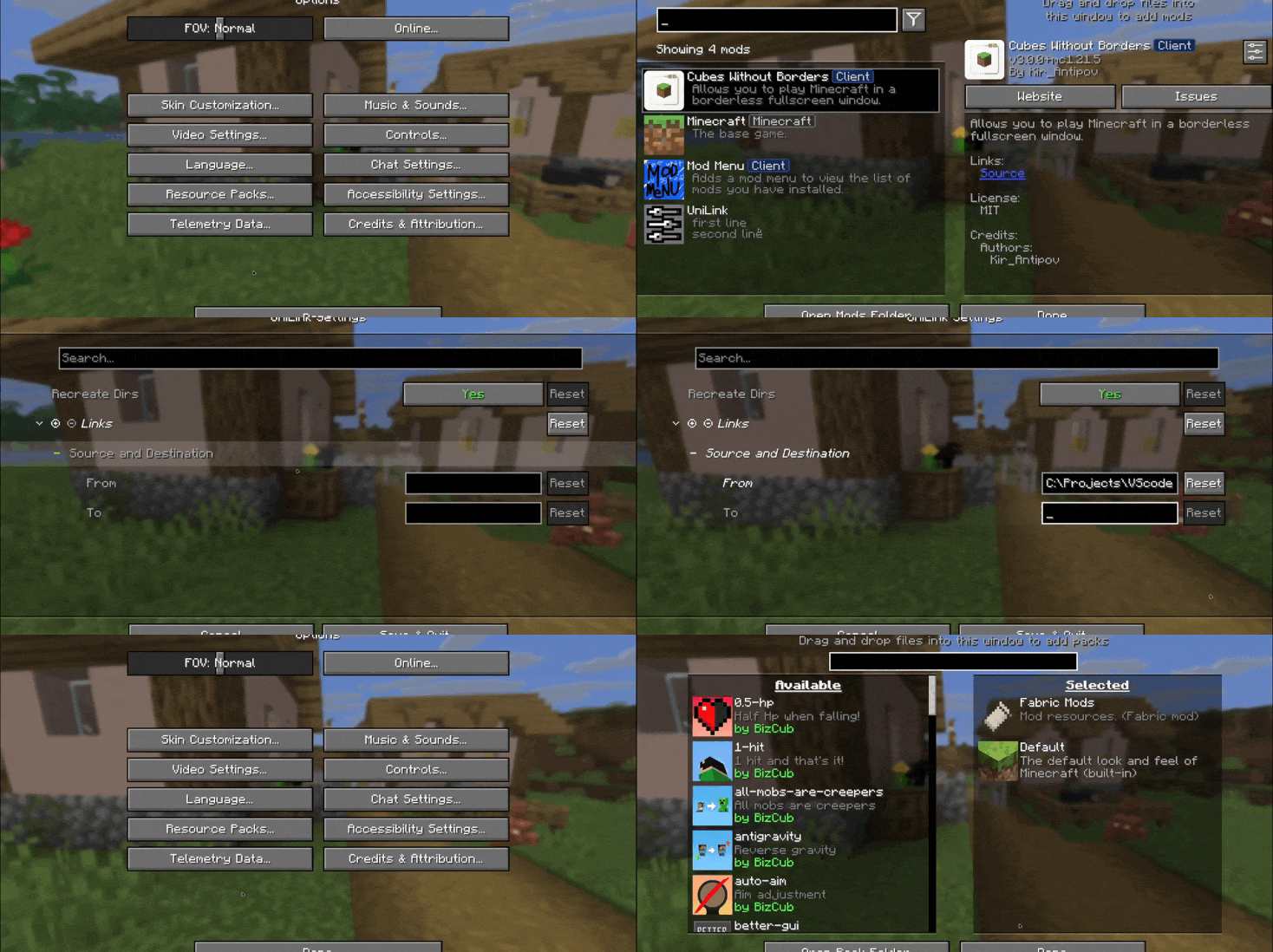
This mod works using symbolic links, which can be used like a folder but don’t require reusing (copying) resources. Some launchers also use symbolic links, but the mod works independently of them. It’s a configuration file. The first field specifies the path to the directory to use, and the second field specifies the path to the folder where the symbolic link should be placed. The final path can be absolute (e.g., “`C:….minecraftsaves“`) or abbreviated (“`saves“`).

If you change the directory used for worlds and then revert the change, the game may freeze while searching for and failing to find the required folder. For this purpose, the configuration file has an option to recreate the folders used by the game.
## 🛠️ How it works
By default, the mod does nothing. However, you can add data to the configuration to create a link: the path from which resources will be used and the path where the symbolic link will be created.
### What follows from this:
* After changing the configuration, new links will be added. Therefore, old, unused links will be deleted.
* Since Minecraft creates some folders, the mod will have to delete the existing folder before creating the link. However, since the mod deletes folders without asking, it has a limitation on deleting directories with files inside. This means that if a folder contains any files, it won’t be deleted and the link won’t be created.
Creating symbolic links requires certain permissions. Therefore, some launchers that don’t have them won’t be able to create links. Solution: Run the launcher as administrator.
## 🤝 Support

UniLib
# UniLib
A common set of Utilities, designed for over 50 versions of Minecraft!
[](https://opensource.org/licenses/MIT)
[](https://app.codacy.com/gl/CDAGaming/UniLib/dashboard?utm_source=gl&utm_medium=referral&utm_content=&utm_campaign=Badge_grade)
[](https://gitlab.com/CDAGaming/UniLib/commits/main)
[](https://www.curseforge.com/minecraft/mc-mods/unilib)
[](https://www.curseforge.com/minecraft/mc-mods/unilib)
[](https://modrinth.com/mod/unilib)
[](https://modrinth.com/mod/unilib)
## General Notes
* This mod identifies as a **Client Side-only** mod
* This means it **will not run** on the Server’s side.
* Fabric and Quilt mod loaders will simply ignore the
mod, while other mod loaders may crash.
* Some versions of the mod for Minecraft 1.14.x and above require
the [Fabric API](https://modrinth.com/mod/fabric-api)
and the [Fabric mod loader](https://fabricmc.net/use/installer)
* Some versions of the mod for Minecraft 1.13.x require
the [Rift API](https://www.curseforge.com/minecraft/mc-mods/rift)
and the [Rift mod loader](https://github.com/DimensionalDevelopment/Rift/releases)
* Some versions of the mod for Minecraft 1.1.0 and below
require [Risugami’s ModLoader](https://mcarchive.net/mods/modloader)
## Features
This library mod offers various API utilities that have been developed over the years,
initially part of [CraftPresence](https://gitlab.com/CDAGaming/CraftPresence),
that have been designed to work on over 50 versions of Minecraft, from the earliest Alphas to the latest Releases.
These APIs range from utilities that can help with Rendering/UI design, Update Checker and Translation ease-of-access,
as well as the APIs provided through the sibling-project, [UniCore](https://github.com/CDAGaming/UniCore)
## Disclaimers & Additional Info
### Minecraft Issues + Additional Build Info
Despite best efforts, issues can occur due to the state of the Minecraft Codebase.
These issues can hinder certain portions of the backend in addition to cause certain parts of the mod to not work.
With this in mind, please note the following:
* **Minecraft 1.16 and above**
* As more parts of the game become data-driven, some modded data is no longer able to be automatically retrieved
without first being in the world.
* **Minecraft 1.15 and below**
* `MC-112292`: When interacting with the `RenderUtils#drawItemStack` method, used in the v2 Item Renderer, blocks
using certain renderers may fail to display properly.
* Additionally, on 1.15.x exclusively, z-level issues may occur on Screens using this method
* **Miscellaneous Issues**
* Due to obfuscation issues in earlier versions of Minecraft, incorrect data may appear when using certain parts of
the mod.
Additionally, some settings or API calls may perform differently under certain MC versions.
### Support
Need some assistance with one of my mods or wish to provide feedback?
I can be contacted via the following methods:
* [Email](mailto:[email protected])
* [CurseForge](https://www.curseforge.com/minecraft/mc-mods/unilib)
* [Discord :: ](https://discord.com/invite/BdKkbpP)
Additionally, codebase documentation for this mod is
available [here](https://cdagaming.gitlab.io/unilib-documentation/) with further guides available
on [the wiki](https://gitlab.com/CDAGaming/UniLib/-/wikis/Home)
#### Licensing
This Mod is under the MIT License as well as the Apache 2.0 License
This project currently makes usage of the following dependencies internally:
* [UniCore](https://github.com/CDAGaming/UniCore) by [CDAGaming](https://github.com/CDAGaming)
* [Classgraph](https://github.com/classgraph/classgraph) by [lukehutch](https://github.com/lukehutch)
* [Lenni Reflect](https://github.com/Lenni0451/Reflect) by [Lenni0451](https://github.com/Lenni0451)
U.P.E. Addon – Neither Portal
Adds a visual effect to the portal in the style of the portals from the snapshot 20w14infinite.
Simply dye and rename one of the pieces of leather armor using any dye, and your portal will become colored.
For proper operation on versions BELOW 1.21.5, a mod implementing CIT (Custom Item Textures) is required.
For versions ABOVE 1.21.5+, no modifications are required (except perhaps the U.P.E. Addon – Connector Ultima, if you want to play with multiple addons).
U.P.E. Addon – Jeb_ Portal
Adds a visual effect to the portal in the style of the renamed sheep jeb_ .
Simply rename one of the pieces of leather armor, and your portal will shimmer with the colors of a “jeb_” sheep.
For proper operation on versions BELOW 1.21.5, a mod implementing CIT (Custom Item Textures) is required.
For versions ABOVE 1.21.5+, no modifications are required (except perhaps the U.P.E. Addon – Connector Ultima, if you want to play with multiple addons).