Mobs have new variants through custom heads or through unused vanilla mobs! This pack uses **over 85 custom player heads** that can be obtained and placed in your world. Spiders also turn upside down when hanging from ceilings.
This data pack/mod is completely server-side, but can also be installed on the client for singleplayer worlds! No resource pack needed!
-> For all added heads and available settings, take a look at the wiki <-
## Installation
Install either as:
* **Data Pack [DP]** ➜ Place `.zip` in your world's `datapacks` folder
* **Mod [Mod]** ➜ Drop into your `mods` folder and optionally install MidnightLib for a global config file and UI
To manage settings, reset, or uninstall the pack, use `/trigger tschipcraft.menu` or `/function #tschipcraft:menu`.
## Compatibility
Tested with Rare Mobs (PMC) and Mob Captains.
**Forge** is only natively supported until Minecraft 1.21.5.
This data pack follows the Smithed and essential MC Datapacks Discord Server Conventions to ensure data pack compatibility.
## Current issues
>
>
> Currently incompatible with Special Mobs – see #7. This will be fixed in a future release.
## External Links
## Partner Offers
Want to buy **Hytale** or upgrade your edition? Use creator code `Tschipcraft` upon checkout for me to receive a commission! (The price for you stays the same)
More Heads
# More Heads
Adds **survival-friendly** access to **mob heads** and **player heads**, using **intentional hoe-based drops** to avoid farm pollution and preserve vanilla progression.
> Expands head collecting by making mob and player heads a deliberate survival reward, not an automatic byproduct.
## Why use this data pack/mod?
1. **All-in-one solution**:
Combines mob heads and player heads in one data pack/mod, keeping head collecting consistent.
2. **Preserves farms and grinders**:
Hoe-based drops keep farms and grinders from filling up with unwanted head drops.
3. **Vanilla-style items**:
Heads use fitting note block sounds, clean names, and subtle tooltip styling so they feel like part of the game.
4. **Lightweight and passive**:
Built around loot tables and pack overlays, without ticking functions, command-heavy systems, or extra runtime overhead.
5. **Flexible installation**:
Works as either a world-specific data pack or packaged mod, making it easy to use in singleplayer, servers, vanilla, and modded setups.
## Installation
After adding the data pack/mod to your world or server, you can open the about panel with:
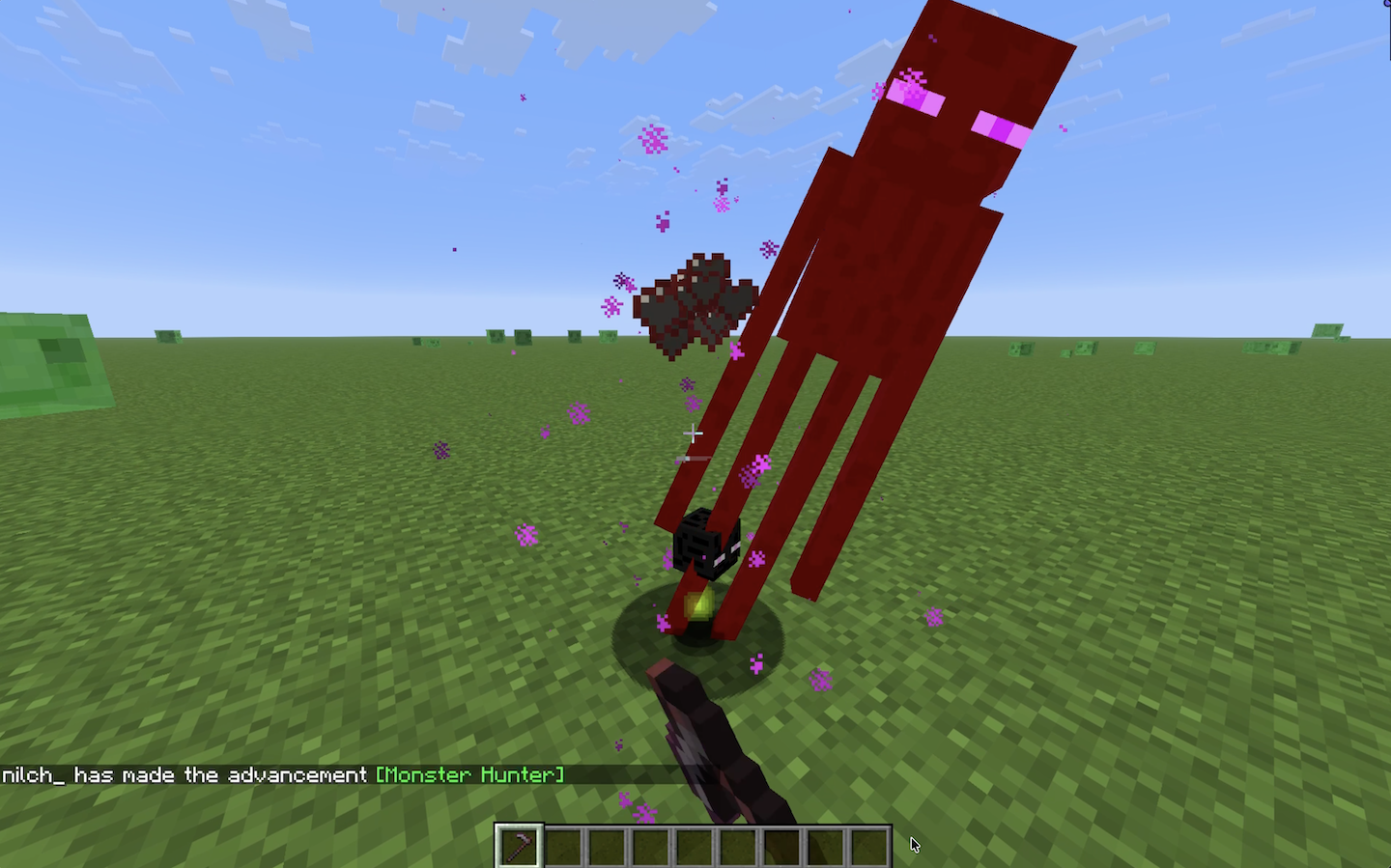
Mobs drop their heads when killed with a **hoe**. The **Wither Skeleton** and **Ender Dragon** are excluded, keeping their **vanilla progression intact**.
> **Enderman Head Drop**
>
> 
## Player Heads
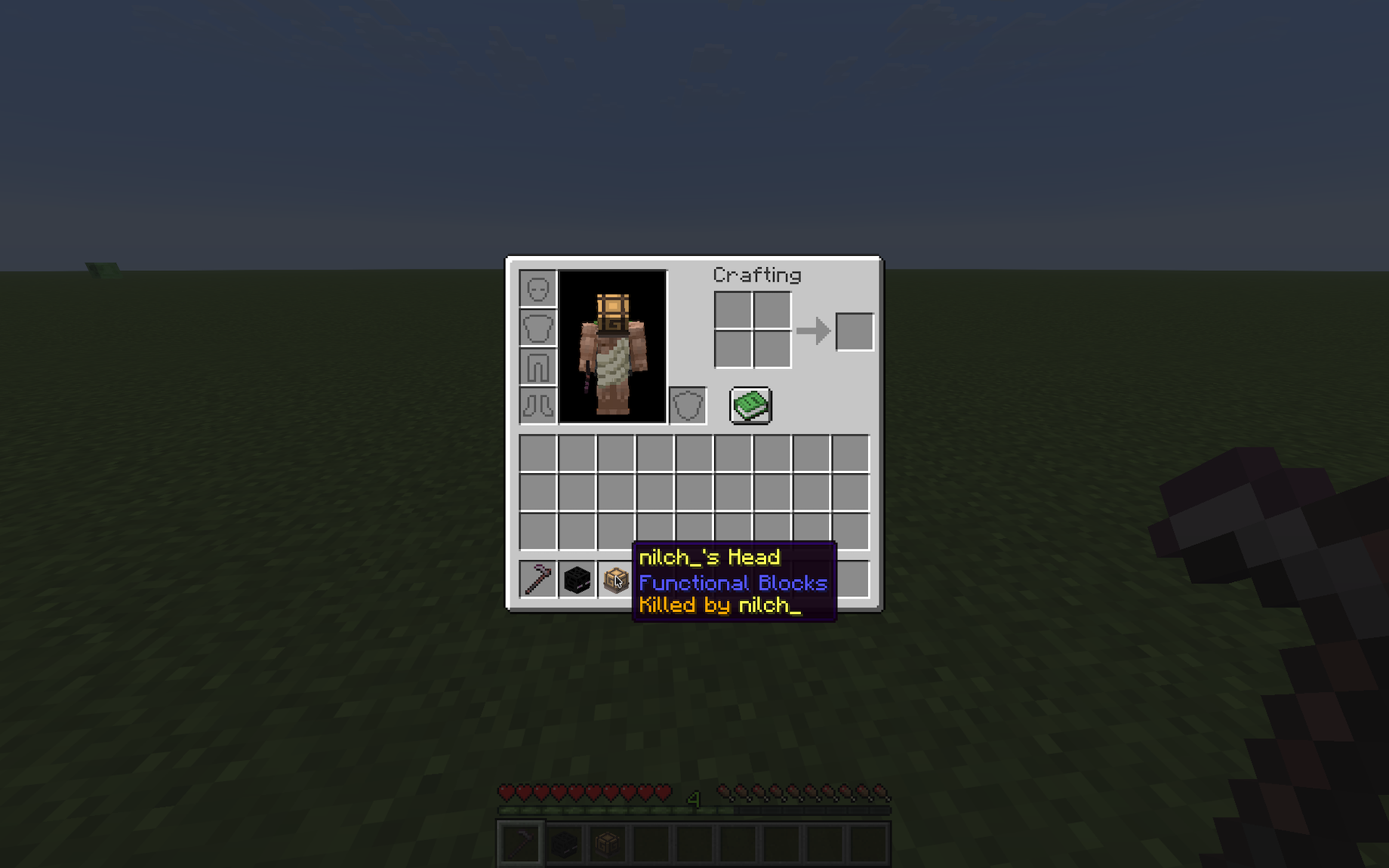
Players drop their heads when killed **by another player**. The killer **is shown** on the head’s tooltip.
> **Player Head Tooltip**
>
> 
## Contributing & Issues
I warmly welcome:
– Bug reports
– Feature requests
– Pull requests
Please open issues or PRs on GitHub.
## License
This project is licensed under the **LGPLv3 License**. See LICENSE for details.
# Hey! I’m Kxffie!
Get More Bang for Your Buck!
No more wasted blocks with these crafting recipes:
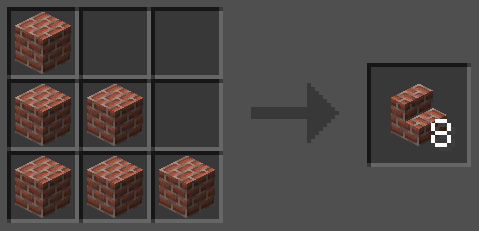
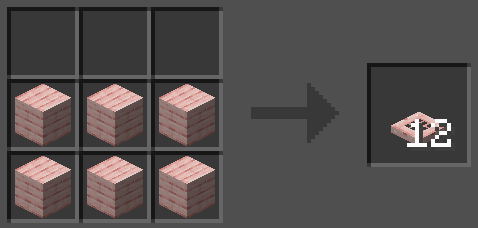
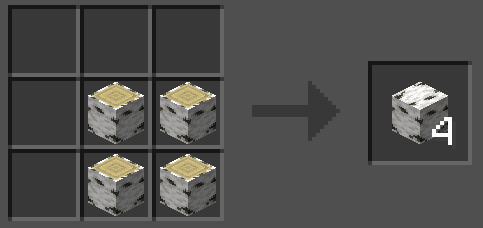
Get more trapdoors, stairs, and wood!
This mod/datapack changes the crafting recipes of stairs, trapdoors, and wood (like the 4 logs into 3 wood is now 4 wood). Trapdoors are now made into 12 of their respected block and stairs are crafted into 8 into their respected block.
You can find this datapack/mod at https://modrinth.com/datapack/more-blocks
## More Barrel Variants
Fill your builds with colourful storage: Now each wood type has its own Barrel.

### Adding 11 new _Barrels_ to Minecraft.
#### These barrels can also be crafted using Nemo’s Woodcutter1.
How can I craft vanilla Barrels using modded wood types from Biomes o’ Plenty, [Let’s Do] mods, and others?
Unfortunately, the vanilla Barrel crafting recipe has to be overridden for the crafting of the variants to function.
But usually these mods add their wood types to the Vanilla recipe, which creates a conflict. Fortunately, there is also a fairly easy way around this issue.
That is what the “More Compatibility Variants” are for: These datapacks/mods resolve this issue across all of our “More X Variants” mods, so you can craft barrels and other vanilla items/blocks just as you would expect.
Currently available **_More Compatibility Variants_**:
– Biomes o’ Plenty
– [[Let’s Do] Meadow, (Nether)Vinery, Beachparty and Blooming Nature](https://modrinth.com/datapack/more-compatibility-variants-lets-do)
– Nature’s Spirit
– Oh The Biomes We’ve Gone
Would you like to see support for another mod with custom wood types? Let me know via Discord, GitHub, or [E-Mail](mailto:[email protected])!
—
## Compatible with Quad 1.3.0+’s block replacement:

Looking at the fisher cottage of a Savanna Village: We can see that instead of _Spruce Barrels_, _Oak Torches_ and regular _Composter_, the game now generates the village with _**Acacia Barrels**_, _**Acacia Torches**_ (from More Torch Variants) and an _**Acacia Composter**_ (from More Composter Variants).
1: In versions 1.11.3 and above.

**
More Armor Trim TP
# More Armor Trim TP
Free and open-source resourcepack for Minecraft 1.21 and higher that works with the More Armor Trim datapack.
## Features
This resourcepack adds models for armor items and color palettes.
More Armor Trim DP
# More Armor Trim DP
Free and open-source datapack for Minecraft 1.21 and higher that adds several new material for armor customisation.
## Features
The following items are new materials that can be used for armors:
– Armadillo Scute
– Blaze Rod
– Bone
– Breeze Rod
– Coal
– Dragon Breath
– Echo Shard
– End Crystal
– Ender Pearl
– Experience Bottle
– Fire Charge
– Glow Ink Sac
– Glowstone Dust
– Gunpowder
– Heart oh the Sea
– Honeycomb
– Leather
– Nautilus Shell
– Nether Brick
– Nether Star
– Netherite Scrap
– Phantom Membrane
– Prismarine Shard
– Prismarine Crystals
– Popped Chorus Fruit
– Rabbit Hide
– Slime Ball
– Turtle Scute
This datapack requires the installation of the More Armor Trim resourcepack.
Mauro Monke Totem of Undying
– EN: “Ape without ears” (Chimp at the computer, Mauro) is a meme with a monkey sitting at a desk and looking at the camera. Both the original picture and a distorted version with the word “Okay” are used
– RU: «Обезьяна без ушей» (Шимпанзе за компьютером, Mauro) — мем с обезьяной, которая сидит за рабочим столом и смотрит в камеру. Используется как оригинальная картинка, так и искажённый вариант со словом «Ладно»
ALL RESOURCEPACKS COLLECTION: MEMES + STREAMERS
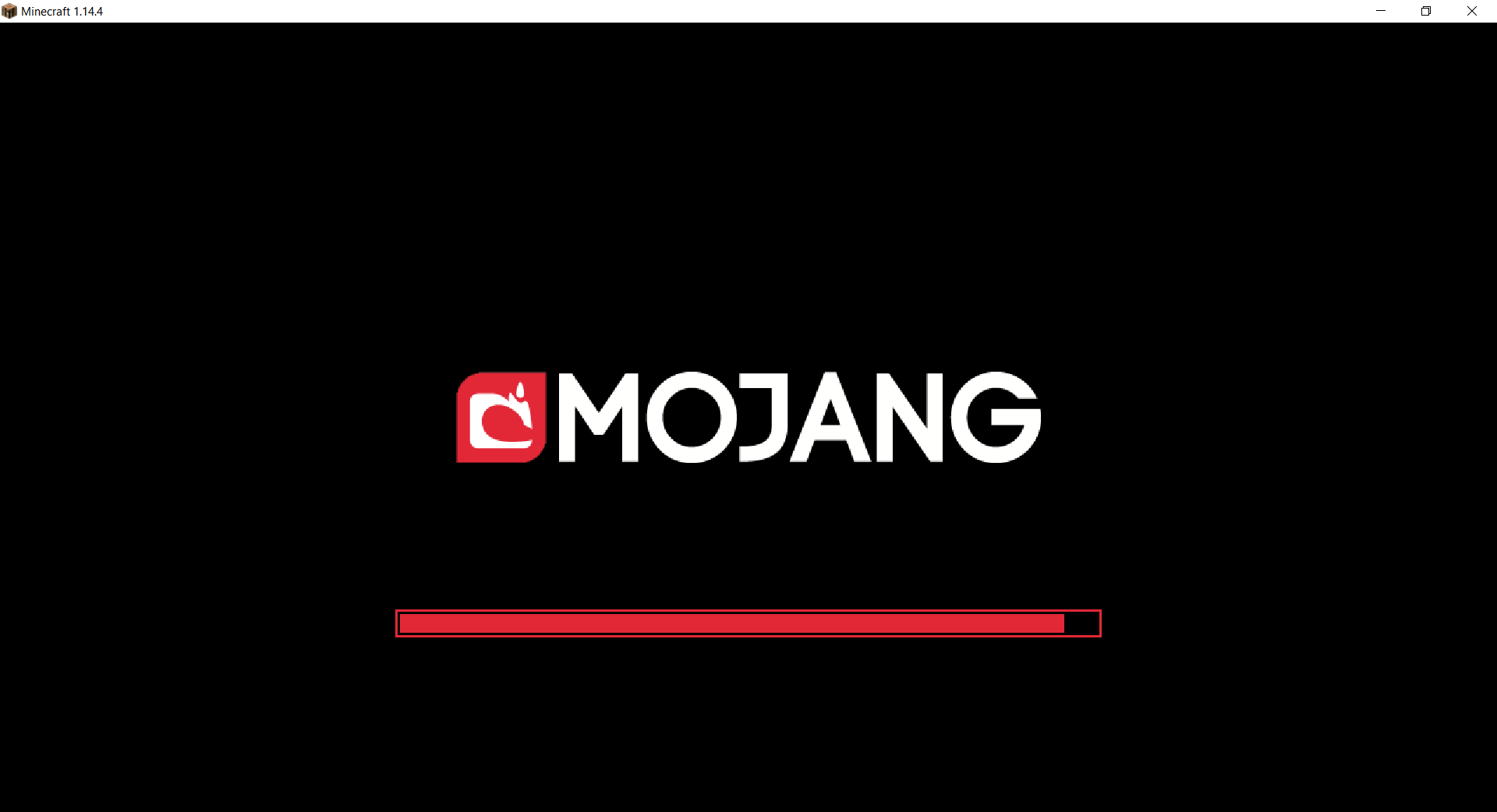
Mojang Black Background
# Mojang Black Background
Changes white background in mojang loading screen to black
Minecraft 1.14 and newer
OptiFine is required to work! optifine.net
## Minecraft 1.16+

## Minecraft 1.14 – 1.15
NightVision is a lightweight and reliable plugin that gives players full-bright night vision without visible potion particles or bubbles. It is designed for Paper and Spigot-style servers, saves player state across relogs, respawns, world changes, and restarts, and makes sure permission changes are always respected.
Features
Toggleable night vision for players
Full brightness effect
Hidden particles and potion bubbles
Persistent saved state by UUID
Restores correctly after relog, death, respawn, and world change
Safe permission checks on join and during play
Prevents saved night vision from bypassing rank or subscription removal
Admin support for toggling and checking other players
Optional admin-forced persistence setting
Separate config.yml and messages.yml
/nv reload recreates missing files automatically
PlaceholderAPI support
Built for modern Paper servers with cross-version-friendly design
Commands
/nv
Toggle night vision for yourself
/nv on
Enable night vision for yourself
/nv off
Disable night vision for yourself
/nv status
Check your own night vision status
/nv
Toggle night vision for another player
/nv on
Enable night vision for another player
/nv off
Disable night vision for another player
/nv status
Check another player’s night vision status
/nv reload
Reload the plugin and recreate missing files
nightvision.use
Allows a player to use night vision for themselves
nightvision.admin.toggle
Allows toggling or setting night vision for other players
nightvision.admin.status
Allows checking another player’s status
nightvision.admin.reload
Allows reloading the plugin
nightvision.bypass.permissionloss
Allows night vision to remain active even without the normal use permission
PlaceholderAPI
%nightvision_status%
Returns the configured enabled/disabled text
%nightvision_enabled%
Returns true or false
ModernFix-mVUS

**ModernFix-mVUS is a fork of ModernFix that will release Modernfix versions for any version that is not supported by the official mod.**
**When the official mod updates to a specific minecraft version this fork will skip releasing that version.**
**Original ModernFix will no longer release Fabric builds so mVUS will only support Fabric for versions that get a NeoForge release on the original mod page.**
**The donation and server host links still point to the official creator’s pages.**
ModernFix is an all-in-one mod that **improves performance, reduces memory usage, and fixes many bugs** in modern Minecraft versions (most versions including and above 1.16 are supported) without majorly compromising the game experience. Most Forge 1.16-1.19.2 modpacks will launch roughly twice as fast with ModernFix installed. If some non-default options are enabled, it can even allow large modpacks like All The Mods 8 to run with 3GB or less of allocated memory.
ModernFix is free, open-source software. All of the code is available on the GitHub repository.
– Multiple contributions made by https://github.com/DerCommander323
## ⚙️ Technical summary
What exactly does ModernFix do for your game? There are a lot of tweaks being made – too many to summarize here. However, here is a brief summary of the general types of improvements being made:
Backports of bugfixes from newer versions of Minecraft and/or Forge, e.g. fixing worlds breaking when you remove a dimension mod in 1.18.
Patches to mods that are no longer supported on a given Minecraft version, to improve the gameplay experience instead of requiring players to update.
Many optimizations & improvements to the game’s launch process to significantly improve speed and reduce random concurrency crashes.
Additional debug tools to help modders and players determine the cause of some rare game crashes/freezes, instead of relying on a painful mod bisection process.
It’s not enabled by default due to compatibility issues, but ModernFix includes functionality to completely redesign the game’s model loading system, replacing it with a new, dynamic version that loads models on the fly. Model loading is one of the major performance regressions to modded Minecraft that has been present since 1.8, and this new system alleviates nearly all of the downsides, bringing memory usage and loading times more in line with how they were in 1.7.10.
Need to play the vanilla game with very little RAM allocated (e.g. 512MB or less)? Now you can do that. Head to the “Ultra-Low Memory Footprint” page on the wiki.
If you are technically savvy and looking for more details on each patch, I recommend reading the Summary of Patches wiki page.
## 🐛 Where to go when something doesn’t work
Please report an issue on GitHub. Be sure to mention the Minecraft version, modloader, and ModernFix version you are using, as well as what other mods you have installed.
## 🎁 How can I support this project?
There are two main ways you can help support the development of ModernFix:
Spread the word! Test ModernFix in modpacks and encourage them to include it.
If you feel generous, I do accept donations via Ko-fi. Donating is not required (as ModernFix is free), but every little bit helps. I work on ModernFix in my spare time, so any compensation I receive helps to sustain development.
❓ What other mods should I use?
There are many performance mods available for Minecraft and I can’t list them all here, but here are some essential mods, in my opinion:
On any version before 1.19.4 you should always have LazyDFU installed, as it eliminates the incredible lag caused by the DFU system.
On any version before 1.20 you should generally use Starlight unless it has a compatibility issue with your mods (which is quite rare). It offers vastly improved lighting performance and can also fix FPS stutters when moving between chunks.
Always have FerriteCore installed, as Mojang’s implementation of blockstates/models is laughably inefficient, and quickly consumes RAM as soon as more content is added beyond what vanilla offers.
Install a mod like Shutup Experimental settings (before 1.19) or Yeetus Experimentus (1.19+). These mods will suppress the pop-up screen about experimental game features, which otherwise causes the game to reload its resources twice.
On a related note: I do not recommend use of OptiFine in any modded scenario. It is closed-source, patches the game in a way that easily breaks Forge and other mods, and significantly slows down game launching, often on the order of minutes. Please consider using Sodium (on Fabric) or Embeddium (on Forge) instead. Using OptiFine with ModernFix is not officially supported, and may cause issues.
### Need a Minecraft server? Consider CreeperHost!











 Source: