SnifferBeGONE – Remove the sniffer sound
A resource pack that removes every sniffer sound, except for it’s death.
### Version support
– Every version after 1.20 is supported. As the sniffer was released that version.
**If you have any issues, please contact me through Discord.**
@zemewtf
SnapshotXBR
# SnapshotXBR
Automatic upscales of the latest textures using [xBRZ](https://sourceforge.net/projects/xbrz/), designed for use under [VanillaXBR](https://modrinth.com/resourcepack/vanillaxbr).
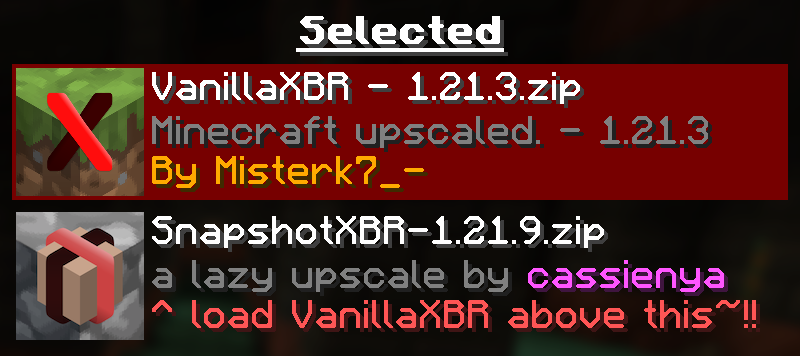
Ensure [VanillaXBR](https://modrinth.com/resourcepack/vanillaxbr) is loaded above SnapshotXBR for the best experience
## Why?
[Misterk7_-](https://modrinth.com/user/misterk7_-) is busy and [VanillaXBR](https://modrinth.com/resourcepack/vanillaxbr) doesnt get updates very quickly, so this is designed to be a sort of bleeding edge build that people can use day 1 as a fallback for textures not yet given [Misterk7_-‘s](https://modrinth.com/user/misterk7_-) touch
### You will notice…
– Gaps in-between block models (ex. missing corners of torches)
– Unnatural pixel blending (ex. the eyes of mobs may morph into the rest of the body)
– Clipped textures in the user interface (ex. the dimming is broken in the world menu)
These are issues that come with a ‘lazy upscale’ of the Minecraft textures, and so will not be fixed as a part of this pack. To fix them, read the recommended usage guidelines below.
### Recommended usage
– Use the latest version of [VanillaXBR](https://modrinth.com/resourcepack/vanillaxbr).
– Enable VanillaXBR above SnapshotXBR in the resource pack menu (as seen above).
– Create and/or improve automatically scaled versions of the textures yourself
## What if I want xBR versions of textures from [insert mod or resource pack]
[PackXBR](https://packxbr.f53.dev/) is the easiest way to make your own textures fit with VanillaXBR.
[](https://packxbr.f53.dev)
Ultimate Smooth FPS Booster
# ⚔️ Smooth PvP Pack
Enhance your PvP experience with smoother visuals and clearer gameplay.
Smooth PvP Pack is a lightweight texture pack designed to improve visibility and reduce visual clutter during combat. It helps players focus better in fights by simplifying effects and keeping the screen clean.
## ✨ Features
– 👁️ Clear and simple visuals for better PvP focus
– ⚡ Reduced unnecessary particles
– 🎯 Improved visibility in combat situations
– 📱 Lightweight and performance-friendly
– 🎮 Smooth gameplay experience
## 🎯 Why use this pack?
This pack is ideal for players who want a cleaner PvP experience without changing the core look of the game. It helps you react faster and play more consistently in battles.
—
🎨 Brand: Own Studio
🛠️ All textures are originally created or modified by Own Studio
—
## ⚡ [ZEYRON CLOUD](https://www.zeyroncloud.com/)
Premium Game Hosting for Minecraft & Servers
## LINKS
**🌐 Website:**
https://zeyroncloud.com
**💬 DISCORD Server:**
https://discord.gg/QPSJzttKwn
Use code **OWNVERSE10** and get **10% OFF** on your **first month** of hosting!
Smooth Entity Shadows
Makes the Shadows under Entities Smooth. The closest you can get without shaders and optifine!

VS Vanilla:

smooth biome moss
add biome blending to moss block, donesnt work with moss carpet unfortunatly.
/! NEEDS either continuity OR optifine to work as it use theyre CTM feature /!
smoothing also need continuity or optiphine as it was not intentional at firs, i will have to remake the texture in the plain for everyone one day but for now, everything in this pack need continuity or optifine
Smaller Crosshair
Did you ever think: “_Why is the Crosshair so big_” ?. If yes, this Texturepack is the right choice!
It makes the Crosshair 1 pixel smaller and is good if you want to change the size of the crosshair, without changing the GUI Scale.
(works with the Crosshair Indicator Mod)

smaller totem pvp
This pack makes tems and shields smaller, allowing for better PvP performance.
Smaller Crit Particle
This Texturepack makes the Crit Particle smaller. It is perfect for PvP, or if you just want a better vision. If you also don’t like the size of the Crosshair, check out my other Packs!

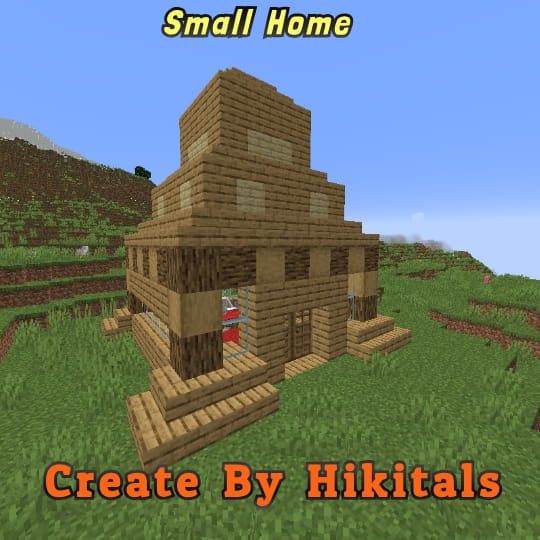
Small Home
My social networks

—
## Description👀
**This datapack adds a new dungeon to your world with a small house where there are a couple of chests of stoves and also beds with dogs**
—
## Useful Сommands🔧
– **Use /locate structure elysianfields:small_home for see dungeon coordinates**
– **Use /place structure elysianfields:small_home for spawn dungeon**
—
Small Tools
🔧 Small Tools Pack
This resource pack combines the best of all my mini-sized tool textures—Small Swords, Small Pickaxes, and Small Axes—into one clean, lightweight bundle. Perfect for PvP or anyone who prefers a less cluttered screen, each tool is carefully downsized to give you more visibility without losing that vanilla Minecraft feel.
✅ Features:
✔️ Smaller tools models for every tier (wood, stone, iron, gold, diamond, netherite)
✔️ Compact sword , pickaxe and axe textures for all materials
✔️ Faithful to the vanilla Minecraft art style
✔️ Ideal for PvP, survival, or aesthetic gameplay
📦 Compatibility:
Minecraft Java Edition
No mods required