More Armor Trim DP
# More Armor Trim DP
Free and open-source datapack for Minecraft 1.21 and higher that adds several new material for armor customisation.
## Features
The following items are new materials that can be used for armors:
– Armadillo Scute
– Blaze Rod
– Bone
– Breeze Rod
– Coal
– Dragon Breath
– Echo Shard
– End Crystal
– Ender Pearl
– Experience Bottle
– Fire Charge
– Glow Ink Sac
– Glowstone Dust
– Gunpowder
– Heart oh the Sea
– Honeycomb
– Leather
– Nautilus Shell
– Nether Brick
– Nether Star
– Netherite Scrap
– Phantom Membrane
– Prismarine Shard
– Prismarine Crystals
– Popped Chorus Fruit
– Rabbit Hide
– Slime Ball
– Turtle Scute
This datapack requires the installation of the More Armor Trim resourcepack.
Mauro Monke Totem of Undying
– EN: “Ape without ears” (Chimp at the computer, Mauro) is a meme with a monkey sitting at a desk and looking at the camera. Both the original picture and a distorted version with the word “Okay” are used
– RU: «Обезьяна без ушей» (Шимпанзе за компьютером, Mauro) — мем с обезьяной, которая сидит за рабочим столом и смотрит в камеру. Используется как оригинальная картинка, так и искажённый вариант со словом «Ладно»
ALL RESOURCEPACKS COLLECTION: MEMES + STREAMERS
Mojang Black Background
# Mojang Black Background
Changes white background in mojang loading screen to black
Minecraft 1.14 and newer
OptiFine is required to work! optifine.net
## Minecraft 1.16+

## Minecraft 1.14 – 1.15
The resurcepack is also available on CurseForge
ModernFix-mVUS

  
**ModernFix-mVUS is a fork of ModernFix that will release Modernfix versions for any version that is not supported by the official mod.**
**When the official mod updates to a specific minecraft version this fork will skip releasing that version.**
**Original ModernFix will no longer release Fabric builds so mVUS will only support Fabric for versions that get a NeoForge release on the original mod page.**
**The donation and server host links still point to the official creator’s pages.**
ModernFix is an all-in-one mod that **improves performance, reduces memory usage, and fixes many bugs** in modern Minecraft versions (most versions including and above 1.16 are supported) without majorly compromising the game experience. Most Forge 1.16-1.19.2 modpacks will launch roughly twice as fast with ModernFix installed. If some non-default options are enabled, it can even allow large modpacks like All The Mods 8 to run with 3GB or less of allocated memory.
ModernFix is free, open-source software. All of the code is available on the GitHub repository.
– Multiple contributions made by https://github.com/DerCommander323
## ⚙️ Technical summary
What exactly does ModernFix do for your game? There are a lot of tweaks being made – too many to summarize here. However, here is a brief summary of the general types of improvements being made:
Backports of bugfixes from newer versions of Minecraft and/or Forge, e.g. fixing worlds breaking when you remove a dimension mod in 1.18.
Patches to mods that are no longer supported on a given Minecraft version, to improve the gameplay experience instead of requiring players to update.
Many optimizations & improvements to the game’s launch process to significantly improve speed and reduce random concurrency crashes.
Additional debug tools to help modders and players determine the cause of some rare game crashes/freezes, instead of relying on a painful mod bisection process.
It’s not enabled by default due to compatibility issues, but ModernFix includes functionality to completely redesign the game’s model loading system, replacing it with a new, dynamic version that loads models on the fly. Model loading is one of the major performance regressions to modded Minecraft that has been present since 1.8, and this new system alleviates nearly all of the downsides, bringing memory usage and loading times more in line with how they were in 1.7.10.
Need to play the vanilla game with very little RAM allocated (e.g. 512MB or less)? Now you can do that. Head to the “Ultra-Low Memory Footprint” page on the wiki.
If you are technically savvy and looking for more details on each patch, I recommend reading the Summary of Patches wiki page.
## 🐛 Where to go when something doesn’t work
Please report an issue on GitHub. Be sure to mention the Minecraft version, modloader, and ModernFix version you are using, as well as what other mods you have installed.
## 🎁 How can I support this project?
There are two main ways you can help support the development of ModernFix:
Spread the word! Test ModernFix in modpacks and encourage them to include it.
If you feel generous, I do accept donations via Ko-fi. Donating is not required (as ModernFix is free), but every little bit helps. I work on ModernFix in my spare time, so any compensation I receive helps to sustain development.
❓ What other mods should I use?
There are many performance mods available for Minecraft and I can’t list them all here, but here are some essential mods, in my opinion:
On any version before 1.19.4 you should always have LazyDFU installed, as it eliminates the incredible lag caused by the DFU system.
On any version before 1.20 you should generally use Starlight unless it has a compatibility issue with your mods (which is quite rare). It offers vastly improved lighting performance and can also fix FPS stutters when moving between chunks.
Always have FerriteCore installed, as Mojang’s implementation of blockstates/models is laughably inefficient, and quickly consumes RAM as soon as more content is added beyond what vanilla offers.
Install a mod like Shutup Experimental settings (before 1.19) or Yeetus Experimentus (1.19+). These mods will suppress the pop-up screen about experimental game features, which otherwise causes the game to reload its resources twice.
On a related note: I do not recommend use of OptiFine in any modded scenario. It is closed-source, patches the game in a way that easily breaks Forge and other mods, and significantly slows down game launching, often on the order of minutes. Please consider using Sodium (on Fabric) or Embeddium (on Forge) instead. Using OptiFine with ModernFix is not officially supported, and may cause issues.
### Need a Minecraft server? Consider CreeperHost!

Modern Mizuno’s

## Modern Mizuno’s
The Mizuno’s 16x texture pack has played a big part in why I’ve stuck around with Minecraft for so long, the cartoony and cozy vibes will forever have a place in my heart.
Unfortunately, official updates for the latest content added to Minecraft Java Edition seem to have stopped.
I hope to keep Mizuno’s alive in the modern era with this add-on acting as an unofficial update to our beloved 16x texture pack that has spawned its own vibrant community.
Want to help keep Mizuno’s alive and provide your suggestions for this pack? Join our Discord server, where we’re always looking for your feedback!
### Features
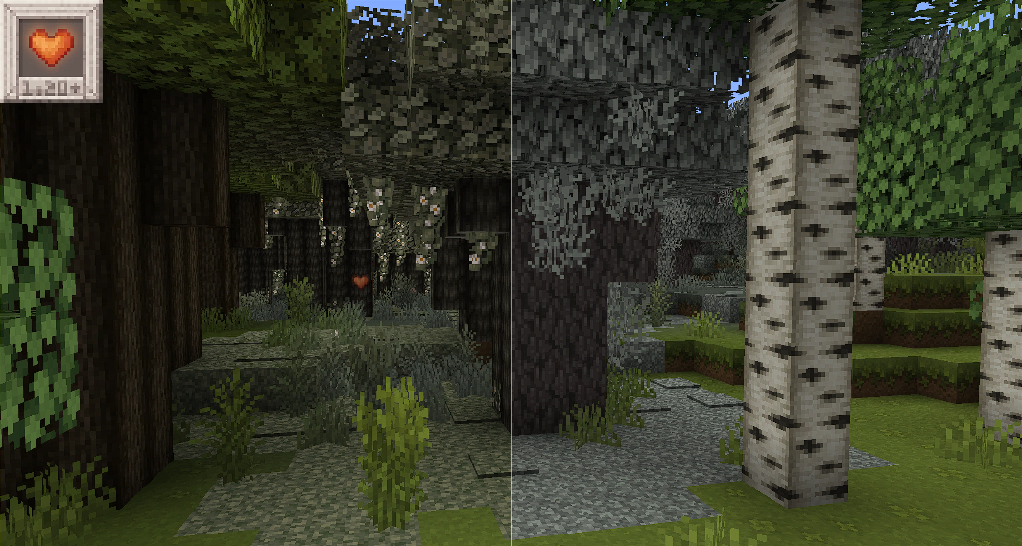
Currently, the pack supports most of the blocks from the Pale Garden drop update (1.21.4), and I plan to keep working on this until every new asset is in line with the classic Mizuno’s style.
Check out the **Slider Showcase Album to see what’s added in this pack!**
### Installation
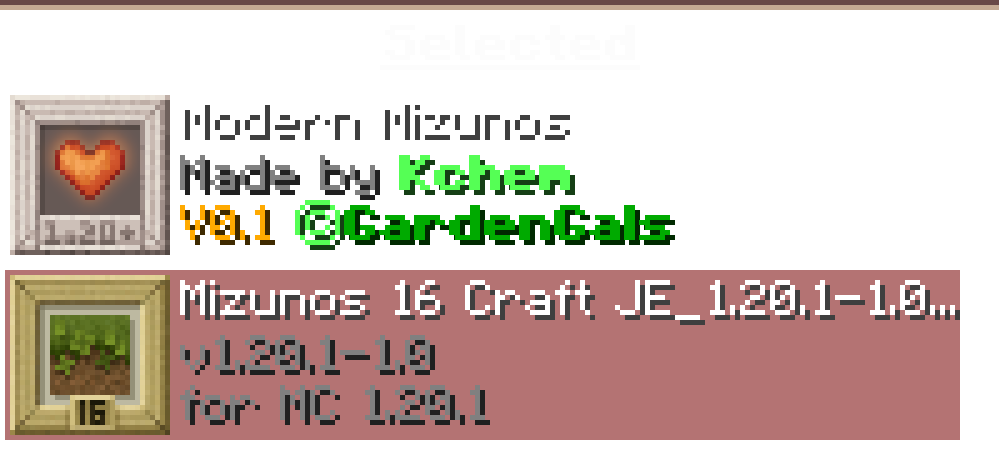
This pack is an add-on that contains none of Mizuno’s own textures, you still need to download the original pack from its official Mediafire link, but keep this pack on top of your list!
*Download the builds used in our showcases!*
*Requires Mizuno’s 16x JE*
*Check out Overgrown Flowery GUI, its used in the showcase images!*
*Check out Astralex Shaders, it’s used in the Banner image!*
*Some assets derived from Abyssal Decor.*
*Some assets derived from Pixel Perfection Legacy*
*Find more Mizunos Resource Packs and addons*
*This pack utilizes Everybody Loves: Bees.*


Mod Loading Screen
# Mod Loading Screen
An advanced loading screen with the loading progress of mods. It works on all Minecraft versions, as it doesn’t even require Minecraft. Its only requirement is Fabric Loader 0.12.0 or later or Quilt Loader (specific versions of Quilt support are unknown). Do note that if you run this mod on a game other than Minecraft, the loading screen may not close itself.
## Agent
Mod Loading Screen provides a Java agent, which allows opening the loading screen before even the mod loader itself loads. This feature is primarily targeted at modpack developers who want to make a seamless loading experience. The agent can be used by passing `-javaagent:mod-loading-screen-1.0.4.jar` as a JVM argument. If the agent is used, the loading screen should *not* be installed as a mod.
## API
To depend on the API, use the Modrinth Maven. The API should be JiJed, and doing so will not include Mod Loading Screen inside your mod (it will only include the API, which is only a few kilobytes). The API is designed to have both forwards and backwards binary compatibility with future Mod Loading Screen versions. An API is provided for checking which API calls will return stubs and which ones are real.
“`gradle
repositories {
exclusiveContent {
forRepository {
maven {
name = “Modrinth”
url = “https://api.modrinth.com/maven”
}
}
filter {
includeGroup(“maven.modrinth”)
}
}
}
dependencies {
// implementation, not modImplementation!
include(implementation(“maven.modrinth:mod-loading-screen:1.0.4:api”))
}
“`
The API has two top-level classes: `LoadingScreenApi` and `AvailableFeatures`. Full javadocs are available for both classes.
Mod Descriptions


This resource pack adds additional unique descriptions to modded blocks, items, and entities. It is an add-on for Item Descriptions.
## Supported Mods
Every mod on this list should be fully supported, with accurate descriptions for all blocks and items.
– Action Mobs, contributed to by sisby-folk
– Ad Astra, contributed to by Liamgrayskull
– Alex’s Caves, contributed to by Liamgrayskull
– Alexs Caves: Stuff & Torpedoes, contributed to by Liamgrayskull
– Amarong
– Angel Block Renewed, contributed to by TheExiIedFeIIow
– Arthropocolypse, contributed to by TheExiIedFeIIow
– Area Tools, contributed to by sisby-folk
– Armisteel
– Autumnity, contributed to by Liamgrayskull
– Barricade
– Basic Storage
– Basic Weapons
– Beans Backpacks
– Bear Minimum
– Bedrockify
– Better Tridents
– Berry Bounty
– Block Breaker and Block Placer
– Blocky Bass
– Blowing Bubbles, contributed to by sisby-folk
– Boing, contributed to by sisby-folk
– Bovines and Buttercups
– Buoys
– Breeze Bounce
– Brewin and Chewin
– Bronze
– Camphor
– Carnival Cuisine
– Caverns and Chasms, contributed to by Liamgrayskull
– CC: Tweaked
– Chickensaurs
– Chiseled, contributed to by sisby-folk
– Chorus Honey, contributed to by sisby-folk
– citsabmoB, contributed to by sisby-folk
– Cloud Storage, contributed to by Liamgrayskull
– Clutter No More
– Cold Sweat, contributed to by Liamgrayskull
– Comforts, contributed to by TheExiIedFeIIow
– Copper Cauldron, contributed to by sisby-folk
– Confetti Stuff
– Crazy Pogo, contributed to by sisby-folk
– Crystalline Sky, contributed to by sisby-folk
– Densha no Omocha, contributed to by sisby-folk
– Doom and Gloom, contributed to by Liamgrayskull
– Dracolotl, contributed to by TheExiIedFeIIow
– Dronebox, contributed to by sisby-folk
– Drones, contributed to by TheExiIedFeIIow
– Elevator Mod, contributed to by TheExiIedFeIIow
– Etcetera, contributed to by Liamgrayskull
– Etched, contributed to by Liamgrayskull
– Enchiridion
– Explorer’s Compass, contributed to by TheExiIedFeIIow
– Extra Shields
– Extended Drawers
– Extravaganza!
– Eye of Dreams, contributed to by sisby-folk
– Farmer’s Delight (Refabricated)
– Fast Item Frames
– Festive Frenzy
– Figures, contributed to by sisby-folk
– Five Guys Burgers and Fries, contributed to by sisby-folk
– Floral Tonics And Tinctures, contributed to by TheExiIedFeIIow
– Frame Changer, contributed to by Liamgrayskull
– Fright’s Delight
– Galosphere, contributed to by sherpascott, craisinlord, and Liamgrayskull
– Galospheric Delight, contributed to by Liamgrayskull
– Gardens of the Dead, contributed to by Liamgrayskull
– gCAPS
– Glide Away
– Gliders
– Glowcase, contributed to by sisby-folk
– Googun, contributed to by sisby-folk
– Grand Indestructible Kingdom, contributed to by sisby-folk
– Green Screen
– Grow Your Crystal, contributed to by sisby-folk
– Gunner, contributed to by sisby-folk
– Hadean Breathe, contributed to by TheExiIedFeIIow
– Happier Ghasts
– Hero Statue, contributed to by sisby-folk
– Hollow
– Hyper Silt, contributed to by sisby-folk
– Inferno
– Instant Feedback
– It’s As Shrimple As That
– Immersive Melodies, contributed to by Liamgrayskull
– Impilllagers
– Jack in the Box, contributed to by sisby-folk
– Just Dandy, contributed to by Liamgrayskull
– Kaleidoscopes, contributed to by sisby-folk
– Laseredstone, contributed to by sisby-folk
– Lifelike, contributed to by sisby-folk
– Lilium
– Litavis
– Lootr, contributed to by Liamgrayskull
– Losing my Marbles, contributed to by sisby-folk
– Map Atlases, contributed to by Liamgrayskull
– Mannequin, contributed to by sisby-folk
– The Masquerade (Illager Boss)), contributed to by TheExiIedFeIIow
– More than a Foxbox, contributed to by sisby-folk
– Mr. Potato Head, contributed to by sisby-folk
– Mr. Scoot, contributed to by sisby-folk
– Mob Mystery Dollhouse, contributed to by sisby-folk
– More Paths
– Mowzie’s Mobs, contributed to by Liamgrayskull
– MmmMmmMmmMmm, contributed to by TheExiIedFeIIow
– Mutant Monsters, contributed to by TheExiIedFeIIow
– Mutant More, contributed to by TheExiIedFeIIow
– My Nether’s Delight
– Nature’s Compass, contributed to by TheExiIedFeIIow
– New in Box, contributed to by sisby-folk
– Nirvana, contributed to by Liamgrayskull
– Neapolitan, contributed to by Liamgrayskull
– Not a Toy, contributed to by sisby-folk
– Not Enough Minecraft, contributed to by sisby-folk
– Oceanic Weaponry
– Occipital Metonymy, contributed to by sisby-folk
– Onion Onion, contributed to by Liamgrayskull
– Oreganized, contributed to by Liamgrayskull
– Origins, contributed to by TheExiIedFeIIow
– Oxide
– Paradise Lost, contributed to by Liamgrayskull
– Patbox’s Brewery
– Peculiars, contributed to by Liamgrayskull
– Pet Cemetery, contributed to by Liamgrayskull
– Pierced
– Playful Planes, contributed to by sisby-folk
– Plonk, contributed to by Liamgrayskull
– Polaroid Camera
– PolyDecorations
– Power Towel, contributed to by sisby-folk
– Raccoons and Rabies
– Rapscallions and Rockhoppers
– Rare Ice, contributed to by Liamgrayskull
– Raspberry Core, contributed to by Liamgrayskull
– RC Toys, contributed to by sisby-folk
– Rest in Pieces
– Rounded
– Scattered Shards, contributed to by sisby-folk
– Showtime, contributed to by sisby-folk
– Simple Radio, contributed to by Liamgrayskull
– Simply Slingshot, contributed to by sisby-folk
– Slotcars, contributed to by sisby-folk
– Snow’s Bosses: Hellstone Golem, contributed to by TheExiIedFeIIow
– Softer Pastels
– Spice of Life: Carrot Edition, contributed to by TheExiIedFeIIow
– Spring Boots, contributed to by sisby-folk
– Straw Statues
– Stickerbomb, contributed to by sisby-folk
– Structure Compass, contributed to by TheExiIedFeIIow
– Sully’s Mod, contributed to by Liamgrayskull
– Supplementaries, contributed to by Liamgrayskull
– Surpuncher, contributed to by sisby-folk
– Sword of Legend, contributed to by sisby-folk
– Telebaton, contributed to by sisby-folk
– Templates 2
– The Block Box
– Thigh Highs etc., contributed to by Liamgrayskull
– Thwackinator
– Toil and Trouble, contributed to by sisby-folk
– Totoro Top, contributed to by sisby-folk
– Toy Bricks, contributed to by sisby-folk
– Toy Water Gun, contributed to by sisby-folk
– Trailier Tales
– Traveler’s Compass, contributed to by TheExiIedFeIIow
– Ultimate Content Mod
– Wabbajack, contributed to by sisby-folk
– Volare, contributed to by sisby-folk
– Wandering Rana
– Weird Wares
– Wheel of Wacky
– Windup Music Box, contributed to by sisby-folk
– Whiff o’ Whisp, contributed to by Liamgrayskull
– World Comment, contributed to by sisby-folk
– Wraith Waystones
– Yamaxanadu, contributed to by sisby-folk
– Zipline
– Zip to It, contributed to by sisby-folk
## Partially Supported Mods
Every mod on this list has partial support, with some descriptions for the mod’s blocks and items.
– Adorn
– Alex’s Mobs, contributed to by sherpascott and craisinlord!
– Cataclysm, contributed to by sherpascott and craisinlord!
– Cerulean
– Colourful Clocks
– Cook’s Collection
– Domestication Innovation, contributed to by sherpascott and craisinlord!
– Environmental, contributed to by Ghoules3000!
– Friends and Foes, contributed to by sherpascott and craisinlord!
– Iron’s Spellbooks, contributed to by sherpascott and craisinlord!
– Jaden’s Nether Expansion, contributed to by sherpascott, craisinlord, and Liamgrayskull!
– Map Utils
– Quark, contributed to by sherpascott.
– Savage and Ravage, contributed to by Ghoules3000!
– Scarves
– Simply Swords, contributed to by sherpascott and craisinlord!
– Spawn, contributed to by Ghoules3000!
– Species, contributed to by Ghoules3000 and Liamgrayskull
– Upgrade Aquatic, contributed to by sherpascott and craisinlord!
– Wilder Wild
## Partially Supported Mods
Every mod on this list has partial support, with some descriptions for the mod’s blocks and items.
– Adorn
– Alex’s Mobs, contributed to by sherpascott and craisinlord!
– Cataclysm, contributed to by sherpascott and craisinlord!
– Cerulean
– Colourful Clocks
– Cook’s Collection
– Domestication Innovation, contributed to by sherpascott and craisinlord!
– Environmental, contributed to by Ghoules3000!
– Friends and Foes, contributed to by sherpascott and craisinlord!
– Iron’s Spellbooks, contributed to by sherpascott and craisinlord!
– Jaden’s Nether Expansion, contributed to by sherpascott, craisinlord, and Liamgrayskull!
– Map Utils
– Quark, contributed to by sherpascott.
– Savage and Ravage, contributed to by Ghoules3000!
– Scarves
– Simply Swords, contributed to by sherpascott and craisinlord!
– Spawn, contributed to by Ghoules3000!
– Species, contributed to by Ghoules3000 and Liamgrayskull
– Upgrade Aquatic, contributed to by sherpascott and craisinlord!
– Wilder Wild
## Adding New Desccriptions
The base mod provides descriptions for vanilla blocks, items, and entities – including supported April Fools versions. This resource pack stores each mod’s translations in the same namespace as the mod, to aid in modularity.
“`json
“lore..“: “A mysterious modded block.”
“`
For more information on formatting, see the information on the Item Descriptions Wiki.
⚔️MOB Items⚔️
Makes that mobs wield custom-designed items and weapons, bringing a fresh new visual to your gameplay.

**Blood’n Bones**
– Bone Bow for Skeletons
– Frost Bow for Strays
– Mossy Bow for Bogged
– Rusty n Bloody Sword/Shovel for Zombies and Husks
– Mossy Fishing Rod & Nautilus Shell for Drowned
**Illager Arsenal:**
– Pillager Crossbows
– Vindicator Axes
– Patrol Helmet (for raid leaders instead of a banner in their head)
– Vex Sword (pixel consistent and translucent)
**Inferno Weaponry:**
– Golden Wrath Axe for Piglin Brute/Zombie Piglin
– Golden Spiked Sword for Piglin/Zombie Piglin
– Golden Crimson Crossbow for Piglin/Zombie Piglin
– Golden Crimson Rod for Zombie Piglin
– Ashen Blade for Wither Skeleton
– Withered Bow for Wither Skeleton
**Friendly Gang:**
– Pandas holding/eating Bamboo has a 3d model
– Pandas holding/eating Cake has a 3d model
– Foxes also eats 3d cakes and bamboos, they were jealous
**EXTRA:**
– Players hold 3d cake and bamboo as well (needs the ADD-ON)
Check my other Packs:
– **Amoozing COWS**
– **Cluckin’ CHICKS**
– **Better BATS**
– **MOB Items**
– **ENCHANTRAX**
– **Better Keys**
– **Iridescent Star**
– **Golem Toys**
#### • Resourcepack made by itsMarkiS • @Markis_ArtS
Mo Glass
# Mo Glass
A Minecraft mod that adds glass stairs and glass slabs to the game, including stained and tinted glass variants, while maintaining all of the seamless transparency and translucency that makes vanilla Minecraft’s glass blocks look so great.

## Features
– Glass Slabs!
– Glass Stairs!
– Stained Glass Slabs! (since v1.3)
– Stained Glass Stairs! (since v1.3)
– Tinted Glass Slabs! (since v1.6)
– Tinted Glass Stairs! (since v1.6)
– Working Transparency! (see below)
– Working Translucency! (for tinted glass)
– Compatible with the Translucent Glass mod! (since Mo Glass v1.10, Translucent Glass v0.2)
## Seamless Transparency
Both the stairs and the slabs are see-through in the same way as vanilla glass blocks. You can place multiple stairs, slabs and full blocks next to each other and they will look like a single piece of glass.

## Working Translucency
Slabs and stairs made from tinted glass will block light if you place them without any air gaps, or let the light through if there is a gap.

## Why aren’t these blocks part of vanilla Minecraft?
Before I started making this mod, I always thought that Mojang just forgot about these blocks, or that they were too lazy to add them. But now that I’ve added these blocks myself and spent many hours to get the transparency to work, I think I finally understand why Mojang didn’t bother. Minecraft’s stairs are surprisingly complex blocks and they were never meant to be made transparent. Slabs might be easy enough, but I think if Mojang added those then people wouldn’t stop asking for the stairs. And glass stairs are an absolute nightmare to make.
Stairs can be placed facing North, East, South or West, they can be upside-down or right-side-up, they can be straight or curved in one of four different ways and they have six faces that may or may not be transparent, depending on what block is next to them. But here’s the catch: On each of those six faces, there could be another block of glass stairs that can also be placed facing North, East, South or West, upside-down or right-side-up and either straight or curved in one of four different ways. And then of course, on each of the six faces there could also be a non-transparent block, a regular glass block or a glass slab that is either placed on the bottom half, top half, or is a double slab.
In the end, there are 10800 possible scenarios that need to be accounted for just to calculate transparency of glass stairs. But then you also have to calculate the transparency of glass slabs (810 possible scenarios) and adjust the transparency calculation of regular glass blocks (270 possible scenarios, or 258 more than before).*
That’s a lot of effort just to add two new blocks to the game – and a lot of opportunities for new bugs to sneak in. That, I think, is why Mojang didn’t bother.
*Here’s how I got those numbers: (click to expand)
possible variations of stairs:
pvStairs = 4 * 2 * 5 = 40
possible variations of slabs:
pvSlabs = 3
possible variations of glass blocks:
pvGlass = 1
possible variations of non-transparent blocks:
pvBlocks = 1 (because any variations would be ignored when calculating transparency)
possible combinations combined:
pvAll = pvStairs + pvSlabs + pvGlass + pvBlocks = 40 + 3 + 1 + 1 = 45
possibly transparent faces of a block (including stairs, even though they have more faces):
f = 6
possible scenarios for transparency of stairs:
psStairs = pvAll * f * pvStairs = 45 * 6 * 40 = 10800
possible scenarios for transparency of slabs:
psSlabs = pvAll * f * pvSlabs = 45 * 6 * 3 = 810
possible scenarios for transparency of glass blocks:
psGlass = pvAll * f * pvGlass = 45 * 6 * 1 = 270
possible scenarios for transparency of glass blocks if glass stairs and slabs don’t exist:
psGlassVanilla = (pvGlass + pvBlocks) * f * pvGlass = (1 + 1) * 6 * 1 = 12
## What about connected textures mods?
~~So far, all connected textures mods that I’ve seen only seem to work on full blocks. They don’t generate connected textures for stairs or slabs, which makes using them with Mo Glass impossible.~~
~~It’s not that Mo Glass doesn’t have support for connected textures, it’s that connected textures mods don’t have support for Mo Glass (or any other mod that adds stairs/slabs).~~
~~This might change one day as people make new mods all the time, so do let me know if there is a connected texture mod that supports stairs now. I’d be happy to add the extra texture files needed (if any) to make that work with Mo Glass.~~
This has changed and support for connected textures is currently being worked on. Please be patient.
## Crafting Recipes
Glass Slab: (click to expand)


Glass Stairs: (click to expand)


## Supported Languages
– Chinese (Simplified) (since v1.2)
– Chinese (Traditional) (since v1.2)
– English (US) (since v1.0)
– French (France) (since v1.6)
– German (Germany) (since v1.2)
– Italian (Italy) (since v1.6)
– Japanese (Japan) (since v1.7)
– Oshiwambo (Oshindonga) (since v1.5)
– Oshiwambo (Oshikwanyama) (since v1.5)
– Portuguese (Brazil) (since v1.7)
– Russian (Russia) (since v1.5)
– Spanish (Argentina) (since v1.4)
– Spanish (Chile) (since v1.4)
– Spanish (Ecuador) (since v1.4)
– Spanish (Spain) (since v1.4)
– Spanish (Mexico) (since v1.4)
– Spanish (Uruguay) (since v1.4)
– Spanish (Venezuela) (since v1.4)
Miyabi ZZZ Title Screen Background
Replaces the default Minecraft main menu background with Miyabi from Zenless Zone Zero.
This resource pack replaces the vanilla panorama with a high-resolution Miyabi background, giving the main menu a cleaner and more modern look while keeping the original UI fully intact and readable.
It’s a simple visual-only change, ideal for players who want a different start screen without affecting gameplay or interface elements.
Includes:
* Custom main menu panorama background
* High-resolution Miyabi artwork
* Seamless integration with the default UI
* Works as a standard resource pack (no mods required)
No other textures or features are modified.