New Hearts
# **New Hearts**
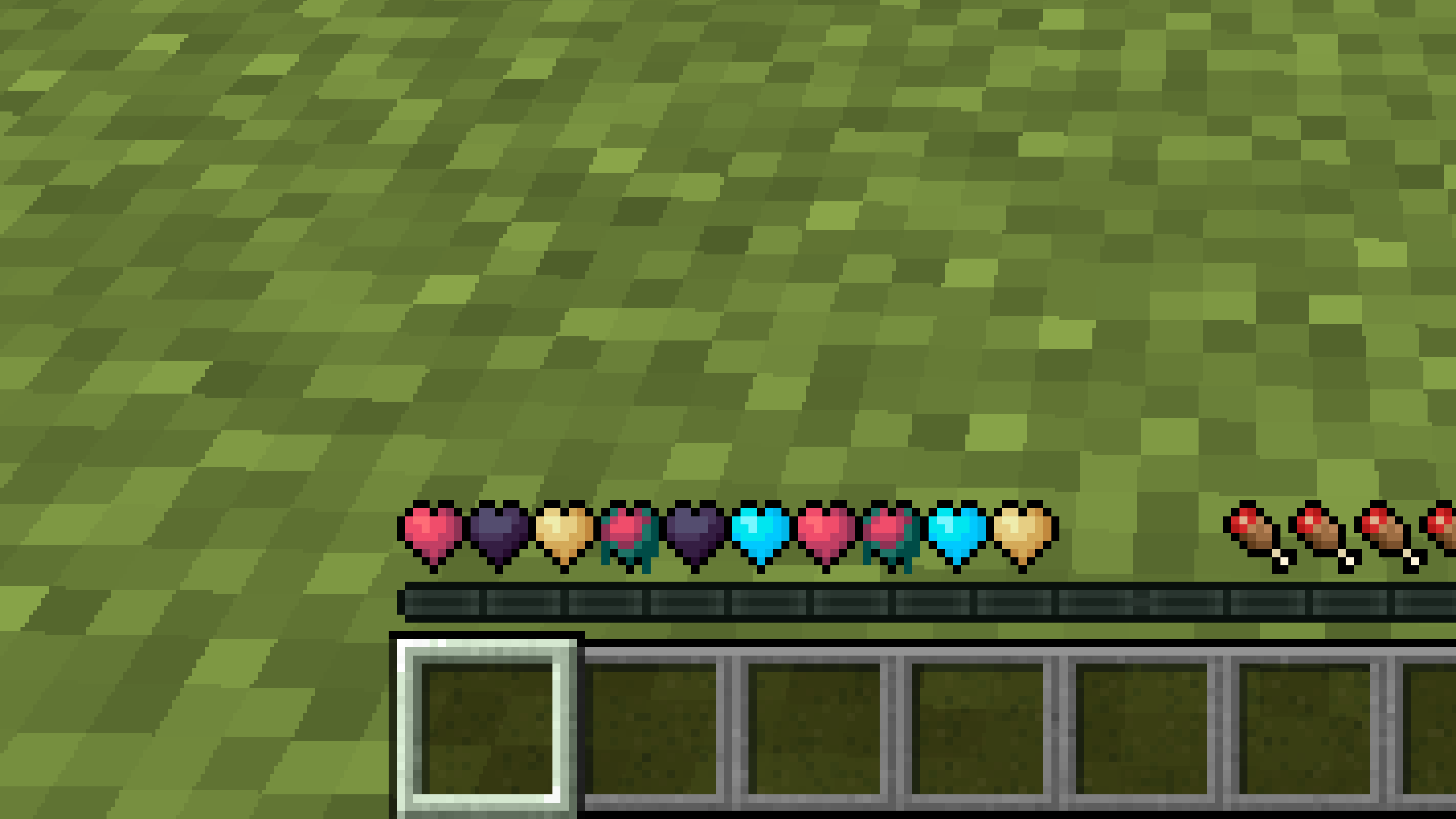
**Don’t like the bright colors of the hearts?**
**This texture pack is for you.**
—
—
## **Description**
**Pastel-colored hearts with softer color transitions.**
—
**Texture pack in classic colors: New Hearts, classic colors**
New Glowing Ores x Blue Netherite
This resourcepack fixes the compatibility beetween the New Glowing Ores resourcepack and Blue Netherite because for some reasons New Glowing Ores adds the Ancient Debris texture for no reasons.
# WARNING
This resourcepack is just a fork of the 2 resourcepacks mentionned erlier. I didn’t make any of the textures myself.
New end stone
# **New end stone**
**Like pink and pastel colors?**
**This texture pack is for you.**
—

—
## **Description**
**This pack slightly modifies end stone, giving it a softer, pastel pink tone.**
NetherX Finder
# 🔥 NetherX Finder
**See what others miss. Mine like a pro in the Nether.**
NetherX Finder is a powerful yet lightweight visual enhancement pack that lets you **detect Ancient Debris instantly**, giving you a serious edge while mining in the Nether.
No more blind digging. No more wasted time. Just **pure efficiency.**
—
## ✨ Features
– 🔍 Advanced highlight system for **Ancient Debris**
– ⚡ Ultra-lightweight — zero FPS drop
– 🎯 Built for speed mining & Netherite farming
– 🧱 Clean, distraction-free visuals
– 💻 Smooth performance on all devices (low-end to high-end)
—
## 🚀 Why NetherX Finder?
Mining Ancient Debris the normal way is slow and frustrating.
With NetherX Finder, you:
– ⏱️ Save hours of grinding
– 💎 Find more debris in less time
– 🧠 Mine smarter with visual advantage
—
## ⚙️ Compatibility
– ✔️ Supports most **Minecraft** versions
– ✔️ Works with OptiFine / Fabric / Forge
– ✔️ No setup required — just install & go
—
## 🌐 Connect with Own Studio


—
## ⚡ ZEYRON CLOUD
Premium Game Hosting for Minecraft & Servers
## LINKS
**🌐 Website:**
https://zeyroncloud.com
**💬 DISCORD Server:**
https://discord.gg/QPSJzttKwn
Use code **OWNVERSE10** and get **10% OFF** on your **first month** of hosting!
—
## 📌 Notes
– This is a visual enhancement pack for convenience
– ⚠️ Always check server rules before using
—
## 💬 Support & Feedback
Got ideas or found a bug?
Join the community and help improve **NetherX Finder!**
—
## ⚡ One-line Summary
**Highlight Ancient Debris instantly and dominate Netherite mining.**
Netherite Wooden Stick
Resource Pack changes the texture of the netherite stick to a wooden one. The pack resource does not add anything else, it is simple and understandable.
The resource pack will be updated only for new versions of minecraft!

Netherite Without Templates
If you wish that smithing Netherite gear didn’t require an upgrade template like it did before 1.20, this datapack solves that issue. It provides the following benefits:
– Netherite smithing only requires the Diamond gear and a Netherite Ingot.
– Netherite Upgrades do not generate in loot chests, at all.
– Existing upgrades can be crafted into a single diamond and the duping recipe has been removed.
– Supports Aether, Traveler’s Backpack, and Farmer’s Delight.
**The single datapack supports everything from 1.20 to 26.1.2.**
Nether Wart on Soul Soil
Frustrated builder trying to spice up their nether build? Too much spare soul soil in the storage and nothing to do with it? Tired of putting up with soul sand under your feet in your nether wart farm? Well, thanks to the great advancements of modern datapacks, here’s a datapack that lets you put Nether Wart on Soul Soil! That’s all.
NeoSpeed Zero
# NeoSpeed Zero
This is a mod that allows you to customize speedrun goals with data pack.
In the goal, you can decide what items to collect, or even what complicated goals to achieve.
If you achieve everything in your goal, you’ll win.
## Commands
– `/neospeed start []`
– ``: Goal ID, e.g. `speedabc:c`
– `[]` (Optional): Difficulty, e.g. `neospeedzero:empty`. See wiki for details.
– Starts a new record.
– `/neospeed stop`
– Stop current record.
– `/neospeed view`
– View progress. Alternatively, you can press `B` (configurable).
– `/neospeed view raw`
– View progress in text.
– `/neospeed view dialog`
– View progress in a dialog.
– `/neospeed list`
– List all available goals, where you can choose one to start a record.
## Built-in goals
There are several built-in goals:
– **SpeedABC**: collect all obtainable items whose ID start with the given letter. For instance, `speedabc:a` contains `acacia_log`, `apple`, etc.
– Goal IDs: `speedabc:a`, `speedabc:b`, `speedabc:c`, …, `speedabc:z`
– **HanNumSpeed**: collect all obtainable items whose Simplified Chinese (`zh_cn`) name match the given length. For instance, `hannumspeed:1` contains Book (书), Crossbow (弩), Sugar (糖), etc.
– Goal IDs: `hannumspeed:1`, `hannumspeed:2`, `hannumspeed:3`, …
– **All Vanilla Items**: collect all obtainable vanilla items. For example, Elytra, Dragon Egg, Deepslate Emerald Ore, but not Bedrock.
– Goal ID: `speedabc:vanilla_all`
## Data pack format
See wiki.
NeoFullbright
# NeoFullbright
**NeoFullbright** is a **lightweight, 100% vanilla resource pack** that applies a **permanent fullbright effect** — no commands, no mods required, and without breaking text or the UI.
—
## ✨ Features
– Clear vision as if it’s daytime, even in caves or at night
– Interface and text remain **fully visible** (no broken fonts)
– Custom pack icon included
– **OptiFine compatible** (includes lightmaps)
– Ultra-light pack with **zero performance impact**
—
—

—
## 📥 Installation
1. Download the `.zip` file
2. Place it in your:
“`
.minecraft/resourcepacks
“`
3. Launch Minecraft → **Options → Resource Packs**
4. Enable **NeoFullbright** and move it to the top of the list
—
## 📥 Installation (via NeoFullbright Installer)
The easiest way to install the NeoFullbright resource pack is by using the **NeoFullbright Installer** — a small Java application that handles everything automatically.
1. Download has to wait 30 seconds and run the **NeoFullbright Installer** (`.jar` file)
2. Select your Minecraft version and confirm the default folder:
“`
.minecraft/resourcepacks
“`
3. Click **Install** — the latest compatible NeoFullbright version will be downloaded and activated automatically
4. Launch Minecraft → **Options → Resource Packs**
5. Confirm that **NeoFullbright** is enabled and placed at the top of the list
—
## 🔧 Compatibility
– ✅ **Minecraft 1.21.11**
– ✅ Works in **vanilla** (no mods required)
– ✅ Compatible with **OptiFine/Fabric/Iris**
– ⚠️ Not compatible with external shaders (they will override the effect)
—
## ⚠️ Note
If you use an external shader (BSL, Complementary, etc.), the NeoFullbright effect will be overridden.

Navy Blue Shield
# Navy Blue Shield
This resource pack replaces the default shield with a custom 3D model.
The design uses a navy blue theme.
No OptiFine required. Vanilla compatible.
## More Shield Themes
– Black
– Blue
– Creeper
– Dark Red
– Mirror
– Rabbit
– Red